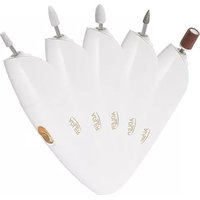
AD 2179 - Callus removal ADLER - Free user manual and instructions
Find the device manual for free AD 2179 ADLER in PDF.



| Brand | Adler |
| Model | AD 2179 |
| Product type | Callus remover device |
| Use | Domestic |
| Power supply | 2 AAA batteries (1.5 V) |
| Included accessories | Grinding cone, sanding band, grinding stone, ceramic bit, polishing head (5 pieces) |
| Dimensions (approx.) | 15 x 3 x 3 cm |
| Weight (approx.) | 100 g (with batteries) |
| Body material | Plastic |
| Main functions | Shaping, filing, polishing of nails and calluses |
| Safety | Use under supervision for children over 8 years; do not use near water |
| Cleaning | Body: damp cloth; accessories: warm water with antibacterial soap |
| Maintenance | Use only original accessories; turn off before changing tips |
| Repairability | Repairs only by an authorized service center |
| Environment | Sort packaging; do not dispose of the device in household waste; recycle batteries |
| Warranty | Warranty card included (not detailed) |
| Available manuals | FR, DE, EN, PL |
Frequently Asked Questions - AD 2179 ADLER
User questions about AD 2179 ADLER
0 question about this device. Answer the ones you know or ask your own.
Ask a new question about this device
Download the instructions for your Callus removal in PDF format for free! Find your manual AD 2179 - ADLER and take your electronic device back in hand. On this page are published all the documents necessary for the use of your device. AD 2179 by ADLER.
USER MANUAL AD 2179 ADLER
natural_image
Product display of ADLER brand hairbrushes including a digital brush and a white electric toothbrush, with no visible text or symbols on the products themselves.AD 2179
(GB) user manual - 3
natural_image
Six labeled dental or mechanical tools (a, b, c, d, e) arranged in a circular pattern on white background, no text or symbols present.ENGLISH
IMPORTANT SAFETY
INSTRUCTIONS READ CAREFULLY AND
KEEP FOR FUTURE
-
Before using the device, read the user manual and follow the instructions contained therein. The manufacturer is not liable for damage caused by using the device contrary to its intended use or improper operation.
-
The device is for home use only. Do not use it for other purposes that are inconsistent with its intended use.
-
Be especially careful when using the device when children are around. Do not allow children to play with the device and do not allow children or people unfamiliar with the device to use it
-
WARNING: This equipment can be used by children over 8 years of age and persons with limited physical, sensory or mental abilities, or persons without experience or knowledge of the equipment, if it is carried out under the supervision of a person responsible for their safety or they have been given instructions on the safe use of the device and they are aware of the dangers associated with its use. Children should not play with the equipment. Cleaning and user
maintenance should not be performed by children, unless they are over 8 years of age and are supervised.
-
WARNING: Do not use this equipment near water.
-
WARNING: Do not use this

equipment near bathtubs, showers, swimming pools or similar bodies of water.
-
Do not immerse the device in water or any other liquid. Do not expose the device to weather conditions (rain, sun, etc.) or use it in high humidity conditions (bathrooms, damp mobile homes).
-
Do not handle the device with wet hands.
-
Do not use a device that is damaged in any way or does not work properly. Do not repair the device yourself, as it may cause electric shock. Return the damaged device to the appropriate service center for inspection or repair. Any repairs may only be made by authorized service points. Improperly performed repair may result in serious danger to the user.
-
The device should be turned off each time it is put away.
-
Change attachments only when the device is switched off.
-
Only use original accessories.
-
The device should not be used by children, people with limited physical, sensory or mental abilities without the supervision of authorized or experienced persons and always in accordance with these instructions.
- Do not leave the device switched on unattended.
- Batteries may leak when they are exhausted or have not been used for a long time. To protect your device and your health, replace it regularly and avoid skin contact with leaking batteries.
- Stop using the device if you experience any discomfort.
- Do not use the device when the body is swollen, inflamed or has a rash.
DEVICE DESCRIPTION (fig. 1, 2)
1a. milling machine body
1b. drive shaft
1c. battery compartment
1d. on/off switch
1e. LED diode
1f. travel case
2a. grinding cone 2b. sanding tape
2c. grinding stone bit 2d. ceramic bit
2e. polishing bit
BATTERY CHANGE
Open the battery compartment cover (1c). Remove the used batteries and insert new ones, paying attention to the indicated polarity. Close the battery compartment (1c).
USING THE MILLING MACHINE
- Place the selected attachment on the drive shaft (1b)
of the milling machine (1a). Press to hear a click. Pull slightly to make sure the bit is seated properly.
- Turn on the device by moving the on/off slider (1d) up.
- Then, depending on the selected bit, you can start nail care.
- To turn off, move the on/off slider (1d) down.
CAUTION: This appliance is intended for filing and polishing nails only.
NOTE: Use extreme caution when changing tips, make sure each time that the device is turned off.
USE OF CUTTERS
Grinding cone (2a) - for shaping and removing cuticles Sanding tape (2b) - for shortening nails and shaping the edge of the nail
Grinding stone cutter (2c) - for matting the nail plate, gel or acrylic. To shape the nail.
Ceramic cutter (2d) - for removing acrylic and gel nails. For polishing the nail head.
Polishing cutter (2e) - for grinding and polishing the nail plate.
CLEANING THE DEVICE
- Do not wash the device under running water or put it into water
- Before cleaning, remove the plug from the mains socket, allow the device to cool down
- Please clean the file body with a slightly damp cloth. The attachments should be cleaned after each use.
- Do not use alcohol, acetone, gasoline and other solvents to clean.
- Regularly clean the attachments in warm water using antibacterial soap.
TECHNICAL DATA:
Battery: 2 x AAA (1.5V)

To protect your environment: please separate carton boxes and plastic bags and dispose them in corresponding waste bins. Used appliance should be delivered to the dedicated collecting points due to hazarsous components, which may effect the environment. Do not dispose this appliance in the common waste bin.
WICHTIGE
SICHERHEITSHINWEISE
SORGFÄLTIG LESEN UND
FÜR DIE ZUKUNFT
AUFBEWAHREN
Brand : ADLER
Model : AD 2179
Category : Callus removal