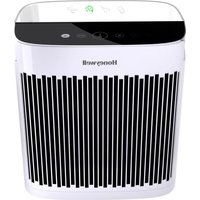
HPA5100 - Air purifier HONEYWELL - Free user manual and instructions
Find the device manual for free HPA5100 HONEYWELL in PDF.



| Product Type | Air Purifier |
| Brand | Honeywell |
| Model | HPA5100 |
| Power Supply | 120 V, 60 Hz |
| Purification Modes | Quiet Clean, General Purification, Pollen, Turbo |
| Automatic Shut-Off Timer | 2, 4 or 8 hours |
| Light Dimmer | High, Low, Off (indicator light at 20%) |
| Main Filter Type | Certified HEPA Filter |
| Pre-Filter | Yes, captures VOCs, odors and large particles |
| Optional Filter | Enhanced filter reducing odors and VOCs (sold separately) |
| Replacement Filter References | Pre-Filter: HRF-AP1, HRF-APP1; HEPA: HRF-R1/R2/R3; VOC Filter: HRFSS1, HRFSK1, HRFSC1, HRFSP1 |
| Pre-Filter Replacement Frequency | Every 3 months |
| HEPA Filter Replacement Frequency | Every 12 months |
| VOC Filter Replacement Frequency (optional) | Every 3 months |
| Maintenance and Cleaning | Wipe exterior surfaces with a dry cloth; do not wash filters |
| Safety | Polarized plug, do not use outdoors, do not expose to water |
| Certifications | ENERGY STAR |
| Warranty | 5-year limited |
Frequently Asked Questions - HPA5100 HONEYWELL
User questions about HPA5100 HONEYWELL
0 question about this device. Answer the ones you know or ask your own.
Ask a new question about this device
Download the instructions for your Air purifier in PDF format for free! Find your manual HPA5100 - HONEYWELL and take your electronic device back in hand. On this page are published all the documents necessary for the use of your device. HPA5100 by HONEYWELL.
USER MANUAL HPA5100 HONEYWELL
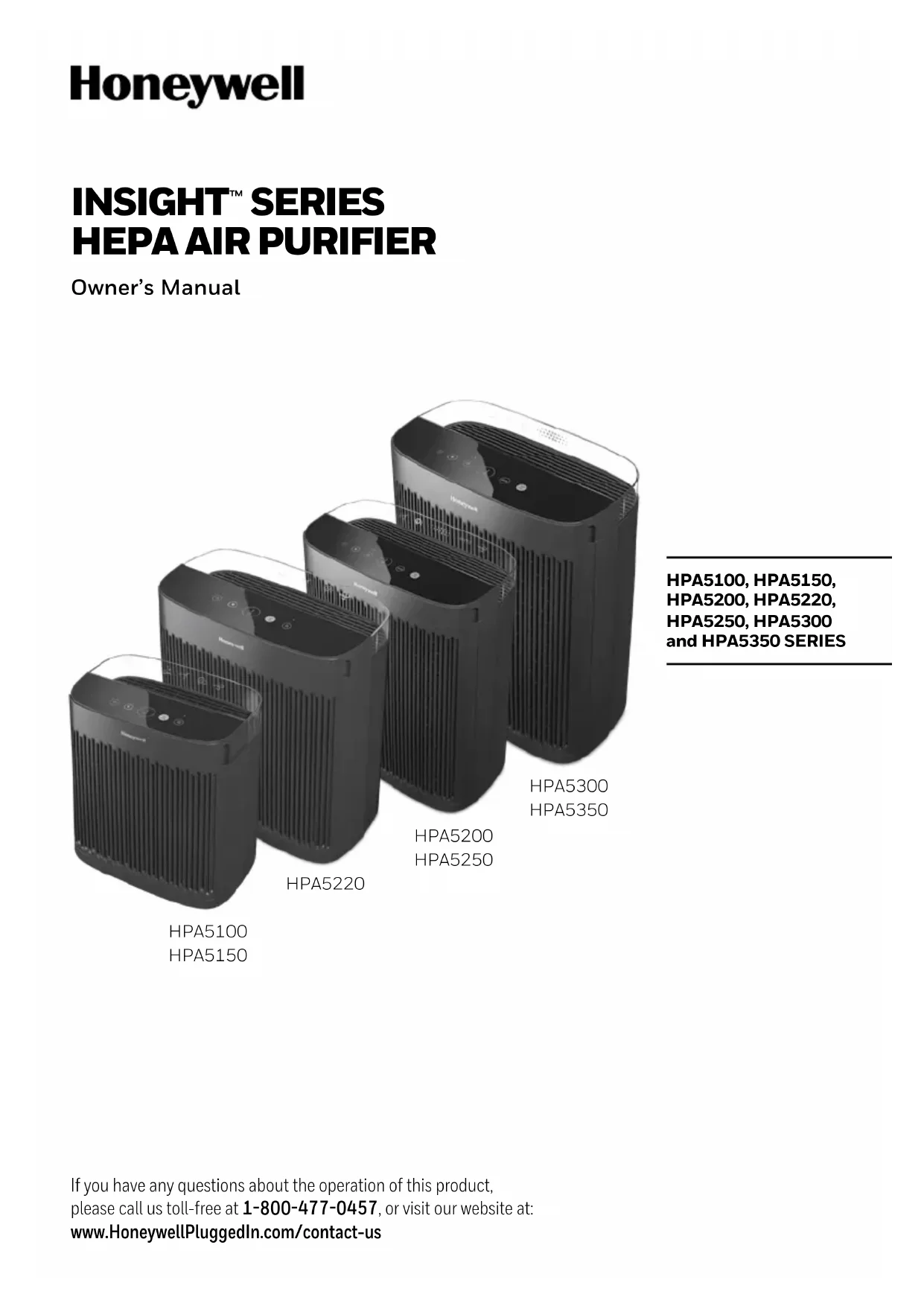
HPA5100, HPA5150, HPA5200, HPA5220, HPA5250, HPA5300 and HPA5350 SERIES
IMPORTANT SAFETY INSTRUCTIONS
READ AND SAVE THESE SAFETY INSTRUCTIONS BEFORE USING THIS AIR PURIFIER
When using electrical appliances, basic precautions should always be followed to reduce the risk of fire, electric shock, and injury to persons, including the following:
- Read all instructions before operating the air purifier.
- Place air purifier where it is not easily overturned by persons in the household.
- ALWAYS turn the air purifier controls to the OFF position and unplug from the wall outlet when not in use.
- To disconnect the air purifier, make sure the unit is powered OFF then grip the plug and pull it from the wall outlet. NEVER pull by the cord.
- DO NOT use any product with a damaged cord or plug, any product that malfunctions, or any product that has been dropped or damaged in any manner. Keep the cord away from heated surfaces.
- DO NOT use air purifier outdoors.
- DO NOT use air purifier unless it is fully assembled.
- DO NOT run power cord under carpets, and DO NOT cover with throw rugs. Arrange cord such that it will not be a tripping hazard.
- DO NOT use air purifier where combustible gases or vapors are present.
- DO NOT expose the air purifier to rain, or use near water, in a bathroom, laundry area or other damp location.
-
The air purifier MUST be used in its upright position.
-
DO NOT allow foreign objects to enter ventilation or exhaust opening as this may cause electric shock or damage to the air purifier. DO NOT block air outlets or intakes.
- Locate air purifier near the outlet and DO NOT use with extension cord or power strip.
- This appliance has a polarized plug (one blade is wider than the other). To reduce the risk of electric shock, this plug is intended to fit only one way in a polarized outlet. If the plug does not fit fully in the outlet, reverse the plug. If it still does not fit, contact a qualified electrician. DO NOT attempt to defeat this safety feature.
- A loose fit between the AC outlet (receptacle) and plug may cause overheating and a distortion of the plug. Contact a qualified electrician to replace loose or worn outlet.
- DO NOT sit, stand or place heavy objects on the air purifier.
- ALWAYS disconnect power supply before servicing.
- Keep out of reach of children and pets.
- Filters may be harmful if ingested. Avoid breathing dust when changing filters.
- SAVE THESE INSTRUCTIONS.
For FCC compliance information, please see last page of this manual.
WARNING: To Reduce The Risk of Fire or Electric Shock, Do Not Use This Air Purifier With Any Solid-State Speed Control Device.
GETTING TO KNOW YOUR AIR PURIFIER
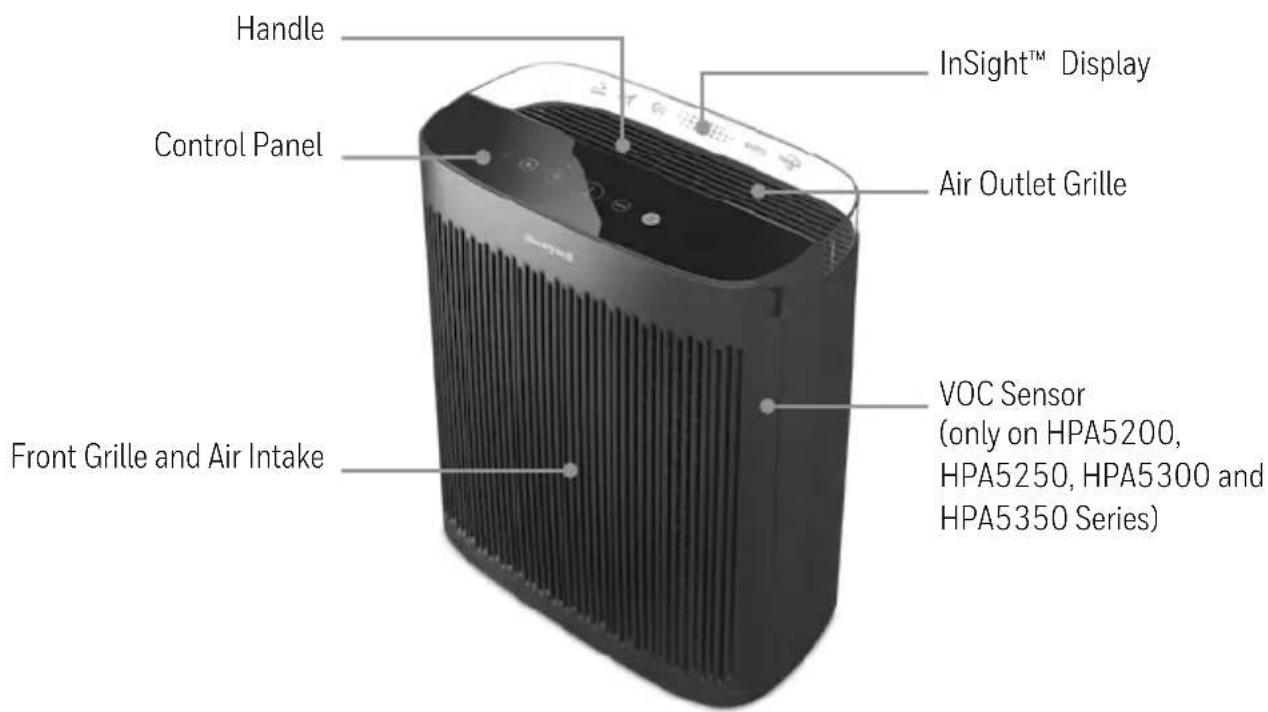
InSight™ Display At-a-Glance Clear Panel illuminates to show Cleaning Levels:
InSight™ Display At-a-Glance Clear Panel illuminates to show Cleaning Levels, Auto Mode and the Air Quality Indicator
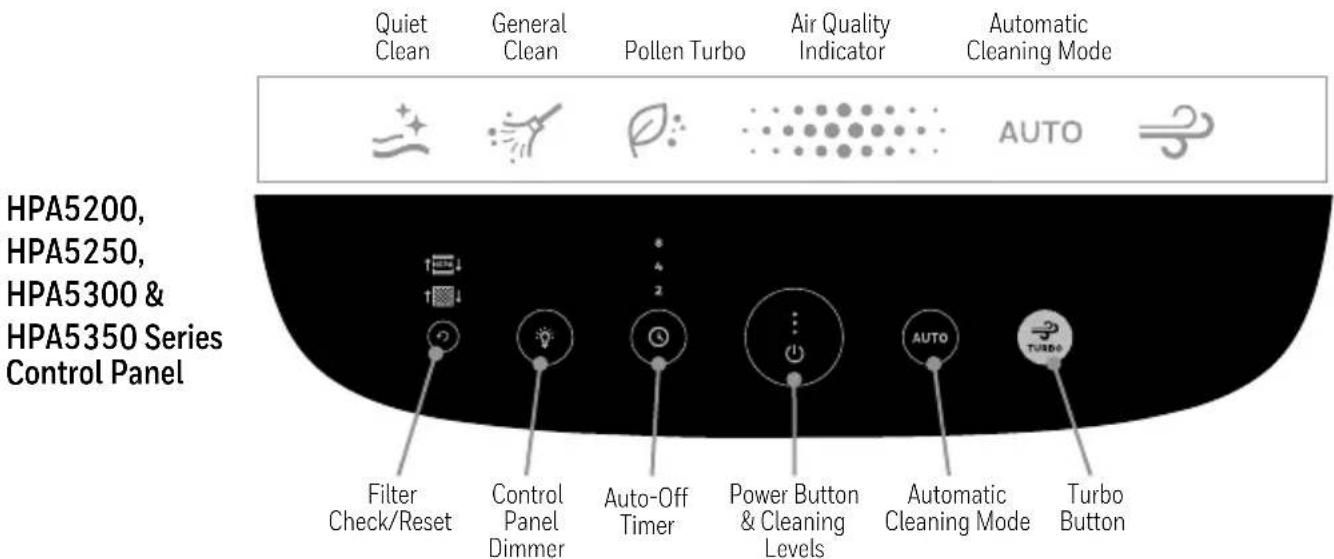
The Honeywell InSight™ Series Air Purifier delivers powerful HEPA filtration and features a cutting-edge design that provides valuable information from a distance.
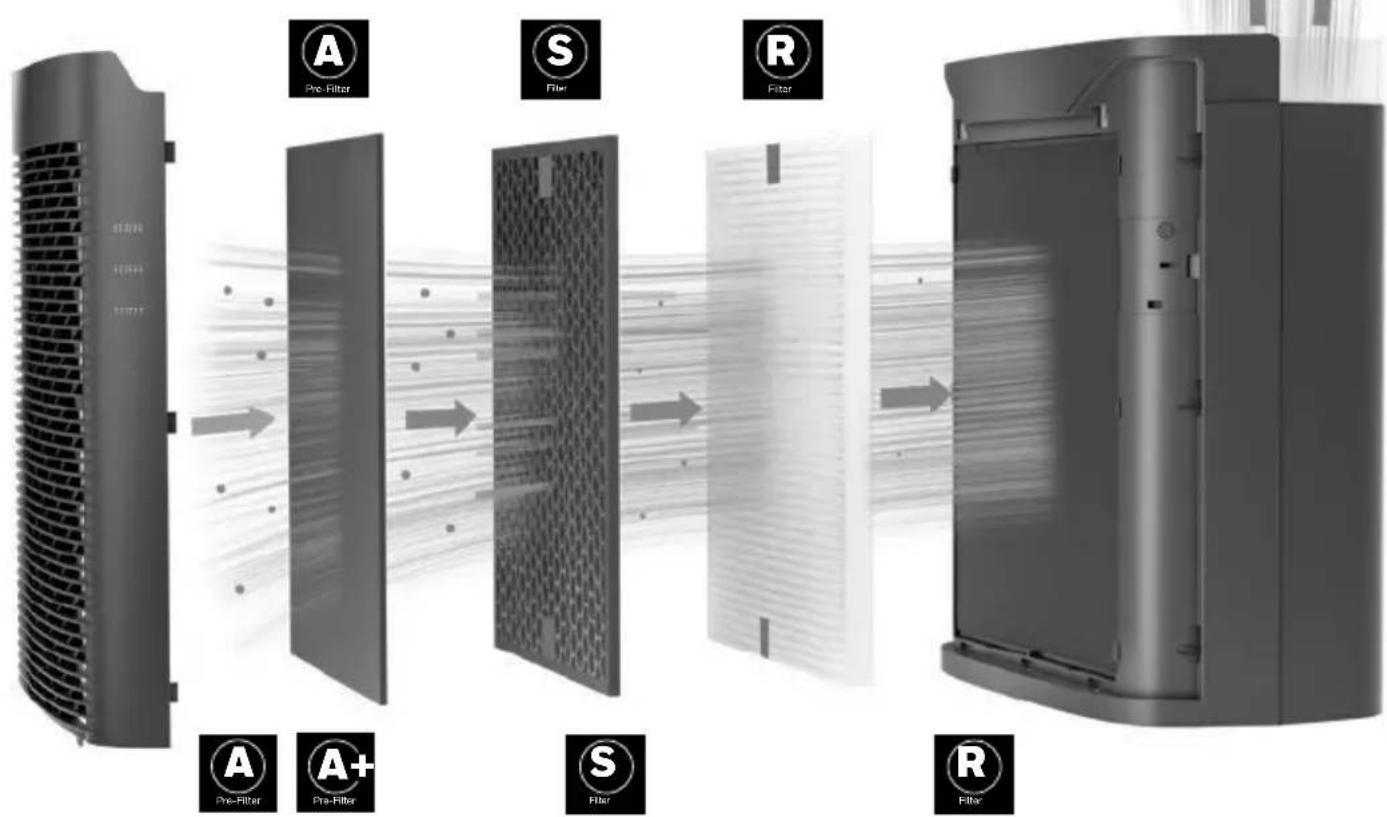


Pre-Filter
Helps capture VOCs, odors and larger airborne particles

Enhanced Odor & VOC
Filter (Optional)
Helps reduce odors and Volatile Organic Compounds (VOCs) from pets, kitchens, smoke, or home renovation (sold separately)

Certified HEPA Filter
Captures the following microscopic airborne allergens and particles: dust, pollen, pet dander, dust mite debris and smoke as small as 0.3 microns or larger from the air that passes through the filter
REPLACEMENT FILTERS
To help ensure stated product performance, use only Certified Honeywell Replacement Filters. You can purchase Genuine Honeywell Filters at the retailer where you purchased your air purifier or order directly from www.HoneywellPluggedIn.com.
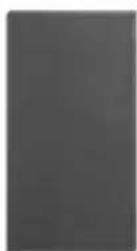
Pre-Filter


Models:
HRF-AP1
(Odor Reducing)
HRF-APP1
(VOC & Odor Reducing)
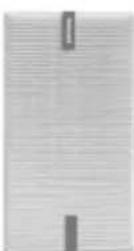
HEPA Filter

Models:
HRF-R1 (One pack)
HRF-R2 (Two pack)
HRF-R3 (Three pack)
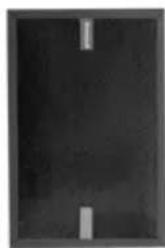
natural_image
Dark rectangular object with two vertical bars, no visible text or symbolsEnhanced Odor & VOC Filter (Optional)

Models:
HRFSS1 (Smoke)
HRFSK1 (Kitchen)
HRFSC1 (Home
Renovation)
HRFSP1 (Pet)
GETTING STARTED
- Ensure that the unit is powered off and unplugged.
- Select a firm, level, and flat location. Ensure the front of the unit faces away from the closest wall or furniture and that no grilles are blocked. Portable air purifiers are more effective in rooms where all doors and windows are closed.
NOTE: If the unit is placed on a light-colored carpet, a small mat or rug should be used underneath to prevent staining. This is especially important in homes with contamination from smoking, fireplaces, or where candles are burned.
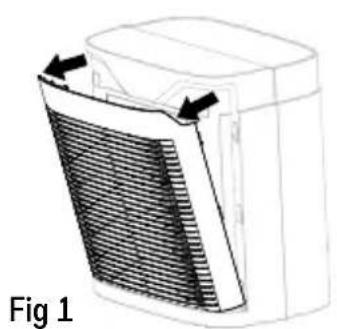
- Remove the front grille by grasping the sides of the grille and pulling forward. (Fig 1).
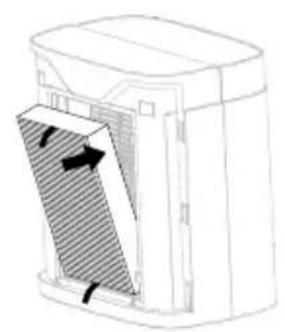
- Remove the Pre-Filter and HEPA Filter(s) from the air purifier. Remove protective plastic wrap from filters. (Fig 2).
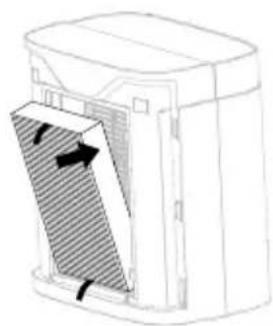
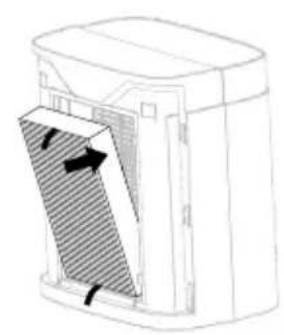
- Place the Certified HEPA Filter(s) 📀 back into the air purifier housing ensuring that the red removal pull tabs are facing outwards (this will facilitate filter removal later). (Fig 3).
- If using the Optional Enhanced Odor and VOC Filter(s) 📄 (sold separately), place in front of the HEPA Filters with the removal pull tabs facing outwards. (Fig 4).
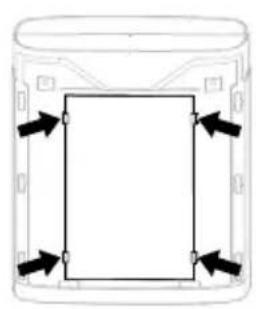
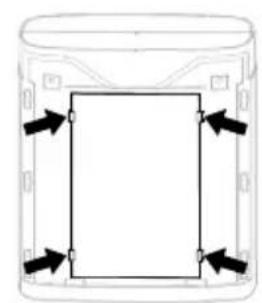
- Place the Pre-Filter in front of the HEPA Filter(s), or if using, in front of the Optional Enhanced Odor and VOC Filter(s) by securing the edges under the fasteners. (Fig 5).
- Replace the front grille by placing the tabs on the bottom of the grille into the slots on the unit. Gently push the top of the grille until secure. (Fig 6).
natural_image
Diagram of a heat exchanger unit with heat flow arrows, labeled Fig 1 (no text or symbols on the diagram itself)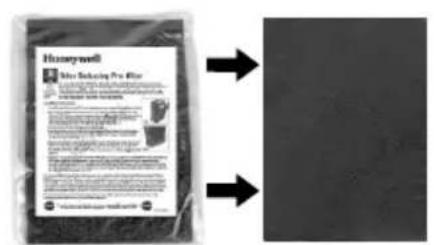
Fig 2 Fig 3
natural_image
Diagram of a device with a shaded internal panel and directional arrows indicating movement (no text or symbols)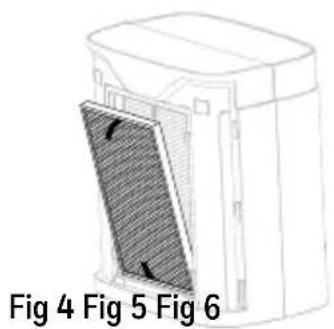
natural_image
Diagram of a device with a shaded panel and labeled sections Fig 4, Fig 5, Fig 6 (no text or symbols on the diagram itself)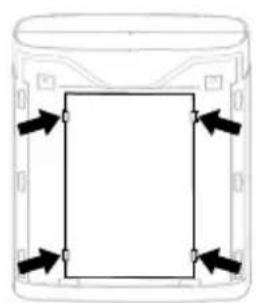
natural_image
Simple line drawing of a cylindrical container with four arrows pointing inward toward the center (no text or symbols)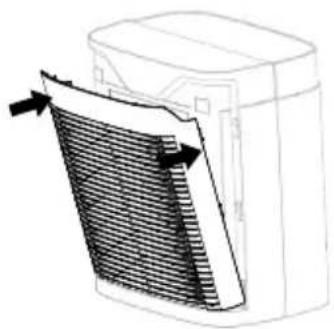
natural_image
Diagram of a heat exchanger or cooling unit with heat flow arrows indicating airflow direction (no text or symbols)OPERATION
ENERGY STAR
This product earned the ENERGY STAR label by meeting strict energy efficiency guidelines set by the U.S. EPA. Room air cleaners have demonstrated the potential for improving air quality and providing health benefits. EPA does not endorse manufacturer claims regarding the degree to which a specific product will produce healthier indoor air.
The energy efficiency of this ENERGY STAR certified model is measured based on a ratio between the model's CADR for Smoke and the electrical energy it consumes, or CADR/Watt.
- Ensure that the plastic wrap has been removed from the filters and the filters are replaced in the unit. Next, plug the power cord into a working electrical outlet.
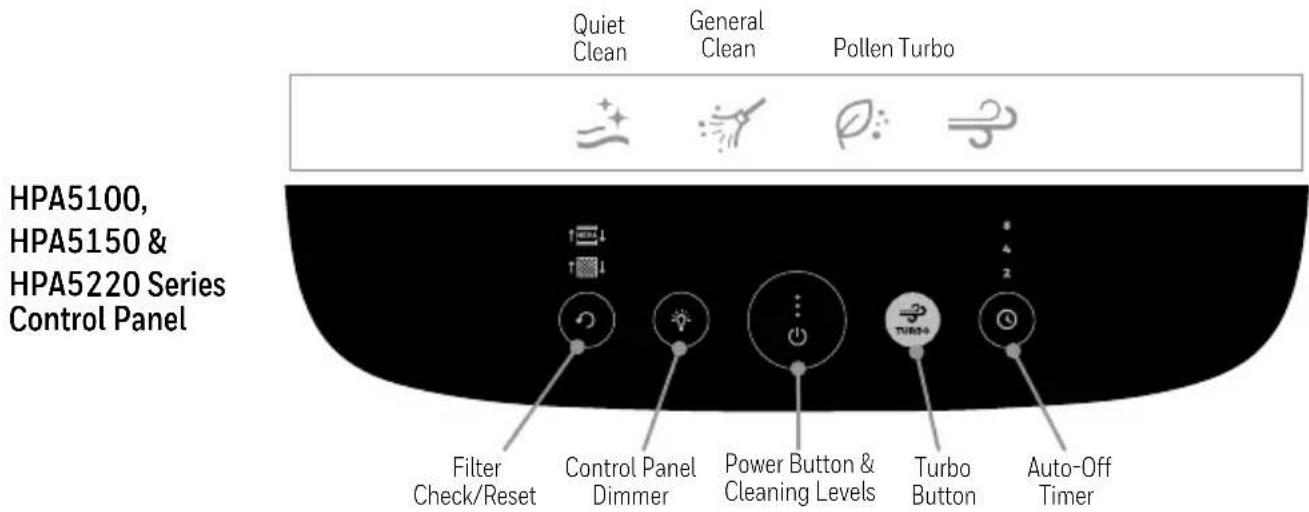
- Tap Power Button ⏻ to turn on the air purifier. The air purifier will start automatically on the Quiet Clean setting until another cleaning level is selected. Continue tapping ⏻ to choose a different cleaning level. With each tap, one of the cleaning level icons will illuminate on the InSight Display.
QUIET CLEAN: quietest setting and optimized to capture small particles.
GENERAL CLEAN: recommended for dust and general, everyday air cleaning.
POLLEN: optimizes pollen capturing performance during pollen season.
- To shut off, tap the Power Button ⏻ until the air purifier shuts off.
TURBO MODE
When Turbo mode is selected, the Turbo icon will illuminate on the InSight Display. This setting operates the air purifier at the highest cleaning level and maximizes its ability to help clean the air and help reduce odors and VOCs quickly. Tapping the Turbo button again will return the air purifier to the previous cleaning setting.
AUTOMATIC CLEANING MODE & AIR QUALITY INDICATOR (only available in the HPA5200, HPA5250, HPA5300 and HPA5350 Series)
These select air purifier models are equipped with VOC Sensors that detect the level of VOCs in the room and provide a visual display to indicate air quality. The Air Quality Indicator color display is located on the InSight Display. The VOC Sensor is constantly monitoring the air and the Air Quality Indicator light will illuminate either green, yellow, or red depending on the level of VOCs detected in the room:
Green - Good air quality. There is a low level of VOCs detected.
Yellow - Moderate air quality. There is a moderate level of VOCs detected.
Red – Poor air quality. There is an elevated level of VOCs detected.
VOCs are gases that are emitted from certain household cleaning, home improvement, and even common home decor products.
When the Auto mode is activated, the air purifier will automatically operate at the appropriate cleaning level to reduce the VOCs that are detected in the room. To select this mode, tap the Auto button and the icon will illuminate on the InSight Display to indicate the setting has been activated.
NOTE: Upon start up, the unit may take a few minutes to calibrate and measure the air quality. During this time, the Air Quality Indicator will pulse between green, yellow, and red until the air quality is determined. When the appropriate reading is determined, the indicator will then remain a solid color.
8
4
2
AUTO-OFF TIMER
The Timer option allows you to select how long the air purifier will run before it automatically shuts off. There are three pre-set run times: 2, 4, and 8 hours. Do not use this option if you want the air purifier to run continuously. To set the timer, tap the Timer button until the desired setting (2, 4 or 8 hours) is illuminated. To exit the Timer mode, tap until the Timer button light shuts off.

CONTROL PANEL DIMMER
The Dimmer option allows you to adjust the brightness of the LEDs on the control panel and the InSight Display. This is helpful if you are looking to adjust the brightness depending on the time of day that the unit will be used. To adjust brightness, tap the Dimmer button ☑ once to dim the lights to LOW. Tap the button twice and it will shut the lights OFF. Please note that the dimmer button will remain on at 20% illumination and will not completely shut off so that the unit can be located in a dark room. All of the other lights will shut off. Tap the Dimmer button a third time to return the brightness to HIGH.
FILTER CHECK/RESET
These air purifier models each have two electronic filter checks to remind you when it is time to replace the Pre-Filter, Optional Enhanced Odor and VOC Filter(s), and HEPA Filter(s) based on the air purifier's hours of use. When it is time to replace the filters, one of the filter icon lights will illuminate above the Filter Check/Reset indicator light to identify which filter needs to be replaced at that time. For more detailed information, see the next section.
FILTER REPLACEMENT
When the Filter Reset indicator light(s) illuminate(s), it is time to replace one or more of the filters.
| Indicator Light | Filter* | When to Replace | Number of Filters Needed |
Pre-Filter:Honeywell A or A+ Pre-Filter | Every 3 months | 1 Pre-Filter | |
Optional Enhanced Odor & VOC Filter:Honeywell S Filter | 1 Enhanced Odor & VOC Filter for the HPA5100 & HPA5150 Series2 Enhanced Odor & VOC Filters for the HPA5200, HPA5220 & HPA5250 Series3 Enhanced Odor & VOC Filters for the HPA5300 & HPA5350 Series | ||
Honeywell HEPA R Filter | Every 12 months | 1 HEPA Filter for the HPA5100 & HPA5150 Series2 HEPA Filters for the HPA5200, HPA5220 & HPA5250 Series3 HEPA Filters for the HPA5300 & HPA5350 Series |
*For specific filter models, reference the Replacement Filters section of this manual (Page 4).
See the Getting Started section for filter replacement instructions (Page 5).
To help ensure stated product performance, use only Certified Honeywell Replacement Filters. You can purchase Genuine Honeywell Filters at the retailer where you purchased your air purifier or order directly from www.HoneywellPluggedIn.com.
These replacement intervals are intended as guidelines only. Performance of any filter media is dependent upon the concentration of particles going through the system. High concentrations of particles such as dust, pet dander, and smoke will reduce the useful performance of the filters.
NOTE: The Pre-Filter, Enhanced Odor & VOC Filter and HEPA Filters are NOT washable and should not be vacuumed.
DO NOT immerse the filters in water.
WARNING: Filters may be harmful if ingested. Avoid breathing dust when changing filters.
RESET FILTER CHECK INDICATOR
After you have replaced the appropriate filters, plug the unit back in. The Pre-Filter/Enhanced Odor and VOC Filter and/or HEPA Filter Reset Light will remain on until it is reset.
Pre-Filter and Enhanced Odor & VOC Filter Reset:
- With the unit powered off, press the Filter Reset button ⏻ 2 times within one second. The Pre-Filter/Enhanced Odor & VOC Filter indicator light will blink twice to indicate the timer has been reset and will then turn off.
HEPA Filter Reset:
- With the unit powered off, press and hold the Filter Reset button ⏻ for two seconds. The HEPA Filter indicator light will blink twice to indicate the timer has been reset and will then turn off.
CLEANING AND STORAGE
We recommend that you clean the air purifier at least once every 3 months and before extended storage. Use only a dry cloth to wipe the external surfaces of the air purifier.
DO NOT USE WATER, WAX, POLISH, OR ANY CHEMICAL SOLUTION.
If your Air Purifier will not be used for more than 30 days, we recommend that you:
- Remove the HEPA Filters from the unit.
- Wrap the HEPA Filters in an air tight plastic bag.
- Remove the Pre-Filter and Enhanced Odor and VOC Filters and place them in an air tight plastic bag.
FREQUENTLY ASKED QUESTIONS
My Air Purifier is starting to make noise and the air output is less. What's wrong?
The filters may be dirty. High amounts of particles can block the pores in the filter and stop the air from moving through it. Replace the Filters. The HEPA Filters should be replaced every year and the Pre-Filter and Enhanced Odor and VOC Filters should be replaced every 3 months. Please note these are guidelines only and filters should be checked periodically as individual home conditions may vary. To help ensure the unit is performing properly, replace with Certified Genuine Honeywell Filters.
How long should I run my Air Purifier?
In general, the unit will be most effective when doors and windows are closed. It is recommended that you run your air purifier while you are at home to help clean the air. If desired or conditions warrant, you may run your air purifier 24 hours a day.
Can I wash any of the filters in my Air Purifier?
No. Washing the filters will ruin them.
What are VOCs?
Volatile Organic Compounds (VOCs) are emitted from various solids and liquids such as paints, cleaning supplies, building materials, and permanent markers. Some of these compounds have higher concentrations indoors than outside.
Why did my Air Purifier suddenly turn on a higher setting? (only for the HPA5200, HPA5250, HPA5300 and HPA5350 Series)
Is the air purifier set to Auto Mode? If it is, the unit may have sensed a higher level of VOCs and has adjusted the cleaning level accordingly.
5 YEAR LIMITED WARRANTY
You should first read all instructions before attempting to use this product.
A. This 5 year limited warranty applies to repair or replacement of product found to be defective in material or workmanship. This warranty does not apply to damage resulting from commercial, abusive, unreasonable use or supplemental damage. Defects that are the result of normal wear and tear will not be considered manufacturing defects under this warranty. KAZ IS NOT LIABLE FOR INCIDENTAL OR CONSEQUENTIAL DAMAGES OF ANY NATURE, ANY IMPLIED WARRANTY OF MERCHANTABILITY OR FITNESS FOR A PARTICULAR PURPOSE ON THIS PRODUCT IS LIMITED IN DURATION TO THE DURATION OF THIS WARRANTY. Some jurisdictions do not allow the exclusion or limitation of incidental or consequential damages or limitations on how long an implied warranty lasts, so the above limitations or exclusions may not apply to you. This warranty gives you specific legal rights, and you also may have other rights which vary from jurisdiction to jurisdiction. This warranty applies only to the original purchaser of this product from the original date of purchase.
B. At its option, Kaz will repair or replace this product if it is found to be defective in material or workmanship.
C. This warranty does not cover damage resulting from any unauthorized attempts to repair or from any use not in accordance with the instruction manual.
D. This warranty does not cover the HEPA Filters, Pre-Filters, or Enhanced Odor and VOC Filters except for material or workmanship defects.
Please go to www.HoneywellPluggedIn.com/warranty-registration to register your product and receive product information updates and new promotional offers.
CONSUMER RELATIONS
We are here to help answer any questions you may have about this product.
Call us toll-free at: 1-800-477-0457, or visit our website at: www.HoneywellPluggedIn.com/contact-us, in Canada: www.HoneywellPluggedIn.ca.
Please be sure to specify the model number of the unit you are contacting us about. The model number is located on the sticker placed on the back of the grille and on the bottom of the unit.
NOTE: IF YOU EXPERIENCE A PROBLEM, PLEASE CONTACT CONSUMER RELATIONS FIRST OR SEE YOUR WARRANTY. DO NOT RETURN TO THE ORIGINAL PLACE OF PURCHASE. DO NOT ATTEMPT TO OPEN THE MOTOR HOUSING YOURSELF, DOING SO MAY VOID YOUR WARRANTY AND CAUSE DAMAGE TO THE AIR PURIFIER OR PERSONAL INJURY.
PURIFICATEUR D'AIR HEPA - SÉRIES INSIGHT ^TM
Guide d'utilisation
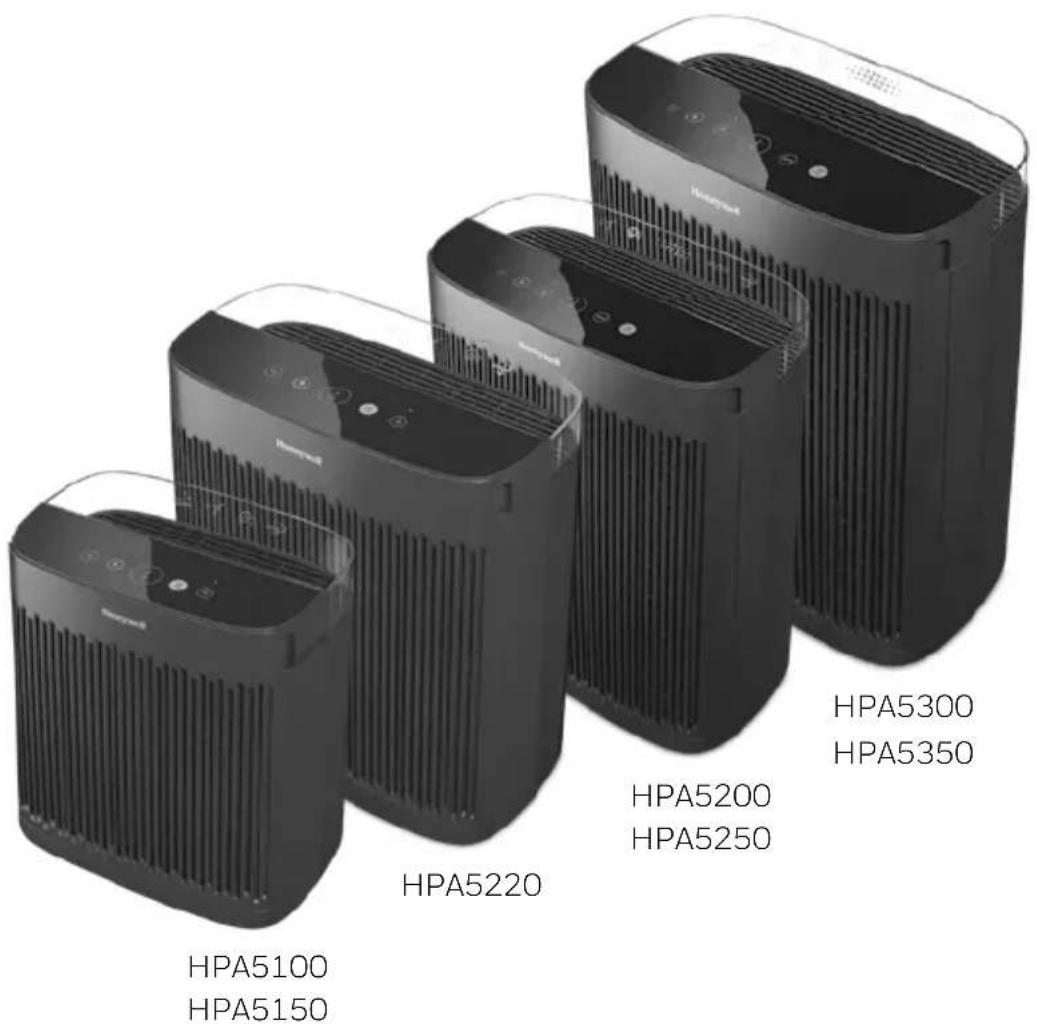
SÉRIES HPA5100, HPA5150, HPA5200, HPA5220, HPA5250, HPA5300 et HPA5350
natural_image
Dark rectangular object with two vertical slots, no visible text or symbolsnatural_image
Diagram of a heat exchanger unit with heat flow arrows, labeled Fig 1 (no text or symbols on the diagram itself)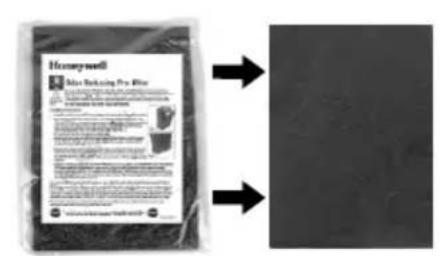
natural_image
Diagram of a device with a shaded internal panel and directional arrows indicating movement (no text or symbols)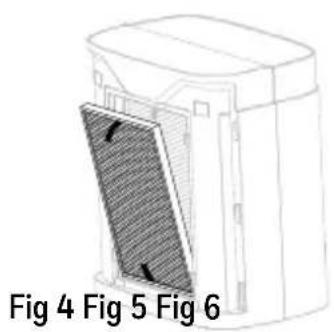
Fig 2 Fig 3
natural_image
Simple line drawing of a rectangular container with four arrows pointing inward (no text or symbols)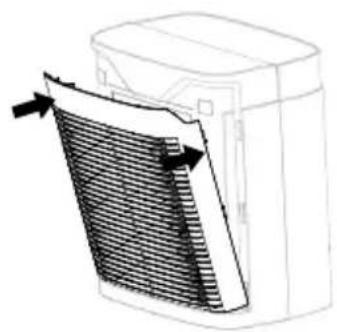
natural_image
Diagram of a heat exchanger or cooling unit with heat flow arrows indicating airflow direction (no text or symbols)FONCTIONNEMENT
ENERGY STAR
REMPLACEMENT DES FILTRES
HPA5100, HPA5150, HPA5200, HPA5220, HPA5250, HPA5300 y HPA5350 SERIES
natural_image
Dark rectangular object with two vertical slots, no visible text or symbolsnatural_image
Diagram of a heat exchanger unit with heat flow arrows, labeled Fig 1 (no text or symbols on the diagram itself)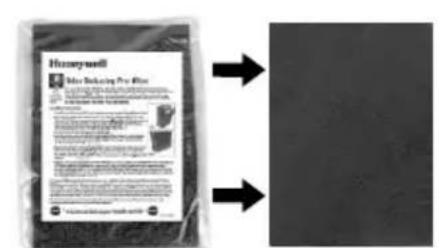
Fig 2 Fig 3
natural_image
Diagram of a device with a shaded internal panel and directional arrows indicating movement or force (no text or symbols)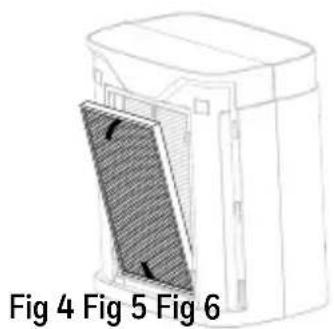
natural_image
Pure diagram of a cylindrical container with arrows pointing inward, no text or symbols present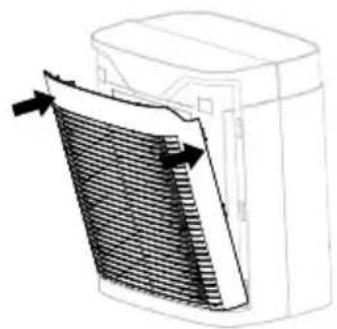
natural_image
Diagram of a heat exchanger or cooling unit with heat flow arrows (no text or symbols)OPERACIÓN
ENERGY STAR

- IMPORTANT SAFETY INSTRUCTIONS
- READ AND SAVE THESE SAFETY INSTRUCTIONS BEFORE USING THIS AIR PURIFIER
- The Honeywell InSight™ Series Air Purifier delivers powerful HEPA filtration and features a cutting-edge design that provides valuable information from a distance.
- REPLACEMENT FILTERS
- GETTING STARTED
- OPERATION
- TURBO MODE
- AUTOMATIC CLEANING MODE & AIR QUALITY INDICATOR (only available in the HPA5200, HPA5250, HPA5300 and HPA5350 Series)
- AUTO-OFF TIMER
- CONTROL PANEL DIMMER
- FILTER CHECK/RESET
- FILTER REPLACEMENT
- RESET FILTER CHECK INDICATOR
- Pre-Filter and Enhanced Odor & VOC Filter Reset:
- HEPA Filter Reset:
- CLEANING AND STORAGE
- DO NOT USE WATER, WAX, POLISH, OR ANY CHEMICAL SOLUTION.
- FREQUENTLY ASKED QUESTIONS
- My Air Purifier is starting to make noise and the air output is less. What's wrong?
- How long should I run my Air Purifier?
- Can I wash any of the filters in my Air Purifier?
- What are VOCs?
- Why did my Air Purifier suddenly turn on a higher setting? (only for the HPA5200, HPA5250, HPA5300 and HPA5350 Series)
- YEAR LIMITED WARRANTY
- CONSUMER RELATIONS
- PURIFICATEUR D'AIR HEPA - SÉRIES INSIGHT TM
- FONCTIONNEMENT
- ENERGY STAR
- REMPLACEMENT DES FILTRES
- OPERACIÓN
Brand : HONEYWELL
Model : HPA5100
Category : Air purifier