Tiger 17R - Lamp BeamZ - Free user manual and instructions
Find the device manual for free Tiger 17R BeamZ in PDF.


User questions about Tiger 17R BeamZ
0 question about this device. Answer the ones you know or ask your own.
Ask a new question about this device
Download the instructions for your Lamp in PDF format for free! Find your manual Tiger 17R - BeamZ and take your electronic device back in hand. On this page are published all the documents necessary for the use of your device. Tiger 17R by BeamZ.
USER MANUAL Tiger 17R BeamZ
SAFETY INSTRUCTIONS....3
UNPACKING INSTRUCTION....4
POWERSUPPLY 4
RIGGING 4
DMX512 CONTROL 5
DISPLAY 5
TRANSPORT SECURITY 5
EXCHANGING GOBOS....6
CLEANING....6
REPLACING THE FUSE....6
TROUBLE SHOOTING 7
NEDERLANDS
VEILIGHEIDSINSTRUCTIES 8
UITPAKKEN 9
AANSLUITSPANNING....9
RIGGING 9
DMX BEDIENING 10
DISPLAY 10
TRANSPORTBEVEILIGING....10
UITWISSELEN GOBOS 11
REINIGEN 11
VERVANGEN ZEKERING....11
PROBLEMEN OPLOSSEN 12
DEUTSCH
REMPLACEMENT DES GOBOS....26
NETTOYAGE 26
REMPLACEMENT DU FUSIBLE 27
RESOLUTION DE PROBLEMES 27
POLSKI
INSTRUKCJA BEZPIECZENSTWA 28
ROZPAKOWYWANIE INSTRUKCJI 29
ZASILACZ 29
MOCOWANIE 29
KONTROLA DMX512 30
WYSWIETLACZ 30
OCHRONA PODCZAS TRANSPORTU 30
WYMIENNE GOBO....31
CZYSZCZENIE 31
WYMIANA BEZPIECZNIKA 31
ROZWIAZYWANIE PROBLEMÓW 32
TECHNICAL DETAILS
CONTROL MENU 33
DMX CHANNELS 34
TECHNICAL SPECIFICATIONS....37
SAFETY INSTRUCTIONS

WARNING! Before carrying out any operations with the unit, carefully read this instruction manual and keep it with care for future reference. It contains important information about the installation, usage and maintenance of the unit.
• Unpack and check carefully that there is no transportation damage before using the unit
- Please read these instructions carefully and follow the instructions.
- Observe all safety warnings. Never remove safety warnings or other information from the equipment.
- Be sure that no ventilation slots are blocked; otherwise the unit will overheated.

WARNING! Before connecting the equipment to the power outlet, first verify that the mains voltage and frequency match the values specified on the equipment. If the equipment has a voltage selection switch, connect the equipment to the power outlet only if the equipment values and the mains power values match. If the included power cord or power adapter does not fit in your wall outlet, contact your electrician.
• After connecting the unit, check all cables in order to prevent damage or accidents, e.g., due to tripping hazards.
• Make sure that the power cord is never crimped or damaged. Check the unit and the power cord from time to time.
- Always disconnect power from the mains, when unit is not used or before cleaning! Only handle the power cord by the plug. Never pull out the plug by tugging the power cord.
• Unplug the power cord and power adapter from the power outlet if there is a risk of a lightning strike or before extended periods of disuse.
- Do not switch the unit on and off in short intervals.
- Do not connect the unit to a dimmerpack.
• Install the unit in a well ventilated place.
- Never place any material over the lens.
- Never let the sunlight lights directly to the front lens, even when the unit is not working.
• Always allow free air space of at least 50 cm around the unit for ventilation.
• Make sure that the area below the installation place is blocked when rigging, derigging or servicing the unit.
- For mounting height >100 cm, always fix the unit with an appropriate safety-rope. Fix the safety-rope at the correct fixation points only. The safety-rope must never be fixed at the transport handles!
- Never look directly at the light beam. Please note that fast changes in lighting, e.g. flashing light, may trigger epileptic seizures in photosensitive persons or persons with epilepsy.
- This unit is not designed for permanent operation. Consistent operation breaks will ensure that the unit will serve you for a long time without defects.

WARNING! If the power cord of the unit is equipped with an earthing contact, then it must be connected to an outlet with a protective ground. Never deactivate the protective ground of a power cord.
• Make sure that the unit is not exposed to extreme heat, moisture or dust.
- Clean the unit using a dry cloth.
- Do not touch the unit bare-handed during its operation (housing becomes very hot). Allow the unit to cool for at least 5 minutes before handling.
- This unit is designed exclusively for indoor use, do not use this equipment in the immediate vicinity of fluid (does not apply to special outdoor equipment - in this case, observe the special instructions noted below). Do not expose this unit to flammable materials, fluids or gases.
- If the unit has been exposed to drastic temperature fluctuation (e.g. after transportation), do not switch it on immediately. The arising condensation water might damage your unit. Leave the unit switched off until it has reached room temperature.
• Never attempt to bypass the thermostatic switch or fuses.
- Do not dismantle or modify the unit.
- For replacement use fuses/bulb of same type and rating only.
• Repairs, servicing and electric connection must be carried out by a qualified technician.
• The ambient temperature must always be between -5^ C and +45^ C.
- If this unit is operated in any other way, than the one described in this manual, the product may suffer damages and the warranty becomes void.
- Plastic bags must be kept out of reach of children.
- Unit must be installed out of the reach of children. Never leave the unit running unattended.

This symbol on the product or on its packaging indicates that this product shall not be treated as household waste. Instead it shall be handed over to the applicable collection point for the recycling of electrical and electronic equipment.
By ensuring this product is disposed of correctly, you will help prevent potential negative consequences for the environment and human health, which could otherwise be caused by inappropriate waste handling of this product. The recycling of materials will help to conserve natural resources. For more detailed information about recycling of this product, please contact your local Civic Office, your household waste disposal service or the shop where you purchased the product.
UNPACKING INSTRUCTION
CAUTION! Immediately upon receiving the product, carefully unpack the carton, check the contents to ensure that all parts are present, and have been received in good condition. Notify the shipper immediately and retain packing material for inspection if any parts appear damage from shipping or the package itself shows signs of mishandling. Save the package and all packing materials. In the event that the product must be returned to the factory, it is important that the product be returned in the original factory box and packing.
If the unit has been exposed to drastic temperature fluctuation (e.g. after transportation), do not switch it on immediately. The arising condensation water might damage your unit. Leave the unit switched off until it has reached room temperature.
POWERSUPPLY
On the label on the backside of the unit is indicated on this type of power supply must be connected. Check that the mains voltage corresponds to this, all other voltages than specified, the light effect can be irreparably damaged. The product must also be directly connected to the mains and may be used. No dimmer or adjustable power supply.

WARNING! Always connect the unit to a protected circuit (circuit breaker or fuse). Make sure the unit has an appropriate electrical ground to avoid the risk of electrocution or fire.
RIGGING
The unit may be set up on a stable and even surface. By means of the fixing facilities of the baseplate, the unit can also be mounted upside down to a truss, see below picture. For fixing, certified clamps with correct save working load are required. According to the figure, the quick lock bolts of the omega brackets are placed into the openings provided in the base plate and turned clockwise until they lock (to the stop). The mounting place must be of sufficient stability and be able to support a weight of 10 times of the unit's weight. Secure the unit with a safety cable so that it cannot fall down.
When carrying out any installation, always comply European and national guidelines concerning rigging, truss and all other safety issues. Always let the installation checked out by an authorized dealer!
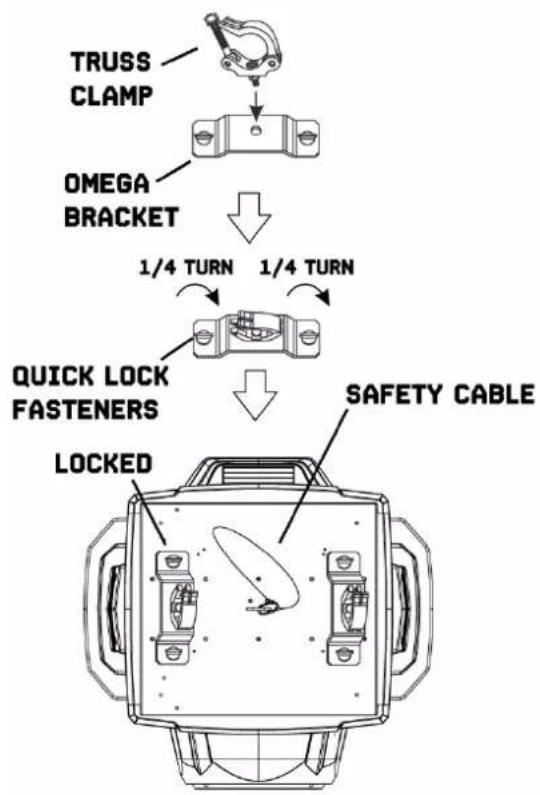
flowchart
graph TD
    A["TRUSS CLAMP"] --> B["OMEGA BRACKET"]
    B --> C["1/4 TURN"]
    C --> D["1/4 TURN"]
    D --> E["QUICK LOCK FASTENERS"]
    E --> F["SAFETY CABLE"]
    F --> G["LOCKED"]
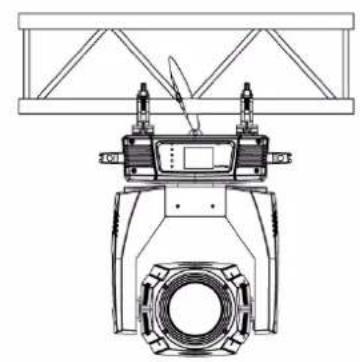
natural_image
Technical line drawing of a mechanical device with no visible text or symbols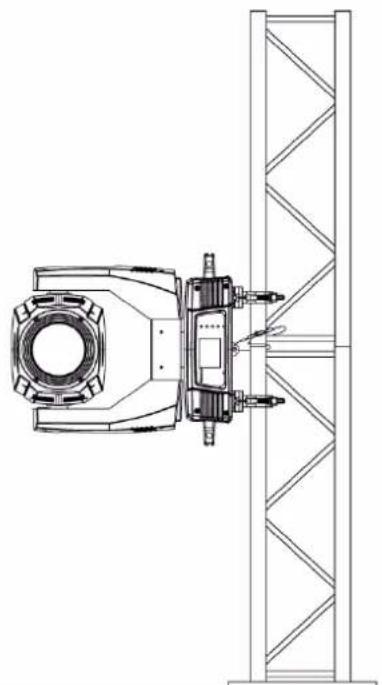
natural_image
Technical line drawing of a mechanical assembly with no visible text or symbolsDMX512 CONTROL
If you are using a standard DMX controller, you can connect the DMX output of the controller directly to the DMX input of the first unit in a DMX chain. Always connect the output of one unit with the input of the next unit until all units are connected.
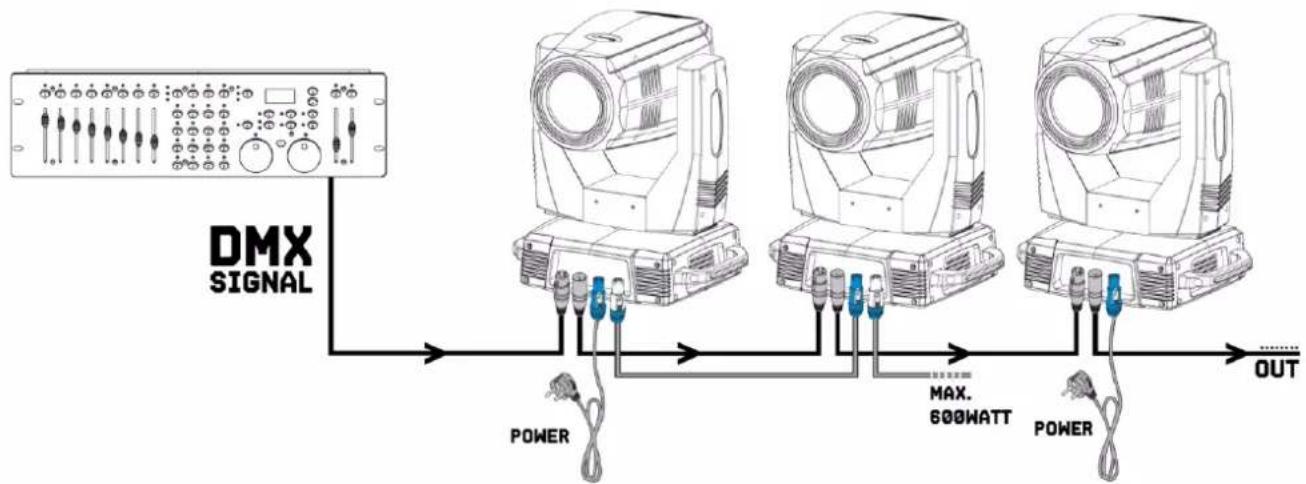
flowchart
graph LR
    A["DMX SIGNAL"] --> B["Device 1"]
    A --> C["Device 2"]
    A --> D["Device 3"]
    B --> E["POWER"]
    C --> F["MAX. 600WATT"]
    D --> G["POWER"]
    E --> H["OUT"]
    F --> H
    G --> H

CAUTION! At the last unit, you must close the DMX line with a terminating resistor. Take an XLR connector and solder a 120 Ohm resistor between signal (-) and signal (+) and connect it to the DMX output of the last unit in the line.
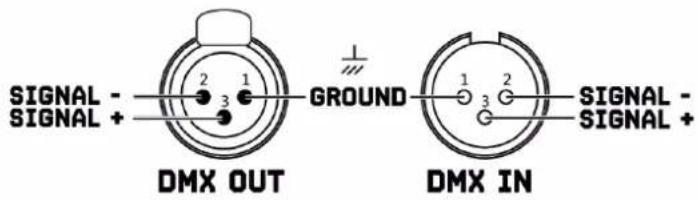
text_image
SIGNAL - SIGNAL + DMX OUT GROUND 1 2 3 1 2 3 SIGNAL - SIGNAL + DMX IN
text_image
1 2 3 120 OHM TERMINATORDISPLAY
This unit has a touchscreen display as well as 4 control buttons. Navigate the menu structure by pressing the buttons on the side of the display, or touching the desired menu option on the display directly. The touchscreen can be calibrated through the display options in the menu.
M
MENU Exits from the current menu or function
④
UP Navigates upwards through the menu list or increases the numeric value when in a function
⑦
DOWN Navigates downwards through the menu list or decreases the numeric value when in a function
©
ENTER Enables the currently displayed menu or sets the currently selected value into the selected function
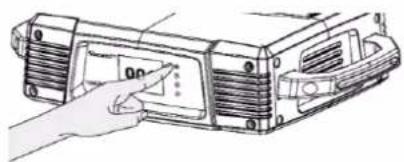
natural_image
Diagram of a device with a hand pointing to a component, showing no text or symbols.BATTERY POWERED DISPLAY
The display and control panel are powered by onboard battery. This gives access to the most important functions in the control panel, including DMX addressing, when the unit is not connected to AC power. To activate the display when the unit is not connected to power, press and hold the Menu button for few seconds. The display extinguishes after 60 seconds automatically when no activity.
TRANSPORT SECURITY
The unit is equipped with Pan/Tilt lock to prevent damage during transport.

WARNING! Pan/Tilt transport protection must be unlocked before the unit will be into use!
LOCK

Lock the unit by sliding the lock pin to the left (horizontally) for Pan or up (vertically) for Tilt.
UNLOCK

Unlock the unit by sliding the lock pin to the right (horizontally) for Pan or down ( vertically) for Tilt.
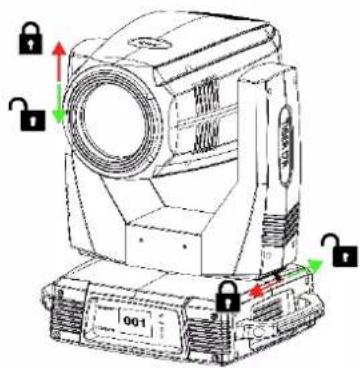
natural_image
Technical line drawing of a mechanical device with lock indicators and directional arrows (no text or symbols)EXCHANGING GOBOS

WARNING! Turn the unit off, disconnect mains power supply and let the unit cool down sufficiently before you will start with inserting or exchanging gobo's.
If you wish to use other patterns as the standard-gobos, make sure that the gobo which you want to insert or exchange has exactly the same size, please follow the instructions below:
- Remove the spring with an appropriate tool.
- Remove the gobo and insert the new gobo.
- Press the spring together and insert it in front of the gobo.
GLASS GOBO
Coated glass gobos are inserted with the coating against the rim of the holder (away from the spring). Textured gobo's are inserted with the smooth side against the spring.
GOBO DIMENSIONS
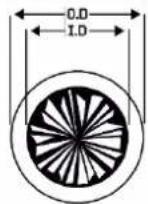
Outer Diameter (O.D) : 15.8mm
Image Diameter (I.D) : 12mm
Max. thickness :1.1 mm

text_image
SPRING GOBO GOBO HOLDERCLEANING
The buildup of dust, dirt and other airborne particles will reduce the unit's light output. It will also prevent the unit from cooling correctly, and this will reduce the unit's lifetime. The rate of dirt buildup will vary depending on environmental factors such as airborne dust, use of smoke machines, airflow from ventilation systems, etc. The unit's cooling fans will accelerate buildup, and any smoke particles that are present in the atmosphere will increase the tendency for dirt to clog.
To get the best performance and lifetime from the unit, inspect it regularly and clean it as soon as you see signs of dirt buildup.
Assess the operating environment each time you begin to use the unit. In dusty or smoky conditions, inspect the unit after a few hours and check it frequently the unit may attract dirt faster than you expect. Draw up a cleaning schedule that will make sure that dirt is removed before it can build up.
Use the following guidelines:
- Disconnect the unit from power and allow it to cool completely before cleaning.
- Do not use solvents, abrasives or any other aggressive product to clean the unit.
- Vacuum or use low-pressure compressed air to remove dust and loose particles from surfaces and air vents. Prevent the blades of cooling fans from turning before you aim a vacuum or air jet at the fan, or you may spin the fan too fast and damage it.
- Clean glass components by wiping gently with a soft, clean, lint-free cloth moistened with a weak detergent solution. Put the solution on the cloth and not on the surface to be cleaned. Avoid rubbing glass surfaces.
- Dry the unit with a soft, clean, lint-free cloth or low-pressure compressed air before reapplying power.
REPLACING THE FUSE
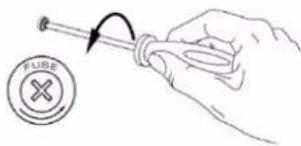
If the fuse is defective, replace the fuse with a fuse of the same type and value. Before replacing the fuse, unplug mains lead.
text_image
FUSEProcedure:
Step 1: Open the fuse holder on the rear panel with a fitting screwdriver.
Step 2: Remove the old fuse from the fuse holder.
Step 3: Install the new fuse in the fuse holder.
Step 4: Replace the fuse holder in the housing.
TROUBLE SHOOTING
The checklist below may help you troubleshoot in the unlikely event that a problem occurs while using the product:
| SYMPTOM | POSSIBLE CAUSE | SUGGESTED ACTION |
| No response from unit. | No power to unit.Fuse blown or internal fault. | Check that power is turned on.Check cables and connections.Replace mean fuse or contact Beamz support or Beamz authorized service partner. Do not remove base or yoke covers. Do not attempt to replace a fuse or carry out any repairs or service that are not described in this User Manual unless you have both authorization from Beamz support or Beamz authorized service partner. |
| Unit resets correctly but does not respond (or does not respond correctly) to the controller. | The controller is not connected.Bad DMX-line.DMX-line has no end resistance.Incorrect unit addressing.A unit is defective and is disturbing data transmission on the DMX-line.Pin 2 and 3 are reversed in XLR connection. | Connect controller.Inspect connections and cables. Correct poor connections. Repair or replace damaged cables.Insert DMX terminator plug in DMX output socket of last unit on DMX-line.Check unit address and DMX mode settings.Unplug DMX IN and OUT connectors and connect them directly together to bypass one unit at a time until normal operation is regained.Have defective unit serviced by an authorized technician.Inspect connections and cables. Install a phase-reversing cable between the units or swap pin 2 and 3 in the unit, that behaves erratically. |
| Error after unit reset. | Effect requires mechanical adjustment. | Check unit's software version and error messages for more information. Contact Beamz support or Beamz authorized service partner. |
| Light output cuts out intermittently. | Unit too hot.LEDs damaged.The power supply settings do not match local AC voltage and frequency. | Allow unit to cool. Reduce ambient temperature. Ensure free airflow around unit.Clean unit if necessary.Disconnect unit and contact Beamz support or Beamz authorized service partner.Disconnect unit. Check settings and correct if necessary. |
VEILIGHEIDSINSTRUCTIES

natural_image
Illustration of a hand pointing at a device panel with no visible text or symbolsDISPLAY OP BATTERIJEN
natural_image
Technical line drawing of a mechanical device with lock indicators and directional arrows (no text or symbols)UITWISSELEN GOBOS

natural_image
Illustration of a device with a hand pointing to a screen (no text or symbols visible)natural_image
Technical line drawing of a mechanical device with multiple lock symbols and directional arrows (no readable text or labels)AUSTAUSCHEN VON GOBOS

natural_image
Illustration of a hand interacting with a device panel (no text or symbols visible)④
UP
natural_image
Technical line drawing of a mechanical device with lock indicators and mounting base (no text or symbols)natural_image
Illustration of a hand inserting a component into a device housing (no text or symbols visible)AFFICHAGE ALIMENTE PAR BATTERIE
natural_image
Technical line drawing of a mechanical device with multiple lock symbols and directional arrows (no text or labels)REPLACEMENT DES GOBOS

REPLACEMENT DU FUSIBLE
natural_image
Technical line drawing of a mechanical device with no visible text or symbols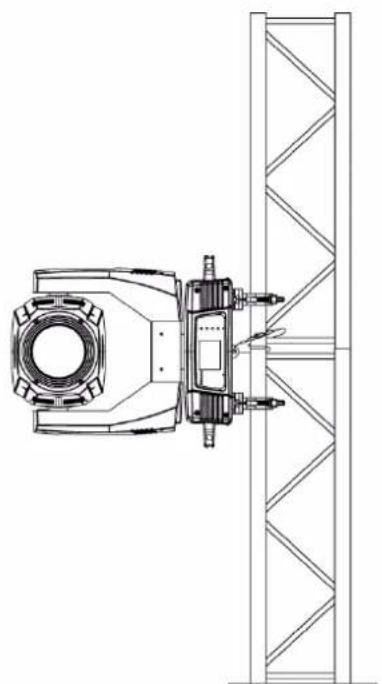
natural_image
Technical line drawing of a mechanical assembly with no visible text or symbolsKONTROLA DMX512
natural_image
Illustration of a hand inserting a component into a device housing (no text or symbols visible)WLACZANIE WYSWIETLACZA
natural_image
Technical line drawing of a mechanical device with lock symbols and directional arrows (no text or labels)WYMIENNE GOBO

Illuminance :207.600lx @1m
Pan : 540°
Tilt :250°
Gobo's :14 + 9 rotating + open
Colour :13+open
Flash rate :1-13 Hz
DMX Channels :16,20
Functions : DMX, Automatic programs and Master-Slave.
Dimensions (per unit) : 420 x 300 x 635mm
Weight (per unit) : 20,6 kg
Design and product specifications are subject to change without prior notice.
European Union
Tronios B.V.,
7602KR Almelo, The Netherlands
2014/35/EU
2014/30/EU
2011/65/EC

United Kingdom
Tronios Ltd.,
130 Harley Street,
London W1G 7JU, United Kingdom
S.I. 2016:1101
S.I. 2016:1091
S.I. 2012:3032

BEAMZ
YOUR FUTURE
YOUR SKILLS
YOUR PLATFORM
YOUR PARTY
YOUR EVENT
KbeamZ Pro
offers a wide range of high performance lighting equipment and related accessories for the rental, entertainment and architectural lighting markets. BeamZ Pro stands for performance, innovation and value pricing!