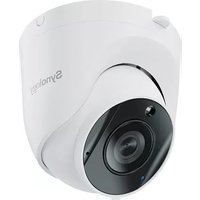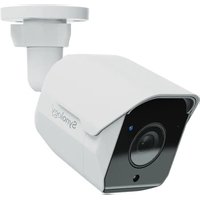
RackStation BC500 - VCR SYNOLOGY - Free user manual and instructions
Find the device manual for free RackStation BC500 SYNOLOGY in PDF.


| Product Type | IP Network Camera |
| Brand | Synology |
| Model | RackStation BC500 |
| Max Resolution | 2880 x 1620 at 30 FPS |
| Lens | 2.8 mm, field of view: 110° (H) x 56° (V) x 132° (D) |
| Aperture | F1.8 |
| Dimensions | ∅110 x 161 mm |
| Weight | 353 g |
| Power Supply | PoE 802.3af (48 V DC) or power adapter 12 V DC / 1 A (not included) |
| Ingress Protection | IP67 |
| Operating Temperature | IR off: -30 °C to 50 °C; IR on: -30 °C to 40 °C |
| Storage | microSD card (max. 128 GB, exFAT) for edge recording |
| Software Compatibility | Surveillance Station 9.1.0+ and Client 2.1.0+ |
| Connectivity | RJ-45 10/100 Mbps (PoE) |
| Key Features | Video surveillance, built-in audio, microSD recording, IR night vision |
| Maintenance and Cleaning | Disconnect power, clean with a damp cloth without chemicals |
| Security | RESET button for reset, auto-block, IP filter |
| Spare Parts and Repairability | RJ-45 connector cover included; power adapter not provided |
| General Information | Wall/ceiling mounting, indoor/outdoor use |
Frequently Asked Questions - RackStation BC500 SYNOLOGY
User questions about RackStation BC500 SYNOLOGY
0 question about this device. Answer the ones you know or ask your own.
Ask a new question about this device
Download the instructions for your VCR in PDF format for free! Find your manual RackStation BC500 - SYNOLOGY and take your electronic device back in hand. On this page are published all the documents necessary for the use of your device. RackStation BC500 by SYNOLOGY.
USER MANUAL RackStation BC500 SYNOLOGY
natural_image
Illustration of a Synalix cybersecurity camera with attached cable and connector (no text or symbols)3 ancres
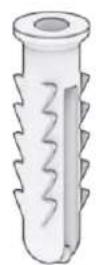
3 vis
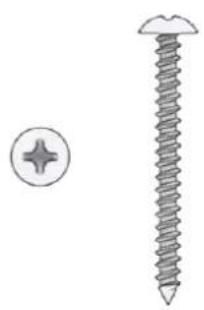
natural_image
Illustration of a screw and its nut (no text or symbols)natural_image
Exploded view diagram of a cylindrical mechanical component showing internal structure and outer ring (no text or symbols)natural_image
Diagram showing light rays passing through a rectangular medium with a central lens (no text or symbols)Remarques :
natural_image
Diagram of a camera system with lens and connector, showing light path from sensor to base (no text or labels)natural_image
Technical illustration of a security camera mounted on a wall-mounted socket (no text or symbols)natural_image
Mechanical assembly diagram showing a camera mounted on a wall with rotational arrows indicating motion (no text or symbols)natural_image
Diagram of a security camera mounted on a wall-mounted device, showing internal components and rotation arrow (no text or symbols)natural_image
Two diagrams showing a mechanical assembly with rotating components, no text or symbols present.natural_image
Illustration of two types of medical or surgical tools with coiled tubing and connectors (no text or symbols)natural_image
Diagram of a security camera setup with a monitor, cable, and network connection (no text or symbols)natural_image
Illustration of a security camera connected to a computer and network device (no text or symbols visible)Remarques :
GARANTIE PRODUIT LIMITÉE
LA PRÉSENTE TRADUCTION EST FOURNIE UNIQUEMENT À TITRE D'INFORMATION. EN CAS DE VARIATION, LA VERSION ANGLAISE EST VALIDE.
CETTE GARANTIE LIMITÉE (« GARANTIE ») S'APPLIQUE AUX PRODUITS (DÉFINIS CI-APRÈS) DE SYNOLOGY, INC. ET DE SES FILIALES, Y COMPRIS SYNOLOGY AMERICA CORP, (COLLECTIVEMENT, « SYNOLOGY »). VOUS ACCEPTEZ ET RECONNAISSEZ VOUS SOUMETTRE AUX TERMES DE CETTE GARANTIE EN OUVRANT ET/OU EN UTILISANT L'EMBALLAGE CONTENANT LE PRODUIT. VEUILLEZ NOTER QUE CETTE GARANTIE LIMITÉE NE S'APPLIQUE PAS AU LOGICIEL CONTENU DANS LES PRODUITS QUI SERA SOUMIS À SON PROPRE CONTRAT DE LICENCE D'UTILISATEUR FINAL ET QUE SYNOLOGY SE RÉSERVE LE DROIT D'AJUSTER ET/OU DE MODIFIER LA PRÉSENTE GARANTIE PRODUIT DE TEMPS À AUTRE SANS AVIS PRÉALABLE. SI VOUS N'ÊTES PAS D'ACCORD AVEC LES TERMES DE CETTE GARANTIE, N'UTILISEZ PAS LE PRODUIT. AU LIEU DE CELA, VOUS POUVEZ RENVOYER LE PRODUIT AU REVENDEUR CHEZ QUI VOUS L'AVEZ ACHETÉ POUR VOUS FAIRE REMBOURSER, EN VERTU DE LA POLITIQUE DE RETOUR APPLICABLE AU REVENDEUR.
VEUILLEZ NOTER QUE LA PRISE EN CHARGE INCLUSE DANS LA GARANTIE DE SYNOLOGY N'EST PAS DISPONIBLE DANS TOUS LES PAYS ET QUE SYNOLOGY PEUT REFUSER DE VOUS FOURNIR CETTE PRISE EN CHARGE PAR LA GARANTIE LIMITÉE SI VOUS FAITES UNE DEMANDE DE PRISE EN CHARGE DANS UN PAYS DIFFÉRENT DU PAYS DANS LEQUEL LE PRODUIT A ÉTÉ INITIALEMENT ACHETÉ. LE PAYS DANS LEQUEL LE PRODUIT A ÉTÉ INITIALEMENT ACHETÉ SERA DÉTERMINÉ EN FONCTION DES ARCHIVES INTERNES DE SYNOLOGY.
FCC Declaration of Conformity
This device complies with Part 15 of the FCC Rules. Operation is subject to the following two conditions: (1) this device may not cause harmful interference, and (2) this device must accept any interference received, including interference that may cause undesired operation.
Declaration Letter of REACH & RoHS Compliance
About REACH
In June 2007, the European Union Regulation (EC) 1907/2006 concerning the Registration, Evaluation, Authorization and Restriction of Chemicals (REACH) was first released. Under this Regulation, manufacturers are required to gather information on the properties of their chemical substances, which will allow their safe handling, and to register the information to European Chemicals Agency (ECHA). The aim is to improve the protection of human health and the environment through the better and earlier identification of the intrinsic properties of chemical substances.
About RoHS
RoHS Directive (EU Directive 2002/95/EC) was issued in 2002, restricted the use of the six chemicals lead, cadmium, mercury, and hexavalent chromium, as well as flame retardants polybrominated biphenyls (PBBs) and polybrominated dipheny ethers (PBDEs). Under this directive, manufacturers are required to replace these chemicals in their products with less hazardous alternatives.
Then RoHS 2.0 (Directive 2011/65/EU) has replaced Directive 2002/95/EC since January 3, 2013. In 2015, EU commission publishes Directive (EU) 2015/863 to amend Annex II to EU RoHS 2 (Directive 2011/65/EU) to add 4 phthalates (DEHP, BBP, DBP and DIBP) onto the list of restricted substances from 22 July 2019.
REACH and RoHS Compliance
Synology meets all requirements of the REACH Regulation and is compliant to all implemented RoHS type regulations worldwide. To the best of Synology's knowledge, all Synology products in production (including finished
Synology®
products, spare parts, and packaging materials) are in compliance with the requirements of the Regulation and/or Directives. Synology continues to monitor, influence, and develop our processes to comply with any proposed changes to the Regulation and/or Directives.
Federal Communication Commission Interference Statement
This equipment has been tested and found to comply with the limits for a Class B digital device, pursuant to part 15 of the FCC Rules. These limits are designed to provide reasonable protection against harmful interference in a residential installation. This equipment generates, uses and can radiate radio frequency energy and, if not installed and used in accordance with the instructions, may cause harmful interference to radio communications. However, there is no guarantee that interference will not occur in a particular installation. If this equipment does cause harmful interference to radio or television reception, which can be determined by turning the equipment off and on, the user is encouraged to try to correct the interference by one or more of the following measures:
—Reorient or relocate the receiving antenna.
—Increase the separation between the equipment and receiver.
—Connect the equipment into an outlet on a circuit different from that to which the receiver is connected.
—Consult the dealer or an experienced radio/TV technician for help.
This device complies with part 15 of the FCC Rules. Operation is subject to the following two conditions: (1) This device may not cause harmful interference, and (2) this device must accept any interference received, including interference that may cause undesired operation.
Canadian Compliance Statement
This device complies with Industry Canada license-exempt RSSs. Operation is subject to the following two conditions:
1) This device may not cause interference, and
2) This device must accept any interference, including interference that may cause undesired operation of the device.
This product meets the applicable Innovation, Science and Economic Development Canada technical specifications.
| 設備名稱:網路攝影機 型號(型式):BC500Equipment name Type designation (Type) | ||||||
| 單元Unit | 限用物質及其化學符號Restricted substances and its chemical symbols | |||||
| 鉛Lead(Pb) | 汞Mercury(Hg) | 鎘Cadmium(Cd) | 六價鉻Hexavalent chromium( Cr^+6 ) | 多溴聯苯Polybrominated biphenyls(PBB) | 多溴二苯醚Polybrominated diphenyl ethers(PBDE) | |
| 前蓋+內玻/後蓋+銅柱 | - | ○ | ○ | ○ | ○ | ○ |
| 印刷電路板及電子組件 | - | ○ | ○ | ○ | ○ | ○ |
| 組裝線、端子線 | ○ | ○ | ○ | ○ | ○ | ○ |
| 電纜線(Cable) | ○ | ○ | ○ | ○ | ○ | ○ |
| 備考1.“超出0.1 wt %”及“超出0.01 wt %”係指限用物質之百分比含量超出百分比含量基準值。Note 1:“Exceeding 0.1 wt %” and “exceeding 0.01 wt %” indicate that the percentage content of the restricted substance exceeds the reference percentage value of presence condition.備考2.“○”係指該項限用物質之百分比含量未超出百分比含量基準值。Note 2:“o” indicates that the percentage content of the restricted substance does not exceed the percentage of reference value of presence.備考3.“—”係指該項限用物質為排除項目。Note 3:The “—” indicates that the restricted substance corresponds to the exemption. | ||||||