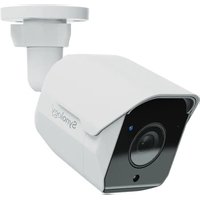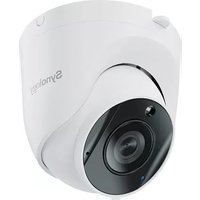
TC500 - VCR SYNOLOGY - Free user manual and instructions
Find the device manual for free TC500 SYNOLOGY in PDF.



| Product Type | Network Surveillance Camera |
| Brand | Synology |
| Model | TC500 |
| Maximum Resolution | 2880 x 1620 at 30 FPS |
| Lens | 2.8 mm, angle H:110°, V:56°, D:132° |
| Aperture | F1.8 |
| Dimensions | ∅97 x 88 mm |
| Weight | 387 g |
| Power Supply | PoE 802.3af (48V DC) or DC adapter 12V/1A |
| Weatherproof Rating | IP67 |
| Impact Resistance | IK10 |
| Local Storage | microSD card slot (exFAT, up to 128 GB tested) |
| Built-in Microphone | Yes |
| Operating Temperature | IR off: -30°C to 50°C; IR on: -30°C to 40°C |
| Humidity | 5% to 95% RH |
| Certifications | FCC, IC, CE, UKCA, SMI, VCCI, RCM, KC, JATE |
| System Requirements | Surveillance Station 9.1.0+; Client 2.1.0+ |
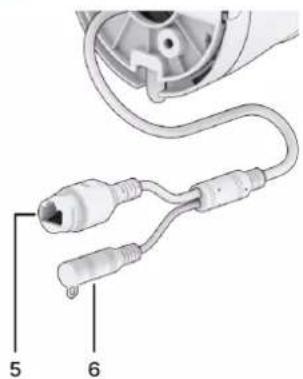
| Connectors | RJ-45 10/100M, power jack (∅2.1 mm) |
| Reset Button | Warm reboot (4s) or factory reset (10s) |
| Cleaning | Disconnect, use a damp cloth, no chemicals |
| Installation | By qualified personnel; mount must support 3x the weight |
Frequently Asked Questions - TC500 SYNOLOGY
User questions about TC500 SYNOLOGY
0 question about this device. Answer the ones you know or ask your own.
Ask a new question about this device
Download the instructions for your VCR in PDF format for free! Find your manual TC500 - SYNOLOGY and take your electronic device back in hand. On this page are published all the documents necessary for the use of your device. TC500 by SYNOLOGY.
USER MANUAL TC500 SYNOLOGY
natural_image
Illustration of a Synosi® vacuum cleaner with attached wiring (no text or symbols)3 ancres
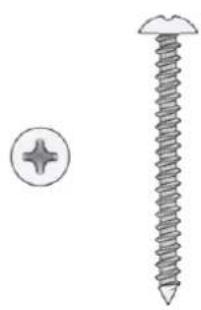
3 vis
natural_image
Illustration of a screw and its nut (no text or symbols)natural_image
Top-down view of a white cylindrical device with concentric rings and labeled parts (1 and 2), no text or symbols present.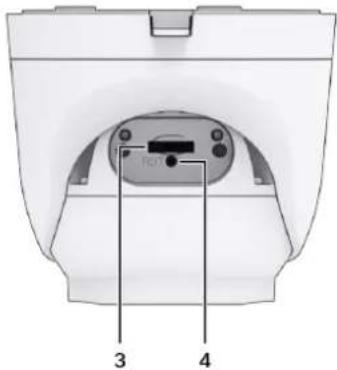
natural_image
Close-up of a medical device with two connected cables (no text or symbols visible)natural_image
Diagram of a ceiling structure with three vertical cylindrical elements and directional arrows indicating flow or movement (no text or symbols)Remarques :
natural_image
3D diagram of a mechanical flange component with three arrows indicating assembly or force direction (no text or symbols)natural_image
3D mechanical assembly diagram showing a Synokay device with internal components and an arrow indicating direction (no text or symbols beyond branding)natural_image
Diagram of a mechanical assembly with concentric circular components and directional arrows, no readable text or symbols present.natural_image
Two diagrams showing a mechanical assembly with rotating components, no text or symbols present.natural_image
Illustration of two types of medical or surgical tools with coiled tubing and connectors (no text or symbols)natural_image
Diagram of a wireless network device with a monitor, cable, and power outlet connected to a camera (no text or symbols visible)Remarques :
GARANTIE PRODUIT LIMITÉE
LA PRÉSENTE TRADUCTION EST FOURNIE UNIQUEMENT À TITRE D'INFORMATION. EN CAS DE VARIATION, LA VERSION ANGLAISE EST VALIDE.
CETTE GARANTIE LIMITÉE (« GARANTIE ») S'APPLIQUE AUX PRODUITS (DÉFINIS CI-APRÈS) DE SYNOLOGY, INC. ET DE SES FILIALES, Y COMPRIS SYNOLOGY AMERICA CORP, (COLLECTIVEMENT, « SYNOLOGY »). VOUS ACCEPTEZ ET RECONNAISSEZ VOUS SOUMETTRE AUX TERMES DE CETTE GARANTIE EN OUVRANT ET/OU EN UTILISANT L'EMBALLAGE CONTENANT LE PRODUIT. VEUILLEZ NOTER QUE CETTE GARANTIE LIMITÉE NE S'APPLIQUE PAS AU LOGICIEL CONTENU DANS LES PRODUITS QUI SERA SOUMIS À SON PROPRE CONTRAT DE LICENCE D'UTILISATEUR FINAL ET QUE SYNOLOGY SE RÉSERVE LE DROIT D'AJUSTER ET/OU DE MODIFIER LA PRÉSENTE GARANTIE PRODUIT DE TEMPS À AUTRE SANS AVIS PRÉALABLE. SI VOUS N'ÊTES PAS D'ACCORD AVEC LES TERMES DE CETTE GARANTIE, N'UTILISEZ PAS LE PRODUIT. AU LIEU DE CELA, VOUS POUVEZ RENVOYER LE PRODUIT AU REVENDEUR CHEZ QUI VOUS L'AVEZ ACHETÉ POUR VOUS FAIRE REMBOURSER, EN VERTU DE LA POLITIQUE DE RETOUR APPLICABLE AU REVENDEUR.
VEUILLEZ NOTER QUE LA PRISE EN CHARGE INCLUSE DANS LA GARANTIE DE SYNOLOGY N'EST PAS DISPONIBLE DANS TOUS LES PAYS ET QUE SYNOLOGY PEUT REFUSER DE VOUS FOURNIR CETTE PRISE EN CHARGE PAR LA GARANTIE LIMITÉE SI VOUS FAITES UNE DEMANDE DE PRISE EN CHARGE DANS UN PAYS DIFFÉRENT DU PAYS DANS LEQUEL LE PRODUIT A ÉTÉ INITIALEMENT ACHETÉ. LE PAYS DANS LEQUEL LE PRODUIT A ÉTÉ INITIALEMENT ACHETÉ SERA DÉTERMINÉ EN FONCTION DES ARCHIVES INTERNES DE SYNOLOGY.
FCC Declaration of Conformity
This device complies with Part 15 of the FCC Rules. Operation is subject to the following two conditions: (1) this device may not cause harmful interference, and (2) this device must accept any interference received, including interference that may cause undesired operation.
Declaration Letter of REACH & RoHS Compliance
About REACH
In June 2007, the European Union Regulation (EC) 1907/2006 concerning the Registration, Evaluation, Authorization and Restriction of Chemicals (REACH) was first released. Under this Regulation, manufacturers are required to gather information on the properties of their chemical substances, which will allow their safe handling, and to register the information to European Chemicals Agency (ECHA). The aim is to improve the protection of human health and the environment through the better and earlier identification of the intrinsic properties of chemical substances.
About RoHS
RoHS Directive (EU Directive 2002/95/EC) was issued in 2002, restricted the use of the six chemicals lead, cadmium, mercury, and hexavalent chromium, as well as flame retardants polybrominated biphenyls (PBBs) and polybrominated dipheny ethers (PBDEs). Under this directive, manufacturers are required to replace these chemicals in their products with less hazardous alternatives.
Then RoHS 2.0 (Directive 2011/65/EU) has replaced Directive 2002/95/EC since January 3, 2013. In 2015, EU commission publishes Directive (EU) 2015/863 to amend Annex II to EU RoHS 2 (Directive 2011/65/EU) to add 4 phthalates (DEHP, BBP, DBP and DIBP) onto the list of restricted substances from 22 July 2019.
REACH and RoHS Compliance
Synology meets all requirements of the REACH Regulation and is compliant to all implemented RoHS type regulations worldwide. To the best of Synology's knowledge, all Synology products in production (including finished
Synology®
products, spare parts, and packaging materials) are in compliance with the requirements of the Regulation and/or Directives. Synology continues to monitor, influence, and develop our processes to comply with any proposed changes to the Regulation and/or Directives.