
GTM 20 - GPS Navigation Accessory GARMIN - Free user manual and instructions
Find the device manual for free GTM 20 GARMIN in PDF.


| Product type | TMC FM traffic information receiver |
| Brand | GARMIN |
| Model | GTM 20 |
| Compatibility | Garmin GPS with power connector |
| Power supply | Via vehicle cigarette lighter cable (12V) |
| Main functions | Reception of TMC traffic information, display of incidents, route bypass |
| GPS connection | Cable with dedicated power connector |
| External antenna | Optional (sold separately at buy.garmin.com) |
| Coverage area | FM stations broadcasting TMC data (see www.garmin.com/traffic) |
| Subscription | Depending on region: free public service, special subscription or paid |
| Subscription activation | Automatic upon receiving Garmin satellite signals |
| Package contents | GTM 20 receiver, connection cable, important information guide |
| Maintenance and cleaning | Clean with a soft, dry cloth; avoid abrasive products |
| Safety | Follow the product information guide; mount without obstructing the driver's view |
| Spare parts | External antenna available at http://buy.garmin.com |
| Operating temperature | Automotive standard (not specified, but compatible with vehicle environment) |
Frequently Asked Questions - GTM 20 GARMIN
User questions about GTM 20 GARMIN
0 question about this device. Answer the ones you know or ask your own.
Ask a new question about this device
Download the instructions for your GPS Navigation Accessory in PDF format for free! Find your manual GTM 20 - GARMIN and take your electronic device back in hand. On this page are published all the documents necessary for the use of your device. GTM 20 by GARMIN.
USER MANUAL GTM 20 GARMIN
natural_image
Coiled black electrical heating element with two connectors (no text or symbols visible)© 2008 Garmin Ltd. or its subsidiaries
All rights reserved. Except as expressly provided herein, no part of this manual may be reproduced, copied, transmitted, disseminated, downloaded or stored in any storage medium, for any purpose without the express prior written consent of Garmin. Garmin hereby grants permission to download a single copy of this manual onto a hard drive or other electronic storage medium to be viewed and to print one copy of this manual or of any revision hereto, provided that such electronic or printed copy of this manual must contain the complete text of this copyright notice and provided further that any unauthorized commercial distribution of this manual or any revision hereto is strictly prohibited.
Information in this document is subject to change without notice. Garmin reserves the right to change or improve its products and to make changes in the content without obligation to notify any person or organization of such changes or improvements. Visit the Garmin Web site (www.garmin.com) for current updates and supplemental information concerning the use and operation of this and other Garmin products.
Garmin ^® and the Garmin logo are trademarks of Garmin Ltd. or its subsidiaries, registered in the USA and other countries. GTM ^™ is a trademark of Garmin Ltd. or its subsidiaries. These trademarks may not be used without the express permission of Garmin.
October 2008
Part Number 190-00659-94 Rev. A
Printed in Taiwan
GTM™ 20 Instructions

See the Important Safety and Product Information guide in the GPS device box for product warnings and other important information.
The Garmin ^® GTM 20 FM TMC Traffic Receiver receives Traffic Message Channel (TMC) information broadcast over the FM radio data system. When a traffic message is received, your Garmin GPS device can change your route to avoid the traffic incident. Traffic information is based on traffic data provided with the permission of one or more third parties. For coverage areas, refer to the Garmin Web site at www.garmin.com/traffic.
To receive traffic information, the traffic receiver must be connected to the GPS device and to an external power source, and the traffic receiver and GPS device must be in data range of an FM station transmitting TMC data.

NOTE: Garmin is not responsible for the accuracy of the traffic information.
Connecting Your GTM 20
- Remove the vehicle power cable from your Garmin GPS device.
- Connect the cable on the GTM 20 to the power connector on your Garmin GPS device.
- Plug the other end into a power outlet in your vehicle.
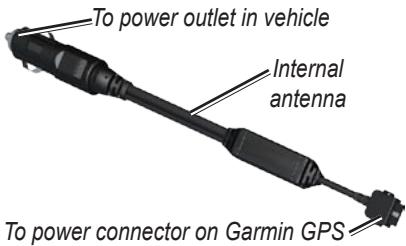
- Route the cable so that it does not interfere with vehicle operating controls.

NOTE: Heated (metalized) windshields could degrade the performance of the traffic receiver.
Connecting an External Antenna
An external antenna may be included in the product box to increase signal range. To purchase an external antenna, go to http://buy.garmin.com.
- Connect the external antenna to the GTM 20.
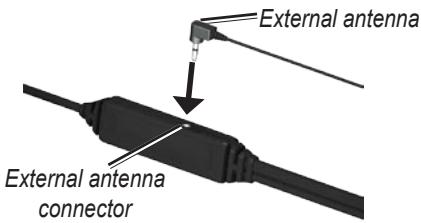
- Use the attached suction cups to route the external antenna on the windshield vertically, if possible.
Before mounting the traffic receiver, see the Important Safety and Product Information guide included with your GPS device for information about laws pertaining to windshield mounting.
Testing the Traffic Receiver
Check the Map: Check the map on the GPS device for traffic incidents or a traffic icon. Refer to the owner's manual.
Verify Signal Strength: If you are inside a garage where radio signals cannot be received, drive the vehicle outside.
Verify that you are in a service area: Check for service from the pay service or free or premium services.
Service and Subscription Information
Depending on your region, your traffic receiver receives data through either a premium service or a free, public service. For information about your traffic service subscription, see the product packaging or the Traffic settings in the GPS device. The subscription activates automatically after your Garmin GPS device acquires satellite signals while receiving traffic signals from the service provider.
You can add other FM TMC subscriptions at any time. Check the Garmin Web site at www.garmin.com/fmtraffic for other available services.
Using Traffic Data with Your Garmin GPS Device
The traffic receiver works with your Garmin GPS device to show traffic flow and incident information, and to enable routing around traffic incidents. Although each GPS device operates differently, they all provide similar traffic information.
Register your Traffic Receiver
To register your traffic receiver, go to http://my.garmin.com.
Instructions relatives au GTM™ 20

For the latest free software updates (excluding map data) throughout the life of your Garmin products, visit the Garmin Web site at www.garmin.com.

© 2008 Garmin Ltd. or its subsidiaries
Garmin International, Inc. 1200 East 151 ^st Street, Olathe, Kansas 66062, USA
Garmin (Europe) Ltd. Liberty House, Houndown Business Park, Southampton, Hampshire, SO40 9RB UK
Garmin Corporation No. 68, Jangshu 2 ^nd Road, Shijr, Taipei County, Taiwan
www.garmin.com
Part Number 190-00659-94 Rev. A
- GTM™ 20 Instructions
- Connecting Your GTM 20
- Connecting an External Antenna
- Testing the Traffic Receiver
- Service and Subscription Information
- Using Traffic Data with Your Garmin GPS Device
- Register your Traffic Receiver
- Instructions relatives au GTM™ 20
- For the latest free software updates (excluding map data) throughout the life of your Garmin products, visit the Garmin Web site at www.garmin.com.
Brand : GARMIN
Model : GTM 20
Category : GPS Navigation Accessory