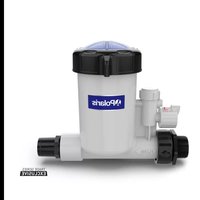
AutoClear PAGTF45 - Water filter POLARIS - Free user manual and instructions
Find the device manual for free AutoClear PAGTF45 POLARIS in PDF.

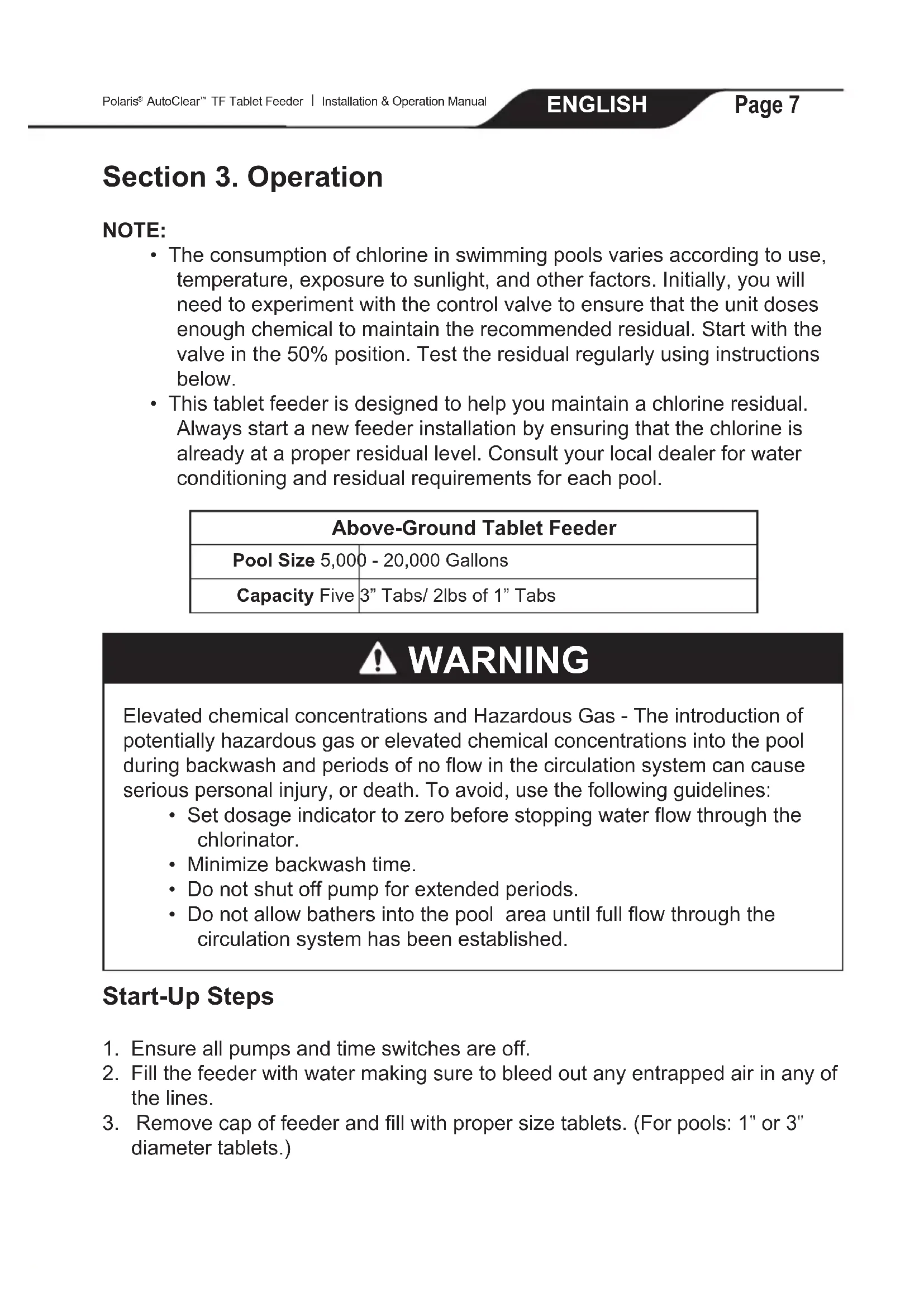


| Product Type | Above-Ground Tablet Feeder System |
| Brand | Polaris |
| Model | AutoClear PAGTF45 |
| Capacity | 5 tablets of 3 inches or 2 lbs (0.9 kg) of 1-inch tablets |
| Recommended Pool Size | 5,000 to 20,000 gallons (18,927 to 75,708 liters) |
| Compatible Chemical Type | Trichlor or slow-dissolving bromine (do not use calcium hypochlorite) |
| Dosing Method | Adjustable control valve, flow indicator |
| Installation | On the pool return line, after the heater and other equipment |
| Body Material | Chemical-resistant plastic |
| O-ring | Lid O-ring (part # R0968600), lubricated with silicone lubricant |
| Included Components | Lid assembly, O-ring, grid and control valve, flow chamber cover, union nut with tail and T-fitting |
| Connection | Inlet: 1-1/2" threaded adapter; Outlet: adapter for flexible or rigid hose |
| Operation | Valve adjustment between 0 and 100%, regular testing of residual chlorine |
| Maintenance | Cleaning the lid, checking and replacing O-rings, air purging, cleaning the grid |
| Safety | Use tablets only, do not mix, wear protective gear, do not smoke nearby |
| Winterization | Drain water, remove undissolved tablets, rinse, disconnect hoses |
| Common Troubleshooting | Cloudy lid (chlorine exposure), reduced flow (clogged grid), leaks (O-rings), low chlorine concentration (depleted tablets or insufficient filtration time) |
| Repairability | Available spare parts: lid, O-ring, grid, control valve, union nut |
Frequently Asked Questions - AutoClear PAGTF45 POLARIS
User questions about AutoClear PAGTF45 POLARIS
0 question about this device. Answer the ones you know or ask your own.
Ask a new question about this device
Download the instructions for your Water filter in PDF format for free! Find your manual AutoClear PAGTF45 - POLARIS and take your electronic device back in hand. On this page are published all the documents necessary for the use of your device. AutoClear PAGTF45 by POLARIS.
USER MANUAL AutoClear PAGTF45 POLARIS
natural_image
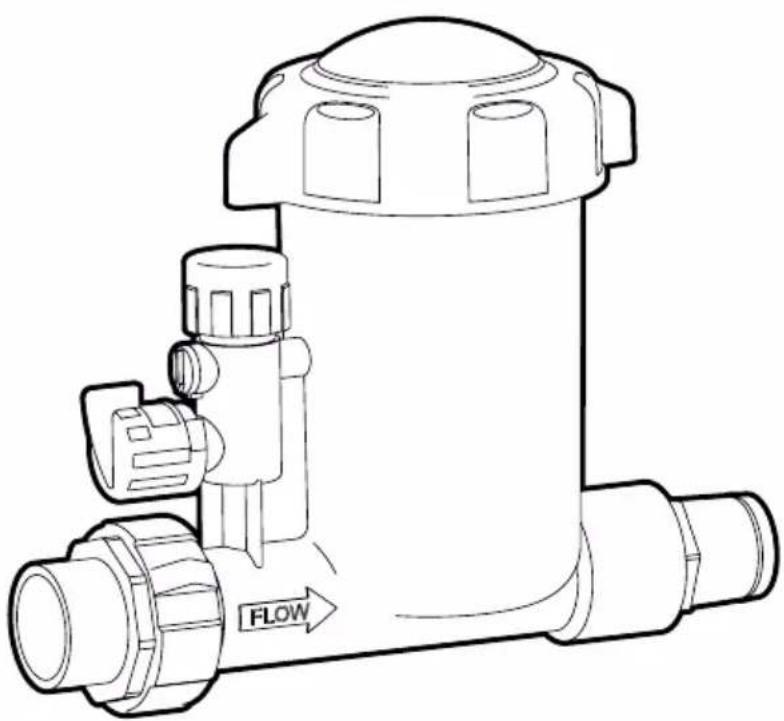
Technical line drawing of a mechanical component with labeled flow direction (no text or symbols beyond 'FLOW')Above-Ground Tablet Feeder PAGTF45
INSTALLATION AND OPERATION MANUAL
ENGLISH | FRANÇAIS | ESPAÑOL
WARNING
If these instructions are not followed exactly, a fire or explosion may result, causing property damage, personal injury, or death.
FOR YOUR SAFETY - This product must be installed by a qualified pool professional or personnel who are knowledgeable with the standards and code requirements for above-ground pool equipment. The maintainer must be a qualified pool professional or personnel with sufficient experience in pool equipment installation and maintenance so that all of the instructions in this manual can be followed exactly. Improper installation and/or operation may result in death, serious injury or property damage. DO NOT MODIFY THIS EQUIPMENT. Before installing this product, read and follow all warning notices and instructions that accompany this product. Failure to follow warning notices and instructions may result in death, serious injury or property damage. Consult Polaris customer service at 1-800-822-7933 for assistance. Improper installation and/or operation may void the warranty.
Table of Contents
Section 1. Important Safety Instructions......3
Section 2. Installation......4
Section 3. Operation....7
Section 4. Winterizing ......9
Section 5. Troubleshooting .....10
Section 1. Important Safety Instructions
READ AND FOLLOW ALL INSTRUCTIONS
! DANGER
RISK OF FIRE OR EXPLOSION.
Only use slow dissolving Tri-Chlorine OR Bromine tablets in this chemical dosing unit and NEVER mix different chemical products together. Failure to observe the above warning could result in an explosion and fire.
NEVER use oils or grease to lubricate o-ring. Oil in contact with Trichlor may result in FIRE. Lubricate o-ring with approved silicone o-ring lubricant only. If you are not the original owner of this feeder, or not sure which chemical was used, be SAFE and flush thoroughly with fresh water. CAUTION SHOULD BE USED WHEN REMOVING CAP. DO NOT INHALE FUMES. IF YOUR POOL HAS COPPER PLUMBING DO NOT INSTALL. This will damage the feeder. NOTE: If heaters are used, a Fireman's Switch or equivalent must be installed to prevent possible damage and improper operation of check valve and other equipment subject to heat damage.
CALCIUM HYPOCHLORITE IS NOT TO BE USED IN ANY FORM.
Never open the dosing unit lid when the unit is running. Before doing so, turn off the pool circulation pump and close all valves. Ensure you take the following precautions: Do not smoke in the vicinity of the unit, wear adequate eye and hand protection and avoid inhaling any gas that may be released. Apart from occasions when the unit needs to be re-filled or maintained, always ensure that the return line back to the pool is open to avoid the accumulation of any gases.
SAVE THESE INSTRUCTIONS
Section 2. Installation
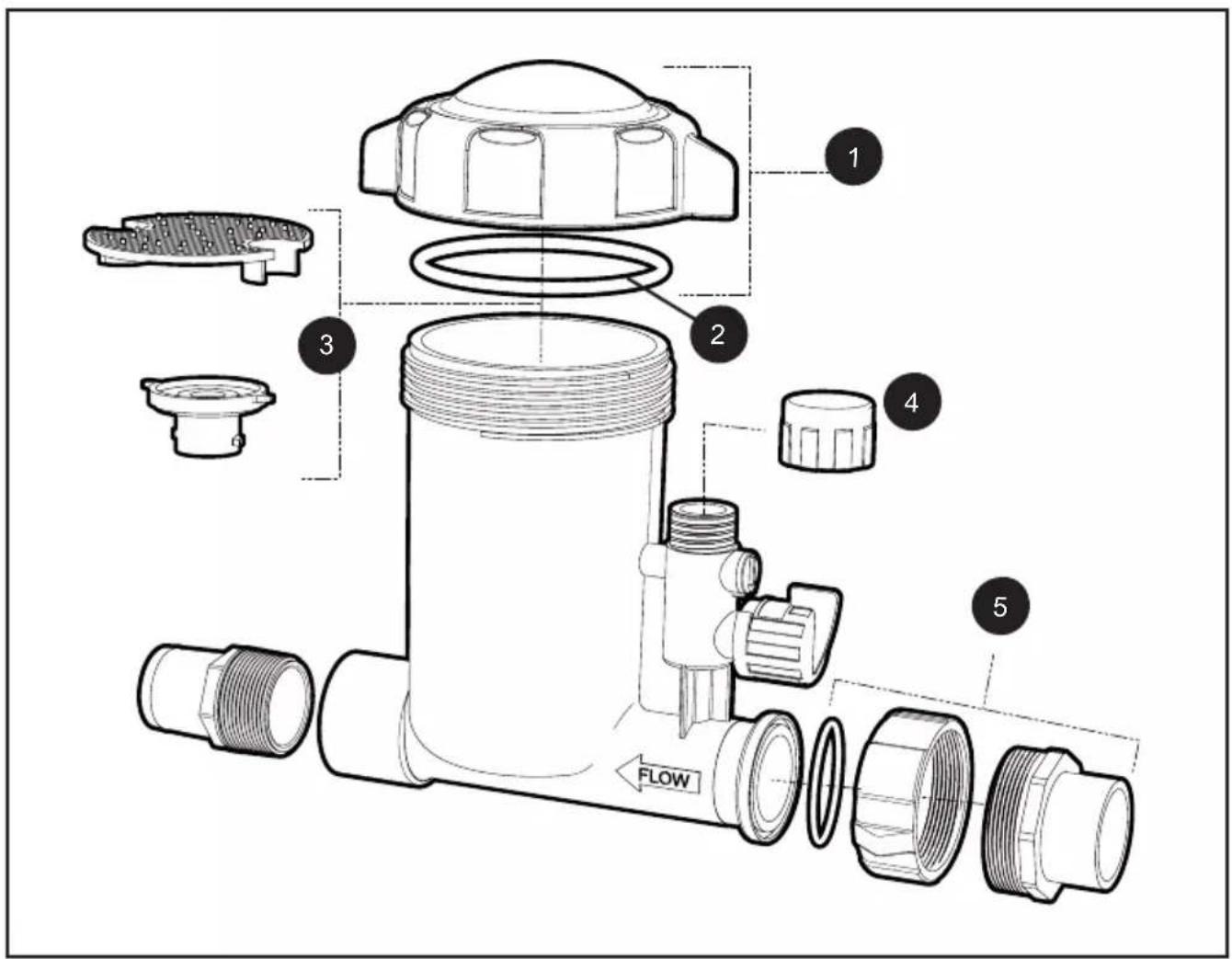
Before you begin installation, verify you have all necessary parts (see Table 1 below).
| KIT PART NO. COMPONENT DESCRIPTION QTY | |||
| 1 R0967400 Lid Assembly (Lid, Collar and O-ring) 1 | |||
| 2 R0968600 Lid O-ring 1 | |||
| 3 R0968500 Grate and Check Valve Assembly 1 | |||
| 4 R0967500 Flow Chamber Cap w/ O-ring 1 | |||
| 5 R0968700 Union Nut, Tail Piece and T-Gasket 1 | |||
Table 1. Components
CAUTION
DO NOT INSTALL chlorine feeder before the heating system. Damage to the heating system may occur. The feeder is designed for permanent installation in the return line of the pool and must always be installed after the heater, pool cleaner, valves, mineral sanitizer etc. If there is no heater then install the feeder after the filter and all other equipment.
WARNING
In order to prevent risk of serious property damage, injury or death: Wear eye and skin protection while maintaining or servicing this unit. Do not inhale fumes from the chlorinator or chemical container. Chlorine feeder may be under pressure. Use caution removing cover.
- Make sure all pumps and timer switches are OFF.
- Place T-gasket into groove on inlet.
-
Install the 1-1/2" threaded adapter to the filter valve or system plumbing then couple the feeder inlet to the 1-1/2" threaded adapter using the split union nut.
-
Install the outlet connection:
-
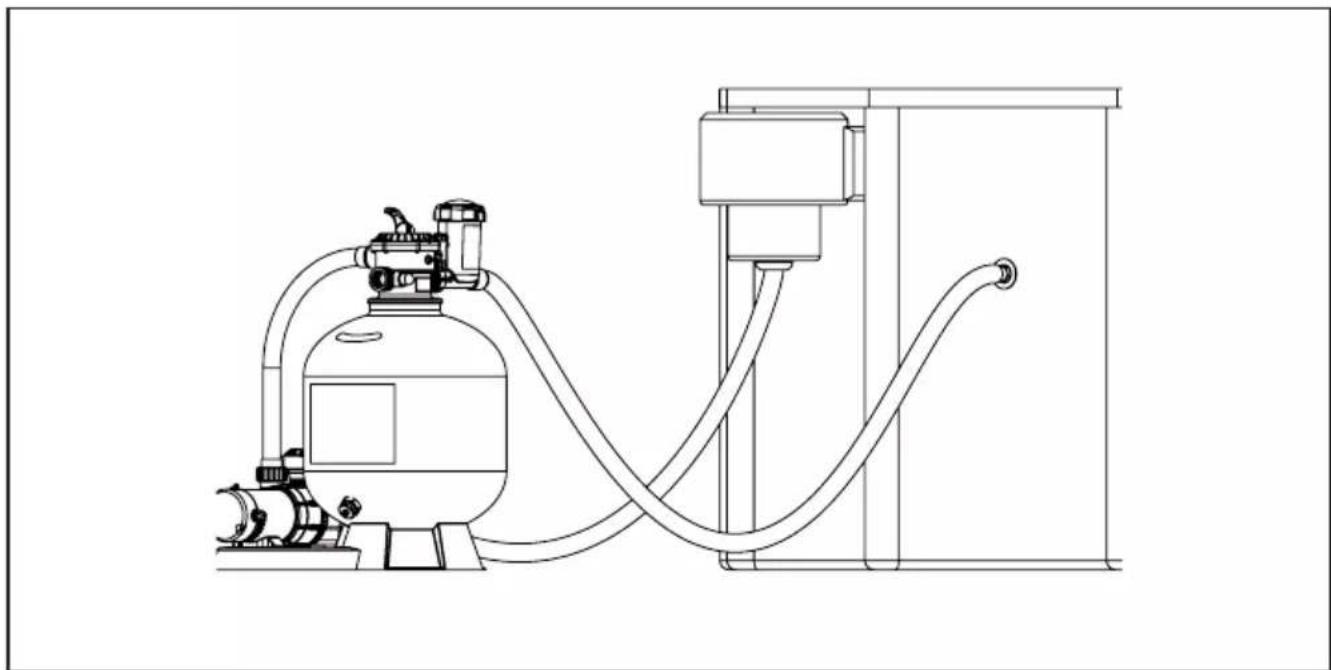
If the pool is plumbed with corrugated or flex hose, install the hose adapter provided in the outlet. (Fig. 3a) Take the 1-1/2" hose adapter and install in the outlet with Teflon tape (not provided).
- If the pool is plumbed with 1-1/2" PVC pipe, use bushings installed directly into the outlet side of the feeder and install the union fitting provided for the inlet. (Fig. 3b)
natural_image
Line drawing of a gas cylinder connected to a vertical pump and tubing (no text or symbols)Figure 3a. Flex Hose Installation Configuration
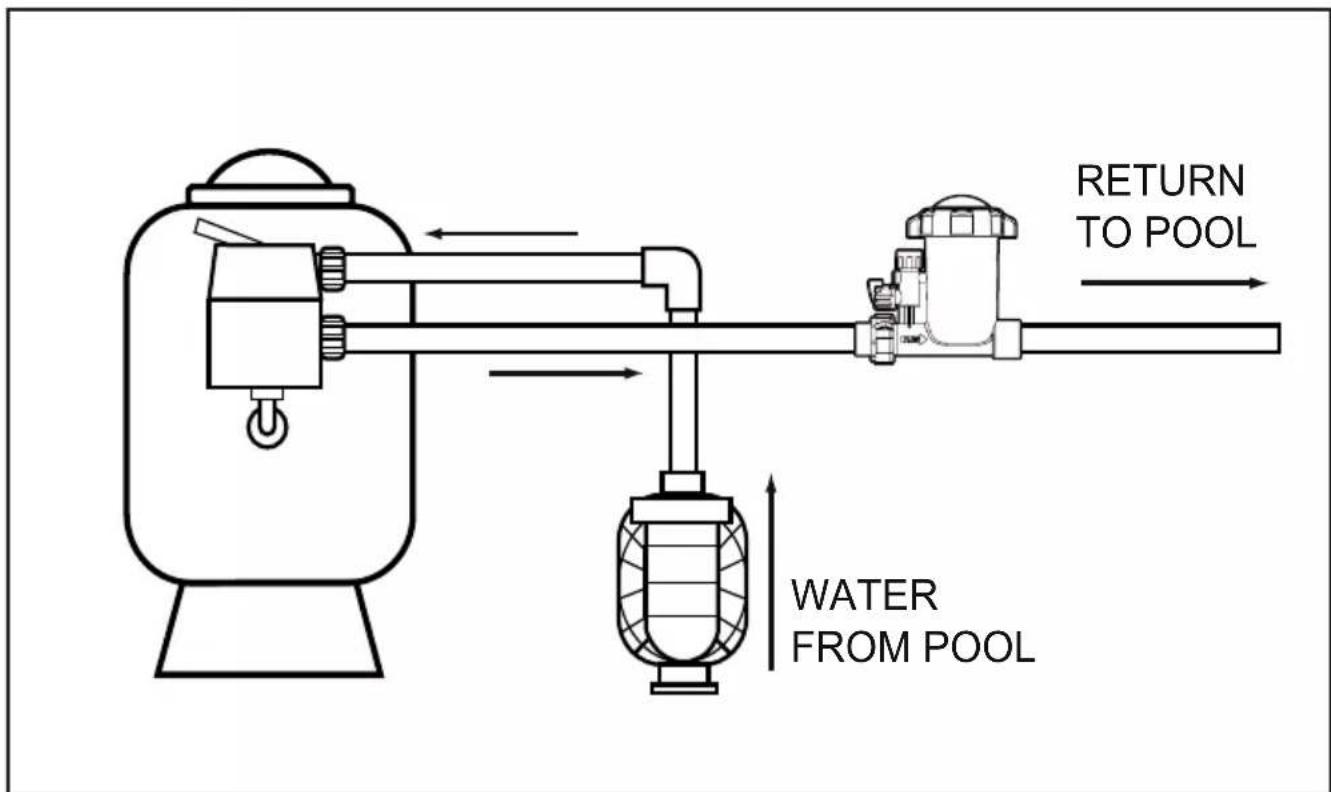
Figure 3b. Rigid Pipe Installation Configuration
Section 3. Operation
NOTE:
- The consumption of chlorine in swimming pools varies according to use, temperature, exposure to sunlight, and other factors. Initially, you will need to experiment with the control valve to ensure that the unit doses enough chemical to maintain the recommended residual. Start with the valve in the 50% position. Test the residual regularly using instructions below.
- This tablet feeder is designed to help you maintain a chlorine residual. Always start a new feeder installation by ensuring that the chlorine is already at a proper residual level. Consult your local dealer for water conditioning and residual requirements for each pool.
| Above-Ground Tablet Feeder | |
| Pool Size 5,000 | - 20,000 Gallons |
| Capacity Five | 3” Tabs/ 2lbs of 1” Tabs |

WARNING
Elevated chemical concentrations and Hazardous Gas - The introduction of potentially hazardous gas or elevated chemical concentrations into the pool during backwash and periods of no flow in the circulation system can cause serious personal injury, or death. To avoid, use the following guidelines:
- Set dosage indicator to zero before stopping water flow through the chlorinator.
- Minimize backwash time.
- Do not shut off pump for extended periods.
- Do not allow bathers into the pool area until full flow through the circulation system has been established.
Start-Up Steps
- Ensure all pumps and time switches are off.
- Fill the feeder with water making sure to bleed out any entrapped air in any of the lines.
-
Remove cap of feeder and fill with proper size tablets. (For pools: 1" or 3" diameter tablets.)
-
Replace cap making sure o-ring is clean, lubricated with approved silicone, and in place.
- Turn on pump and timer switches for a minimum of 6 to 8 hours.
- Adjust the dosage indicator according to the size of the pool. Use a test kit to determine the chemical residual. It is recommended that the chemical residual be checked daily for the first five days.
NOTE:
- Hot weather, high water temperature and increased bather use will cause the pool to use more chemical. Increase the feed rate a few days in advance when possible. The valve settings may require adjustment depending on the conditions.
- If the feeder does not provide enough chemical residual when using 3" tablets, switch to 1" tablets for faster erosion and increased residual.
- During regular maintenance, always check o-rings for damage, breaks, swelling, etc. Replace if necessary. (see Replacement Parts list)
- Before operating this feeder, or any time the cover is removed, completely fill feeder with water and bleed out entrapped air in any of the lines.
To achieve optimal performance the pool must be cleaned and balanced as follows:
- Raise chlorine level to APSP recommended levels so the water has a sustained 1-3 ppm free chlorine level.
- Test pool chemistry and adjust pH between 7.4 and 7.6.
- Adjust total alkalinity between 80 and 120 ppm.

WARNING
In order to prevent risk of serious property damage, injury or death:
- Wear eye and skin protection while maintaining or servicing this unit.
- Do not inhale fumes from the chlorinator or chemical container.
- Chlorine feeder may be under pressure. Use caution removing cover.

WARNING
To avoid risk of property damage, serious injury or death, Calcium Hypochlorite is not to be used in any form.
Replacing Tablets
- Turn control valve to the closed position. SHUT OFF PUMP.
- Wait one minute allowing the water and fumes to drain from the feeder.
- Leave the control valve closed. (The check valve will prevent water from entering the feeder).
- Rotate lid to open and access tablets. Refill with tablets.
- Completely fill body with water, and bleed out entrapped air in all system lines.
- Press lid with o-ring seal firmly into body. O-ring should be clean, lubricated with silicone based lubricant and in place. Engage cover threads and turn clockwise to seal. (Hand tighten only).
- Open control valve to original setting. Inspect the inlet line below the control valve for leaks each time the feeder is refilled. Replace the lines yearly if needed.
NOTE: Keep an eye on the tablet level in the unit, preferably reload BEFORE they run out.
Section 4. Winterizing
NOTE: If the equipment is subject to freezing conditions, it will be necessary to winterize the unit following these instructions.
- Ensure that all power to the equipment system is disconnected/ turned off.
- Drain water from the unit by disconnecting one side of the hose or pipe connections.
- Remove any remnants of undissolved chemical tablets, rinse out the body with clean water.
- Follow other normal procedures for your system to winterize.
- Consult manufacturer instructions for winterizing additional equipment.
Section 5. Troubleshooting
| SYMPTOM CAUSE CORRECTIVE ACTION | ||
| Plastic lid is cloudy | Chlorine exposure Remove the lid and wipe clean. Place lid in an open area, some cloudiness may clear itself if left exposed to sunlight and fresh air.If cover becomes opaque and does not clear after steps above, the cover should be replaced.DO NOT leave chlorinator open without the lid installed. If the lid must be left off to clear up, a replacement must be installed temporarily. | |
| Reduced Flow / Low Chlorine / Flow Indicator Not Moving | Clogged chlorinator body | The bottom grate can be removed in order to remove anything that may clog the inside of the unit. Any chlorine residue must be removed or it may effect feeder performance. The grate helps keep pieces of chemical tablets from clogging the outlet. |
| Leaks around connections or cover | Damaged o-rings Check o-rings for damage, replace as needed. | |
| Low chlorine concentration in the pool | 1. The trichlor tabs have been consumed2. Filtration time too low3. Chlorine demand too high | 1. Add trichlor tablets in the unit.2. Increase daily filtration time.3. If using 3" tabs, use 1" instead. |
| Water is green and/or algae is present | A water parameter is not properly maintained (pH, cyanuric acid, etc) | Contact your pool professional for more details and actions |
NOTES
Zodiac Pool Systems LLC
2882 Whiptail Loop # 100, Carlsbad, CA 92010, USA
PolarisPool.com | 1.800.822.7933
Zodiac Pool Systems Canada, Inc.
2-3365 Mainway, Burlington, ON L7M 1A6 Canada
PolarisPool.ca | 1.888.647.4004
Section 2. Installation

MISE EN GARDE
natural_image
Line drawing of a gas cylinder connected to a vertical pump and tubing (no text or symbols)Zodiac Pool Systems LLC
2882 Whiptail Loop 100, Carlsbad, CA 92010, USA
PolarisPool.com | 1.800.822.7933
Zodiac Pool Systems Canada, Inc.
2-3365 Mainway, Burlington, ON L7M 1A6 Canada
PolarisPool.ca | 1.888.647.4004
PRECAUCIÓN
natural_image
Line drawing of a gas cylinder connected to a vertical pump and tubing (no text or symbols)Zodiac Pool Systems LLC
2882 Whiptail Loop # 100, Carlsbad, CA 92010, EE. UU.
PolarisPool.com | 1.800.822.7933
Zodiac Pool Systems Canada, Inc.
2-3365 Mainway, Burlington, ON L7M 1A6 Canadá
PolarisPool.ca | 1.888.647.4004
- Above-Ground Tablet Feeder PAGTF45
- INSTALLATION AND OPERATION MANUAL
- WARNING
- Table of Contents
- Section 1. Important Safety Instructions
- READ AND FOLLOW ALL INSTRUCTIONS
- ! DANGER
- RISK OF FIRE OR EXPLOSION.
- SAVE THESE INSTRUCTIONS
- Section 2. Installation
- CAUTION
- Section 3. Operation
- NOTE:
- Start-Up Steps
- Replacing Tablets
- Section 4. Winterizing
- Section 5. Troubleshooting
- NOTES
- MISE EN GARDE
- PRECAUCIÓN
Brand : POLARIS
Model : AutoClear PAGTF45
Category : Water filter