USER MANUAL TOPO FRANCE GARMIN
TOPO France for GARMIN GPS
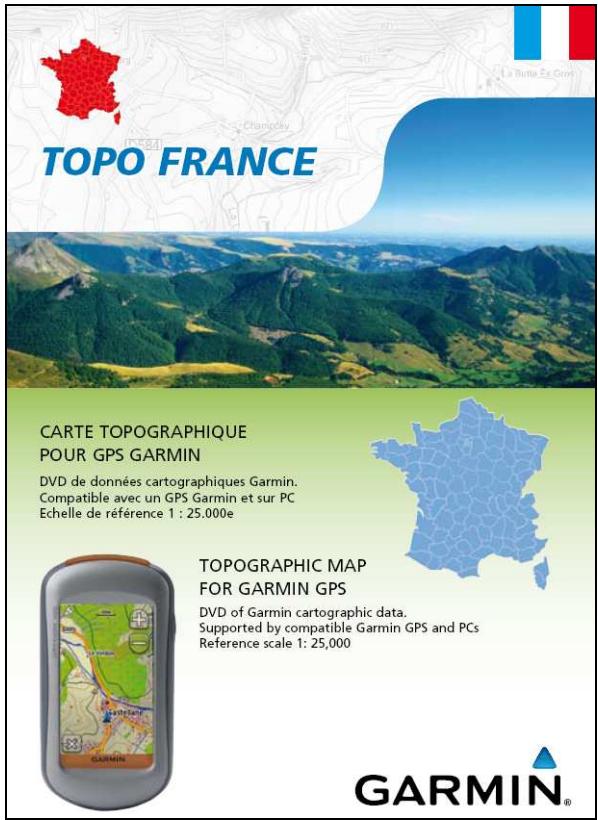
Supported by compatible Garmin GPS and PCs
Reference scale 1: 25,000
GARMIN®
Table des matières
Page
Introduction....2
Please consider when using the map data TOPO France....14
Please read thoroughly before use 14
TOPO France product licence....15
How to install and unlock the map.... 17
How to intall the map .... 17
How to unlock and registrate the map....20
How to unlock a map in MapSource manually 22
Introduction
Thank you for choosing TOPO France, the Outdoor cartography for your Garmin navigator.
This manual is here to help you install and unlock the map.
Thank you for choosing us.
Garmin France
Contents of the box
- A DVD-ROM with a user code valid only for a Garmin GPS device
- A microSD card (with SD adapter) pre-loaded with the region where you made your purchase (France or quarter of France).
Advice
In the event of misuse, the pre-loaded data on the card could be erased. If this happens, the restoration of the data will not be covered by the guarantee and you will need to obtain a new card. To avoid inconvenience, please remember to create a backup copy of the microSD card on your computer. You will then be able to recreate an SD card with all the necessary information, should you need to.
Description
TOPO France is vectorial cartography covering all of Metropolitan France. Garmin cartography, compatible with our GPS units, is based on part of the IGN (French National Geographic Institute) data used in the production of paper maps to the scale of 1:25000. To transfer the TOPO France on your GPS unit, please use the included MapSource software to transfer the map data to a compatible GPS.
With the Garmin MapSource software (included on the DVD), you can schedule and map out your outdoor activity (creating and/storing routes, waypoints or tracks), transfer them onto a peripheral Garmin GPS device, display the altimetric profile of a route, search for locations and much more. For more information, please refer to the software guide. With TOPO France cartography you can plan your route from your computer and display it in 3D on your Garmin GPS (this option is only available on Colorado and Oregon products).
Please note: The TOPO France cartography is intended to work on GPS equipment with colour screens. If you use TOPO France on GPS with a black and white screen, the results will not be displayed correctly.
Please consider when using the map data TOPO France
TOPO France is designed for private use for leisure activities like hiking, cycling, or climbing, for example. It is not suitable for professional use. If properly used, TOPO France enables you to position and orientate yourself based on the digital map data in the area noted. Remember, that an empty battery is enough to render your GPS useless. Therefore, you should always have additional tools for navigation, like a compass, paper maps, etc. Further more, you should always collect additional information for your trip and pay attention to the level of difficulty.
Based on the official IGN data (Institut géographique national), TOPO France is for Garmin GPS devices only. As with every map this data can be incomplete or wrong. The land survey results are made available by our data suppliers with the care necessary for their public tasks. Our data suppliers aim to update and correct the data base in regular intervals. Any cartographic processing and any generalisation of the map data is done with the utmost care. However, we cannot be held liable or guarantee the completeness or correctness of the data.
TOPO France is not intended to be used to drive or guide auto pilots in vehicles, vessels or airplanes or to be used for navigation purposes with precise positioning. The map is not designed to use in “night-time” mode.
Please read thoroughly before use
The TOPO France product includes a DVD and a pre-programmed microSD card (with SD adapter). You may install and use the TOPO France DVD on one computer and transfer the map data on one GARMIN GPS device. The microSD card allows usage of the TOPO France on an additional GARMIN GPS device.
- Which data are provided on the DVD? On the DVD you will find the Garmin software MapSource and the TOPO France map data.
- How can the DVD data be used? The TOPO France map data as well as the included MapSource software from the DVD can be installed and used on one computer. The Garmin software MapSource allows you to create and manage routes as well as transfer data to a GARMIN GPS unit. From the computer you may transfer many different tiles of map data to the GPS unit depending on the memory size of the unit.
- How can the map data from the DVD be transferred to the GPS unit? The DVD may only be installed and unlocked for one computer. From this computer you may only transfer map data to the GPS unit for which it had been unlocked for. The map data may be transferred to the internally memory of the GPS unit or on an additional memory card inside this unit.
Note: The map data provided on the DVD should NOT be transferred to the included pre-programmed memory card. The data on the pre-programmed memory card are not write-protected and will be irretrievably deleted this way.
- Which data are provided on the memory card (SD/MicroSD)? The memory card contains the map data of the TOPO France. The memory card can be used in any compatible Garmin GPS unit additionally to the unit which is using the transferred data from the DVD.
- How can the pre-programmed memory card be used? The map data of the TOPO France is provided on the included memory card. You can use either the Micro SD card in Garmin GPS units with a Micro SD slot or combined with the SD adapter in units with a SD card slot. If the memory card is not instantly recognized by the unit please start the unit again or insert the memory card again.
- Is there a need to unlock and install the pre-programmed memory card? You do not have to install the included memory card. You can put the card directly without unlocking into the card slot of any compatible Garmin GPS unit.
TOPO France product licence
This is a User Licence for the purchaser of the TOPO France DVD-ROM.
Please carefully read the terms and conditions of the User Licence on the CD-ROM containing the TOPO France software and the BD TOPO® and BD CARTO® databases from the IGN.
You will not be authorised to install or use the TOPO France DVD-ROM in any other form unless you accept the terms and conditions defined in this Licence hereinafter.
1. Rights and obligations of the user
As recipient of the Licence, the user shall have the right to use the files for his own use on his own computer.
He may transfer the data onto one GPS device, the serial number of which he provided at the unlocking stage and after having obtained an unlock code via the unlocking website.
The Licence renders it illegal to:
Decompile, disassemble or modify the software in any way whatsoever
- Transfer or copy the software from one computer to another or to make it available on a network
- Separate the software components for use on more than one computer
- Use the cartographic files separately from the software in any way
In no way whatsoever does this Licence constitute the full or partial acquisition of the ownership rights to the software and the cartographic files.
The Licence simply confers on the customer the right to personal use of the software for his own requirements.
Accordingly, the licensee is prohibited from communicating the files to third parties, free of charge or in return for payment, in any form, by any means and for any purpose whatsoever.
2. Limits of cover
There shall be no guarantee that the program will function without errors in all computer configurations and on all authorised GPS devices, or that all of the data on the card is correct. The liability of Garmin France SAS associated to the use of the CR-ROM, as well as any payments for damages and interests, shall be limited to the replacement of the CD-ROM, within a maximum period of one month from the date of sale to the user and one year from the date of sale by Garmin France SAS to retailer for the stock, the shortest period being applicable.
3. Limits of liability
The information on the TOPO France cartography is provided from the BD TOPO® and BD CARTO® databases from the IGN.
This information guarantees the quality of the choice, preparation and success of your trips and outdoor excursions.
Despite the great care taken when creating the TOPO France cartography, it may occur that certain information provided is incomplete or is inaccurate.
However, under no circumstances shall Garmin France or IGN be held liable in the event of inaccuracy, omission or error in the TOPO France product.
The practice of outdoor activities, whatever they may be, poses risks for those involved. On the land, each person is required:
- To be responsible for themselves and others
- To respect safety regulations specific to each activity
- To consult an outdoor activities professional for greater safety
- To use appropriate material in good condition
- To find out before each excursion the practical conditions specific to each activity
- To adapt their objectives on the basis of their abilities and aptitudes and conditions encountered
- To abort an excursion if it presents too high a risk
- To remain cautious under all circumstances.
Garmin France SAS shall not be held responsible for any damage whatsoever concerning the use or inability to use the software.
4. Copyright
The TOPO France DVD-ROM and the related documentation are the exclusive property of Garmin France SAS, Immeuble Le Capitole – 55 avenue des Champs Pierreux – 92729 Nanterre Cedex.
Please direct all queries relating to the TOPO France DVD-ROM or the preloaded card to this address.
The software is protected by national and international copyright and intellectual property law. Any copy or reproduction, in any form whatsoever, is prohibited, irrespective of what is authorised by the licence.
© IGN-PARIS 2008 for the cartographic data BD TOPO® et BD CARTO®
© FFRP 2008 for GR®, GR Pays®, PR® hiking and walking routes — all rights reserved
© Teleatlas 2008
© GARMIN INTERNATIONAL Inc 2008 for the MAPSOURCE® software
How to install and unlock the map
How to intall the map
Note: The TOPO France is installed automatically on your local device C of your computer.
Please insert the TOPO France DVD into the drive of your computer. Installation starts automatically and a start screen appears. If not, click the 'Start' button on your taskbar. Click 'Run', and enter the letter of the DVD drive followed by the command setup.
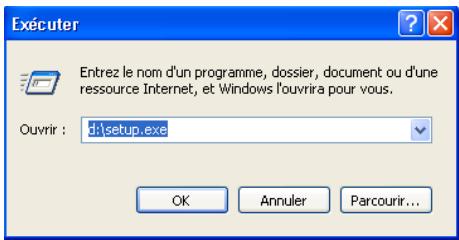
Click 'OK' or press 'Enter' on your keyboard.
The start screen appears.
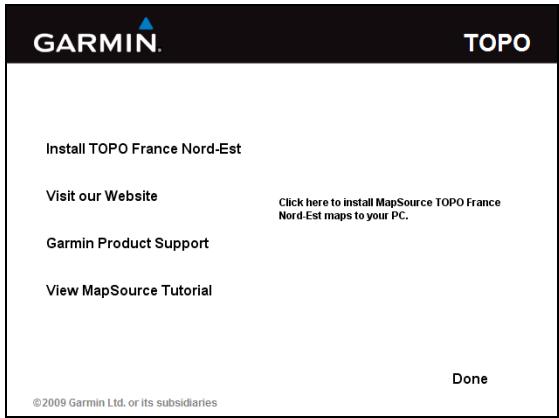
Click ,Install TOPO France '
Please read the License Agreement carefully.
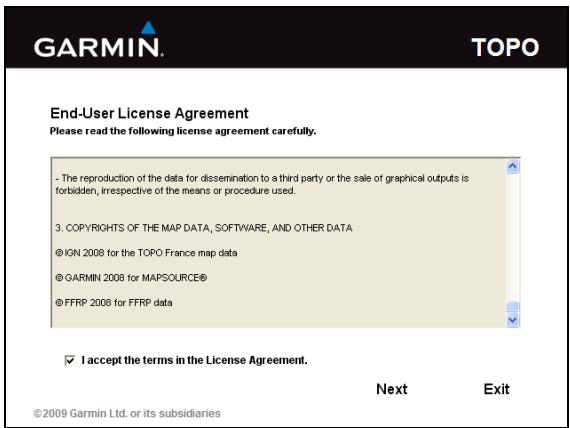
To agree to the License Agreement activate the check box and click 'Next'.
The setup assistant starts the installation. Because of the data volume it may take several minutes.
Please be patient.
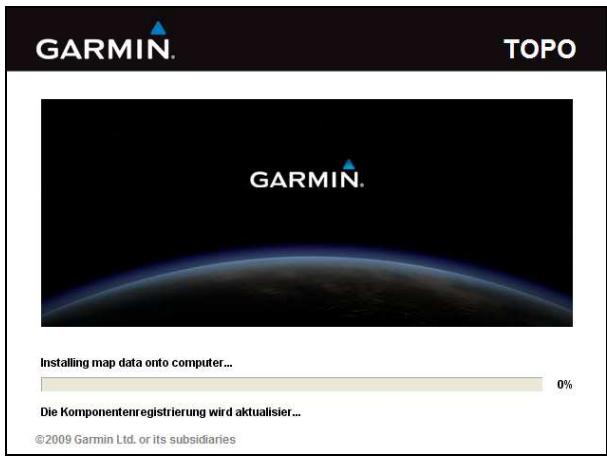
During setup the MapSource manual is installed on your computer. For displaying the manual you need the Adobe reader. If you do not have it installed yet you can download it here (internet access is required).
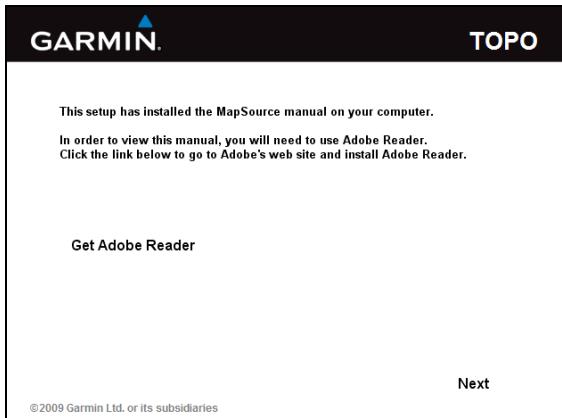
To proceed with the installation click 'Next'
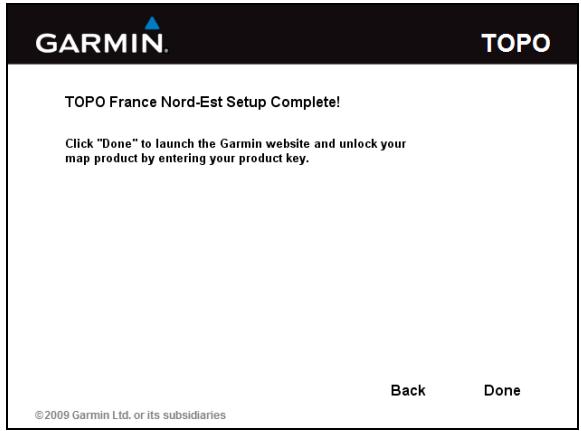
After setup is complete, click 'Done'. Thereby you close the Setup-Browser and a Web-Browser for unlocking your map will open automatically.
How to unlock and register the map
After the installation of the map is completed the web browser to unlock your map will open automatically. Please check if the Garmin Communicator Plug-In is installed on your computer before you start to unlock the map. In case the Garmin Communicator Plug-In is not installed yet, please go to http://www8.garmin.com/products/communicator/ to download and install it.
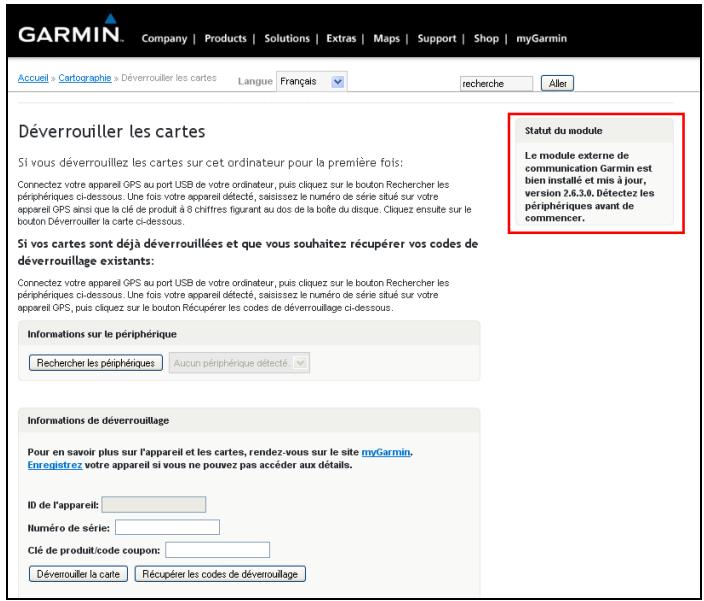
Connect your GPS device to your computer's USB port and click the 'Rechercher les périphérics' button below. When your device is detected, enter the serial number found on your GPS device and the 8-digit product key found on the back of the disc's case.
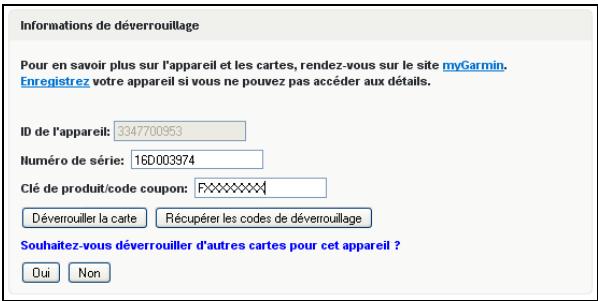
After you completed the information in the form, click ,Déverrouiller la carte'. There is no need to unlock more maps at the moment, therefore click ,Non' below.
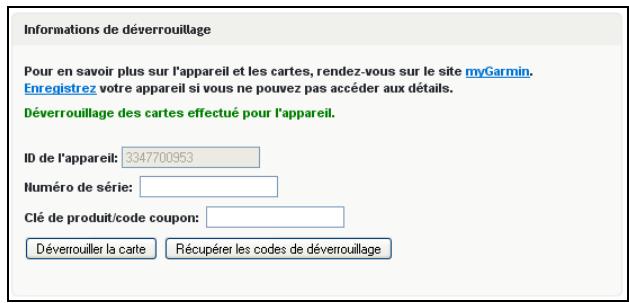
The generated unlock code will be sent to MapSource automatically via the Garmin Communicator. The Map is now unlocked and can be used in MapSource to plan your routes or to transfer map data to your registered GPS unit.
Additionally you may create an account on the MyGarmin platform. With your MyGarmin account you may manage all unlocked maps or access unlock codes at a later time. Recommended is also the registration of your GPS units on your MyGarmin account.
The process of unlocking the map is now completed. You may use the TOPO France in MapSource with all its functionalities.
How to unlock a map in MapSource manually
If you already have your 25-digit unlock code you may unlock the map manually in MapSource.
Please start MapSource using the shortcut on your desktop.
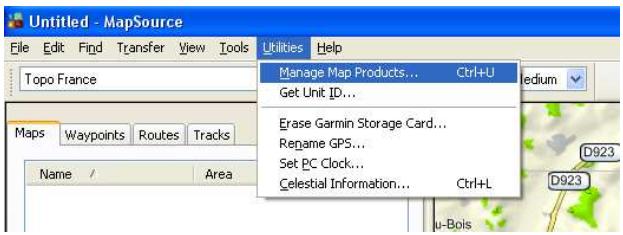
Chose from the menu bar ,Utilities' and then ,Manage Map Products'
Change to the tab 'Unlock Regions'
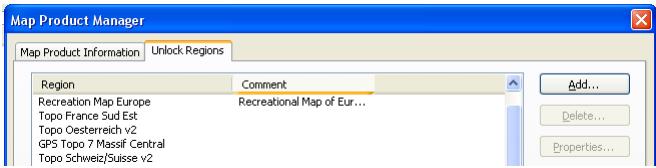
Choose the button 'Add'
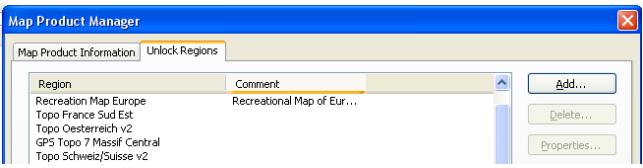
Enter the 25-digit unlock code and if applicable enter a comment
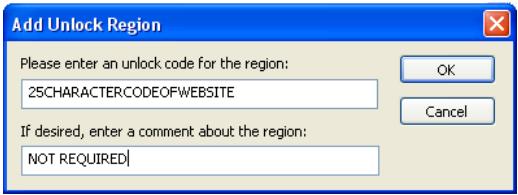
Confirm with OK.
GARMIN™
© Copyright 2009
GARMIN France SAS



