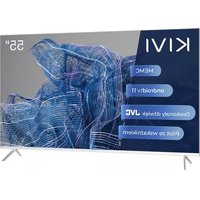
55U750NW - Television Kivi - Free user manual and instructions
Find the device manual for free 55U750NW Kivi in PDF.



| Product Type | LED UHD 4K TV |
| Brand | Kivi |
| Model | 55U750NW |
| Screen Size (Diagonal) | 55 inches (140 cm) |
| Resolution | UHD (3840 x 2160 pixels) |
| HDMI Connectors | 4 HDMI Inputs (HDMI 2.1) |
| USB Ports | 2 USB 2.0 Ports (500 mA max) |
| Wi-Fi | Yes (a/b/g/n/ac) |
| Ethernet (LAN) | Yes (RJ45) |
| Optical Audio Output | Yes (OPTICAL OUT) |
| Headphone Output | Yes (3.5 mm) |
| Antenna Input | Yes (75 ohms) |
| CI Module | Yes (CI Port) |
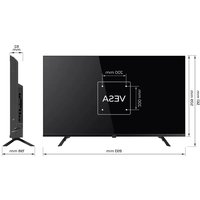
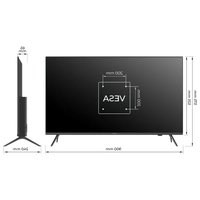
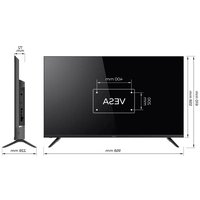
| VESA Standard | 400 x 200 mm (M6 screws) |
| Dimensions without Stand (W x H x D) | 1229 x 710 x 63 mm |
| Dimensions with Stand | 1229 x 772 x 260 mm |
| Net Weight | 13 kg |
| Remote Control | RC40/RC60 with Pointer and Voice Search |
| Dolby Audio | Yes (licensed by Dolby Laboratories) |
| Power Supply | 220-240 V, 50/60 Hz |
| Standby Power Consumption | < 1 W |
| Operating Temperature | +15 to +35 °C |
| Operating Humidity | 55 to 70 % |
| Warranty | 2 years |
| Recommended Cleaning | Microfiber cloth, do not spray liquid on the screen |
Frequently Asked Questions - 55U750NW Kivi
User questions about 55U750NW Kivi
0 question about this device. Answer the ones you know or ask your own.
Ask a new question about this device
Download the instructions for your Television in PDF format for free! Find your manual 55U750NW - Kivi and take your electronic device back in hand. On this page are published all the documents necessary for the use of your device. 55U750NW by Kivi.
USER MANUAL 55U750NW Kivi
Hello there! It's me, your KIVI color LED-TV, and I will tell you how to use me safely.
If you still have any questions about my settings, functionality, or have any complaints or suggestions, please contact the support service.
To chat, scan the QR-code or call by phone numbers.
3 General information about me.
4 Attention!
5 Who am I? My features.
6-7 Remote control.
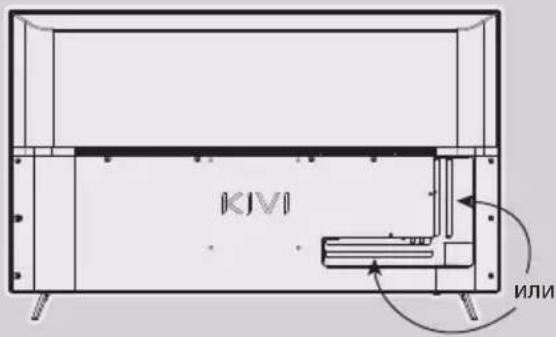
8 Connection ports.
9 When something goes wrong.
SPIS RTESCI

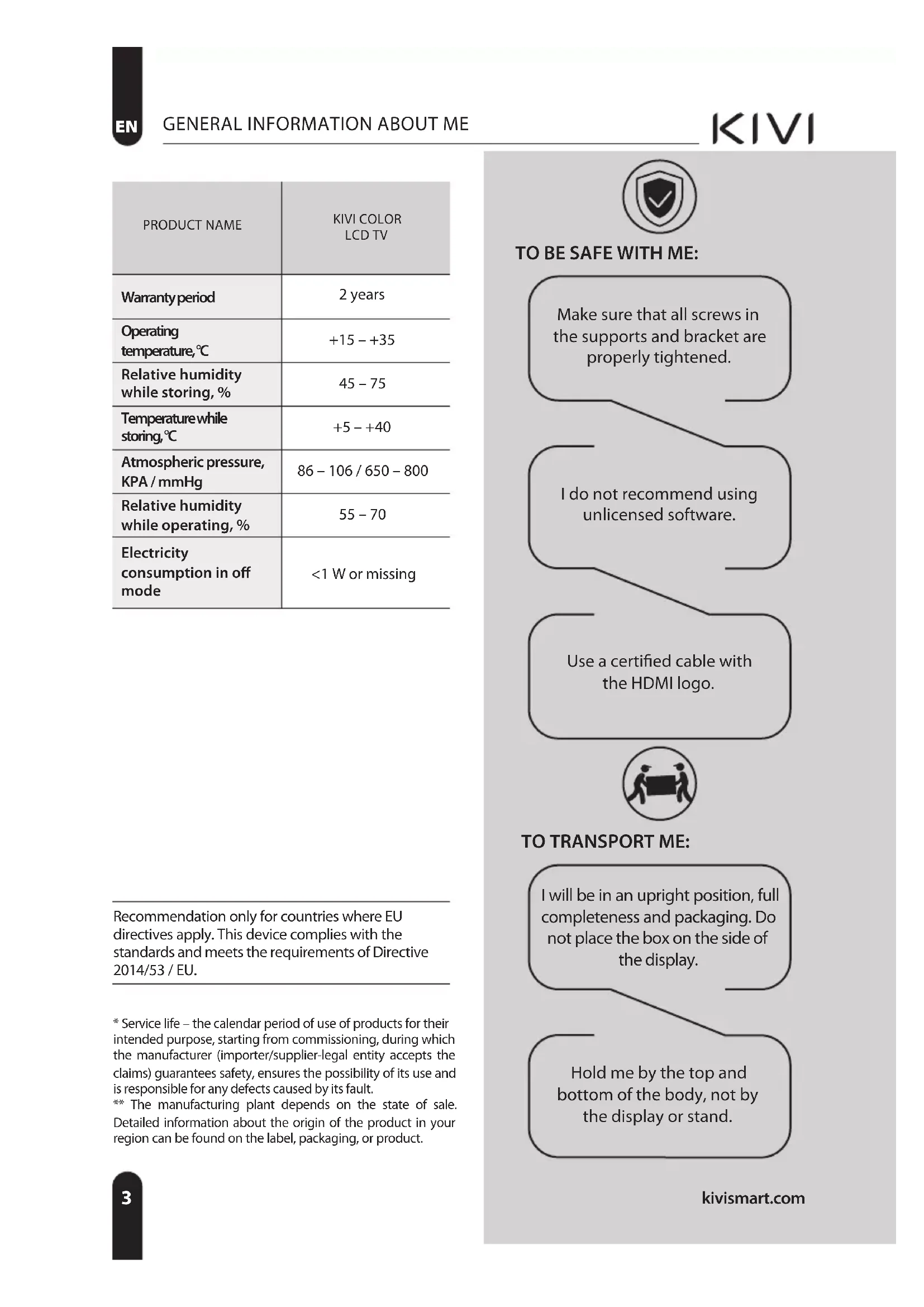
| PRODUCT NAME | KIVI COLOR LCD TV |
| Warranty period | 2 years |
| Operating temperature, ℃ | +15 – +35 |
| Relative humidity while storing, % | 45 – 75 |
| Temperaturewhile storing, ℃ | +5 – +40 |
| Atmospheric pressure, KPA / mmHg | 86 – 106 / 650 – 800 |
| Relative humidity while operating, % | 55 – 70 |
| Electricity consumption in off mode | <1 W or missing |
Recommendation only for countries where EU directives apply. This device complies with the standards and meets the requirements of Directive 2014/53 / EU.
- Service life – the calendar period of use of products for their intended purpose, starting from commissioning, during which the manufacturer (importer/supplier-legal entity accepts the claims) guarantees safety, ensures the possibility of its use and is responsible for any defects caused by its fault.
** The manufacturing plant depends on the state of sale. Detailed information about the origin of the product in your region can be found on the label, packaging, or product.

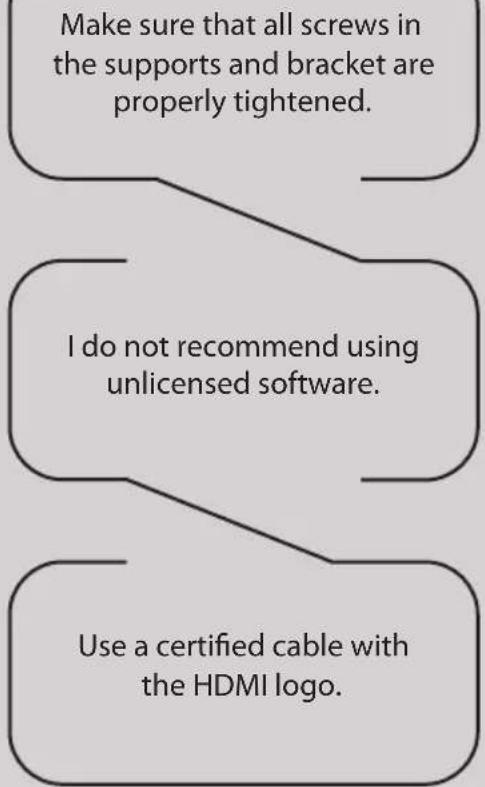
TO BE SAFE WITH ME:

TO TRANSPORT ME:
I will be in an upright position, full completeness and packaging. Do not place the box on the side of the display.
Hold me by the top and bottom of the body, not by the display or stand.

DON'TUSEMEIF:
- The power cord, plug, or screen is damaged.
I fallen myself or your favorite cat fallen on me.

TO USE ME EFFECTIVELY AND SAFELLY:
- Read and follow all instructions and precautions.
If your outlet doesn't fit, please, contact a specialist. - Please connect me to power supply using a voltage stabilizer or relay only.
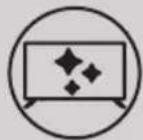
TO KEEP ME CLEAN:
- Wipe me with a cloth designed for the care and maintenance of the LCD screens.
- Do not spray liquids directly on me.
- If you touch me with greasy or sticky hands, turn me off, apply screen cleaner to a microfiber cloth, and wipe me down.

Tiny black or colored spots can appear on my liquid crystal panel while in operation.
Depending on the viewing location, brightness, and color of the panel can change. And it is absolutely Okay.





This symbol indicates that I have double isolation between the mains voltage and dangerous parts for you.

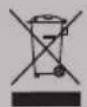
Friends, unfortunately, I am not eternal. Therefore, at the end of my term, I shall be handed over to the receiving point of electrical and electronic equipment. For more detailed information about receiving and disposal points, please contact local municipal authorities or a household waste disposal company.
FEATURES
| Model | 32H750NB 32H750NW | 32F750NB 32F750NW | 40F750NB | 43U750NB 43U750NW | 50U750NB | 55U750NB 55U750NW 55U850NB | 65U740NB |
| Diagonal screen size, inches/cm | 32/81 32/81 | 40/102 43/109 | 50/127 55/140 | 65/165 | |||
| Resolution | HD 1366x768 | FHD 1920x1080 | UHD 3840x2160 | ||||
| USB 2.0 | 2 | 2 | |||||
| HDMI | 3 | 4 | |||||
| HDMI | HDMI 1.4a HDMI 2.1 | ||||||
| Wi-Fi | a/b/g/n/ac | ||||||
| VESA standard, mm | 200x100 200x200 400x200 | ||||||
| VESA bolts | M4 M4 M6 M6 M6 M6 M6 | ||||||
| Width, height, depth, mm | 720x425 x62 | 720x425 x62 | 901x511 x64 | 960x556 x64 | 1116x642 x61 | 1229x710 x63 | 1448x830 x61 |
| Dimensions with stand, mm | 720x465 x180 | 720x464 x204 | 901x574 x240 | 960x620 x240 | 1116x705 x240 | 1229x772 x260 | 1448x899 x300 |
| Net weight, kg | 4,2 4,2 6,4 7,4 | 10,5 13 | 17,3 | ||||
*Indicators of power supply, power consumption related to the operation of "Home" TV Mode, indicators mode "store" may differ upwards. **The complete set, appearance and specifications of the product may differ or may be changed by the manufacturer without prior notice
INPUT IMPEDANCE: 75Ω
For stable reception of digital TV channels, I recommend using an external antenna with an amplifier (the gain ratio of 30 dB or more).
NOTE:
The manufacturer, importer, or supplier are not responsible for damage to my components due to high voltage supply through the antenna port.

HIGH-DEFINITION MULTIMEDIA INTERFACE
The terms HDMI, HDMI High-definition Multimedia Interface, and the HDMI logo are trademarks or registered trademarks of HDMI and Microsoft Administrator, Inc.
Manufactured under DOLBY LABORATORIES license. The DOLBY, DOLBY AUDIO, and Double D symbols are trademarks of DOLBY and laboratories.
This product is manufactured, distributed, serviced and warranted exclusively by SHENZHEN MTC CO., LTD. "JVC" is a trademark of JVCKENWOOD Corporation, used by this company is under license. "Sound by JVC". Sound certificated by JVC.
REMOTE CONTROL (RC40) / POINTER (RC60)
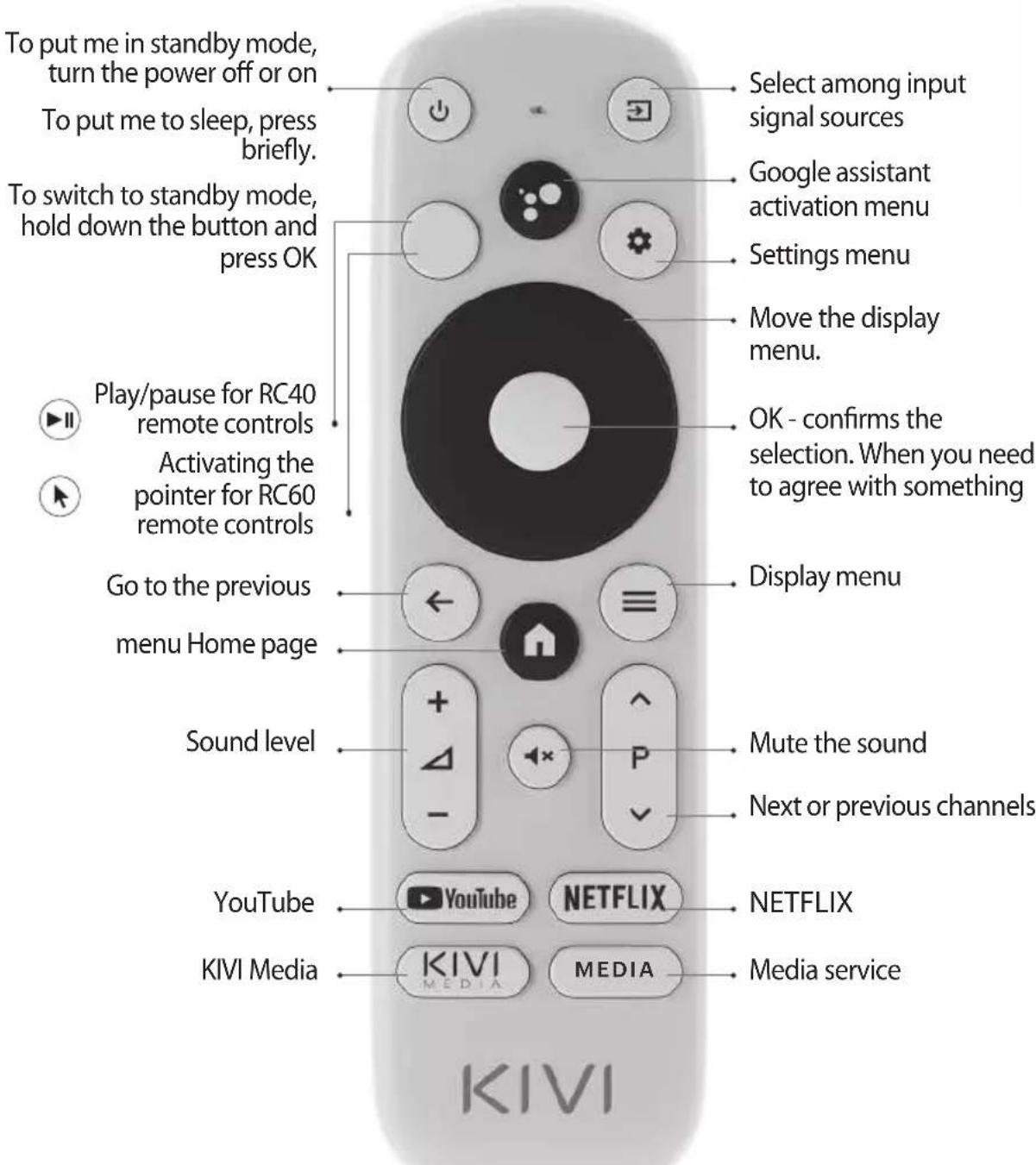
Assigning keys
NOTE:
1 The pointer control mode is completed with models 43U750NB, 43U750NW, 50U750NB, 55U750NB, 55U750NW, 50U850NB, 55U850NB, 65U850NB.
2 The voice search function is available in the RC40/60 remote controls.
3 The manufacturer may change The complete set and appearance may differ or may be changed by the manufacturer without prior notice.
4 Remote control has CE certification.

Remote control (RC) range — up to 10 meters..
To make it work - insert the alkaline batteries and point it at me.

Do not mix new batteries with old ones, and do not leave the remote control near a heat source.

If you don't use the remote control for more than one month, get the batteries out of there.
I HAVE TO APOLOGIZE FOR SOME INCONVENIENCES!
Unfortunately, the standard Google Gboard keyboard temporarily does not support the remote control-pointer.
THEREFORE:
Open Settings using the notification window that appears when you click on the pointer button on the remote control.
Connect the Wi-Fi, log in to Google Play, and install the necessary app for the pointer to work correctly.
After installing it, click on the pointer button on the remote contro
If you have already connected me to the Internet before - wait about 5-10 minutes, while the leanback app will appear in the general list of programs (the "+" icon in the main menu).
After that, press the pointer button on the remote control
IF ANYTHING:
When using a remote control pointer in applications, not all buttons and symbols are supported.
You can adjust the speed of the pointer by pressing the buttons simultaneously:
-
Speed increase - pointer button + right;
-
Speed reduction - pointer button + left.
Detailed instructions with images are also available on the website kivismart.com, in the "24/7 support" section
CONNECTING DEVICES
I am compatible with most devices for video and audio playback and can be connected to a Bluray, game console, stereo system, etc.
HD/FHD
MODELS
UHD
MODELS
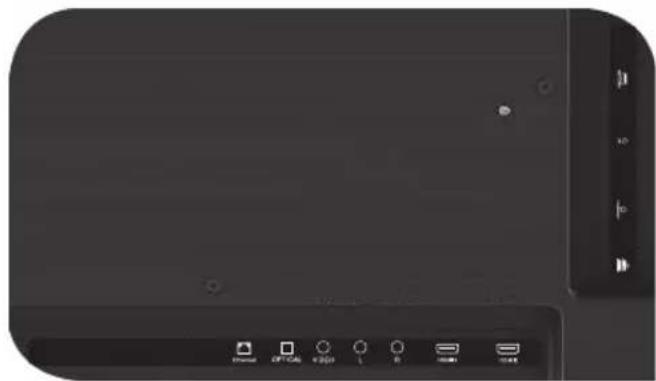
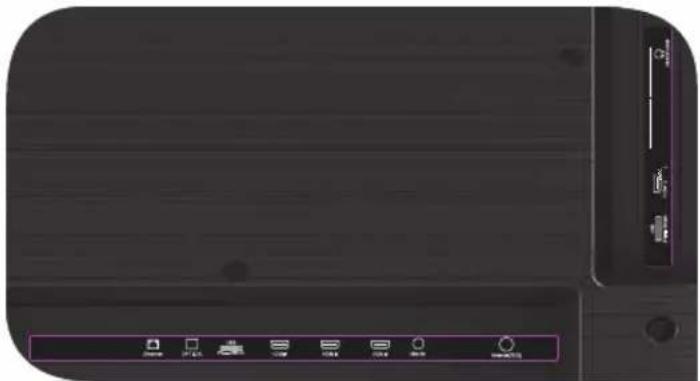
USB Input for USB devices (500mA)
HDMI HDMI input
Antenna Antenna connection port
CI CAM module connection port
Mini AV IN Composite audio/video input
VIDEO Composite video input
LAN Ethernet input
HEADPHONEHeadphone output (3.5 mm)
OPTICAL OUTOptical output
NOTE:
- All external devices should not be connected after you turn me off.
- The maximum load on the USB port should not exceed 0.5 A.
- The TV supports ARC, CEC. 2K supports HDMI 1.4 a, 4K supports HDMI 2.1.
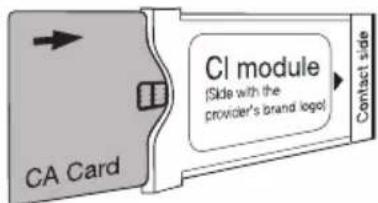
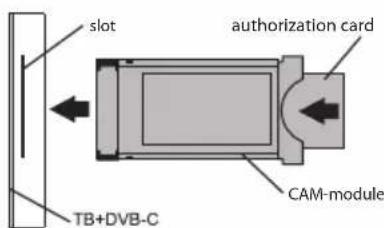
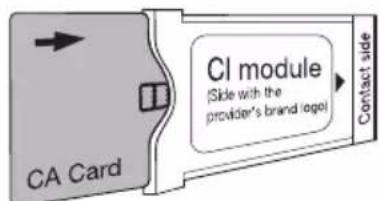
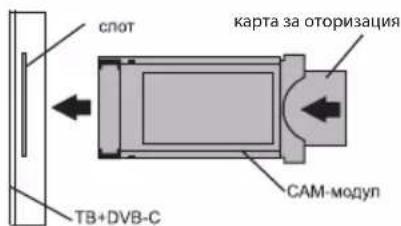
CONNECTING A CI CONDITIONAL ACCESS CARD
A CAM module with a CI conditional access card can be attached to a digital cable broadcasting service provider along with information for use.
The names of individual menu modes, the designations of some connectors and places of application, and the performance of individual ergonomic control functions may differ slightly from those described and depicted in this manual.
In addition to hardware-related malfunctions, if there are any non-standard operations, power me off for 30 seconds.
| Unstable or missing broadcast / cable TV signal | 1. I'm on the antenna, but I cannot find channels, and I broadcast channels with image distortion or audio interruptions. | 1. For stable reception of DVB-T2 (digital) and ATV (analog) signals, use an external antenna with an amplifier (gain 30 dB and more). Additional power to the antenna input is already transmitted and cannot be supplied via my USB ports. Point your antenna toward the nearest TV tower. If you are using a room antenna, raise it higher, rotate it around your own axle, and move it around the room. Make sure that you have selected an antenna in the settings ->Channel -> channel setup mode menu. Configure the channels manually. For a stable image and sound, the indicators shall be from 50% or higher. Check the integrity of the cable. |
| 2. I'm cable, but I don't find channels, and I broadcast channels with image distortion or audio interruptions. | 2. If you are using cable TV (DVB-C) or a common house antenna, I recommend connecting without a splitter. If possible, connect me to another antenna cable. Make sure that you have selected an antenna in the Settings -> Channel -> Channel setup mode menu. Configure the channels manually. Check the integrity of the cable. Use a signal amplifier. | |
| Sound is not played on external speakers | 1. Connecting speakers via Bluetooth | 1. Connect Bluetooth speakers via the Settings menu - Remote controls and accessories - Add a device. |
| 2. Connect speakers via HDMI | 2. Connect the speakers to me via the HDMI (ARC) Jack. In the Settings menu -> Sound -> Speakers — select "External audio system". In the Settings menu -> Device Settings -> Inputs -> HDMI EDID version - set the value to "EDID 1.4". In Settings menu -> Device Settings -> Sound -> digital output - select Auto, Skip, PCM, etc. | |
| 3. Connect speakers via AUX (3.5 mm headphone jack) | 3. Make sure that the audio cable is inserted all the way into the 3.5 jack. | |
| 4. Connecting speakers via optics | 4. Attach the speakers to the OPTICAL connector. In the Settings menu -> Device Settings -> Sound -> Digital output-> select Auto, Skip, PCM, etc. Use the VOL button on the remote control to turn down the sound volume until it is completely turned off. Use the remote control from the speakers to increase the sound to the desired level. |
ZEBY ZEMNA BYLO BEZPIECZNIE:
BY MNIE TRANSPORTOWAC:
MNIE JUZ NIE UZYWAC W PRZYPADKACH:
IMPEDANCJA WEJSCIOWA:75 OM
PENTRU CA SÄ FIU CURAT:

DA METPAHCNOPTNUPAT:
TpaBa da cBm n3npaBeH, HantbIHO o6OpyDbaH nOnakOBaH. He noCTabYte Kytna OTCpaHn Ha dncnne.
ДрьхтemeВгорнataи ДолнaturaчacHTHaKUTnЯta,aHe 3aДИСПЕИNCTOИKaTа.

HE MOFA DA CE N3N0JI3BAM BEUE:
-Поврень зхранвац кабел,шencel ninn ekpan
- Hamokpux ce, naHax uIN KOTKaTa Tn naHa Bbpxy MeH

3A DA ME I3IOL3BATE EΦEKTUBHO I 6E3OПАСНО:
- PpOueTe Te nCneBaiTe BCnUKN HcTpyKuNN npEpa3HmepKn;
- Ako KOHTaKTbT Bn He nacBa, CBbpXeTe ce C npoepnoHaJIInCT.
CbpxeMe KbM 3axpaHbaHeTo cMo C NOMOHTa Ha CTa6nIIN3aTOP Ha HAnpeXeHneTO nn peIe.
3AДАББДАЧИСТ:
- N36bpyte Me c Kbpna, npedHa3NaueHa 3a rpnka 3a LCD ekpaH;
He npbckaai Te TceHocTn DnpeKTHo Bbpxy MeH;
Ako CTe Me DoKoCHaHn C Ma3HN NIn JeNkABn Pbue,

B 3aBnCnMoCT OT
MRACTOTOHa
rIeHaHe,ApKocTtA
UBeTbT Ha nHaHeNa
MOXe Da ce
PpOMeHrT N NO
Bpeme Ha pa60Ta
MOraT Da Ce NoAByT
MaIKN NIN UBeTHN
ToUKn. He HanbIHo Hapei.






To3n CmB0N IOKa3Ba,Ye IMaM DBOHn HA 3ONaCLy MExJy MPeXKOBoT O HAppeHne N AcTlTe, KOInTO ca ONaChn 3a Bac.

PnraTeH, 3a CbKaJIeHHe He CbM BeueH. 3aTOBa B Kpa H a EKcIIOaTcIOHHNc cX NIBOT Tp6Ba Da 6bda IpeaJeH Ha NyHKT 3a Cb6npaH He eNEKtpuuecko n ENEKToPOHH OobopydBaHc. 3a NoBee HΦOpMaunr OTHOCHO NyKTOBeTe 3a Cb6puHa n3XBbPnHe, MOJ, CBpbXeTe Ce C MeCTHnTE OeUHcKn Bnactn INC BaWata KOMNaHn 3a IN3XBbPnHe Ha 6ntOBn OTnAdbm.
XAPAKTEPNUKU
| Модень | 32H750NB 32H750NW | 32F750NB 32F750NW | 40F750NB | 43U750NB | 43U750NW | 50U750NB | 55U750NB U750NW 55U850NB | 65U740NB |
| Размер на ekрANA Диагонално, Дюйм/см | 32/81 32/81 40/102 43/109 50/127 55/140 65/165 | |||||||
| Разшени | HD 1366x768 | FHD 1920x1080 3840x2160 | UHD | |||||
| USB 2.0 2 | 2 | |||||||
| HDMI | 3 | 4 | ||||||
| HDMI | HDMI 1.4a | HDMI 2.1 | ||||||
| Wi-Fi | a/b/g/n/ac | |||||||
| Стандар.T VESA, MM | 200x100 200x200 | 400x200 | ||||||
| ТулбOLTVESA | M4 | M4 | M6 | M6 | M6 | M6 | M6 | M6 |
| ШирINA, ВисочINA, MM | 720x425 x62 | 720x425 x62 | 901x511 x64 | 960x556 x64 | 960x556 x64 | 1116x642 x61 | 1229x710 x63 | 1448x830 x61 |
| Разmersи CBС Стояк, MM | 720x465 x180 | 720x464 x204 | 901x574 x240 | 960x620 x240 | 960x620 x240 | 1116x705 x240 | 1229x772 x260 | 1448x899 x300 |
| Тер lo Нeto, Кг | 4,2 | 4,2 | 6,4 | 7,4 | 7,4 | 10,5 | 13 | 17,3 |
*HnKAtOpnte 3a MoUHcT, KOHCyMaun Ha eNeKTpoeHeprna Ce OTHcAra T a pa6oTaTa B TeJeBn3NoHeh pexm "Y doma", HnDnKaTopnTe B peXm "Marazn" Morat da ce paZnHaBat Harope.
**PbHnT KOMnIeK, BnHnHnT BnI TeXnuecknte XapaKTePncTnHa npOdykTa MoKe Da ce pa3nnuabat nn Da 6bDaT npomeHeHn OT npOn3BODNTeA 6e3 npEni3BeCTne.
INHCTAIIPAIte MOrTA AHTEHA, KAKTO E IOKA3AHO IO-IOJU
BXOДHOCbПPOTINBJIENHE:75Ω
3a cta6nHNo npneMaHe Ha cnΦpOBN
TeNeBn3NoHHKaHaJI
npenopbBaM da n3nOJ3BaTe
BbHsHa aHTeHa C yCnJBaTeI
(ycnIbAne ot 30 nb nnn noBee).
3A6EJIEXKA:
Pon3BOJNTeJIaT, BHOCITeJIaT, DOCTaBcIKbT He Hocn OTROBOPHOCT 3a NOBpeHa MOnTe KOMIOHEnB Bpe3yIaT Ha NpdaBaHe Ha BnCOKo HApexKeHne Ipe3 IopTa Ha aHTeHaTa, KaKTo n NobpeDa Ha TeIeBN3Opa nopadm MpeXKO BO HApexKeHne, KOEt e N3BbH pa6OTHH
Диana3OH.

HIGH-DEFINITION MULTIMEDIA INTERFACE
TepmHnTe HDMl, HDMl High-Definition Multimedia Interface n HDMI Ioroto ca TbproBckn MapKn nn pernctpupaHn TbproBckn MapKn Ha HDMl Licensing Administrator, Inc.
Ipon3BeHeNo no IuueH3 Ha DOLBY LABORATORIES. DOLBY, DOLBY AUDIO n cunBoJbT c BoiHo D ca TbproBcN MapKn Ha DOLBY LABORATORIES.
ДИСТАЦИОННОУПAPВЕHNE (RC40)/YKA3KA (RC60)
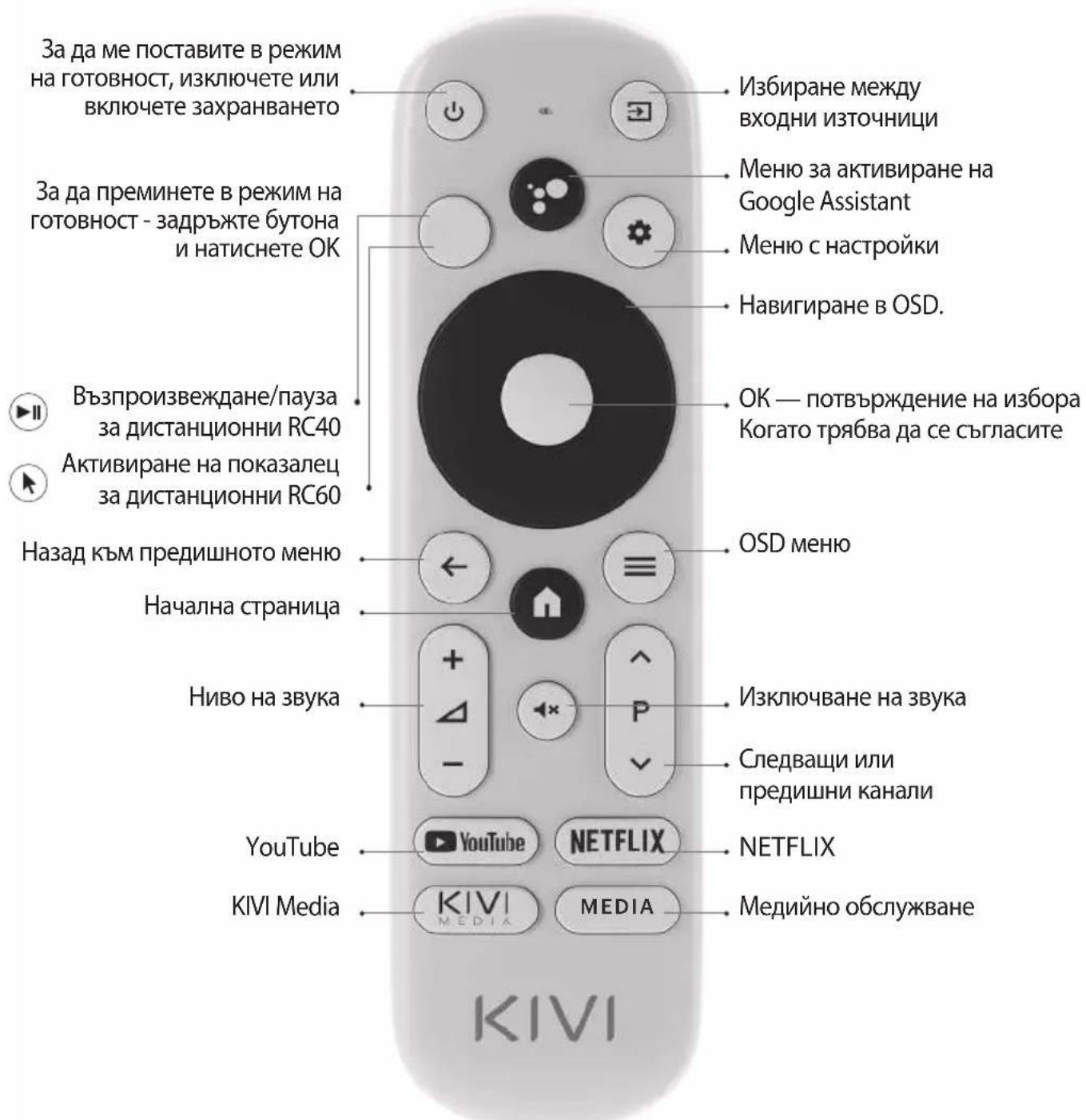
Ha3Na4aBaHe Ha 6yToHnTe
3A6EJIEXKKA:
1ДиctaHIOHnHa nokaIka RC60 e BkIoueHa B MoJeIte 43U750NB,43U750NW,50U750NB,55U750NB,55U750NW, 50U850NB,55U850NB,65U850NB.
2ФункияТа3гласоВTOБрсе HeHaHIMuHa HaRC40/60.
3 CbIbpkaHHeTo N BbHnHnT BnM MoKe Da BapnP aT nN NoDJIeXaT Ha npOMHa OT npOImBODInTeJ 6e3 npEIM3BeCTne.
4ДиuctaHOnHToуnpaBneHne e CE cepTnФuNpaHo.

06xbaTHa
dntaHnOHHO
ynpabHeHne-1o 10
MeTpa.
3a da pa6oTu, NOCTaBeTe aIkaJIHn 6aTePm I ro HacOuyeTe KbM MeH.

He cmeBaIte HOBn 6aTePmCbC CTapn N He octaBMyTe MCTAHIOHOTO ynpabJIeHne NOd IN3TOUHNi Ha TOPIINHa.

Ako He n3nOJ3BaTe
dNCTaHcUHOHOTo
ynpaBHeHne NOBeue
OT eINH Mece,
IpemaxHeTe
6aTePmTe.
TPRABA IACE N3BUNH 3A HAKON HEYIOBCTBA!
3a cxbkaneHne cTaHdapThaTaNabNaTpyHa Google Gboard BpeMeHHo He NODbPka DnCTaHcNHO ynpabJIeHne C POKa3aJeU.
BATOBA:
OTBOPeTe HAcTpoiKnte C NOMOuTa Ha npo3opeua 3a yBeDomBaHe, KOITo Ce NOBra, KOraTO HaTnCHTe 6yToHa Ha NOKa3aneHa DnCTaHcNHOHOTO ynpaBHeHne.
CbpxeTe ce c Wi-Fi, Bne3Te B Google Play n HCTaInpaIte Heo6xOIMOTO npuIooKeHne, 3a da pa6OTn NOKa3aneT npaBUNHO.
Cne KaTo ce HCTaHnpa,HaTNCHeTe 6yToHa c noka3aneu Ha dNCTaHcNOHHO ynpabNeHne.
Ako Beue cTe Me Cbbp3aHn C nHTepHeT npedn - n3yakaTe OKoNo 5-10 MNHyTN, DOKaTO npINOxKeHneTo Leanback ce NOBn B O6uNcNcBk C npINOxKeHn (IKOHATA ^ + ^ B rnaBHOTo MeHIO).
Cne ToBa HATNCHeTe 6yToHa Ha noka3aneHa
AKO HELLO:
Korato n3no3BaTe
HaocuBaIo DnCTaHcNoHHO B
npINOJKeHna, He ce
IOdIbpxKaT BCnUKN 6yToHn I
CIMBOJI.
Mozkete da perynilpateCKOpocTTa Ha JxKoIcTNKaUpe3 eHOBpeMeHHoHaTnCKaHe Ha 6byToHnte:
- YBéniucaBaHe Ha cKopoCTTa
-6yToHHaNOKa3aIeua + HADYCHO; - HamaJIaBaHe Ha cKOpocTtA
-6yToHHaNoka3aIeua + HanaBO.
OPTICAL OUT ONTNUeH n3XoD
3A6EJIEXK:
1.BcnuKn BbHnHyctpoiCTBa Tpa6Ba Da 6DaT CbP3aHn, cne KaTo Me n3KJIouHTe.
2. MakcunmaHTo HaTobapBaHe Ha USB nopTa He Tp8Ba Da HaDbuwaBa 0.5A
3. TeneBn3OpbT noDbpxkARC, CEC. 2K noDbpxka HDM1 1.4a, 4KHDM2.1
CbP3BAHE HA KAPTA 3A YCIOBEH IOCTbI CI
CAM moyn c CI kapta moxe da 6bde 3akyneH OT doctabvn Ka6eHH yCnyn, 3aeHc nHopmaun 3a ynoTpe6a.
HMeTo Ha OTdEnHnTepeXmHa MeHTo,06o3HaueHneTo Ha HAKO KOHeKTopu IM MeCTaTa NM Ha npInoKeHne, N3bJIHeHnTe Ha OTdEnHnTe ePROHomuHN OyHKcN 3a ynpaBHeHne OT MeH MoKe Jeko Da ce pa3nUaBaT OT ONCaHnTe n3o6pa3eHN B TOBa pbKOBOCTBO.
BdoJIbHeHne KbM HeN3npaBHOCTn, Cbbp3aHn C xapnyepa, aKO ce npoRbH HeCTaHapTHaT Mpa6Ota, n3KnIOUeTe Me 3a 30ceKyHdN.
| П repкьсан ул нИКаКВ наземен/кав- len Тelenвизио- нен сигнал | 1. Аз сын Ha аHTeHaTа, HO He Mога ду Намря Канал, пOKaЗВam Канал c иЗКрИВане Ha иЗобразжени ил П repьсваня На 3БУк | 1. 3a Stabilno primemahe Ha DVB-T2 (цифови) и ATV (ahalorobu) сигналi, иЗпОзВаite BbHUna aHTeNa C yCunBateN (ycunBaNe ot 30дБ плпове). ДоьнIHITeNo 3axpaHbAte 3a BXOda Ha aHTeHata Beue e ocNtpyeNo I He мосяда 6ьдe obcnyKbAH npe3 mone USB npotbe. Hacочete aHTeHata Kьm Na-блИЗКATA TelenBn3IOHnA aHTeHa. Ако ИЗПОЗВATE BbTpeSha aHTeHa, NOBdINrHeteЯ NO-BvCOKO, 3aBbPTeTeЯ HAOKOLo HeHATA OC N CE DBIXTe M3 STaTRA. Уberete ce, чe в MeHOTO HAcTpoIKN -> KaHAI -> PexIM Ha HAcTpoIKA Ha KaHALn иЗбразх Te aHTeHa. ИЗБрштЕ NaCTpoIKNITE Ha KaHAla рБЧNO. 3a StablIno IizOBpaxeHne I 3bYk INdIkaTOpitte Trp8bda ca sa 50% плпове. П repьетe цelocTta Ha Kabena. |
| 2. Аз сын Ha Ka6en, Но He мога дa Hameря KaHailn, пokazBam KaHailn c иЗКрИВанe Ha иЗобразжени ил П repьсваня На 3БУк | 2. Пи ИЗПОЗВАнe Ha Ka6ENHa TelenBn3Igna (DVB-C) плп об Luca aHTeHa порьчам Да CBржete 6e3 Дa ИЗПОЗВATE Cplntep. CBржete Me Kьm dpyr Ka6e9la 3a aHTeHa, akO e Bb3MOxHNo. Uberete ce, чe в MeHOTO HAcTpoIKN -> KaHAI -> PexIM Ha HAcTpoIKA Ha KaHALn иЗбразх Te Ka6ENHa TelenBn3Ig. ИЗБрштЕ NaCTpoIKNITE Ha KaHAla рБЧNO. П repьетe цelocTta Ha Kabena. ИЗПОЗВАte YcINBAtel Ha CnTHana. | |
| нЯма иЗвждане на ЗБУК КьM Вьншна акystika | 1. СврзBAнe Ha akystika чe3 Bluetooth | 1.Сврзгет Bluetooth ВincOKOROBOPITeL npe3 MeHOTO HAcTpoIKN -Диstahn- ONHи и Akcecoapri -Добави uctpoICTBO. |
| 2.СврзBAнe Ha BucOKOrOBopITe- лучe3 HDMI | 2.Сврзгет akystikaТа КьМ Менчpe3 HDMI (ARC). В MeHOTO HAcTpoIKN -> 3bYk -> BucOKOROBOPITeL n36peTe BbHsHa aydino cNCTema. В MeHOTO HAcTpoIKN -> HAcTpoIKA Ha uCTpoICTBTO -> BxOduBe -> HDMI EDID BepSry 3aДaJITe "EDID 1.4". В MeHOTU HAcTpoIKN - HAcTpoIKA Ha uCTpoICTBTO - 3bYk - LcNΦPOB n3XOD - n36peTe AByTo, ПponyckaAne, PCM и T.N. | |
| 3.СврзBAнe Ha akystika чe3 AUX (КонeKTop 3.5 Зa сFlyшалки) | 3.Уberete ce, чe aydino Ka6eIbT e noctaben n3zraLo BЖaka 3.5. | |
| 4.СврзBAшa akystika чe3 onTika | 4.4.Сврзгет ВincOKOROBOPITeLNTe KьMЖaka OPTICAL. В MeHOTU HAcTpoIKN - HAcTpoIKA Ha uCTpoICTBTO - 3bYk - LcNΦPOB n3XOD - n36peTe AByTo, ПponyckaAne, PCM и T.N. ИЗПОЗВАte 6byToHa VOL Na dinSTahnCIOHnOуnpaВлeNHme, за DA hamalinite слЛаТа на 3bYka DoKpai. ИЗПОЗВАte aKcTNUHToДиStahnCIOHNo уnpaВлeNHme, Здду уBERnUTe 3bYka до NeO6xOДIMOTO HNBO. |

ABY SE MNOU BYLO BEZPECNO:
VSTUPNÁ IMPEDANCIA: 75Ω
Full troubleshooting instructions are available via the QR code.
Scan the QR code using your smartphone or Viber camera.
Zeskanuj kod QR za pomocag smartfona lub aparatu Viber.
CkaHpaTe QR kOJa c KaMepaTa Ha BauncMaprfoH nn Viber.
CkaHpaTe QR kOda c KaMepaTa Ha BaWn CmapTfoH nn Viber.
- SPIS RTESCI
- DON'TUSEMEIF:
- TO USE ME EFFECTIVELY AND SAFELLY:
- TO KEEP ME CLEAN:
- INPUT IMPEDANCE: 75Ω
- NOTE:
- REMOTE CONTROL (RC40) / POINTER (RC60)
- I HAVE TO APOLOGIZE FOR SOME INCONVENIENCES!
- THEREFORE:
- IF ANYTHING:
- CONNECTING DEVICES
- CONNECTING A CI CONDITIONAL ACCESS CARD
- ZEBY ZEMNA BYLO BEZPIECZNIE:
- BY MNIE TRANSPORTOWAC:
- MNIE JUZ NIE UZYWAC W PRZYPADKACH:
- IMPEDANCJA WEJSCIOWA:75 OM
- PENTRU CA SÄ FIU CURAT:
- HE MOFA DA CE N3N0JI3BAM BEUE:
- 3A DA ME I3IOL3BATE EΦEKTUBHO I 6E3OПАСНО:
- 3AДАББДАЧИСТ:
- INHCTAIIPAIte MOrTA AHTEHA, KAKTO E IOKA3AHO IO-IOJU
- BXOДHOCbПPOTINBJIENHE:75Ω
- 3A6EJIEXKA:
- ДИСТАЦИОННОУПAPВЕHNE (RC40)/YKA3KA (RC60)
- 3A6EJIEXKKA:
- TPRABA IACE N3BUNH 3A HAKON HEYIOBCTBA!
- BATOBA:
- AKO HELLO:
- 3A6EJIEXK:
- CbP3BAHE HA KAPTA 3A YCIOBEH IOCTbI CI
- VSTUPNÁ IMPEDANCIA: 75Ω
Brand : Kivi
Model : 55U750NW
Category : Television