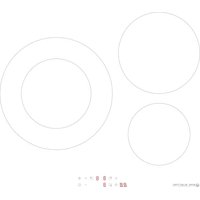
EMIH280-3FWL - Cooker EAS Electric - Free user manual and instructions
Find the device manual for free EMIH280-3FWL EAS Electric in PDF.



| Product Type | Induction Hob |
| Brand | EAS Electric |
| Model | EMIH280-3FWL |
| Number of Cooking Zones | 3 Induction Zones |
| Zone Diameters | Left front zone: 16 cm, Left rear zone: 21 cm, Right zone: 29 cm |
| Power Supply | 220-240 V ~ 50/60 Hz |
| Maximum Total Power | 7200 W |
| Product Dimensions (W x D x H) | 590 x 520 x 62 mm |
| Built-in Dimensions (W x D) | 560 x 490 mm |
| Weight | Approx. 10 kg |
| Surface Material | Ceramic Glass |
| Control Type | Touch Control |
| Boost Function | Yes, for each zone |
| Timer Function | Yes (alarm and automatic shut-off up to 99 min) |
| Child Lock Function | Yes |
| Automatic Safety Shut-off | Yes (according to power level) |
| Pan Detection | Yes, with 'U' indication |
| Residual Heat Indicator | Yes ('H' display) |
| Energy Consumption per Zone | 16 cm zone: 188.5 Wh/kg, 21 cm zone: 183.6 Wh/kg, 29 cm zone: 177.1 Wh/kg |
| Total Energy Consumption | 183.1 Wh/kg |
| Cleaning | Soft cloth, non-abrasive products; scrape sugar residues with a spatula |
| Warranty | 3 years (excluding wear parts and aesthetic damage) |
Frequently Asked Questions - EMIH280-3FWL EAS Electric
User questions about EMIH280-3FWL EAS Electric
0 question about this device. Answer the ones you know or ask your own.
Ask a new question about this device
Download the instructions for your Cooker in PDF format for free! Find your manual EMIH280-3FWL - EAS Electric and take your electronic device back in hand. On this page are published all the documents necessary for the use of your device. EMIH280-3FWL by EAS Electric.
USER MANUAL EMIH280-3FWL EAS Electric
natural_image
Simple diagram with three concentric circles and four smaller circles below, no text or symbols present.EMIH280-3FL EMIH280-3FWL
natural_image
Simple line drawing of a steam machine with cooling unit and two control panels (no text or symbols)olla de hierro
text_image
Diagram showing two hand positions on a line with checkmark and cross symbols indicating correct and incorrect states.natural_image
Three identical cooking pots with crossed-out X marks, placed on a flat surface (no text or symbols)natural_image
Four identical cooking pots with crossed-out X marks, shown in sequence (no text or symbols)text_image
Diagram showing cooking process with crossed-out pot and cooking pot, indicating heating or cooling conditions.text_image
L W H D X B X A X
text_image
SEAL Min.3mm F| L(mm) | W(mm) | H(mm) | D(mm) | A(mm) | B(mm) | X(mm) | F(mm) |
| 590 520 | 62 58 56 | 60+4 | +1 | 490+4+1 | 50 min. | 3 min. |
text_image
Diagram illustrating three different machining or finishing methods with checkmark indicators and arrows indicating direction.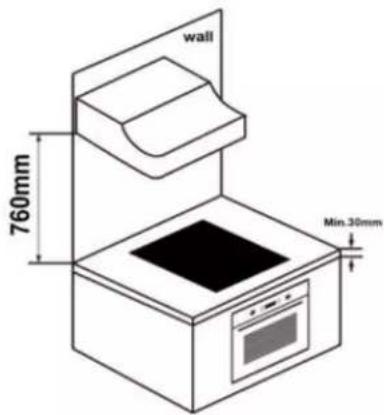
text_image
wall 760mm Min.30mmtext_image
Min. 50mm Max. 5mm Max. 5mm
Information for domestic electric hobs
4 INTRODUCTION
4 Safety warnings
4 Installation
6 Operation and maintenance.
9 PRODUCT INFORMATION
9 Overview
9 Control panel
9 Product information
10 Before using your new induction hob
10 Technical specifications
10 PRODUCT OPERATION
10 Control panel
10 Choosing the right cooking utensils
11 Using the induction hob
15 COOKING GUIDES
16 Cooking types
16 Detecting small objects
16 HEAT SETTINGS
17 CLEANING AND MAINTENANCE
18 TROUBLESHOOTING
19 DISPLAYED FAULTS AND DIAGNOSIS
21 INSTALLATION
27 WARRANTY CONDITIONS
1. Foreword
1.1 Safety Warnings
Your safety is important to us. Please read this information before using your cooktop.
1.2 Installation
1.2.1 Electrical Shock Hazard
- Disconnect the appliance from the mains electricity supply before carrying out any work or maintenance on it.
- Connection to a good earth wiring system is essential and mandatory.
- Alterations to the domestic wiring system must only be made by a qualified electrician.
- Failure to follow this advice may result in electrical shock or death.
1.2.2 Cut Hazard
• Take care - panel edges are sharp.
- Failure to use caution could result in injury or cuts.
1.2.3 Important safety instructions
- Read these instructions carefully before installing or using this appliance.
- No combustible material or products should be placed on this appliance at any time.
- Please make this information available to the person responsible for installing the appliance as it could reduce your installation costs.
- In order to avoid a hazard, this appliance must be installed according to these instructions for installation.
- This appliance is to be properly installed and earthed only by a suitably qualified person.
- This appliance should be connected to a circuit which incorporates an isolating switch providing full disconnection from the power supply.
- Failure to install the appliance correctly could invalidate any warranty or liability claims.
- This appliance is not intended for use by persons (including children) with reduced physical, sensory or mental capabilities, or lack of experience and knowledge, unless they have been given supervision or instruction concerning use of the appliance by a person responsible for their safety. Children should be supervised to ensure that they do not play with the appliance.
- If the supply cord is damaged, it must be replaced by the manufacturer, its service agent or similarly qualified persons in order to avoid a hazard.
- This appliance can be used by children aged from 8 years and above and persons with reduced physical, sensory or mental capabilities or lack of experience and knowledge if they have been given supervision or instruction concerning use of the appliance in a safe way and understand the hazards involved.
Children shall not play with the appliance. Cleaning and user maintenance shall not be made by children without supervision.
- Warning: If the surface is cracked, switch off the appliance to avoid the possibility of electric shock, for hob surfaces of glass-ceramic or similar material which protect live parts.
• A steam cleaner is not to be used.
- Metallic objects such as knives, forks, spoons and lids should not be placed on the hob surface since they can get hot
- Do not use a steam cleaner to clean your cooktop.
- After use, switch off the hob element by its control and do not rely on the pan detector.
- The appliance is not intended to be operated by means of an external timer or separate remote-control system.
- Danger of fire: do not store items on the cooking surfaces.
CAUTION: The cooking process must be supervised. A short-term cooking process must be supervised continuously.
WARNING: Unattended cooking on a hob with fat or oil can be dangerous and may result in a fire.
- WARNING: The appliance and its accessible parts become
hot during use.
Care should be taken to avoid touching heating elements. Children less than 8 years of age shall be kept away unless continuously supervised.
- WARNING: Unattended cooking on a hob with fat or oil can be dangerous and may result in fire.
NEVER try to extinguish a fire with water, but switch off the appliance and then cover flame e.g. with a lid or a fire blanket. - WARNING: Use only hob guards designed by the manufacturer of the cooking appliance or indicated by the manufacturer of the appliance in the instructions for use as suitable or hob guards incorporated in the appliance. The use of inappropriate guards can cause accidents.
1.3 Operation and maintenance
1.3.1 Electrical Shock Hazard
- Do not cook on a broken or cracked cooktop. If the cook-top surface should break or crack, switch the appliance off immediately at the mains power supply (wall switch) and contact a qualified technician.
- Switch the cooktop off at the wall before cleaning or maintenance.
- Failure to follow this advice may result in electrical shock or death.
1.3.2 Health Hazard
- This appliance complies with electromagnetic safety standards.
- However, persons with cardiac pacemakers or other electrical implants (such as insulin pumps) must consult with their doctor or implant manufacturer before using this appliance to make sure that their implants will not be affected by the electromagnetic field.
- Failure to follow this advice may result in death.
1.3.3 Hot Surface Hazard
- During use, accessible parts of this appliance will become
hot enough to cause burns.
- Do not let your body, clothing or any item other than suitable cookware contact the Induction glass until the surface is cool.
- Keep children away.
- Handles of saucepans may be hot to touch. Check saucepan handles do not overhang other cooking zones that are on. Keep handles out of reach of children.
- Failure to follow this advice could result in burns and scalds.
1.3.4 Cut Hazard
- The razor-sharp blade of a cooktop scraper is exposed when the safety cover is retracted. Use with extreme care and always store safely and out of reach of children.
- Failure to use caution could result in injury or cuts.
1.3.5 Important safety instructions
- Never leave the appliance unattended when in use. Boil over causes smoking and greasy spillovers that may ignite.
- Never use your appliance as a work or storage surface.
- Never leave any objects or utensils on the appliance.
- Do not place or leave any magnetizable objects (e.g. credit cards, memory cards) or electronic devices (e.g. computers, MP3 players) near the appliance, as they may be affected by its electromagnetic field.
- Never use your appliance for warming or heating the room.
- After use, always turn off the cooking zones and the cook-top as described in this manual (i.e. by using the touch controls). Do not rely on the pan detection feature to turn off the cooking zones when you remove the pans.
- Do not allow children to play with the appliance or sit, stand, or climb on it.
- Do not store items of interest to children in cabinets above the appliance. Children climbing on the cooktop could be seriously injured.
- Do not leave children alone or unattended in the area where the appliance is in use.
- Children or persons with a disability which limits their ability to use the appliance should have a responsible and
competent person to instruct them in its use. The instructor should be satisfied that they can use the appliance without danger to themselves or their surroundings.
- Do not repair or replace any part of the appliance unless specifically recommended in the manual. All other servicing should be done by a qualified technician.
- Do not place or drop heavy objects on your cooktop.
- Do not stand on your cooktop.
- Do not use pans with jagged edges or drag pans across the Induction glass surface as this can scratch the glass.
- Do not use scourers or any other harsh abrasive cleaning agents to clean your cooktop, as these can scratch the Induction glass.
- This appliance is intended to be used in household and similar applications such as staff kitchen areas in shops, offices and other working environments; farmhouses; by clients in hotels, motels and other residential type environments; bed and breakfast type environments.
- WARNING: The appliance and its accessible parts become hot during use.
- Care should be taken to avoid touching heating elements.
- Children less than 8 years of age shall be kept away unless continuously supervised.
Congratulations on the purchase of your new Induction Hob.
We recommend that you spend some time to read this Instruction / Installation Manual in order to fully understand how to install correctly and operate it.
For installation, please read the installation section.
Read all the safety instructions carefully before use and keep this Instruction / Installation Manual for future reference.
2. Product Introduction
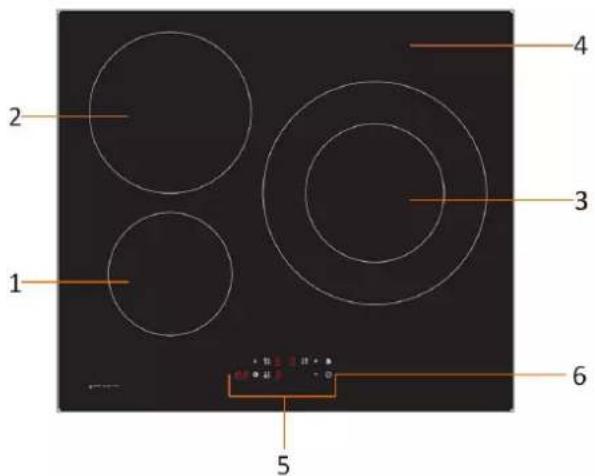
2.1 Top View
text_image
1 2 3 4 5 6- Max. 1300/1500W zone
- Max. 2300/2600W zone
- Max. 3000/3600W zone
- Glass plate
- Control panel
- ON/OFF control
2.2 Control Panel

text_image
3 4 5 6 B 8 8 + - 1 2 8.8- On/Off control
- Timer control
- Boost
- Heating zone selection controls
- Power / Timer regulating key
- Keylock control
2.3 Working Theory
Induction cooking is a safe, advanced, efficient, and economical cooking technology. It works by electromagnetic vibrations generating heat directly in the pan, rather than indirectly through heating the glass surface. The glass becomes hot only because the pan eventually warms it up.

natural_image
Simple line drawing of a steam locomotive with wheels and motion arrows, no text or symbols presentiron pot
magnetic circuit
ceramic glass plate
induction coil
induced currents
2.4 Before using your New Induction Hob
- Read this guide, taking special note of the 'Safety Warnings' section.
- Remove any protective film that may still be on your Induction hob.
2.5 Technical Specification
| Cooking Hob | EMIH280-3FL / EMIH280-3FWL |
| Cooking Zones | 3 Zones |
| Supply Voltage | 220-240V~ 50Hz or 60Hz |
| Installed Electric Power | 7200W |
| Product Size L×W×H (mm) | 590X520X62 |
| Building-in Dimensions A×B (mm) | 560X490 |
Weight and Dimensions are approximate. Because we continually strive to improve our products we may change specifications and designs without prior notice
3. Operation of Product
3.1 Touch Controls
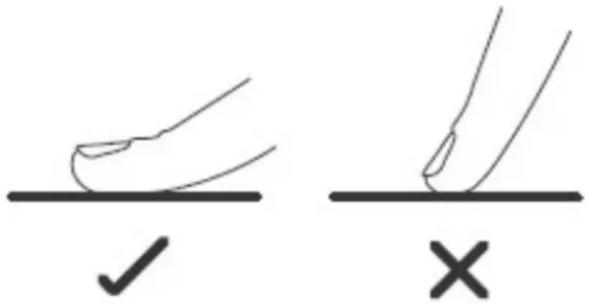
- The controls respon nd to touch, so you don't need to apply any pressure.
- Use the ball of your finger, not its tip.
- You will hear a beep each time a touch is registered.
- Make sure the controls are always clean, dry, and that there is no object (e.g. a utensil or a cloth) covering them. Even a thin film of water may make the controls difficult to operate.
text_image
Diagram showing two hand positions on a surface with checkmark and cross symbols indicating correct and incorrect states.3.2 Choosing the right Cookware

- Only use cookware with a base suitable for induction cooking.
Look for the induction symbol on the packaging or on the bottom of the pan.
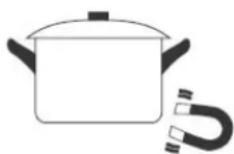
- You can check whether your cookware is suitable by carrying out a magnet test. Move a magnet towards the base of the pan. If it is attracted, the pan is suitable for induction.
-
If you do not have a magnet:
-
Put some water in the pan you want to check.
-
If U does not flash in the display and the water is heating, the pan is suitable.
- Cookware made from the following materials is not suitable: pure stainless steel, aluminium or copper without a magnetic base, glass, wood, porcelain, ceramic, and earthenware.
Do not use cookware with jagged edges or a curved base.

natural_image
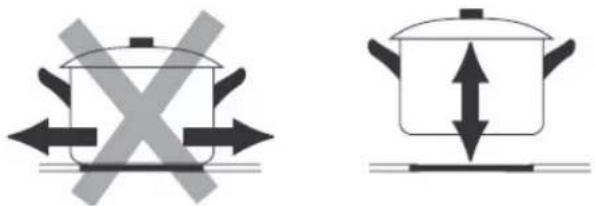
Three identical cooking pots with crossed-out X marks on their bases, no text or symbols presentMake sure that the base of your pan is smooth, sits flat against the glass, and is the same size as the cooking zone. Use pans whose diameter is as large as the graphic of the zone selected. Using a pot a slightly wider energy will be used at its maximum efficiency. If you use smaller pot efficiency could be less than expected. Pot less than 140 mm could be undetected by the hob. Always center your pan on the cooking zone.

natural_image
Four identical cooking pots with crossed-out X marks, shown in sequence (no text or symbols)Always lift pans off the Induction hob – do not slide, or they may scratch the glass.
text_image
Diagram showing two cooking pots with crossed arrows indicating opposing pressure or heating conditions.3.3 How to use
3.3.1 Start cooking
| Touch the ON/OFF control. After power on, the buzzer beeps once, all displays show “-” or “--”, indicating that the induction hob has entered the state of standby mode. | 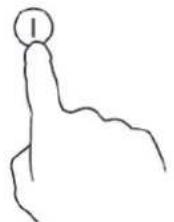 |
| Place a suitable pan on the cooking zone that you wish to use.• Make sure the bottom of the pan and the surface of the cooking zone are clean and dry. |  |
| Touching the heating zone selection control, and an indicator next to the key will flash |  |
| Select a heat setting by touching the “-” or “+” control.· If you don’t choose a heat setting within 1 minute, the Induction hob will automatically switch off. You will need to start again at step 1.· You can modify the heat setting at any time during cooking. | 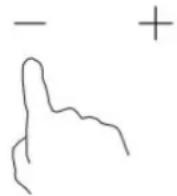 |
If the display flashes alternately with the heat setting
This means that:
- you have not placed a pan on the correct cooking zone or,
- the pan you're using is not suitable for induction cooking or,
- the pan is too small or not properly centered on the cooking zone.
No heating takes place unless there is a suitable pan on the cooking zone.
The display “U” will automatically disappear after 1 minute if no suitable pan is placed on it.
3.3.2 Finish cooking
| Touching the heating zone selection control that you wish to switch off |  | |
| Turn the cooking zone off by scrolling down to “0” or touching “-” and “+” control together. Make sure the display shows “0”. | 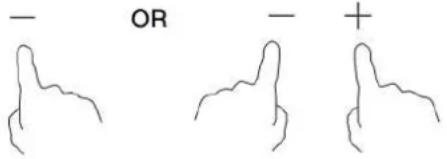 | |
| Turn the whole cooktop off by touching the ON/OFF control. | 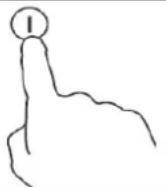 | |
| Beware of hot surfacesH will show which cooking zone is hot to touch. It will disappear when the surface has cooled down to a safe temperature. It can also be used as an energy saving function if you want to heat further pans, use the hotplate that is still hot. | 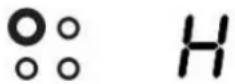 | |
3.3.3 Using the Boost function
| Activate the boost function | |
| Touching the heating zone selection control. | 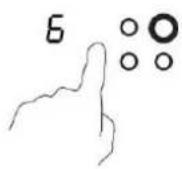 |
| Touching the boost control B, the zone indicator show “P” and the power reach Max. | 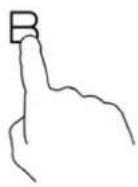 |
| Cancel the Boost function | |
| Touching the "Boost" control or the “-” button to cancel the Boost function, then the cooking zone will revert to its original setting. | 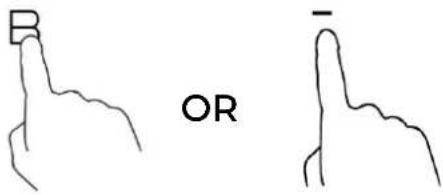 |
| Touching “-” and “+” control together. The cooking zone switch off and the boost function cancel automatically | 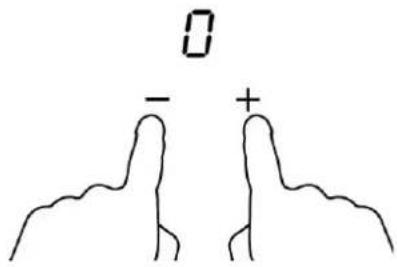 |
- The function can work in any cooking zone.
- The cooking zone returns to its original setting after 5 minutes.
- If the original heat setting equals 0, it will return to 9 after 5 minutes.
3.3.4 Locking the Controls
- You can lock the controls to prevent unintended use (for example children accidentally turning the cooking zones on).
- When the controls are locked, all the controls except the ON/OFF control are disabled.
| To lock the controls | |
| Touch the lock control The timer indicator will show “Lo” | |
| To unlock the controls | |
| Touch and hold the lock control for a while. |

When the hob is in the lock mode, all the controls are disable except the ON/OFF ①, you can always turn the induction hob off with the ON/OFF control in an emergency, but you shall unlock the hob first in the next operation.
3.3.5 Timer control
You can use the timer in two different ways:
a) You can use it as a minute minder. In this case, the timer will not turn any cooking zone off when the set time is up.
b) You can set it to turn one or more cooking zones off after the set time is up.
The timer of maximum is 99 min.
a) Using the Timer as a Minute Minder
If you are not selecting any cooking zone
| Make sure the cooktop is turned on.Note: you can use the minute minder at least one zone shall be active. |  |
| Touch timer control. The minder indicator will start flashing and “10” will show in the timer display. | |
| Set the time by touching the “-” or “+” control of the timerHint: Touch the “-” or “+” control of the timer once to decrease or increase by 1 minute.Touch and hold the “-” or “+” control of the timer to decrease or increase by 10 minutes. |  |
| Touching the “-” and “+” together, the timer is cancelled, and the “00” will show in the minute display. | 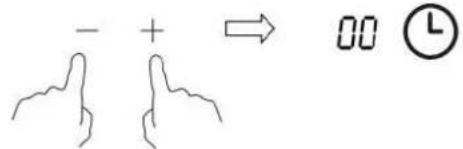 |
| When the time is set, it will begin to count down immediately. The display will show the remaining time and the timer indicator will flash for 5 seconds. |  |
| Buzzer will beep for 30 seconds and the timer indicator shows “- -” when the setting time finished. | 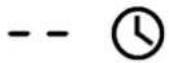 |
b) Setting the timer to turn one or more cooking zone off
| Set one zone | |
| Touching the heating zone selection control that you want to set the timer for. (e.g. zone 3#) |  |
| In short time, touch timer control, the minder indicator will start flashing and “10” will show in the timer display. |  |
| Set the time by touching the or control of the timerHint: Touch the “-” or “+” control of the timer once will decrease or increase by 1 minute.Touch and hold the “-” or “+” control of the timer will decrease or increase by 10 minutes. | 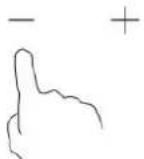 |
| Touching the “-” and “+” together, the timer is cancelled, and the “00” will show in the minute display. | 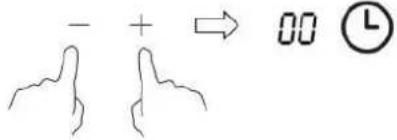 |
| When the time is set, it will begin to count down immediately.The display will show the remaining time and the timer indicator flash for 5 seconds.NOTE: The red dot next to power level indicator will illuminate indicating that zone is selected. |   |
| When cooking timer expires, the corresponding cooking zone will be switched off automatically. |  |

Other cooking zone will keep operating if they are turned on previously.
The pictures shown above are for reference only, and the final product shall prevail.
3.3.6 Default working times
Auto shut down is a safety protection function for your induction hob. It shut down automatically if ever you forget to turn off your cooking. The default working times for various power levels are shown in the below table:
| Power level | 1 | 2 | 3 | 4 | 5 | 6 | 7 | 8 | 9 |
| Default working timer (hour) | 8 | 8 | 8 | 4 | 4 | 4 | 2 | 2 | 2 |
When the pot is removed, the induction hob can stop heating immediately and the hob automatically switch off after 2 minutes.

People with a heart pacemaker should consult with their doctor before using this unit.
4. Cooking Guidelines

Take care when frying as the oil and fat heat up very quickly, particularly if you're using PowerBoost. At extremely high temperatures oil and fat will ignite spontaneously and this presents a serious fire risk.
4.1 Cooking Tips
- When food comes to the boil, reduce the temperature setting.
• Using a lid will reduce cooking times and save energy by retaining the heat. - Minimize the amount of liquid or fat to reduce cooking times.
- Start cooking on a high setting and reduce the setting when the food has heated through.
4.1.1 Simmering, cooking rice
- Simmering occurs below boiling point, at around 85°C, when bubbles are just rising occasionally to the surface of the cooking liquid. It is the key to delicious soups and tender stews because the flavours develop without overcooking the food. You should also cook egg-based and flour thickened sauces below boiling point.
- Some tasks, including cooking rice by the absorption method, may require a setting higher than the lowest setting to ensure the food is cooked properly in the time recommended.
4.1.2 Searing steak
To cook juicy flavorsome steaks:
- Stand the meat at room temperature for about 20 minutes before cooking.
- Heat up a heavy-based frying pan.
- Brush both sides of the steak with oil. Drizzle a small amount of oil into the hot pan and then lower the meat onto the hot pan.
- Turn the steak only once during cooking. The exact cooking time will depend on the thickness of the steak and how cooked you want it. Times may vary from about 2 – 8 minutes per side. Press the steak to gauge how cooked it is – the firmer it feels the more ‘well done’ it will be.
- Leave the steak to rest on a warm plate for a few minutes to allow it to relax and become tender before serving.
4.1.3 For stir-frying
- Choose an induction compatible flat-based wok or a large frying pan.
- Have all the ingredients and equipment ready. Stir-frying should be quick. If cooking large quantities, cook the food in several smaller batches.
- Preheat the pan briefly and add two tablespoons of oil.
- Cook any meat first, put it aside and keep warm.
- Stir-fry the vegetables. When they are hot but still crisp, turn the cooking zone to a lower setting, return the meat to the pan and add your sauce.
- Stir the ingredients gently to make sure they are heated through.
- Serve immediately.
4.2 Detection of Small Articles
When an unsuitable size or non-magnetic pan (e.g. aluminium), or some other small item (e.g. knife, fork, key) has been left on the hob, the hob automatically go on to standby in 1 minute. The fan will keep cooking down the induction hob for a further 1 minute.
5. Heat Settings
The settings below are guidelines only. The exact setting will depend on several factors, including your
cookware and the amount you are cooking. Experiment with the induction hob to find the settings that best suit you.
| Heat setting Suitability | |
| 1 - 2 | ·delicate warming for small amounts of food·melting chocolate, butter, and foods that burn quickly·gentle simmering·slow warming |
| 3 - 4 | ·reheating·rapid simmering·cooking rice |
| 5 - 6 | ·pancakes |
| 7 - 8 | ·sautéing·cooking pasta |
| 9 | ·stir-frying·searing·bringing soup to the boil·boiling water |
6. Care and Cleaning
| What? How? Important! | ||
| Everyday soiling on glass (finger-prints, marks, stains left by food or non-sugary spillovers on the glass) | 1. Switch the power to the cooktop off.2. Apply a cooktop cleaner while the glass is still warm (but not hot!)3. Rinse and wipe dry with a clean cloth or paper towel.4. Switch the power to the cooktop back on. | ·When the power to the cooktop is switched off, there will be no ‘hot surface’ indication but the cooking zone may still be hot! Take extreme care.·Heavy-duty scourers, some nylon scourers and harsh/abrasive cleaning agents may scratch the glass. Always read the label to check if your cleaner or scourer is suitable.·Never leave cleaning residue on the cooktop: the glass may become stained. |
| Boilovers, melts, and hot sugary spills on the glass | Remove these immediately with a fish slice, palette knife or razor blade scraper suitable for Induction glass cooktops, but beware of hot cooking zone surfaces:1. Switch the power to the cooktop off at the wall.2. Hold the blade or utensil at a 30° angle and scrape the soiling or spill to a cool area of the cooktop.3. Clean the soiling or spill up with a dish cloth or paper towel.4. Follow steps 2 to 4 for ‘Everyday soiling on glass’ above. | ·Remove stains left by melts and sugary food or spillovers as soon as possible. If left to cool on the glass, they may be difficult to remove or even permanently damage the glass surface.·Cut hazard: when the safety cover is retracted, the blade in a scraper is razor-sharp. Use with extreme care and always store safely and out of reach of children. |
| Spillovers on the touch controls | 1. Switch the power to the cooktop off.2. Soak up the spill3. Wipe the touch control area with a clean damp sponge or cloth.4. Wipe the area completely dry with a paper towel.5. Switch the power to the cooktop back on. | · The cooktop may beep and turn itself off, and the touch controls may not function while there is liquid on them. Make sure you wipe the touch control area dry before turning the cooktop back on. |
- Hints and Tips
| Problem Possible causes | What to do | |
| The induction hob cannot be turned on. | No power. Make sure the induction | hob is connected to the power supply and that it is switched on.Check whether there is a power outage in your home or area. If you've checked everything and the problem persists, call a qualified technician. |
| The touch controls are unresponsive. | The controls are locked. Unlock the | controls. See section‘Using your induction cooktop’ for instructions. |
| The touch controls are difficult to operate. | There may be a slight film of water over the controls or you may be using the tip of your finger when touching the controls. | Make sure the touch control area is dry and use the ball of your finger when touching the controls. |
| The glass is being scratched. | Rough-edged cookware.Unsuitable, abrasive scourer or cleaning products being used. | Use cookware with flat and smooth bases. See ‘Choosing the right cookware’.See ‘Care and cleaning’. |
| Some pans make crackling or clicking noises. | This may be caused by the construction of your cookware (layers of different metals vibrating differently). | This is normal for cookware and does not indicate a fault. |
| The induction hob makes a low humming noise when used on a high heat setting. | This is caused by the technology of induction cooking. | This is normal, but the noise should quieten down or disappear completely when you decrease the heat setting. |
| Fan noise coming from the induction hob. | A cooling fan built into your induction hob has come on to prevent the electronics from overheating. It may continue to run even after you've turned the induction hob off. | This is normal and needs no action. Do not switch the power to the induction hob off at the wall while the fan is running. |
| Pans do not become hot and appears in the display. | The induction hob cannot detect the pan because it is not suitable for induction cooking.The induction hob cannot detect the pan because it is too small for the cooking zone or not properly centered on it. | Use cookware suitable for induction cooking. See section ‘Choosing the right cookware’.Centre the pan and make sure that its base matches the size of the cooking zone. |
| The induction hob or a cooking zone has turned itself off unexpectedly, a tone sounds and an error code is displayed (typically alternating with one or two digits in the cooking timer display). | Technical fault. Please note down the error letters and numbers, switch the power to the induction hob off at the wall, and contact a qualified technician. |
8. Failure Display and Inspection
The induction hob is equipped with a self-diagnostic function. With this test the technician can check the function of several components without disassembling or dismounting the hob from the working surface.
Troubleshooting
1) Failure code occur during customer using & Solution;
| Failure code | Problem | Solution |
| No Auto-Recovery | ||
| E1 | Ceramic plate temperature sensor failure--open circuit. | Check the connection or replace the ceramic plate temperature sensor. |
| E2 | Ceramic plate temperature sensor failure--short circuit. | |
| Eb | Ceramic plate temperature sensor failure | |
| E3 | High temperature of ceramic plate sensor. | Wait for the temperature of ceramic plate return to normal.Touch “ON/OFF” button to restart unit. |
| E4 | Temperature sensor of the IGBT failure --open circuit. | Replace the power board. |
| E5 | Temperature sensor of the IGBT failure --short circuit | |
| E6 | High temperature of IGBT. | Wait for the temperature of IGBT return to normal.Touch “ON/OFF” button to restart unit.Check whether the fan runs smoothly; if not, replace the fan. |
| E7 Supply voltage | ge is below the rated voltage. | Please inspect whether power supply is normal.Power on after the power supply is normal. |
| E8 Supply voltage | ge is above the rated voltage. | |
| U1 Communication error. | Reinsert the connection between the display board and the power board.Replace the power board or the display board. | |
2) Specific Failure & Solution
| Failure Problem Solution A | Solution B | ||
| The LED does not come on when unit is plugged in. | No power supplied. | Check to see if plug is secured tightly in outlet and that outlet is working. | |
| The accessorial power board and the display board connected failure. | Check the connection. | ||
| The accessorial power board is damaged. | Replace the accessorial power board. | ||
| The display board is damaged. | Replace the display board. | ||
| Some buttons can't work, or the LED display is not normal. | The display board is damaged. | Replace the display board. | |
| The Cooking Mode Indicator comes on, but heating does not start. | High temperature of the hob. | Ambient temperature may be too high. Air Intake or Air Vent may be blocked. | |
| There is something wrong with the fan. | Check whether the fan runs smoothly. if not, replace the fan. | ||
| The power board is damaged. | Replace the power board. | ||
| Heating stops suddenly during operation and the display flashes “u”. | Pan Type is wrong. | Use the proper pot (refer to the instruction manual.) | Pan detection circuit is damaged, replace the power board. |
| Pot diameter is too small. | |||
| Cooker has overheated; | Unit is overheated. Wait for temperature to return to normal.Push “ON/OFF” button to restart unit. | ||
| Heating zones of the same side (Such as the first and the second zone ) would display “u”. | The power board and the display board connected failure; | Check the connection. | |
| The display board of communicate part is damaged. | Replace the display board. | ||
| The Main board is damaged. | Replace the power board. | ||
| Fan motor sounds abnormal. | The fan motor is damaged. | Replace the fan. |
The above are the judgment and inspection of common failures.
Please do not disassemble the unit by yourself to avoid any dangers and damages to the induction hob.
9. Installation
9.1 Selection of installation equipment
Cut out the work surface according to the sizes shown in the drawing.
For the purpose of installation and use, a minimum of 5 cm space shall be preserved around the hole. Be sure the thickness of the work surface is at least 30mm. Please select heat-resistant and insulated work surface material (Wood and similar fibrous or hygroscopic material shall not be used as work surface material unless impregnated) to avoid the electrical shock and larger deformation caused by the heat radiation from the hotplate. As shown below:

Note: The safety distance between the sides of the hob and the inner surfaces of the worktop should be at least 3mm.

text_image
L W H D' X B X A X X B X A SEAL Min.3mm F| L(mm) | W(mm) | H(mm) | D(mm) | A(mm) | B(mm) | X(mm) | F(mm) |
| 590 520 | 62 58 56 | 60+4 | +1 | 490+4 +1 | 50 min. | 3 min. |
Under any circumstances, make sure the Induction cooker hob is well ventilated and the air inlet and outlet are not blocked. Ensure the induction cooker hob is in good work state. As shown below

Note: The safety distance between the hotplate and the cupboard above the hotplate should be at least 760 mm.
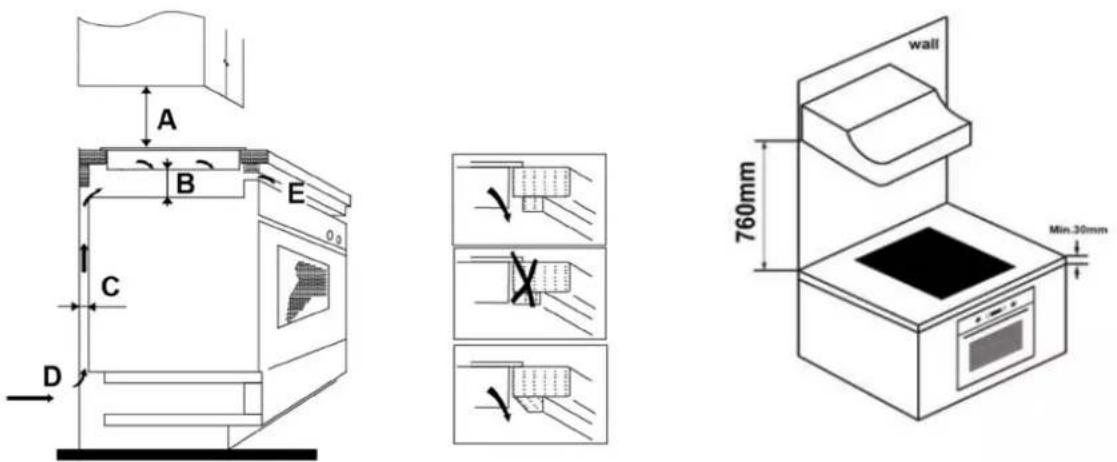
| A(mm) B(mm) | C(mm) D E | |||
| 760 50 min. 20 | min. Air intake | Air exit 5mm | ||
WARNING: Ensuring Adequate Ventilation
Make sure the induction cooker hob is well ventilated and that air inlet and outlet are not blocked. In order to avoid accidental touch with the overheating bottom of the hob, or getting unexpected electric shock during working, it is necessary to put a wooden insert, fixed by screws, at a minimum distance of 50mm from the bottom of the hob. Follow the requirements below.
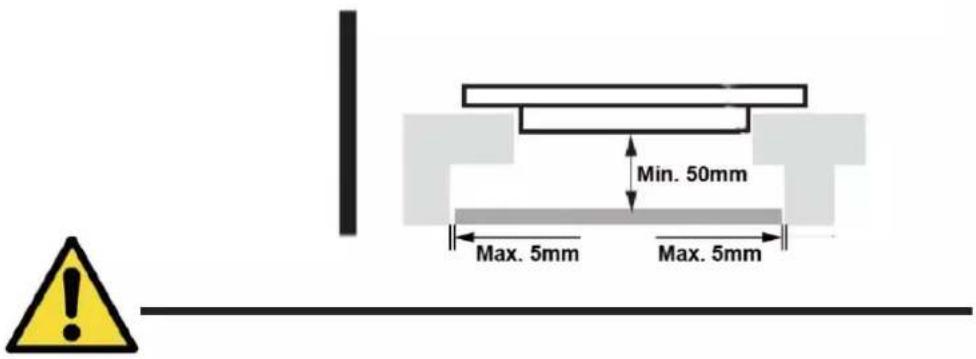
text_image
Min. 50mm Max. 5mm Max. 5mmThere are ventilation holes around outside of the hob. YOU MUST ensure these holes are not blocked by the worktop when you put the hob into position.
- Be aware that the glue that join the plastic or wooden material to the furniture, must resist to temperature not below 150°C, to avoid the unstuck of the paneling.
- The rear wall, adjacent and surrounding surfaces must therefore be able to withstand a temperature of 90^ C.
9.2 Before installing the hob, make sure that
- The work surface is square and level, and no structural members interfere with space requirements.
- The work surface is made of a heat-resistant and insulated material.
- If the hob is installed above an oven, the oven has a built-in cooling fan.
- The installation will comply with all clearance requirements and applicable standards and regulations.
- A suitable isolating switch providing full disconnection from the mains power supply is incorporated in the permanent wiring, mounted and positioned to comply with the local wiring rules and regulations.
- The isolating switch must be of an approved type and provide a 3 mm air gap contact separation in all poles (or in all active [phase] conductors if the local wiring rules allow for this variation of the requirements).
- The isolating switch will be easily accessible to the customer with the hob installed.
- You consult local building authorities and by-laws if in doubt regarding installation.
- You use heat-resistant and easy-to-clean finishes (such as ceramic tiles) for the wall surfaces surrounding the hob.
9.3 After installing the hob, make sure that
- The power supply cable is not accessible through cupboard doors or drawers.
- There is adequate flow of fresh air from outside the cabinetry to the base of the hob.
- If the hob is installed above a drawer or cupboard space, a thermal protection barrier is installed below the base of the hob.
- The isolating switch is easily accessible by the customer.
9.4 Before locating the fixing brackets
The unit should be placed on a stable, smooth surface (use the packaging). Do not apply force onto the controls protruding from the hob.
9.5 Adjusting the bracket position
Fix the hob on the work surface by screw 4 brackets on the bottom of hob (see picture) after installation.
Adjust the bracket position to suit for different tabletop thickness.

text_image
Bracket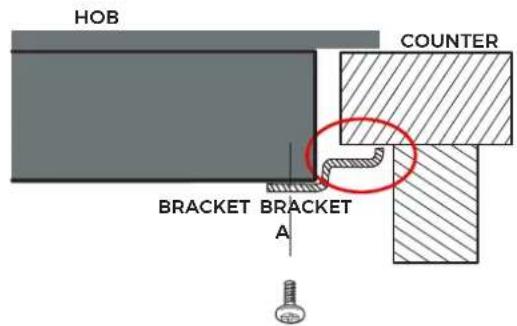
text_image
HOB COUNTER BRACKET BRACKET A
text_image
HOB COUNTER B
Under any circumstances, the brackets cannot touch with the inner surfaces of the worktop after installation (see picture).
9.6 Cautions
- The induction hotplate must be installed by qualified personnel or technicians. We have professionals at your service. Please never conduct the operation by yourself.
- The hob will not be installed directly above a dishwasher, fridge, freezer, washing machine or clothes dryer, as the humidity may damage the hob electronics
- The induction hotplate shall be installed such that better heat radiation can be ensured to enhance its reliability.
- The wall and induced heating zone above the table surface shall withstand heat.
- To avoid any damage, the sandwich layer and adhesive must be resistant to heat.
- A steam cleaner is not to be used.
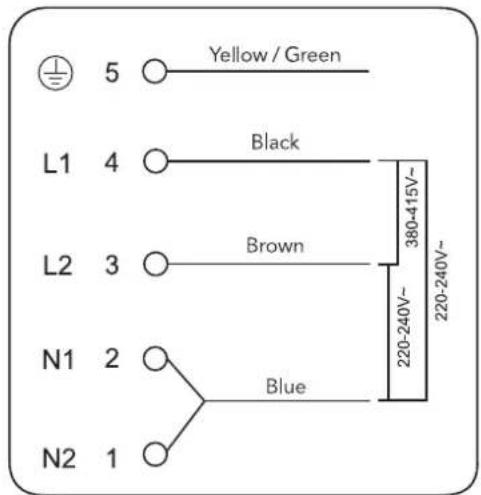
9.7 Connecting the hob to the mains power supply

This hob must be connected to the mains power supply only by a suitably qualified person. Before connecting the hob to the mains power supply, check that:
- The domestic wiring system is suitable for the power drawn by the hob.
-
The voltage corresponds to the value given in the rating plate
-
The power supply cable sections can withstand the load specified on the rating plate.
To connect the hob to the mains power supply, do not use adapters, reducers, or branching devices, as they can cause overheating and fire.
The power supply cable must not touch any hot parts and must be positioned so that its temperature will not exceed 75^ C at any point.

Check with an electrician whether the domestic wiring system is suitable without alterations.
Any alterations must only be made by a qualified electrician.
text_image
5 Yellow / Green L1 4 Black L2 3 Brown N1 2 Blue N2 1 380-415V~ 220-240V~ 220-240V~
If the total number of heating unit of the appliance you choose is not less than 4, the appliance can be connected directly to the mains by single-phase electric connection, as shown below.

text_image
220-240V~ L N ⊕ 25A~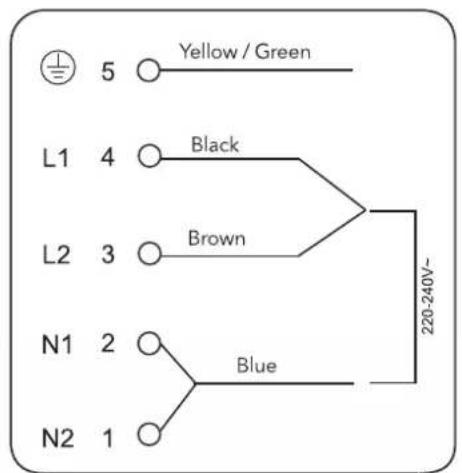
text_image
5 Yellow / Green L1 4 Black L2 3 Brown N1 2 Blue N2 1 220-240V~- If the cable is damaged or to be replaced, the operation must be carried out the by after-sale agent with dedicated tools to avoid any accidents.
- If the appliance is being connected directly to the mains an omnipolar circuit-breaker must be installed with a minimum opening of 3mm between contacts.
- The installer must ensure that the correct electrical connection has been made and that it is compliant with safety regulations.
- The cable must not be bent or compressed.
- The cable must be checked regularly and replaced by authorised technicians only.

The bottom surface and the power cord of the hob are not accessible after installation.
natural_image
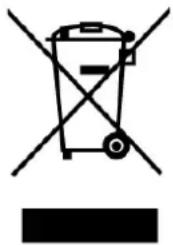
Symbol of a trash bin crossed with two crossed arms, no text or labels presentCorrect disposal of this product
The symbol on the product, or in its packaging, indicates that this product may not be treated as household wasted. Instead, it should be taken to the appropriate waste collection point for the recycling of electrical and electronic equipment. By ensuring this product is disposed of correctly, you will help prevent potential negative consequences for the environment and human health, which could otherwise be caused by the inappropriate waste handling of this product. For more detailed information about the recycling of this product, please contact your local council, your household waste disposal service, or the shop where you purchased the product.
| Symbol Value Unit | |||
| Model identification | / | EMIH280-3FL/EMIH280-3FWL | |
| Type of hob | / | Built-in hob | |
| Number of cooking zones and/or areas | / | 3 Zone | |
| Heating technology (induction cooking zones and cooking areas, radiant cooking zones, solid plates) | / Induction cooking areas | ||
| For circular cooking zones or area:diameter of useful surface area per electric heated cooking zone, rounded to the nearest 5 mm | Zone1: 16.0Zone2: 21.0Zone3: 29.0 | cm | |
| For non-circular cooking zones or areas:length and width of useful surface area per eletric heated cooking zone or area, rounded to the nearest 5 mm | LW | cm | |
| Energy consumption per cooking zone or area calculated per kg | EC_electric cooking | Zone1: 188.5Zone2: 183.6Zone3: 177.1 | Wh/kg |
| Energy consumption for the hob calculated per kg | EC_electric hob | 183.1 | Wh/kg |
WARRANTY CONDITIONS
This appliance is guaranteed for three years from the date of sale against all manufacturing defects, including labour and spare parts. In order to justify the date of purchase, it will be compulsory to present the invoice or purchase receipt. The conditions of this warranty apply only to Spain and Portugal. If you have purchased this product in another country, please consult your distributor for the applicable conditions.
WARRANTY EXCLUSIONS
- Remote controls, drain intake rubbers, dockings and door seals, weather stripping.
- Damage to enamels, paints, nickel plating, chrome plating, oxidation or other types of aesthetic parts or components that do not affect the internal functioning of the appliance.
- Damage to wear parts due to use, corrosion or oxidation, whether caused by normal use of the appliance or accelerated deterioration due to unfavorable environmental or climatic circumstances. Not suitable for outdoor use.
- Damage to fragile pieces of glass, glass ceramic, plastics, handles, baskets, doors or light bulbs when their failure or breakage is not attributable to a manufacturing defect.
- Faults produced by fortuitous causes or accidents of force majeure, or as a consequence of abnormal, negligent or inappropriate use of the device.
- Civil liabilities of any nature.
- Consequential damage to the appliance as long as it has not been caused by an internal malfunction.
- Maintenance or upkeep of the appliance: periodic reviews, adjustments and greases.
- Faults that accessories and complements, adapters, external cables, bags, spare parts of all kinds, lamps, as well as any part considered consumable by the manufacturer, may suffer.
- Faults caused by incorrect or illegal installation, inadequate ventilation, lack of grounding in the home, power disturbances, inappropriate modifications or use of non-original spare parts.
- Appliances used in industrial applications or for commercial purposes.
- Appliances with illegible or altered serial number.
- Defects or breakdowns produced as a result of fixes, repairs, modifications, or disassembly of the installation of the device by the user or by a technician not authorized by the manufacturer, or as a result of manifest non-compliance with the manufacturer's instructions for use and maintenance.
- During the warranty period it is essential to keep all manuals together with the equipment. If the equipment is sold, donated or given away, the manual and all related documents must be given to the new user. If any of these are lost, their replacement cannot be claimed.
- Faults that have their origin or are a direct or indirect consequence of: contact with liquids, chemicals and other substances, as well as conditions derived from the climate or the environment: earthquakes, fires, floods, excessive heat or any other external force, such as insects, rodents and other animals that may have access to the interior of the machine or its connection points.
- Damages derived from terrorism, riot or popular tumult, legal or illegal demonstrations and strikes; facts of actions of the Armed Forces or the State Security Forces in times of peace; armed conflicts and acts of war (declared or not); nuclear reaction or radiation or radioactive contamination; vice or defect of the goods; facts classified by the Government of the Nation as "national catastrophe or calamity".
Design and specifications are subject to change without notice for product improvement. Any changes to the manual will be updated on our website, you can check the latest version.

EAS ELECTRIC
SMART TECHNOLOGY
www.easelectric.es
Contenu
natural_image
Simple line drawing of a steam machine with cooling unit and two control panels (no text or symbols)pot de fer
text_image
Diagram showing two hand positions on a line with checkmark and cross symbols indicating correct and incorrect states.natural_image
Three identical cooking pots with crossed-out X marks, placed on a flat surface (no text or symbols)natural_image
Four identical cooking pots with crossed-out X marks, shown in sequence (no text or symbols)text_image
Diagram showing two cooking pots with opposing directional arrows, indicating pressure or movement.text_image
L W H D' X B X A X X B X A SEAL Min.3mm Ftext_image
Min. 50mm Max. 5mm Max. 5mm
CONDITIONS DE LA GARANTIE
EXCLUSIONS DE LA GARANTIE
natural_image
Simple line drawing of a steam machine with cooling unit and two control panels (no text or symbols)panela de ferro
circuito magnético
text_image
Diagram showing two hand positions on a line with checkmark and cross symbols indicating correct and incorrect states.natural_image
Three identical cooking pots with crossed-out X marks on their bases, no text or symbols presentnatural_image
Four identical cooking pots with crossed-out X marks, shown in sequence (no text or symbols)text_image
Diagram showing two cooking pots with crossed arrows indicating opposing pressure or heating conditions.text_image
L W H D' X B X A X X A SEAL Min.3mm F| L(mm) | W(mm) | H(mm) | D(mm) | A(mm) | B(mm) | X(mm) | F(mm) |
| 590 520 | 62 58 56 | 60+4 | +1 | 490+4+1 | 50 min. | 3 min. |
text_image
Min. 50mm Max. 5mm Max. 5mm
Information for domestic electric hobs
Scan for manual in other languages and further updates: