PowerQuest 505 - Power conditioner AudioQuest - Free user manual and instructions
Find the device manual for free PowerQuest 505 AudioQuest in PDF.


| Product Type | Power conditioner |
| Brand | AudioQuest |
| Model | PowerQuest 505 |
| Dimensions (W x H x D) | 43.2 cm x 8.6 cm (8.9 cm with feet) x 34 cm |
| Weight | 4.9 kg (10.8 lbs) |
| Chassis material | Metal, painted black, black anodized front panel |
| Rack mount | 2U, rack adapters included |
| Power supply | 120 VAC, 15 A RMS |
| Maximum input current capacity | 15 A RMS |
| Total number of AC outlets | 12 (4 high current, 8 with ultra-linear filtering) |
| Transverse mode noise filtering | > 22 dB from 30 kHz to 1 GHz |
| Common mode noise filtering | > 22 dB from 30 kHz to 100 MHz |
| Surge suppression | Non-sacrificial, withstands 6000 V / 3000 A |
| Extreme voltage shutdown | 140 VAC, automatic reset |
| AC power cord included | 2m PowerQuest PQ-715, with ZERO-Tech and RF/ND-Tech |
| Typical power consumption | Less than 0.5 A at 120 VAC |
| Recommended cleaning | AudioQuest CleanScreen or glass cleaner, soft cloth |
| Warranty | 5 years (after online registration) |
| Continuous operation | Yes, designed for over 20 years |
| Operating ambient temperature | 7 °C to 38 °C, humidity < 20% |
| Feet | 4 removable rubber feet |
Frequently Asked Questions - PowerQuest 505 AudioQuest
User questions about PowerQuest 505 AudioQuest
0 question about this device. Answer the ones you know or ask your own.
Ask a new question about this device
Download the instructions for your Power conditioner in PDF format for free! Find your manual PowerQuest 505 - AudioQuest and take your electronic device back in hand. On this page are published all the documents necessary for the use of your device. PowerQuest 505 by AudioQuest.
USER MANUAL PowerQuest 505 AudioQuest
text_image
Charge/discharge protection PowerQuest On PowerQuest On power ON OFF PowerQuest 505 NON-SACHSICAL EDGE PROTECTION + STRALAWAY FILTERING audioquest.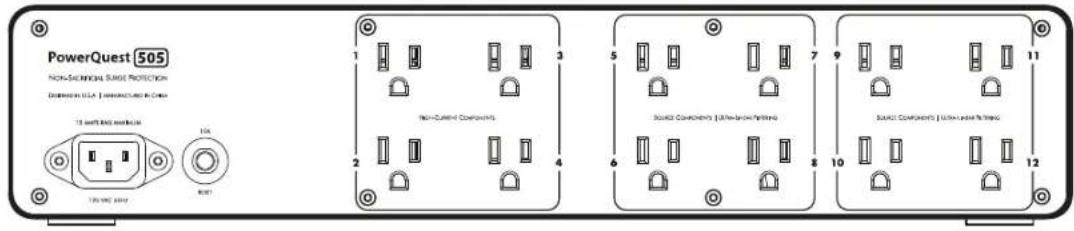
text_image
PowerQuest 505 NON-SCIENTIFIC SURGE PROTECTION DIMENSION: ULTA | DIMENSION: UTA CHINA 124 124 VDC 200V 10A RDT Non-Current Components Source Components | Internal/Internal Wiring Source Components | Internal/Internal WiringENGLISH
PowerQuest 505 Features 3
Introduction 3
Installation/Unpacking 5
Unpacking 5
Safety Information/Warnings 5
Servicing/Return to AudioQuest 5
Power Source 5
Placement 5
Connection to Audio/Video Components 6
AC Cable Routing 6
High Current/Low-Z Power Outlets 6
Ultra-Linear Filtered Power Outlets 6
Suggested AC Connections 7
Operation and Continuous Use 8
Power Switch/Circuit Breaker and LED Power Indicator 8
Overvoltage Protection Indicator 8
Break-in Time/Continuous Use 8
Specifications 9
Trouble-Shooting Guide 10
Warranty 11
Français 13
PowerQuest 505 Features
■ Ultra-Linear Differential Filter: 30kHz – 1GHz (well in excess of 22dB)
■ Ultra-Linear Common-Mode Filter: 30kHz – 100MHz (well in excess of 22dB)
■ Both filters linearized for (rising) line impedance with frequency from 0.05 Ohms (source) and 10 to 50 Ohms load (system current dependent)
■ Non-Sacrificial Surge Suppression (will withstand multiple strikes of 6000V or 3000A without damage)
■ Extreme Voltage Shutdown: 140VAC. Will activate main circuit relay in under 0.25 seconds. Automatically resets once incoming voltage is within a safe range
■ (4) High-Current outlets; (8) Ultra-Linear Filtered Source outlets
■ Detachable 2-meter PowerQuest PQ-715 AC cord featuring ZERO-Tech and RF/ND-Tech
■ Maximum Input Current Capacity: 15A RMS
■ 2RU rack mountable metal chassis (rack ears included)
Introduction
The science of AC power is not simple; it demands focus, and the devil is in the details. In fact, the mammoth increase in airborne and AC-line-transmitted radio signals, combined with overtaxed utility lines and the ever-increasing demands from high-definition audio/video components, has rendered our utilities' AC power an antiquated technology.
Where Alternating Current (AC) is concerned, we're relying on a century-old technology created for incandescent lights and electric motors—technology that was certainly never meant to power the sophisticated analog and digital circuits used in premium audio/video systems. To properly accommodate the promise of today's ever-increasing bandwidth and dynamic range, we must achieve extraordinarily low noise across a wide range of frequencies.
Further, today's power amplifiers are being taxed for instantaneous peak-current demand, even when they're driven at modest volumes. Although we have seen a substantial increase in both dynamics and bass content from our audio software, the loudspeakers we employ to reproduce them are no more efficient than they were two to four decades ago. This places great demands on an amplifier's power supply, as well as the source AC power supplying it.
Our systems' sensitive components need better alternating current—a fact that has resulted in a host of AC power conditioning, isolation transformers, regeneration amplifiers, and battery back-up system topologies. Through differential sample tests and spectrum analysis, it can be proven that up to a third of a high-resolution (low-level) audio signal can be lost, masked, or highly distorted by the vast levels of noise riding along the AC power lines that feed our components. This noise couples into the signal circuitry as current noise and through AC ground, permanently distorting and/or masking the source signal.
All sincere attempts to solve this problem must be applauded since once the audio/video signal is gone, it's gone forever...
For AudioQuest, honoring the source is never a matter of simply using premium “audiophile-grade parts” or relying on a proprietary technology—common approaches used within the audiophile market. For years, we have all been witness to the same, seemingly endless audiophile debates: Valves versus transistors. Analog versus digital. Can cables really make a difference? The debates go on and on. While we, too, can brag about our many unique technologies, we realize that true audio/video optimization is never a matter of any one secret or exotic circuit. When it comes to noise dissipation for AC power, many approaches can yield
meaningful results. However, they may also impart ringing, current compression, and non-linear distortions that are worse than the disease.
Though it's easy to boast, it's quite another thing to create a solution that is consistent, holistic, functional, and that honors verifiable science. It's not enough to reduce AC line noise and its associated distortions at just one octave, thus leaving vulnerable the adjacent octaves and octave partials to noise, resonant peaking, or insufficient noise reduction. Consistency is key. We should never accept superior resolution in one octave, only to suffer from masking effects a half-octave away and ringing artifacts two octaves from there. This is the principal criterion for all AudioQuest's AC power products.
The PowerQuest 505 represents over 25 years of exhaustive research and proven AC power products designed for audiophiles, broadcast engineers, and professional audio applications. We welcome you to experience the PowerQuest 505 and hear firsthand the remarkable results of highly optimized power management.
—Garth Powell, Senior Director of Engineering, AudioQuest
Installation | Unpacking
Before unpacking your PowerQuest 505, inspect the carton for any obvious damage to the boxes and internal protective materials. If internal damage is likely, contact the carrier who delivered the unit. If shipping damage is evident on the product, then please contact your shipping carrier. Please save all shipping and packing materials. Should you move or otherwise need to transport your PowerQuest 505, these packing materials will ensure the safest transportation. The carton should contain the PowerQuest 505 (120V North American NEMA Edison AC Outlets), two foam inserts, owner's manual, rack-mount kit, and 2m PowerQuest PQ-715 AC power cord. Registration is recommended. In the event that your original ownership documents are lost, your registration can be used to establish whether the unit is within the warranty period.
Safety Information | Warnings
Before operating the PowerQuest 505, please read and observe all safety and operating instructions. Retain these instructions for future reference.
■ Do not disassemble or in any way modify the PowerQuest 505. There are no user-serviceable parts inside.
- Keep away from moisture and avoid excessive humidity.
■ Do not allow liquids or foreign objects to enter the unit.
Servicing | Return to AudioQuest
Servicing of the PowerQuest 505 must be performed by AudioQuest, and is only required when:
■ The PowerOuest 505 has been exposed to rain, flooding, or extreme moisture.
■ The PowerQuest 505 does not appear to operate normally. (See "Trouble-Shooting Guide.")
■ The PowerQuest 505 has been dropped and sustained considerable physical damage.
If sending the PowerQuest 505 to AudioQuest for servicing (or shipping it for any reason), please use the factory-approved packaging materials. If you have lost any of these (carton, two foam inserts, one poly bag), please contact AudioQuest for replacements. We will provide replacement packaging materials for a nominal charge; shipping costs will be paid by the individual or company requesting the packaging material. Please do not rely on other methods of packaging, including those provided or suggested by packaging/mailing stores. These methods and materials could seriously damage the product, as well as its finish. Even the loss of the thick polybag is enough to permanently damage the finish during transport. If you have lost the original packaging material, please request replacement materials from AudioQuest.
Power Source
Ideally, the power source to which the PowerQuest 505 is connected should be adequate for use at 120V single phase nominal voltage, 15 amps (current capacity RMS or greater).
For proper operation, the PowerQuest 505 requires a safety ground (supplied via the power utility AC wall outlet).
Placement
The PowerQuest 505 is manufactured with four rubber-foam textured polymer feet for safe, secure placement on any table, cabinet, shelf, or floor. Placement or proximity to other components is not critical, and, under standard use, the PowerQuest 505 does not produce any appreciable heat. The PowerQuest 505 may be rack-mounted in a standard 19" rack by attaching the included 2-RU rack ears.
To attach the optional rack ears to the PowerQuest 505 chassis, first remove the three Phillips flathead screws from the front portion of both the left and right sides of the cover assembly. Next, mount the rack ears flush with the PowerQuest 505's front panel. Finally, secure the rack ears into place by installing the rack-mount kit's Phillips pan head screws.
When tight installations do not provide adequate room in a rack, shelf, or cabinet, the PowerQuest 505 can be placed on its side. Such placement will pose no safety or performance compromises, but we recommend placing a soft towel or carpet under the unit to prevent the chassis and front panel from being scratched or marred in any way.
Connection to Audio/Video Components
AC Cable Routing
Once the PowerQuest 505 is placed, a 15-amp-rated (or greater), high-current AC cord must be connected to the rear-panel AC inlet (IEC-C14) connector. The AC cord must have an IEC-C13 female end connector and a grounded male 120VAC Edison/NEMA plug for use in North America or Taiwan. We highly recommend the use of the supplied PowerQuest PQ-715 AC cord or any AudioQuest NRG-Z, Wind Series, or High-Current Storm Series AC cable.
When facing the PowerQuest 505's rear panel, the IEC-C14 inlet is located on the unit's lower-left side. The AC inlet cord must be connected to an appropriate AC outlet (see "Power Source"). Though a conventional AC outlet will function safely and yield high performance, for the very best sonic performance, we strongly recommend the installation of the AudioQuest NRG Edison 15 or 20.
Whenever possible, it is best to keep at least three inches (approximately 7cm) between AC cables and any signal cable. When this is not possible in a practical layout of system cabling, crossing the AC cables to signal cables at 90 degrees is best to minimize induced noise.
High-Current | Low-Z Power Outlets
There are four High-Current Power outlets (labeled "1" through "4"—four outlets in all). These are designed to ensure optimal performance from any power amplifier, monoblock amplifier, integrated amplifier, powered receiver, or powered subwoofer, by minimizing the AC impedance to the amplifier power supply.
However, the other eight AC outlets (Ultra-Linear Noise-Filtering), are not optimized for most power amplifiers. They have been optimized for line-level audio preamplifiers, DACs, universal players, turntables, and video products that utilize constant-current voltage amplifier circuits. These circuits never suffer from current compression, but their lower input level and higher gain require a more robust means of noise dissipation. This is key to the PowerQuest 505's discrete AC power banks, in that not every circuit is treated the same, but rather isolated bank by bank and optimized for best performance.
Ultra-Linear Filtered Power Outlets
There are 8 discrete outlets in all, labeled "5" through "12" that utilize this technology within the PowerQuest 505. All eight of these are in turn isolated from the High-Current outlets, labeled 1 through 4. This offers a great advantage in controlling the complex interactions of RF (radio frequency) and other induced noises present in the AC power supplied from your utility, the noise that will be present on and in every AC cord, and the noise that is produced within your system's components and that "backwashes" into the PowerQuest 505's output circuits.
Though it would be simple to recommend putting the digital or video components into outlets 5, 6, 7, and 8, and the line-level audio components and turntables into outlets 9, 10, 11, and 12, the quest for optimal performance is more complex. This scenario will work, and likely work well, but a certain amount of experimentation is best given the fact that no filter can eliminate 100% of all noise. The size of many of these RF-induced waveforms possess sinewaves as small as the edge of a piece of paper, and the interactions are complex. So long as the power amplifiers are in their appropriate outlets (1 through 4), and the other components are in outlets 5 through 12, you should experience exemplary performance.
Suggested AC Connections
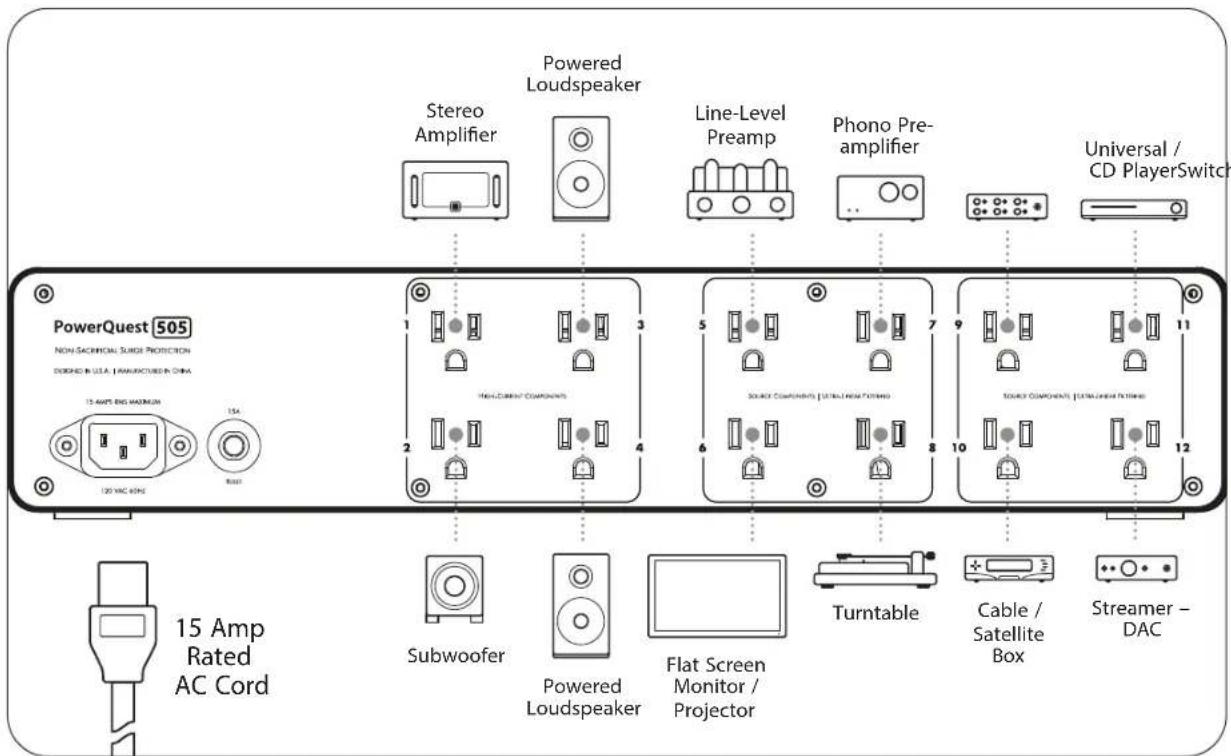
text_image
PowerQuest 505 NON SACRINIONAL SURE PROTECTION DESIGNED IN USA. I MANUFACTURED IN CHINA 15 AMP END MAXIMUM 120 VAC 6/9E 15A 15 Amp Rated AC Cord Stereo Amplifier Powered Loudspeaker Line-Level Preamp Phono Pre- amplifier Universal / CD PlayerSwitch 1 3 5 7 9 11 12 13 14 15 Subwoofer Powered Loudspeaker Flat Screen Monitor / Projector Turntable Cable / Satellite Box Streamer - DACNote: Outlets 5 through 12 are subject to many variables and circuit conditions, so experimentation for best results is encouraged. Power amplifiers must be connected to outlets 1 through 4.
Operation and Continuous Use
Power Switch | Circuit Breaker and LED Power Indicator
Once the AC cords are properly connected to the AC source tap, and the components are connected to the appropriate outlet banks, it is safe to energize the PowerQuest 505. On the right-hand side of the PowerQuest 505's front panel, there is a black rocker switch. Firmly press the rocker switch so that its upper portion is flush with the front panel. Typically, within a couple of seconds, you should hear an audible "clack" sound(s) from one or more relays within the PowerQuest 505. At the same time, the front-panel LED power indicator will glow green, signifying that the unit is operational. (If this does not occur, see the "Trouble-Shooting Guide" in this manual.)
Overvoltage Protection Indicator
One portion of the PowerQuest 505's non-sacrificial surge protection is dedicated to a fast-acting extreme voltage shutdown circuit. If more than 140VAC is present on the incoming AC line for more than a quarter of a second, the circuit will instantly open a high-current relay that will disengage the AC power from all the PowerQuest 505's AC outlets, activating the red front-panel LED "Overvoltage Protection" warning indicator. Once the event has passed, or the building wiring fault has been corrected, the circuit will automatically re-engage.
Break-in Time | Continuous Use
The PowerQuest 505 is made of a variety of passive and active components. As such, the PowerQuest 505 will benefit from continuous use, just like any other audio/video component. This is not to say that you will be made to "suffer" through weeks or months of intolerable performance until that "magic day" when the parts are fully formed and ready. On the contrary, the PowerQuest 505 will perform very well from the first moment you use it. It will improve gradually, in small increments, over a period of approximately two weeks. While leaving the PowerQuest 505 turned on during this period will aid the process, it is also perfectly acceptable to turn the unit off; doing so will simply increase the time it takes to reach final "break-in."
The PowerQuest 505 has a 5-year warranty, but it was designed to last for over two decades. Provided that the PowerQuest 505 is used inside a home, store, studio, or office with a reasonable climate (45 degrees to 100 degrees Fahrenheit, with less than 20% humidity), it can be left on continuously; there are no parts that will wear out.
Specifications
PowerQuest 505
■ Surge Suppression: Non-sacrificial (nothing to damage with repeated 6000V/3000A input surge tests, which is the maximum that can survive through a building's AC electrical panel).
■ Extreme Voltage Shutdown Voltage: 140VAC (will activate the main high-current relay to open within less than 0.25 second; automatically resets once the incoming power is within a safe range).
■ Transverse-Mode Noise Filtering: Well in excess of 22dB from 30kHz to 1GHz, linearized for dynamic (rising) line impedance with frequency (source) and 10- to 50-ohm load, system current dependent.
■ Common-Mode Noise Filtering: Well in excess of 22dB from 30kHz to 100MHz, linearized for dynamic (rising) line impedance with frequency (source) and 10- to 50-ohm load, system current dependent.
■ Maximum Input Current Capacity: 15 amps RMS
■ 12 AC Outlets: 4 High-Current; 8 Ultra-Linear Filtering.
■ Power Consumption: Typically, less than 0.5 amps at 120VAC input, with all connected components operational.
■ Dimensions: 17.0" W x 3.4" H (3.5" w/ feet attached) x 13.4" D (2-RU rack-mounting ears are provided)
■ Weight: 10.8 lbs.
PowerQuest PQ-715 AC Power Cable (2m | 6'6")
■ 14AWG | 15A RMS capacity; NEMA male plug with IEC C-13 female connectors
■ Semi-Solid Concentric Long-Grain Copper (LGC) Conductors
■ ZERO-Tech (No Characteristic Impedance) for uncompressed current transfer
■ RF/ND-Tech minimizes circuit misbehavior by canceling induced RF noise
■ Direction-Controlled Conductors assure induced noise is properly dissipated and drained
Trouble-Shooting Guide
At AudioQuest, we always appreciate hearing from you. However, if you have questions, problems, or suspect that your PowerQuest 505 requires service, please start here.
There is no power to any of the AC outlets.
When the PowerQuest 505's front-panel LED power indicator glows green, the unit is operational. If the Protection On indicator is not lit, consider the following:
• Is the upper portion of the front-panel rocker switch fully flush with the chassis?
• Is the input AC cord fully inserted into the PowerQuest 505's AC inlet?
• Is the input AC cord properly plugged into the wall AC service outlet?
Is the wall's AC outlet functioning properly?
Plug into the outlet another component, product, or lamp to verify that power is present, and that the electrical panel's circuit breaker has not tripped. If there are only one or two AC outlets that have no output power, a component may be malfunctioning. Verify the AC output with a known simple device such as a lamp.
There is no power to any of the AC outlets and the red front-panel Overvoltage Protection indicator is lit.
This indicates that either there is more than 140VAC (+/-3V) present on the wall's AC service outlet, or the PowerQuest 505's protection circuit is mis-calibrated. The latter is quite rare. (This circuit is adjustable, but it's tested and retested before it leaves the factory, and it's glued into place, so shipping will not affect it.) Use an AC voltage meter to determine if your outlet has too much voltage to be safe for operation, or if there is a wiring fault that is causing this to occur.
Once the power is brought into a safe range for operation (90VAC to 137 VAC), the PowerQuest 505's protection circuit will automatically switch to operational mode and the green power indicator will light.
The rear panel circuit breaker tripped (the button is extended outward) while the system was playing.
You may have exceeded the maximum current capacity of the PowerQuest 505. This should be rare, but it may be possible. Typical power amplifiers draw about one-third of their maximum current consumption at 120VAC, as listed in the product's specifications (typically found in their owner's manual). This is further complicated by the fact that the power consumption to all AC outlets (1 through 12), is a cumulative draw on the maximum current capacity of 15 amps that will trip the circuit breaker.
My home or grounds were hit by lightning. The PowerQuest 505 seems to be functioning properly. Should it be sent in for inspection or service?
If you see or smell smoke coming from the unit, it needs service. Otherwise, if it functions after such an event (which is very likely), there is nothing that would be compromised or damaged. If it fails after such an event, it will fail totally. However, it's unlikely that this would occur. The circuit is designed to easily handle any voltage or current surge that could possibly make it past an electrical panel. The force required to damage the PowerQuest 505 via a power surge would melt the panel and burn the building (in which case, the PowerQuest 505 is the least of your worries).
How do I clean the chassis?
The PowerQuest 505's black textured polymer and anodized front panel can be cleaned with AudioQuest CleanScreen, or a modest misting of household window cleaners. Please use soft cotton or wool toweling to remove the liquid from the metal and painted surface. Never use alcohol or solvent-based cleaners. They can damage the surfaces, paint, and silk-screening material.
Warranty
The Quest Group, DBA: AudioQuest, warrants to the original purchaser of this AudioQuest PowerQuest 505, will be free from defects in material and workmanship for a period of one year. The purchaser of the product is allowed 30 days from the date of purchase to complete the warranty registration online at the AudioQuest website: https://www.audioquest.com/page/aq-product-registration.html. If the purchaser completes the aforementioned registration, the warranty period will be increased to five years from the date of purchase.
If the product does not conform to this Limited Warranty during the warranty period (as herein above specified), purchaser shall notify AudioQuest in writing (or e-mail), of the claimed defects. If the defects are of such type and nature as to be covered by this warranty, AudioQuest shall authorize the purchaser to return the product to the AudioQuest factory (2621 White Road, Irvine, California, 92614 USA). Warranty claims should be accompanied by a copy of the original purchase invoice showing the purchase date; this is not necessary if the Warranty Registration was completed by registering online at the AudioQuest website. Shipping charges to the AudioQuest factory (Irvine, California, USA) must be prepaid by the purchaser of the product. AudioQuest shall, at its own expense, furnish a replacement product or, at AudioQuest's option, repair the defective product. Return shipping charges back to the purchaser will be paid by AudioQuest.
All warranties contained herein are null and void if: the AudioQuest AC power product has been opened, improperly installed, altered in any way, or tampered with. AudioQuest is not responsible for any connected equipment or any claims of damage to connected equipment due to the occurrence of an AC power surge, spike, or over-voltage event, unless AudioQuest determines after thorough inspection and testing by AudioQuest (with product shipped to AudioQuest USA at the owner's expense), that the protection circuitry was in whole or in part improperly functioning. AudioQuest is not responsible for any connected equipment that is damaged due to external signal lines (non-AC power lines), that carry an electrical storm or signal wiring fault surge or spike (such as Ethernet, cable, and satellite connections). All AudioQuest AC power products, must be plugged directly into a properly wired AC power line with a protective ground.
AudioQuest AC power products cannot be "daisy-chained" together in serial fashion with other AC power strips, UPS devices, other AC surge protectors, AC power conditioners, three-to-two prong adapters, or AC extension cords. Any such installation voids the warranty. The AudioQuest warranty only protects against damage to properly connected equipment or AC cables where AudioQuest has determined, at its sole discretion, that the damage resulted from an AudioQuest power product circuit or protection circuit malfunction and does not protect against acts of God (other than lightning, such as flood or earthquake), war, terrorism, vandalism, theft, normal use wear and tear, erosion, depletion, obsolescence, abuse, damage due to low-voltage disturbances (i.e., brownouts or sags), or system equipment modification or alteration. Do not use this product in any way with a generator, heater, sump pump, water-related devices, life-support devices, medical devices, automobile, motorcycle, or golf-cart battery charger. To be used indoors only and in dry areas. All warranties contained herein are null and void if used in any way with any of the aforementioned devices.
THE FOREGOING IS IN LIEU OF ALL OTHER WARRANTIES, EXPRESS OR IMPLIED, INCLUDING BUT NOT LIMITED TO THE IMPLIED WARRANTIES OF MERCHANTABILITY AND FITNESS FOR A PARTICULAR PURPOSE. AudioQuest does not warrant against damages or defects arising out of improper or abnormal use or handling of the product, against defects or damages arising from improper installation, against defects in products or components not manufactured by AudioQuest, or against damages resulting from such non-AudioQuest made products or components. This warranty shall be cancelled by AudioQuest at its sole discretion if the product is modified in any way without written authorization from AudioQuest. This warranty also does not apply to products upon which repairs have been affected or attempted by persons other than pursuant to written authorized by AudioQuest.
THIS WARRANTY IS EXCLUSIVE. The sole and exclusive obligation of AudioQuest shall be to repair or replace the defective product in the manner and for the period provided above. AudioQuest shall not have any other
obligation with respect to this product or any part thereof, whether based on contract, tort, strict liability, or otherwise. Under no circumstances, whether based on this Limited Warranty or otherwise, shall AudioQuest be liable for incidental, special, or consequential damages. AudioQuest employees or representatives' ORAL OR WRITTEN STATEMENTS DO NOT CONSTITUTE WARRANTIES, shall not be relied upon by purchaser, and are not a part of the contract for sale or this Limited Warranty. This Limited Warranty states the entire obligations of AudioQuest with respect to the product. If any part of this Limited Warranty is determined to be void or illegal, the remainder shall remain in full force and effect.
Warranty claims should be accompanied by a copy of the original purchase invoice showing the date of purchase. (If the product was registered online, this is not necessary.) Before returning any equipment for repair, please be sure it is adequately packed and cushioned in either the original or a new AudioQuest factory-supplied polybag, foam insert pair, and dual carton set to protect against damage in shipment, and that it is insured.
FRANÇAIS
Installation/déballage 16
Déballage 16