 ManualGo.com
RCHT9510WFW2001/W - Thermostat HONEYWELL - Free user manual and instructions
Find the device manual for free RCHT9510WFW2001/W HONEYWELL in PDF.


Download the instructions for your Thermostat in PDF format for free! Find your manual RCHT9510WFW2001/W - HONEYWELL and take your electronic device back in hand. On this page are published all the documents necessary for the use of your device. RCHT9510WFW2001/W by HONEYWELL.
USER MANUAL RCHT9510WFW2001/W HONEYWELL
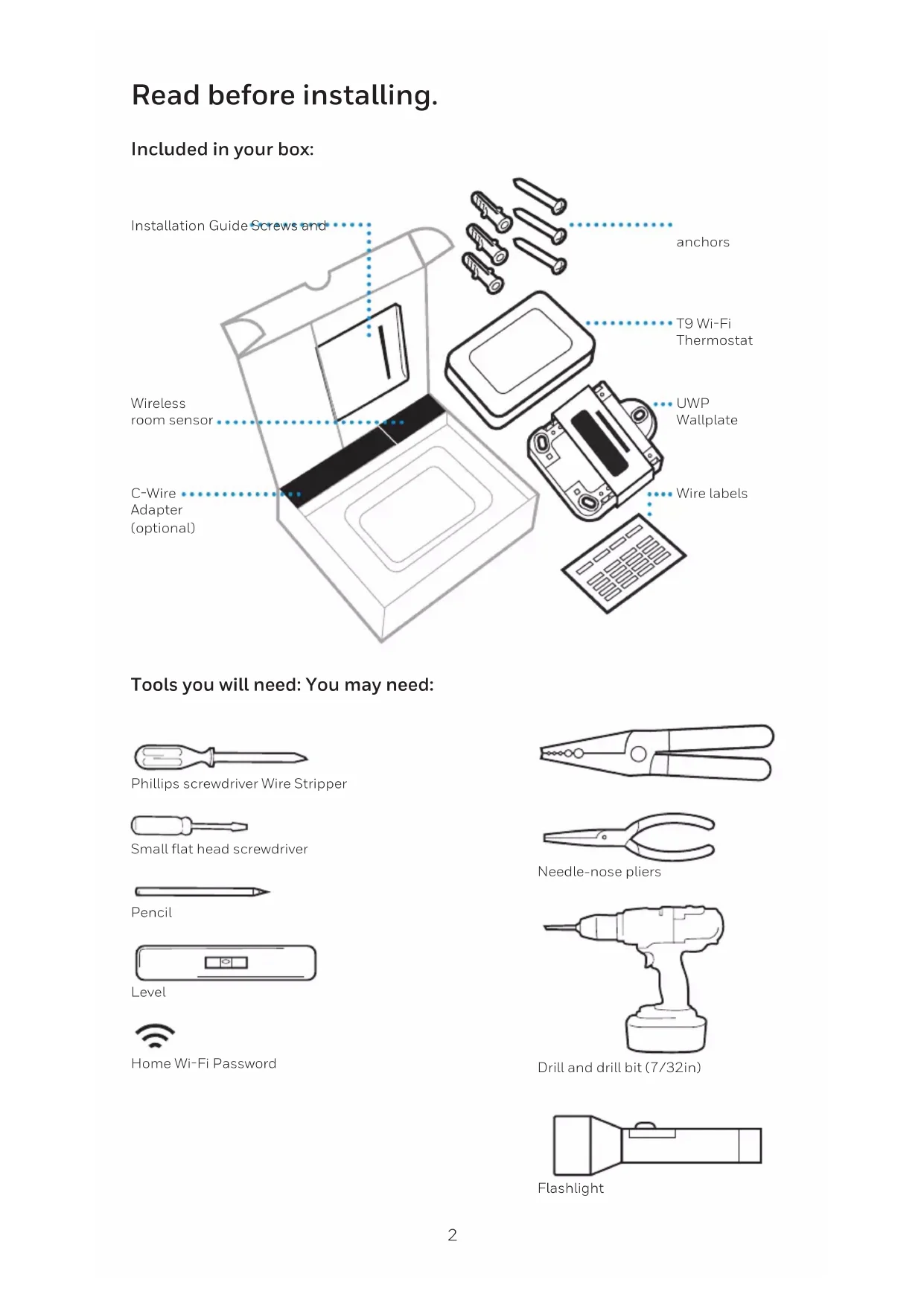
T9 THERMOSTAT Installation Guide Online Guides honeywellhome.com2 Read before installing. Included in your box: Tools you will need: You may need: Installation Guide Screws and anchors Phillips screwdriver Wire Stripper Home WiFi Password Wireless room sensor T9 WiFi Thermostat Small flat head screwdriver Needle-nose pliers CWire Adapter (optional) UWP Wallplate Pencil Drill and drill bit (7/32in) Wire labels Level Flashlight3 Compatibility Section For help, see: ONLINE GUIDES AND SUPPORT VIDEOS AT: honeywellhome.com/support SOCIAL Twitter: @Honeywell_Home, Facebook: Honeywell Home Or contact: EMAIL honeywellhomessupport@honeywell.com
- REQUIRED: A C-Wire (common wire) is needed for 24 VAC power. If you do not have a C-Wire, then a C-Wire Adapter is provided. This guide will help you determine if you have a C-Wire or will need to use the included C-Wire Adapter (Step 10). The C-Wire is a wire that originates from your heating and cooling system and needs to be connected to the C terminal on your thermostat. There is no universal color used to designate this type of wire.
CAUTION: ELECTRICAL HAZARD
Can cause electrical shock or equipment damage. Disconnect power before beginning installation.
CAUTION: EQUIPMENT DAMAGE HAZARD
Compressor protection is bypassed during testing. To prevent equipment damage, avoid cycling the compressor quickly.
CAUTION: MERCURY NOTICE
If this product is replacing a control that contains mercury in a sealed tube, do not place the old control in the trash. Contact your local waste management authority for instructions regarding recycling and proper disposal.
- Compatible with most heating, cooling, and heat pump systems
- Does not work with electric baseboard heat (120-240V)
- Does not work with millivolt systems
- Does not support S terminals for indoor and outdoor sensors
C-Wire C-Wire Adapter4 Removing your old thermostat You will need: Screwdriver, needle-nose pliers OFF
Turn off power To protect your equipment, turn off the power at the breaker box or switch that controls you heating and cooling equipment. Note: The thermostat off switch will not turn off the power to the equipment. Check that your system is off Change the temperature on your old thermostat so that your system starts heating or cooling. If you don’t hear or feel the system turn on within 5 minutes, the power is off. Note: If you have a digital thermostat that has a blank display, skip this step. Remove your existing thermostat from the wall plate On most thermostats, you can take off the thermostat by grasping and gently pulling. Some thermostats may have screws, buttons, or clasps. Do not remove any wires from your thermostat at this time!
Take a picture of your existing wall plate’s wiring In order to capture all of the letters next to the terminals, be sure to take multiple pictures from different angles. You may need to reference this image later. Remove any jumpers A jumper is used to connect two terminals. It may look like a small staple or a colored wire. Do not discard. Keep jumpers with your old wallplate. Label the wires Use the stickers provided with your new thermostat to label each wire on your existing wall plate. Do not label jumpers. Your new thermostat does not need jumpers. Do you have a line voltage system? Line voltage systems have thick black wires with wire nuts or are labeled high voltage (120V or higher). Your system is not compatible. Call 18557335465 to find a pro- installer in your area. Continue to the next step. Wire nut Thick black wire Example of a jumper Terminals Compatibility Check YES
Do you have a CWire? Look at the thermostat wiring checklist from Step 8, or the photo you took. Is the CTerminal checked? This means you will not need to install the included CWire Adapter. Skip to Installing Your New Thermostat (page 9). This means you don’t have a C-wire connected to your thermostat. Continue to next step. Compatibility Check YES
Disconnect the wires and remove the old wall plate You may need a screwdriver to release wires from terminals. Tip: Wrap the wires around a pencil to prevent them from falling in the wall. Write down the colors of the wires Check the boxes and write down the color of the wires connected to terminals that are coming from the wall. Check all that apply (not all will apply). Terminal Wire Color Terminal Wire Color
*A C-wire or CWire Power Adapter (included) is required. If there are wires in terminals that are not listed, you will need additional wiring support. Visit honeywellhome.com/support to find out more.
Do you have a zoning panel? You have a zoning panel if you have multiple thermostats and one furnace or heating system. CWire Adapter installation is more complicated on zoned systems. Call 18557335465 to find a pro-installer. Proceed to the next step. Do you have an unused wire? Look at the bundle of wires coming from the wall. Note: You may have to pull the bundle of wires out from the wall to find the unused wire. Continue to Step 13. Open the included C-Wire Adapter box and follow the instruction guide. Label unused wire Label your unused wire with the provided “C” sticker label. You may need to use a wire stripper to expose at least 1/4 inch of the wire. Note: If you have multiple unused wires, then label only one wire and make note of the color here: Compatibility Check YES YES
Only complete this section if you answered No to Step 10 Connecting Your Unused C-Wire You will need: Screwdriver, flashlight, wire strippers Thermostat Furnace Example of unused C-wire Zoning Panel
Go to your furnace or heating system This system is often located in your basement, attic or garage. Bring a flashlight and screwdriver.8
Remove cover from furnace or heating system Open the heating and cooling system’s cover to find the control board. You should see the same terminal labels that are on your thermostat. Note: You may need to unscrew the cover. The control board may be at the top or bottom. Connect the unused wire to the C-terminal Note: If there are existing wires in the C-terminal, make sure they are still connected to the C-terminal after connecting this wire. Find the other end of the unused wire Locate the bundle of wires that are the same as the ones at your thermostat. The unused wire should be the same color as the one near your existing thermostat. See Step 13 for the color you wrote down. Close the cover to the furnace or heating system Be sure the cover is completely closed. Some systems will not power up if the cover isn’t fully closed. You’ve connected the C-wire. You will NOT need to use the included CWire Adapter.
Go back to the wall where you are installing your thermostat and continue to “Installing Your New Thermostat” on the next page.9 Installing Your New Thermostat You will need: Level, pencil, drill and a 7/32in drill bit Thermostat Screws UWP wallplate WallAnchors10
Position wall plate Pull open the wall plate that was included with your new thermostat. Insert the bundle of wires through the back of the wall plate. Make sure at least 1/4-inch of each wire is exposed for easy insertion into the wire terminals. Insert recommended wall anchors It is recommended that you use the wall anchors included in the box to mount your thermostat. You can use the wall plate to mark where you want to place the wall anchors. a) Level the wall plate b) Mark the location of the wall anchors using a pencil c) Remove the wall plate d) Drill the holes using a 7/32” drill bit e) Insert the wall anchors f) Make sure the anchors are flush with the wall g) Reposition the wall plate on wall
Connect remaining wires from Step 8 Push down on the tabs to put the wires into the inner holes of their corresponding terminals on the wall plate (one wire per terminal) until it is firmly in place. Gently tug on the wires to verify they are secure. Tip: If you need to release the wires again, push down the terminal tabs on the sides of the wall plate.
right R-switch is in the up position.
R-switch to the down position.
Determine Correct RSwitch Position and Insert R-wire or wires Set the R-switch up or down based on your wiring notes in Step 8. Insert wires into the inner holes of the terminals on the wall plate. The tabs will stay down once the wire is inserted. If you have 1 RWire (R, RC, RH): If you have 2 RWires (R, RC, RH):
R-wire (R, Rh or Rc) into R-terminal.
wire into Rc- terminal.
Close the door and mount the wall plate Mount the wall plate using the provided screws. Install all three screws for a secure fit on your wall. Tip: Prior to tightening the screws, use a level to ensure the wall plate is level. Attach your thermostat Align the thermostat on the wall plate and firmly snap into place. Turn power back on Turn on the switch that controls your heating and cooling system. Complete setup on the thermostat Remove the protective film and confirm that your thermostat reads “Welcome.” If you do not see this, visit honeywellhome.com/support or call 1-855-733-5465 for more help. Go back to your circuit breaker box. Go back to your thermostat. OFF
Breaker box Switch Welcome!13 Getting the most from the T9 Wi-Fi Thermostat Prioritize Rooms Prioritize a specific room or multiple rooms, or let comfort follow your move using built-in motion detection. Control on the Go Adjust your thermostat from anywhere using your tablet or smartphone. Save Energy With geofencing, you can save money on the most expensive part of your energy bill while you’re away. Simple Installation The thermostat automatically programs itself. Just answer a few simple questions and you’ll be up and running in no time. Whole-Home Range With up to a 200-foot* range, 20 sensors with temperature, humidity, and occupancy detection can connect to your thermostat from throughout your home. *Range can vary based on home construction, wireless interference, and other factors. Know Your Home Is Safe Get customizable alerts on your mobile device such as when the basement is so cold a pipe could burst, or if the baby’s room is getting too hot.14 Using your thermostat The screen will wake up by pressing the center area of the displayed temperature.
18% Indoor Temperature Displays the current indoor temperature. Adjust Temperature Touch the up and down arrows to set your desired temperature. Current Priority Displays the type of priority and number of rooms being prioritized. Extend your thermostat’s reach with additional Wireless Room Sensors. Menu Contains features such as mode, fan, schedule, priority, and other thermostat settings. Indoor Humidity Displays the current indoor humidity. Desired Temperature Displays the desired temperature.15 Using Priority Priority creates an average temperature in your home based on specific rooms. This allows you to prioritize comfort where you want it. Selected Rooms Rooms you manually select create an average temperature in your home. Unselected Room Will not contribute to the average temperature. Selected Room Will contribute to the average temperature.
Active Rooms Rooms with detected motion are automatically selected to create an average temperature in your home. Room without Activity No motion is detected. Will not contribute to the average temperature. Room with Activity Motion is detected. Will contribute to the average temperature.16 Troubleshooting If you have difficulty with your thermostat, please try the following suggestions. Most problems can be corrected quickly and easily. Display is blank • Check circuit breaker and reset if necessary.
- Make sure power switch for heating & cooling system is on.
- Make sure furnace door is closed securely.
- Make sure the C wire is connected. Heating or cooling system does not respond
- Press Menu > System Mode > Heat > Done to set the system to Heat mode. Make sure the desired temperature is higher than the indoor temperature.
- Press Menu > System Mode > Cool > Done to set the system to Cool mode. Make sure the desired temperature is lower than the indoor temperature.
- Check circuit breaker and reset if necessary.
- Make sure power switch for heating & cooling system is on.
- Make sure furnace door is closed securely.
- Wait 5 minutes for the system to respond. Temperature settings do not change Make sure desired temperature is within acceptable ranges:
- Heat: 40 °F to 90 °F (4.5 °C to 32.0 °C)
- Cool: 50 °F to 99 °F (10.0 °C to 37.0 °C) Aux heat runs in cooling
- For heat pump systems, verify there is not a wire attached to W on the UWP. Cool runs with a call for heat
- For heat pump systems, verify there is not a wire attached to W the UWP. Sensor will not connect
- Press and hold Connect on the wireless sensor for 15 seconds. The LED will turn Amber. Return to the thermostat menu and press Menu > Devices and Sensors. Follow the on- screen instructions to add the sensor. The product should not be disposed of with other household waste. Check for the nearest authorized collection centers or authorized recyclers. The correct disposal of end-of-life equipment will help prevent potential negative consequences for the environment and human health.17 Resideo warrants this product, excluding battery, to be free from defects in workmanship or materials, under normal use and service, for a period of two (2) years from the date of first purchase by the original purchaser. If at any time during the warranty period the product is determined to be defective due to workmanship or materials, Resideo shall repair or replace it (at Resideo’s option). If the product is defective, (i) return it, with a bill of sale or other dated proof of purchase, to the place from which you purchased it; or (ii) call Resideo Customer Care at 1-800-633-3991. Customer Care will make the determination whether the product should be returned to the following address: Resideo Return Goods, Dock 4 MN10-3860, 1885 Douglas Dr. N., Golden Valley, MN 55422, or whether a replacement product can be sent to you. This warranty does not cover removal or reinstallation costs. This warranty shall not apply if it is shown by Resideo that the defect was caused by damage which occurred while the product was in the possession of a consumer. Resideo’s sole responsibility shall be to repair or replace the product within the terms stated above. RESIDEO SHALL NOT BE LIABLE FOR ANY LOSS OR DAMAGE OF ANY KIND, INCLUDING ANY INCIDENTAL OR CONSEQUENTIAL DAMAGES RESULTING, DIRECTLY OR INDIRECTLY, FROM ANY BREACH OF ANY WARRANTY, EXPRESS OR IMPLIED, OR ANY OTHER FAILURE OF THIS PRODUCT. Some states do not allow the exclusion or limitation of incidental or consequential damages, so this limitation may not apply to you. THIS WARRANTY IS THE ONLY EXPRESS WARRANTY RESIDEO MAKES ON THIS PRODUCT. THE DURATION OF ANY IMPLIED WARRANTIES, INCLUDING THE WARRANTIES OF MERCHANTABILITY AND FITNESS FOR A PARTICULAR PURPOSE, IS HEREBY LIMITED TO THE TWO YEAR DURATION OF THIS WARRANTY. Some states do not allow limitations on how long an implied warranty lasts, so the above limitation may not apply to you. This warranty gives you specific legal rights, and you may have other rights which vary from state to state. If you have any questions concerning this warranty, please write Resideo Customer Care, 1985 Douglas Dr, Golden Valley, MN 55422 or call 1-800-633-3991. 2-year limited warrantyResideo Inc., 1985 Douglas Drive North Golden Valley, MN 55422 www.resideo.com ©2018 Resideo Technologies, Inc. All rights reserved. The Honeywell Home trademark is used under license from Honeywell International Inc. 33-00421EF—01 M.S. 11-18 Printed in U.S.A. 33-00421EF-01Guides en ligne honeywellhome.com THERMOSTAT T9 Guide d’installation2 Lire avant l’installation. Contenu de l’emballage : Outils nécessaires : Vous pourriez avoir besoin de ces outils : Guide d’installation Vis et ancrages Tournevis cruciforme Pinces à dénuder Mot de passe Wi-Fi du réseau domestique Détecteur de pièce sans fil Thermostat Wi-Fi T9 Petit tournevis à tête plate Pinces à bec long Adaptateur pour fil C (en option) Plaque murale UWP Crayon Perceuse et mèches (7/32 po) Étiquettes pour fils Niveau à bulle Lampe de poche3 Section sur la compatibilité Pour obtenir de l’aide, consultez : GUIDES EN LIGNE ET VIDÉOS DE SOUTIEN À L’ADRESSE : honeywellhome.com/support RÉSEAUX SOCIAUX Twitter: @Honeywell_Home, Facebook: Honeywell Home Ou contactez : COURRIEL honeywellhomessupport@honeywell.com