
EVCA25 - Industrial sensor IFM - Free user manual and instructions
Find the device manual for free EVCA25 IFM in PDF.


User questions about EVCA25 IFM
0 question about this device. Answer the ones you know or ask your own.
Ask a new question about this device
Download the instructions for your Industrial sensor in PDF format for free! Find your manual EVCA25 - IFM and take your electronic device back in hand. On this page are published all the documents necessary for the use of your device. EVCA25 by IFM.
USER MANUAL EVCA25 IFM
Installation instruction
ecolink / ecolink fast connect

ecolink connector


Fig. 1: ecolink connector installation
▶ Connect the connector with the device (A).
▶ When doing so, ensure that the coding is positioned correctly.
For M12 connectors, the arrow indicates the position of the keyway (a).
▶ Tighten the coupling nut by hand to ensure the specified protection rating (B).
(Optional) For use in harsh environments and with increased shock and vibration resistance:
▶ Tighten the coupling nut one notch further using a spanner. When doing so, do not exceed the maximum tightening torque (→ data sheet) of the counterpart.
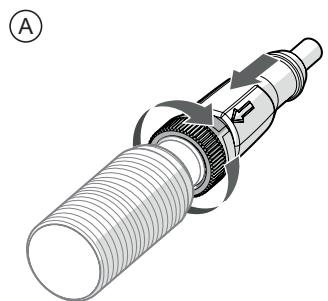

Fig. 2: Demounting of the ecolink connector
▶ Press the connector against the unit and simultaneously loosen the coupling nut (A).
▶ Disconnect the connector from the device (B).
ecolink fast connect

ATTENTION
Only use connectors with threaded sleeves.
▷ Using unsuitable connectors may damage the terminals.


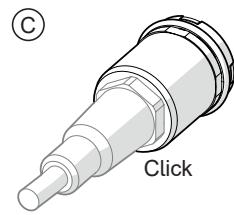
Fig. 3: ecolink Fast Connect installation
▶ Do not use unsuitable connectors (A).
▶ Press the threaded sleeve of the connector into the device (B).
▶ Push past the spring resistance until the end position is reached (C).
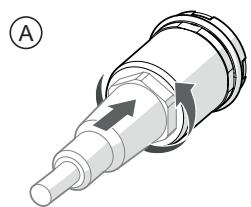

Fig. 4: Demouting of the ecolink fast connect
▶ Press the connector against the unit and simultaneously loosen the coupling nut (A).
▶ Disconnect the connector from the device (B).

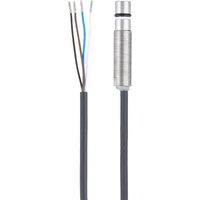


Brand : IFM
Model : EVCA25
Category : Industrial sensor