
Toasty One - Toaster TINECO - Free user manual and instructions
Find the device manual for free Toasty One TINECO in PDF.



| Product Type | 2-Slot Toaster |
| Brand | Tineco |
| Model | Toasty One (TS10******) |
| Power Supply | 120 V ~ 60 Hz, 1200 W |
| Dimensions (approx.) | 30 x 20 x 20 cm |
| Weight (approx.) | 2 kg |
| Capacity | 2 slices of bread (max. 2.5 cm thick) |
| Toasting Modes | Smart Mode (browning sensor) and Manual Mode (4 levels: Fresh, Frozen, Reheat) |
| Settings | Continuous browning slider in Smart Mode; 4 levels in Manual Mode |
| Special Functions | Independent or combined slot control, preference memory (Favorite), language selection (5 languages) |
| Screen | Touchscreen with progress display |
| Safety | Auto-off after 10 minutes of inactivity, screen lock after 30 seconds, polarized plug, short cord |
| Maintenance | Removable crumb tray, included cleaning tool, wipe exterior with damp cloth |
| Spare Parts | Crumb tray, cleaning tool (available at tineco.com) |
| Warranty | 1-year limited (material and workmanship defects) |
| General Information | Household use only, do not immerse, do not use unattended |
Frequently Asked Questions - Toasty One TINECO
User questions about Toasty One TINECO
0 question about this device. Answer the ones you know or ask your own.
Ask a new question about this device
Download the instructions for your Toaster in PDF format for free! Find your manual Toasty One - TINECO and take your electronic device back in hand. On this page are published all the documents necessary for the use of your device. Toasty One by TINECO.
USER MANUAL Toasty One TINECO
natural_image
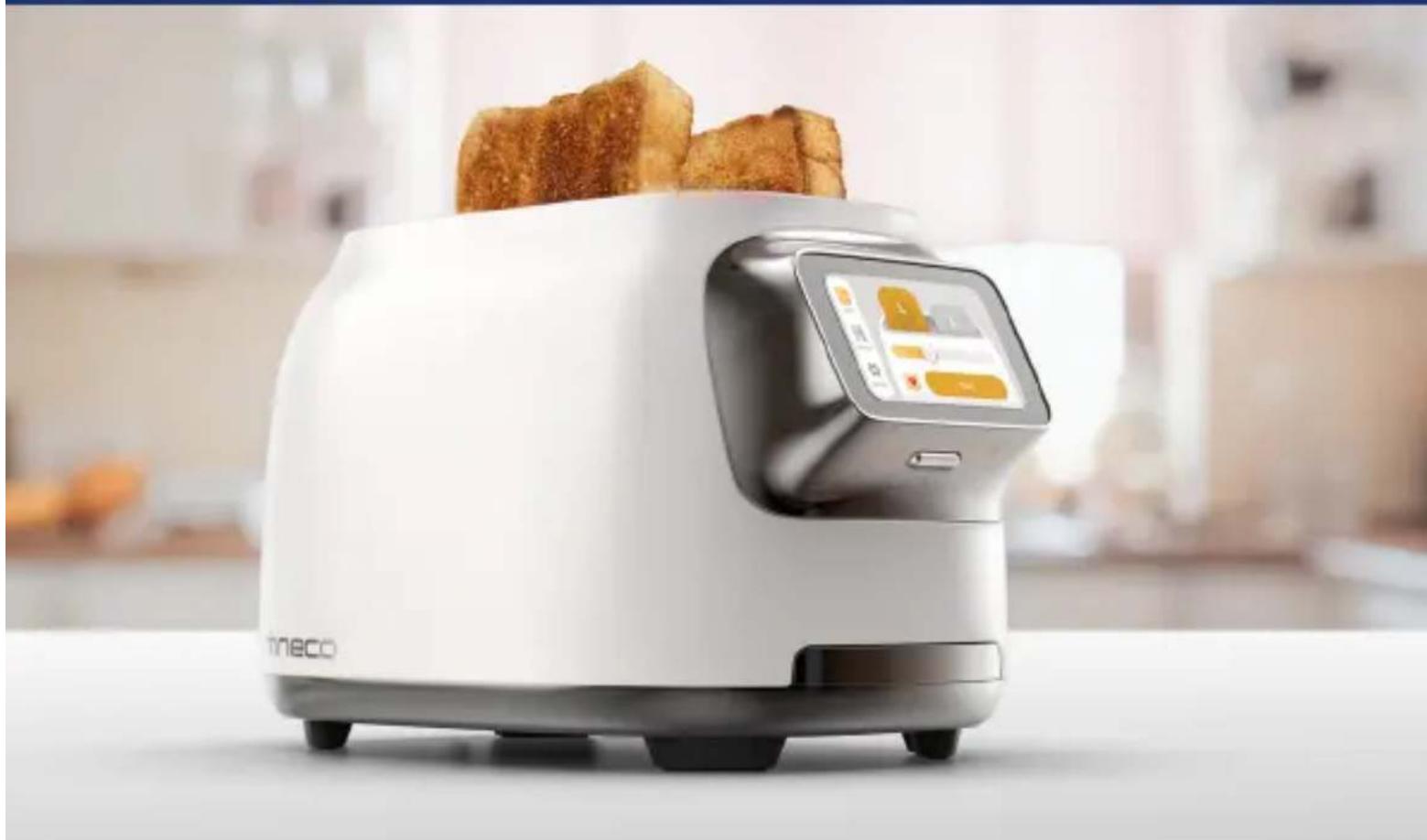
Modern white and black kitchen toaster with digital display showing orange buttons (no visible text or symbols)*Actual product may differ from illustration.
TOASTY ONE
TOAST YOUR WAY, EVERY SLICE.
natural_image
White modern kitchen grater with digital display showing two fried food items, in a kitchen setting (no visible text or symbols)
Easily Slide:To Your Preferred Level Snider Level

natural_image
Grid of ten square panels with warm tones and no visible text or symbolsCONTENTS
Important Safety Instructions.... 2
Specifications 7
Overview 8
Operation 9
Maintenance 14
Warranty 15
Important Safety Instructions
Household use only.
When using an electrical appliance, basic precautions should always be followed, including the following:
-
READ ALL INSTRUCTIONS BEFORE USING (THIS APPLIANCE). Failure to follow the warnings and instructions may result in electric shock, fire and/or serious injury.
-
Make sure that your outlet voltage corresponds to the voltage stated on the rating label of the toaster.
-
Do not touch hot surface. Use power button or touch screen only.
-
To protect against electrical shock, do not immerse cord, plug, or any part of the toaster in water or other liquid.
-
Close attention is necessary when used by or near children, pets or plants.
-
Unplug unit from outlet when not in use and before cleaning. Allow to cool before putting on or taking off parts.
-
Do not operate any appliance with a damaged cord or plug, or in abnormal state. If its main cord is damaged, it must be replaced by the manufacturer, the nearest service agent or a qualified person.
-
Do not let the cord hang over edge of table or counter, or touch hot surface.
-
Do not use the appliance for other than its intended use.
-
Oversize food, metal foil packages or utensils must not be inserted in the toaster as they may cause fire or electric shock.
- The use of accessory attachments not recommended by the appliance manufacturer may cause injuries.
- Don't attempt to dislodge food when toaster is in operation.
- Be sure to take the bread out carefully after toasting so as to avoid injuries.
- This appliance can be used by children aged from 8 years and above and persons with reduced physical, sensory or mental capabilities or lack of experience and knowledge if they have been given supervision or instruction concerning use of the appliance in a safe way and understand the hazards involved. Children shall not play with the appliance. Cleaning and user maintenance shall not be made by children unless they are older than 8 and supervised.
- Keep the appliance and its cord out of reach of children less than 8 years.
- Warning: if toast of small bread slices less than 85mm length, you must pay attention to the potential risk of burning when taking out the slices.
- The appliance is not intended to be operated by means of an external timer or separate remote-control system.
- Don't use the appliance outdoors.
- The hot surface warning symbol marked on the appliance means that the appliance may be hot during use.
- To disconnect, turn any control to "off", then remove plug from wall outlet.
-
When heating toaster pastries, always use the lightest toast color setting.
-
Do not operate unattended.
- A fire may occur if toasters are covered or touching flammable material, including curtains, draperies, walls, and the like, when in operation.
- Do not place on or near a hot gas or electric burner, or in a heated oven.
- Extreme caution must be used when moving an appliance containing hot oil or other hot liquids.
⚠ WARNING! Shock Hazard
Your toaster is fitted with a short power supply cord to reduce the risk resulting from becoming entangled in or tripping over a longer cord. Longer detachable power-supply cords or extension cords are available and may be used if care is exercised.
If a longer extension cord is used, the marked electrical rating of the extension cord must be equal to or greater than the rating of the appliance. Care must also be taken to arrange the extension cord so that it will not drape over the countertop or tabletop where it can be pulled on by children or accidentally tripped over, and if the appliance is of the grounded type, the cord set of extension cord should be a grounding-type 3-wire cord.
To avoid electrical circuit overload, do not use another high-wattage appliance on the same circuit with this appliance.
This appliance has a polarized plug (one blade is wider than the other). To reduce the risk of electric shock, this plug is intended to fit into a polarized outlet only one way. If the plug does not fit fully into the outlet, reverse the plug. If it still does not fit, contact a qualified electrician. Do not attempt to modify the plug in any way.
Note: This toaster is electronically controlled and should be used with 120-volt power outlet.
ADDITIONAL SAFEGUARD INFORMATION
DO
• Always use toaster in the upright position.
- Before each use, make sure that the crumb tray is in its proper location.
- Regularly remove crumbs from the crumb tray.
- If food jams in the toaster slots while toasting, unplug from the outlet or turn off the power and wait for the toaster to cool before removing the food.
- Unplug the toaster or turn off the power if it shows any working abnormalities.
DO NOT
- Do not leave the toaster unattended during operation.
- Do not immerse toaster in water or run water into the toaster.
- Do not place the toaster in the dishwasher.
- Do not touch hot surfaces of the toaster.
- Do not transport the toaster by grasping the toaster slots.
- Do not put body parts in the toaster slots.
- Do not attempt to toast foods with ingredients that melt or drip in the toaster.
- Do not toast torn slices of bread.
- Do not place buttered bread or wrapped food into the toaster.
-
Do not toast small-size breads, mini-baguettes, breadsticks, etc. in this toaster.
-
Do not toast foods thicker than one inch in the toasting slots.
- Do not cover this appliance while in use.
- Do not use this appliance as source of heating or drying.
- Do not use this toaster near any flammable materials such as curtains, under shelving or wall cupboards, etc.
- Do not put paper, cardboard or plastic, or cloth in, on or under the toaster.
- Do not operate toaster under or around any flammable materials.
- Do not use the toaster for cooking, grilling or defrosting frozen food other than recommended food products (bread, bagel, waffle, English muffin, toaster pastry).
- Do not unplug appliance by pulling on cord. Instead, grasp plug and pull to disconnect.
- Do not wrap cord around toaster.
- Do not insert non-food objects into the toaster.
- Do not toast food items that are not recommended for this toaster. Recommended food items are bread, bagels, waffles, English muffins and toaster pastries only. Placing other food items in the toaster can cause a fire.
SAVE THESE INSTRUCTIONS
This product has been designed for household use only. Any professional use, inappropriate use or failure to comply with the instructions will void the warranty.
TINECO INTELLIGENT, INC.
1700 WESTLAKE AVENUE N., SUITE 200, SEATTLE, WA,
98109, USA
WWW.TINECO.COM
1-855-292-8864
Specifications
| Product TOASTY ONE SERIES | |
| Model TS10****** | |
| Voltage 120V~ 60Hz | 1200W |
Overview
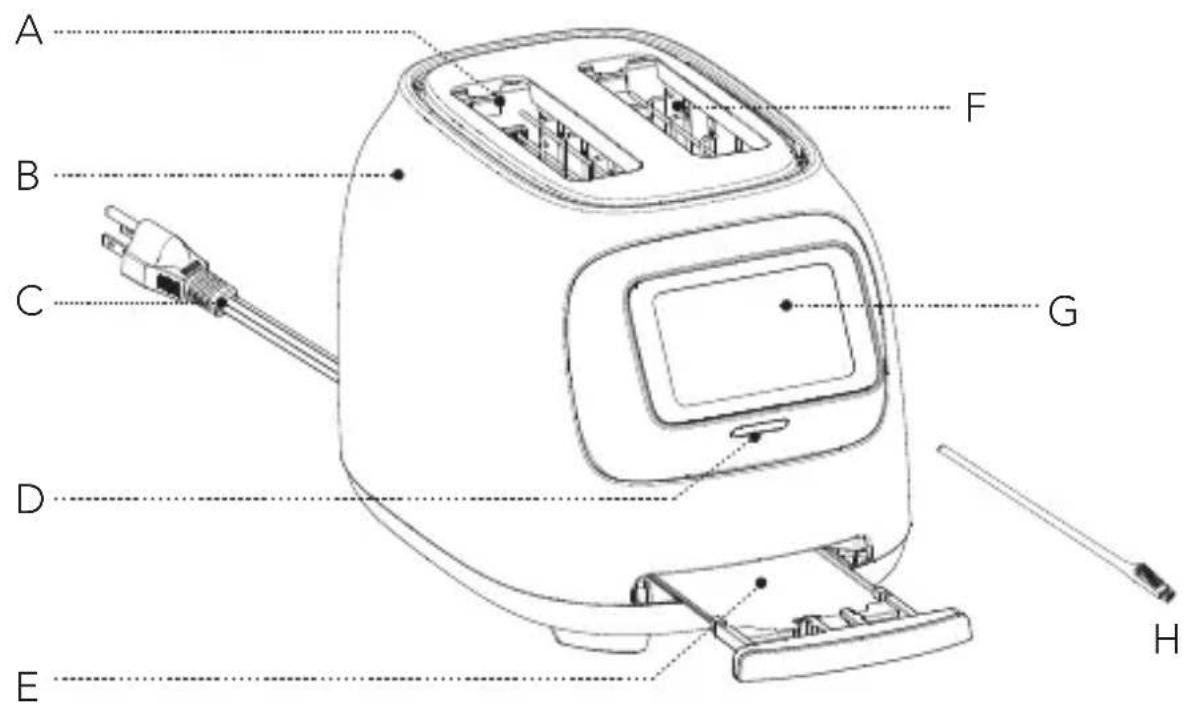
A. Left toaster slot
E. Removable crumb tray
B. Housing
F. Right toaster slot
C. Plug
G. Touch screen
D. Power button
H. Cleaning tool
Power Button
- Press the button to turn on the appliance.
- Hold the button for 3 seconds to turn off.
- The appliance will lock the screen if no operation in 30 seconds.
- The appliance will shut down if no operation in 10 minutes.
Operation
Preparing for Use
Before first use, remove any packaging material attached to your toaster, including the cardboard on the toaster slots and the adhesive cling on the touchscreen. Place the toaster on a countertop and plug it into a grounded power outlet.
Note:
- The toaster may emit a thin smoke or distinct odor when used for the first time. This is normal and not detrimental to the performance of the toaster and will not occur after several uses.
- It is suggested to operate according to the below steps without bread, then let the toaster cool down and begin toasting the first slice.
Mode Description
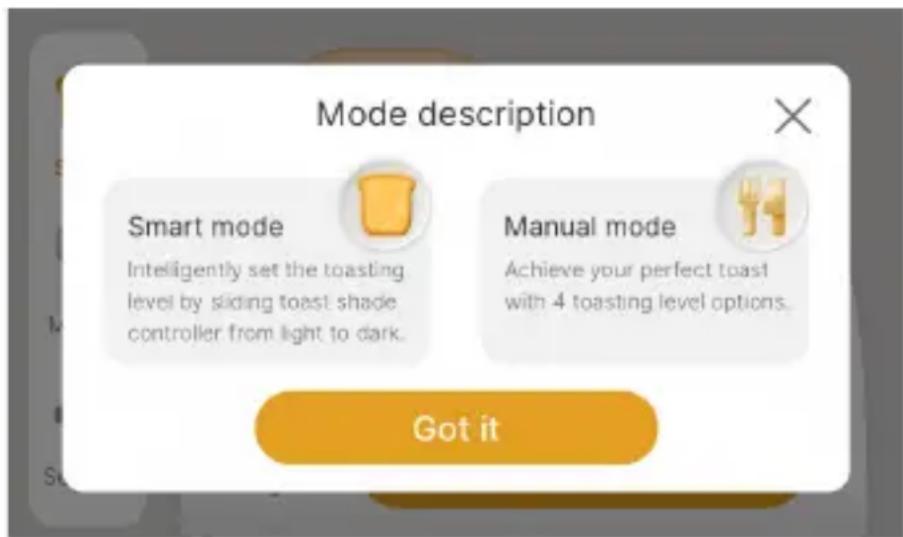
- Smart mode
Only for toasting bread slices. Smart sensor identifies the bread brownness level, the left and right slots control the toasting color and degree, and it can also save personal toasting preference.
- Manual mode
Recommended for toasting bagels/waffles/muffins and other types of bread, it has 4 toasting levels with Frozen, Fresh and Reheat modules.
Introduction of Smart Mode
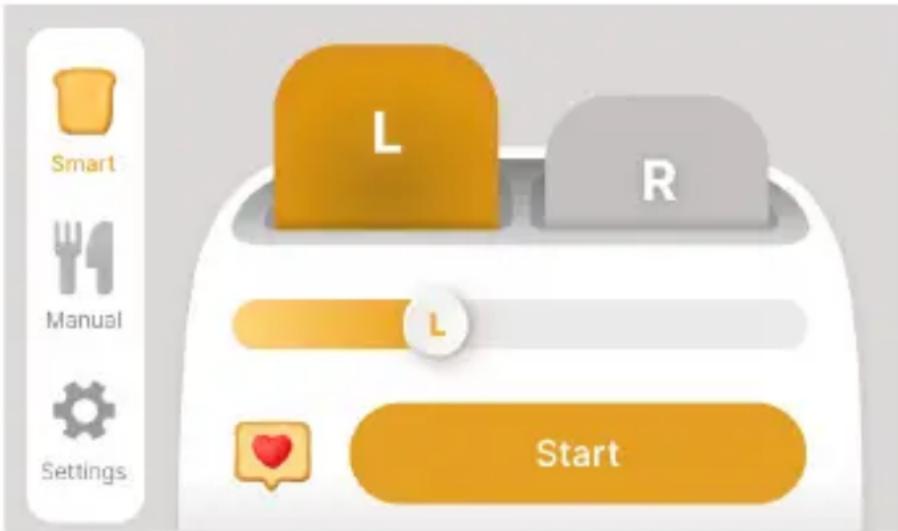
- Insert bread slices (two slices at most each time) into the bread slot. Only regular slices can be inserted.
Note:
- Make sure the crumb tray is positioned in place before using.
-
Place the toast right in the middle of the slot.
-
Choose the slot you want to set.
- Set toast shade control slider to your desired color. From left to right, the color is from light to dark. The bread slice can be toasted to golden color at the middle position.
- When the setup is complete, tap Start to begin toasting.
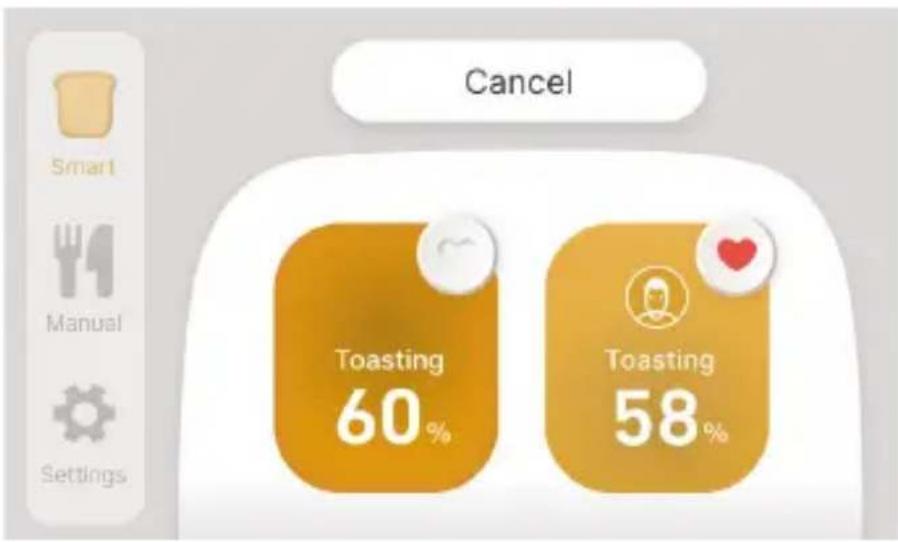
pie
| Category | Value | | ---------- | ------ | | Toasting | 60% | | Toasting | 58% |- The baking progress will be displayed on the screen, once the bread has been toasted to the preset color, the bread will automatically pop up.
- During toasting, you may also observe the toasting color. If it is satisfactory, you can tap Cancel to stop at any time.
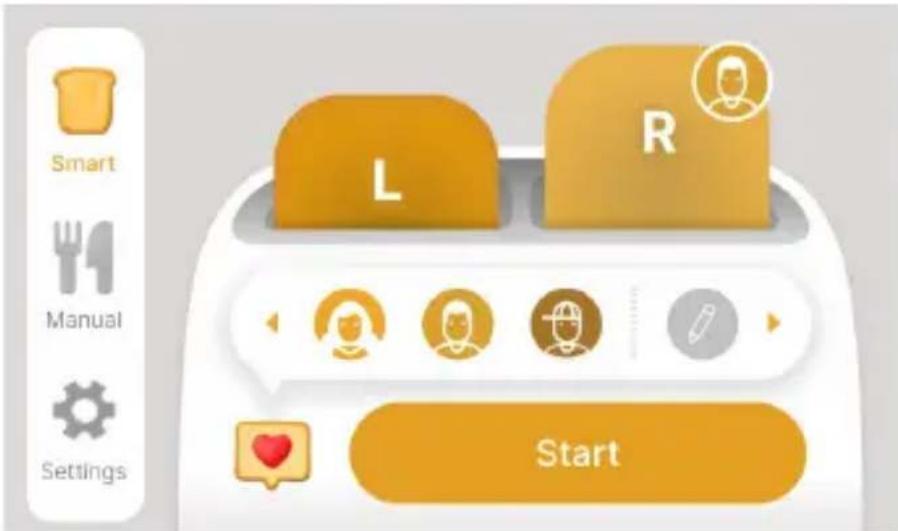
- The toaster can save your toasting preferences in Smart Mode, and when you use it next time, you can simply select the Favorites icon to toast the bread slices.
Introduction of Manual Mode
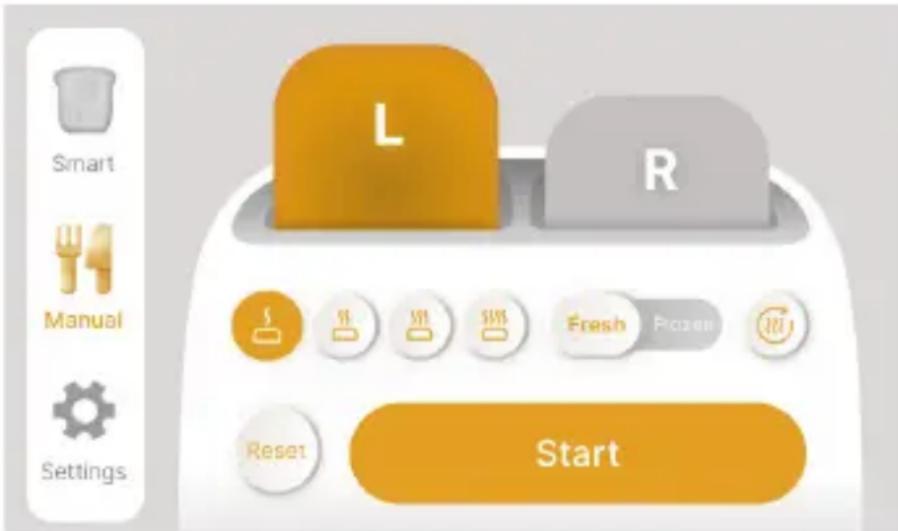
Place your food in the slots, select toasting functions and desired level of toasting.
- Fresh – for fresh foods or foods you keep on the counter or fridge.
- Frozen – for foods you keep in the freezer.
- Reheat – reheating food that has been toasted but cooled down, completed in 30 seconds.

CAUTION:
- If toaster starts to smoke, tap Cancel or power off immediately.
- Avoid toasting the food with extremely runny ingredients such as butter.
- The bread slots are only suitable for baking ordinary slices of bread or recommended types of bread.
- Be sure not to damage the internal mechanism or heating elements when removing bread.
- In order to achieve uniform color, we recommend that you wait at least 30s between each toasting so that color control can reset automatically.
How to Personalize Your Toaster

Two personalization functions: Manage toaster slots and Change language
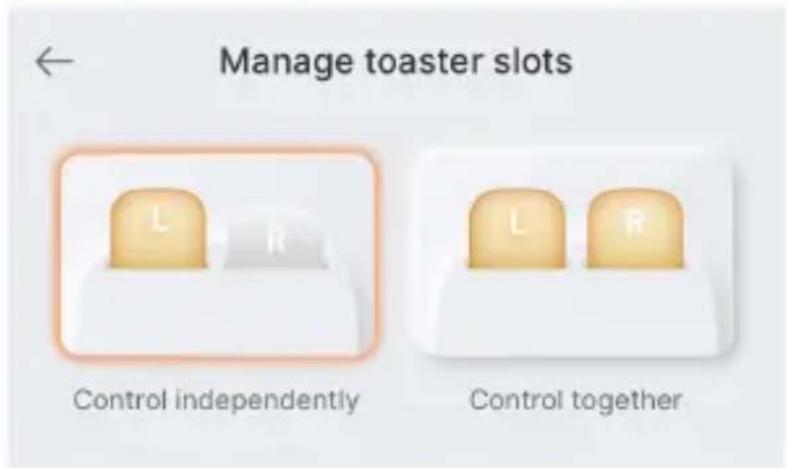
The left and right slots of the toaster can be controlled independently or together.
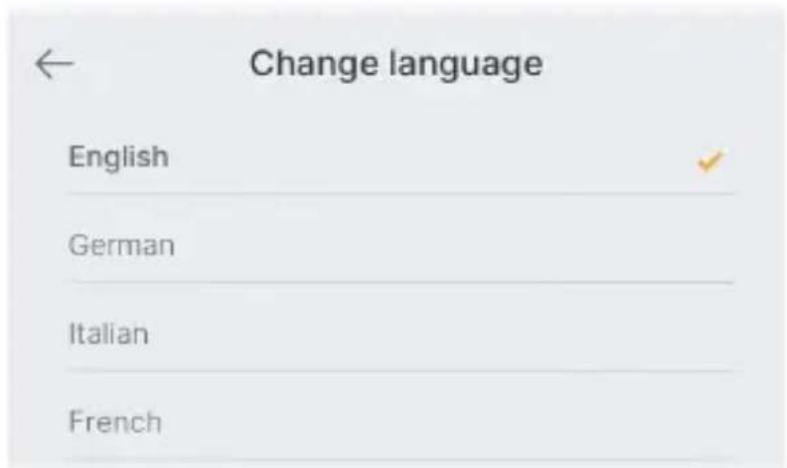
There are 5 languages for you to choose, you can also choose your preferred one.
Maintenance
natural_image
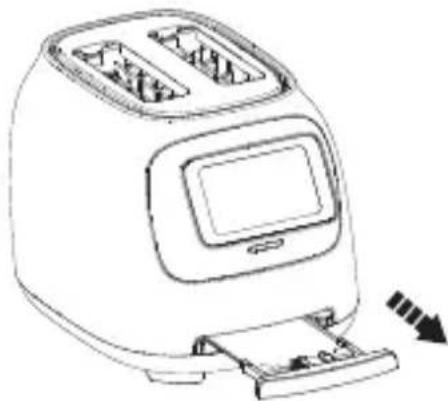
Line drawing of a modern toaster with digital display and scroll (no text or symbols)To clean any crumbs from the toaster, remove the crumb tray by pulling it outwards. replace the crumb tray by sliding it inwards until it locks into position. And empty the crumb tray before using the toaster again.
Note: If toaster is used frequently, accumulated bread crumbs should be removed at least once a week.
natural_image
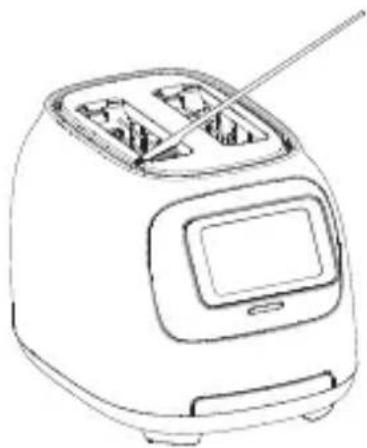
Line drawing of a modern toaster with digital display and antenna (no text or symbols)Use the cleaning tool provided by Tineco to clean any crumbs left in the toaster. Do not use sharp tools that may damage the appliance. Unplug then turn the toaster upside down and shake gently to remove any crumb residue.
Note:
- Do not use abrasive cleansers. Wipe the outside with soft dry cloth, never use metal polish. Simply wipe the exterior with a clean damp cloth and dry thoroughly. Apply any cleansing agent to a cloth, not to the toaster, before cleaning.
- Unplug the toaster from the power outlet and allow the toaster to cool completely before storing. For long-term storage, we recommend returning your toaster to its original packaging.
- Any other servicing should be performed by an authorized service or manufacturer representative. If you are experiencing problems with your toaster, please visit website www.tineco.com for further support.
Warranty
1-YEAR LIMITED WARRANTY
- Only applies to purchases made from authorized retailers of Tineco.
- Is subject to the adherence of the requirements outlined in this instruction manual, and is subject to further conditions outlined below.
- This warranty is governed by and construed under the laws of the country in which the purchase took place. We provide 1-year warranty or a warranty period as stipulated by applicable local law, whichever is longer.
WHAT IS COVERED?
- Your Tineco appliance has a 1-year warranty against original defects in material and workmanship, when used for private household purposes in accordance with the Tineco Instruction Manual.
- This warranty provides, at no extra cost to you, all labor and parts necessary to ensure your appliance is in proper operating condition during the warranty period.
- This warranty will only be valid if the appliance is used in the country in which it was sold.
WHAT IS NOT COVERED?
Tineco shall not be liable for costs, damages or repairs incurred as a result of:
- Appliances purchased from an unauthorized dealer.
- Careless operation or handling, misuse, abuse and/or lack of maintenance or use not in accordance with the Tineco Instruction Manual.
- Use of the product for anything other than as a toaster.
- Use of parts not in accordance with the Tineco Instruction Manual.
- Use of parts and accessories other than those produced or recommended by Tineco.
- External factors unrelated to product quality and use, such as weather, modifications, accidents, electrical outages, power surges or acts of God.
• Repairs or alterations carried out by unauthorized parties or agents. - Normal wear and tear (e.g. crumb tray etc.).
WARRANTY LIMITATIONS
- Any implied warranties relating to your appliance including but not limited to warranty of merchantability or warranty of fitness for a particular purpose, are limited to the duration of this warranty.
- This limited warranty gives you specific legal rights. You may also have other rights which vary by region.
- Manufacturer's warranties may not apply in all cases, depending on factors such as use of the product, where the product was purchased, or who you purchased the product from. Please review the warranty carefully, and contact the manufacturer if you have any questions.
WARRANTY SERVICE
Register: We highly recommend that upon purchase, you register your appliance on the Tineco official website (www.tineco.com) and enjoy exclusive benefits. To register, please enter the whole serial number.
Failure to register your product won't diminish your warranty rights.
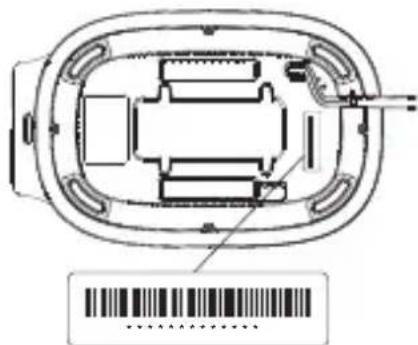
How to Claim: Please retain your proof of purchase. To make a claim under our Limited Warranty, you need to provide your serial number and the original purchase receipt with the purchase date and order number on it. All work will be carried out by Tineco or an authorized agent.
Any replaced defective parts will become the property of Tineco.
Service under this warranty will not extend the period of this warranty.
Contact our Customer Service
Hotline: 1-855-292-8864
or Visit Tineco website
www.tineco.com
for expert customer service.
CONTENIDO
natural_image
Line drawing of a modern toaster with digital display and cooling mechanism (no text or symbols)natural_image
Line drawing of a toaster with digital display and keyboard (no text or symbols)bar
| Category | Value (%) | |---|---| | Grillage | 60 | | Grillage | 58 |natural_image
Line drawing of a modern toaster with digital display and scroll (no text or symbols)natural_image
Line drawing of a toaster with digital display and keyboard (no text or symbols)Contact us - We'll get back to you within 1 business day.


- TOASTY ONE
- TOAST YOUR WAY, EVERY SLICE.
- CONTENTS
- Important Safety Instructions
- Household use only.
- ⚠ WARNING! Shock Hazard
- ADDITIONAL SAFEGUARD INFORMATION
- DO
- DO NOT
- SAVE THESE INSTRUCTIONS
- Specifications
- Overview
- Power Button
- Operation
- Preparing for Use
- Note:
- Mode Description
- - Smart mode
- - Manual mode
- Introduction of Smart Mode
- Introduction of Manual Mode
- CAUTION:
- How to Personalize Your Toaster
- Maintenance
- Warranty
- 1-YEAR LIMITED WARRANTY
- WHAT IS COVERED?
- WHAT IS NOT COVERED?
- WARRANTY LIMITATIONS
- WARRANTY SERVICE
- CONTENIDO
Brand : TINECO
Model : Toasty One
Category : Toaster