NV7B6699ACN - Oven SAMSUNG - Free user manual and instructions
Find the device manual for free NV7B6699ACN SAMSUNG in PDF.



Pick your language and provide your email: we'll send you a specifically translated version.
| Product Type | Built-in Oven |
| Brand | Samsung |
| Model | NV7B6699ACN |
| Dimensions (W x H x D) | 595 x 596 x 570 mm (appliance); 560 x 579 x 549 mm (recess) |
| Weight | 44.2 kg |
| Volume | 76 liters |
| Power Supply | 230-240 V ~50 Hz, 3650-3950 W |
| Energy Class | A+ |
| Conventional Consumption | 1.05 kWh/cycle |
| Fan Forced Consumption | 0.71 kWh/cycle |
| Cooking Modes | Convection, Conventional, Grill, Steam, Air Fry, Air Sous Vide, Dual, Meat Probe |
| Special Modes | Keep Warm, Defrost, Ferment, Pizza, Slow Cook, Dry |
| Cleaning | Pyrolysis, Steam Cleaning, Descaling |
| Safety | Child Lock, Soft Close, Intelligent Safety (stops if door open) |
| Lighting | Upper LED (non-user replaceable); side halogen bulb (25-40 W, 220-240 V) |
| Included Accessories | Grid, Drip Tray, Baking Tray, Meat Probe, Steamer, Air Fry Tray, Divider |
| Connectivity | Wi-Fi (2.4/5 GHz), SmartThings, Integrated Camera |
| Maximum Connected Power | 3650-3950 W |
| Door Type | Flex Door (partial or full opening), Soft Close |
| Repairability | LED lamp not user-replaceable; halogen bulb replaceable; other parts: contact Samsung after-sales service |
Frequently Asked Questions - NV7B6699ACN SAMSUNG
How do I clean the oven using the pyrolysis function?
Select the Pyrolysis mode in the Cleaning menu. The oven heats up to a high temperature to burn off residue. Do not touch the oven during the cycle and keep children away. After cooling, wipe away the ashes with a damp cloth.
Can I use steam without water in the tank?
No, all steam modes require filling the water tank (max 500 ml). The oven will alert you if the level is insufficient. Use potable water.
How do I set the time and date?
Press the ≡ button, select Settings then Date and Time. You can enable automatic update via Wi-Fi or set manually.
What if the door does not open automatically?
Use the supplied door opener: insert it into the gap between the door and the control panel, then lift. If the problem persists, unplug the oven for a few minutes and contact Samsung after-sales service.
How do I use the meat probe?
Insert the probe tip into the center of the meat (without touching the rubber handle). Plug the connector into the socket on the left side of the cavity. Select a compatible mode and set the core temperature. The oven stops automatically at the chosen temperature.
Why is the interior light dim?
The light turns off automatically after a few minutes to save energy. You can turn it back on by pressing Light. If it remains dim, clean the camera cover or the LED. If defective, contact after-sales service (LED bulb not user-replaceable).
Which accessories can I use for Air Fry?
Use the supplied Air Fry Tray placed on the grid at level 4. The divider must be installed. No preheating is necessary. Turn food halfway through for optimal results.
How do I disable the child lock?
Press and hold the ≡ button until the message 'Controls unlocked' appears. To activate, press ≡ once and select Lock.
The oven emits a burning smell on first use, is this normal?
Yes, operate the oven at 200 °C in Convection or Conventional mode for one hour to burn off manufacturing residues. Ensure the room is well ventilated.
How do I descale the steam generator?
The oven will remind you to run Descaling after a certain number of steam uses. Place a specific descaling agent (for steam ovens or coffee makers) in the water tank and follow the on-screen instructions. Do not interrupt the cycle.
User questions about NV7B6699ACN SAMSUNG
0 question about this device. Answer the ones you know or ask your own.
Ask a new question about this device
No questions yet. Be the first to ask one.
Download the instructions for your Oven in PDF format for free! Find your manual NV7B6699ACN - SAMSUNG and take your electronic device back in hand. On this page are published all the documents necessary for the use of your device. NV7B6699ACN by SAMSUNG.
USER MANUAL NV7B6699ACN SAMSUNG
natural_image
Line drawing of a rectangular tray with ribbed pattern and two circular ends (no text or symbols)Horna (mm)
| A 560 G 503 | ||
| B 166 H 481 | ||
| C 383 I 21 | ||
| D 45 J 549 | ||
| E 596 K 579 | ||
| F 595 L 559 |
Horno (mm)
| A 560 G 503 | ||
| B 166 H 481 | ||
| C 383 I 21 | ||
| D - J 549 | ||
| E 546 K 579 | ||
| F 595 L 559 |
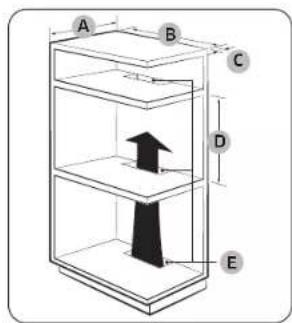
Armario empotrado (mm)
| A M in. 550 |
| B M in. 560 |
| C M in. 50 |
| D M in. 590 - Máx. 600 |
| E M in. 460 x M in. 50 |
NOTA
natural_image
Pure technical line drawing of a rectangular frame with a small circular component and dimension lines (no text or symbols)natural_image
Pure geometric diagram showing a circle intersected by two diagonal lines, with a labeled point A inside (no text or symbols beyond the label)natural_image
Architectural line drawing of a window frame structure with an inset showing a mechanical component (no text or symbols)natural_image
Pure technical line drawing of a mechanical component or bracket (no text or symbols)natural_image
Technical line drawing of a rectangular device with four components and a small pen, no text or symbols present.natural_image
Close-up of a mechanical component with a magnified inset showing a threaded screw (no text or symbols)natural_image
Illustration of a transparent container with internal mesh and six circular patterns inside (no text or symbols)natural_image
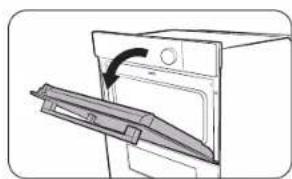
Line drawing of a hand inserting a small object into a device (no text or symbols)- Presione completamente la palanca del tirador.
natural_image
Diagram of a door with an arrow indicating direction, showing a handle or latch (no text or symbols present)- Tire de la palanca.
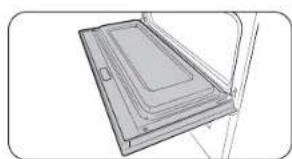
natural_image
Technical line drawing of a rectangular electronic component or panel with internal channels (no text or symbols)natural_image
Line drawing of a hand using a tool to adjust or install a component on a cabinet (no text or symbols)natural_image
Simple line drawing of a rectangular panel or tray with internal compartments, no text or symbols present.PRECAUCIÓN
natural_image
Illustration of a hand inserting a small electronic component into a door (no text or symbols)natural_image
Illustration of a hand pouring liquid into a container with a handle (no text or symbols)natural_image
Technical diagram of a mechanical component with labeled section A (no text or symbols beyond label)natural_image
Hand holding a tool with a rectangular object above a grid of wires (no text or symbols visible)natural_image
Pure technical line drawing of a mechanical component with no text or symbolsnatural_image
Diagram of a refrigerator interior with a circular inset showing the front view of the refrigerator (no text or symbols present)PRECAUCIÓN
natural_image
Line drawing of an open oven with a door and lid, showing the interior and exterior view (no text or symbols)natural_image
Simple line drawing of a cabinet with doors and a central tray, no text or symbols presentnatural_image
Diagram of a two-tier dormitory cabinet or bunk bed structure (no text or symbols)natural_image
Illustration of a raw steak with a flat bun, shown in a white packet (no text or symbols)natural_image
Simple line drawing of a vertical structure with horizontal supports and a central horizontal beam (no text or symbols)natural_image
Diagram showing two connected cables with a cross symbol and circle, no text or labels present
Table of contents
Click a title to access it
Manual assistant
Powered by Anthropic
Waiting for your message
Product information
Brand : SAMSUNG
Model : NV7B6699ACN
Category : Oven