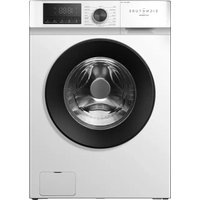
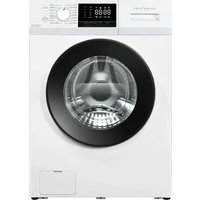
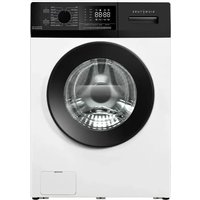
SLF7140ATBV - Washing machine SIGNATURE - Free user manual and instructions
Find the device manual for free SLF7140ATBV SIGNATURE in PDF.


| Product type | Washing machine |
| Brand | SIGNATURE |
| Model | SLF7140ATBV |
| Nominal capacity | 7 kg |
| Dimensions (H × W × D) | 850 × 595 × 495 mm |
| Electrical supply | 220-240 V ~ 50 Hz |
| Power rating | 1850 W |
| Admissible water pressure | 0.05 - 0.8 MPa |
| Energy efficiency class | A |
| Maximum spin speed | 1400 rpm |
| Wash programs | Mixed, Quick wash, Wool, Shirt, Sport, Intensive, Bed linen, Anti-allergy, Cotton, + Prewash, ECO 40-60, 20°C, Delicate, Machine care, Spin, Rinse + spin |
| Available temperatures | Cold, 20°C, 30°C, 40°C, 60°C, 95°C (depending on program) |
| Delay start function | Yes (3 to 24 hours in 1-hour increments) |
| Child lock | Yes (activation by simultaneous press Temp. + Spin for 3 s) |
| Alarm disabled | Yes (simultaneous press Spin + Delay end for 3 s) |
| Additional functions | Wash + (extended time), Rinse +, Smart (automatic washing), Unbalance protection, Power failure recovery |
| Noise level (spin) | 76 dB(A) |
| Water consumption (eco 40-60 program) | 45 L/cycle (weighted average) |
| Energy consumption (eco 40-60 program) | 0.448 kWh/cycle (weighted average) |
| Warranty | 2 years (legal warranty of conformity) |
| Availability of spare parts | 10 years (after end of marketing) |
Frequently Asked Questions - SLF7140ATBV SIGNATURE
User questions about SLF7140ATBV SIGNATURE
0 question about this device. Answer the ones you know or ask your own.
Ask a new question about this device
Download the instructions for your Washing machine in PDF format for free! Find your manual SLF7140ATBV - SIGNATURE and take your electronic device back in hand. On this page are published all the documents necessary for the use of your device. SLF7140ATBV by SIGNATURE.
USER MANUAL SLF7140ATBV SIGNATURE
natural_image
Front view of a modern white washing machine with a black circular vent and digital display (no visible text or symbols on the device body)SIGNATURE®
LAVE-LINGE HUBLOT
SLF7140ATBV
TABLE DE MATIÈRES
TABLE DE MATIÈRES -1-
CONSIGNES DE SÉCURITÉ -2-
DESCRIPTION DE L'APPAREIL -7-
INSTALLATION -8-
FONCTIONNEMENT -12-
ENTRETIEN ET NETTOYAGE -23-
PANNES ET SOLUTIONS -25-
CARACTÉRISTIQUES TECHNIQUES -28-
PROTECTION DE L'ENVIRONNEMENT -33-

LE TRI

FACILE

natural_image
Simple line drawing of a door with an arrow indicating clockwise motion (no text or symbols)natural_image
Simple line drawing of a door with a valve and directional arrow (no text or symbols)
natural_image
Simple line drawing of a door with an arrow pointing to a circular object (no text or symbols)natural_image
Technical line drawing of a mechanical assembly with no visible text or symbols
natural_image
Illustration of a faucet with a valve and arrow indicating fluid flow (no text or symbols)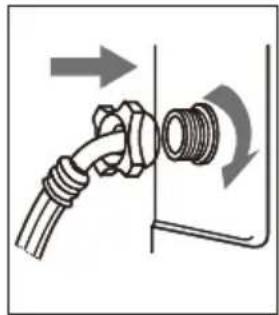
natural_image
Diagram of a pipe fitting with directional arrows indicating movement or force (no text or symbols)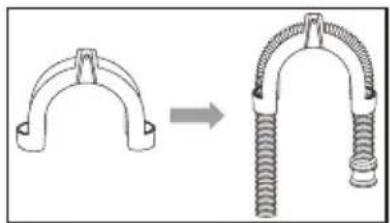
natural_image
Diagram showing a mechanical clamp or spring being inserted into a larger clamp (no text or symbols present)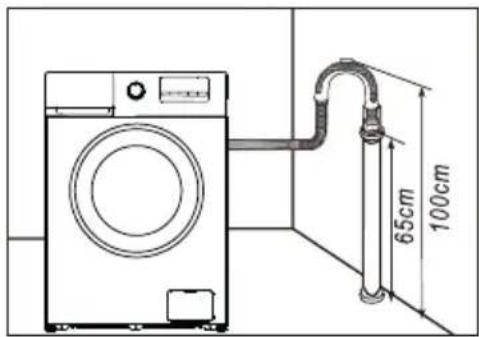
INSTALLATION
FONCTIONNEMENT
natural_image
Line drawing of a hand opening a circular mechanical component (no text or symbols)FONCTIONNEMENT
natural_image
Illustration of a hand holding a tool near a vertical line, with no visible text or symbols
natural_image
Illustration of a hand using a tool to adjust or install a mechanical component (no text or symbols visible)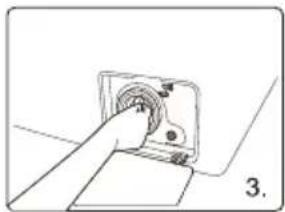
natural_image
Hand inserting a button into a device (no text or symbols visible)
natural_image
Illustration of a hand holding a faucet with a valve, showing mechanical adjustment (no text or symbols)
natural_image
Hand connecting two cables to a terminal panel (no text or symbols visible)
natural_image
Diagram of two pipes connected to a wall-mounted device (no text or symbols visible)ENTRETIEN ET NETTOYAGE
natural_image
Technical diagram of a mechanical assembly with arrows indicating direction (no text or symbols)natural_image
Technical diagram of a mechanical assembly with arrows indicating motion or force direction (no text or symbols)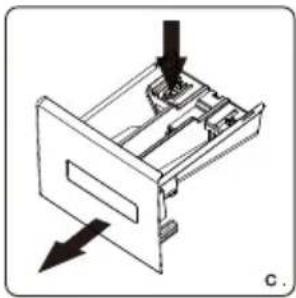
natural_image
Diagram of a mechanical device with arrows indicating direction, no text or symbols present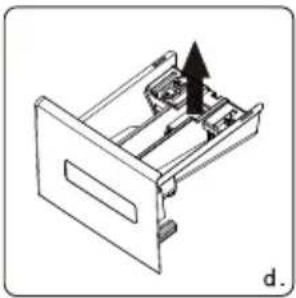
natural_image
Technical line drawing of a mechanical device with an arrow indicating direction (no text or symbols)Distributeur commun
natural_image
Front view of a modern white washing machine with black circular vent and digital display (no visible text or symbols on the device itself)SIGNATURE®
HUBLOT WASHING MACHINE
SLF7140ATBV
TABLE OF CONTENTS
TABLE OF CONTENTS -1-
SAFETY INSTRUCTIONS -2-
OVERVIEW OF WASHING MACHINE -6-
INSTALL WASHING MACHINE -7-
OPERATE WASHING MACHINE -11-
CARE AND MAINTENANCE -22-
TROUBLESHOOTING -24-
TECHNICAL SPECIFICATIONS -27-
DISPOSAL OF OLD ELECTRICAL APPLIANCES -32-

THIS PRODUCT IS FOR HOUSEHOLD USE ONLY! PLEASE READ CAREFULLY THIS MANUEL BEFORE YOUR FIRST USE AND SAVE IT FOR FUTURE REFERENCE.
SAFETY INSTRUCTIONS
WARNING
To reduce the risk of fire, electric shock, or injury to persons when using your appliance, follow basic precautions, including the following
- This appliance is intended to be used in household and similar applications such as:
- staff kitchen areas in shops, offices and other working environments;
- farm houses;
- by clients in hotels, motels and other residential type environments;
- bed and breakfast type environments;
- Areas for communal use in blocks of flats.
- The appliance shall be connected to the water mains using new hose-sets supplied with the appliance, old hose-sets should not be reused.
·The ventilation openings must not be obstructed by a carpet.
·This appliance can be used by children aged from 8 years and above and persons with reduced physical, sensory or mental capabilities or lack of experience and knowledge if they have been given supervision or instruction concerning use of the appliance in a safe way and understand the hazards involved. Children shall not play with the appliance.
Cleaning and user maintenance shall not be made by children without supervision - Children of less than 3 years should be kept away unless continuously supervised.
· If the supply cord is damaged, it must be replaced by the manufacturer, its service agent or similarly qualified persons in order to avoid a hazard.
SAFETY INSTRUCTIONS
·Take care that power voltage and frequency shall be identical to those of washing machine.
·To ensure your safety, power cord plug must be inserted into an earthed socket. Check carefully and make sure that your socket is proper and earthed reliably.
·Do not use any socket with rated current less than that of washing machine.
·Do not operate your washer when parts are missed or broken.
·Never pull out power plug with wet hands.
- Replace immediately worn power cord, loose plugs/power sockets.
- Unplug your washer before cleaning or making any repair. Please check whether the water inside the drum has been drained before opening the door. Please do not open the door if there is any water visible.
·Glass door may be very hot during the operation. Keep kids and pets far away from the washer during the operation.
·Make sure that the water and electrical device must be connected by a qualified technician in accordance with the manufacturer's instruction and local safety regulations.
SAFETY INSTRUCTIONS
- Before operating this machine, all packages and transit bolts must be removed. Otherwise, the washing machine may be seriously damaged while washing the clothes. - Flammable and explosive or toxic sovents are forbidden. Gasoline and alcohol etc. Shall not be used as detergents. Please only select the detergents suitable for machine washing.
- Be careful of scald while the washer draining hot washing water.
·Never unplug your washer by pulling on the supply cord. Always grasp the plug firmly and pull straight out from the outlet.
·If your old appliance is not being used anymore, we recommend that you remove the door and cut off the supply cord.
·Packing materials may be dangerous to the kids. Please keep all packing materials(plastic bags,foams etc)far away from the kids.
·Do not climb up and sit on top cover of the machine.
·Pets and kids may climb into the machine. Check the machine before every operation.
·Do not lean against the door of the washer.
·The household washing machine isn't intended to be built-in.
·This washing machine is for indoor using only.
·Make sure that all pockets are empty. Sharp and rigid items such as coin, brooch, nail, screw or stone etc. May cause serious damages to the washer.
- Please remember to disconnect water and power supply immediately after the clothes are washed.
·The washing machine shall not be installed in bath room or very wet rooms as well as in the rooms with explosive or caustic gases.
SAFETY INSTRUCTIONS
·Before washing the clothes at first time, the washing machine shall be operated in one round of the whole procedures without the clothes inside.
·Do not repair or replace any part of the washer unless you have been specifically recommended in the user-repair instructions and you have the knowledge and skills to make it.
- It is forbidden to wash carpets and bras inset with steel wire.
·Never refill water by hand during washing.
·After the program is completed, please wait for two minutes to open the door.
- When handing the machine, the accumulated water shall be drained out of the machine firstly. Handle the machine carefully. Never hold each protruded part on the machine while lifting. Machine door can not be used as the handle during the conveyance.
·The washing machine with single inlet valve only can be connected to the cold water supply. The washing machine with double inlet valves can be connected to the hot water and cold water supply.
· Maximum dry cloth mass for which the unit is designed = 7 kg
•The maximum inlet water pressure: 0.8 MPa
. The minimum inlet water pressure: 0.05 MPa
· If you have lost the user manual accidentally, ask customer service for e-copy or hard copy.
· Regarding the information pertaining to the installation, handling, servicing and disposal of the appliance, thanks to refer to the below paragraph of the manual.
OVERVIEW OF WASHING MACHINE
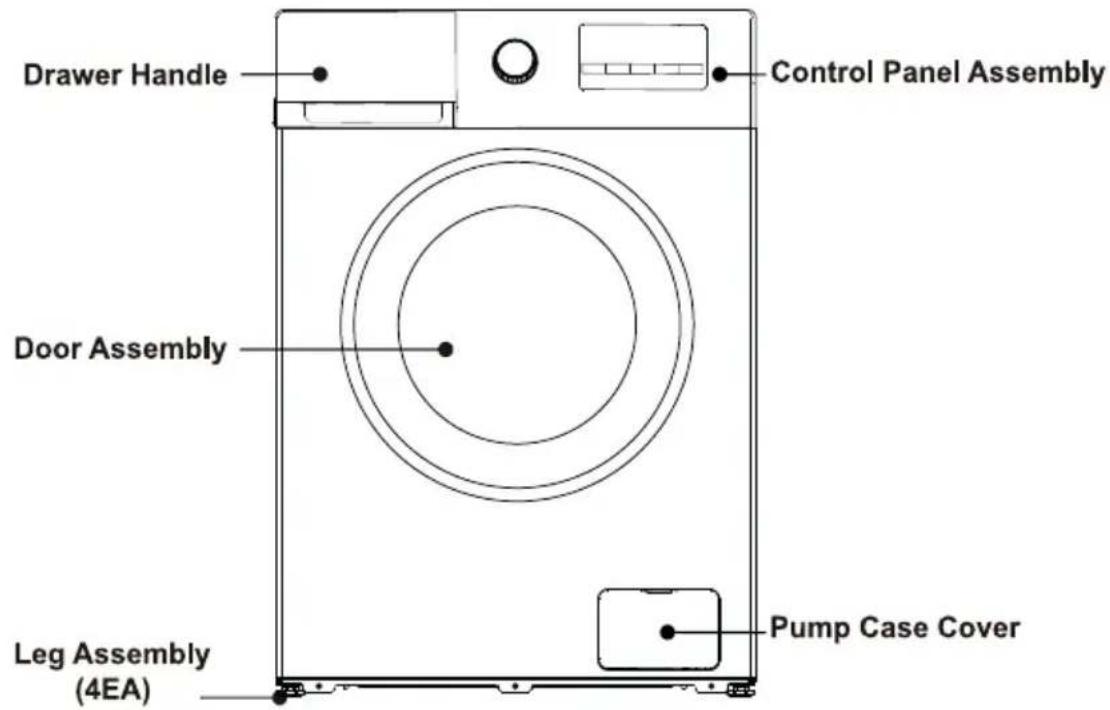
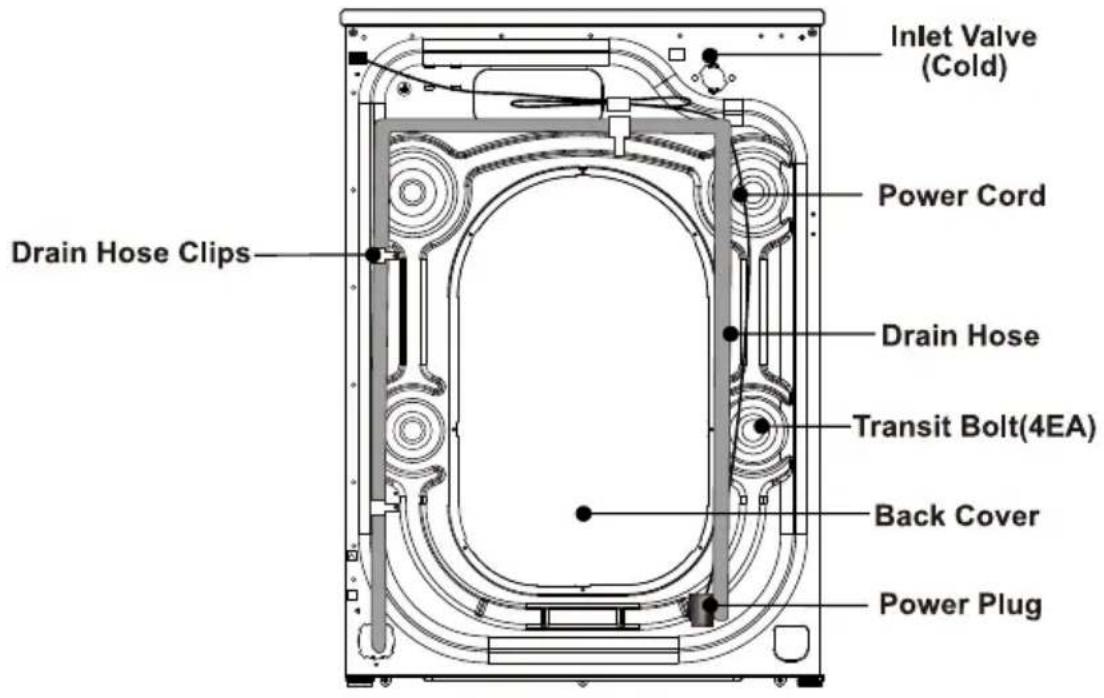
INSTALL WASHING MACHINE

NOTE
We recommend that your new washer should to installed by a qualified appliance technician. If you feel that you have the skills to install the washer, please read the installation instructions carefully before installing.
■ Tools needed
You may need to have the following tools to help you in the installation of your washer:
•Scissors
•Pliers
•Standard Screwdriver
•Gloves
- Spanner
■ Unpacking the washing machine
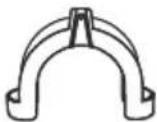
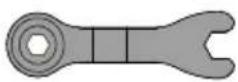
Unpacking your washing machine and check if is there any damage during the transportation. Also make sure that all the the items (as shown below) in the attached bag are received. If there is any damage to the washing machine during the transportation, or any item is missing or damaged, please contact the local dealer immediately.
| Inlet Hose (Connect to cold water supply) | Hole Cover (4EA) (Used to plug transit bolt holes) | Drain Hose Support Bracket (Used to loop the end of drain hose) | Spanner (1.Used to adjust the bottom of the machine, 2.Remove the transport bolt on the back of the machine) |
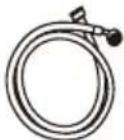 | 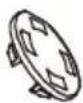 |  |  |
■ Select the location
Before installing the washer, the location characterized as follows shall be selected:
-Rigid, dry, and level surface (if not level, please make it level with reference to the following figure "Adjustable Leg").
-Avoid direct sun light.
-Sufficient ventilation.
-The ambient temperature shall be between 0-40°C.
-The ambient humidity shall be below 95%(When the temperature is 25°C).
-Keep far away from the heat resources such as coal or gas.Make sure that the washer will not stand on power cord.Do not install the washer on the carpet floor.
INSTALL WASHING MACHINE
■ Remove transit bolts
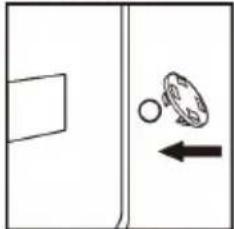
Before using this washing machine, transit bolts must be removed from the backside of this machine. Please take the following steps to remove the bolts:
⚠️ Keep the transit bolts properly for further use.
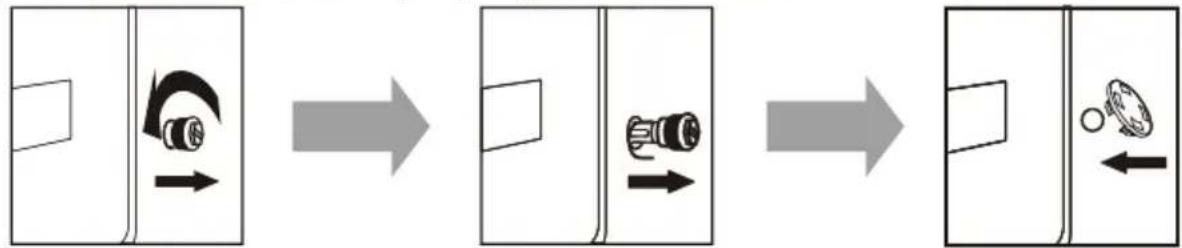
1. Loosen the four transit bolts with a spanner
2. Take each bolt head and pull it through the wide part of the hole. Repeat for each bolt.
3. Fill the holes with the supplied plastic covers.
■ Level the washing machine
Install or place the washing machine under the environmental temperature of not less than 0irc C but not outdoors, for it may damage the programming controller.

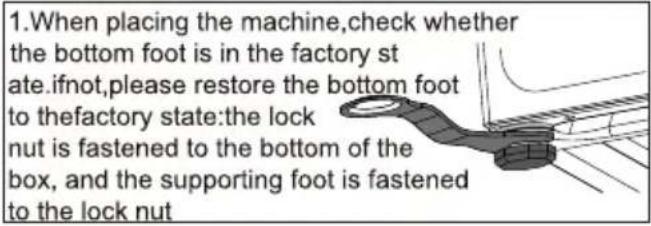
Factory status
■ Lock the bottom of the box
■ Support foot next to locking nut
Note: In order to facilitate installation, the factory status of the foot may not be all locked, please be sure to lock all four feet before adjusting the level

-
After the machine is placed, press the opposite corner of the top cover plate of the washing
machine with both hands in turn and shake it vertically downward to check whether the supporting foot is close to the ground and whether the machine is shaken
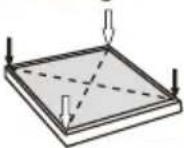
-
To ensure that the machine is placed in the right state, loosen the locking nut according to the direction shown in the diagram with the attached spanner to the appropriate height until the supporting foot is close to the ground and the machine is free from shaking
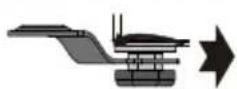
Support base is close to the ground
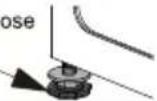

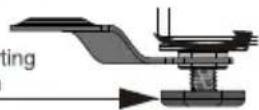
- Finally, use the spanner to turn the lock nut back to the bottom of the box to lock it (you can also slightly fix the support foot by hand to avoid the support foot moving again)
Ensure that the supporting feet do not move again
CAUTION
- The machine must be perfectly leveled and stabilized when the four supporting feet are close to the ground. Lower the feet as much as possible on the basis that the machine is leveled.
- Improper leveling adjustment may cause loud noise, machine vibrating, machine displacement and other abnormal phenomena.
- Air-vent is designed on the bottom of the machine (prevent blockage). Install the washing machine on solid, smooth and skid-proof ground. Do not place the washing machine on soft blanket or wooden floor, or various desktops and stands, in case of unnecessary injury.
INSTALL WASHING MACHINE
■ Connect the inlet hose
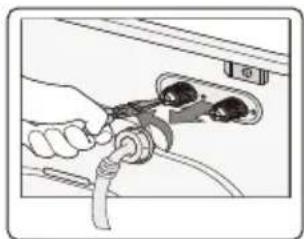
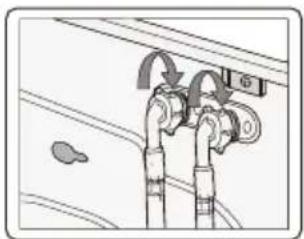
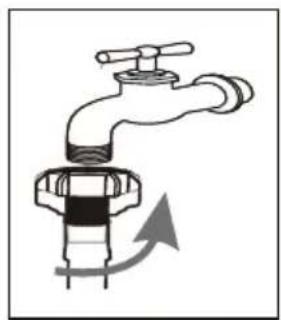
- Connect the inlet hose to tap and fasten it anticlockwise.
natural_image
Illustration of a faucet with a valve and handle, showing fluid flow direction (no text or symbols)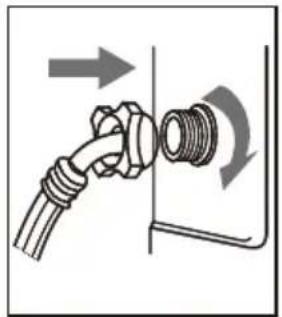
natural_image
Diagram of a pipe fitting with directional arrows indicating movement (no text or symbols)- Connect the other end of the inlet hose to the inlet valve at the backside of the washing machine and fasten the hose tightly clockwise.
when there is a inlet at the back of the machine, it must be connected to a cold water supply.
Follow the indication of the picture below to complete the connection.


NOTE
- If there is any leakage with hose after the connection, then repeat the steps to connect inlet hose.
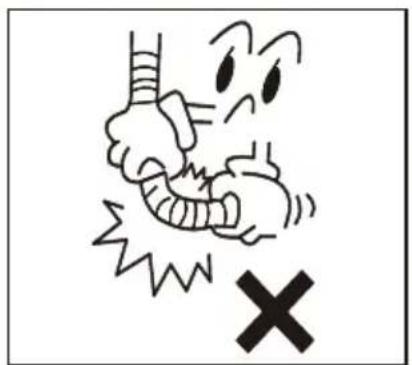
- Do not bend the hose.
- Check for inlet hose connection carefully before using the washer each time.
■ Connect the drain hose
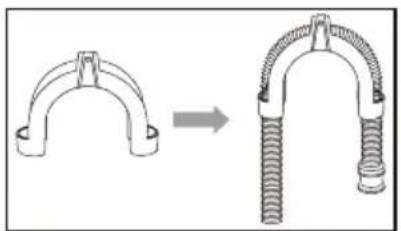
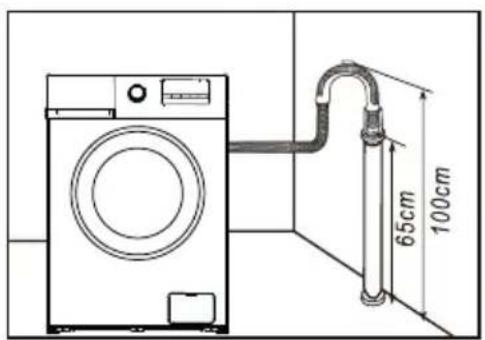
- The drain hose shall be placed at a height of 65-100cm above the floor, otherwise, it can cause poor drainage.
- You can use the supplied drain hose support bracket to loop the drain hose down into the wall, standpipe or laundry tub.
• Take care to ensure all hose connections are tight.
natural_image
Diagram showing a mechanical clamp or spring being inserted into a coiled spring (no text or symbols present)
NOTE
• The end of the drain hose cannot be immersed in water for the washer to work properly.
INSTALL WASHING MACHINE
■ Connect the power
- As the maximum current through the unit is 10A when you are using its heating function, please make sure the power supply system (current, power voltage and wire) at your home can meet the normal loading requirements of the electrical appliances.
- Please connect the power to a socket which is correctly installed and properly earthed.
- Make sure the power voltage at your plate is same to that in the machine's rated voltage.
• Power plug must match the socket.
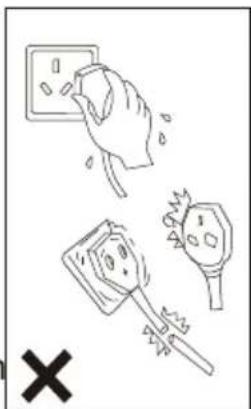
- Do not use multi-purpose plug or socket as extension cord.
- Do not connect and pull out plug with wet hands.
- When pulling out the plug, hold the plug tightly and then pull it out. Do not pull power cord forcibly.
- If power cord is damaged or has any sign of being broken, special power cord must be selected or purchased from its manufacturer or service center for replacement.

WARNING
- This machine must be earthed properly. If there is any short circuit, earthing can reduce the danger of electrical shock.
- Washing machine shall be operated in a circuit separate from other electrical appliances. Otherwise, power protector may be tripped or fuse may be burned out.

NOTE
Ensure your machine is installed properly before use.
Before washing clothes for the first time, you must run a complete cycle without clothes.
To do this:
- Connect power source and water.
- Put a little detergent (about 10g) into the drawer and close it.
- Press the ⏻ On/Off button.
- Turn the knob to be "Cotton" program.
- Press the ▷ Start/Pause button.
This will remove any water from the manufacturer's test run remaining in the machine.
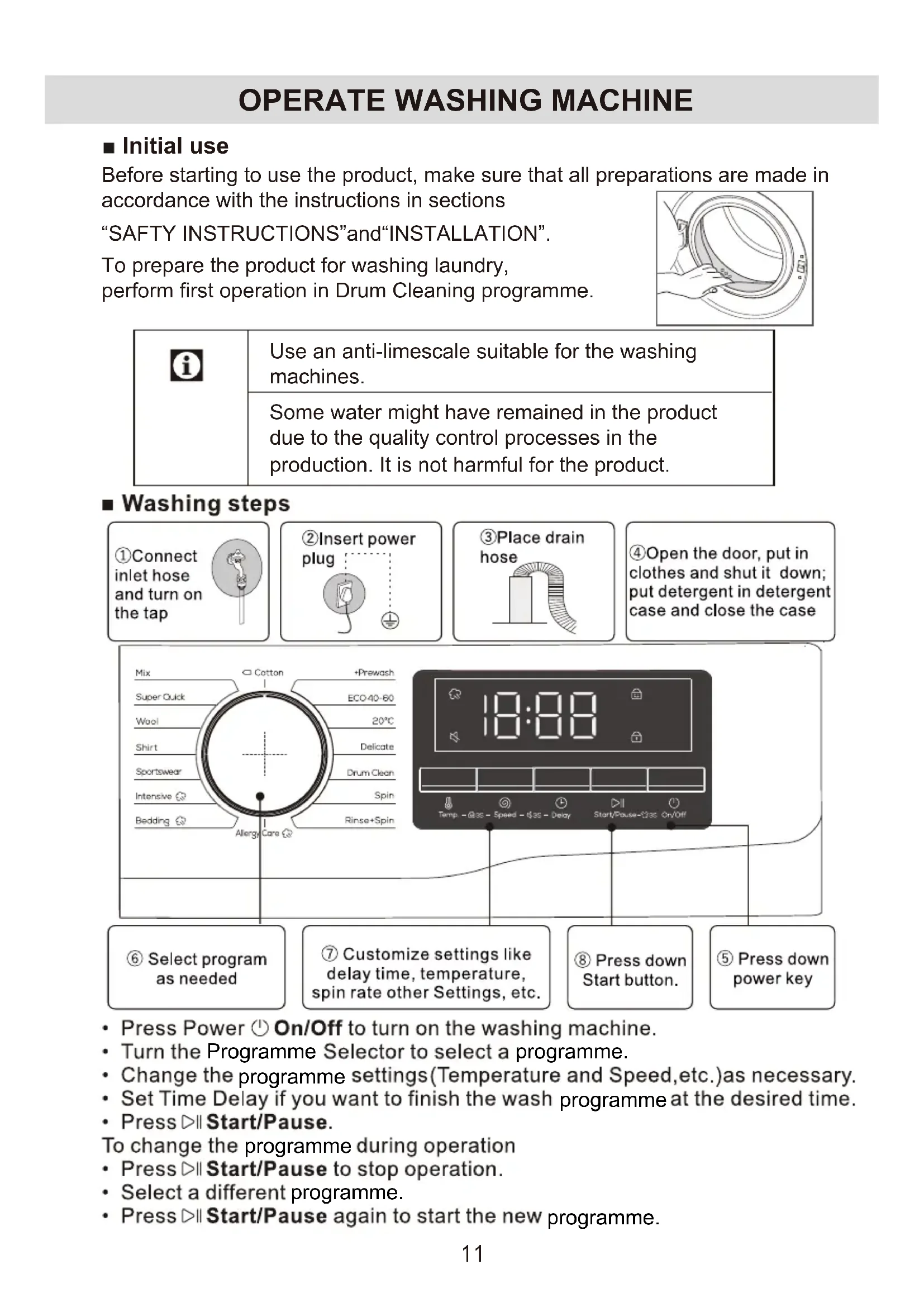
Before starting to use the product, make sure that all preparations are made in
accordance with the instructions in sections
"SAFTY INSTRUCTIONS" and "INSTALLATION".
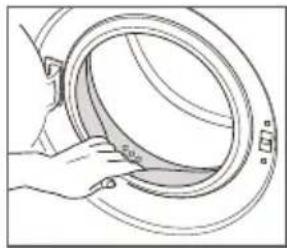
To prepare the product for washing laundry, perform first operation in Drum Cleaning programme.
natural_image
Line drawing of a hand opening a circular mechanical component (no text or symbols)| i | Use an anti-limescale suitable for the washing machines. |
| Some water might have remained in the product due to the quality control processes in the production. It is not harmful for the product. |
■ Washing steps
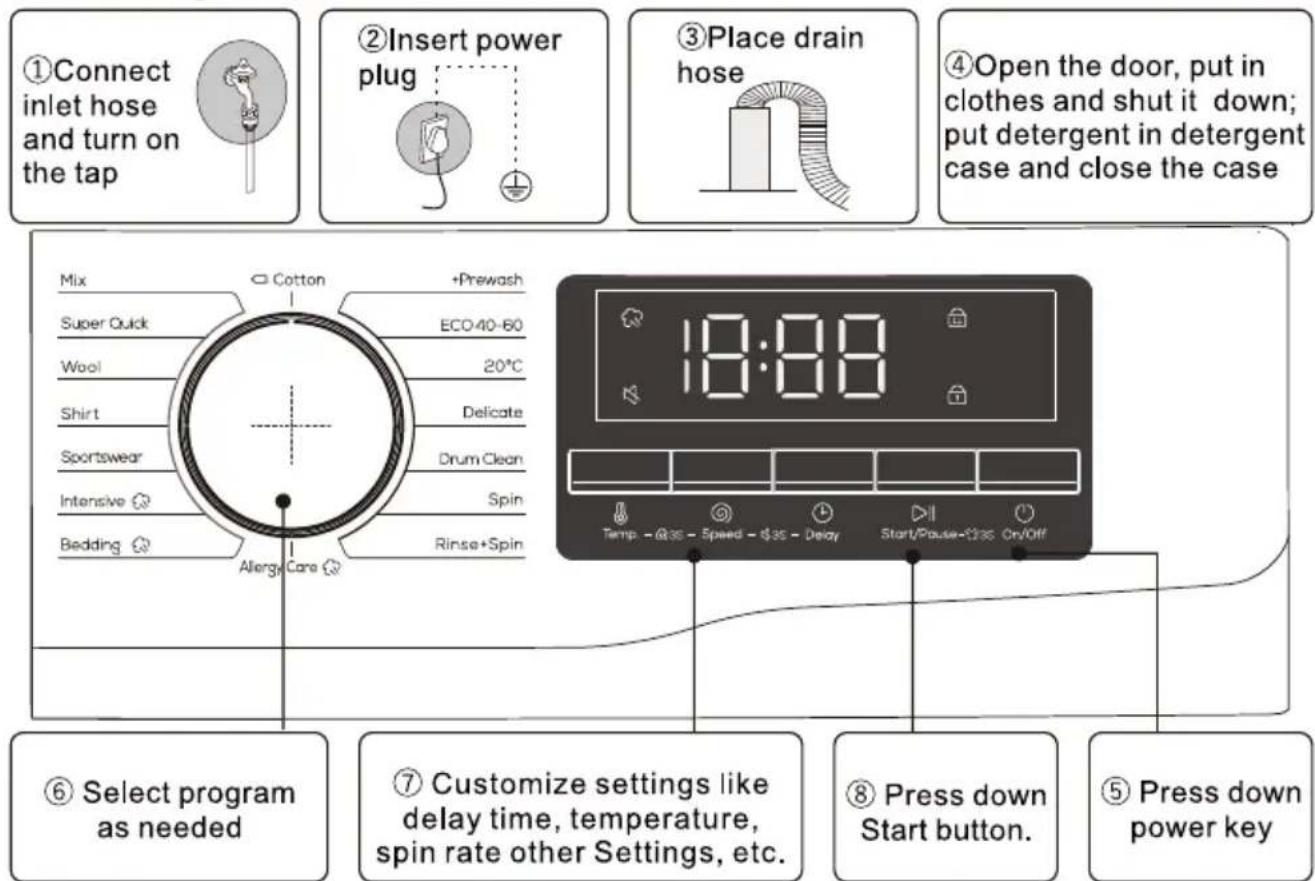
- Press Power ⏻ On/Off to turn on the washing machine.
- Turn the Programme Selector to select a programme.
- Change the programme settings(Temperature and Speed,etc.)as necessary.
- Set Time Delay if you want to finish the wash programme at the desired time.
- Press ▷ Start/Pause.
To change the programme during operation
- Press ▷ Start/Pause to stop operation.
- Select a different programme.
- Press ▷ Start/Pause again to start the new programme.
■ Preparing laundry for washing
- Laundry items with metal attachments such as, underwired bras, belt buckles or metal buttons will damage the machine. Remove the metal pieces or wash the clothes by putting them in a laundry bag or pillow case.
- Take out all substances in the pockets such as coins, pens and paper clips, and turn pockets inside out and brush. Such objects may damage the product or cause noise problem.
- Put small size clothes such as infant's socks and nylon stockings in a laundry bag or pillow case.
- Fasten zippers, sew loose buttons and mend rips and tears.
- Wash"machine washable"or"hand washable"labeled products only with an appropriate programme.
- Do not wash colours and whites together. New, dark coloured cottons release a lot of dye. Wash them separately.
- Tough stains must be treated properly before washing. If unsure, check with a dry cleaner.
- Use only dyes/colour changers and limescale removers suitable for machine wash. Always follow the instructions on the package.
- Wash trousers and delicate laundry turned inside out.
- Keep laundry items made of Angora wool in the freezer for a few hours before washing. This will reduce pilling.
- Laundry that are subjected to materials such as flour, lime dust, milk powder, etc. intensely must be shaken off before placing into the machine. Such dusts and powders on the laundry may build up on the inner parts of the machine in time and can cause damage.
■ Sorting the laundry
- Sort laundry according to type of fabric, colour, and degree of soiling and allowable water temperature.
- Always obey the instructions given on the garment tags.
- Before putting your clothes or other articles in the washing machine, please carefully read the corresponding care label to know under what conditions and maximum temperature it can be washed.
■ Loading the laundry
- Open the loading door.
- Place laundry items loosely into the machine.
- Push the loading door to close until you hear a locking sound.
Ensure that no items are caught in the door.
| i | The loading door is locked while a programme is running. The door can only be opened a while after the programme comes to an end. |
| ! | WARNING: In case of misplacing the laundry, noise and vibration problems may occur in the machine. |
■ Using detergent and softener
When using detergent, softener, starch, fabric dye, bleach or limescale remover read the manufacturer's instructions on the package carefully and follow the suggested dosage values. Use measuring cup if available.
■ Put detergent
- Pull out the detergent drawer.
- Add detergent for prewash into compartment I. Used only for prewash programs.
(option1:detergent that is solid; option2:detergent that is liquid.) - Add detergent for main wash into compartment II. (option1:detergent that is solid; option2:detergent that is liquid.)
- Add fabric softener into compartment Ⓜ.
- Please choose suitable type of detergent for the various washing temperature to get the best washing effect with less water and energy consumption.
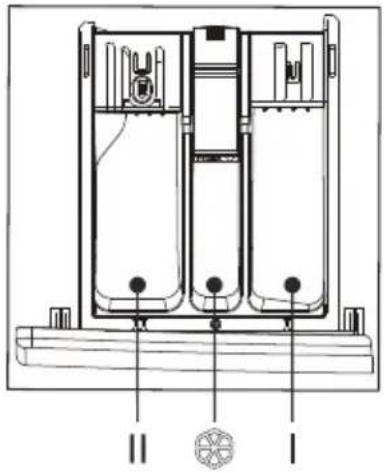
- The amount of detergent/softener used should be added only once at a time. Please refer to the manufacturer's instructions for the dosage of detergent/softener.
- Excessive detergent will produce a lot of foam, easy to overflow, and will affect its dissolution, resulting in rinsing difficulties.
- Washing efficiency and performance is determined by used detergent quality. Use only machine wash approved detergent.
- If need use specific detergent, e.g. for synthetic and woolen fabric. Mind always detergent manufacturer recommendations.
- Do not use dry cleaning agents such as trichloroethylene and similar products. Choose the best detergent.
| Program | Max Load (kg) | Kind of detergent | Default temperature (°C) | ||
| 7 | Universal | Special | Softener | ||
| Mix | 3.5 | L/P | - | ○ | (-)/20/30/40 |
| Super Quick | 2 | L/P | - | ○ | (-)/20/30 |
| Wool | 2 | - | L/P | - | (-)/20/30/40 |
| Shirt | 2.5 | L/P | L | ○ | (-)/20/30/40 |
| Sportswear | 2.5 | L/P | - | ○ | (-)/20/30/40 |
| Intensive | 7 | L/P | - | ○ | (-)/20/30/40/60 |
| Bedding | 5 | L/P | L/P | ○ | (-)/20/30/40/60 |
| Allergy Care | 3.5 | L/P | L/P | ○ | (-)/20/30/40/60 |
| Cotton | 7 | L/P | - | ○ | (-)/20/30/40/60/95 |
| + Prewash | 5 | L/P | - | ○ | (-)/20/30/40/60/95 |
| ECO 40-60 | 7 | L/P | - | ○ | 40 |
| 20°C | 3.5 | L/P | - | ○ | 20 |
| Delicate | 3.5 | L/P | L/P | - | (-)/20/30/40 |
| Drum Clean | 0 | - | - | - | 60/95(95) |
| Spin | 7 | - | - | - | (-) |
| Rinse + Spin | 7 | - | - | ○ | (-) |
L=gel-/liquid detergent P=Powder detergent O=optional -=no If using liquid detergent, it is not recommended to activate the time delay. We recommend by using: Laundry powder 20°C to 95°C; Wool detergent 20°C to 40°C; *Choose 95°C wash temperature only for special hygienic requirements.
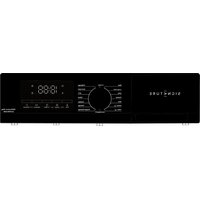
* The following illustration is a simple example of the model control panel. The illustration is for reference only. Please refer to the actual effect.
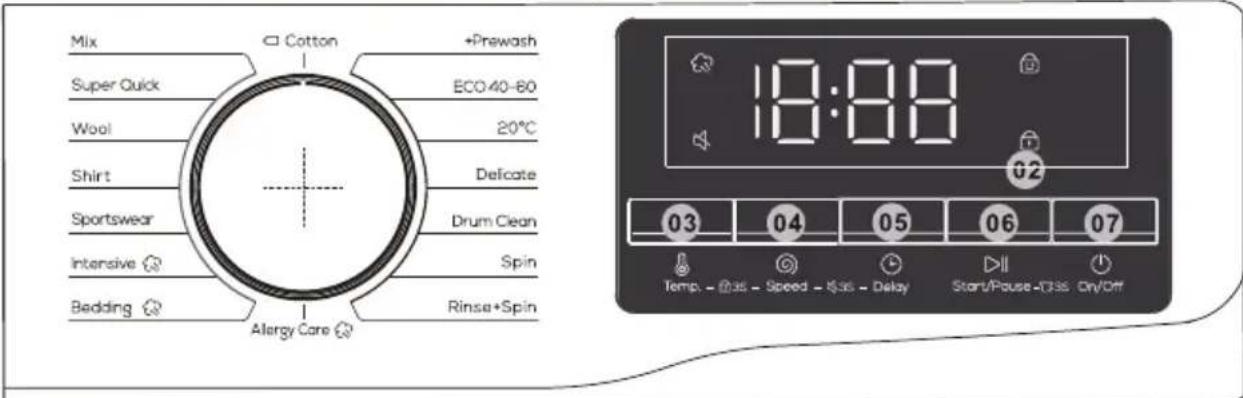
| 01 Cycle Selector | Turn the dial to select a cycle. |
| 02 Display | The display shows current cycle information and estimated time remaining, or an information code when a problem occurs. |
| 03 Temp. | Press to change the water temperature for the current cycle.Available temperature range depends on the cycle.The selected temperature will be displayed on the display. |
| 04 Speed | Press to change the spinning speed for the current cycle.Available spin speed depends on the cycle.The selected spin speed will be displayed on the display. |
| 05 Delay | Press Delay repeatedly to cycle through the available Delay options (from 3 to 24 hours in one hour increments). |
| 06 Start/Pause | Press to Start/Pause operation.Press the button once to start a cycle.To pause operation, press the button again.You may change the cycle settings and options.To resume paused operation, press the button again. |
| 07 On/Off | Press to turn On/Off the washing machine.If you turn on the washing machine and do not use it for 10 minutes, it will turn off automatically. |
Delay ⏱
You can set the washing machine to finish yourwash automatically at a later time, choosing a delay of between 3 to 24 hours (in 1 hour increments). The hour displayed indicated the time the wash will finish.
- Select a cycle. Then change the cycle settings if necessary.
- Press Delay repeatedly until a desired end time is set.
- Press ▷ Start/Pause.
The corresponding indicator turns on with the clock running.
- To cancel the Delay, restart the washing machine by pressing ⏻ On/Off. Real-life case
You want to finish a two-hour course 3 hours later from now. For this, you add the Delay option to the current cycle with the 3-hour setting, and press ▷ Start/Pause at 2:00 p.m. Then, what happens? The washing machine starts operating at 3:00 p.m., and ends at 5:00 p.m.
If this icon is always bright, it means the Steam Wash function is enabled.
Child Lock

To prevent accidents by children, Child Lock locks all buttons except for ⏻ On/Off.
• To activate or deactivate the Child Lock function, press and hold Temp. and Speed simultaneously for 3 seconds.
When Child Lock is activated, the indicator 😊 lights up.
Alarm Off

You can turn on or off the sound of the cycle selector and all buttons.
- To turn on or off the sound, press and hold Speed and Delay simultaneously for 3 seconds. When the sound is off, the indicator lights up.
Door Lock

When the door is not closed or locked normally, the icon is not bright; Lock the door correctly, the icon is always bright.
Reload

Long press the ▷ll Start/Pause button for 3 seconds. After the lock is unlocked, the function of adding clothes in the middle can be started.
■ Programme selection
- Select the programme suitable for the type, quantity and soiling degree of the laundry in accordance with the temperature table below.
| 90°C | Heavily soiled white cottons and linens.(coffee table covers, tableclothes, towels, bed sheets, etc.) |
| 60°C | Normally soiled, coloured, fade proof linens, cottons or synthetic clothes (shirt, nightgown, pajamas, etc.) and lightly soiled white linens (underwear, etc.) |
| 40°C- 30°C-20°CFroid | Blended laundry including delicate textile (veil curtains,etc.), synthetics and woolens. |
- Select the desired programme with the Programme Selection button.
| i | Programmes are limited with the highest spin speed appropriate for that particular type of fabric. |
| i | When selecting a programme, always consider the type of fabric, colour, degree of soiling and permissible water temperature. |
| i | Always select the lowest required temperature. Higher temperature means higher power consumption. |
| i | For further programme details,see Programme and onsumption table. |
Mix: For mixed load consisting of cotton and synthetic.
Super Quick: For lightly soiled garments in less than 2.0 kg that you want to wash quickly.
Wool: The wool course features gentle cradling and soaking to protect the wool fibres from shrinkage/distortion.
A neutral detergent is recommended.
Shirt: You can select this procedure to wash shirts made of cotton, linen, synthetic fobers or blended fabrics.
Sportswear: This procedure is applicable to the cleaning of sportswear.
Intensive: For heavily soiled items. The operation time is longer than other cycles.
Bedding: This procedure is suitable for washing heavier clothes.Jeans, bedding, etc.
Allergy Care: Featuring a high-temperature wash and extra rinses to help remove the remaining detergent effectively.
☐ Cotton: For cottons, bed linens, table linens, underwear, towels, or shirts. The washing time and the rinse count are automatically adjusted according to the load.
+ Prewash: Add a preliminary washing process before starting the Cotton cycle.
ECO 40-60: For cleaning normally soiled cotton items which are declared to be washable at 40 °C or 60 °C, together in the same cycle. This cycle is used to assess the compliance with the EU Ecodesign legislation. This cycle is set as a default.
20°C: Which is able to clean lightly soiled cotton laundry, at a nominal temperature of 20 °C.
Delicate: For sheer fabrics, bras, lingerie (silk), and other handwash-only fabrics. For best performance, use liquid detergent.
Drum Clean: Cleans the drum by removing dirt and bacteria from it. Make sure the drum is empty.
Do not use any cleaning agents for cleaning the drum.
Spin: Featuring an additional spin process to effectively remove moisture from laundry.
Rinse + Spin: Featuring an additional rinse process after applying fabric softener to the laundry.
☆ RMC Full name: remaining moisture content.
- The most effective programmes in terms of energy consumption are usually those implemented at lower temperatures and over longer periods of time;
- Loading the household washing machine up to the capacity indicated by the manufacturer for the respective programmes will contribute to energy and water savings.
- Noise and remaining moisture content are influenced by the spinning speed: the higher the spinning speed in the spinning phase, the higher the noise and the lower the remaining moisture content.
• The values given are indicative only, except for the eco 40-60 program and the wash and dry cycle.
■ Auxiliary function selection
Select the desired auxiliary functions before starting the programme.
Furthermore, you may also select or cancel auxiliary functions that are suitable to the running programme without pressing the Start / Pause button when the machine is operating. For this, the machine must be in a step before the auxiliary function you are going to select or cancel. If the auxiliary function cannot be selected or canceled, light of the relevant auxiliary function will blink 3 times to warn the user.
Wash+
In the standby mode, press the enhanced washing function on setting button, the Strengthen washing function indicator will be on, and the Strengthen washing function will be added in the washing process. After selecting the Strengthen washing function, the washing time in the main washing stage will be increased by 10 minutes, and the time after adding the Strengthen washing function will be displayed in the remaining time window. If you press it again, the Strengthen washing function will be cancelled.
Rinse+
Press the rinse Plus button in standby mode, and the rinse plus function indicator will be on. At the same time, add a rinse process in the washing process, and the time after adding the function will be displayed in the remaining time window. The rinse function will cancelled when it is pressed again, if it does not run to the rinse stage during operation, press the pause button, The rinsing button can be added or cancelled, and the rinsing function cannot be selected or cancelled during operation.
Smart Start
The smart start program is an intelligent program, which can be entered and run automatically in the standby and power off states. Under the smart start program, the washing temperature, water level and washing time are automatically set according to the weighing results, and the washing parameters do not need to be set by the user.
Delay
With the Delayed Start function the startup of the programme may be delayed up to 24 hours. Delayed start time can be increased by increments of 1 hour.
| Do not use liquid detergents when you set Delayed Start! There is the risk of staining of the clothes. |
Open the loading door, place the laundry and put detergent, etc. Select the washing programme, temperature, spin speed and, if required, the auxiliary functions. Set the desired time by pressing the Delay button. Press
Start / Pause button. The delayed start time you have set is displayed. Delayed start countdown starts. The':' in the display time blinks once every second, and the time gradually decreases.
| i | Additional laundry may be loaded during thedelayed start period. |
At the end of the countdown, duration of the selected programme will be displayed. ‘:symbol will disappear and the selected programme will start.
■ Starting the programme
Press Start / Pause button to start the programme.Programme follow-up light showing the startup of the programme will turn on.
| i | If no programme is started or no key is pressedwithin 10 minuted durning programme selectionprocess,the machine will switch to turn off modeand the temperature,speed and other lights willturn off. |
■ Child Lock
Use Child Lock function to prevent children from tampering with the machine. Thus you can avoid any changes in a running programme.
| If the Programme Selection knob is turned when the Child Lock is active,“”appears on the display.The Child Lock does not allow any change in the programmes and the selected temperature, speed and auxiliary functions. | |
| Even if another programme is selected with the Programme Selection knob while the Child Lock is active, previously selected programme will continue running |
■ Canceling the Delayed Start function
If you want to cancel the delayed start countdown and start the programme immediately: Set the Delayed Start period to zero or turn the Programme Selection knob to any programme. Thus, Delayed Start function will be canceled. The End/Cancel light flashes continuously. Then, select the programme you want to run again. Press Start / Pause button to start the programme.
"End" appears on the display at the end of the programme.
Wait until the loading door light illuminates steadily.
Press On / Off button to switch off the machine. Take out your laundry and close the loading door. Your machine is ready for the next washing cycle.
■ Adding or taking out laundry
Press the Start / Pause button to switch the machine to pause mode. The programme follow-up light of the relevant step during which the machine was switched into the pause mode will flash. Wait until the Loading Door can be opened.
Open the Loading Door and add or take out the laundry.
Close the Loading Door.Make changes in auxiliary functions,temperature and speed settings if necessary.Press Start /Pause button to start the machine.
■ Introduction of Other Functions
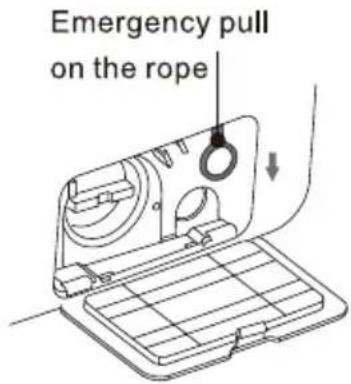
Unlock of emergency door
■ If you want to take out the clothes when there is a long-time power cut, make sure the water level in the drum is below the safe level, the temperature is under 40°C, and the inner drum is does not rotate, then detach the drain hose and lower it, replace the hose after water runs out;
■ Open the drain pump cover at the bottom right of the front side, pull down the rod lightly, when hearing a light sound then open the door and take out or put in the clothes;
■ Replace drain pump cover;
■ This method can only be used in emergency.
Resume Function
■ This machine has the resume function in case of power-down. If there is a power failure or plug loose in the process of machine, the machine can remember the working status and resume work when the power is restored.
Cloth Weigh Awareness
■ In the beginning of the washing, the machine will estimate the weight of the clothes and dispense the detergent automatically (on condition that there is enough detergent in the case), then decide the amount of the water accordingly to achieve the goal of saving water.
Unbalance Protection
■ When the machine is ready to spin, The washer may take a few time to balance clothes due to great unbalance.
■ If clothes is still unbalance in the drum after that, the spinning speed can be slow down to avoid great vibration.
■ If clothes in drum is too less, the machine may not to spin due to the unbalance protection, then you should add more clothes in the machine to make it to spin.
CARE AND MAINTENANCE
Proper maintenance on the washing machine can extend its work life.

WARNING
Before your maintenance starts, please do pull out the power plug or disconnect power and close the tap.
■ Clean internal drum
The rusts left inside the drum by the metal articles shall be removed immediately with chlorine-free detergents. Never use steel wool.
■ Clean surface
- If there is any water overflow, use the dry cloth to wipe it off immediately. No sharp items are allowed to strike the washer.
- The surface can be cleaned with diluted non-abrasive neutral detergents when necessary.
■ Clean the drain pump
natural_image
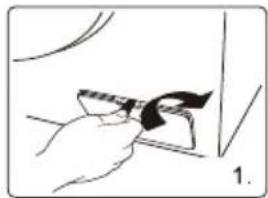
Illustration of a hand holding a small object with a black mark, possibly a tool or device, against a plain background (no text or symbols)Unscrew the filter and pay attention to the remaining water, taking out any foreign material from the drain pump filter;

Open the filter cover with tools such as coins according to the direction of the graphic;

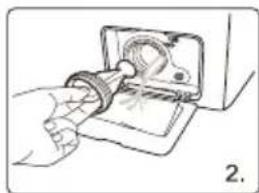
natural_image
Illustration of a hand using a tool to adjust or install a mechanical component (no text or symbols visible)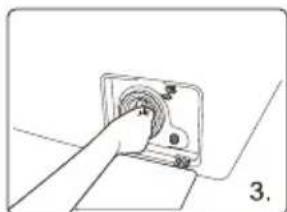
natural_image
Simple line drawing of a hand inserting a component into a square housing (no text or symbols)
Reinstall the filter.
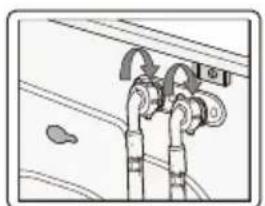
■ Clean Inlet valve filter
The inlet filter shall be cleaned if there is not any or insufficient water in when the tap is opened.
- Lower the water pressure:
a. Close the tap.
b. Select any procedure except "Spin" procedure.
c. Press the button "Start / Pause" and keep the procedure running for about 40 seconds.
d.Pull out the power plug. - Remove the inlet hose from the tap.
- Use water to wash the filter.
- Reconnect the inlet hose.
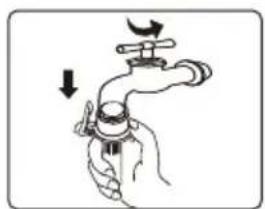
natural_image
Illustration of a hand holding a faucet with a valve, showing a downward force (no text or symbols)
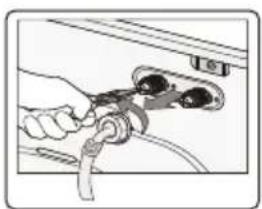
natural_image
Hand connecting cables to a wall-mounted plug (no text or symbols visible)
natural_image
Diagram of a car interior showing pipes and a valve (no text or symbols)CARE AND MAINTENANCE
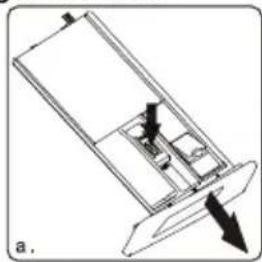
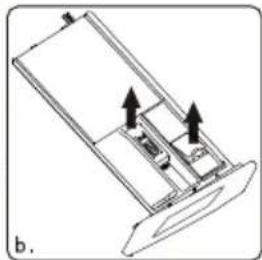
■ Clean detergent drawer
The structure of detergent case varies from different machine models; please follow steps and methods shown in below figure to clean the detergent case:
natural_image
Technical diagram of a mechanical component with directional arrows indicating movement (no text or symbols)Auto dispenser
natural_image
Technical diagram of a mechanical component with directional arrows indicating movement (no text or symbols)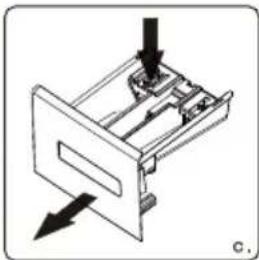
natural_image
Diagram of a mechanical device with arrows indicating direction (no text or symbols)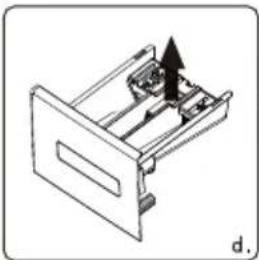
natural_image
Diagram of a mechanical device with an arrow indicating direction, no text or symbols presentCommon dispenser
■ If there is detergent or softener residue in the case:
◆ As fig. a(c) shows, pull the case and press down the limit rod; pull the whole drawer out;
◆ As fig. b(d) shows, open the case (pick it up slowly) and take out syphon plate(lift it up);
◆ Use tap water or brush to wash detergent case and syphon pipe;
◆ Restore case cover and syphon pipe, and push the drawer in.
■ A little detergent will flow into water box when drawing the case, this is normal.
Try not repeatedly opening and closing the case of detergent loss;
■ Pay attention to the spillover of detergent that may cause inconvenience when adjusting (like tilting and moving, etc.) the machine (draw out the case before adjusting).
■ Recovery from freezing
The washing machine may freeze when it drops below 0°C.
- Turn off the washing machine, and unplug the power cord.
- Pour warm water over the water tap to loosen the water hose.
- Disconnect the water hose, and soak it in warm water.
- Pour warm water into the drum and leave it for about 10 minutes.
- Reconnect the water hose to the water tap.
Use meter:
When running, press [Delay]+[Temperature] key for 3 seconds at the same time, and the machine will display the number of cycles that have been run (the program currently running does not count in this number).
If the running time exceeds 9999, the count is reset.
Power off the control board or long press [Delay] + [Temperature] for 3 seconds to exit the current mode.
NOTE
- When the washing machine is reused, make sure the ambient temperature is above 0irc C.
- If your washing machine is located in the room where it can get frozen easily, please drain the remaining water inside drain hose and inlet hose thoroughly.
- Please contact a technician if your washer is frozen.
TROUBLESHOOTING
Replacing certain parts of your household electrical appliance may lead to a danger. Please ensure that you have the necessary skills and own all tools required to carry out the self-repair operations safely. Otherwise, please contact a qualified professional.
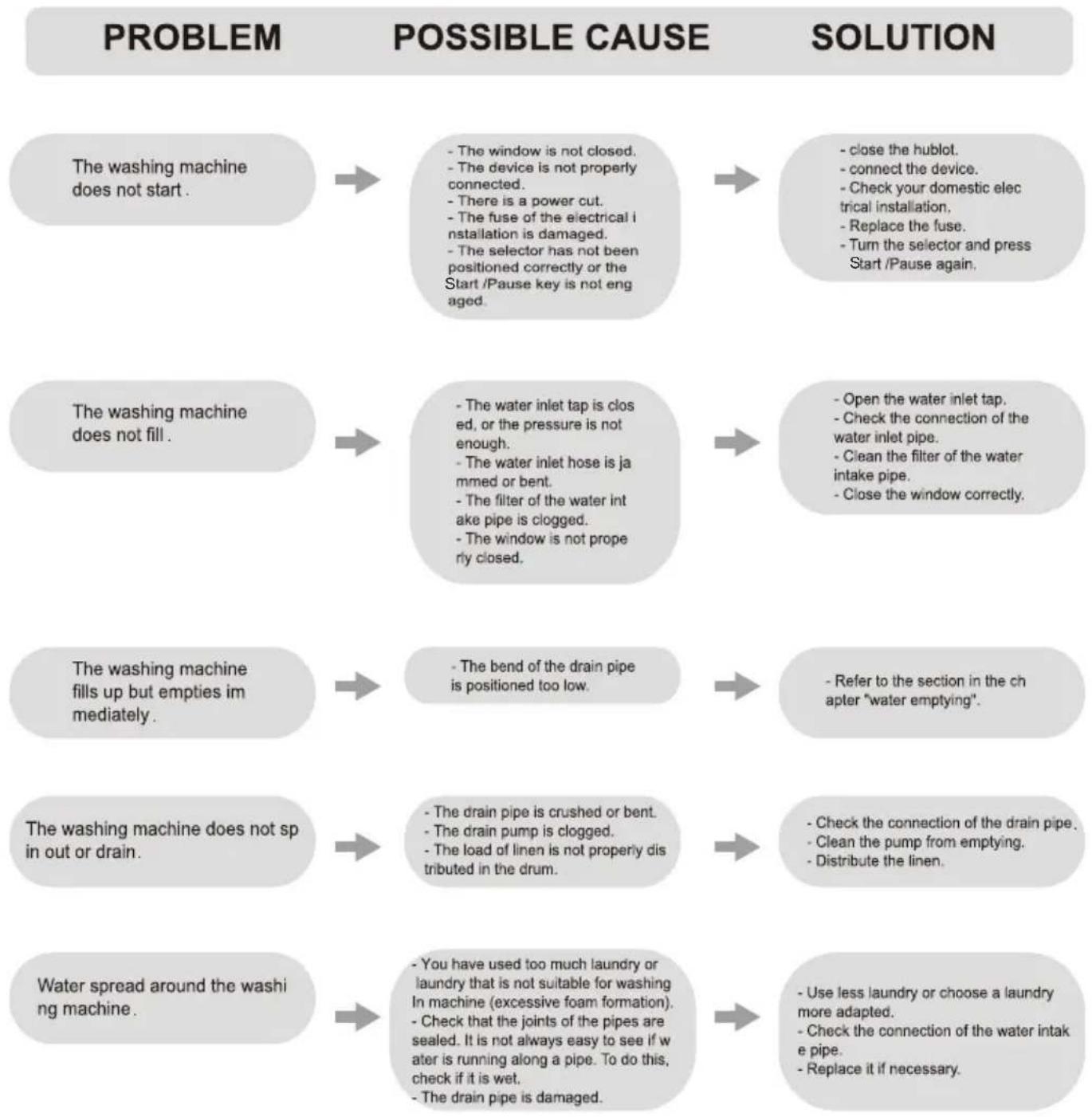
flowchart
graph TD
A["The washing machine does not start."] --> B["The window is not closed.<br>The device is not properly connected.<br>There is a power cut.<br>The fuse of the electrical installation is damaged.<br>The selector has not been positioned correctly or the Start/Pause key is not engaged."]
C["The washing machine does not fill."] --> D["The water inlet tap is closed, or the pressure is not enough.<br>The water inlet hose is jammed or bent.<br>The filter of the water intake pipe is clogged.<br>The window is not properly closed."]
E["The washing machine fills up but empties immediately."] --> F["The bend of the drain pipe is positioned too low."]
G["The washing machine does not sp in out or drain."] --> H["The drain pipe is crushed or bent.<br>The drain pump is clogged.<br>The load of linen is not properly distributed in the drum."]
I["Water spread around the washing machine."] --> J["You have used too much laundry or laundry that is not suitable for washing in machine (excessive foam formation).<br>Check that joints of the pipes are sealed. It is not always easy to see if water is running along a pipe. To do this, check if it is wet.<br>The drain pipe is damaged."]
K["SOLUTION"] --> L["close the hublot.<br>connect the device.<br>Check your domestic electrical installation.<br>Replace the fuse.<br>Turn the selector and press Start/Pause again."]
M["SOLUTION"] --> N["Open the water inlet tap.<br>Check the connection of the water inlet pipe.<br>Clean the filter of the water intake pipe.<br>Close the window correctly."]
O["SOLUTION"] --> P["Refer to the section in the chapter "water emptying"."]
Q["SOLUTION"] --> R["Check the connection of the drain pipe.<br>Clean the pump from emptying.<br>Distribute the linen."]
S["SOLUTION"] --> T["Use less laundry or choose a laundry more adapted.<br>Check the connection of the water intake pipe.<br>Replace it if necessary."]
TROUBLESHOOTING
PROBLEM
POSSIBLE CAUSE
SOLUTION
Washing results are not satisfactory.

- You have used too little laundry or a laundry that is not suitable for machine washing.
- Stubborn stains have not been treated before washing.
- You have not selected the right program or the right temperature.
- There is too much linen.

- Increase the amount of laundry or choose one more suitable laundry.
- Use products from the trade to process stubborn stains.
- Check that you have selected the right program and the right temperature.
-Introduce less laundry into the drum.
Detergent residues remain in the product tank.
The door does not open.

- Wet powder detergent has agglomerated in the product tank.
- The program is not finished.
- The window blocking device is not deactivated.
- There is too much water in the drum.

- Wlean the product tank well.
- Wait for the end of the washing cycle.
- Wait 2 minutes.
- Select the drain or spin program to Drain the water.
The washing machine vibrates or is noisy.

-You have not removed the protective devices for transport and the packaging.
- You have not adjusted the feet.
- The load of linen is not properly distributed in the drum.

- You have not removed the protective devices for transport and the packaging.
- You have not adjusted the feet.
- The load of linen is not properly.
Spin starts late or the washing machine does not spin.

- There is little linen in the drum.
- The electronic anti-imbalance safety device has been activated because the linen is not well distributed in the drum. To distribute the cloth better, the drum rotates in both directions until there is no more imbalance. The lavelinge will then perform its spin normally.
However, if after 10 minutes the load is still not properly distributed, the final spin is not carried out. -In this case, it is advisable to programmer a new spin taking care. Before unpacking manually the laundry.

Distributed in the drum.
TROUBLESHOOTING
| DISPLAY | MEANS | SOLUTIONS |
| E1 | The washer fills over time. | Check if the tap is opened.Check if the water pressure is too low.Check if the inlet hose is blocked. |
| E2 | Water drainage over time. | Check if the drain pump is blocked.Contact a technician if necessary. |
| E3 | Door lock is breakdown. | Close the door well again.Check if the clothes is caught between the door and seal.Contact a technician if necessary. |
| E4 | Water is overflowed. | water automatically until the water level is suitable for wash procedure.Contact a technician if necessary. |
| E5 | The electrical motor is breakdown. | Please contact a technician. |
| E6 | The heater does not work. | Please contact a technician. |
| E7 | There is a temperature sensor fault. | Please contact a technician. |
| E8 | Unmatched software/ hardware on mainboard and frequency inverting plate. | Please contact a technician. |
| E9 | communication failures. | Please contact a technician. |
| E10 | Inverter failures. | Please contact a technician. |
| EP | The procedure running is not corresponded to the cycle that the knob points. | Turn the cycle selector to the cycle corresponded to the procedure working on. |
TECHNICAL SPECIFICATIONS
COMMISSION DELEGATED REGULATION (EU) 2019/2014 with regard to energy labelling of household washing machines and household washer-dryers
Supplier's name or trade mark: SIGNATURE
Supplier's address: BUT INTERNATIONAL, 1 AVENUE SPINOZA, 77184 EMERAINVILLE, FRANCE
Model identifier: SLF7140ATBV
General product parameters:
| Parameter | Value | Parameter | Value | ||
| Rated capacity(a)(kg) | 7,0 | Dimensions in mm | Height | 85,0 | |
| Width | 59,5 | ||||
| Depth | 49,5 | ||||
| Energy Efficiency Index(a)(EEIw) | 52,0 | Energy efficiency class(a) | A | ||
| Washing efficiency index(a) | 1,031 | Rinsing effectiveness (g/kg)(a) | 5,0 | ||
| Energy consumption in kWh per cycle, based on the eco 40-60 programme at a combination of full and partial loads. Actual energy consumption will depend on how the appliance is used. | 0,448 | Water consumption in litre p cycle, based on the eco 40-60 programme at a combination of full and partial loads. Actual water consumption will depend on how the appliance is used and on the hardness of the water. | 45 | ||
| Maximum temperature inside the treated textile(a)(°C) | Rated capacity | 34 | Weighted remaining moisture content(a)(%) | 53,9 | |
| Half | 32 | ||||
| Quarter | 23 | ||||
| Spin speed(a)(rpm) | Rated capacity | 1400 | Spin-drying efficiency class(a) | B | |
| Half | 1400 | ||||
| Quarter | 1400 | ||||
| Programme duration(a)(h:min) | Rated capacity | 3:28 | Type | free-standing | |
| Half | 2:42 | ||||
| Quarter | 2:34 | ||||
| Airborne acousti-cal noise emissions in the spinning phase(a)(dB(A) re 1 pW) | 76 | Airborne acoustical noise emission class(a)(spinning phase) | B | ||
TECHNICAL SPECIFICATIONS
| Off-mode (W) (if applicable) | 0,50 | Standby mode (W) (if applicable) | - | |
| Delay start (W) (if applicable) | 4,00 | Networked standby (W) (if applicable) | - | |
| Minimum duration of the guarantee offered by the supplier: 24 months | ||||
| This product has been designed to release silver ions during the washing cycle | NO | |||
| Additional information: | ||||
| Weblink to the supplier's website, where the information in point 9 of Annex II to Commission Regulation (EU) 2019/2023 is found: http://notices.wesder.net | ||||
(a) for the eco 40-60 programme.
Note: More data information, please scan the QR code on the energy label.
TECHNICAL SPECIFICATIONS
| PARAMETER | UNIT | VALUE |
| Rated capacity for the ECO40-60 programme, at 0,5 kg intervals (c) | kg | 7.0 |
| Energy consumption of the ECO40-60 programme at rated capacity (EW,full) | kWh/cycle | 0.648 |
| Energy consumption of the ECO40-60 programme at half rated capacity (EW,1⁄2) | kWh/cycle | 0.444 |
| Energy consumption of the ECO40-60 programme at quarter rated capacity (EW,1/4) | kWh/cycle | 0.174 |
| Weighted energy consumption of the ECO40-60 programme (EW) | kWh/cycle | 0.448 |
| Standard energy consumption of the ECO40-60 programme (SCEW) | kWh/cycle | 0.862 |
| Energy Efficiency Index (EEIW) | - | 52.0 |
| Water consumption of the ECO40-60 programme at rated capacity (WW,full) | L/cycle | 56.0 |
| Water consumption of the ECO40-60 programme at half rated capacity (WW,1⁄2) | L/cycle | 40.0 |
| Water consumption of the ECO40-60 programme at quarter rated capacity (WW,1/4) | L/cycle | 34.0 |
| Weighted water consumption (WW) | L/cycle | 45 |
| Washing efficiency index of the ECO40-60 programme at rated capacity (Iw) | - | 1.031 |
| Washing efficiency index of the ECO40-60 programme at half rated capacity (Iw) | - | 1.031 |
| Washing efficiency index of the ECO40-60 programme at quarter rated capacity (Iw) | - | 1.031 |
| Rinsing effectiveness of the ECO40-60 programme at rated capacity (IR) | g/kg | 5.0 |
| Rinsing effectiveness of the ECO40-60 programme at half rated capacity (IR) | g/kg | 5.0 |
| Rinsing effectiveness of the ECO40-60 programme at quarter rated capacity (IR) | g/kg | 5.0 |
TECHNICAL SPECIFICATIONS
| Programme duration of the ECO40-60 programme at rated capacity ( tw ) | h:min | 3:28 |
| Programme duration of the ECO40-60 programme at half rated capacity ( tw ) | h:min | 2:42 |
| Programme duration of the ECO40-60 programme at quarter rated capacity ( tw ) | h:min | 2:34 |
| Temperature reached for minimum 5 min inside the load during ECO40-60 programme at rated capacity (T) | °C | 34 |
| Temperature reached for minimum 5 min inside the load during ECO40-60 programme at half rated capacity (T) | °C | 32 |
| Temperature reached for minimum 5 min inside the load during ECO40-60 programme at quarter rated capacity (T) | °C | 23 |
| Spin speed in the spinning phase of the ECO40-60 programme at rated capacity (S) | rpm | 1400 |
| Spin speed in the spinning phase of the ECO40-60 programme at half rated capacity (S) | rpm | 1400 |
| Spin speed in the spinning phase of the ECO40-60 programme at quarter rated capacity (S) | rpm | 1400 |
| Remaining moisture content for the ECO40-60 programme at rated capacity ( Dfull ) | % | 53.90 |
| Remaining moisture content for the ECO40-60 programme at half rated capacity ( D1/2 ) | % | 53.90 |
| Remaining moisture content for the ECO40-60 programme at quarter rated capacity ( D1/4 ) | % | 53.90 |
| Weighted remaining moisture content (D) | % | 53.9 |
| Airborne acoustical noise emissions during ECO40-60 programme (spinning phase) | dB(A) re 1 pW | 76 |
| Power consumption in ‘off mode’ ( Po ) | W | 0.50 |
| Power consumption in ‘standby mode’ ( Psm ) | W | - |
| Does ‘standby mode’ include the display of information? | - | - |
| Power consumption in ‘standby mode’ ( Psm ) in condition of networked standby (if applicable) | W | - |
| Power consumption in ‘delay start’ ( Pds ) (if applicable) | W | 4.00 |
TECHNICAL SPECIFICATIONS
| Parameter/Capacity | Inverter Motor Series |
| 7kg | |
| Model | SLF7140ATBV |
| Voltage | 220-240V~/50Hz |
| Rated Power | 1850W |
| Water Pressure | 0,05-0,8MPa |
| Outer Dimension (W*D*H) mm | 595*495*850 |
DISPOSAL OF OLD ELECTRICAL APPLIANCES
"European directive 2012/19/EU on Waste from Electrical and Electronic Equipment (WEEE), requires that used household appliances are not thrown into the normal municipal waste stream. Used appliances must be collected separately in order to optimize the rate of recovery and recycling of materials that compose
them, and to reduce the impact on human health and on the environment. The crossed bin symbol is affixed to all the products to remind you of the obligations of separated collection.
We decline liability for any damage or accident derived from any use of this product which is not in conformity with the instructions contained in this booklet.
If you need access to the list of spare parts and technical documentation for your product, please go to https://pieces-detachees-butelectro.sfg.fr
There you will be able to buy spare parts for repairing your product or having it repaired.
Duration of availability of spare parts: 10 years.
In accordance with Article L.217 of the Consumer Code, your porduct has 2 year legal guarantee of conformity. To contact our After-Sales Service before going to BUT store.
Monday to Friday from 09:00 to 19:00, and
Saturday 09:00 to 18:00
Price of a local call

LE TRI

FACILE


- SIGNATURE®
- TABLE DE MATIÈRES
- INSTALLATION
- FONCTIONNEMENT
- ENTRETIEN ET NETTOYAGE
- HUBLOT WASHING MACHINE
- TABLE OF CONTENTS
- SAFETY INSTRUCTIONS
- WARNING
- OVERVIEW OF WASHING MACHINE
- INSTALL WASHING MACHINE
- NOTE
- ■ Tools needed
- ■ Unpacking the washing machine
- ■ Select the location
- ■ Remove transit bolts
- ■ Level the washing machine
- Factory status
- CAUTION
- ■ Connect the inlet hose
- ■ Connect the drain hose
- ■ Connect the power
- Ensure your machine is installed properly before use.
- To do this:
- ■ Washing steps
- ■ Preparing laundry for washing
- ■ Sorting the laundry
- ■ Loading the laundry
- ■ Using detergent and softener
- ■ Put detergent
- Delay ⏱
- Child Lock
- Alarm Off
- Door Lock
- Reload
- ■ Programme selection
- ■ Auxiliary function selection
- Wash+
- Rinse+
- Smart Start
- Delay
- ■ Starting the programme
- ■ Child Lock
- ■ Canceling the Delayed Start function
- ■ Adding or taking out laundry
- ■ Introduction of Other Functions
- Unlock of emergency door
- Resume Function
- Cloth Weigh Awareness
- Unbalance Protection
- CARE AND MAINTENANCE
- ■ Clean internal drum
- ■ Clean surface
- ■ Clean the drain pump
- ■ Clean Inlet valve filter
- ■ Clean detergent drawer
- ■ Recovery from freezing
- Use meter:
- TROUBLESHOOTING
- PROBLEM
- POSSIBLE CAUSE
- SOLUTION
- TECHNICAL SPECIFICATIONS
- DISPOSAL OF OLD ELECTRICAL APPLIANCES
Brand : SIGNATURE
Model : SLF7140ATBV
Category : Washing machine