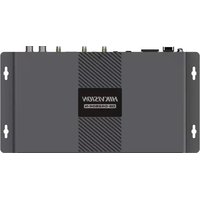
DS-D42B04-N - Monitor Hikvision - Free user manual and instructions
Find the device manual for free DS-D42B04-N Hikvision in PDF.


| Product Type | Professional Monitor |
| Brand | Hikvision |
| Model | DS-D42B04-N |
| Screen Size | 42 inches (diagonal) |
| Resolution | 1920 x 1080 pixels (Full HD) |
| Video Inputs | HDMI 1, HDMI 2, DP, DVI, LAN (network) |
| Video Output | HDMI OUT, 3D OUT |
| Audio Input | AUDIO IN |
| Audio Output | AUDIO OUT |
| USB Ports | USB (for keyboard, mouse, USB flash drive) |
| Network Interface | LAN RJ45 |
| Power Supply | 100-220 V AC, 50/60 Hz |
| Power Consumption | Not specified |
| Main Functions | Video wall display, control via OSD menus, image test, light sensor |
| Control | Rotary knob, SOURCE/TEST, BACK, POWER UP/DOWN buttons |
| LED Indicators | POWER, ACTIVE, SOURCE, USB, SYSERR, LINKERR |
| Safety | Bipolar fuse, grounding, Class A (radio interference) |
| Ventilation | Free space of at least 20 cm around the device |
| Operating Temperature | Not specified |
| Operating Humidity | Not specified |
| Dimensions (W x H x D) | Not specified |
| Weight | Not specified |
| Included Accessories | Not specified |
Frequently Asked Questions - DS-D42B04-N Hikvision
User questions about DS-D42B04-N Hikvision
0 question about this device. Answer the ones you know or ask your own.
Ask a new question about this device
Download the instructions for your Monitor in PDF format for free! Find your manual DS-D42B04-N - Hikvision and take your electronic device back in hand. On this page are published all the documents necessary for the use of your device. DS-D42B04-N by Hikvision.
USER MANUAL DS-D42B04-N Hikvision
LED Full-Color Display Controller
Quick Start Guide
Contents
| English | 1 |
| Français | 4 |
| Deutsch | 7 |
| Español | 10 |
| Italiano | 13 |
| Português | 16 |
| Nederlands | 19 |
| Češna | 22 |
| Dansk | 25 |
| Magyar | 28 |
| Polski | 31 |
| Română | 34 |
| Slovenčina | 37 |
| Bahasa Indonesia | 40 |
| 43 | |
| Türkçe | 47 |
| Русский | 50 |
| Українська | 53 |
© 2020 Hangzhou Hikvision Digital Technology Co., Ltd. All rights reserved.
This Manual is the property of Hangzhou Hikvision Digital Technology Co., Ltd. or its aliates (hereinaer referred to as "Hikvision"), and it cannot be reproduced, changed, translated, or distributed, parally or wholly, by any means, without the prior written permission of Hikvision. Unless otherwise expressly stated herein, Hikvision does not make any warranties, guarantees or representations, express or implied, regarding to the Manual, any informaon contained herein.
About this Manual
The Manual includes instrucons for using and managing the Product. Pictures, charts, images and all other informaon hereinaer are for descripon and explanaon only. The informaon contained in the Manual is subject to change, without noce, due to rmware updates or other reasons. Please nd the latest version of this Manual at the Hikvision website (hps://www.hikvision.com).
Please use this Manual with the guidance and assistance of professionals trained in supporting the Product.
Trademarks
- HIKVISION and other Hikvision's trademarks and logos are the properes of Hikvision in various jurisdicons.
● Other trademarks and logos menoned are the properes of their respective owners. - HDMI® The terms HDMI and HDMI High-Denion Mulmedia Interface, and the HDMI Logo are trademarks or registered trademarks of HDMI Licensing Administrator, Inc. in the United States and other countries.
Disclaimer
TO THE MAXIMUM EXTENT PERMITTED BY APPLICABLE LAW, THIS MANUAL AND THE PRODUCT DESCRIBED, WITH ITS HARDWARE, SOFTWARE AND FIRMWARE, ARE PROVIDED "AS IS" AND "WITH ALL FAULTS AND ERRORS". HIKVISION MAKES NO WARRANTIES, EXPRESS OR IMPLIED, INCLUDING WITHOUT LIMITATION, MERCHANTABILITY, SATISFACTORY QUALITY, OR FITNESS FOR A PARTICULAR PURPOSE.
THE USE OF THE PRODUCT BY YOU IS AT YOUR OWN RISK. IN NO EVENT WILL HIKVISION BE LIABLE TO YOU FOR ANY SPECIAL,
CONSEQUENTIAL, INCIDENTAL, OR INDIRECT DAMAGES, INCLUDING, AMONG OTHERS, DAMAGES FOR LOSS OF BUSINESS PROFITS,
BUSINESS INTERRUPTION, OR LOSS OF DATA, CORRUPTION OF SYSTEMS, OR LOSS OF DOCUMENTATION, WHETHER BASED ON BREACH OF CONTRACT, TORT (INCLUDING NEGLIGENCE), PRODUCT LIABILITY, OR OTHERWISE, IN CONNECTION WITH THE USE OF THE PRODUCT, EVEN IF HIKVISION HAS BEEN ADVISED OF THE POSSIBILITY OF SUCH DAMAGES OR LOSS.
YOU ACKNOWLEDGE THAT THE NATURE OF INTERNET PROVIDES FOR INHERENT SECURITY RISKS, AND HIKVISION SHALL NOT TAKE ANY RESPONSIBILITIES FOR ABNORMAL OPERATION, PRIVACY LEAKAGE OR OTHER DAMAGES RESULTING FROM CYBER-ATTACK, HACKER ATTACK, VIRUS INFECTION, OR OTHER INTERNET SECURITY RISKS; HOWEVER, HIKVISION WILL PROVIDE TIMELY TECHNICAL SUPPORT IF REQUIRED.
YOU AGREE TO USE THIS PRODUCT IN COMPLIANCE WITH ALL APPLICABLE LAWS, AND YOU ARE SOLELY RESPONSIBLE FOR ENSURING THAT YOUR USE CONFORMS TO THE APPLICABLE LAW. ESPECIALLY, YOU ARE RESPONSIBLE, FOR USING THIS PRODUCT IN A MANNER THAT DOES NOT INFRINGE ON THE RIGHTS OF THIRD PARTIES, INCLUDING WITHOUT LIMITATION, RIGHTS OF PUBLICITY, INTELLECTUAL PROPERTY RIGHTS, OR DATA PROTECTION AND OTHER PRIVACY RIGHTS. YOU SHALL NOT USE THIS PRODUCT FOR ANY PROHIBITED END-USES, INCLUDING THE DEVELOPMENT OR PRODUCTION OF WEAPONS OF MASS DESTRUCTION, THE DEVELOPMENT OR PRODUCTION OF CHEMICAL OR BIOLOGICAL WEAPONS, ANY ACTIVITIES IN THE CONTEXT RELATED TO ANY NUCLEAR EXPLOSIVE OR UNSAFE NUCLEAR FUEL-CYCLE, OR IN SUPPORT OF HUMAN RIGHTS ABUSES.
IN THE EVENT OF ANY CONFLICTS BETWEEN THIS MANUAL AND THE APPLICABLE LAW, THE LATER PREVAILS.
Regulatory Informaon
FCC Informaon
Please take aenon that changes or modicaon not expressly approved by the party responsible for compliance could void the user's authority to operate the equipment.
FCC compliance: This equipment has been tested and found to comply with the limits for a Class B digital device, pursuant to part 15 of the FCC Rules. These limits are designed to provide reasonable protecon against harmful interference in a residential installaon. This equipment generates, uses and can radiate radio frequency energy and, if not installed and used in accordance with the instrucons, may cause harmful interference to radio communicaons. However, there is no guarantee that interference will not occur in a particular installaon. If this equipment does cause harmful interference to radio or television recepon,
which can be determined by turning the equipment o and on, the user is encouraged to try to correct the interference by one or more of the following measures:
— Reorient or relocate the receiving antenna.
— Increase the separaon between the equipment and receiver.
— Connect the equipment into an outlet on a circuit dierent from that to which the receiver is connected.
— Consult the dealer or an experienced radio/TV technician for help.
FCC Conditions
This device complies with part 15 of the FCC Rules. Operaon is subject to the following two conditions:
- This device may not cause harmful interference.
- This device must accept any interference received, including interference that may cause undesired operaon.
EU Conformity Statement


This product and - if applicable - the supplied accessories too are marked with "CE" and comply therefore with the applicable harmonized European standards listed under the EMC Directive 2014/30/EU, the LVD Directive 2014/35/EU, the RoHS Directive 2011/65/EU.
2012/19/EU (WEEE direcve): Products marked with this symbol cannot be disposed of as unsorted municipal waste in the European Union. For proper recycling, return this product to your local supplier upon the purchase of equivalent new equipment, or dispose of it at designated collecon points. For more informaon see: www.recyclethis.info
2006/66/EC (baery direcve): This product contains a baery that cannot be disposed of as unsorted municipal waste in the European Union. See the product documentaon for specic baery informaon. The baery is marked with this symbol, which may include leering to indicate cadmium (Cd), lead (Pb), or mercury (Hg). For proper recycling, return the baery to your supplier or to a designated collecon point. For more informaon see: www.recyclethis.info
Industry Canada ICES-003 Compliance
This device meets the CAN ICES-3 (B)/NMB-3(B) standards requirements.
Safety Instrucon
You must carefully read the safety instrucons before using and installing the product.
Warnings & Cauons:
- This is a class A product and may cause radio interference in which case the user may be required to take adequate measures.
- In the use of the product, you must be in strict compliance with the electrical safety regulations of the naon and region.
- The equipment shall not be exposed to dripping or splashing and that no objects lled with liquids, such as vases, shall be placed on the equipment.
- CAUTION: To reduce the risk of re, replace only with the same type and rang of fuse.
- CAUTION: Double pole/Neutral fusing. Aer operaon of the fuse, parts of the equipment that remain energized might represent a hazard during servicing.
- The equipment must be connected to an earthed mains socket-outlet.
- Ensure correct wiring of the terminals for conneccon to an AC mains supply.
• 4 indicates hazardous live and the external wiring connected to the terminals requires installaon by an instructed person.
- The equipment has been designed, when required, modified for conneccon to an IT power distribution system.
- This equipment is not suitable for use in locaons where children are likely to be present.
- CAUTION: Risk of explosion if the baery is replaced by an incorrect type.
- Improper replacement of the baery with an incorrect type may defeat a safeguard (for example, in the case of some lithium battery types).
- Do not dispose of the baery into fire or a hot oven, or mechanically crush or cut the battery, which may result in an explosion.
- Do not leave the battery in an extremely high temperature surrounding environment, which may result in an explosion or the leakage of ammable liquid or gas.
- Do not subject the baery to extremely low air pressure, which may result in an explosion or the leakage of flammable liquid or gas.
- Dispose of used baeries according to the instrucons.
- No naked ame sources, such as lighted candles, should be placed on the equipment.
- The venlaon should not be impeded by covering the venlation openings with items, such as newspapers, table-cloths, curtains, etc. The openings shall never be blocked by placing the equipment on a bed, sofa, rug or other similar surface.
- Keep a minimum 20 cm distance around the equipment for sucient venlaon.
- The USB port of the equipment is used for connecting to a mouse, a keyboard, or a USB ash drive only.
- This equipment is not suitable for use in locaons where children are likely to be present.
• Install the equipment according to the instructions in this manual.
- To prevent injury, this equipment must be securely installed in the cabinet in accordance with the installaon instrucons.
- Keep body parts away from fan blades. Disconnect the power source during servicing.
- Keep 90^ when moving or using the equipment.
Overview
LED Full-Color Display Controller can be used with the full-color display units to achieve a seamless video wall in any dimensions. It is applicable to the meeng room, studio, gym, airport, bank, adversement, family cinema, etc.
Interface
The interfaces of LED display controller may vary with product model. The following gures are for illustraon purpose only.

| Indicator | Descripon | Indicator | Descripon |
| POWER | Power indicator | ACTIVE | Acve status indicator |
| SOURCE | Signal source status indicator | USB | USB indicator |
| SYSERR | System error indicator | LINKERR | Link error indicator |
| LCD Panel | Display informaon such as brightness, device IP, input/output resoluon, signal source type, menu lock status | Knob | Normal Mode (not the Menu Mode): rotate right/le to adjust brightnessMenu Mode: rotate right/le to select menu item; press to select or enter next menu |
| BACK | Long press: unlock the menu lock and press the knob to enter menu modeShort press: back to the previous menu or the main menu | SOURCE/TEST | Long press: enter the image test modeShort press: switch the signal source |
| POWERUP/DOWN | Long press: put the device to sleepShort press: wake the device | —— | —— |

| Interface | Descripon | Interface | Descripon | Interface | Descripon |
| LAN | Network signal input | USB | USB interface | DP | DP interface |
| HDMI IN 1/IN 2 | HDMI signal input 1/input 2 | LIGHT SENSOR | Light sensor interface | DVI | DVI interface |
| HDMI OUT | HDMI signal output | AUDIO IN/OUT | Audio input/output | IR IN | Infrared input |
| WAKEUP | Wakeup interface | 3D OUT | 3D signal output | 3D IN | 3D signal input |
| DATA | 16 network port output | Power | 110 to 220 VAC | — — | — — |
Acvaon and Login
Run the client and avvate the desired device using password. Go to the login interface and enter IP address, port No., user name, and password to log in.
© 2020 Hangzhou Hikvision Digital Technology
( \text{Hikvision} ) Hangzhou Hikvision Digital Technology Co., Ltd. ( \text{Q}_2\text{Q}_3\text{Q}_4\text{Q}_5 ) (Q( _{1} )Q( _{2} )Q( _{3} )Q( _{4} )Q( _{5} )) “Hikvision” Q( _{1} ) Q( _{2} )Q( _{3} )Q( _{4} )Q( _{5} )) ( \text{Q}_1 ) ( \text{Q}_2 )Q( _{3} )Q( _{4} )Q( _{5} )Q( _{6} ): Q( _{1} )Q( _{2} )Hikvision ( \text{Q}_1 ) Q( _{2} )Q( _{3} )Q( _{4} ): Q( _{1} )Q( _{2} )Q( _{3} )Q( _{4} )Q( _{5} ): Q( _{1} )Q( _{2} )Q( _{3} )Q( _{4} ): Q( _{1} )Q( _{2} )Q( _{3} )Q( _{4} ): Q( _{1} )Q( _{2} )Q( _{3} )Q( _{4} ): Q( _{1} )Q( _{2} )Q( _{3} )Q( _{4} ): ( \text{Q}_1 )Q( _{2} )Q( _{3} )Q( _{4} ): ( \text{Q}_1 )Q( _{2} )Q( _{3} )Q( _{4} ): ( \text{Q}_1 )Q( _{2} )Q( _{3} )Q( _{4} ): ( \text{Q}_1, \text{Q}_2, \text{Q}_3, \text{Q}_4, \text{Q}_5, \text{Q}_6, \text{Q}_7, \text{Q}_8, \text{Q}_9, \text{Q}_10, \text{Q}_11, \text{Q}_12, \text{Q}_13, \text{Q}_14, \text{Q}_15, \text{Q}_16, \text{Q}_17, \text{Q}_18, \text{Q}_19, \text{Q}_20, \text{Q}_21, \text{Q}_22, \text{Q}_23, \text{Q}_24, \text{Q}_25, \text{Q}_26, \text{Q}_27, \text{Q}_28, \text{Q}_29, \text{Q}_30, \text{Q}_31, \text{Q}_32, \text{Q}_33, \text{Q}_34, \text{Q}_35, \text{Q}_36, \text{Q}_37, \text{Q}_38, \text{Q}_39, \text{Q}_40, \text{Q}_41, \text{Q}_42, \text{Q}_43, \text{Q}_44, \text{Q}_45, \text{Q}_46, \text{Q}_47, \text{Q}_48, \text{Q}_49, \text{Q}_50, \text{Q}_51, \text{Q}_52, \text{Q}_53, \text{Q}_54, \text{Q}_55, \text{Q}_56, \text{Q}_57, \text{Q}_58, \text{Q}_59, \text{Q}_60, \text{Q}_61, \text{Q}_62, \text{Q}_63, \text{Q}_64, \text{Q}_65, \text{Q}_66, \text{Q}_67, \text{Q}_68, \text{Q}_69, \text{Q}_70, \text{Q}_71, \text{Q}_72, \text{Q}_73, \text{Q}_74, \text{Q}_75, \text{Q}_76, \text{Q}_77, \text{Q}_78, \text{Q}_79, \text{Q}_80,
நீலே:ஒரைகோாடே:
- LED Full-Color Display Controller
- Contents
- © 2020 Hangzhou Hikvision Digital Technology Co., Ltd. All rights reserved.
- About this Manual
- Trademarks
- Disclaimer
- Regulatory Informaon
- FCC Informaon
- FCC Conditions
- EU Conformity Statement
- Industry Canada ICES-003 Compliance
- Safety Instrucon
- Warnings & Cauons:
- Overview
- Interface
- Acvaon and Login
- நீலே:ஒரைகோாடே:
Brand : Hikvision
Model : DS-D42B04-N
Category : Monitor