ManualGo.com
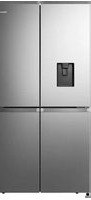
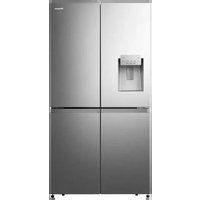
RF728N4SASE - Fridge HISENSE - Free user manual and instructions
Find the device manual for free RF728N4SASE HISENSE in PDF.



Download the instructions for your Fridge in PDF format for free! Find your manual RF728N4SASE - HISENSE and take your electronic device back in hand. On this page are published all the documents necessary for the use of your device. RF728N4SASE by HISENSE.
USER MANUAL RF728N4SASE HISENSE
Before operating this unit, please read this manual thoroughly, and retain for future referenceThank you for choosing Hisense. We are sure you will find your new refrigerator a pleasure to use. However, before you use the appliance, we recommend that you carefully read the instructions, which provide details about installing and using the product. Please keep this manual for future reference.
- Features p. 21
- General Use Information p. 23
- REFRIGERATOR CARE p. 25
- Cleaning p. 25
- Lights p. 25
- Vacation and Moving Care p. 26
- Reinstalling/Using Refrigerator Again p. 26
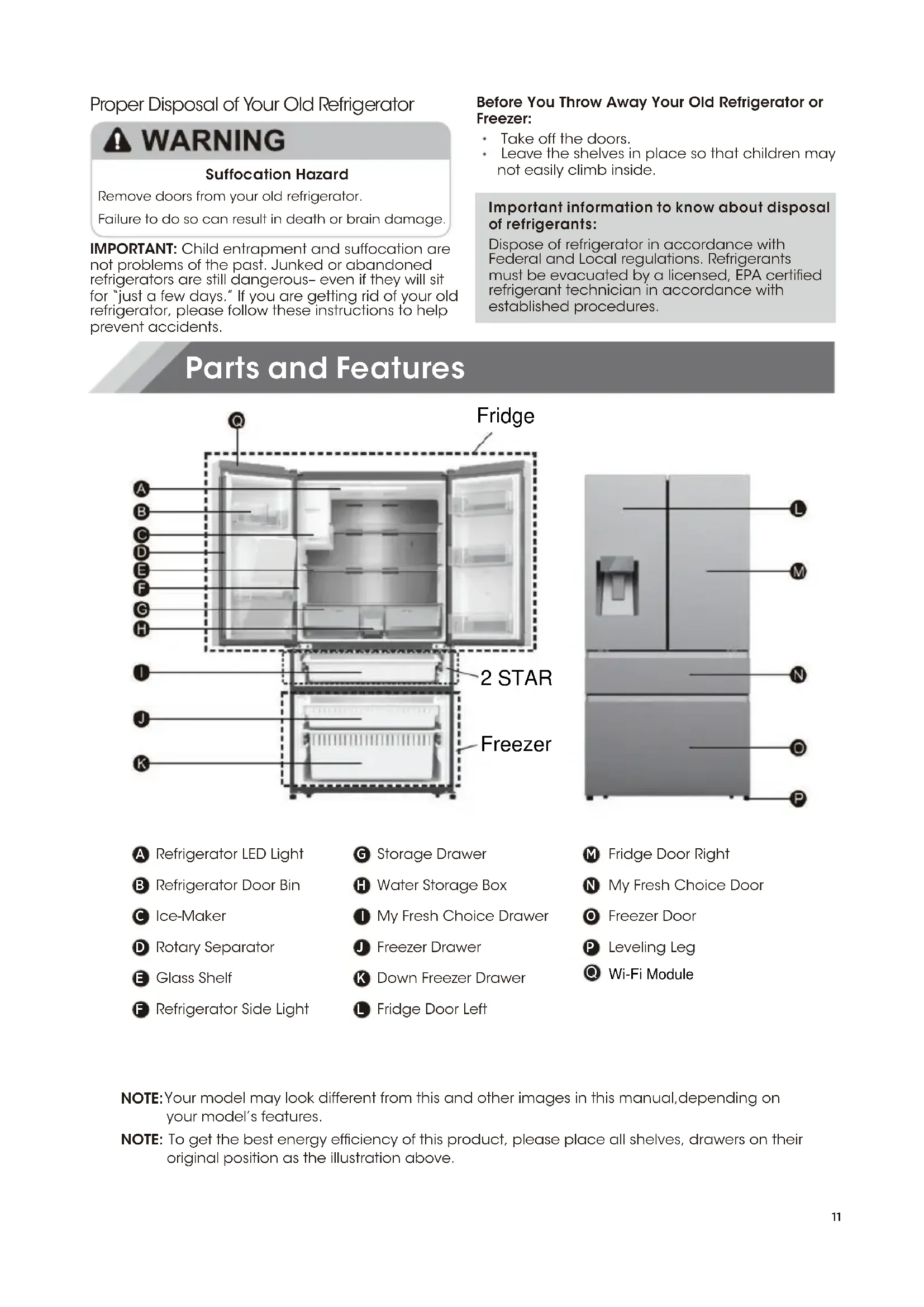
- TROUBLESHOOTING YYour model may look different from this and other images in this manual,depending on your model’s features. Parts and Features Proper Disposal of Your Old Refrigerator Remove doors from your old refrigerator.Failure to do so can result in death or brain damage. Suffocation Hazard IMPORTANT: Child entrapment and suffocation are not problems of the past. Junked or abandoned refrigerators are still dangerous– even if they will sit for “just a few days.” If you are getting rid of your old refrigerator, please follow these instructions to help prevent accidents. Before You Throw Away Your Old Refrigerator or Freezer: Take off the doors. Leave the shelves in place so that children may not easily climb inside. Important information to know about disposal of refrigerants: Dispose of refrigerator in accordance with Federal and Local regulations. Refrigerants must be evacuated by a licensed, EPA certified refrigerant technician in accordance with established procedures. p. 29
NOTE: To get the best energy efficiency of this product, please place all shelves, drawers on their original position as the illustration above.
Risk of fire/ flammable materials Keep flammable materials and vapors,such asgasoline,away from appliance.Failure to do so can result in death,explosion or fire. Electrical Shock Hazard Plug into a grounder 3 prong outlet.Do not remove the ground prong from the powercord plug.Do not use an adapter.Do not use an extension cord.Failure to do so can result in death,fire orelectrical shock. Recommender Clearances Temperature Exterior and Dimensions Ventilation Recommender Grounding Method 914mm 725mm mm5871Refrigerator doorsMy fresh chioce doorFreezer door AC 220-240 volt, 50 Hz, AC only 15- or 20-amp fused, grounded electrical supply is required. It is recommended that a separate circuit serving only your refrigerator is provided. Use an outlet that cannot be turned off by a switch. Do not use an extension cord. NOTE: Befor performing any type of installation or cleaning, disconnect the refrigerator from the electrical source. When you have finished, reconnect the refrigerator to the electrical source and reset the temperature controls to the desired setting.Unpack the Refrigerator Door Removal (only if needed)
,Use of water storage box 1 . The user pulls out the ice box in the direction of the arrow.2. Open the lid of the ice box and add water to it.
3. Close the lid and push back into the ice box in
the direction of the arrow.
Adjustable foot Roller Roller big gasket 2 pcs small gasket 2 pcs 1.The ice box can hold up to 4.2L of water. 2.If the water storage box is not in place, the icon“ ”on the control panel flashes. 3.If the user has more than 7 days of travel planned,it is recommended to clean the ice. 4.When the tank is repositioned,the pump will reverse the water from the ice maker. After about a minute,a few drops of water will fall out of the ice outlet,which is normal. Level Refrigerator (if needed) The gaskets are used to align doors, you can find16 125° 125° 908mm 1471.4mm 1115mm 610mm your refrigerator to swing the doors open.17 When the appliance is powered on for the first time, the backlighting of the icons on the display panel starts working. If no buttons have been touched and the doors are closed, the backlighting will turn off after 60 seconds. Caution! When you set a temperature, you set an average temperature for the whole Refrigerate cabinet. Temperatures inside each compartment may vary from the temperatures displayed on the panel, depending on how much food you store and where you place it. High or low room temperature may also affect the actual temperature inside the appliance. Alarm Child Lock and Door This button serves two purposes:
Press and hold Alarm key for 3 seconds to lock the all the Control Panel including dispenser function. If Control panel is locked, the icon" "will be on, and none of the key on the Control panel work. To unlock the Control panel, please press and hold Alarm key for 3 seconds again.
In case of alarm," "icon will flicker and a buzzing sound will be heard. Touch Alarm key to clear alarm, then the" "icon will stop flickering and keep on, the buzzing will stop at the same time. When the door of fridge, variation or freezer is open over 2 minutes, the door alarm will come on. The " " icon will flicker, the control panel will display " dr " , and you will hear a buzzer sound. The buzzer will sound 3 times per minute and will stop after 8 minutes. Also it can be stopped by closing all the doors. When Child Lock is off, and the doors are open, you can turn alarm off by touching Alarm key. Note : To save energy, please avoid keeping doors open for a long time when using Refrigerate. Ice Off This key controls the ice maker. You can touch Ice Off key to control the ice maker. When the Child Lock is off, and18 the ice function is on, you can touch the Ice Off key to lock the ice maker, and the icon" " will be illuminated. If you want to unlock the ice maker, please touch the Ice Off key again, and the icon" "will be off. Note: When the" "is on, it only lock the ice maker not the dispenser. Fridge temperature control You can touch the Fridge key to activate the mode to control the fridge temperature. When you touch the key continuously, the temperature will be set in the following sequence. If you want to decrease the time needed to cool products in the Fridge, please touch and hold this key for 3 seconds, the super cool icon " " will be illuminated, the fridge temperature setting displays 2℃. Super cool automatically switches off after 3 hours, and the Refrigerate temperature setting will revert back to the previous setting. When super cool function is on, you can touch the Fridge key to switch it off. The fridge will not retain the Super Cool function when power off. Note: On the Super Cool function, when you touch the Eco key, Eco function will be activated, and Super Cool mode will be off. Freezer temperature control You can touch the Freezer key to activate the mode to control the freezer temperature. When you press the key continuously, the temperature will be set in the following sequence. Press and hold the Freezer key for 3 seconds, the icon " " will be illuminated the freezer temperature setting displays -24℃. Super Freeze can quickly lower the temperature and freeze your food faster than usual. This can retain more of the vitamins and nutrition in fresh food and keep your food longer. Super freeze automatically switches off after 52 hours, and the freezer temperature setting will revert back to the previous setting. When the super freeze function is on, you can touch Freezer key to switch off the Super Freeze function. And it will not retain the Super Freeze function when power off. To freeze fresh food activate the SuperFreeze function at least 24 hours before placing the food to complete pre-freezing. Note: On the Super Freezer Function, when you touch the Eco Key, Eco function will be activated, and Super Freezer mode will be off. When selecting the Super Freeze function. ensure there are no bottles in the freezer compartment. Bottles and cans may explode. My Fresh Choice Temperature Control You can touch the My Fresh Choice key to activate the mode to control the convertible compartment temperature. When you press the button continuously, the temperature will be set in the19 following sequence. Dispenser control When the Child Lock is on, the dispenser will not work. When the Child Lock is off, You can press the "Cubed" or "Crushed" option to choose the type of Ice to be dispensed, and press the "Water" button will activate the water mode. If you choose the function of cubed, the " " icon will be illuminated; If you choose the function of Crushed, the" "icon will be illuminated, and the" "icon will be illuminated when Water function be chose.If you don’t need ice, turn the function off to save on water and energy consumption. (See Ice Off above.) Eco You can touch this key to turn Eco mode on and off.When you turn Eco on,the Eco icon " "lights. The temperature of the fridge is automatically switched to 6℃ and the freezer to -17℃. If Eco mode is off, the icon" "will go off and the temperature setting will revert back to the previous setting. Tank reset icon If the water tank is not installed in place, the icon will flicker. If the water tank is installed in place, the icon" "will be extinguished. when the icon " " flicker , long press the Eco key 3 seconds to cancel tank alarm and the icon will be extinguished. Note: If you need to make ice, you still need to put the tank in place. Demo mode Demo mode is for store display, and it prevents the Refrigerate from generating cool air. In this Cooling off Mode, the Refrigerate may seem like it is working but it not make cool air. The indicators on the control panel will show "OF". To cancel this mode, press and hold " Alarm " and " WI-FI " keys at the same time for 3 seconds and buzzing a long sound. Wi-Fi function This appliance may be controlled remotely with a smart phone or a tablet computer. If the appliance is not connected to the home network, it will function like a regular appliance. What do you need to connect the appliance?
- Signal from the local wireless network (Wi-Fi) should be sufficiently strong in the spot where the appliance is installed.
- Home network router has to be connected to the internet, and the Wi-Fi function on the appliance should be activated.
- The smart phone/tablet computer has to be connected to the internet. Operating system on your smart phone/ tablet computer should be compatible with the ConnectLife app. ConnectLife App The ConnectLife App is available to download free of charge from the Apple App Store or from the Google Play Store.20 Installing the ConnectLife app
1. Go to the App Store (on Apple
devices), AppGallery (on Huawei devices) or Google Play Store (on Android devices) on your phone/tablet computer.
2. Search for " ConnectLife".
3. Choose the ConnectLife app and
install it on your smart phone/tablet computer. INFORMATION! We recommend downloading and installing the mobile app and creating a ConnectLife account before attempting to set up the connection with your appliance. CONNECT APPLIANCE TO Wi –Fi After activating the Wi-Fi function, connect your device to your home router in order to connect your appliance with the ConnectLife mobile app. Step 1: Set the appliance to normal operation. Touch the Wi-Fi key for approximately 3 seconds. You entered network connection menu when '--' appears in the display. Step 2: Touch the Fridge key to select ' 0 ' within 6 0 seconds. Step 3: Touch the Wi-Fi key to confirm the selection mode. The Wi-Fi symbol starts blinking and the network of this appliance is now open to connect to, for 5 minutes. Step 4: When the Wi-Fi symbol is on, it means that the Wi-Fi connection is successful. The display will return to normal. PAIR APPLIANCE The appliance can be paired with your mobile device. Simply pair another user to your appliance. This requires, that your appliance was already set up before and is connected to your home network. If not, go back and select. CONNE CTION SETUP. Step 1: Set the appliance to normal operation. Touch the Wi-Fi key for approximately 3 seconds. You entered network connection menu when ' -- '. Step 2: Touch the Fridge key to select ' P ' within 60 seconds. Step 3: Touch the Wi-Fi key to confirm the selection mode. The PAIR network of this appliance is now open to connect to, for 5 minutes. Step 4: When the display returns to normal, it means the PAIR connection is successful.
UNBIND ALL PAIR APPLIANCE
By activating this function, the appliance will be removed from all paired app user accounts. Step 1: Set the appliance to normal operation. Touch the Wi-Fi key for approximately 3 seconds. You entered network connection menu when ' -- ' appears in the display. Step 2: Touch the Fridge key to select ' 88 ' within 60 seconds. Step 3: Touch the Wi-Fi key to confirm the selection mode to realize unbinding. Step 4: After the device is unbound, it will automatically enter the distribution network state, the Wi-Fi icon flashes, and the distribution network time is up to 5 minutes.NOTE: Unscrew the drawer before taking it out.
1. Pull out drawer to maximum extension.
2. Lift up to remove the drawer.
3. Reverse steps 1 and 2 to replace the drawer.
3. Removing/Replacing freezer drawer
passes the rail support. select what you want to dispense. (1) (2) 21First, open the door at the maximum Angle.
The water dispenser is located in the fridge door. To get water, push the water button. Then move your glass down to the dispenser lever (A) in the suggested position and press it. as required. Then move your glass down to the the water dispenser still installed even if the dispenser is not in use.
To relocate the door baskets (B), slide them into the original location and push down until them sticks. To relocate the door baskets (A), slide them in above the desired location and push down until them stop. To remove the glass shelves, tilt up the front of the shelf shown in Page19 (1) and lift it up vertically shown in Page19 (2). Then pull the shelf out.Clean regularly the surfaces that can come in Make sure the compliance is checked by regular inspections. 24W hen cleaning the shelf parts, remove the lower shelf parts and place them horizontally. Either front or back, to prevent the shelf support from falling off. If the shelf parts are placed at an angle,their sides will touch the ground.When the force applied for cleaning is not proper,the shelf bracket will easily fall off.
Lights This product contains a light source of energy efficiency class on the top and side of the refrigerating chamber. 25Tape rubber or wooden blocks to the tops of the two doors, and let them open a sufficient distance to let air in. This stops odor and mold from building up. Seal the doors with tape and tape the power 26Refrigerator operation 2728Disposal of the appliance It is prohibited to dispose of this appliance as household waste. Packaging materials Packaging materials with the recycle symbol are recyclable. Dispose of the packaging into a suitable waste collection container to recycle it. Before disposal of the appliance
1. Pull out the mains plug from the mains socket.
2. Cut off the power cord and discard with the mains plug.
This symbol on the product or in its packing indicates that this product may not be treated as household waste. Instead, it should be taken to the appropriate waste collection point for the recycling of electrical and electronic equipment. By ensuring this product is disposed of correctly, you will help prevent potential negative consequences for the environment and human health, which could otherwise be caused by the inappropriate waste handling of this product. For more detailed information about the recycling of this product, please contact your local council your household waste disposal service, or the shop where you purchased the product. WARNING Refrigerators contain refrigerant and gases in the insulation. Refrigerant and gases must be disposed of professionally as they may cause eye injuries or ignition. Ensure that tubing of the refrigerant circuit is not damage prior to proper disposal. Correct Disposal of this product 29Español