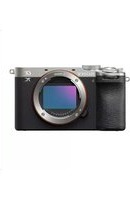
Alpha 7C II - Camera SONY - Free user manual and instructions
Find the device manual for free Alpha 7C II SONY in PDF.



| Product Type | Interchangeable lens camera |
| Brand | Sony |
| Model | Alpha 7C II |
| Image sensor | 35mm full-frame CMOS (35.6 mm × 23.8 mm) |
| Effective pixels | Approx. 24.2 megapixels |
| Total pixels | Approx. 25.3 megapixels |
| Lens mount | Sony E-mount |
| Viewfinder | 1.0 cm (0.39 type) electronic viewfinder |
| Screen | 7.5 cm (3.0 type) TFT touch screen |
| Power | Rechargeable battery NP-FZ100, AC adapter AC-UUD12/AC-UUE12 |
| Rated input voltage | 100–240 V ∼, 50/60 Hz, 0.2 A |
| Operating temperature | 0 to 40 °C |
| Storage temperature | -20 to 55 °C |
| Dimensions (approx.) | 124 × 71 × 60 mm (W × H × D, excluding protrusions) |
| Weight (approx.) | 509 g (with battery and SD memory card) |
| Wireless network | Wi-Fi IEEE 802.11 a/b/g/n/ac, 2.4 GHz/5 GHz band |
| Video formats | XAVC S, XAVC HS |
| Image formats | RAW, JPEG |
| Disposal | Perform initialization (Reset settings) before handing over the device |
| Supplied accessories | Battery NP-FZ100, USB Type-C cable, AC adapter, shoulder strap, body cap and hot shoe cap, guides |
| Maintenance | Avoid direct sunlight exposure, use a tripod with screw ≤ 5.5 mm |
Frequently Asked Questions - Alpha 7C II SONY
User questions about Alpha 7C II SONY
0 question about this device. Answer the ones you know or ask your own.
Ask a new question about this device
Download the instructions for your Camera in PDF format for free! Find your manual Alpha 7C II - SONY and take your electronic device back in hand. On this page are published all the documents necessary for the use of your device. Alpha 7C II by SONY.
USER MANUAL Alpha 7C II SONY
https://www.sony.net/SonyInfo/Support/
SONY®
5-021-708-41(1)
α7c
α7C
E-mount

"Help Guide" (Web manual)
Refer to "Help Guide" for in-depth instructions on the many functions of the camera.
https://rd1.sony.net/help/ilc/2020/h_zz/
| Interchangeable Lens Digital Camera/Startup Guide GB |
| Appareil photo à objectif interchangeable/Guide de démarrage FR |
| Digitalkamera mit Wechselobjektiv/Einführungsanleitung DE |
| Cámara Digital de Lentes Intercambiables/Guía de inicio ES |
| Fotocamera digitale con obiettivo intercambiabile/Guida di avvio IT |
| Câmara Digital de Objetivas intercambiáveis/Guia de início PT |
| Digitale camera met verwisselbare lens/Beknopte gids NL |
| Aparat cyfrowy z wymiennymi obiektywami/Przewodnik uruchamiania PL |
| Цифровой фотоаппарат со сменным объективом/Руководство по началу работы RU |
| Цифрова камера зі змінним об'єктивом/Посібник із початку роботи UA |
| Digitalkamera med utbytbart objektiv/Startguide SE |
| Digitaalinen kamera vaihdettavalla objektiivilla/Aloitusopas FI |
| Digitalkamera med utskiftbart objektiv/Startveiledning NO |
| Digitalkamera med udskifteligt objektiv/Startvejledning DK |
©2020 Sony Corporation Printed in Thailand
5021708410
ILCE-7C
About the manual for this camera
This guide describes the necessary preparations to start using the product, basic operations, etc. For details, refer to the "Help Guide" (web manual).
"Help Guide" (Web manual)
https://rd1.sony.net/help/ilc/2020/h_zz/
ILCE-7C Help Guide

natural_image
Simple line drawing of a laptop and smartphone (no text or symbols)Looking for valuable information, such as essential points on shooting
This website introduces convenient functions, ways of usage, and setting examples.
Refer to the website when you set up your camera.
Tutorials
https://www.sony.net/tutorial/ilc/7c/
Preparations
Checking the supplied items
The number in parentheses indicates the number of pieces.
- Camera (1)
• Power cord (mains lead) (1)* (supplied in some countries/regions)
* Multiple power cords may be supplied with this equipment. Use the appropriate one that matches your country/region. See "Notes on use."
- Rechargeable battery pack NP-FZ100 (1)
-
USB Type-C® cable (1)
-
AC Adaptor (1)
The type of the AC Adaptor may differ depending on the country/region. - Shoulder strap (1)
• Body cap (1) (attached to the camera) - Shoe cap (1) (attached to the camera)
- Startup Guide (this manual) (1)
• Reference Guide (1)
Inserting the battery pack (supplied)/memory card (sold separately) into the camera
Open the battery cover and the memory card cover, insert the battery/memory card, and close the covers.
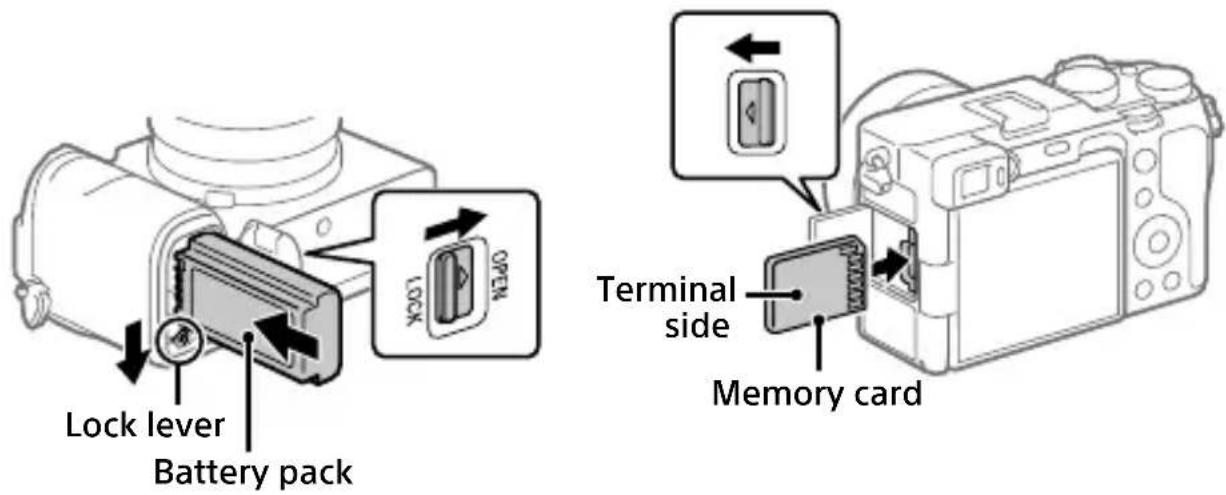
Battery pack
Make sure that the battery pack is facing in the correct direction, and insert it while pressing the battery lock lever.
Memory card
Insert the memory card with the terminal side facing as illustrated.
This camera is compatible with SD memory cards. For details on the compatible memory cards, refer to the "Help Guide."
When you use a memory card with this camera for the first time, format the card using the camera in order to stabilize the performance of the memory card.
Note
- Formatting erases all data, including protected images and registered settings (M1 to M4). Once erased, this data cannot be restored. Save valuable data to a computer, etc. before formatting.
Charging the battery pack
1 Turn the power off.
If the camera is turned on, the battery pack will not be charged.
2 Connect the camera with the battery pack inserted to the AC Adaptor (supplied) using the USB cable (supplied), and connect the AC Adaptor to the wall outlet (wall socket).
The charge lamp will light up when charging starts. When the charge lamp turns off, charging is completed.

Attaching a lens

natural_image
Diagram showing camera assembly process with two views of a camera body (no text or symbols present)Mounting indexes
1 Remove the body cap from the camera and the rear lens cap from the rear of the lens.
2 Mount the lens by aligning the two white index marks (mounting indexes) on the lens and camera.
3 While pushing the lens lightly toward the camera, turn the lens slowly in the direction of the arrow until it clicks into the locked position.
Setting the language and the clock
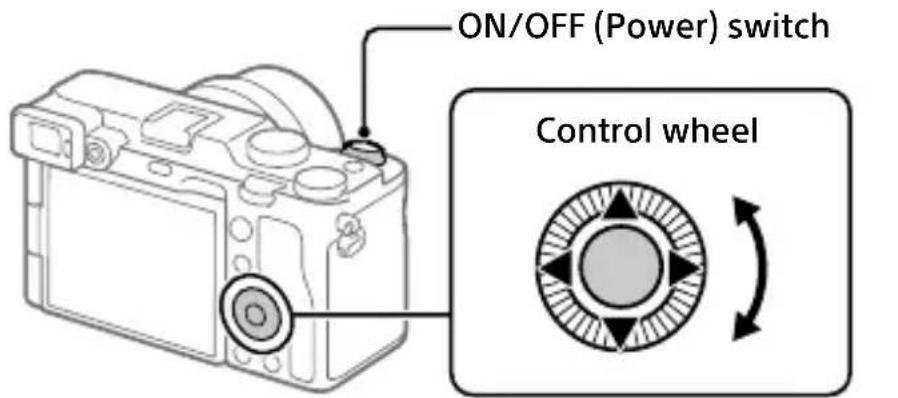
Select items: ▲/▼/◄/►/▽ Confirm : Center button
GB
1 Set the ON/OFF (Power) switch to "ON" to turn on the camera.
2 Select the desired language and then press the center of the control wheel.
3 Make sure that [Enter] is selected on the screen and then press the center button.
4 Select the desired geographic location and then press the center button.
5 Set [Daylight Savings], [Date/Time], and [Date Format], and then select [Enter] and press the center button.
If you want to reconfigure the date/time or the area setting at a later point, select MENU → (Setup) → [Date/Time Setup] or [Area Setting].
Shooting
Shooting still images
1 Select the desired shooting mode by turning the mode dial.
2 Press the shutter button halfway down to focus.
3 Press the shutter button all the way down.

Shooting movies
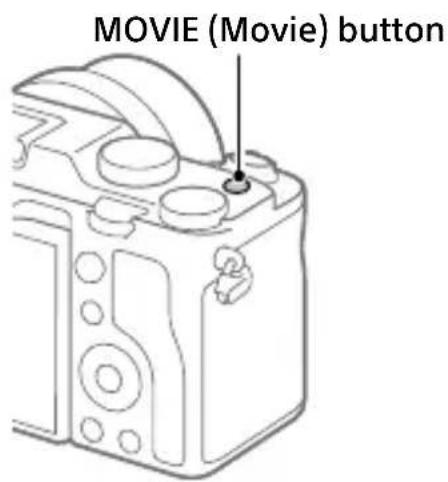
1 Press the MOVIE (Movie) button to start recording.
Movie recording can be started from any shooting mode in the default setting.
2 Press the MOVIE button again to stop recording.
Viewing
1 Press the (Playback) button to switch to the playback mode.
2 Select an image with the control wheel.
You can move to the previous image/ next image by pressing the left/right side of the control wheel.
To start playing back a movie, press the center button on the control wheel.

GB
Transferring images to a smartphone
You can transfer images to a smartphone by connecting the camera and a smartphone via Wi-Fi.
1 : Install Imaging Edge Mobile on your smartphone.
To connect the camera and your smartphone, Imaging Edge Mobile is required.
Install Imaging Edge Mobile to your smartphone in advance.
If Imaging Edge Mobile is already installed on your smartphone, be sure to update it to the latest version.

https://www.sony.net/iem/
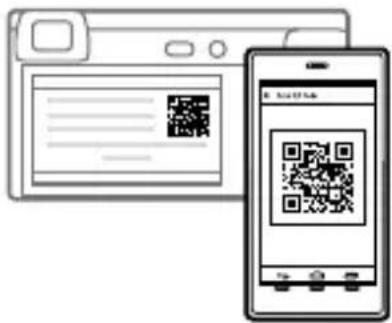
2 Connect the camera and your smartphone using the QR Code.

: MENU

Network)
[Send to Smartphone Func.]
[Send to Smartphone] [Select on This Device] images to transfer.
If you want to select images on the smartphone, select
[Select on Smartphone].

launch Imaging Edge Mobile on your smartphone, and select
[Connect with a new camera].

can the QR Code displayed on the camera using your smartphone.
3 The selected images will be transferred.
If you are using Android, you can transfer images after the first time simply by launching Imaging Edge Mobile with Step 2- above.
If image transfer does not start, select the camera to connect on the screen of your smartphone.
For details on how to connect to a smartphone, refer to the following support sites:
https://www.sony.net/dics/iem02/
- For details on other connection methods, types of images that can be transferred, or how to use the smartphone as a remote commander to operate the camera, refer to the “Help Guide.”
- The Wi-Fi functions introduced in this manual are not guaranteed to operate on all smartphones or tablets.
- The Wi-Fi functions of this camera are not available when connected to a public wireless LAN.
Editing movies on a smartphone
You can edit recorded movies by installing the Movie Edit add-on to your smartphone.
For details on installation and use, refer to the following URL:

https://www.sony.net/mead/
Managing and editing images on a computer
GB
By connecting the camera to a computer using a USB cable or inserting the camera's memory card into the computer, you can import recorded images to the computer.
You can perform remote shooting from a computer, and adjust or develop RAW images recorded with the camera by using the software suite Imaging Edge Desktop.
For details on the computer software, refer to the following URL. https://www.sony.net/disoft/
Notes on use
Refer to "Precautions" in the "Help Guide" as well.
Notes on handling the product
- This camera is designed to be dust-and moisture-resistant, but is not waterproof or dust-proof.
- Do not leave the lens or the viewfinder exposed to a strong light source such as sunlight. Because of the lens's condensing function, doing so may cause smoke, fire, or a malfunction inside the camera body or the lens. If you have to leave the camera exposed to a light source such as sunlight, attach the lens cap to the lens.
- When you shoot with backlighting, keep the sun sufficiently far away from the angle of view. Otherwise, the sunlight may enter the focus inside the camera and cause smoke or fire. Even if the sun is slightly away from the angle of view, it may still cause smoke or fire.
- Do not directly expose the lens to beams such as laser beams. That may damage the image sensor and cause the camera to malfunction.
- Do not look at sunlight or a strong light source through the lens when it is detached. This may result in unrecoverable damage to the eyes or cause a malfunction.
- This camera (including accessories) has magnet(s) which may interfere with pacemakers, programmable shunt valves for hydrocephalus treatment, or other medical devices. Do not place this camera close to persons who use such medical devices. Consult your doctor before using this camera if you use any such medical device.
- Do not leave the device parts within the reach of infants. It may cause an accident or injury.
Notes on the monitor and electronic viewfinder
- The monitor and electronic viewfinder are manufactured using extremely high-precision technology, and over 99.99% of the pixels are operational for effective use. However, there may be some small black dots and/or bright dots (white, red, blue or green in color) that constantly appear on the monitor and electronic viewfinder. These are imperfections due to the manufacturing process and do not affect the recorded images in any way.
- When shooting with the viewfinder, you may experience symptoms such as eyestrain, fatigue, motion sickness, or nausea. We recommend that you take a break at regular intervals when you are shooting with the viewfinder.
- If the monitor or electronic viewfinder is damaged, stop using the camera immediately. The damaged parts may harm your hands, face, etc.
Notes on continuous shooting
During continuous shooting, the monitor or viewfinder may flash between the shooting screen and a black screen. If you keep watching the screen in this situation, you may experience uncomfortable symptoms such as feeling of unwellness. If you experience uncomfortable symptoms, stop using the camera, and consult your doctor as necessary.
Notes on recording for long periods of time or recording 4K movies
- The camera body and battery may become warm with use – this is normal.
-
If the same part of your skin touches the camera for a long period of time while using the camera, even if the camera does not feel hot to you, it may cause symptoms of a low-temperature burn such as redness or blistering. Pay special attention in the following situations and use a tripod, etc.
-
When using the camera in a high temperature environment
- When someone with poor circulation or impaired skin sensation uses the camera
- When using the camera with
[Auto Power OFF Temp.] set to [High]
Notes on using a tripod
Use a tripod with a screw less than 5.5 mm (7/32 inches) long. Otherwise, you cannot firmly secure the camera, and damage to the camera may occur.
Sony lenses/accessories
Using this unit with products from other manufacturers may affect its performance, leading to accidents or malfunction.
Warning on copyrights
Television programs, films, videotapes, and other materials may be copyrighted. Unauthorized recording of such materials may be contrary to the provisions of the copyright laws.
Notes on location information
If you upload and share an image tagged with a location, you may accidentally reveal the information to a third party. To prevent third parties from obtaining your location information, set [☐ Location Info. Link Set.] to [Off] before shooting images.
Notes on discarding or transferring this product to others
Before discarding or transferring this product to others, be sure to perform the following operation to protect private information.
- Select [Setting Reset] [Initialize].
Notes on discarding or transferring a memory card to others
Executing [Format] or [Delete] on the camera or a computer may not completely delete the data on the memory card. Before transferring a memory card to others, we recommend that you delete the data completely using data deletion software. When discarding a memory card, we recommend that you physically destroy it.
Note on network functions
When you use network functions, unintended third parties on the network may access the camera, depending on the usage environment. For example, unauthorized access to the camera may occur in network environments to which another network device is connected or can connect without permission. Sony bears no responsibility for any loss or damage caused by connecting to such network environments.
Note on the 5 GHz band for wireless LAN
When using the wireless LAN function outdoors, set the band to 2.4 GHz by following the procedure below. (WW850128 only)
- MENU → (Network) → [Wi-Fi Settings] → [Frequency Band]
How to turn off wireless network functions (Wi-Fi, etc.) temporarily
When you board an airplane, etc., you can turn off all wireless network functions temporarily using [Airplane Mode].
Power Cord
For the customers in the UK, Ireland, Malta, Cyprus and Saudi Arabia
Use the power cord (A).
For safety reasons, the power cord (B) is not intended for above countries/regions and shall therefore not be used there.
For the customers in other EU countries/regions
Use the power cord (B).
(A) (B)

natural_image
Illustration of a cordless electrical plug with three pins (no text or symbols)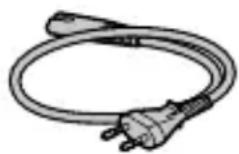
For Customers in the U.S.A.
For question regarding your product or for the Sony Service Center nearest you, call 1-800-222-SONY (7669).
Supplier's Declaration of Conformity
Trade Name : SONY
Model: WW850128
Responsible Party : Sony Electronics Inc. Address : 16535 Via Esprillo, San Diego, CA 92127 U.S.A.
Telephone Number: 858-942-2230
This device complies with part 15 of the FCC rules. Operation is subject to the following two conditions: (1) This device may not cause harmful interference, and (2) this device must accept any interference received, including interference that may cause undesired operation.
For Customers in the U.A.E.
TRA
REGISTERED No:
ER42682/15
DEALER No:
DA0073692/11
Specifications
Camera
[System]
Camera Type: Interchangeable Lens Digital Camera Lens: Sony E-mount lens
[Image sensor]
Image format: 35 mm full frame (35.6 mm × 23.8 mm), CMOS image sensor
Effective pixel number of camera: Approx. 24 200 000 pixels
Total pixel number of camera: Approx. 25 300 000 pixels
[Electronic Viewfinder]
Type: 1.0 cm (0.39 type) Electronic Viewfinder
[Monitor]
7.5 cm (3.0 type) TFT drive, touch panel
[General]
Rated input: 7.2 V ---, 2.9 W
Operating temperature: 0 to 40°C (32 to 104°F)
Storage temperature: -20 to 55°C (-4 to 131°F)
Dimensions (W/H/D) (Approx.): 124.0 × 71.1 × 59.7 mm 124.0 × 71.1 × 53.5 mm (from grip to monitor) 5 × 2 7/8 × 2 3/8 in. 5 × 2 7/8 × 2 1/8 in. (from grip to monitor)
Mass (Approx.): 509 g (1 lb 2.0 oz) (including battery pack, SD memory card)
[Wireless LAN]
WW850128 (see name plate on the bottom of camera)
Supported format: IEEE 802.11 a/b/g/n/ac
Frequency band: 2.4 GHz/5 GHz
Security: WEP/WPA-PSK/WPA2-PSK
Connection method: Wi-Fi Protected Setup™ (WPS)/ Manual
Access method: Infrastructure mode
WW384063 (see name plate on the bottom of camera)
Supported format: IEEE 802.11 b/g/n
Frequency band: 2.4 GHz
Security: WEP/WPA-PSK/WPA2-PSK
Connection method: Wi-Fi Protected Setup™ (WPS)/ Manual
Access method: Infrastructure mode
AC Adaptor
AC-UUD12/AC-UUE12
Rated input:
100 - 240 V ∼, 50/60 Hz, 0.2 A
Rated output: 5 V, -1.5 A
Rechargeable battery pack
NP-FZ100
Rated voltage: 7.2 V---
Design and specifications are subject to change without notice.
Trademarks
• XAVC S and are registered trademarks of Sony Corporation.
- USB Type-C® and USB-C® are registered trademarks of USB Implementers Forum.
- Android and Google Play are trademarks or registered trademarks of Google LLC.
- Wi-Fi, the Wi-Fi logo and Wi-Fi Protected Setup are registered trademarks or trademarks of the Wi-Fi Alliance.
• QR Code is a trademark of Denso Wave Inc.
- In addition, system and product names used in this manual are, in general, trademarks or registered trademarks of their respective developers or manufacturers. However, the ™ or ® marks may not be used in all cases in this manual.
Additional information on this product and answers to frequently asked questions can be found at our Customer Support Website.
https://www.sony.net/
https://rd1.sony.net/help/ilc/2020/h_zz/
natural_image
Simple line drawing of a laptop and smartphone (no text or symbols)Tutoriels
https://www.sony.net/tutorial/ilc/7c/
Préparatifs
natural_image
Diagram showing a camera with lens and adjustment mechanism, no text or symbols presentRepères de montage
https://www.sony.net/iem/
https://www.sony.net/mead/
natural_image
Simple line drawing of a cable with a plug and connector (no text or symbols)
Spécifications
Appareil photo
[Système]
Dimensions (L/H/P) (approx.): 124,0 × 71,1 × 59,7 mm
124,0 × 71,1 × 53,5 mm
Batterie rechargeable NP-FZ100
https://rd1.sony.net/help/ilc/2020/h_zz/
ILCE-7C Hilfe


natural_image
Simple line drawing of a laptop and smartphone (no text or symbols)Tutorials
https://www.sony.net/tutorial/ilc/7c/
Vorbereitungen
natural_image
Diagram showing a camera with lens assembly before and after rotation, illustrating the process (no text or symbols present)Ansetzindexe
https://www.sony.net/iem/
https://www.sony.net/mead/
natural_image
Illustration of a medical or electrical device with a coiled tube and plug (no text or symbols)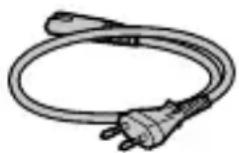
Technische Daten
Kamera
[System]
Kameratyp:
Wi-Fi Protected Setup™ (WPS)/Manuell
https://rd1.sony.net/help/ilc/2020/h_zz/
natural_image
Simple line drawing of a laptop and smartphone (no text or symbols)Tutoriales
https://www.sony.net/tutorial/ilc/7c/
Preparativos
natural_image
Diagram showing a camera with lens and adjustment mechanism, no text or symbols presentÍndices de montura
https://www.sony.net/iem/
https://www.sony.net/mead/
natural_image
Illustration of a coiled electrical plug with a bulb (no text or symbols)
Especificaciones
Cámara
[Sistema]
https://rd1.sony.net/help/ilc/2020/h_zz/
ILCE-7C Guida
![SONY Alpha 7C II - [Sistema] - 1](/content/2026/04/652026/images/41d74e5c5972db09ebe1a7986d3febbe4fbdceed75446192ec0e1f725b622387.jpg)
![SONY Alpha 7C II - [Sistema] - 2](/content/2026/04/652026/images/22ec7e6393bc379d07da25f0121df512701a5d0eb3ca274aedd54d10c8108c8e.jpg)
natural_image
Simple line drawing of a laptop and smartphone (no text or symbols)Tutorial
https://www.sony.net/tutorial/ilc/7c/
Preparazioni
https://www.sony.net/iem/
https://www.sony.net/mead/
IT
natural_image
Simple line drawing of a cable with a plug and socket (no text or symbols)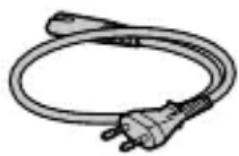
Dati tecnici
Fotocamera
[Sistema]
https://rd1.sony.net/help/ilc/2020/h_zz/
natural_image
Simple line drawing of a laptop and smartphone (no text or symbols)Tutoriais
https://www.sony.net/tutorial/ilc/7c/
Preparativos
natural_image
Diagram showing a camera body being adjusted to form a circular component, with no text or symbols present.Índices de montagem
https://www.sony.net/iem/
https://www.sony.net/mead/
natural_image
Two types of electrical plug connectors shown in line drawings (no text or symbols)Especificações
Câmara
[Sistema]
https://rd1.sony.net/help/ilc/2020/h_zz/
ILCE-7C Helpgids
![SONY Alpha 7C II - [Sistema] - 1](/content/2026/04/652026/images/796f21eea522d89a0985190624be05934e2a9566c2ea50e80128261e3a05c595.jpg)
![SONY Alpha 7C II - [Sistema] - 2](/content/2026/04/652026/images/6b0ed4aa1bf2586a1528e2d7d00f810b00e3fcdd05d32cc12db5c915797610a8.jpg)
natural_image
Simple line drawing of a laptop and smartphone (no text or symbols)Zelfstudiematerialen
https://www.sony.net/tutorial/ilc/7c/
Voorbereidingen
https://www.sony.net/iem/
https://www.sony.net/mead/
NL
natural_image
Illustration of a coiled electrical plug with wires (no text or symbols)
Technische gegevens
Camera
[Systeem]
https://rd1.sony.net/help/ilc/2020/h_zz/
natural_image
Simple line drawing of a laptop and smartphone (no text or symbols)Samouczki
https://www.sony.net/tutorial/ilc/7c/
Przygotowania
natural_image
Diagram showing a camera with lens and adjustment mechanism, no text or symbols presentWskaźniki mocowania
natural_image
Line drawing of a digital camera with no text or symbolsOglądanie obrazów
https://www.sony.net/iem/
https://www.sony.net/mead/
natural_image
Simple line drawing of a plug with a bulb and three pins (no text or symbols)
Dane techniczne
Aparat
[System]
https://rd1.sony.net/help/ilc/2020/h_zz/
natural_image
Simple line drawing of a laptop and smartphone (no text or symbols)Учебные материалы
https://www.sony.net/tutorial/ilc/7c/
Подготовка
natural_image
Diagram showing a camera with lens adjustment before and after, illustrating the process (no text or symbols present)Метка крепления
natural_image
Line drawing of a mechanical device with no visible text or symbolsПросмотр
1 Нажмите кнопку
https://www.sony.net/iem/
https://www.sony.net/mead/
natural_image
Simple line drawing of a cable with a plug and socket (no text or symbols)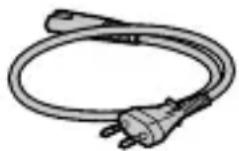

https://rd1.sony.net/help/ilc/2020/h_zz/
ILCE-7C Довідка

natural_image
Simple line drawing of a laptop and smartphone (no text or symbols)Навчальні посібники
https://www.sony.net/tutorial/ilc/7c/
Підготовка
natural_image
Diagram showing a camera with lens and adjustment mechanism, no text or symbols presentnatural_image
Line drawing of a mechanical device with no visible text or symbolsПерегляд
https://www.sony.net/iem/
UA
https://www.sony.net/mead/
natural_image
Simple line drawing of a plug with a bulb and plug (no text or symbols)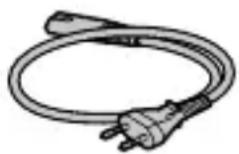
https://rd1.sony.net/help/ilc/2020/h_zz/
ILCE-7C Hjälpguide


natural_image
Simple line drawing of a laptop and smartphone (no text or symbols)Handledning
https://www.sony.net/tutorial/ilc/7c/
Förberedelser
natural_image
Diagram showing a camera with lens and adjustment mechanism, no text or symbols presentMonteringsmärken
Uppspelning
https://www.sony.net/iem/
https://www.sony.net/mead/
natural_image
Illustration of a coiled electrical plug with a bulb (no text or symbols)
Tekniska data
Kamera
[System]
Kameratyp: Digitalkamera med utbytbart objektiv
Objektiv: Sony-objektiv med E-fattning
[Bildsensor]
Bildformat: 35 mm fullt format (35,6 mm × 23,8 mm), CMOS-bildsensor
Effektivt antal bildpunkter på kameran: Ca. 24 200 000 pixlar
Totalt antal bildpunkter på kameran: Ca. 25 300 000 bildpunkter
[Elektronisk sökare]
https://rd1.sony.net/help/ilc/2020/h_zz/
ILCE-7C Käyttöopas
![SONY Alpha 7C II - [Elektronisk sökare] - 1](/content/2026/04/652026/images/ddbee094dfab996cc1a096f201cdc07ee6b198358d9f22f4b950efea6ca05616.jpg)
![SONY Alpha 7C II - [Elektronisk sökare] - 2](/content/2026/04/652026/images/d43280f2a11703d5b13dfd3ca48fbfdfd22a6f05cabf01f3ea943d082481b652.jpg)
natural_image
Simple line drawing of a laptop and smartphone (no text or symbols)Opetusohjelmat
https://www.sony.net/tutorial/ilc/7c/
Valmistelut
https://www.sony.net/iem/
FI
https://www.sony.net/mead/
natural_image
Simple line drawing of a power plug with three pins (no text or symbols)
Tekniset tiedot
Kamera
[Järjestelmä]
"Hjelpeveiledning" (Internett-håndbok)
https://rd1.sony.net/help/ilc/2020/h_zz/
ILCE-7C Hjelpeveiledning
![SONY Alpha 7C II - [Järjestelmä] - 1](/content/2026/04/652026/images/0b29f065b54aa2c69bb873e9634b060c58759db1cef292e07f47b17860d68bac.jpg)
![SONY Alpha 7C II - [Järjestelmä] - 2](/content/2026/04/652026/images/34144908f94fdbdc6cb4f4cc709235014fdbeca5dbd212675b693f69023cb9cb.jpg)
natural_image
Simple line drawing of a laptop and smartphone (no text or symbols)Veiledninger
https://www.sony.net/tutorial/ilc/7c/
Forberedelser
Kontrollere leverte deler
Tallet i parentes angir antall deler.
natural_image
Diagram showing a camera with lens and adjustment mechanism, no text or symbols presentFatningsindekser
natural_image
Line drawing of a digital camera with lens and buttons (no text or symbols)Vise
1 Trykk på (avspillingsknappen) for å bytte til avspillingsmodus.
2 Velg et bilde med kontrollhjulet.
https://www.sony.net/iem/
NO
https://www.sony.net/mead/
Administrere og redigere bilder på en datamaskin
Du kan importere bilder til datamaskinen ved å koble kameraet til en datamaskin med en USB-kabel eller sette inn kameraets minnekort i datamaskinen.
natural_image
Illustration of a cordless electrical plug with three pins (no text or symbols)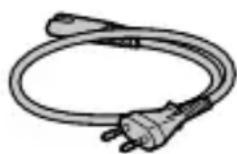
Spesifikasjoner
Kamera
[System]
Kameratype: Digitalkamera med utskiftbart objektiv
Nominell spenning: 7,2 V ---
https://rd1.sony.net/help/ilc/2020/h_zz/
natural_image
Simple line drawing of a laptop and smartphone (no text or symbols)Vejledninger
https://www.sony.net/tutorial/ilc/7c/
Forberedelser
Visning
https://www.sony.net/iem/
https://www.sony.net/mead/
natural_image
Illustration of a cord with plug and socket (no text or symbols)
DK
Specifikationer
Kamera
[System]
Wi-Fi Protected Setup™ (WPS)/Manuel
Adgangsmetode: Infrastrukturtilstand
AC-adapter
AC-UUD12/AC-UUE12
Nominal indgang: 100 - 240 V ∼, 50/60 Hz, 0,2 A
- SONY®
- α7C
- About the manual for this camera
- Looking for valuable information, such as essential points on shooting
- Preparations
- Checking the supplied items
- Inserting the battery pack (supplied)/memory card (sold separately) into the camera
- Battery pack
- Memory card
- Note
- Charging the battery pack
- Turn the power off.
- Connect the camera with the battery pack inserted to the AC Adaptor (supplied) using the USB cable (supplied), and connect the AC Adaptor to the wall outlet (wall socket).
- Attaching a lens
- Setting the language and the clock
- Shooting
- Shooting still images
- Shooting movies
- Viewing
- Transferring images to a smartphone
- Connect the camera and your smartphone using the QR Code.
- The selected images will be transferred.
- Editing movies on a smartphone
- Managing and editing images on a computer
- Notes on use
- Refer to "Precautions" in the "Help Guide" as well.
- Notes on handling the product
- Notes on the monitor and electronic viewfinder
- Notes on continuous shooting
- Notes on recording for long periods of time or recording 4K movies
- Notes on using a tripod
- Sony lenses/accessories
- Warning on copyrights
- Notes on location information
- Notes on discarding or transferring this product to others
- Notes on discarding or transferring a memory card to others
- Note on network functions
- Note on the 5 GHz band for wireless LAN
- How to turn off wireless network functions (Wi-Fi, etc.) temporarily
- Power Cord
- For the customers in other EU countries/regions
- For Customers in the U.S.A.
- Supplier's Declaration of Conformity
- For Customers in the U.A.E.
- TRA
- REGISTERED No:
- DEALER No:
- Specifications
- Camera
- [System]
- [Image sensor]
- [Electronic Viewfinder]
- [Monitor]
- [General]
- [Wireless LAN]
- AC Adaptor
- AC-UUD12/AC-UUE12
- Rechargeable battery pack
- NP-FZ100
- Trademarks
- Préparatifs
- Spécifications
- Appareil photo
- [Système]
- Batterie rechargeable NP-FZ100
- Vorbereitungen
- Technische Daten
- Kamera
- Preparativos
- Especificaciones
- Cámara
- [Sistema]
- Preparazioni
- Dati tecnici
- Fotocamera
- Especificações
- Câmara
- Voorbereidingen
- Technische gegevens
- [Systeem]
- Przygotowania
- Oglądanie obrazów
- Dane techniczne
- Aparat
- Учебные материалы
- Подготовка
- Просмотр
- Нажмите кнопку
- Підготовка
- Перегляд
- Förberedelser
- Uppspelning
- Tekniska data
- [Bildsensor]
- [Elektronisk sökare]
- Valmistelut
- Tekniset tiedot
- [Järjestelmä]
- Forberedelser
- Kontrollere leverte deler
- Vise
- Administrere og redigere bilder på en datamaskin
- Spesifikasjoner
- Visning
- Specifikationer
- AC-adapter
Brand : SONY
Model : Alpha 7C II
Category : Camera