DV170 - DVD player LG - Free user manual and instructions
Find the device manual for free DV170 LG in PDF.


| Product Type | DVD Player |
| Brand | LG |
| Model | DV170 |
| Dimensions (W x H x D) | 430 x 35 x 242 mm (17 x 1.4 x 9.5 inches) |
| Net Weight | 1.9 kg (4.2 lbs) |
| Power Supply | AC 200-240 V, 50/60 Hz |
| Power Consumption | 8 W |
| Supported Disc Formats | DVD (8/12 cm), DVD±R/RW finalized, Video CD (VCD/SVCD), Audio CD, CD-R/RW (MP3, WMA, JPEG) |
| Region Code | Region 2 (Europe) |
| Video Outputs | 1 x RCA Composite (1 Vp-p, 75 Ω), 1 x SCART (RGB), 1 x Component Y Pb Pr |
| Audio Outputs | 2 x RCA (L/R), 1 x Digital Coaxial (0.5 Vp-p, 75 Ω) |
| Progressive Scan Output | Yes (via component) |
| Main Functions | Playback of DVD/VCD/CD/MP3/WMA/JPEG, repeat, zoom, time search, bookmarks, random play, programmed play, parental control, last scene memory, screen saver, auto power off |
| Remote Control | Yes, with integrated TV control (LG and other brands) |
| OSD Menu Languages | French, English, German, etc. |
| Included Accessories | Video cable, audio cable, remote control, batteries (AAA x 2) |
| Operating Temperature | 5 °C to 35 °C (41 °F to 95 °F) |
| Operating Humidity | 5% to 90% |
| Safety | Parental control (password lock), region code |
| Maintenance and Cleaning | Clean with a dry cloth; do not use solvents |
| After-Sales Service | Contact an authorized center for any repairs |
Frequently Asked Questions - DV170 LG
User questions about DV170 LG
0 question about this device. Answer the ones you know or ask your own.
Ask a new question about this device
Download the instructions for your DVD player in PDF format for free! Find your manual DV170 - LG and take your electronic device back in hand. On this page are published all the documents necessary for the use of your device. DV170 by LG.
USER MANUAL DV170 LG
Before connecting, operating or adjusting this product, please read this instruction booklet carefully and completely.

CAUTION RISK OF ELECTRIC SHOCK DO NOT OPEN

CAUTION: TO REDUCE THE RISK
OF ELECTRIC SHOCK
DO NOT REMOVE COVER (OR BACK)
NO USER-SERVICEABLE PARTS INSIDE
REFER SERVICING TO QUALIFIED SERVICE
PERSONNEL.

This lightning flash with arrowhead symbol within an equilateral triangle is intended to alert the user to the presence of uninsulated dangerous voltage within the product's enclosure that may be of sufficient magnitude to constitute a risk of electric shock to persons.

The exclamation point within an equilateral triangle is intended to alert the user to the presence of important operating and maintenance (servicing) instructions in the literature accompanying the product.
WARNING: TO PREVENT FIRE OR ELECTRIC SHOCK HAZARD, DO NOT EXPOSE THIS PRODUCT TO RAIN OR MOISTURE.
CAUTION: Do not block any ventilation openings. Install in accordance with the manufacturer's instructions.
Slots and openings in the cabinet are provided for ventilation and to ensure reliable operation of the product and to protect it from over heating.
The openings should be never be blocked by placing the product on a bed, sofa, rug or other similar surface. This product should not be placed in a built-in installation such as a bookcase or rack unless proper ventilation is provided or the manufacturer's instruction have been adhered to.
CAUTION: VISIBLE AND INVISIBLE LASER RADIATION WHEN OPEN AND INTERLOCKS DEFEATED.
CAUTION:
This product employs a Laser System.
To ensure proper use of this product, please read this owner's manual carefully and retain it for future reference. Should the unit require maintenance, contact an authorized service center.
Use of controls, adjustments or the performance of procedures other than those specified herein may result in hazardous radiation exposure.
To prevent direct exposure to laser beam, do not try to open the enclosure. Visible laser radiation when open. DO NOT STARE INTO BEAM.
CAUTION: The apparatus should not be exposed to water (dripping or splashing) and no objects filled with liquids, such as vases, should be placed on the apparatus.
CAUTION concerning the Power Cord
Most appliances recommend they be placed upon a dedicated circuit;
That is, a single outlet circuit which powers only that appliance and has no additional outlets or branch circuits. Check the specification page of this owner's manual to be certain.
Do not overload wall outlets. Overloaded wall outlets, loose or damaged wall outlets, extension cords, frayed power cords, or damaged or cracked wire insulation are dangerous. Any of these conditions could result in electric shock or fire. Periodically examine the cord of your appliance, and if its appearance indicates damage or deterioration, unplug it, discontinue use of the appliance, and have the cord replaced with an exact replacement part by an authorized servicer.
Protect the power cord from physical or mechanical abuse, such as being twisted, kinked, pinched, closed in a door, or walked upon. Pay particular attention to plugs, wall outlets, and the point where the cord exits the appliance.
To disconnect power from the mains, pull out the mains cord plug. When installing the product, ensure that the plug is easily accessible.
POWER: This unit operates on a mains supply of 200-240V, 50/60Hz.
WIRING: This unit is supplied with a BSI 1363 approved 13 amp mains plug, fused at 5 amp. When replacing the fuse always use a 5 amp BS 1362, BSI or ASTA approved type. Never use this plug with the fuse cover omitted. To obtain a replacement fuse cover contact your dealer. If the type of plug supplied is not suitable for the mains sockets in your home, then the plug should be removed and a suitable type fitted. Please refer to the wiring instructions below:
WARNING: A mains plug removed from the mains lead of this DVD player must be destroyed. A mains plug with bared wires is hazardous if inserted in a mains socket.
Do not connect either wire to the earth pin, marked with the letter E or with the earth symbol 12 or coloured green or green and yellow.
If any other plug is fitted, use a 5 amp fuse, either in the plug, or at the distribution board.
IMPORTANT: The wires in this mains lead are coloured in accordance with the following codes:
- BLUE: NEUTRAL, BROWN: LIVE - As the colours of the wires in the mains lead of this DVD player may not correspond with the coloured marking identifying the terminals in your plug, proceed as follows: The wire which is coloured blue must be connected to the terminal which is marked with the letter N or coloured black. The wire which is coloured brown must be connected to the terminal which is marked with the letter L or coloured red.
Contents
Introduction 4-7
About the ∅ Symbol Display .....4
Symbol used in this Manual .....4
Notes on Discs 4
Handling Discs 4
Storing Discs 4
Cleaning Discs 4
Maintenance and Service ....4
Types of Playable Discs .....5
Regional Code ....5
Controlling other TVs with the remote control . . .5
Front Panel 6
Remote Control ....7
Remote Control Operation .....7
Remote Control Battery Installation .....7
Installation and Setup .....8-13
Setting up the Player ....8
DVD Player Connections ....8
Video and Audio Connections to Your TV ...8
Audio Connection to Optional Equipment ...9
Displaying Disc Information on-screen ....10
Initial Settings 10
General Operation 10
LANGUAGE 10
- Menu Language 10
• Disc Audio / Subtitle / Menu .....10
DISPLAY 10
• TV Aspect 10
- Display Mode 10
• Progressive Scan .....11
• TV Output Select .....11
AUDIO 11
• Dolby Digital / DTS / MPEG .....11
• Sample Freq. (Frequency) .....11
• Dynamic Range Control (DRC) .....11
LOCK (Parental Control) 12
• Rating 12
- Password 12
- Area Code 12
OTHERS 13
• PBC 13
• Auto Play 13
• B.L.E. (Black Level Expansion) .....13
Operation .....14-17
General Features ....14
Additional Features ....15
Playing an Audio CD or MP3/WMA file .....16
Programmed Playback 16
Erasing a Track from Program List .....16
Viewing a JPEG file .....17
Moving to another File 17
To rotate picture .....17
Still Picture 17
Zoom 17
Reference .....18-19
Language Codes 18
Area Codes 18
Troubleshooting 19
Specifications 19
Introduction
To ensure proper use of this product, please read this owner's manual carefully and retain for future reference.
This manual provides information on the operation and maintenance of your DVD player. Should the unit require service, contact an authorized service location.
About the ☉ Symbol Display
“∅” may appear on your TV display during operation and indicates that the function explained in this owner's manual is not available on that specific DVD video disc.
Symbol Used in this Manual
Note:
Indicates special notes and operating features.
Tip:
Indicates tips and hints for making the task easier.
A section whose title has one of the following symbols is applicable only to the disc represented by the symbol.
ALL All discs listed below
DVD DVD and finalized DVD±R/RW
VCD Video CDs
ACD Audio CDs
MP3 MP3 files
WMA WMA files
Notes on Discs
Handling Discs
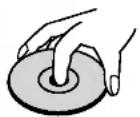
Do not touch the playback side of the disc. Hold the disc by the edges so that fingerprints do not get on the surface. Never stick paper or tape on the disc.

Storing Discs
After playing, store the disc in its case. Do not expose the disc to direct sunlight or sources of heat and never leave it in a parked car exposed to direct sunlight.
Cleaning Discs
Fingerprints and dust on the disc can cause poor picture quality and sound distortion. Before playing, clean the disc with a clean cloth. Wipe the disc from the center out.
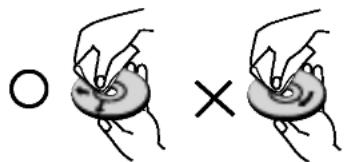
Do not use strong solvents such as alcohol, benzine, thinner, commercially available cleaners, or anti-static spray intended for older vinyl records.
Maintenance and Service
Refer to the information in this chapter before contacting a service technician.
Handling the Unit
When shipping the unit
Please save the original shipping carton and packing materials. If you need to ship the unit, for maximum protection, re-pack the unit as it was originally packed at the factory.
Keeping the exterior surfaces clean
- Do not use volatile liquids such as insecticide spray near the unit.
- Do not leave rubber or plastic products in contact with the unit for a long period of time. since they leave marks on the surface.
Cleaning the unit
To clean the player, use a soft, dry cloth. If the surfaces are extremely dirty, use a soft cloth lightly moistened with a mild detergent solution.
Do not use strong solvents such as alcohol, benzine, or thinner, as these might damage the surface of the unit.
Maintaining the Unit
The unit is a high-tech, precision device. If the optical pick-up lens and disc drive parts are dirty or worn, the picture quality could be diminished.
Depending on the operating environment, regular inspection and maintenance are recommended after every 1,000 hours of use.
For details, please contact your nearest authorized service center.
Types of Playable Discs
 | DVD(8 cm / 12 cm disc) |
 | Video CD (VCD/SVCD)(8 cm / 12 cm disc) |
 | Audio CD(8 cm / 12 cm disc) |
In addition, this unit plays DVD±R/RW and CD-R/RW that contains audio titles, MP3, WMA, and/or JPEG files.
Notes:
- Depending on the conditions of the recording equipment or the CD-R/RW (or DVD±R/RW) disc itself, some CD-R/RW (or DVD±R/RW) discs cannot be played on the unit.
- Do not use irregularly shaped CDs (e.g., heart-shaped or octagonal) since they may result in malfunctions.
Regional Code
This unit has a regional code printed on the rear of the unit. This unit can play only DVD discs labelled same as the rear of the unit or "ALL".
Notes on Regional Codes
- Most DVD discs have a globe with one or more numbers in it clearly visible on the cover. This number must match your DVD player's regional code or the disc cannot play.
- If you try to play a DVD with a different regional code from your player, the message "Check Regional Code" appears on the TV screen.
Notes on Copyrights:
It is forbidden by law to copy, broadcast, show, broadcast via cable, play in public, or rent copyrighted material without permission. This product features the copy protection function developed by Macrovision. Copy protection signals are recorded on some discs. When recording and playing the pictures of these discs picture noise will appear. This product incorporates copyright protection technology that is protected by method claims of certain U.S. patents and other intellectual property rights owned by Macrovision Corporation and other rights owners. Use of this copyright protection technology must be authorized by Macrovision Corporation, and is intended for home and other limited viewing uses only unless otherwise authorized by Macrovision Corporation. Reverse engineering or disassembly is prohibited.
CONSUMERS SHOULD NOTE THAT NOT ALL HIGH DEFINITION TELEVISION SETS ARE FULLY COMPATIBLE WITH THIS PRODUCT AND MAY CAUSE ARTIFACTS TO BE DISPLAYED IN THE PICTURE. IN CASE OF 525 OR 625 PROGRESSIVE SCAN PICTURE PROBLEMS, IT IS RECOMMENDED THAT THE USER SWITCH THE CONNECTION TO THE 'STANDARD DEFINITION' OUTPUT. IF THERE ARE QUESTIONS REGARDING OUR TV SET COMPATIBILITY WITH THIS MODEL 525p AND 625p DVD PLAYER, PLEASE CONTACT OUR CUSTOMER SERVICE CENTER.
Controlling other TVs with the remote control
You can control the sound level, input source, and power switch of your LG TV with the supplied remote control.
You can control the sound level, input source, and power switch of non-LG TVs as well. If your TV is listed in the table below, set the appropriate manufacturer code.
- While holding down TV POWER button, press the number buttons to select the manufacturer code for your TV (see the table below).
- Release TV POWER button.
Code numbers of controllable TVs
If more than one code number is listed, try entering them one at a time until you find the one that works with your TV.
| Manufacturer | Code Number |
| LG / GoldStar | 1 (Default), 2 |
| Zenith | 1, 3, 4 |
| Samsung | 6, 7 |
| Sony | 8, 9 |
| Hitachi | 4 |
Notes:
- Depending on your TV, some or all buttons may not function on the TV, even after entering the correct manufacturer code.
- If you enter a new code number, the code number previously entered will be erased.
- When you replace the batteries of the remote, the code number you have set may be reset to the default setting. Set the appropriate code number again.
Front Panel
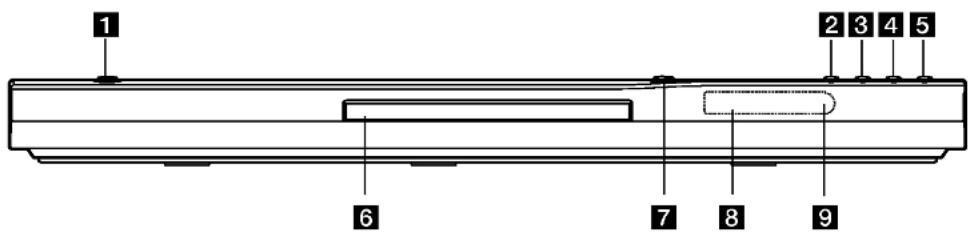
1 POWER
Switches the unit ON and OFF.
2 ▶ (PLAY)
Starts playback.
3 ■ (STOP)
Stops playback.
4 SKIP (I◄◄)
Returns to beginning of current chapter or track or go to previous chapter or track.
5 SKIP (▶▶▶)
Go to next chapter or track.
6 Disc Tray
Insert a disc here.
7 ▲ (OPEN / CLOSE)
Opens or closes the disc tray.
8 Display window
Shows the current status of the unit.
9 Remote Sensor
Point the remote control here.
Remote Control
POWER Switches DVD Player ON and OFF.
OPEN/CLOSE (▲)
Opens and closes the disc tray.
0-9 numerical buttons
Selects numbered items in a menu.
CLEAR
Removes a track number on the Program List or a mark on the Marker Search menu.
TV Control Buttons
POWER: Turns the TV on or off. AV: Selects the TV's source.
PR/CH +/-: Selects TV's channel. VOL +/-: Adjusts TV's volume.
DVD MENU
Accesses menu on a DVD disc.
TITLE
Displays title menu, if available.
◀ / ▶ / ▲ / ▼ (left/right/up/down)
Selects an item in the menu.
DISPLAY
Accesses On-Screen Display.
RETURN (○)
Displays the video CD with PBC.
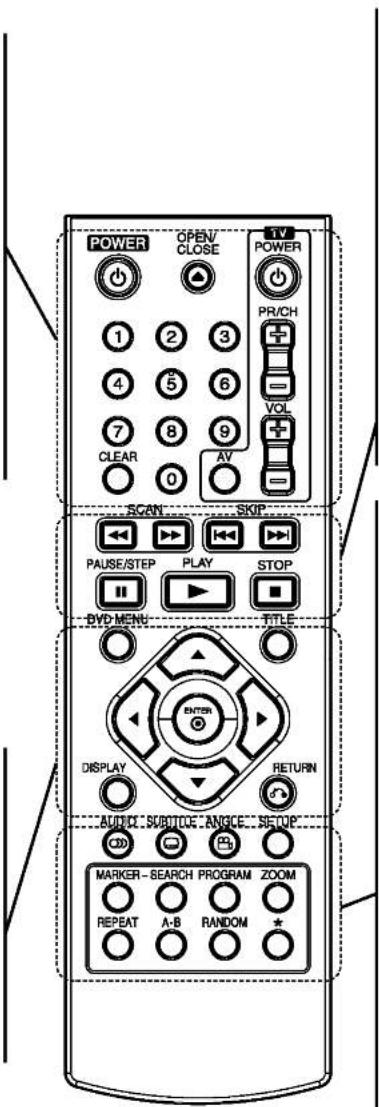
SCAN (◄◄ / ►►)
Search backward or forward.
SKIP (I ◀◀ / ▶▶▶)
Go to next chapter or track. Returns to beginning of current chapter or track or go to previous chapter or track.
PAUSE / STEP (II)
Pauses playback temporarily/press repeatedly for frame-by-frame playback.
(PLAY)
Starts playback.
STOP (■)
Stops playback.
AUDIO
Selects an audio language or an audio channel.
SUBTITLE
Selects a subtitle language.
ANGLE
Selects a DVD camera angle, if available.
SETUP
Accesses or removes the Setup menu.
MARKER
Marks any point during playback.
SEARCH
Displays MARKER SEARCH menu.
PROGRAM
Enter to program edit mode.
ZOOM
Enlarges video image.
REPEAT
Repeat chapter, track, title, all.
A-B
Repeat sequence from point A to point B.
RANDOM
Plays tracks in random order.
Remote Control Operation
Point the remote control at the remote sensor and press the buttons.
Caution:
Do not mix old and new batteries and never mix different types of batteries such as standard, alkaline, etc.
Remote Control Battery installation
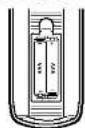
Detach the battery cover on the rear of the remote control, and insert two batteries (size AAA) with ⊕ and ⊖ aligned correctly.
Installation and Setup
Setting up the Player
The picture and sound of a nearby TV, VCR, or radio may be distorted during playback. If this occurs, position the player away from the TV, VCR, or radio, or turn off the unit after removing the disc.
DVD Player Connections
Depending on your TV and other equipment there are various ways you can connect the player. Please refer to the manuals of your TV, stereo system or other devices as necessary for additional connection information.
Rear of TV
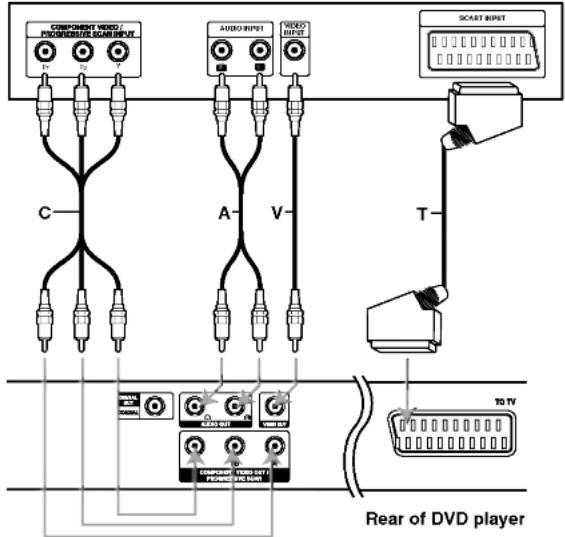
Caution:
You must set the TV Output Select option to use COMPONENT VIDEO OUT/PROGRESSIVE SCAN and SCART jacks.
(See "TV Output Select" on page 11.)
Video and Audio Connections to Your TV
Make sure the DVD player is connected directly to the TV and not to a VCR, otherwise the DVD image could be distorted by the copy protection system.
Video – Connect the VIDEO OUT jack on the DVD player to the video in jack on the TV using the video cable (V)
SCART connection – Connect the TO TV scart jack on the DVD player to the corresponding in jacks on the TV using the scart cable (T).
Component Video – Connect the COMPONENT VIDEO OUT/PROGRESSIVE SCAN jacks on the DVD Player to the corresponding in jacks on the TV using an Y Pb Pr cable (C).
Progressive Scan
- If your television is a high-definition or "digital ready" television, you may take advantage of the DVD Player's progressive scan output for the highest video resolution possible.
- If your TV does not accept the Progressive Scan format, the picture will appear scrambled if you try Progressive Scan on the DVD Player.
Notes:
- Set the Progressive to "On" on the setup menu for progressive signal, see page 11.
- Set the progressive to "Off" by removing any disc from the unit and close the disc tray. Confirm that "no disc" is displayed on the display window. Then press STOP and hold it for five seconds before releasing it.
- Progressive scan does not work with the composite video connection (yellow VIDEO OUT jack).
Audio – Connect the left and right AUDIO OUT jacks of the DVD Player to the audio left and right IN jacks on the TV (A) using the audio cables. Do not connect the DVD Player's AUDIO OUT jack to the phone in jack (record deck) of your audio system.
Audio Connection to Optional Equipment
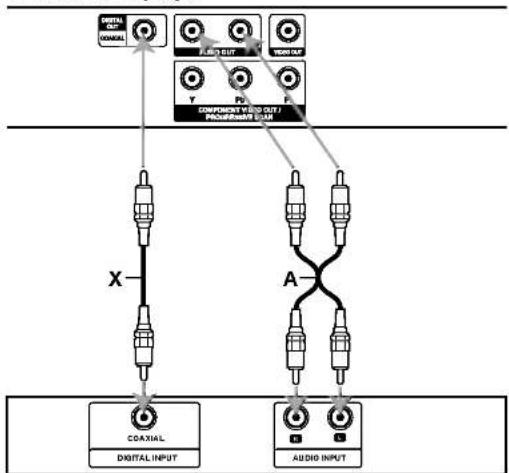
Connect the DVD player to your optional equipment for audio output.
Rear of DVD player
flowchart
graph TD
    A["Digital Input"] --> B["Coaxial Digital Input"]
    C["Audio Input"] --> D["Audio Input"]
    E["Component Video Output"] --> F["X"]
    G["Video Output"] --> H["A"]
Amplifier (Receiver)
Manufactured under license from Dolby Laboratories. "Dolby", "Pro Logic", and the double-D symbol are trademarks of Dolby Laboratories.
DTS and DTS Digital Out are trademarks of Digital Theater Systems, Inc.
Amplifier equipped with 2-channel analog stereo or Dolby Pro Logic II / Pro Logic: Connect the left and right AUDIO OUT jacks on the DVD player to the audio left and right IN jacks on your amplifier, receiver, or stereo system, using the audio cables (A).
Amplifier equipped with 2-channel digital stereo (PCM) or audio / video receiver equipped with a multi-channel decoder (Dolby Digital™, MPEG 2, or DTS): Connect one of the DVD Player's DIGITAL AUDIO OUT jacks (COAXIAL X) to the corresponding in jack on your amplifier. Use an optional digital (COAXIAL X) audio cable.
Digital Multi-channel sound
A digital multi-channel connection provides the best sound quality. For this you need a multi-channel audio / video receiver that supports one or more of the audio formats supported by your DVD player such as MPEG 2, Dolby Digital and DTS. Check the receiver manual and the logos on the front of the receiver.
Notes:
- If the audio format of the digital output does not match the capabilities of your receiver, the receiver produces a strong, distorted sound or no sound at all.
- Six Channel Digital Surround Sound via a digital connection can only be obtained if your receiver is equipped with a Digital Multi-channel decoder.
Displaying Disc Information on-screen
Some items can be changed using the menu.
- Press DISPLAY during playback.
- Press ◀ / ▶ to select an item. The selected item is highlighted.
- Press ▲ / ▼ to change the setting. Press ENTER. You can also use the number buttons if appropriate (e.g. inputting the title number).
Title(Track) Number, 0:06:30 : Time search Chapter Number (DVD disc only)
Note:
If no button is pressed for a few seconds, the on-screen display disappears.
Initial Settings
By using the Setup menu, you can make various adjustments to items such as picture and sound. You can also set a language for the subtitles and the Setup menu, among other things. For details on each Setup menu item, see pages 10 to 13.
To display and exit the Menu:
Press SETUP to display the menu. A second press of SETUP will take you back to initial screen.
To go to the next level:
Press ▶ on the remote control.
To go back to the previous level:
Press ◀ on the remote control.
General Operation
- Press SETUP. The Setup menu appears.
- Use ◀ / ▶ to select the desired option then press ▼ or ENTER to move to the second level. The screen shows the current setting for the selected item, as well as alternate setting(s).
- Use ▲ / ▼ to select the second desired option then press ▶ to move to the third level.
- Use ▲ / ▼ to select the desired setting then press ENTER to confirm your selection. Some items require additional steps.
- Press SETUP, RETURN or PLAY to exit the Setup menu.
LANGUAGE
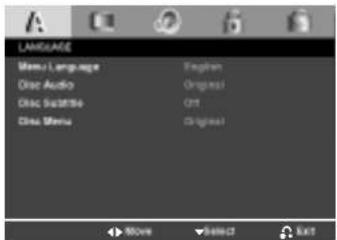
Menu Language
Select a language for the Setup menu and on-screen display.
Disc Audio / Subtitle / Menu
Select the language you prefer for the audio track (disc audio), subtitles, and the disc menu.
Original – Refers to the original language in which the disc was recorded.
Other – To select another language, press number buttons then ENTER to enter the corresponding 4-digit number according to the language code list on page 19. If you enter the wrong language code, press CLEAR.
DISPLAY
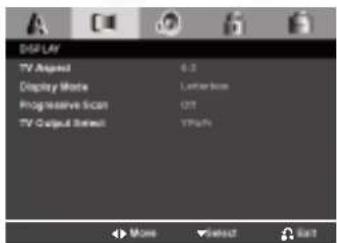
TV Aspect
4:3 – Select when a standard 4:3 TV is connected.
16:9 – Select when a 16:9 wide TV is connected.
Display Mode
Display Mode setting works only when the TV Aspect mode is set to "4:3".
Letterbox – Displays a wide picture with bands on the upper and lower portions of the screen.
Panscan – Automatically displays the wide picture on the entire screen and cuts off the portions that do not fit.
Progressive Scan
Progressive Scan Video provides the highest quality pictures with less flickering. If you are using the Component Video jacks for connection to a TV or monitor that is compatible with a progressive scan signal, set Progressive Scan to On. Press ENTER to confirm your selection. The confirm menu will appear.
Caution:
If your TV does not accept the Progressive Scan format, the picture will appear scrambled if you try Progressive Scan on the DVD Player. If you set Progressive Scan to On in error, you must reset the unit.
1) Press ▶. Select "Off" using the ▲ / ▼ buttons. The Setup menu appears.
2) Press STOP and hold it for five seconds before releasing it. The video output will be restored to the standard setting and a picture will once again be visible on a conventional analog TV or monitor.
TV Output Select
Set the player's TV Output Select options according to the TV connection type.
YPbPr – When your TV is connected with the COMPONENT VIDEO OUT/PROGRESSIVE SCAN jacks on the DVD player.
RGB – When your TV is connected with the SCART (RGB signal) jack.
AUDIO
Each DVD disc has a variety of audio output options. Set the player's AUDIO options according to the type of audio system you use.
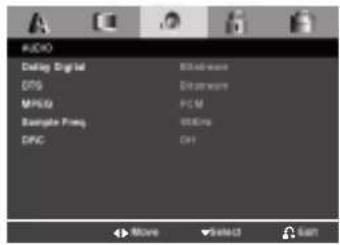
Dolby Digital / DTS / MPEG
Bitstream – Select "Bitstream" if you connect this unit's DIGITAL OUT jack to an amplifier or other equipment with a Dolby Digital, DTS or MPEG decoder.
PCM (for Dolby Digital / MPEG) – Select when connected to a two-channel digital stereo amplifier. DVDs encoded in Dolby Digital or MPEG will be automatically downmixed to two-channel PCM audio.
Off (for DTS): If you select "Off", the DTS signal is not output through the DIGITAL OUT jack.
Sample Freq. (Frequency)
If your receiver or amplifier is NOT capable of handling 96 kHz signals, select 48 kHz. When this choice is made, this unit automatically converts any 96 kHz signals to 48 kHz so your system can decode them.
If your receiver or amplifier is capable of handling 96 kHz signals, select 96 kHz.
Check the documentation for your amplifier to verify its capabilities.
Dynamic Range Control (DRC)
With the DVD format, you can hear a program's soundtrack in the most accurate and realistic presentation possible. However, you may wish to compress the dynamic range of the audio output (the difference between the loudest sounds and the quietest ones). This allows you to listen to a movie at a lower volume without losing clarity of sound. Set DRC to On for this effect.
LOCK (Parental Control)
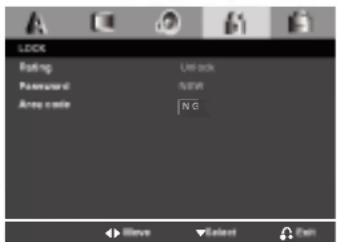
Rating
Blocks playback of rated DVDs based on their content. Not all discs are rated.
- Select Rating on the LOCK menu then press ▶.
- Select a rating from 1 to 8 using the ▲ / ▼ buttons and press ENTER. The password window will appear.
Rating 1-8: Rating one (1) has the most restrictions and rating eight (8) is the least restrictive.
Unlock: If you select unlock, parental control is not active and the disc plays in full.
- If you have not entered password yet: When the "New Password" section is highlighted, enter a 4-digit password using the numbered buttons then press ENTER. Enter the 4-digit security password again to verify when the "Confirm Password" section is highlighted. The "OK" will be highlighted.
If you have entered password already: Enter a 4-digit password you have entered using the numbered buttons. The "OK" will be highlighted.
- Press ENTER to confirm your rating selection, then press SETUP to exit the menu.
Tips:
- If you make a mistake before pressing ENTER in each section, press CLEAR to enter again or ▶ repeatedly to delete password numbers one by one then correct it.
- If you enter the wrong password, you can not proceed to the next step.
Password
You can create or change password.
-
Select Password on the LOCK menu then press ▶. The "Change" is highlighted
-
Press ENTER then the password window will appear.
-
To make a new password: When the "New Password" section is highlighted, enter a 4-digit password using the numbered
buttons then press ENTER. Enter the 4-digit password again to verify when the "Confirm Password" section is highlighted, then. The "OK" will be highlighted.
To change the password:
When the "Old Password" section is highlighted, enter the 4-digit password you have created then press ENTER. The "New Password" section will be highlighted. Enter a new 4-digit password using the numbered buttons then press ENTER. Enter the new 4-digit security password again to verify when the "Confirm Password" section is highlighted. The "OK" will be highlighted.
- Press SETUP to exit the menu.
If you forget your Security Code
If you forget your security code you can clear it using the following steps:
- Remove any disc from the unit and close the disc tray. See that "nodISC" is displayed on the display window.
- Press SETUP and setup menu appears on the TV screen. Use the numbered buttons to enter the 6-digit number "210499". See that "P-CLr" is displayed on the display window.
- Enter a new password as described above.
Area Code
Enter the code of the area whose standards were used to rate the DVD video disc, based on the list in the reference chapter.
-
Select "Area Code" on the LOCK menu then press ▶.
-
Select the first character using ▲ / ▼ buttons.
-
Shift the cursor using ▶ button and select the second character using ▲ / ▼ buttons then press ENTER, the password window will appear
-
Press ENTER, the password window will appear.
-
If you have not entered password yet: When the "New Password" section is highlighted, enter a 4-digit password using the numbered buttons then press ENTER. Enter the 4-digit security password again to verify when the "Confirm Password" section is highlighted. The "OK" will be highlighted.
If you have entered password already:
Enter a 4-digit password you have entered using the numbered buttons. The "OK" will be highlighted.
- Press ENTER to confirm your Area Code selection, then press SETUP to exit the menu.
OTHERS
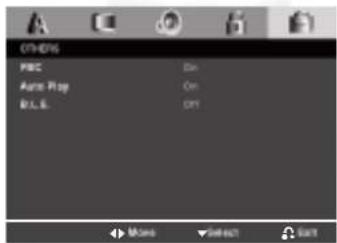
PBC
Set Playback Control (PBC) to On or Off.
On: Video CDs with PBC are played according to the PBC.
Off: Video CDs with PBC are played the same way as Audio CDs.
Auto Play
You can set up the DVD player so a DVD disc automatically starts playing whenever the DVD is inserted.
If Auto Play mode is set to On, this DVD player will search for title that has the longest playback time and then play back the title automatically.
Note:
The Auto Play function may not work for some DVDs.
B.L.E. (Black Level Expansion)
To select the black level of playback pictures. Set your preference and monitor's ability.
On: Expanded grey scale. (0 IRE cut off)
Off: Standard grey scale. (7.5 IRE cut off)
Note:
The B.L.E. function works NTSC system only.
Operations
General features
| Buttons | Operations | Discs | |
| ▲ (OPEN / CLOSE) | Opens or closes the disc tray. | ALL | |
| II (PAUSE) | During playback, press II to pause playback. | ALL | |
| Press II repeatedly to play Frame-by-Frame. | DVD | VCD | |
| SKIP (I◄◄ / ►►I) | During playback, press SKIP (I◄◄ or ►►I) to go to the next chapter/track or to return to the beginning of the current chapter/track. | ALL | |
| Press SKIP I◄◄ twice briefly to step back to the previous chapter/track. | |||
| SCAN (◄◄ / ►►) | During playback, press SCAN (◄◄ or ►►) repeatedly to select the required scan speed. DVD disc; 4 stepsVideo CD, MP3, WMA, Audio CD ; 3 steps | ALL | |
| While the playback is paused, press SCAN ►► repeatedly to play in slow motion (4 steps, forward only). | DVD | VCD | |
| REPEAT | During playback, press REPEAT repeatedly to select a desired repeat mode. DVD Video discs: Chapter/Title/OffVideo CD, Audio CD, MP3/WMA discs: Track/All/Off or Normal | ALL | |
| A-B | During playback, each press of A-B button to select point A and point B and repeats a sequence from point A (Starting point) to point B (End point). Press CLEAR to exit. | DVD | VCD |
| ACD | |||
| ZOOM | During playback or pause mode, press ZOOM to enlarge the video image (4 steps). You can move through the zoomed picture using ◀►▲▼ buttons. Press CLEAR to exit. | DVD | VCD |
| RANDOM | During playback or in stop mode, press RANDOM for random playback. | VCD | ACD |
| WMA | |||
| TITLE | If the current DVD title has a menu, the title menu appears on the screen. Otherwise, the disc menu may appears. | DVD | |
| DVD MENU | The disc menu appears on the screen. | DVD | |
| ○ (ANGLE) | During playback of DVD disc contains scenes recorded different camera angles, press ANGLE repeatedly to select a desired angle. | DVD | |
| ○ (SUBTITLE) | During playback, press SUBTITLE repeatedly to select a desired subtitle language. | DVD | |
| ○ (AUDIO) | During playback, press AUDIO repeatedly to hear a different audio language or audio track. | DVD | VCD |
Notes on general features:
- On a Video CD with PBC, you must set PBC to Off on the setup menu to use the repeat function (See "PBC" on page 13).
- If you press SKIP (▶▶▶) once during Repeat Chapter (Track) playback, the repeat playback cancels.
- Zoom may not work on some DVDs.
- When you are playing a DVD disc contains scenes recorded different camera angles, the angle indicator will blink on the TV screen during scenes recorded at different angles as an indication that angle switching is possible.
Additional features
Time Search DVD VCD
To start playing at any chosen time on the disc:
- Press DISPLAY during playback.
- Press ◀ / ▶ to select the time clock icon and "-;--;-" appears.
- Input the required start time in hours, minutes, and seconds from left to right. If you enter the wrong numbers, press CLEAR to remove the numbers you entered. Then input the correct numbers.
- Press ENTER to confirm. Playback starts from the selected time.
Marker Search DVD VCD
To enter a Marker
You can start playback from up to nine memorized points. To enter a marker, press MARKER at the desired point on the disc. The Marker icon appears on the TV screen briefly. Repeat to enter up to nine markers.
To Recall or Clear a Marked Scene
- During disc playback, press SEARCH. The marker search menu appears on the screen.
- Within 10 seconds, press ◀ / ▶ to select a marker number that you want to recall or clear.
- Press ENTER and playback starts from the marked scene. Or, Press CLEAR and the marker number is erased from the list.
- You can play any marker by inputting its number on the marker search menu.
Last Scene Memory DVD ACD VCD
This player memorizes last scene from the last disc that is viewed. The last scene remains in memory even if you remove the disc from the player or switch off the player. If you load a disc that has the scene memorized, the scene is automatically recalled.
Note:
This player does not memorize the scene of a disc if you switch off the player before commencing to play the disc.
Screen Saver
The screen saver appears when you leave the DVD player in Stop mode for about five minutes. If the Screen Saver is displayed for five minutes, the DVD Player automatically turns itself off.
System Select
You must select the appropriate system mode for your TV system. If NO DISC appears in the display window, press and hold PAUSE/STEP for more than 5 seconds to be able to select a system (PAL, NTSC, or AUTO).
Playing an Audio CD or MP3/WMA file
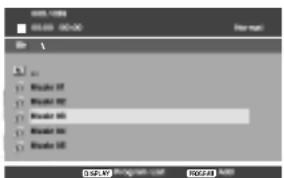
Audio CD – Once you insert an audio CD a menu appears on the TV screen. Press ▲ / ▼ to select a track then press PLAY or ENTER to playback starts.
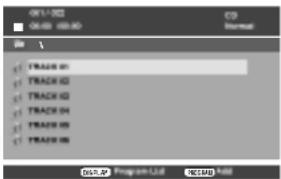
MP3 / WMA
- Press ▲ / ▼ to select a folder, and press PLAY or ENTER to see the folder contents.
- Press ▲ / ▼ to select a track then press PLAY or ENTER. Playback starts.
Tips:
- If you are in a file list on the MUSIC menu and want to return to the Folder list, use the ▲ / ▼ to highlight ▲ and press PLAY or ENTER.
- Press DVD MENU to move to the next page. Press TITLE to move to the previous page.
- On a CD with MP3/WMA and JPEG you can switch MP3/WMA and JPEG.
Press ▲ / ▼ to select a folder, and press ENTER to see the folder contents.
MP3 / WMA disc compatibility with this player is limited as follows:
- Sampling frequency: within 8 - 48 kHz (MP3), within 32 - 48kHz (WMA)
- Bit rate: within 8 - 320kbps (MP3), 32 - 192kbps (WMA)
- The player cannot read an MP3/WMA file that has a file extension other than ".mp3" / ".wma".
• CD-R physical format should be ISO 9660 -
If you record MP3 / WMA files using software that cannot create a file system (eg. Direct-CD) it is impossible to playback MP3 / WMA files. We recommend that you use Easy-CD Creator, which creates an ISO 9660 file system.
-
File names should have a maximum of 8 letters and must incorporate an .mp3 or .wma extension.
- They should not contain special letters such as / ? * : " < > | etc.
- The total number of files on the disc should be less than 648.
- This DVD player requires discs and recordings to meet certain technical standards in order to achieve optimal playback quality. Pre-recorded DVDs are automatically set to these standards. There are many different types of recordable disc formats (including CD-R containing MP3 or WMA files) and these require certain pre-existing conditions (see above) to ensure compatible playback.
Customers should note that permission is required in order to download MP3 / WMA files and music from the Internet. Our company has no right to grant such permission. Permission should always be sought from the copyright owner.
Programmed Playback
The program function enables you to store your favorite tracks from any disc in the player memory. A program can contain 30 tracks (Audio CD, MP3/WMA).
- Insert a disc. (Audio CD, MP3 or WMA.)
- Press ▲ / ▼ to select the desired file.
- Press PROGRAM during playback or in the stop mode. Repeat press PROGRAM to place additional tracks on the program list.
- Press DISPLAY. Program List menu appear.
Press ▲ / ▼ to select the track you want to start playing.
Press DVD MENU to move to the next page.
Press TITLE to move to the previous page.
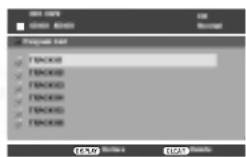
Audio CD Menu
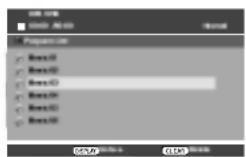
MP3/WMA Menu
- Press PLAY or ENTER to start.
- To resume normal playback from programmed playback. Press DISPLAY then select a track of list and then press PLAY or ENTER.
Erasing a Track from program list
- Use ▲ / ▼ to select the track that you wish to erase from the program list.
- Press CLEAR. Repeat to erase additional tracks on the list.
For details on each operation item, refer to relevant page.
Viewing a JPEG file
Using this DVD Player you can view discs with JPEG files.
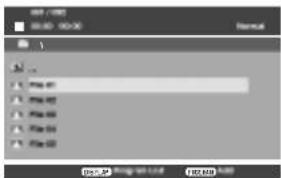
- Insert a disc and close the tray. The PHOTO menu appears on the TV screen.
-
Press ▲ / ▼ to select a folder, and press ENTER or PLAY. A list of files in the folder appears. If you are in a file list and want to return to the previous Folder list, use the ▲ / ▼ buttons on the remote to highlight ▲ and press ENTER or PLAY.
-
If you want to view a particular file, press ▲ / ▼ to highlight a file and press ENTER or PLAY. Viewing the file proceeding starts. While viewing a picture, you can press STOP to move to the previous menu (PHOTO menu).
Tips:
- Press DVD MENU to move to the next page. Press TITLE to move to the previous page.
- On a CD with MP3/WMA and JPEG you can switch MP3/WMA and JPEG. Press ▲ / ▼ to select a folder, and press ENTER to see the folder contents.
Moving to another File
Press SKIP (I◄◄ or ►►) once while viewing a picture to advance to the next or previous file.
To rotate picture
Press ◀ / ▶ during showing a picture to rotate the picture clockwise or counter clockwise.
Still Picture
- Press PAUSE/STEP during slide show. The player will now go into PAUSE mode.
- To return to the slide show, press PLAY, ENTER or press PAUSE/STEP again.
Zoom
Use zoom to enlarge the video image.
- Press ZOOM during playback to activate the Zoom function.
- Each press of the ZOOM button changes the screen in the sequence:
100% → 150% → 200% → 100%
3 Use the ◀▶▲▼ buttons to move through the zoomed picture. - To resume normal playback, press CLEAR or press ZOOM repeatedly to select the 100%.
JPEG disc compatibility with this player is limited as follows:
- Depending upon the size and number of JPEG files, it could take a long time for the DVD player to read the disc's contents. If you don't see an on-screen display after several minutes, some of the files may be too large — reduce the resolution of the JPEG files to less than 2M pixels as 2760 x 2048 pixels and burn another disc.
- The total number of files and folders on the disc should be less than 648.
- Ensure that all the selected files have the ".jpg" extensions when copying into the CD layout.
- If the files have ".jpe" or ".jpeg" extensions, please rename them as ".jpg" file.
- File names without ".jpg" extension will not be able to be read by this DVD player. Even though the files are shown as JPEG image files in Windows Explorer.
Reference
Language Codes
Use this list to input your desired language for the following initial settings: Disc Audio, Disc Subtitle, Disc Menu.
| Language | Code | Language | Code | Language | Code | Language | Code |
| Abkhazian | 6566 | Fiji | 7074 | Lingala | 7678 | Singhalese | 8373 |
| Afar | 6565 | Finnish | 7073 | Lithuanian | 7684 | Slovak | 8375 |
| Afrikaans | 6570 | French | 7082 | Macedonian | 7775 | Slovenian | 8376 |
| Albanian | 8381 | Frisian | 7089 | Malagasy | 7771 | Somali | 8379 |
| Ameharic | 6577 | Galician | 7176 | Malay | 7783 | Spanish | 6983 |
| Arabic | 6582 | Georgian | 7565 | Malayalam | 7776 | Sudanese | 8385 |
| Armenian | 7289 | German | 6869 | Maltese | 7784 | Swahili | 8387 |
| Assamese | 6583 | Greek | 6976 | Maori | 7773 | Swedish | 8386 |
| Aymara | 6588 | Greenlandic | 7576 | Marathi | 7782 | Tagalog | 8476 |
| Azerbaijani | 6590 | Guarani | 7178 | Moldavian | 7779 | Tajik | 8471 |
| Bashkir | 6665 | Gujarati | 7185 | Mongolian | 7778 | Tamil | 8465 |
| Basque | 6985 | Hausa | 7265 | Nauru | 7865 | Tatar | 8484 |
| Bengali; Bangla | 6678 | Hebrew | 7387 | Nepali | 7869 | Telugu | 8469 |
| Bhutani | 6890 | Hindi | 7273 | Norwegian | 7879 | Thai | 8472 |
| Bihari | 6672 | Hungarian | 7285 | Oriya | 7982 | Tibetan | 6679 |
| Breton | 6682 | Icelandic | 7383 | Panjabi | 8065 | Tigrinya | 8473 |
| Bulgarian | 6671 | Indonesian | 7378 | Pashto, Pushto | 8083 | Tonga | 8479 |
| Burmese | 7789 | Interlingua | 7365 | Persian | 7065 | Turkish | 8482 |
| Byelorussian | 6669 | Irish | 7165 | Polish | 8076 | Turkmen | 8475 |
| Cambodian | 7577 | Italian | 7384 | Portuguese | 8084 | Twi | 8487 |
| Catalan | 6765 | Japanese | 7465 | Quechua | 8185 | Ukrainian | 8575 |
| Chinese | 9072 | Javanese | 7487 | Rhaeto-Romance | 8277 | Urdu | 8582 |
| Corsican | 6779 | Kannada | 7578 | Rumanian | 8279 | Uzbek | 8590 |
| Croatian | 7282 | Kashmiri | 7583 | Russian | 8285 | Vietnamese | 8673 |
| Czech | 6783 | Kazakh | 7575 | Samoan | 8377 | Volapük | 8679 |
| Danish | 6865 | Kirghiz | 7589 | Sanskrit | 8365 | Welsh | 6789 |
| Dutch | 7876 | Korean | 7579 | Scots Gaelic | 7168 | Wolof | 8779 |
| English | 6978 | Kurdish | 7585 | Serbian | 8382 | Xhosa | 8872 |
| Esperanto | 6979 | Laothian | 7679 | Serbo-Croatian | 8372 | Yiddish | 7473 |
| Estonian | 6984 | Latin | 7665 | Shona | 8378 | Yoruba | 8979 |
| Faroese | 7079 | Latvian, Lettish | 7686 | Sindhi | 8368 | Zulu | 9085 |
Area Codes
Choose a Area code from this list.
| Area | Code | Area | Code | Area | Code | Area | Code |
| Afghanistan | AF | Ethiopia | ET | Malaysia | MY | Saudi Arabia | SA |
| Argentina | AR | Fiji | FJ | Maldives | MV | Senegal | SN |
| Australia | AU | Finland | FI | Mexico | MX | Singapore | SG |
| Austria | AT | France | FR | Monaco | MC | Slovak Republic | SK |
| Belgium | BE | Germany | DE | Mongolia | MN | Slovenia | SI |
| Bhutan | BT | Great Britain | GB | Morocco | MA | South Africa | ZA |
| Bolivia | BO | Greece | GR | Nepal | NP | South Korea | KR |
| Brazil | BR | Greenland | GL | Netherlands | NL | Spain | ES |
| Cambodia | KH | Herd and Mcdonald Islands | HM | Netherlands Antilles | AN | Sri Lanka | LK |
| Canada | CA | Hong Kong | HK | New Zealand | NZ | Sweden | SE |
| Chile | CL | Hungary | HU | Nigeria | NG | Switzerland | CH |
| China | CN | India | IN | Norway | NO | Taiwan | TW |
| Colombia | CO | Indonesia | ID | Oman | OM | Thailand | TH |
| Congo | CG | Israel | IL | Pakistan | PK | Turkey | TR |
| Costa Rica | CR | Italy | IT | Panama | PA | Uganda | UG |
| Croatia | HR | Jamaica | JM | Paraguay | PY | Ukraine | UA |
| Czech Republic | CZ | Japan | JP | Philippines | PH | United States | US |
| Denmark | DK | Kenya | KE | Poland | PL | Uruguay | UY |
| Ecuador | EC | Kuwait | KW | Portugal | PT | Uzbekistan | UZ |
| Egypt | EG | Libya | LY | Romania | RO | Vietnam | VN |
| El Salvador | SV | Luxembourg | LU | Russian Federation | RU | Zimbabwe | ZW |
Troubleshooting
| Symptom | Possible Cause | Correction |
| No power. | The power cord is disconnected. | Plug the power cord into the wall outlet securely. |
| The power is on, but the DVD player does not work. | No disc is inserted. | Insert a disc. (Check the disc indicator in the display window is lit.) |
| No picture. | The TV is not set to receive DVD signal output. | Select the appropriate video input mode on the TV. |
| The video cable is not connected securely. | Connect the video cable securely. | |
| No sound. | The equipment connected with the audio cable is not set to receive DVD signal output. | Select the correct input mode of the audio receiver so you can listen to the sound from the DVD player. |
| The power of the equipment connected with the audio cable is turned off. | Turn on the equipment connected with the audio cable. | |
| The AUDIO options are set to the wrong position. | Set the AUDIO option to the correct position, then turn on the DVD player again by pressing POWER. | |
| The DVD player does not start playback. | An unplayable disc is inserted. | Insert a playable disc. (Check the disc type and regional code.) |
| The rating level is set. | Change the rating level. | |
| The remote control does not work properly. | The remote control is not pointed at the remote sensor on the DVD player. | Point the remote control at the remote sensor of the DVD player. |
| The remote control is too far from the DVD player. | Operate the remote control closer to the DVD player. |
Specifications
General
Power requirements: AC 200-240 V, 50/60 Hz
Power consumption: 8 W
Dimensions (Approx.):
430 x 35 x 242 mm (17 x 1.4 x 9.5 inches)
(W x H x D) without foot
Weight (Approx.): 1.9 kg (4.2 lbs)
Operating temperature:
5 °C to 35 °C (41 °F to 95 °F)
Operating humidity: 5 % to 90 %
Outputs
VIDEO OUT:
1 V (p-p), 75 Ω, sync negative, RCA jack x 1 / SCART (TO TV)
COMPONENT VIDEO OUT:
(Y) 1.0 V (p-p), 75 Ω, negative sync, RCA jack x 1
(Pb)/(Pr) 0.7 V (p-p), 75 Ω, RCA jack x 2
AUDIO OUT:
2.0 Vrms (1 KHz, 0 dB), 600 Ω, RCA jack (L, R) x 1 /
SCART (TO TV)
Note: Design and specifications are subject to change prior notice.
P/NO.:3834RD0092E
DIGITAL OUT (COAXIAL):
0.5 V (p-p), 75 Ω, RCA jack x 1
System
Laser:
Semiconductor laser, wavelength 650 nm
Signal system: NTSC/PAL
Frequency response:
DVD (PCM 96 kHz): 8 Hz to 44 kHz
DVD (PCM 48 kHz): 8 Hz to 22 kHz
CD: 8 Hz to 20 kHz
Signal-to-noise ratio:
More than 100 dB (ANALOG OUT connectors only)
Harmonic distortion: Less than 0.02%
Dynamic range:
More than 95 dB (DVD/CD)
Accessories:
Video cable (1), Audio cable (1), Remote control (1), Batteries (2)

LG
LECTEUR DVD
MODE D'EMPLOI
MODEL : DV170



RISQUE D'ÉLECTROCUTION NE PAS OUVRIR

ATTENTION: AFIN DE MINIMISER LES RISQUES DE CHOC ELECTRIQUE
NE PAS RETIRER LE COUVERCLE (OU LA PARTIE) IL N'Y A PAS DE PIÈCES POUVANT ÊTRE RÉPARÉES PAR L'UTILISATEUR DANS DE CETTE UNITÉ CONFIER À PERSONNEL QUALIFIÉ.

• Progressive Scan .....11
- Sortie TV 11
AUDIO 11
• Dolby Digital / DTS / MPEG .....11
• Sample Freq. (fréquence) .....11
Indicates special notes and operating features.
Conseil:
Keeping the exterior surfaces clean
YPbPr – When your TV is connected with the COMPONENT VIDEO OUT/PROGRESSIVE SCAN jacks on the DVD player.
Conseils:
| Régional | Code | Régional | Code | Régional | Code | Régional | Code |
| Afghanistan | AF | Ethiopia | ET | Malaysia | MY | Saudi Arabia | SA |
| Argentina | AR | Fiji | FJ | Maldives | MV | Senegal | SN |
| Australia | AU | Finland | FI | Mexico | MX | Singapore | SG |
| Austria | AT | France | FR | Monaco | MC | Slovak Republic | SK |
| Belgium | BE | Germany | DE | Mongolia | MN | Slovenia | SI |
| Bhutan | BT | Great Britain | GB | Morocco | MA | South Africa | ZA |
| Bolivia | BO | Greece | GR | Nepal | NP | South Korea | KR |
| Brazil | BR | Greenland | GL | Netherlands | NL | Spain | ES |
| Cambodia | KH | Iles Heard et McDonald | HM | Netherlands Antilles | AN | Sri Lanka | LK |
| Canada | CA | Hong Kong | HK | New Zealand | NZ | Sweden | SE |
| Chile | CL | Hungary | HU | Nigeria | NG | Switzerland | CH |
| China | CN | India | IN | Norway | NO | Taiwan | TW |
| Colombia | CO | Indonesia | ID | Oman | OM | Thailand | TH |
| Congo | CG | Israel | IL | Pakistan | PK | Turkey | TR |
| Costa Rica | CR | Italy | IT | Panama | PA | Uganda | UG |
| Croatia | HR | Jamaica | JM | Paraguay | PY | Ukraine | UA |
| Czech Republic | CZ | Japan | JP | Philippines | PH | United States | US |
| Denmark | DK | Kenya | KE | Poland | PL | Uruguay | UY |
| Ecuador | EC | Kuwait | KW | Portugal | PT | Uzbekistan | UZ |
| Egypt | EG | Libya | LY | Romania | RO | Vietnam | VN |
| El Salvador | SV | Luxembourg | LU | Russian Federation | RU | Zimbabwe | ZW |
Dépannage
(W x H x D) sans pied.
Remarque: Design and specifications are subject to change prior notice.
- CAUTION RISK OF ELECTRIC SHOCK DO NOT OPEN
- CAUTION:
- CAUTION concerning the Power Cord
- Most appliances recommend they be placed upon a dedicated circuit;
- Contents
- Introduction 4-7
- Installation and Setup .....8-13
- Operation .....14-17
- Reference .....18-19
- Introduction
- About the ☉ Symbol Display
- Symbol Used in this Manual
- Note:
- Tip:
- Notes on Discs
- Handling Discs
- Storing Discs
- Cleaning Discs
- Maintenance and Service
- Handling the Unit
- When shipping the unit
- Keeping the exterior surfaces clean
- Cleaning the unit
- Maintaining the Unit
- Notes:
- Regional Code
- Notes on Regional Codes
- Notes on Copyrights:
- Controlling other TVs with the remote control
- Code numbers of controllable TVs
- Front Panel
- Remote Control
- Remote Control Operation
- Remote Control Battery installation
- Installation and Setup
- Setting up the Player
- DVD Player Connections
- Video and Audio Connections to Your TV
- Progressive Scan
- Audio Connection to Optional Equipment
- Digital Multi-channel sound
- Displaying Disc Information on-screen
- Initial Settings
- To display and exit the Menu:
- To go to the next level:
- To go back to the previous level:
- General Operation
- LANGUAGE
- Menu Language
- Disc Audio / Subtitle / Menu
- DISPLAY
- TV Aspect
- Display Mode
- TV Output Select
- AUDIO
- Dolby Digital / DTS / MPEG
- Sample Freq. (Frequency)
- Dynamic Range Control (DRC)
- LOCK (Parental Control)
- Rating
- Tips:
- Password
- To change the password:
- If you forget your Security Code
- Area Code
- If you have entered password already:
- OTHERS
- PBC
- Auto Play
- B.L.E. (Black Level Expansion)
- Operations
- Notes on general features:
- Additional features
- Time Search DVD VCD
- Marker Search DVD VCD
- To enter a Marker
- To Recall or Clear a Marked Scene
- Last Scene Memory DVD ACD VCD
- Screen Saver
- System Select
- Playing an Audio CD or MP3/WMA file
- MP3 / WMA
- MP3 / WMA disc compatibility with this player is limited as follows:
- Programmed Playback
- Erasing a Track from program list
- Viewing a JPEG file
- Moving to another File
- To rotate picture
- Still Picture
- Zoom
- JPEG disc compatibility with this player is limited as follows:
- Reference
- Language Codes
- Area Codes
- Specifications
- General
- Outputs
- System
- LECTEUR DVD
- MODE D'EMPLOI
- Conseil:
- Conseils:
Brand : LG
Model : DV170
Category : DVD player