UC-P10-T-HS - Phone Crestron - Free user manual and instructions
Find the device manual for free UC-P10-T-HS Crestron in PDF.


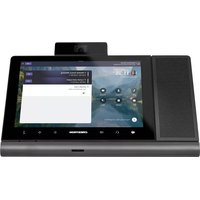
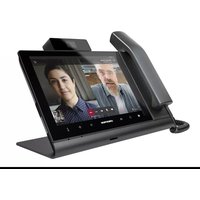
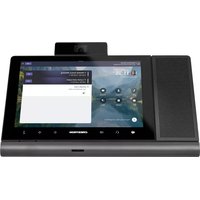
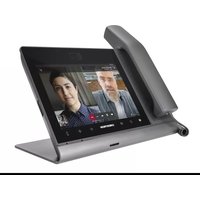
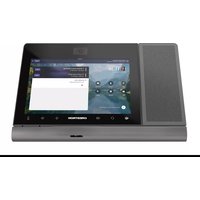
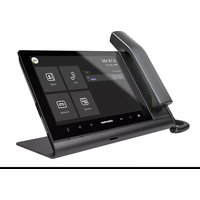
| Product type | Conference phone with touch screen |
| Brand | Crestron |
| Model | UC-P10-T-HS |
| Screen | 10-inch capacitive touch screen |
| Dimensions (W x D x H) | 295 mm x 185 mm x 120 mm |
| Weight | 1.5 kg |
| Power supply | PoE (Power over Ethernet) IEEE 802.3af |
| Network connectivity | Ethernet 10/100/1000 Mbps |
| USB connectivity | USB 2.0 port (for peripherals) |
| Audio | HD Audio, echo cancellation, wideband speaker |
| Microphone | Built-in omnidirectional |
| Main functions | VoIP calls, video conferencing integration (Teams, Zoom), directory, call log |
| Maintenance | Clean with a soft, dry cloth; do not use liquid or abrasive products |
| Safety | Important safety instructions provided; do not expose to water or humidity |
| Spare parts and repairability | Contact Crestron for replacement parts; no user-serviceable parts |
| Warranty | See www.crestron.com/warranty |
| General information | Manufactured by Crestron Electronics, Inc.; indoor use |
Frequently Asked Questions - UC-P10-T-HS Crestron
User questions about UC-P10-T-HS Crestron
0 question about this device. Answer the ones you know or ask your own.
Ask a new question about this device
Download the instructions for your Phone in PDF format for free! Find your manual UC-P10-T-HS - Crestron and take your electronic device back in hand. On this page are published all the documents necessary for the use of your device. UC-P10-T-HS by Crestron.
USER MANUAL UC-P10-T-HS Crestron
Crestron Electronics, Inc.

The original language version of this document is U.S. English.
All other languages are a translation of the original document.
The product warranty can be found at www.crestron.com/warranty.
The specific patents that cover Crestron products are listed online at www.crestron.com/legal/pat Chinese: Crestron 产品所覆盖的特定专利列表可在线查看www.crestron.com/legal/patents。
Crestron and the Crestron logo are either trademarks or registered trademarks of Crestron Elec Inc. in the United States and/or other countries. Other trademarks, registered trademarks, and names may be used in this document to refer to either the entities claiming the marks and their products. Crestron disclaims any proprietary interest in the marks and names of others. Not responsible for errors in typography or photography.
©2023 Crestron Electronics, Inc.
English
Important Safety Instructions
- Read these instructions.
- Keep these instructions.
- Heed all warnings.
- Follow all instructions.
- Do not use this apparatus near water.
- Clean only with dry cloth.
- Do not block any ventilation openings. Install in accordance with the manufacturer's instructions.
- Do not install near any heat sources radiators, heat registers, stoves, or ot apparatus (including amplifiers) that produce heat.
- Do not defeat the safety purpose of polarized or grounding-type plug. A polarized plug has two blades with a wider than the other. A grounding-type has two blades and a third grounding-prong. The wide blade or the third is provided for your safety. If the providing plug does not fit into your outlet, an electrician for replacement of the observation outlet.
- Protect the power cord from being walked on or pinched particularly at plugs, convenience receptacles, and the point where they exit from the apparatus.
- Only use attachments/accessories specified by the manufacturer.
- Use only with the cart, stand, tripod, bracket, or table specified by the manufacturer, or sold with the equipment. When a cart is used, use of when moving the cart/equipment combination to avoid injury from tipping over.
- Unplug this apparatus during lightning storms or when unused for long periods of time.
- Refer all servicing to qualified service This is personnel. Servicing is required when the shall apparatus has been damaged in any way with an such as power-supply cord or plug is damaged, liquid has been spilled or objects have fallen into the apparatus, the device. This dev. apparatus has been exposed to rain or moisture, does not operate normally, or has been dropped.
- Disconnect power prior to connecting or disconnecting equipment.
- Do not install in direct sunlight.
- The apparatus must be installed in a way that the power cord can be removed either from the wall outlet or from the device itself in order to disconnect the mains power.
- Prevent foreign objects from entering the device.
WARNING:
To reduce the risk of fire or electric shock, it is not exposed this apparatus to rain or moisture. The apparatus shall not be exposed to dripping or splashing. Objects filled with liquids, such as vases, should not be placed on the apparatus.
WARNING:
To prevent electric shock, do not remove cover. There are no user serviceable parts inside. Only qualified service personnel should perform service.

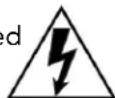

The lightning flash with arrowhead symbol, within an equilateral triangle, is intended to alert the user to the presence of uninsulated “dangerous voltage” within the product’s enclosure that may be of sufficient magnitude to constitute a risk of electric shock to persons.
The exclamation point within an equilateral triangle is intended to alert the user to the presence of important operating and maintenance (servicing) instructions in the literature accompanying the appliance.
WARNING:
an apparatus with Class I construction be connected to an electrical outlet earthing ground terminal.
IMPORTANT:
jects This device can be used with Class 2 output wiring.
Waste Electrical & Electronic Equipment Contact
Directive
If you have any questions, please contact
The Waste Electrical & Electronic Equipm@nestron.
(WEEE) directive marking on a product North and South America:
indicates that it should not be disposed of Cefstron Electronics, Inc.
with general waste. Instead, you are 15 Volvo Drive
encouraged to reuse or recycle the product Rockleigh, NJ 07647 USA
accordance with Directive 2012/19/EU of the Europe, Middle East, and Africa:
European Union. Proper disposal of this Crestron Europe BV
product will help prevent potential negative effects on the environment and human Oude Keerbergsebaan 2,
effects on the environment and human 2820 Rijmenam, Belgium
health, which could otherwise be caused by VAT No. BE0699.717.121
Inappropriate waste handling. Penalties may be applicable for incorrect disposal of this Australia and New Zealand:
waste in accordance with your national Crestron ANZ PTY. Ltd.
legislation. For information about recycling Level 5, 15 Help Street,
this product, please contact your household Chatswood NSW 2067, Australia
waste disposal service, your original distributor, or Crestron.

Asia:
Crestron Singapore Pte. Ltd.
30, rue Cecil
21-05, Tour Prudential
049712 de Singapour
Phone:
Please visit crestron.com to find the phone
number for Crestron support in your region.
Email:
satisfaction@crestron.com or
support@crestron.com
North and South America:
Crestron Electronics, Inc.
15 Volvo Drive
Rockleigh, NJ 07647 USA
Europe, Middle East, and Africa:
Crestron Europe BV
2820 Rijmenam, Belgium
VAT No. BE0699.717.121
Australia and New Zealand:
Crestron ANZ PTY. Ltd.
Level 5, 15 Help Street,
Chatswood NSW 2067, Australia
Asia:
Crestron Singapore Pte. Ltd.
30, rue Cecil
21-05, Tour Prudential
049712 de Singapour
电话:
North and South America:
Crestron Electronics, Inc.
15 Volvo Drive
Rockleigh, NJ 07647 USA
Europe, Middle East, and Africa:
Crestron Europe BV
2820 Rijmenam, Belgium
VAT No. BE0699.717.121
Australia and New Zealand:
Crestron ANZ PTY. Ltd.
Level 5, 15 Help Street,
Chatswood NSW 2067, Australia
Asia:
Crestron Singapore Pte. Ltd.
30, rue Cecil
21-05, Tour Prudential
049712 de Singapour
電話:
North and South America:
Crestron Electronics, Inc.
15 Volvo Drive
Rockleigh, NJ 07647 USA
Europe, Middle East, and Africa:
Crestron Europe BV
2820 Rijmenam, Belgium
VAT No. BE0699.717.121
Australia and New Zealand:
Crestron ANZ PTY. Ltd.
Level 5, 15 Help Street,
Chatswood NSW 2067, Australia
Asia:
Crestron Singapore Pte. Ltd.
30, rue Cecil
21-05, Tour Prudential
049712 de Singapour
Telefon:
Europe, Middle East, and Africa:
ADVERTENCIA:
Australia and New Zealand:
Crestron ANZ PTY. Ltd.
Level 5, 15 Help Street,
Chatswood NSW 2067, Australia
Asia:
Level 5, 15 Help Street,
21-05, Tour Prudential
North and South America:
Crestron Electronics, Inc.
15 Volvo Drive
Rockleigh, NJ 07647 USA
Europe, Middle East, and Africa:
Crestron Europe BV
2820 Rijmenam, Belgium
VAT No. BE0699.717.121
Australia and New Zealand:
Crestron ANZ PTY. Ltd.
Level 5, 15 Help Street,
Chatswood NSW 2067, Australia
Asia:
Crestron Singapore Pte. Ltd.
30, rue Cecil
21-05, Tour Prudential
049712 de Singapour
電話:
North and South America:
deFestron Electronics, Inc.
95 Volvo Drive
Rockleigh, NJ 07647 USA
Europe, Middle East, and Africa:
2820 Rijmenam, Belgium
VAT No. BE0699.717.121
Australia and New Zealand:
en Crestron ANZ PTY. Ltd.
Level 5, 15 Help Street,
Chatswood NSW 2067, Australia
Asia:
Crestron Singapore Pte. Ltd.
30, rue Cecil
21-05, Tour Prudential
049712 de Singapour
Telefoon:
North and South America:
Crestron Electronics, Inc.
15 Volvo Drive
Rockleigh, NJ 07647 USA
Europe, Middle East, and Africa:
Crestron Europe BV
2820 Rijmenam, Belgium
VAT No. BE0699.717.121
Australia and New Zealand:
Crestron ANZ PTY. Ltd.
Level 5, 15 Help Street,
Chatswood NSW 2067, Australia
НИЕAsia:
Chestron Singapore Pte. Ltd.
30, Я rule Cecil
21005, Tour Prudential
049712 de Singapour
PT^K eleф^C он: