ION Home Security Camera - Surveillance Camera Niceboy - Free user manual and instructions
Find the device manual for free ION Home Security Camera Niceboy in PDF.



| Product type | Indoor surveillance camera |
| Brand | Niceboy |
| Model | ION Home Security Camera |
| Video resolution | 1920 x 1080 pixels (Full HD) |
| Viewing angle | Pan 355°, tilt 90° |
| Night vision | Up to 10 meters |
| Power supply | DC 5 V / 1 A (adapter included) |
| Power consumption | < 8 W |
| Connectivity | WiFi 2.4 GHz (2.4-2.5 GHz band) |
| Local storage | microSD card up to 128 GB (not included) |
| Mobile app | Niceboy ION (iOS and Android) |
| Audio functions | Two-way communication (built-in microphone and speaker) |
| Motion detection | PIR sensor with push notifications |
| Private mode | Camera deactivation via the app |
| Operating temperature | -10 °C to +50 °C |
| Package contents | Camera, power adapter, mounting accessories, manual |
| Dimensions (approx.) | Not specified in the manual (estimated: 10 x 10 x 12 cm) |
| Weight (approx.) | Not specified in the manual (estimated: 300 g) |
Frequently Asked Questions - ION Home Security Camera Niceboy
User questions about ION Home Security Camera Niceboy
0 question about this device. Answer the ones you know or ask your own.
Ask a new question about this device
Download the instructions for your Surveillance Camera in PDF format for free! Find your manual ION Home Security Camera - Niceboy and take your electronic device back in hand. On this page are published all the documents necessary for the use of your device. ION Home Security Camera by Niceboy.
USER MANUAL ION Home Security Camera Niceboy
Please follow the following safety precautions before using the product:
- Please read this manual carefully before using the product and use the product according to the instructions in this manual.
-
Any operation inconsistent with this manual may lead to damage of the product and personal injury.
-
This product can only be dismantled by authorized technician. Such behavior without permission is not suggested.
- Only the power adapter provided by the factory can be used with this product. The use of adapter of other specification may cause damage to the product.
- Don't touch the cord and power adapter with a wet hand.
- Before discarding the product, disconnect the camera from power adapter.
- Do not use the product with a damaged power cord or power socket.
- Do not use the product when the product cannot work normally due to falling, damage or water ingress.
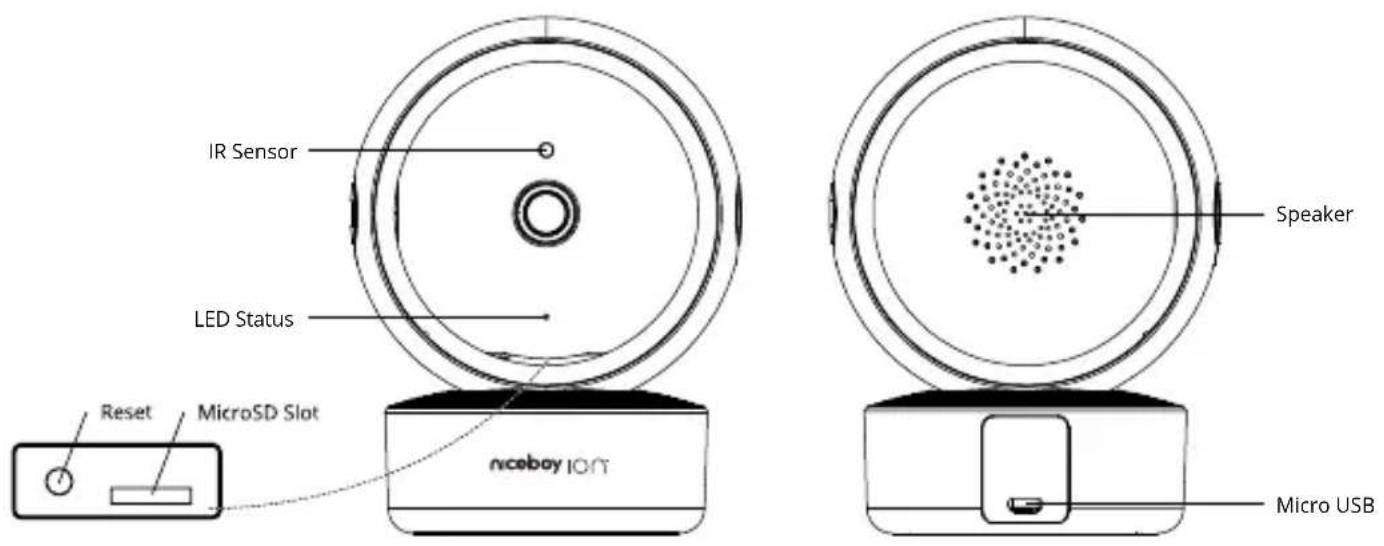
PRODUCT INTRODUCTION
text_image
IR Sensor LED Status Speaker Reset MicroSD Slot nicebay ION Micro USBAPP CONNECTION
- Download the App by scanning the QR code with your cell phone or Search for „Niceboy ION“ in the mobile app market and download the app. Before using this function make sure your cell phone has been connected to Wi-Fi.
- Open "Niceboy ION" App and register a new account or use an existing account.
- After the password is set, proceed to the next step „Add Device“
- Select and click on „Cameras“
- Select and click on „Niceboy ION Home Security Camera“
-
Camera will turn on automatically after connecting in power socket.
-
After turning on the device, reset by pressing the button for more than 5s. The LED on the camera flashes.
- Confirm that the LED is flashing and click NEXT to connect to the network. (In the case of a cable connection, it is necessary to change the mode to cable connection on the Device Reset screen in the upper right corner)..
- Follow the instructions in the app to enter the Wi-Fi network name, enter the Wi-Fi password, and click NEXT (note: the camera can be connected via a 2.4 GHz Wi-Fi network).
- The QR code for connecting the camera is displayed on the phone screen. Read the QR code from the phone screen with the camera from a distance of 15 - 20 cm.
- Camera is then added to the device list. You can change the name of camera before confirming.
Connecting your device to a Wi-Fi network may take tens of seconds, depending on the signal strength.
After the device is successfully connected, the control interface is displayed.
Reset Wi-Fi: In case of connection timeout or before connecting another cell phone, first switch on the device and, within 10 seconds, long press the Start/Stop button for 5 seconds till it beeps, and then reconnect it to Wi-Fi network. After the password is set, proceed to the next step „Add Device" (3) The APP serves as the control environment for the Niceboy ION Home Security Camera. Function settings and camera image display are performed via the Niceboy ION Application.
Niceboy s.r.o. hereby declares that the type of radio equipment Home Security Camera complies with Directives 2014/53 / EU, 2014/30 / EU, 2014/35 / EU, and 2011/65 / EU. The full content of EU Declaration of Conformity is available on the following websites: https://niceboy.eu/en/declaration/home-security-camera
Information on all frequency bands in which the radio equipment operates and intentionally transmits radio waves as well as the maximum radio frequency power transmitted in the frequency band in which the radio equipment is operated is included in the instructions and safety information.
FEATURES
Two-way communication - The camera is equipped with a speaker and a microphone.
Recording - The camera can record continuously on a memory card. The events recorded by the PIR sensor are highlighted in the APP, if it is turned on. Using the application, you can save the real-time recording directly to your phone. (Additional charges may apply when using mobile data).
Motion detector - When motion or noise is detected in the sector near the camera, a notification will be displayed in the mobile phone (for this function it is necessary to enable notifications in the phone settings).
Pan/Tilt - 355° rotation in horizontal and 90° vertical.
Private mode - The camera turns off. (Tip: For a better feeling of privacy, the camera lens can be rotated all the way down to cover it with camera body)
Detailed camera settings are located in the upper right corner of the screen.
FAQ
Q: Failed to add device during pairing?
A: Make sure the mobile phone is connected to 2,4 GHz Wifi network. Make sure the Wifi password is correct and try again.
Q: Why is the device still on the list after resetting the device?
A: The device resetting resets the cameras network configuration and cannot change the configuration on the APP. You must delete it from the list.
Q: Why I can not get the notifications via APP?
A: Make sure notifications for Niceboy ION APP are enabled on your mobile phone.
Q: How to connect the camera to another router?
A: First log in the APP to delete and reset the camera and then configure the device again via APP.
Q: Why the device can not identify SD card?
A: The memory card must be formatted and inserted into the camera when it is turned off.
SPECIFICATION
Resolution: 1920x1080
Power supply: DC 5 V/1 A
Power consumption: <8 W
Storage: MicroSD (max 128 GB)
Connectivity: Wi-Fi 2,4 GHz
Operating temperature: -10 °C - 50 °C
Pan/Tilt: 355°/90°
Wi-Fi: (2.4 - 2.5 GHz)
APP: Niceboy ION
IR distance: 10 m
CONTENTS OF THE PACKAGE
Camera - Niceboy ION Home Security Camera
Power adapter
Mounting accessories
Manual
USER INFORMATION FOR DISPOSING ELECTRICAL AND ELECTRONIC DEVICES (HOME USE)
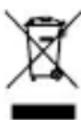
This symbol located on a product or in the product's original documentation means that the used electrical or electronic products may not be disposed together with the communal waste. In order to dispose of these products correctly, take them to a designated collection site, where they will be accepted for free. By disposing of a product in this way, you are helping to protect precious natural resources and helping to prevent any potential negative impacts on the environment and human health, which could be the result of incorrect waste disposal. You may receive more detailed information from your local authority or nearest collection site. According to national regulations, fines may also be given out to anyone who disposes of this type of waste incorrectly. User information for disposing electrical and electronic devices. (Business and corporate use). In order to correctly dispose of electrical and electronic devices for business and corporate use, refer to the product's manufacturer or importer. They will provide you with information regarding all disposal methods and, according to the date stated on the electrical or electronic device on the market, they will tell you who is responsible for financing the disposal of this electrical or electronic device. Information regarding disposal processes in other countries outside the EU. The symbol displayed above is only valid for countries within the European Union. For the correct disposal of electrical and electronic devices, request the relevant information from your local authorities or the device seller.
DE
SICHERHEITSHINWEISE
Razlučivost: 1920x1080
Mrežno napajanje: DC 5 V/1 A
Potrošnja energije: <8 W
Pohrana: MicroSD (maks. 128 GB)
Povezivost: Wi-Fi 2,4 GHz
Radna temperatura: -10^ - +50^
Pan/tilt: 355°/90°
Wi-Fi: (2,4 do 2,5 GHz)
APP: Niceboy ION
IR udaljenost: 10 m
SADRŽAJ PAKIRANJA
Kamera – Vanjska sigurnosna kamera Niceboy ION
Mrežni prilagodnik
Oprema za ugradnju
Priručnik
INFORMACIJE ZA KORISNIKA O NAČINU ZBRINJAVANJA ZLEKTRIČNIH I ELEKTRONSKIH UREĐAJA (DOMĆINSTVA)
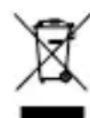
Simbol naveden na proizvodu ili u popratnoj dokumentaciji znači da je zabranjeno odlagati električne ili elektroničke proizvode zajedno s komunalnim otpadom. Pobrinite se za pravilnu likvidaciju otpada: dotrajali proizvod predajte besplatno u ovlašteni centar za skupljanje otpada. Propisnom likvidacijom dotrajalog proizvoda ćete doprinijeti očuvanju skupocjenih prirodnih izvora te prevenciji negativnih utjecaja na okoliš i ljudsko zdravlje zbog nepravilne likvidacije otpada. Za više informacija obratite se nadležnom lokalnom uredu ili mjestu zbrinjavanja. Nepravilno zbrinjavanje ove vrste otpada kažnjava se sukladno nacionalnim propisima. Informacije za korisnika o načinu zbrinjavanja električnih i elektronskih uređaja (Poslovna uporaba) Vezano za pravilno zbrinjavanje dotrajale električne/elektronske opreme za poslovnu upotrebu i upotrebu u tvorničkim pogonima obratite se proizvođaču ili uvozniku ovog proizvoda. Proizvođač će Vam pružiti informacije o načinu zbrinjavanja proizvoda i obavijestit će vas o tome tko je dužan osigurati zbrinjavanje ovog električnog uređaja ovisno o datumu uvođenja proizvoda na tržište. Informacije o zbrinjavanju dotrajalog proizvoda u ostalim zemljama (izvan EU). Gore navedeni simbol važi samo u Europskoj uniji. Za više informacija o pravilnom zbrinjavanju električnih i elektronskih uređaja se obratite prodavatelju ili dobavljaču.
PL
ZALECENIA DOTYCZĄCE BEZPIECZEŃSTWA
INSTRUCTIUNI CU PRIVIRE LA SIGURANTĂ
Praha 4, Czech Republic, ID: 294 16 876.
Made in China.
RoHS CE 📧 ✉