
HIVE Airsport - Headphones Niceboy - Free user manual and instructions
Find the device manual for free HIVE Airsport Niceboy in PDF.


| Product Type | True Wireless Stereo (TWS) Earbuds |
| Model | HIVE Airsport |
| Brand | Niceboy |
| Connectivity | Bluetooth 5.0 |
| Supported Bluetooth Profiles | A2DP, AVRCP, HFP, HSP |
| Operating Range | Up to 10 meters (33 feet) |
| Battery Life (earbuds) | 4-6 hours per charge |
| Battery Life (with charging case) | Up to 24 hours |
| Charging Time (earbuds) | Approx. 1.5 hours |
| Charging Case Capacity | 300-400 mAh (estimated) |
| Water Resistance | IPX4 (splash-proof) |
| Driver Size | 6-8mm (estimated) |
| Frequency Response | 20 Hz – 20 kHz |
| Impedance | 16-32 ohms |
| Weight (each earbud) | Approx. 4-5 g |
| Weight (charging case) | Approx. 30-35 g |
| Controls | Touch or physical buttons (call/music/voice assistant) |
| Compatibility | iOS, Android, Windows, macOS |
| Cleaning | Wipe with a dry, soft cloth; do not use liquids |
| Safety Warnings | Use at moderate volume to prevent hearing damage; keep away from children |
| Spare Parts | Ear tips (S/M/L) included; replacements available via Niceboy |
| Repairability | Limited; battery replacement not user-serviceable |
Frequently Asked Questions - HIVE Airsport Niceboy
User questions about HIVE Airsport Niceboy
0 question about this device. Answer the ones you know or ask your own.
Ask a new question about this device
Download the instructions for your Headphones in PDF format for free! Find your manual HIVE Airsport - Niceboy and take your electronic device back in hand. On this page are published all the documents necessary for the use of your device. HIVE Airsport by Niceboy.
USER MANUAL HIVE Airsport Niceboy
PRVNÍ SPUŠTĚNÍ A PÁROVÁNÍ
natural_image
Simple line drawing of a trash bin with crossed lines indicating no waste or discharge (no text or symbols)PRVÉ SPUSTENIE A SPÁROVANIE
Siri / Google Assistant
NABÍJANIE:
natural_image
Simple line drawing of a trash bin with crossed lines and a horizontal bar below (no text or symbols)- LED
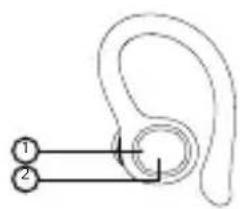
- Multifunction button
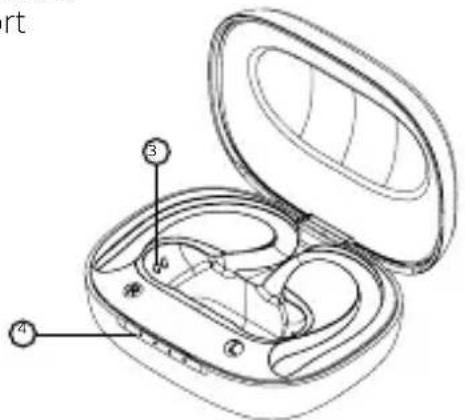
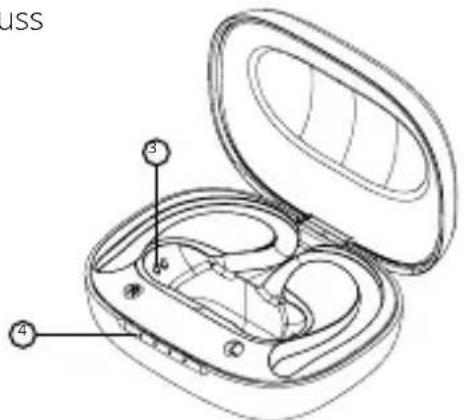
- Port for charging
- LED charging indicators
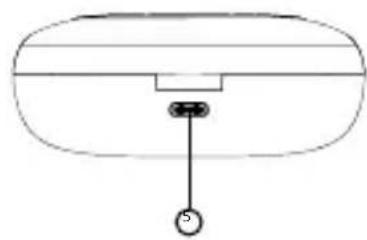
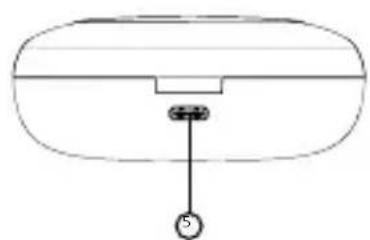
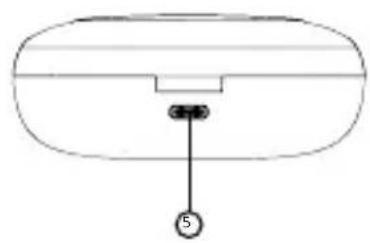
- USB-C charging port
- USB-C charging port
- USB-C charging port
- USB-C charging port
- USB-C charging port
- USB-C charging port
- USB-C charging port
- USB-C charging port
- USB-C charging port
natural_image
Simple line drawing of a device with a central button and a small circular symbol at the bottom (no text or labels)FIRST START-UP AND PAIRING
- Remove both earphones from the charging box and remove the stickers protecting the charging pins (3) on the earphones.
- Switch the earphones on by pressing and holding the multifunction button (2) on both earphones.
- The earphones will switch on and pair with each other. Once the LED (1) on one of the earphones starts flashing white and orange, the earphones are ready to connect to a Bluetooth device.
-
Open the Bluetooth settings on your device and search for „Niceboy HIVE Airsport“ on the list of available devices.
-
Successful pairing is announced by an acoustic prompt.
When reconnecting to a device that has already been paired, simply remove the earphones from the box. They will switch on and connect to the device automatically.
SWITCHING ON AND OFF:
To switch the earphones on, simply remove them from the charging box, or manually switch them on by pressing and holding both multifunction buttons.
To switch them off, simply place the earphones in the charging box. They will turn themselves off and disconnect from your device. Correct storing of the earphones in the box is indicated by the LED (1) turning red. When the earphones are fully charged, the LED goes out. To switch the earphones off, press and hold both multifunction buttons (2) for approx. 5 seconds.
MULTIFUNCTIONAL BUTTON - BASIC CONTROLS
Double pressing any button: play/pause
Single press of the right button: increase the volume by one level, accept call/hang up
Single press of the left button: reduce the volume by one level, accept call/hang up
Long-press of the right button: next song, reject call
Long-press of the left button: previous song, reject call
Triple press of the left button: activate Siri / Google Assistant
CHARGING:
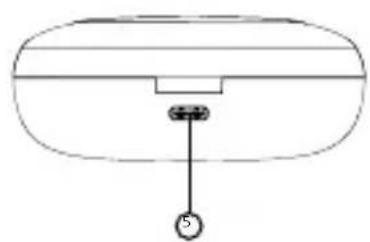
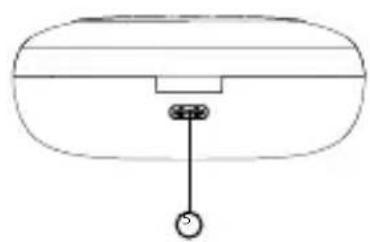
Before using the earphones for the first time, it is recommended to fully charge the battery. Charge the earphones using the enclosed USB-C cable and a 5V/2A power adapter, or a USB port on a PC, power bank etc. To charge the box itself, connect the charging cable to the USB-C port (5). The LEDs (5) flash during charging and remain lit when the battery is fully charged.
FACTORY SETTINGS:
In case of technical issues, reset the earphones to factory settings as follows
- Disconnect and remove the earphones from all paired devices.
- Place both earphones in the charging box for at least 5 seconds.
- Remove both earphones from the charging box and press both multifunction buttons five times in quick succession.
- A successfully factory reset is announced by a sound.
- You can now turn on Bluetooth mode on your device and connect to the earphones.
SPECIFICATIONS
Bluetooth: 5.0
Supported Bluetooth profiles: HFP, HSP, A2DP, AVRCP
Supported codecs: AAC, SBC
Protection rating: IPX6
Transmission range: 10 m
Frequency: 20 Hz-20 kHz
Sensitivity: 98 dB ± 3 dB
Speaker: 8 mm
Impedance: 32 Ω
Earphones battery capacity: 40 mAh
Charging box battery capacity: 400 mAh
PACKAGE CONTENTS:
Niceboy HIVE Airport earphones
Charging box
Spare earbuds
USB-C cable
Manual
This product complies with all the basic requirements of relevant EU directives.
USER INFORMATION FOR DISPOSING ELECTRICAL AND ELECTRONIC DEVICES (HOME USE)
natural_image
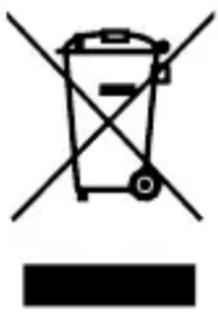
Simple line drawing of a trash bin with crossed lines and a horizontal bar below (no text or symbols)This symbol located on a product or in the product's original documentation means that the used electrical or electronic products may not be disposed together with the communal waste. In order to dispose of these products correctly, take them to a designated collection site, where they will be accepted for free. By disposing of a product in this way, you are helping to protect precious natural resources and helping to prevent any potential negative impacts on the environment and human health, which could be the result of incorrect waste disposal. You may receive more detailed information from your local authority or nearest collection site. According to national regulations, fines may also be given out to anyone who disposes of this type of waste incorrectly. User information for disposing electrical and electronic devices.
(Business and corporate use)
In order to correctly dispose of electrical and electronic devices for business and corporate use, refer to the product's manufacturer or importer. They will provide you with information regarding all disposal methods and, according to the date stated on the electrical or electronic device on the market, they will tell you who is responsible for financing the disposal of this electrical or electronic device. Information regarding disposal processes in other countries outside the EU. The symbol displayed above is only valid for countries within the European Union. For the correct disposal of electrical and electronic devices, request the relevant information from your local authorities or the device seller.
DE
PRODUKTBESCHREIBUNG
natural_image
Simple line drawing of a device with a labeled component (no text or symbols)ERSTE INBETRIEBNAHME UND PAIRING
natural_image
Symbol of a trash bin crossed with two crossed lines and a solid black rectangle below (no text or labels)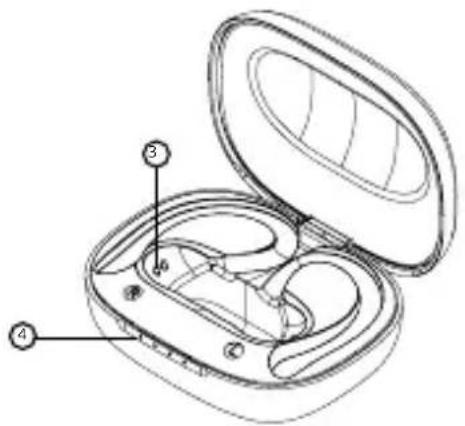
natural_image
Simple line drawing of a device with a labeled pin (no text or symbols beyond the number 5)natural_image
Simple line drawing of a trash bin with crossed lines and a solid black rectangle below (no text or symbols)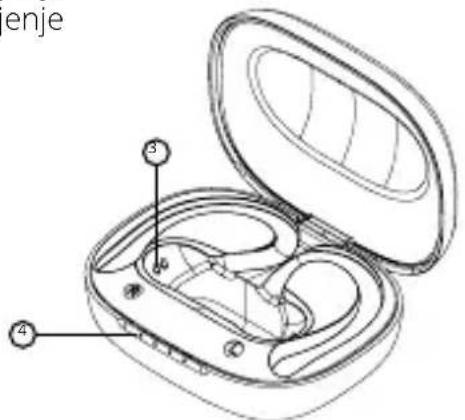
natural_image
Simple line drawing of a device with a labeled component (no text or symbols)PRVO POKRETANJE I UPARIVANJE
natural_image
Symbol of a trash bin crossed with a diagonal line and a horizontal bar below (no text or numbers present)Simbol naveden na proizvodu ili u popratnoj dokumentaciji znači da je zabranjeno odlagati električne ili elektroničke proizvode zajedno s komunalnim otpadom. Pobrinite se za pravilnu likvidaciju otpada: dotrajali proizvod predajte besplatno u ovlašteni centar za skupljanje otpada. Propisnom likvidacijom dotrajalog proizvoda ćete doprini-jeti očuvanju skupocjenih prirodnih izvora te prevenciji negativnih utjecaja na okoliš i ljudsko zdravlje zbog nepravilne likvidacije otpada. Za više informacija obratite se nadležnom lokalnom uredu ili mjestu zbrinjavanja. Nepravilno zbrinjavanje ove vrste otpada kažnjava se sukladno nacionalnim propisima. Informacije za korisnika o načinu zbrinjavanja električnih i elektronskih uređaja
(Poslovna uporaba)
Vezano za pravilno zbrinjavanje dotrajale električne/elektronske opreme za poslovnu upotrebu i upotrebu u tvorničkim pogonima obratite se proizvođaču ili uvozniku ovog proizvoda. Proizvođač će Vam pružiti informacije o načinu zbrinjavanja proizvoda i obavijestit će vas o tome tko je dužan osigurati zbrinjavanje ovog električnog uređaja ovisno o datumu uvođenja proizvoda na tržište. Informacije o zbrinjavanju dotrajalog proizvoda u ostalim zemljama (izvan EU). Gore navedeni simbol važi samo u Europskoj uniji. Za više informacija o pravilnom zbrinjavanju električnih i elektronskih uređaja se obratite prodavatelju ili dobavljaču.
PL
OPIS PRODUKTU
natural_image
Symbol of a trash bin crossed with two crossed lines and a solid black rectangle below (no text or labels)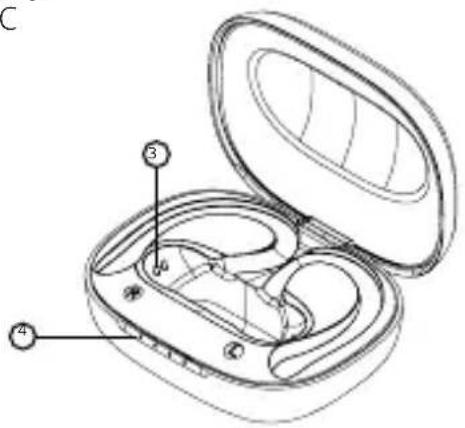
natural_image
Simple line drawing of a device with a handle and circular connector (no text or symbols)PRVI VKLOP IN SEZNANJANJE
natural_image
Simple line drawing of a trash bin with crossed lines indicating no waste or discharge (no text or symbols)PRIMA PORNIRE ŞI ASOCIEREA
natural_image
Simple line drawing of a trash bin with crossed lines indicating no waste or discharge (no text or symbols)natural_image
Symbol of a trash bin crossed with two crossed lines and a solid black rectangle below (no text or labels)Importer to EU: RTB media s.r.o., Pretlucka 16, Prague 10, 100 00, Czech Republic, ID: 294 16 876 Made in China.
RoHS CE 📋 ✉ 📄

- PRVNÍ SPUŠTĚNÍ A PÁROVÁNÍ
- PRVÉ SPUSTENIE A SPÁROVANIE
- NABÍJANIE:
- FIRST START-UP AND PAIRING
- SWITCHING ON AND OFF:
- MULTIFUNCTIONAL BUTTON - BASIC CONTROLS
- CHARGING:
- FACTORY SETTINGS:
- SPECIFICATIONS
- PACKAGE CONTENTS:
- USER INFORMATION FOR DISPOSING ELECTRICAL AND ELECTRONIC DEVICES (HOME USE)
- (Business and corporate use)
- DE
- PRODUKTBESCHREIBUNG
- ERSTE INBETRIEBNAHME UND PAIRING
- PRVO POKRETANJE I UPARIVANJE
- (Poslovna uporaba)
- PL
- OPIS PRODUKTU
- PRVI VKLOP IN SEZNANJANJE
- PRIMA PORNIRE ŞI ASOCIEREA
Brand : Niceboy
Model : HIVE Airsport
Category : Headphones