
HIVE Beans POP - Headphones Niceboy - Free user manual and instructions
Find the device manual for free HIVE Beans POP Niceboy in PDF.


| Product Type | True Wireless Stereo (TWS) Earbuds |
| Model | Niceboy HIVE Beans Pop |
| Bluetooth Version | 5.3 |
| Bluetooth Profiles | HSP, HFP, A2DP, AVRCP |
| Supported Codecs | AAC, SBC |
| Driver Size | 13 mm |
| Frequency Response | 20 Hz - 20 kHz |
| Sensitivity | 98 ± 3 dB |
| Impedance | 32 Ω |
| Water Resistance | IPX4 (splash-proof) |
| Playback Time (Earbuds) | Up to 6 hours |
| Total Playback Time (with Case) | Up to 24 hours |
| Earbud Battery Capacity | 30 mAh each |
| Charging Case Battery Capacity | 250 mAh |
| Charging Port | USB-C (on case) |
| Voice Assistant Support | Siri, Google Assistant |
| Controls | Multifunction buttons (play/pause, volume, track skip, call management, voice assistant) |
| Auto Power On/Off | Removing from case turns on; placing in case turns off |
| Package Contents | Earbuds, charging case, USB-C cable, manual |
| Safety Features | Hearing protection warning, avoid liquids/extreme temperatures, battery safety |
Frequently Asked Questions - HIVE Beans POP Niceboy
User questions about HIVE Beans POP Niceboy
0 question about this device. Answer the ones you know or ask your own.
Ask a new question about this device
Download the instructions for your Headphones in PDF format for free! Find your manual HIVE Beans POP - Niceboy and take your electronic device back in hand. On this page are published all the documents necessary for the use of your device. HIVE Beans POP by Niceboy.
USER MANUAL HIVE Beans POP Niceboy
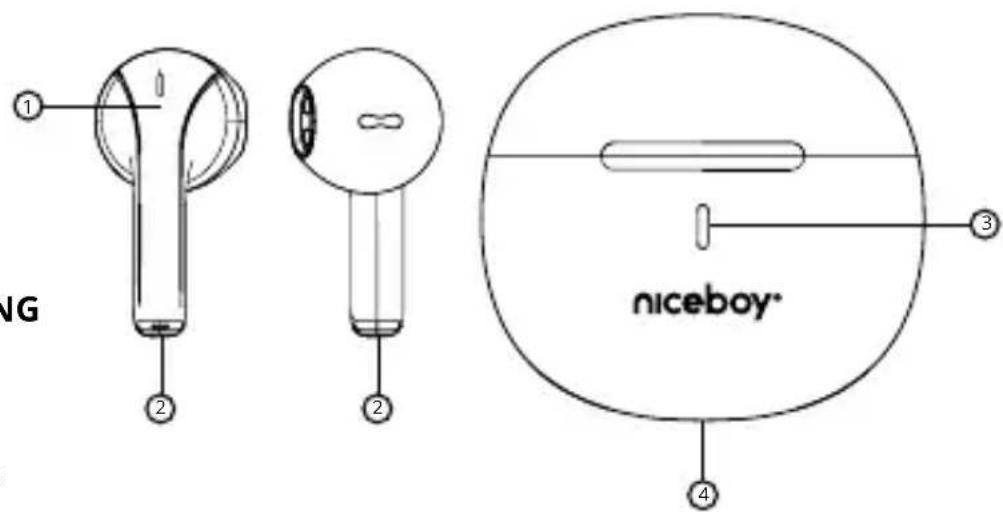
- Multi-function button
- Charging pins
- LED charging indicator
- USB-C charging port
FIRST START-UP AND PAIRING
- Remove both headphones from the packaging.
- Place both earphones in the charging box and let them charge. During charging, the LED indicator (3) lights up, after full charging, the light goes out.
- Remove the headphones from the box. They turn themselves on and pair with each other.
- Now the headphones are ready to connect to the Bluetooth device.
- Open Bluetooth settings on your device and in the available list search for "Niceboy HIVE Beans Pop" on your device.
- Successful pairing will be announced by an acoustic prompt.
ON AND OFF
To turn the headphones on, just remove the headphones from the charging box, or you can manually turn on the headphones by long pressing both multifunction buttons (1). To turn the headphones off, just put the headphones in the charging box. Alone will turn off and disconnect from your device. You can also turn off the headphones with a long press both multifunction buttons (1) for approx. 5s.
MULTIFUNCTION BUTTON - BASIC CONTROL
One press of any button - play/pause, answer/end call Double press of the right button - increase the volume by one level Double press of the left button - decrease the volume by one level
Long press the right button for 2 seconds - next song, call rejection
Long press the left button for 2 seconds - previous song, call rejection
Triple press of the left button - activation of the voice assistant Siri / Google Assistant
CHARGING
To charge the box itself, connect the charging cable to the USB port (4). During charging, the indicator LED (3) flashes, after full charging it lights up permanently.
FACTORY SETTINGS
- In the settings of your device, remove the headphones from the list of all paired devices and turn off the bluetooth function.
- Place the headphones in the charging box.
- Remove both earphones from the charging box. Press any multifunction button five times in a row. An acoustic signal will sound and the headphones will turn off.
- Place the headphones in the charging box.
- Now the process is finished. After removing from the charging box, the headphones turn on by themselves, connect to each other and it is possible to pair them with your device again.
SPECIFICATIONS
BT: 5.3
BT profiles: HSP, HFP, A2DP, AVRCP
Supported codecs: AAC, SBC
Degree of protection: IPX4
Transmission range: 10m
Speaker: 13mm
Frequency: 20Hz-20kHz
Sensitivity: 98 ± 3dB
Impedance: 32Ω
Playback time per charge: up to 6 hours
Total playback time: up to 24 hours
Headphone battery capacity: 30mAh
Charging box battery capacity: 250mAh
Voice assistants: Siri and Google Assistant
PACKAGE CONTENTS:
Headphones Niceboy HIVE Beans Pop
Charging box
USB-C cable
Manual
SAFETY INFORMATION
Listening to music at a very high volume can damage your hearing. Do not expose the device to fluids or humidity. Do not expose the device to extreme temperatures or try to disassemble it. Protect the device from sharp objects and falls from height. Batteries – improper handling (prolonged charging, short circuit, breakage by other objects, etc.) may result in fire, overheating or battery leakage. The battery or accumulator that may be included with the product has a service life of six months, as it is consumable.
In the case of radio equipment which intentionally transmits radio waves, the instructions and safety information shall include information on all frequency bands along which the radio equipment operates and the maximum radio frequency power transmitted by the frequency band in which the radio equipment operates.
The manual is available for download in electronically at www.niceboy.eu in the support section. NICEBOY s.r.o. hereby declares that the Niceboy HIVE Beans Pop comply with Directives 2014/53 / EU, 2014/30 / EU, 2014/35 / EU, and 2011/65 / EU. The full EU Declaration of Conformity is available at the following website:
https://niceboy.eu/en/declaration/hive-beans-pop
INFORMATION FOR USERS ON DISPOSAL OF ELECTRICAL AND ELECTRONIC EQUIPMENT (HOUSEHOLDS)
The above symbol on the product or accompanying documentation means that used-up electrical or electronic products must not be disposed of as communal waste. To dispose of the product correctly, bring it to designated waste collection points, where it will be disposed of free of charge. Proper disposal of the product
helps preserve valuable natural resources and prevent potential negative impacts on the environment and human health caused by improper waste disposal. For more
information, contact local authorities or the nearest waste collection point. Improper disposal of this type of waste may result in a fine pursuant to national legislation.
Information for Users on Disposal of Electrical and Electronic Equipment (Corporate Use) To properly dispose of electrical and electronic equipment for corporate use, contact the manufacturer or importer of the product. They will provide you with information on disposal methods for the product and will inform you on who is obligated to fund the disposal of the electrical device based on the date the product was put on the market. Information on Disposal in Countries outside the European Union. The above symbol only applies to EU countries. To properly dispose of electrical and electronic equipment, request more information from your local authority or the seller of the product.
DE
PRODUKTBESCHREIBUNG
BT-Profile: HSP, HFP, A2DP, AVRCP
https://niceboy.eu/hr/declaration/hive-beans-pop
INFORMACIJE ZA KORISNIKE O ODLAGANJU ELEKTRIČNE I ELEKTRONIČKE OPREME (KUĆANSTVA)
Profile BT: HSP, HFP, A2DP, AVRCP
DESCRIERE PRODUS
Nusle, 140 00, Prague 4, Czech Republic, ID: 294 16 876
Made in China.
RoHS
CE


- FIRST START-UP AND PAIRING
- ON AND OFF
- MULTIFUNCTION BUTTON - BASIC CONTROL
- CHARGING
- FACTORY SETTINGS
- SPECIFICATIONS
- PACKAGE CONTENTS:
- SAFETY INFORMATION
- INFORMATION FOR USERS ON DISPOSAL OF ELECTRICAL AND ELECTRONIC EQUIPMENT (HOUSEHOLDS)
- DE
- PRODUKTBESCHREIBUNG
- INFORMACIJE ZA KORISNIKE O ODLAGANJU ELEKTRIČNE I ELEKTRONIČKE OPREME (KUĆANSTVA)
- DESCRIERE PRODUS
Brand : Niceboy
Model : HIVE Beans POP
Category : Headphones