
AquaClean Cama - Toilet GEBERIT - Free user manual and instructions
Find the device manual for free AquaClean Cama GEBERIT in PDF.


| Product type | Lavatory toilet |
| Brand | Geberit |
| Model | AquaClean Cama |
| Dimensions (LxDxH) | 18.5 x 24.5 x 30.5 cm |
| Weight | 3.1 kg |
| Power supply | 230 V AC, 50 Hz |
| Power consumption | 1850 W |
| Standby power | ≤ 0.5 W |
| Protection rating | IPX4 |
| Protection class | I |
| Water tank capacity | 3 L |
| Connection | Mains via electrical socket |
| Radio technology | Bluetooth® Low Energy (2400–2483.5 MHz) |
| Hygiene functions | Anal douche WhirlSpray, automatic pre-rinse |
| Comfort functions | Adjustable jet intensity (3 levels), adjustable water temperature (34-40°C) via app |
| Control | Wireless remote control and Geberit Home app |
| Cleaning | Weekly cleaning of tank and technical module, annual descaling |
| Maintenance | Replacement of douche nozzle every 6 months |
| Safety | Mandatory grounding, supervision required for children |
| Warranty | 3 years subject to registration within 90 days |
Frequently Asked Questions - AquaClean Cama GEBERIT
User questions about AquaClean Cama GEBERIT
0 question about this device. Answer the ones you know or ask your own.
Ask a new question about this device
Download the instructions for your Toilet in PDF format for free! Find your manual AquaClean Cama - GEBERIT and take your electronic device back in hand. On this page are published all the documents necessary for the use of your device. AquaClean Cama by GEBERIT.
USER MANUAL AquaClean Cama GEBERIT
USER MANUAL
BEDIENUNGSANLEITUNG
MODE D'EMPLOI
ISTRUZIONI PER L'USO

[Non-Text]
-
广力云智慧零售收银系统
[Non-Text]
[Non-Text]
[Non-Text]
[Non-Text]
[Non-Text]
[Non-Text]
[Non-Text]
[Non-Text]
[Non-Text]
[Non-Text]
[Non-Text]
[Non-Text]
[Non-Text]
[Non-Text]
[Non-Text]
[Non-Text]
[Non-Text]
[Non-Text]
[Non-Text]
[Non-Text]
[Non-Text]
|
|
[Non-Text]
[Non-Text]
[Non-Text]
[Non-Text]
[Non-Text]
[Non-Text]
[Non-Text]
[Non-Text]
[Non-Text]
[Non-Text]
[Non-Text]
[Non-Text]
[Non-Text]
[Non-Text]
[Non-Text]
[Non-Text]
[Non-Text]
[Non-Text]
[Non-Text]
[Non-Text]
[Non-Text]
[Non-Text]
-
[Non-Text]
Deutsch 4
English.... 34
Français.... 64
Italiano.... 94
Geberit AquaClean Cama 6
Grundlegende Informationen beachten.... 6
Android: iOS:
Per Geberit Home App:


DE

DE
Duschdüse anbringen
DE
2
Ergebnis
2
3
4
DE
Explanation of warning notes 37
Register your device.... 38
Geberit App.... 39
Checking compatibility.... 39
Downloading the Geberit Home app 39
Familiarise yourself with the Geberit Home app.... 40
Getting to know your device 41
Familiarise yourself with the Geberit AquaClean Cama.... 41
Familiarise yourself with the functions.... 42
How to install the device 43
Prepare the Geberit AquaClean Cama 43
Attaching the spray nozzle 44
Connecting the technics assembly.... 47
Fix cable with cable ducts 48
Establish connection with the Geberit remote control 48
Establish connection with the Geberit app 49
Water leakage – situation and solutions.... 50
How to use the device 51
Operating concept 51
Familiarise yourself with the Geberit remote control 51
Use the anal shower.... 52
Set the spray intensity 52
Additional device settings in the Geberit Home app.... 52
Cleaning and descaling the device 53
Care Instructions 53
General cleaning and descaling recommendations 53
General care instructions 54
Cleaning the surface 54
Clean the vacuum pads and spray nozzle 55
Descale the device 56
Replace the remote control battery 59
Sustainability 60
Geberit Group and sustainability 60
Ecodesign - ecobalance 60
Tips for reducing the ecological footprint.... 60
Disposal 61
Disposal of waste electrical and electronic equipment.... 61
End user warranty 62
Technical data and conformity 63
Technical data 63
Simplified EU Declaration of Conformity 63
Simplified UK Declaration of Conformity 63
Observe basic information
In order to use the Geberit AquaClean Cama without complications, it is imperative that you observe the following basic information:
- The Geberit AquaClean Cama is only allowed to be used to execute the Geberit AquaClean shower toilet functions within the bathroom.
—The device is only allowed to be used when it is earthed.
—Geberit accepts no liability for the consequences arising from misuse.
- The Geberit AquaClean Cama is only allowed to be used by children and people with physical impairments once they have been given appropriate instructions and can be supervised.
- The Geberit AquaClean Cama is only allowed to be used together with the Geberit Home app and the Geberit remote control.
- Keep the packaging of the Geberit AquaClean Cama to use when transporting it to a different place of use.
– The device is only allowed to be transported in its original packaging.
- When unpacking the device, check that it is not damaged and that none of the hygiene seals have been broken. If damaged, the Geberit AquaClean Cama must be returned to Geberit immediately.
—If damaged, do not continue to use the device.
- Only install the device according to Geberit instructions.
—It is not permitted to make any modifications.
- You must read this user manual before installing or operating the device and ensure you follow all instructions.
- Replace the water in the water tank at regular intervals and only use water of drinking water quality (cold water).
- Follow the care instructions provided in this user manual.
—The device is only allowed to be cleaned when the power supply is disconnected.
- Descale the device at least once a year and follow the descaling instructions in this user manual.
Explanation of warning notes
Warning notes are placed at the location at which the hazard may occur.
Warning notes are structured as follows:

WARNING
Nature and source of the hazard
Possible consequences if the hazard is ignored.
▶ Measures to prevent the hazard.
The following signal words are used to indicate residual hazards in warning notes and important information.
| Symbol S | Signal word and meaning |
 | WARNINGThe signal word denotes a hazard with a medium degree of risk which, if not avoided, could result in death or serious injury. |
| ATTENTIONThe signal word denotes a hazard, which, if not avoided, may result in material damage. | |
 | Symbol only.Refers to important information. |
Warranty registration
Extend the warranty period of your Geberit AquaClean for free. Register for this within 90 working days from the installation date.

In the third year of the warranty period, Geberit will supply replacement parts free of charge in the event of material or production defects.
By computer: http://www.geberit-aquaclean.com/registration
By smartphone or tablet:

Android: iOS:
Via Geberit Home app:


Checking compatibility
To ensure you can use the Geberit App to its full extent, you will need a smartphone with an up-to-date Android or iOS version. You may need to check the permissions (Bluetooth®, location sharing) and confirm them.
Downloading the Geberit Home app
Download the free Geberit Home app for Android and iOS smartphones directly from the respective App Store:
1 Open the App Store on your smartphone.
2 Enter "Geberit Home app" in the search field.
√ The Geberit Home app is displayed.

GEBERIT
3 Download the app.
√ The app is downloaded and displayed on your smartphone.
Alternatively, you can scan the respective QR code to download the Geberit Home app:
Android: iOS:

EN
Familiarise yourself with the Geberit Home app
The Geberit Home app communicates via a Bluetooth® interface with the AquaClean device.

The remote control function of the Geberit AquaClean device is deactivated while the device is connected to the Geberit Home app.
You can execute the following functions and settings via the Geberit Home app:
- Remote control
– Using remote control functions
- Care and maintenance (Geberit services)
- Registering the device
- Software update
- Updating the firmware
You can access the following information via the Geberit Home app:
• Service and contact
- Chatbot
- Order accessories
– Frequently asked questions (FAQ)
– Geberit AquaClean customer service
- Information
– Name (of your device: you can edit this)
- Colour (of the background in the app: you can edit this)
- Model
- Article number
- Serial number
– Initial commissioning
- Step-by-step instructions
- Displaying descaling
- Explanatory videos
– Playing function videos
– Playing maintenance and cleaning videos
- User manual
- Displaying the user manual
Familiarise yourself with the Geberit AquaClean Cama
We are delighted to introduce you to the Geberit AquaClean Cama that you can use to experience the Geberit AquaClean shower sensation in your own home.
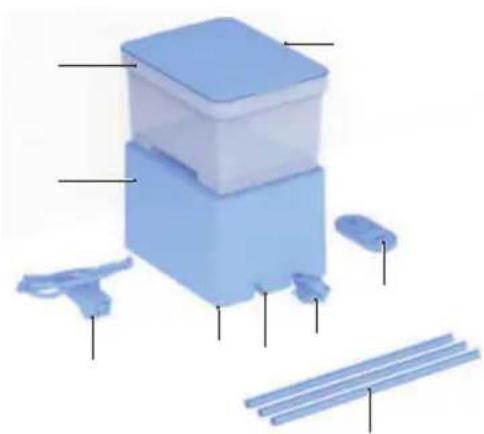
| Item Component Information | ||
| 1 Lid – | ||
| 2 Water tank – | ||
| 3 Technics assembly – | ||
| 4 Spray nozzle with feed pipe | For regular replacement:Available for you in the Geberit Web Shop with the art. no. 245.390.11.1 | |
| 5 | Specification plate with serial number (not visible) | Below the technics assembly |
| 6 | Connection between feed pipe and technics assembly | – |
| 7 | Mains cable for the technics assembly | Wound up below the technics assembly |
| 8 Cable ducts | 3 x 33 cm, for cutting to size and fixing the hose and cable | |
| 9 Remote control To operate your device | ||
EN
Some components and the consumables listed below can be ordered directly via the Geberit Home app, the Geberit spare parts catalogue or via the Geberit Web Shop.
| Consumables Information | |
| Geberit AquaClean cleaning set | To clean your device:Art. no. 242.547.00.1 |
| Geberit AquaClean descaling agent | To descale your device:Art. no. 147.040.00.1 |
| Geberit AquaClean descaling agent set (4 pcs.) | Art. no. 147.047.00.1 |
| Geberit AquaClean descaling agent set (10 pcs.) | Art. no. 147.048.00.1 |
Familiarise yourself with the functions
Hygiene functions:
• WhirlSpray shower technology
• automatic pre-flush function (with cold water)
- descaling programme
Comfort functions:
• spray intensity can be selected
• water temperature can be selected (via the Geberit Home app)
- selected functions can be operated via remote control
- all functions can be operated via the Geberit Home app
Prepare the Geberit AquaClean Cama

WARNING
Incorrect installation
Incorrect cable routing can lead to injuries.
▶ Lay the cable in a way that does not create any trip hazards.
▶ Connect the device to the nearest mains connection, bearing in mind the cable length of 3 metres.
1 Check the distance to the nearest power socket.
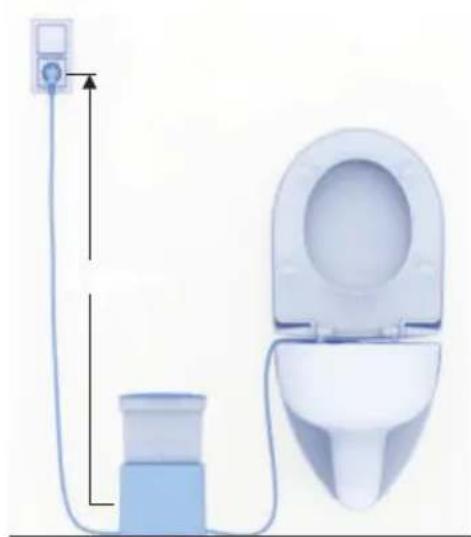

Position the technics assembly firmly on the floor.
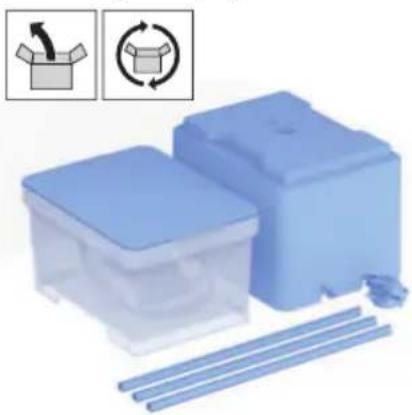
2 Remove the device from the packaging.
√ Check for damage. √ Retain the packaging.
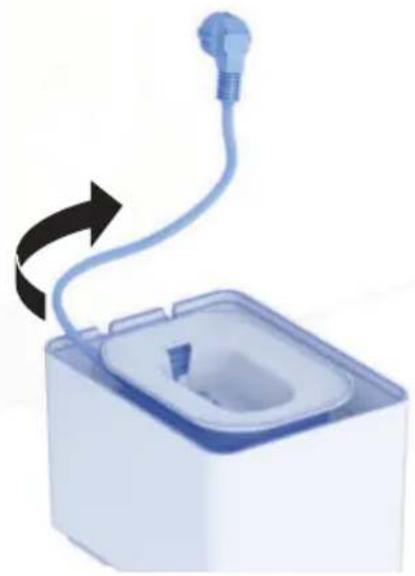
3 Unroll the mains cable enough to reach the power socket.
EN
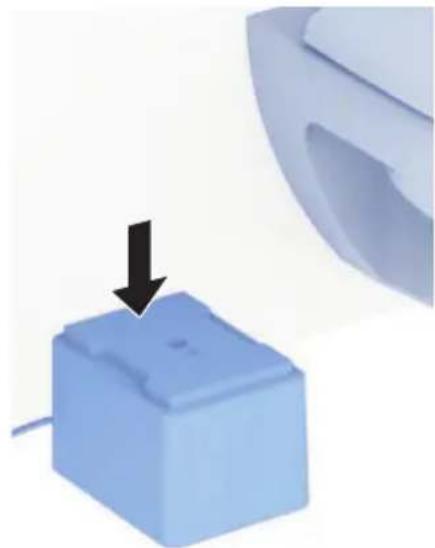
4 Position the technics assembly accordingly.
√ The technics assembly can be positioned on the right or left of the WC.
Attaching the spray nozzle
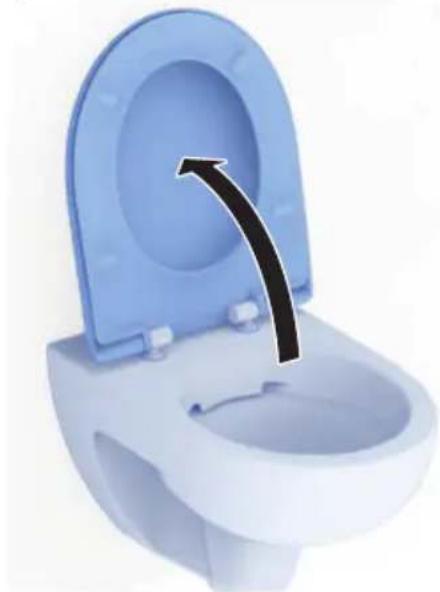
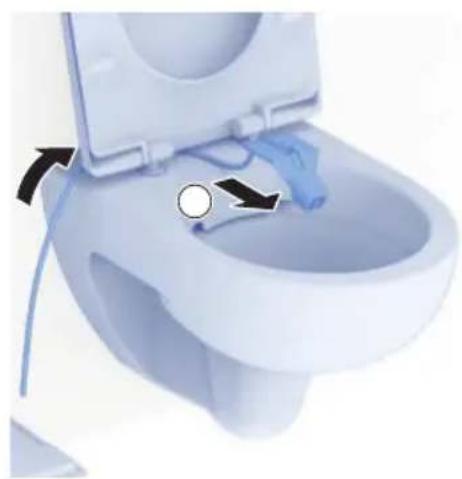
1 Lift up the WC seat.
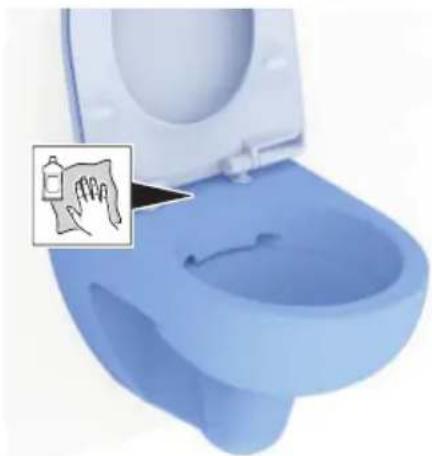
2 Clean the WC surface.
3 Take the spray unit out of the water tank.
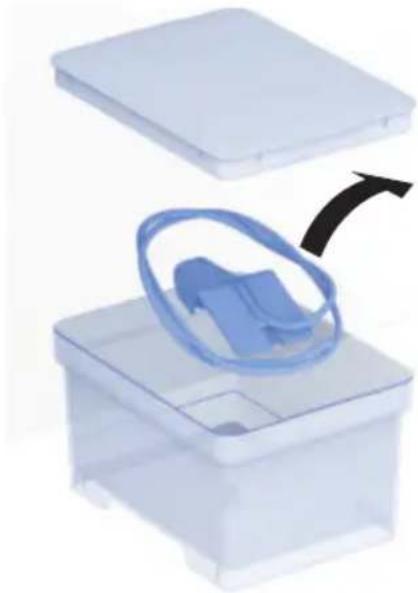
4 Replace the lid on the water tank to close it again and prevent any impurities from getting inside.
5 Take the spray unit out of the plastic bag.
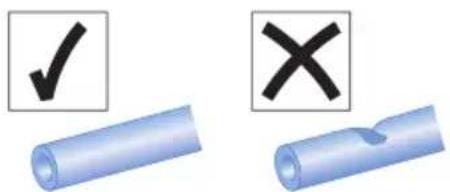
6 Roll out the feed pipe for the spray unit ensuring no kinks are formed.
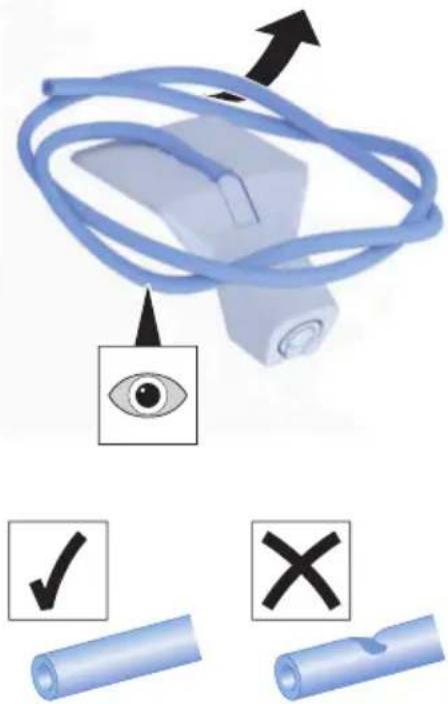
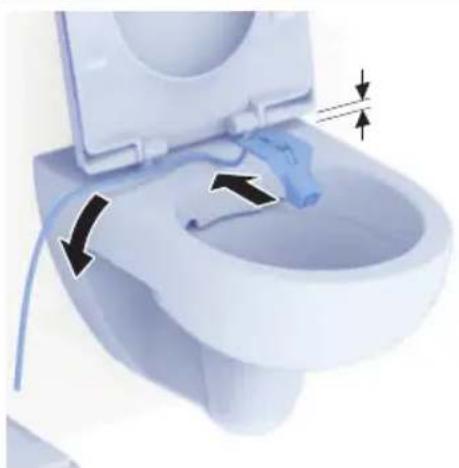
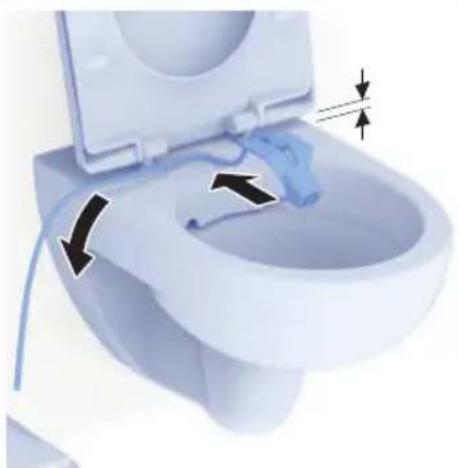
7 Guide the feed pipe for the spray unit between the WC seat and the WC surface and out towards the technics assembly side.
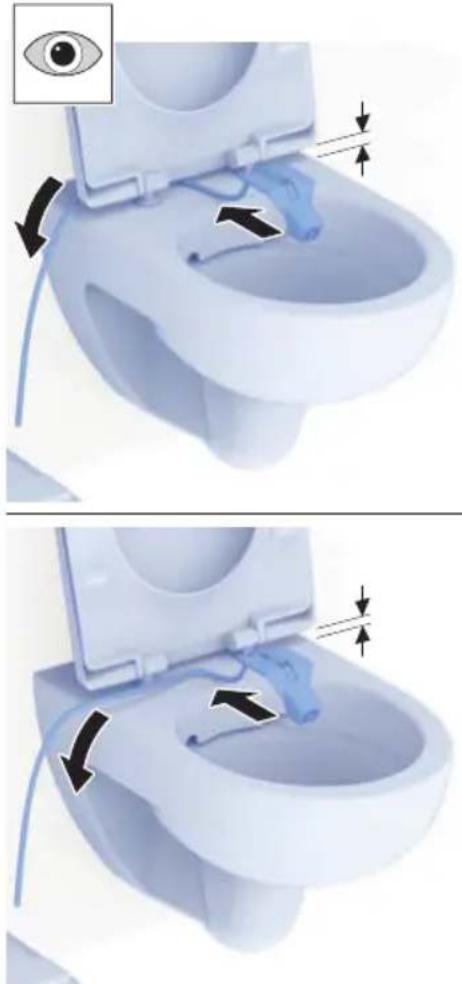
8 Position the spray unit centrally in the preferred position on the rear rim of the WC without sticking it down.
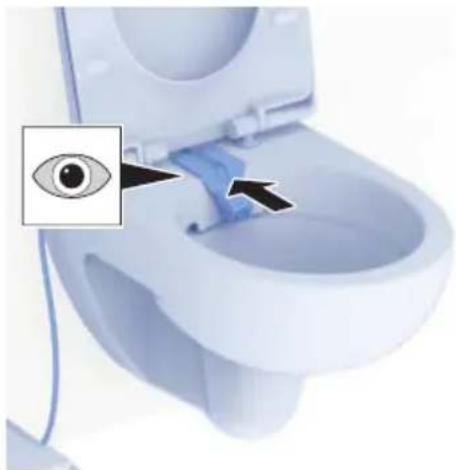
EN
9 Remove the protective foil.
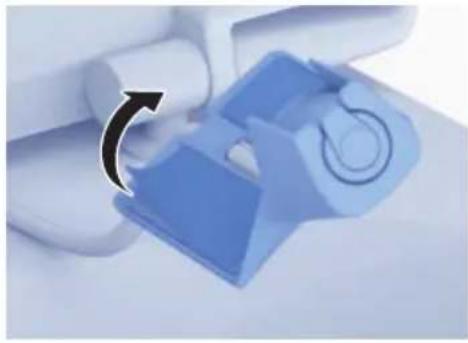
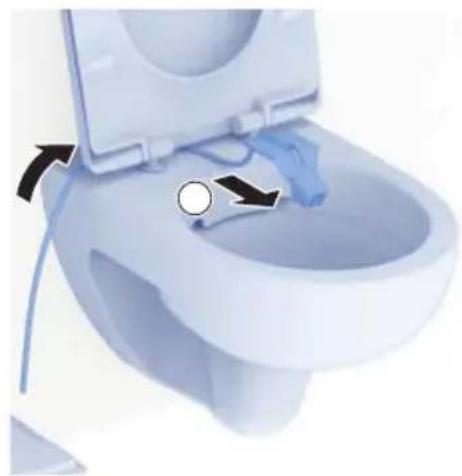
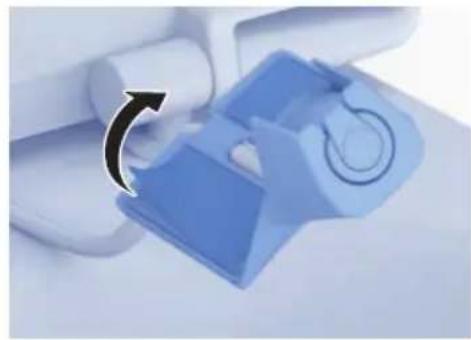
10 Fasten the spray unit down centrally in the preferred position on the rear rim of the WC and press it firmly against the ceramic for at least 1 minute.
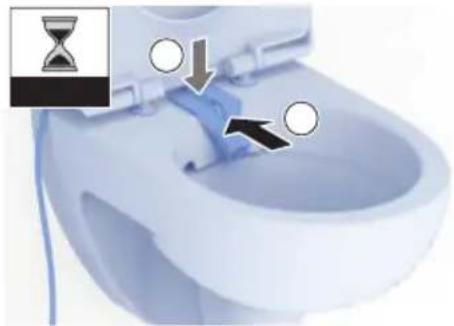
11 Close the WC seat ring and check whether the spray unit is properly secured.
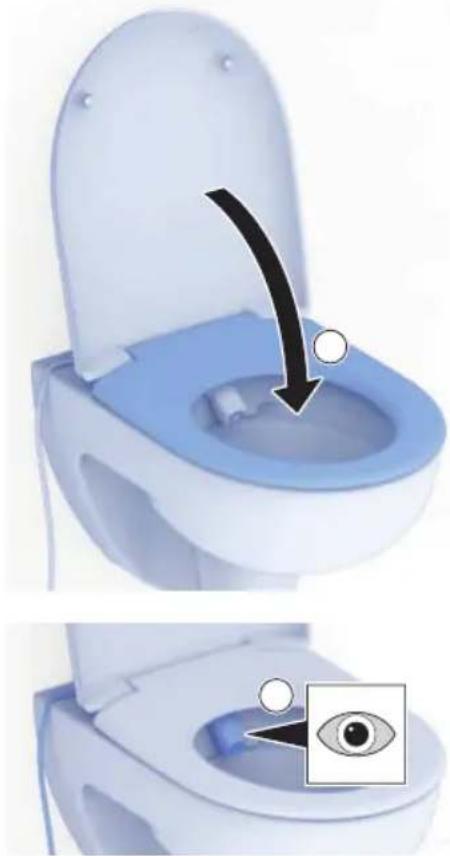
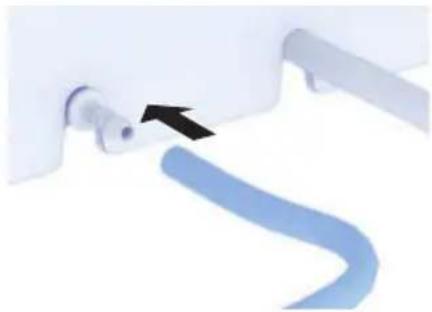
Connecting the technics assembly
1 Connect the water hose for the spray unit to the technics assembly.
√ To ensure an optimal water supply, the water hose must not have any kinks.
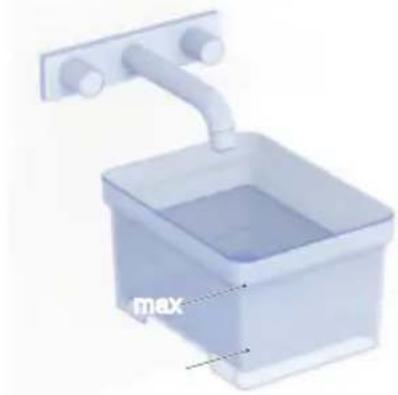
2 Fill the water tank with water.
√ Only fill it with water of drinking water quality (cold water).
√ Replace the water regularly.
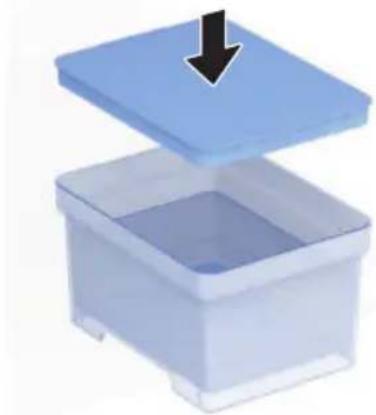
3 Replace the lid on the water tank to close it.
√ The lid must sit correctly on the water tank to ensure no impurities can enter.
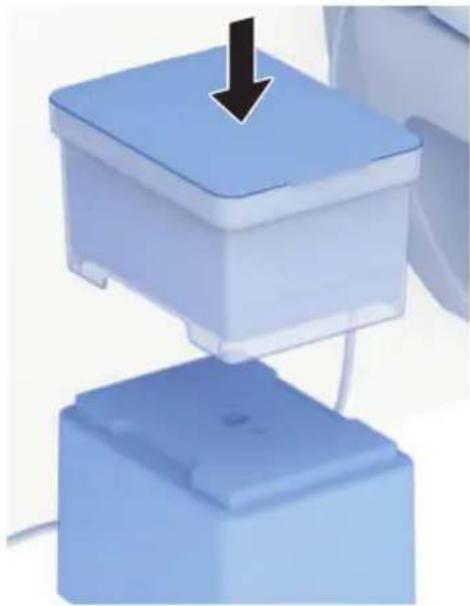
4 Place the water tank with the lid closed on top of the technics assembly.
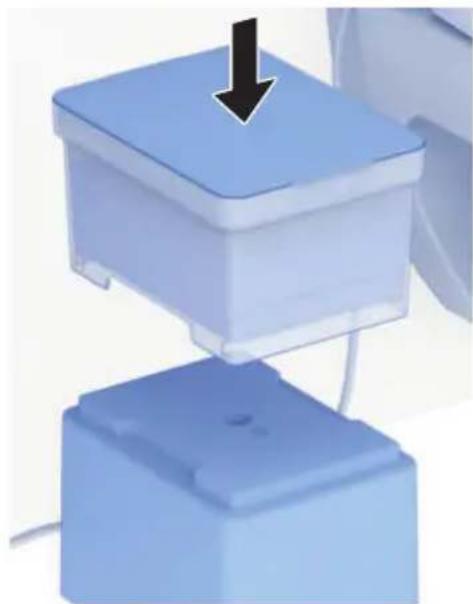
√ The Geberit AquaClean device is installed and can be connected with the Geberit app or the remote control.
EN
Fix cable with cable ducts

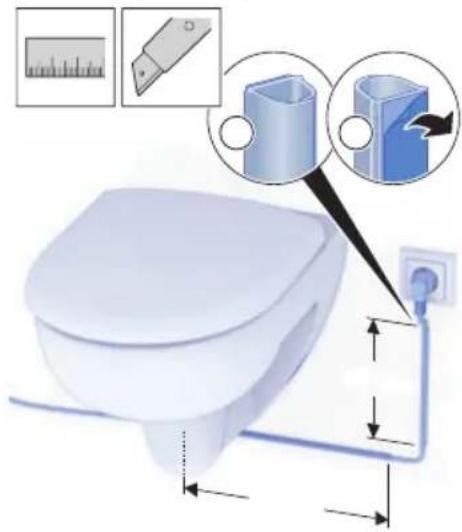
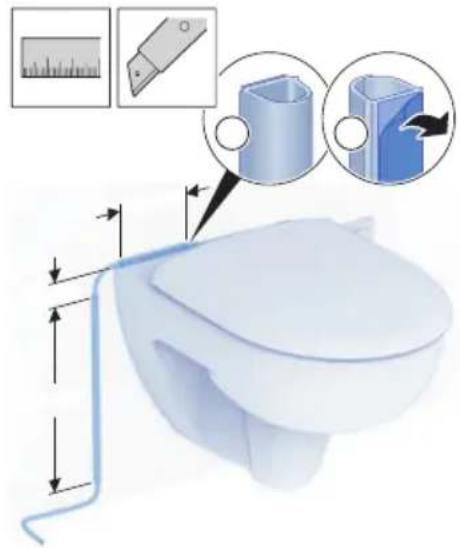
All cables must be securely laid and fixed in cable ducts to prevent tripping hazards and cable damage.
Note that three cable ducts are provided, which you can cut to size and fix individually. You may need more than the cable ducts provided to lay and fix all cables securely. The laying of the cables shown here in the example may also vary depending on the prerequisites for your bathroom.
1
Lay the cable ducts so that all cables are securely laid and fixed.
2
Lay the cable ducts so that all cables are securely laid and fixed.
Establish connection with the Geberit remote control

The shower procedure can be actuated at any time – even if no one is sitting down on the WC seat ring. Ensure that you are sitting on the WC seat ring before starting the shower procedure.
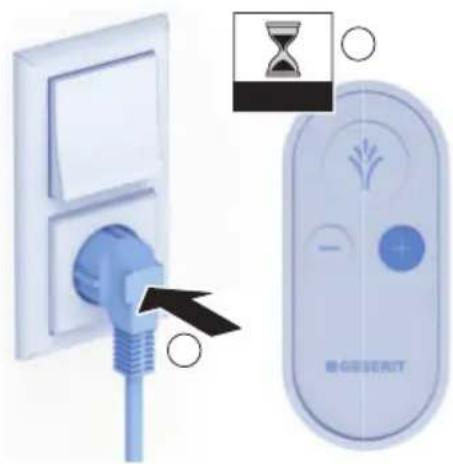
▶ Connect the Geberit AquaClean device to the power supply and press the <+> button on your remote control for about 10 seconds.
√ Ensure you are in close range of the device.
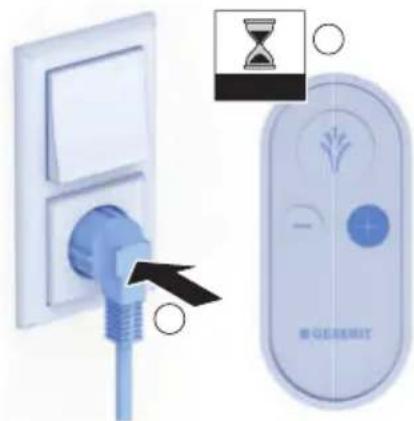
√ The connection is established. This can take several seconds.
√ The Geberit AquaClean device is ready for operation.
Establish connection with the Geberit app
1 Connect the Geberit AquaClean device to the power supply and press the <+> button on your remote control for about 10 seconds.
2 Open the Geberit app.
√ Ensure you are in close range of the device.
3 Select your country and language and confirm with [NEXT].
4 Start the search by selecting [Add (search for products)].
√ The Geberit AquaClean device is displayed.
5 Connect your Geberit AquaClean device with [Connect now].
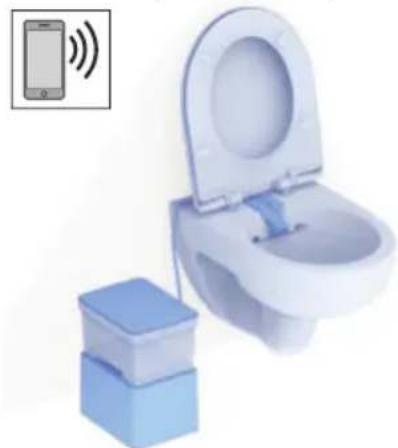
√ The connection is established. This can take several seconds.
√ The Geberit AquaClean device is ready for operation.
ATTENTION
Device does not connect to the Geberit app
The Geberit AquaClean device does not connect to the Geberit app within the next ten minutes or needs to be connected to a second smartphone.
▶ Disconnect the mains plug and plug it back in after approximately 10 seconds. Then press the <+> button on your remote control for approximately 30 seconds to restart the pairing process.
EN
Water leakage – situation and solutions
If the device tips over and water leaks out, the technics assembly could come into contact with water. Proceed as follows if the technics assembly comes into contact with water:
1 Disconnect the device from the power supply.
2 Ensure that the technics assembly is not in the vicinity of leaking water.
3 If the technics assembly has come into contact with water, allow it to dry out fully.
4 Dry the floor fully to ensure there is no more residual water.
5 Once the device is dry and there is no more water in the vicinity, re-install it according to the instructions in the user manual.
If the Geberit AquaClean device shows signs of damage, contact Geberit or return the device immediately to Geberit.
Operating concept
You can operate the device via the Geberit remote control or the Geberit Home app.

The remote control function of the Geberit AquaClean device is deactivated while the device is connected to the Geberit Home app.
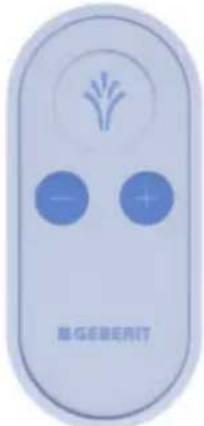
Familiarise yourself with the Geberit remote control
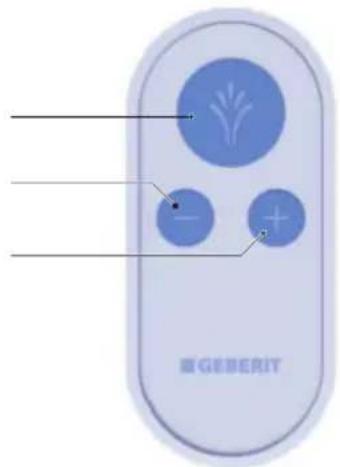
1
2 <-> button: Reduce spray intensity
3 <+> button: Increase spray intensity
EN
Use the anal shower

The shower procedure can be actuated at any time – even if no one is sitting down on the WC seat ring. Ensure that you are sitting on the WC seat ring before starting the shower procedure.
Prerequisite
- You are sitting on the WC seat ring.
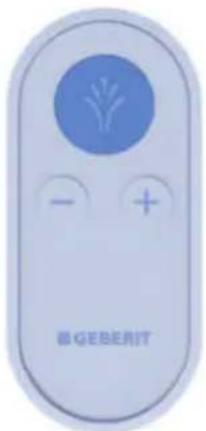
▶ Briefly press the
Result
√ The shower procedure starts.
Set the spray intensity
Prerequisite
- The shower procedure is running.
▶ Press the <+> button to increase the spray intensity. Press the <-> button to decrease the spray intensity.
Result
√ The shower spray becomes stronger/weaker.

You can set the spray intensity in 3 stages.
Additional device settings in the Geberit Home app
| Appointment Adjustment range Factory setting | ||
| Shower water temperature Position 1–5 Position 4 | ||
| Hot water of the spray functionality on/off on |
Care Instructions
You have selected a product with a high-grade surface. Please follow the care instructions below.
The manufacturer does not assume any liability for product damage that arises as a result of incorrect care and handling.
General cleaning and descaling recommendations
Cleaning the shower toilet at the recommended cleaning intervals will ensure that it functions properly. The shower toilet must only be cleaned using suitable cleaning agents and cleaning equipment.
ATTENTION
Aggressive descaling agents
Unsuitable descaling agents may cause damage to the device.
▶ Only use Geberit AquaClean descaling agents to descale the device.
▶ Refer to the “Descaling the device” section.
ATTENTION
Aggressive and scouring cleaning agents
Cleaning using aggressive and scouring cleaning agents can cause surface damage.
▶ Use Geberit AquaClean cleaning agents.
▶ Pay attention to the cleaning and care instructions.
| Interval Task | |
| Daily | ▸ Remove water drops with a soft, lint-free cloth to avoid limescale stains. |
| Weekly | ▸ Empty the water tank. Clean the water tank and lid with a soft, lint-free cloth and a suitable cleaning agent. Only fill the water tank with water of drinking water quality (cold water).▸ Clean the technics assembly with a soft, lint-free cloth and a suitable cleaning agent.√ Always disconnect the device from the power supply to clean it.√ The technics assembly must not be immersed in water.▸ Check spray nozzle including vacuum pads and clean or replace if necessary. → See "Clean the vacuum pads and spray nozzle", page 55. |
| Annually ▶ Descale your device. → See "Descale the device", page 56. | |
EN
General care instructions
- Never use cleaning agents that contain chlorine or that are acidic or corrosive.
- Never use cleaning agents that are abrasive or may scratch the surface.
- Never use sharp or pointed objects when cleaning.
• Make sure that an efficient source of ventilation and an appropriate room temperature are present in your bathroom. - Protect the surface from bleaching due to extreme light and sun exposure.
Cleaning the surface

WARNING
Danger of fatal electric shock Incorrect cleaning can lead to death or serious injury.
▶ Disconnect the power supply before cleaning.
▶ Allow all of the surfaces to dry completely before the power supply is permitted to be switched back on.
1 Clean the surfaces. Please follow the corresponding care instructions.
2 Dry the surfaces with a soft, lint-free cloth.
Clean the vacuum pads and spray nozzle
Prerequisite
- The vacuum pad is dirty and no longer adheres to the surface.
– The spray nozzle is dirty. - The spray nozzle and feed pipe must be replaced after approximately 6 months.
- The water tank is empty.
1 Demount the spray unit and the feed pipe to clean them.
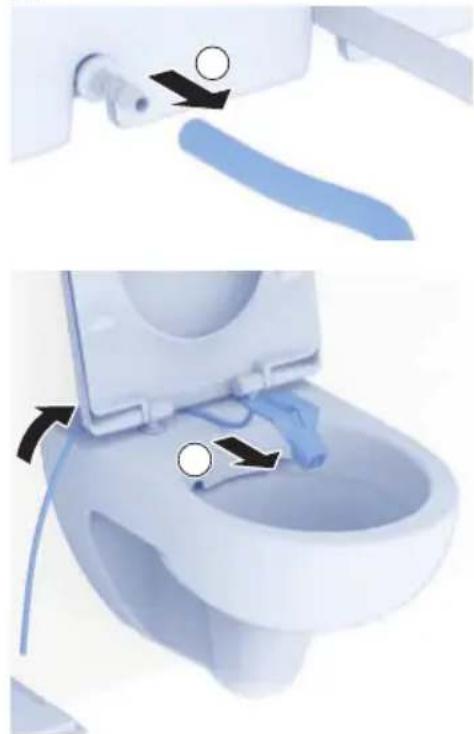
2 Clean the vacuum pad and the spray nozzle by rinsing them with warm, clear water and a mild cleaning agent.
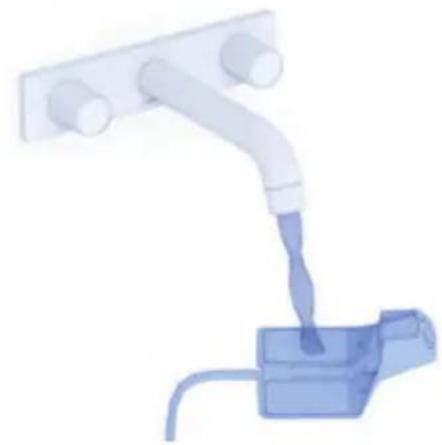
3 Allow the spray nozzle to dry at room temperature for 30 minutes.
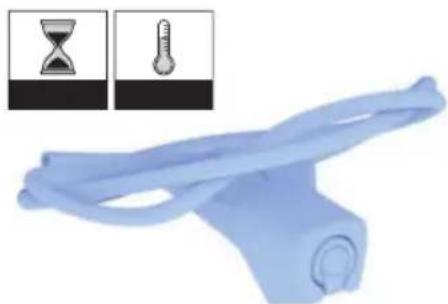
√ The vacuum pad and spray nozzle are clean, and the vacuum pad adheres to the surface again.
4 Reattach the spray nozzle to your WC. → See "Attaching the spray nozzle", page 44.
EN
Descale the device

Bear in mind that you can also perform descaling by following the step-by-step instructions available on the Geberit Home app.
1
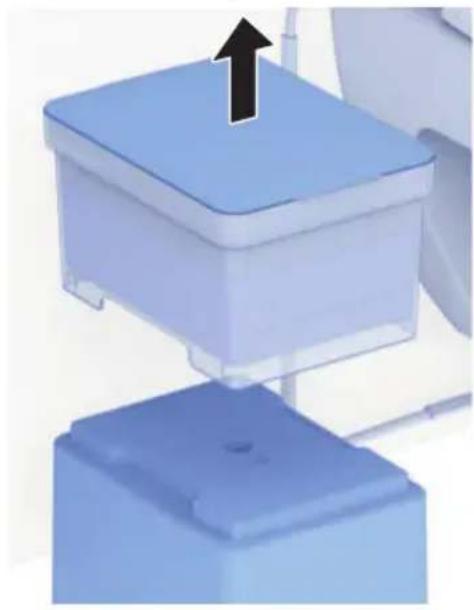
Remove the water tank from the technics assembly.
2
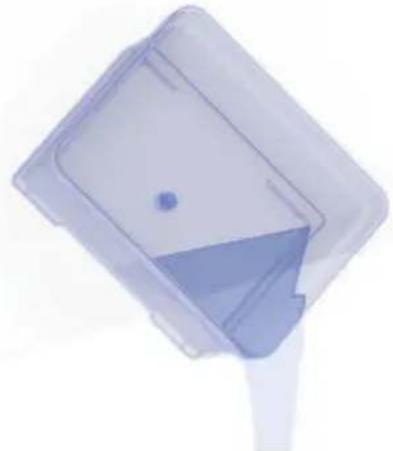
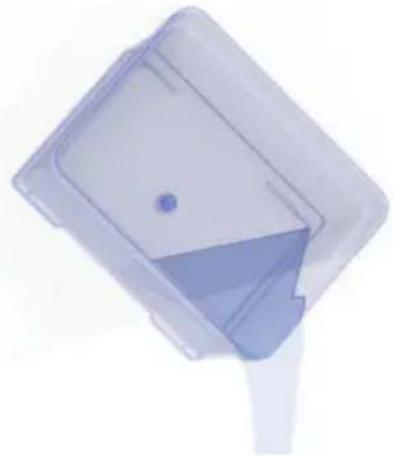
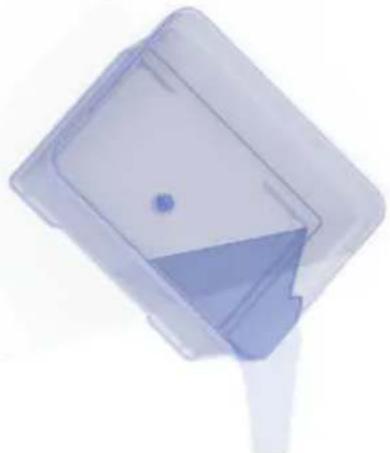
Empty out the water.
3
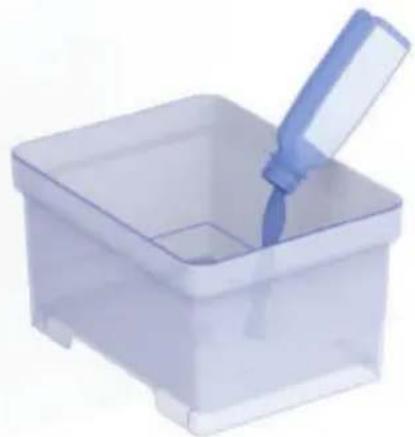
Pour a bottle (125 ml) of Geberit descaling agent into the water tank.
4
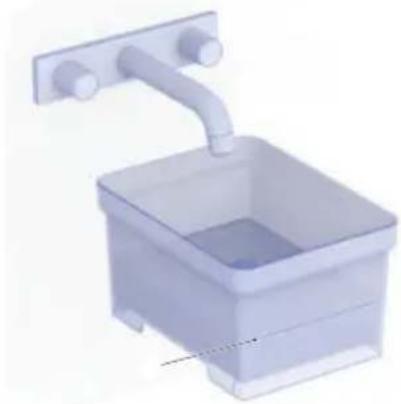
Fill the water tank half full with water.
√ Only fill it with water of drinking water quality (cold water).
5 Replace the lid on the water tank to close it.
√ The lid must sit correctly on the water tank to ensure no impurities can enter.
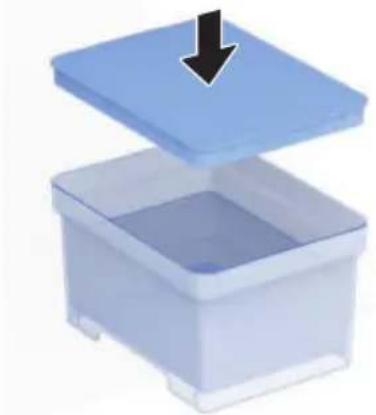
6 Place the water tank with the lid closed on top of the technics assembly.
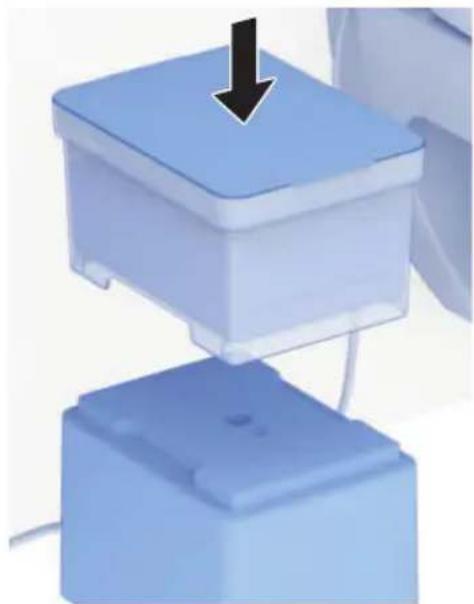
7 Press the <-> and

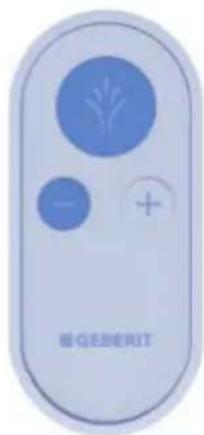
√ The descaling programme is started, which can take about 30 minutes.
√ The descaling programme is finished as soon as the water tank is completely empty.
8 Remove the water tank from the technics assembly.
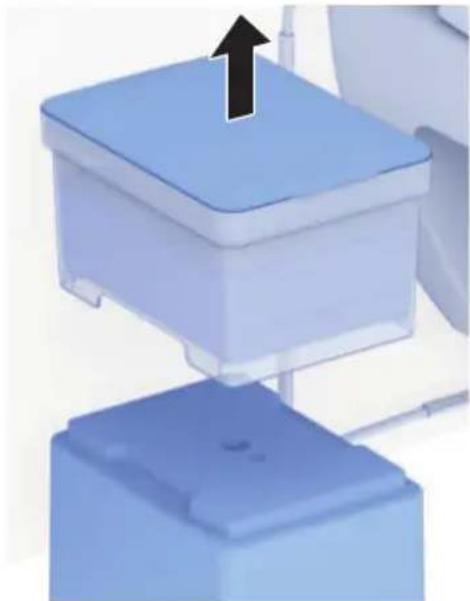
EN
9 Fill the water tank half full with water.
√ Only fill it with water of drinking water quality (cold water).
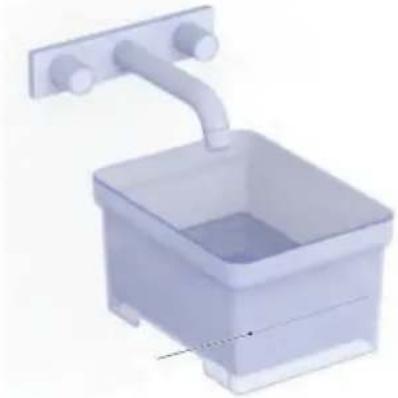
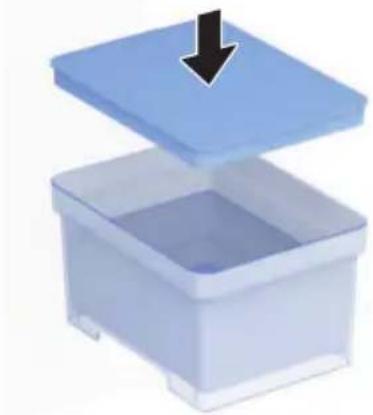
10 Replace the lid on the water tank to close it.
√ The lid must sit correctly on the water tank to ensure no impurities can enter.
11 Place the water tank with the lid closed on top of the technics assembly.
12 Press the button to start the flushing programme.
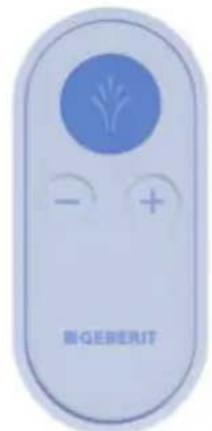
√ The flushing programme is started, which can take about 10 minutes.
13 Fill the water tank completely with water.
√ Only fill it with water of drinking water quality (cold water).
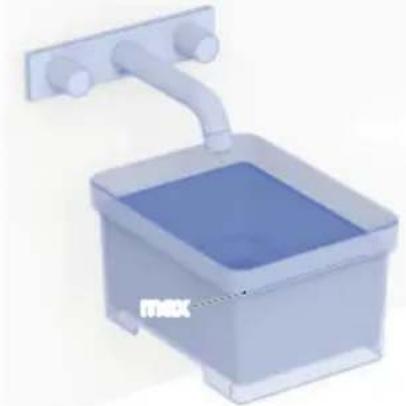
14 Replace the lid on the water tank to close it.
√ The lid must sit correctly on the water tank to ensure no impurities can enter.
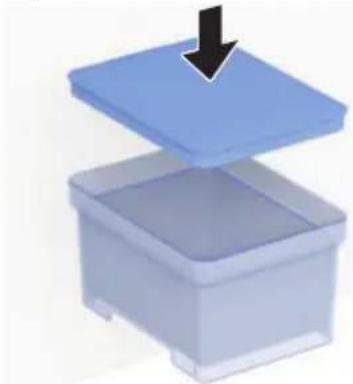
√ After the flushing programme is finished, the device is ready for operation again.
Replace the remote control battery
Prerequisite
– During the entire procedure, the remote control must be located in the physical range of the shower toilet.
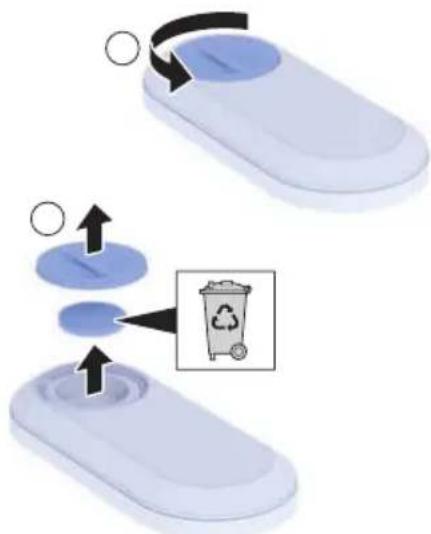
1 Remove the used battery. Dispose of the used battery appropriately.
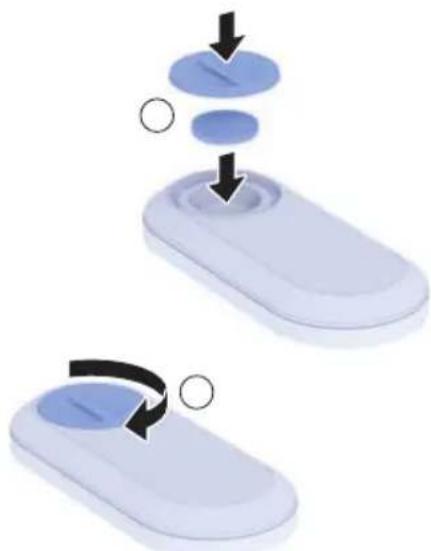
2 Insert a new CR2032 battery.
Geberit Group and sustainability
As the European market leader in the sanitary industry, Geberit stands for water saving, resource efficiency and sustainable building. The Group has proven for decades that long-term business success is compatible with environmentally friendly actions and social policies. A company management geared to sustainability helps to save costs while minimizing risks at the same time. Geberit aims to act as a role model and set standards for its customers, suppliers and other partners. This means creating water-saving and sustainable products, using safe, environmentally friendly and resource-efficient production practices, engaging in purchasing and logistics activities with high environmental and ethical standards, and offering excellent working conditions for more than 12 000 dedicated and highly qualified employees worldwide. One way in which the company is showing its awareness of social responsibility is by participating in water relief projects around the world.
Ecodesign – ecobalance
The basis for sustainable products is formed by a systematic innovation process in which product materials and functional principles are chosen that are as environmentally friendly as possible, risks are minimised and a high degree of resource efficiency is strived for. We can supply a detailed ecobalance for this product upon request.
Tips for reducing the ecological footprint
This product was developed with the utmost care, also with regard to the consumption of energy, water and resources (see also technical data). You can reduce the ecological footprint of the product by observing the following recommendations:
- Switch off the device when you go on holiday.
- Interrupt the spray functionality manually in order to save hot water.
- Use small amounts of paper for drying.
- Switch off the heating function of the water heater when you do not need warm shower water.
- Use environmentally friendly cleaning agents.
- Carry out regular maintenance on the device and handle it with care in order to extend the service life.
- Return defective devices to Geberit or a designated partner for appropriate disposal.
Disposal of waste electrical and electronic equipment
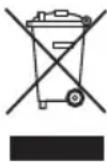
The symbol of the crossed-out wheeled bin means that waste electrical and electronic equipment (WEEE) must be disposed of separately and not with other non-recyclable waste. End users are legally obliged to return old equipment to public waste disposal authorities, distributors, or Geberit for proper disposal. Many distributors of electrical and electronic equipment are obliged to take back WEEE free of charge. Contact the responsible sales or service company to return the WEEE to Geberit.
Used batteries and accumulators that are not enclosed within the old equipment, as well as lamps that can be removed from the old equipment in a non-destructive manner, must be separated from the old equipment before being handed over to a disposal point.
If personal data is stored on the old equipment, end users themselves are responsible for deleting it before handing it over to a disposal point.
End user warranty
The following end user warranty is provided in addition to and does not affect your contractual partner's liability for defective products.
The Geberit company (“Geberit”) responsible for the place of installation of the Geberit AquaClean product (“product”) shall provide the end user with a warranty for the product identified by the serial number on the warranty card. The scope of this warranty is as follows:
- Geberit guarantees that the product shall be free from material defects and manufacturing faults for a period of 3 years (“warranty period”) calculated from the installation date at the end user's premises. Warranty scope:
– Within the first 2 years of the warranty period, a customer service representative authorised by Geberit shall rectify any material defects or manufacturing faults free of charge by repairing or replacing the defective parts.
– In the third year of the warranty period, Geberit shall supply replacements for defective parts free of charge to the customer service representative authorised by Geberit and contracted by the end user to repair the product.
-
The end user shall not be entitled to assert more extensive claims against Geberit on the basis of this warranty.
-
Claims can only be made under the warranty if:
-
No modifications have been made to the product; in particular, no parts have been removed, replaced or added.
-
The product defect has not been caused by improper installation or use, nor can it be attributed to inadequate care or maintenance.
– Claims made in the third year of the warranty period are only valid within 90 working days, calculated from the installation date. -
This warranty applies solely to places of installation in countries in which Geberit has its own sales company or is represented by a sales partner.
-
The warranty is exclusively subject to the substantive law of the country in which Geberit has its place of business. The United Nations Convention on Contracts for the International Sale of Goods is expressly excluded. The exclusive place of jurisdiction for all disputes arising from or in connection with this warranty is the location of Geberit's headquarters.
Technical data
| Dimensions 18.5 x 24.5 x 30.5 cm (WxDxH) | |
| Weight 3.1 kg | |
| Max. water tank capacity 3 l | |
| Nominal voltage 230 V AC | |
| Mains frequency 50 Hz | |
| Power consumption 1850 W | |
| Power consumption standby ≤ 0.5 W | |
| Protection degree IPX4 | |
| Protection class I | |
| Frequency range 2400–2483.5 MHz | |
| Maximum output power 0 dBm | |
| Wireless technology Bluetooth® Low Energy | 1) |
| Mains connection Mains connection via mains | plug |
| Spray time 30 s | |
| Number of shower pressure settings, shower spray | 3 |
| Water temperature 34–40 °C | |
| Operating temperature 5–40 °C |
1) The Bluetooth® brand and its logos are the property of Bluetooth SIG, Inc. and are used under licence by Geberit.
Simplified EU Declaration of Conformity
Geberit International AG hereby declares that the radio equipment type Geberit AquaClean Cama is in compliance with Directive 2014/53/EU.
The full text of the EU declaration of conformity is available at the following Internet address: https://doc.geberit.com/969879000.pdf.
Simplified UK Declaration of Conformity
Hereby, Geberit International AG declares that the radio equipment type Geberit AquaClean Cama is in compliance with the Radio Equipment Regulations 2017.
The full text of the UK declaration of conformity is available at the following Internet address: https://doc.geberit.com/970866000.pdf
Geberit AquaClean Cama 66
Android : iOS :

FR
FR
FR
9 Retirez le film de protection.
2
Résultat
Résultat
2
Videz l'eau.
3
4
FR
Android: iOS:
Tramite la Geberit Home App:


IT

IT
IT
2
2
Svuotare l'acqua.
3
4
IT

- USER MANUAL
- GEBERIT AQUACLEAN CAMA 6
- DE
- DUSCHDÜSE ANBRINGEN
- 2
- ERGEBNIS
- 3
- 4
- REGISTER YOUR DEVICE.... 38
- GEBERIT APP.... 39
- GETTING TO KNOW YOUR DEVICE 41
- HOW TO INSTALL THE DEVICE 43
- HOW TO USE THE DEVICE 51
- CLEANING AND DESCALING THE DEVICE 53
- SUSTAINABILITY 60
- DISPOSAL 61
- END USER WARRANTY 62
- TECHNICAL DATA AND CONFORMITY 63
- OBSERVE BASIC INFORMATION
- EXPLANATION OF WARNING NOTES
- WARNING
- NATURE AND SOURCE OF THE HAZARD
- WARRANTY REGISTRATION
- CHECKING COMPATIBILITY
- DOWNLOADING THE GEBERIT HOME APP
- EN
- FAMILIARISE YOURSELF WITH THE GEBERIT HOME APP
- FAMILIARISE YOURSELF WITH THE GEBERIT AQUACLEAN CAMA
- FAMILIARISE YOURSELF WITH THE FUNCTIONS
- PREPARE THE GEBERIT AQUACLEAN CAMA
- INCORRECT INSTALLATION
- ATTACHING THE SPRAY NOZZLE
- CONNECTING THE TECHNICS ASSEMBLY
- FIX CABLE WITH CABLE DUCTS
- 1
- ESTABLISH CONNECTION WITH THE GEBERIT REMOTE CONTROL
- ESTABLISH CONNECTION WITH THE GEBERIT APP
- ATTENTION
- WATER LEAKAGE – SITUATION AND SOLUTIONS
- OPERATING CONCEPT
- FAMILIARISE YOURSELF WITH THE GEBERIT REMOTE CONTROL
- USE THE ANAL SHOWER
- PREREQUISITE
- RESULT
- SET THE SPRAY INTENSITY
- ADDITIONAL DEVICE SETTINGS IN THE GEBERIT HOME APP
- CARE INSTRUCTIONS
- GENERAL CLEANING AND DESCALING RECOMMENDATIONS
- AGGRESSIVE DESCALING AGENTS
- AGGRESSIVE AND SCOURING CLEANING AGENTS
- GENERAL CARE INSTRUCTIONS
- CLEANING THE SURFACE
- CLEAN THE VACUUM PADS AND SPRAY NOZZLE
- DESCALE THE DEVICE
- 9 FILL THE WATER TANK HALF FULL WITH WATER
- 10 REPLACE THE LID ON THE WATER TANK TO CLOSE IT
- 11 PLACE THE WATER TANK WITH THE LID CLOSED ON TOP OF THE TECHNICS ASSEMBLY
- 12 PRESS THE BUTTON TO START THE FLUSHING PROGRAMME
- 13 FILL THE WATER TANK COMPLETELY WITH WATER
- 14 REPLACE THE LID ON THE WATER TANK TO CLOSE IT
- REPLACE THE REMOTE CONTROL BATTERY
- 1 REMOVE THE USED BATTERY. DISPOSE OF THE USED BATTERY APPROPRIATELY
- 2 INSERT A NEW CR2032 BATTERY
- GEBERIT GROUP AND SUSTAINABILITY
- ECODESIGN – ECOBALANCE
- TIPS FOR REDUCING THE ECOLOGICAL FOOTPRINT
- DISPOSAL OF WASTE ELECTRICAL AND ELECTRONIC EQUIPMENT
- END USER WARRANTY
- SIMPLIFIED EU DECLARATION OF CONFORMITY
- SIMPLIFIED UK DECLARATION OF CONFORMITY
- GEBERIT AQUACLEAN CAMA 66
- FR
- RÉSULTAT
- IT
Brand : GEBERIT
Model : AquaClean Cama
Category : Toilet