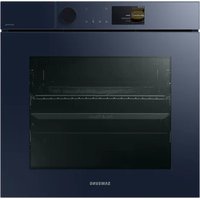
SAMSUNG NV7B7970CAN - Cooker

NV7B7970CAN - Cooker SAMSUNG - Free user manual and instructions

Find the device manual for free NV7B7970CAN SAMSUNG in PDF.

📄 544 pages English EN Download 💬 AI Question 10 questions ⚙️ Specs
Notice SAMSUNG NV7B7970CAN - page 478
Pick your language and provide your email: we'll send you a specifically translated version.
Product type Built-in oven
Brand Samsung
Model NV7B7970CAN
Dimensions (W x H x D) 595 x 596 x 570 mm (main unit); 560 x 579 x 549 mm (built-in)
Weight 42.0 kg
Power supply 230-240 V ~ 50 Hz, 3650-3950 W
Capacity 76 liters
Main functions Convection, Classic, Grill (large and eco), Steam (steam cooking, steam convection), Dual cooking, Air fry, Sous-vide, Slow cooking, Defrost, Dough proofing, Pizza, Drying, Keep warm, Hot plate. Auto cooking programs (50 or 70 depending on model) and Healthy cooking (20 programs).
Probe Yes, for measuring internal meat temperature
Cleaning Pyrolysis, Steam cleaning, Descaling, Drainage
Safety Control lock, smart safety mechanism (heating stops when door opens), manual opening with included door opener
Included accessories Metal grid, grid for tray, baking sheet, universal tray, deep tray, separator grid, probe, steam container, air fry tray, door opener
Spare parts Halogen bulbs 25-40 W / 220-240 V resistant to 300 °C, available at Samsung service centers.
Connectivity Wi-Fi, SmartThings compatible, remote control possible (depending on settings)
Energy class A+ (energy efficiency index 81.6)
Energy consumption 0.71 kWh/cycle in convection; 1.05 kWh/cycle in traditional mode
Noise level Not specified, adjustable via settings
Repairability Authorized Samsung service center. Manual available online. Spare parts available.
Warranty Consult Samsung's general conditions

Frequently Asked Questions - NV7B7970CAN SAMSUNG

How to install the Samsung NV7B7970CAN oven?
Installation must be carried out by a qualified electrician. Respect the built-in dimensions (560 x 579 x 549 mm) and leave a gap of at least 5 mm on each side for ventilation. Plug into a 230-240 V grounded outlet.
How to use the steam function?
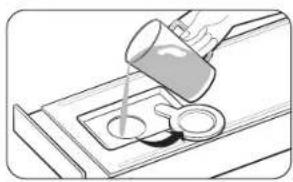
Fill the water tank with 500 ml of drinking water up to the MAX line. Select a steam mode (Steam cooking, Steam convection, etc.) and adjust the steam level (Low, Medium, or High). Place food in the steam container on the designated level.
How to clean the oven with the pyrolysis function?
Remove all accessories. Select Cleaning > Pyrolysis. Choose the duration (2h, 2h30, or 3h). The door locks automatically. Once the cycle is finished, wait for cooling, then wipe away ashes with a damp cloth.
What to do if the door does not open automatically?
Use the provided door opener: insert it into the gap between the door and the control panel, then lift. If the problem persists, unplug the appliance for 30 seconds and try again. Contact Samsung service if necessary.
How to set the time and date?
Press the ≡ button, select Settings > Date and time. You can enable automatic synchronization via Wi-Fi or set manually. The 12h/24h format is configurable.
What accessories are included with the NV7B7970CAN model?
Metal grid, grid for tray, baking sheet, universal tray, deep tray, separator grid, probe, steam container (glass lid, metal pot, steam tray, nozzle), air fry tray, door opener, and two fixing screws.
How to change the oven light bulb?
Turn off the oven and unplug it. Use a flathead screwdriver to remove the side lighting cover. Replace with a halogen bulb 25-40 W / 220-240 V resistant to 300 °C. Put the cover back in place.
The oven displays error code C-d1, what to do?
Turn off the oven and restart. If the code persists, unplug the power for 30 seconds then plug back in. If the issue continues, contact a Samsung service center.
How to use the Air Fry function?
Place the separator grid on level 3, then the air fry tray with food on level 4. Select Air Fry mode (default temperature 220 °C). Preheating is not necessary. Turn the food halfway through cooking.
The oven does not heat up, what to check?
Make sure the door is properly closed, the controls are correctly set, and the circuit breaker has not tripped. Check that demo mode is not activated. If the problem persists, contact service.

User questions about NV7B7970CAN SAMSUNG

0 question about this device. Answer the ones you know or ask your own.

Ask a new question about this device

The email remains private: it is only used to notify you if someone responds to your question.

No questions yet. Be the first to ask one.

Download the instructions for your Cooker in PDF format for free! Find your manual NV7B7970CAN - SAMSUNG and take your electronic device back in hand. On this page are published all the documents necessary for the use of your device. NV7B7970CAN by SAMSUNG.

USER MANUAL NV7B7970CAN SAMSUNG

natural_image Simple line drawing of a rectangular plate with two circular ends, no text or symbols present.

www.samsung.com/uk/aboutsamsung/sustainability/environment/our-commitment/data/

SAMSUNG NV7B7970CAN - 1

Courant nominal (A) Section minimale
10 < A ≤ 16.5 mm^2
16 < A ≤ 25.25 mm^2

Four (mm)

A 560 G 481
B 186 H 21
C 383 I 549
D 596 J 579
E 595 K 559
F 503

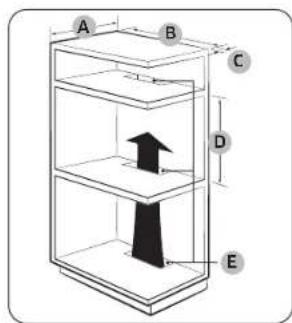
A B C D E

Meuble encastré (mm)

A 550 minimum
B 560 minimum
C 50 minimum
D 590 minimum - 600 maximum
E 460 minimum x 50 minimum

REMARQUE

natural_image Pure technical diagram of a mechanical assembly with no text, numbers, or symbols
natural_image Pure diagram of a circular object with a labeled point A, no text or symbols present
natural_image Technical line drawing of a structural bracket with an inset showing a cross-section detail (no text or symbols)
natural_image Illustration of four different electronic devices or enclosures with no visible text or symbols

SAMSUNG NV7B7970CAN - REMARQUE - 1

natural_image Diagram showing a mechanical component with a magnified inset highlighting a specific feature (no text or symbols present)

SAMSUNG NV7B7970CAN - REMARQUE - 2

natural_image Illustration of a rectangular container with internal compartments and decorative patterns (no text or symbols)
natural_image Pure electrical circuit lines without any symbols
natural_image Line drawing of an open oven with a door and lid, showing the interior and exterior view (no text or symbols)
natural_image Simple line drawing of a cabinet interior with doors and a central tray (no text or symbols)

SAMSUNG NV7B7970CAN - REMARQUE - 3

natural_image Diagram of a two-tiered storage unit with horizontal shelves and support beams (no text or labels)
natural_image Illustration of a loaf of bread inside a bag (no text or symbols)
natural_image Simple line drawing of a rectangular enclosure with a central platform and surrounding shelves (no text or symbols)
natural_image Diagram showing a hand holding a device inside a vehicle suspension frame (no text or symbols)
natural_image Diagram of a kitchen appliance with an open door and a blade, showing airflow direction (no text or symbols)
natural_image Diagram of a car seatbelt mechanism with directional arrows indicating motion (no text or labels)
natural_image Technical line drawing of a mechanical component with an inset close-up showing a hand operating a tool (no text or symbols present)
natural_image Diagram of a mechanical assembly with a ruler and a square component labeled '01' (no text or symbols beyond labels)
natural_image Pure technical diagram of a rectangular frame with a central square and arrow, no text or symbols present
natural_image Diagram of a mechanical or architectural component with a highlighted section and directional arrow (no text or symbols)
natural_image Technical line drawing of a mechanical assembly with a circular component and mounting base (no text or symbols)
natural_image Technical diagram of a door frame with a labeled component (01), showing no text or symbols beyond the label.

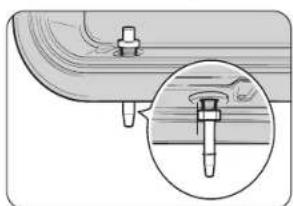
01 Collecteur d'eau

natural_image Technical line drawing of a mechanical assembly with an inset showing a detail (no text or symbols)
natural_image Diagram of a mechanical linkage or frame structure with a rotational arrow indicating rotation (no text or symbols present)
natural_image Line drawing of a door handle with a circular vent and a leaf on the side (no text or symbols)
natural_image Diagram of a door handle with a circular button and an arrow indicating rotation (no text or symbols)
natural_image Diagram of a refrigerator with an open door and a black arrow indicating rotation (no text or symbols)
natural_image Simple line drawing of a hand holding a bulb inside a circular frame (no text or symbols)

SAMSUNG NV7B7970CAN - REMARQUE - 4

AVERTISSEMENT

natural_image Illustration of a hand holding a tool inside a circular frame (no text or symbols)

UNE QUESTION ? DES COMMENTAIRES ?

PAYS APPELEZ LE OU CONTACTEZ-NOUS EN LIGNE SUR
AUSTRIA 080072 67 864 (0800-SAMSUNG) www.samsung.com/at/support
BELGIUM 02-201-24-18www.samsung.com/be/support (Dutch)www.samsung.com/be.fr/support(French)
DENMARK 707019 70 www.samsung.com/dk/support
FINLAND 0306227 515 www.samsung.com/ft/support
FRANCE 01 4863 00 00 www.samsung.com/fr/support
GERMANY 06196 77 555 77 www.samsung.com/ce/support
ITALIA 800-SAMSUNG (800.7267864) www.samsung.com/it/support
CYPRUS8009 4000 only from landline, toll freewww.samsung.com/gr/support
GREECE80111-SAMSUNG (80111 726 7864)only from land line(+30) 210 6897691 from mobile and land linewww.samsung.com/gr/support
LUXEMBURG 26103 710 www.samsung.com/be_fr/support
NETHERLANDS088 90 90 100www.samsung.com/nl/support
NORWAY21629099www.samsung.com/no/support
PORTUGAL210 608 038Chamada para a rede fixa nacionalDias úteis das 9h às 20hwww.samsung.com/pt/support
SPAIN91 175 00 15www.samsung.com/es/support
SWEDEN0771-400 300www.samsung.com/se/support
SWITZERLAND0800 726 786www.samsung.com/ch/support(German)www.samsung.com/ch_fr/support(French)
UK0333 000 0333www.samsung.com/uk/support
IRELAND (EIRE)0818 717100www.samsung.com/ie/support
PAYS APPELEZ LE OU CONTACTEZ-NOUS EN LIGNE SUR
ALBANIA 045620 202 www.samsung.com/al/support
BOSNIA055 233 999www.samsung.com/ba/support
NORTH MACEDONIA023 207 777 www.samsung.com/mk/support
BULGARIA0800 111 31 - Безплатен за всички оператори *3000 - Цена на един градски разговор или според тарифата на мобилижит оператор 09:00 до 18:00 - Понеделиких до Петъкwww.samsung.com/bg/support
CROATIA072 726 785www.samsung.com/nr/support
CZECH800 - SAMSUNG (800-726786)www.samsung.com/cz/support
HUNGARY 0680800-0800-0800-0800-0800-0800-0800-0800-0800-0800-0800-0800-0800-0800-0800-0800-0800-0800-0800-0800-0800www.samsung.com/hu/support
MONTENEGRO020 405 888www.samsung.com/support
POLAND801-172-678" lup +48 22 607-93-33" *(oplata wedlug taryfy operatora)http://www.samsung.com/pl/support/
ROMANIA0800872678 - Apel gratuit *8000 - Apel tarifat în rețea Program Call Center Luni - Vineri: 9 AM - 6 PMwww.samsung.com/ro/support
SERDIA011 321 6899www.samsung.com/rs/support
SLOVAKIA0800 - SAMSUNG (0800-726 785)www.samsung.com/sk/support
LITHUANIA 8-8000-77777 www.samsung.com/ll/support
LATVIA8000 7267www.samsung.com/lv/support
ESTONIA800-7267www.samsung.com/ee/support
SLOVENIA080 697 267 (brezplačna številka) www.samsung.com/si/support
KO50VO038 40 30 90www.samsung.com/support

SAMSUNG NV7B7970CAN - AVERTISSEMENT - 1
DG68-01472A-01

Einbaubackofen

natural_image Simple line drawing of a rectangular tray with vertical slats and two circular handles (no text or symbols)

Gerät (mm)

A 560 G 481
B 186 H 21
C 383 I 549
D 596 J 579
E 595 K 559
F 503

WARNING

natural_image Pure technical diagram of a mechanical assembly without any text, numbers, or symbols
natural_image Pure technical diagram showing a circular component with a labeled section 'A' and diagonal lines, no text or symbols present.
natural_image Technical line drawing of a structural frame with an inset magnified detail (no text or symbols)
natural_image Illustration of four different electronic devices or enclosures with no visible text or symbols

SAMSUNG NV7B7970CAN - WARNING - 1

natural_image Diagram showing a mechanical component with a magnified inset highlighting a specific feature (no text or symbols present)

SAMSUNG NV7B7970CAN - WARNING - 2

natural_image Illustration of a rectangular container with internal compartments and decorative patterns (no text or symbols)
natural_image Illustration of a hand inserting a device into a cabinet (no text or symbols)

SAMSUNG NV7B7970CAN - WARNING - 3

natural_image Illustration of a hand pouring liquid into a container with a spoon (no text or symbols)
natural_image Technical diagram of a mechanical assembly with a circular component and an arrow indicating direction (no text or symbols)

HINWEIS

natural_image Simple line drawing of a cabinet with doors and a central tray, no text or symbols present

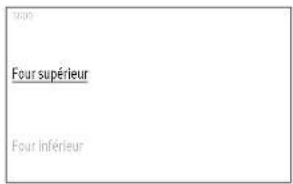
2:02 Oberer Backofen Unterer Backofen

SAMSUNG NV7B7970CAN - HINWEIS - 2

natural_image Diagram of a two-tiered storage cabinet or rack unit (no text or symbols visible)
natural_image Illustration of a small rectangular object wrapped in plastic wrap, no text or symbols present
natural_image Simple line drawing of a rectangular enclosure with a central horizontal beam and vertical shelves (no text or symbols)
natural_image Diagram showing two cables connected to a door panel, with a circled 'X' and 'O' symbols (no text or labels present)
Table of contents Click a title to access it
Manual assistant
Powered by Anthropic
Waiting for your message
Product information

Brand : SAMSUNG

Model : NV7B7970CAN

Category : Cooker