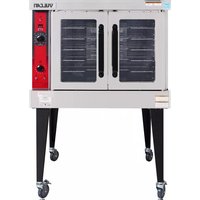
VC4GD - Oven Vulcan - Free user manual and instructions
Find the device manual for free VC4GD Vulcan in PDF.


| Brand | Vulcan |
| Model | VC4GD |
| Product type | Gas convection oven |
| Use | Professional (food service) |
| Energy source | Natural gas or propane, with electrical supply 120 V / 60 Hz / 1 Ph (standard) |
| Burner power | 50,000 BTU/h |
| Temperature control | Solid-state thermostat, programmable |
| Timer | 1 hour (standard), 5 hours (optional) |
| Fan speed | High and low |
| Interior lighting | Yes, with switch |
| Number of racks | 5 (standard), additional racks optional |
| Cavity material | Porcelain |
| Door opening | Independent (standard), simultaneous (option) |
| Dimensions (height) | 654 mm (standard) |
| Adjustable legs | Yes (optional) |
| Roasting and keep-warm function | Optional |
| Oven stacking | Possible with optional stacking kit |
| Maintenance | Daily cleaning with soapy water; Snorkel tube to be cleaned weekly |
| Safety | Emergency shutdown on gas odor; permanent pilot or electronic ignition |
| Spare parts | Available from Vulcan-Hart after-sales service |
Frequently Asked Questions - VC4GD Vulcan
User questions about VC4GD Vulcan
0 question about this device. Answer the ones you know or ask your own.
Ask a new question about this device
Download the instructions for your Oven in PDF format for free! Find your manual VC4GD - Vulcan and take your electronic device back in hand. On this page are published all the documents necessary for the use of your device. VC4GD by Vulcan.
USER MANUAL VC4GD Vulcan
ITW Food Equipment Group
VULCAN
HOBART

GAS CONVECTION OVENS
MODELS
VC4GD
VC4GC
VC6GD
VC6GC
HGC5
HGC5X
HGC5D
HGC5DX
WKGD
natural_image
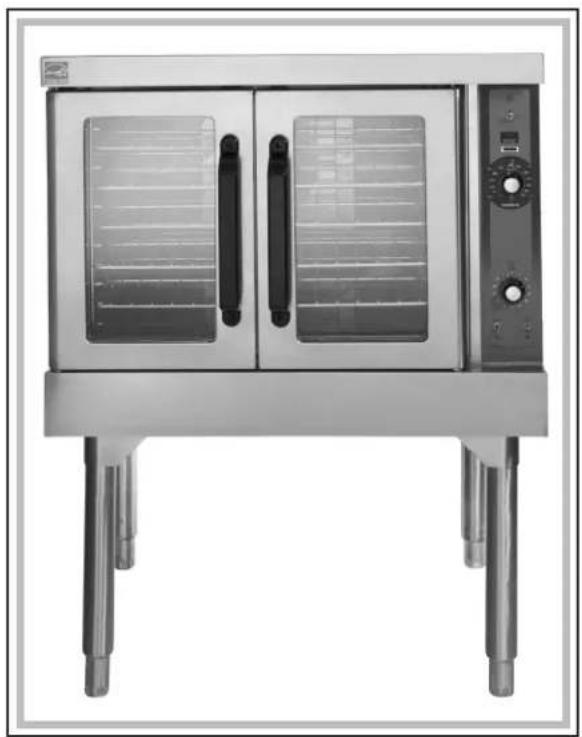
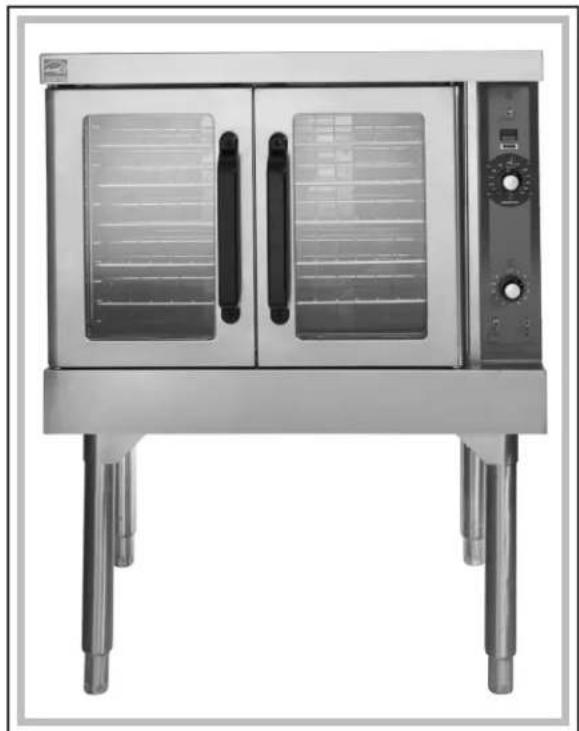
Front view of a stainless steel electric bulation with dual doors and control panel (no visible text or symbols)For additional information on Vulcan-Hart or to locate an authorized parts and service provider in your area, visit our website at www.vulcanhart.com
ITW FOOD EQUIPMENT GROUP, LLC P.O. BOX 696, LOUISVILLE, KY 40201-0696 • TEL: 502-778-2791
IMPORTANT FOR YOUR SAFETY
THIS MANUAL HAS BEEN PREPARED FOR PERSONNEL QUALIFIED TO INSTALL GAS EQUIPMENT, WHO SHOULD PERFORM THE INITIAL FIELD START-UP AND ADJUSTMENTS OF THE EQUIPMENT COVERED BY THIS MANUAL.
POST IN A PROMINENT LOCATION THE INSTRUCTIONS TO BE FOLLOWED IN THE EVENT THE SMELL OF GAS IS DETECTED. THIS INFORMATION CAN BE OBTAINED FROM THE LOCAL GAS SUPPLIER.
IMPORTANT
IN THE EVENT A GAS ODOR IS DETECTED, SHUT DOWN UNITS AT MAIN SHUTOFF VALVE AND CONTACT THE LOCAL GAS COMPANY OR GAS SUPPLIER FOR SERVICE.
FOR YOUR SAFETY
DO NOT STORE OR USE GASOLINE OR OTHER FLAMMABLE VAPORS OR LIQUIDS IN THE VICINITY OF THIS OR ANY OTHER APPLIANCE.
⚠ WARNING Improper installation, adjustment, alteration, service or maintenance can cause property damage, injury or death. Read the installation, operating and maintenance instructions thoroughly before installing or servicing this equipment.
IN THE EVENT OF A POWER FAILURE, DO NOT ATTEMPT TO OPERATE THIS DEVICE.
Installation, Operation and Care of GAS CONVECTION OVENS
KEEP THIS MANUAL FOR FUTURE REFERENCE
GENERAL
All models feature a solid state temperature control. All models feature a programmable oven controller. One hour dial timer is standard; five hour timer is optional. Two-speed 12 HP (0.37 kw) electric motor is standard equipment. Each oven is furnished with 5 racks; additional oven racks are available. The burner input rating for each oven is 50,000 BTU/hr.
Porcelain interior is standard on all models.
VC6GD, VC6GC, HGC5X, and HGC5DX oven models have cavities that are 4 inches (102 mm) deeper than standard models.
Standard ovens are 120 V, 60 Hz, 1 PH and include cord and plug. Optional electrical specifications of 208/240 V are available and require hard wire connection.
Independently opening doors are standard; simultaneous door opening is optional. Hobart models are standard with simultaneous doors.
Other options include: an open stand with lower storage rack, roast and hold, and a stacking kit for mounting one oven on top of another.
Convection Ovens are produced with quality workmanship and material. Proper installation, usage and maintenance of your oven will result in many years of satisfactory performance.
It is suggested that you thoroughly read this entire manual and carefully follow all of the instructions provided.
FEATURES AND OPTIONS
| Model | Thermostat | Timer | Oven Lights | Programmable Storage Rack | Legs Stand with | Voltage | |
| Standard size | Solid State 1 | Hr. Std. Std. | Opt. | 23 | ^3/_4 (603 mm) | Opt.208/60 | 120/60/1 Std.1 Opt. |
| Deep size | Solid State | 1 Hr. Std. | Std. | Opt. | 23^3/_4 (603 mm) | Opt.240/50 | 240/60/1 Opt.1 Opt. |
| Stacked Ovens | 8"(203 mm) | 220/380 (3W)/50/3 Opt.220/380 (4W)/50/3 Opt.240/415 (4W)/50/3 Opt. | |||||
INSTALLATION
Before installing, verify that the electrical service and type of gas supply (natural or L.P.) agree with the specifications on the rating plate, located behind the top trim panel on the front of the oven. If the supply and equipment requirements do not agree, do not proceed with the installation. Contact your dealer or Vulcan-Hart Company immediately.
UNPACKING
This oven was inspected before leaving the factory. The transportation company assumes full responsibility for safe delivery upon acceptance of the shipment. Immediately after unpacking, check for possible shipping damage. If the oven is found to be damaged, save the packaging material and contact the carrier within 15 days of delivery.
Carefully unpack the oven and place it in a work-accessible area near to its final installed position.
Do not use the doors or their handles to lift the oven.
LOCATION
The equipment area must be kept free and clear of combustible substances.
When installed, minimum clearance from combustible construction must be 1 inch (25 mm) at the left side, 2 inches (51 mm) at the right side and 0 inch (0 mm) at the rear. Minimum clearance from noncombustible construction must be 0 inch (0 mm) at the left side, 0 inches (0 mm) at the right side and 0 inch (0 mm) at the rear. The oven may be installed on combustible floors.
The installation location must allow adequate clearances for servicing and proper operation. For solid state and digital control models, there must be 18 inches (457 mm) of clearance on the right side of the oven from any open flame.
The oven must be installed so that the flow of combustion and ventilation air will not be obstructed. Adequate clearance for air openings into the combustion chamber must be provided. Make sure there is an adequate supply of air in the room to allow for combustion of gas at the oven burners.
Do not permit fans to blow directly at the oven. Wherever possible, avoid open windows next to the oven. Avoid wall-type fans which create air cross currents within the room.
INSTALLATION CODES AND STANDARDS
In the United States of America:
-
State and local codes.
-
National Fuel Gas Code, ANSI/Z223.1/NFPA #54 (latest edition). Copies may be obtained from The American Gas Association, Inc., Accredited Standards Committee Z223 @ 400 N. Capital St. NW, Washington, DC 20001 or the Secretary Standards Council, NFPA, 1 Batterymarch Park, Quincy, MA 02169-7471.
NOTE: In the Commonwealth of Massachusetts,
All gas appliances vented through a ventilation hood or exhaust system equipped with a damper or with a power means of exhaust shall comply with 248 CMR.
- Vapor Removal From Cooking Equipment, NFPA-96 (latest edition). Copies may be obtained from The National Fire Protection Association, Batterymarch Park, Quincy, MA 02169-7471.
- National Electrical Code, ANSI/NFPA-70 (latest edition). Copies may be obtained from The National Fire Protection Association, Batterymarch Park, Quincy, MA 02169-7471.
In Canada:
- Local codes.
- CSA B149.1 Natural Gas and Propane Installation Code.
- CSA C22.1 Canadian Electric Code (latest edition).
The above are available from the Canadian Standard Association, 5060 Spectrum Way, Suite 100, Mississauga, Ontario, Canada L4W 5N6.
INSTALLING BASIC OVEN
The basic oven must be installed on legs or be mounted on a modular stand. Installations on concrete bases or other supports restricting air circulation underneath the oven is not advisable and may void the warranty.
Ovens Mounted on Casters
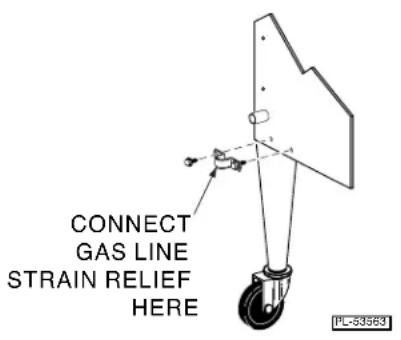
Ovens mounted on casters must use a flexible connector (not supplied by Vulcan) that complies with the Standard for Connectors for Movable Gas Appliances, ANSI Z21.69 • CSA 6.16 and a quick-disconnect device that complies with the Standard for Quick-Disconnect Devices for Use With Gas Fuel, ANSI-Z21.41 • CSA 6.9. In addition, adequate means must be provided to limit movement of the appliance without depending on the connector and the quick-disconnect device or its associated piping to limit appliance movement. Attach the restraining device at the rear of the oven as shown in Fig. 1.
text_image
CONNECT GAS LINE STRAIN RELIEF HERE PL-53563Fig. 1
Remove two screws from the rear of the oven and install the tie-down strap shipped with the casters using these screws (Fig. 1). Attach the gas line strain relief to the tie-down strap at the rear of the oven (Fig. 1).
If disconnection of the restraint is necessary, turn off the gas supply before disconnection. Reconnect this restraint prior to turning the gas supply on and returning the oven to its installation position.
Separate instructions for installing casters to the oven are included with the casters.
Note: If the oven is installed on casters and is moved for any reason, it is recommended that the oven be relevaled front to back and side to side.
Assembling the Legs to the Oven
The legs must be installed on the bottom of the oven. Gently position the oven on its side, taking care not to scratch or damage it.
Attach each of the four leg assemblies to the bottom of the oven with the 24 bolts and lockwashers (six per leg). Carefully raise the oven to its normal position.
ASSEMBLING THE STAND TO THE OVEN
Attach each of the four leg assemblies to the bottom of the oven with the 24 bolts and lockwashers (six per leg). Carefully raise the oven to its normal position.
Attach the undershelf to the legs with eight bolts and lockwashers (two per leg).
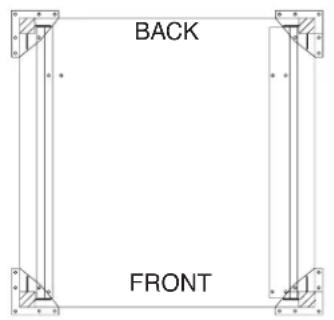
Install the rack guides into the undershelf at desired locations (for pan or flat rack), then attach the rack supports to the top end of the rack guides. Attach rack supports to the leg assembly by removing one middle bolt and reattaching back through the end holes in the rack support (Fig. 2).
text_image
BACK FRONT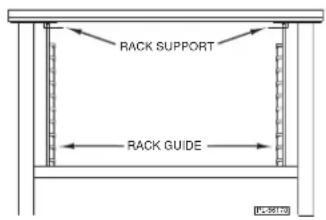
text_image
RACK SUPPORT RACK GUIDEFig. 2
ASSEMBLING STACKED OVENS
Unpack the ovens and stack kit. Position the oven to be used as the bottom oven on its back for access to the oven bottom, taking care not to scratch or damage it. The gas pipe protrudes beyond the back; provide for this when the oven is tipped back by resting it on suitable spacers (2 x 4" [51 x 102 mm], etc.). Attach the four leg assemblies with the 24 bolts and lockwashers (six per leg).
Place the lower oven (with legs) on the floor and remove two 716 inch (11 mm) diameter knockouts on each side of the top cover. Remove vent guard and discard it.
Move the oven with legs to the installed position and place upper oven on top of lower oven using the locating studs.
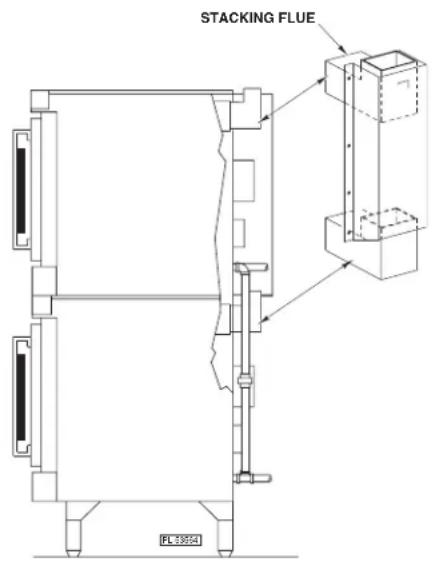
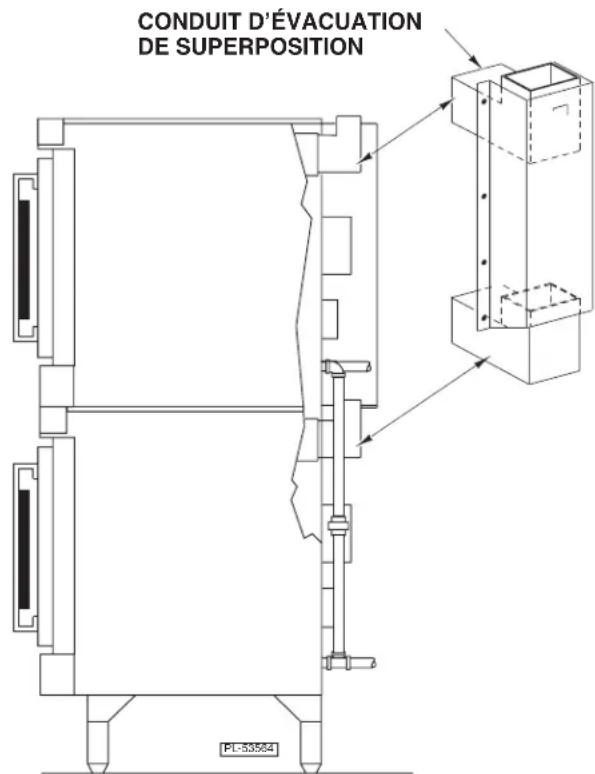
Install the stacking flue (Fig. 3) with the four screws provided.
Connect the piping between the top oven and bottom oven. For all gas supply connections, pipe joint compound must be resistant to the action of propane gases.
text_image
STACKING FLUE FL13054Fig. 3
LEVELING
Make sure that the oven racks are level in the final installed position. If the oven is installed on legs, turn the adjustable feet in or out to level the oven front-to-back and side-to-side. If the oven is installed on casters, loosen set screws and turn casters in or out to level the oven front-to-back and side-to-side. Retighten set screws after leveling.
GAS DATA
| INPUT RATING MODEL | MANIFOLD PRESSURE | |||
| Natural | L.P. GASES (Propane) | Natural | L.P. GASES (Propane) | |
| All models | 50,000 BTU/hr | 50,000 BTU/hr | 5.0” W.C. (1.245 kPa) | 10” W.C. (2.5 kPa) |
| Standing Pilot | 50,000 BTU/hr | 50,000 BTU/hr | 3.7» W.C. (0.93 kPa) | 10» W.C. (2.5 kPa) |
Gas supply connections and any pipe joint compound must be resistant to the action of propane gases.
Location of the gas inlet is at the rear of the oven. Codes require that a gas shutoff valve must be installed in the gas line ahead of the oven.
Connect gas supply after leveling the oven. The gas supply line must be at least the equivalent of 34 inch (19 mm) iron pipe. Make sure the pipes are clean and free of obstructions, dirt or pipe joint compound.
The ovens are equipped with fixed burner orifices which coincide with installation elevation.
Standard oven with electronic ignition is provided with a regulator integral to the gas solenoid valve and requires no external regulator.
Ovens with standing pilot must use external regulator provided with unit, set to pressures as indicated in above gas data chart.
NOTICE The gas pressure regulator provided with Standing Pilot must be used. This regulator is set for an outlet pressure of 3.7" W.C. (0.93 kPa) natural gas and 10" W.C. (2.5 kPa) propane gas.
⚠ WARNING Prior to lighting, check all joints in the gas supply for leaks. Use soap and water solution. Do not use an open flame.
A. Check all joints prior to the gas valve (solenoid) before lighting unit.
B. Check all joints beyond gas valve (solenoid) after unit is lit.
After piping has been checked for leaks, all piping receiving gas should be fully purged to remove air.
TESTING THE GAS SUPPLY SYSTEM
When gas supply pressure exceeds 12 psig (3.45 kPa), the oven and its individual shutoff valve must be disconnected from the gas supply piping system.
When gas supply pressure is 12 psig (3.45 kPa) or less, the oven should be isolated from the gas supply system by closing its individual manual shutoff valve.
BURNER AIR ADJUSTMENT
Although main burner air is adjusted before shipment, it should be checked at the time of installation. Excessive air will cause flames to lift off a burner when cold or may cause flash-back during normal cycling of oven, particularly when propane gas is used.
Insufficient air will cause flames to burn with a yellow tip and result in carbon accumulation in the flame chamber and heat exchanger tubes.
Contact your local Vulcan-Hart servicer if required.
VENT SYSTEM
DO NOT obstruct the flow of flue gases from the flue located on the rear of the oven. It is recommended that the flue gases be ventilated to the outside of the building through a ventilation system installed by qualified personnel.
Ovens may use an optional down-draft diverter flue method. This optional down-draft diverter must be purchased from the oven manufacturer and vented to the outside; otherwise, the installation of any such device will void all oven certifications and warranties. This oven is suitable for connection to Type B Gas Vent when used with the draft hood provided.
From the termination of the flue to the filters of the hood venting system, a minimum clearance of 18 inches (457 mm) must be maintained.
Information on the construction and installation of ventilating hoods may be obtained from Vapor Removal from Cooking Equipment, NFPA Standard No. 96 (latest edition), available from the National Fire Protection Association, Batterymarch Park, Quincy, MA 02269.
ELECTRICAL CONNECTIONS
⚠ WARNING Electrical and grounding connections must comply with the applicable portions of the National Electrical Code and/or other local electrical codes.
⚠ WARNING Appliances equipped with a flexible electric supply cord are provided with a three-prong grounding plug. It is imperative that this plug be connected into a properly grounded three-prong receptacle. If the receptacle is not the proper grounding type, contact an electrician. Do not remove the grounding prong from this plug.
VC series ovens with 120 V/60 Hz/1 PH electrical specification are equipped with a cord and plug as standard equipment.
A wiring diagram is located on the inside of the control housing.
ELECTRICAL DATA
| Models | V/Hz/PH | Minimum Circuit AmpacityMaximum Protective DeviceAMPS |
| All models | 120/60/1 | 15 |
| 208/60/1 | 15 | |
| 240/60/1 | 15 | |
| 240/50/1 | 15 | |
| 220/380 (3W)/50/3 | 15 | |
| 220/380 (4W)/50/3 | 15 | |
| 240/415 (4W)/50/3 | 15 |
Compiled in accordance with the National Electrical Code, NFPA-70 (latest edition).
OPERATION
WARNING The oven and its parts are hot. Use care when operating, cleaning or servicing the oven.
CONTROLS
text_image
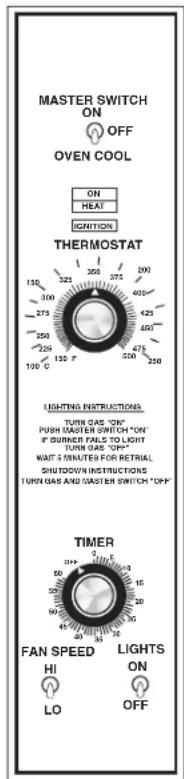
MASTER SWITCH ON OFF OVEN COOL ON HEAT IGNITION THERMOSTAT 150 325 375 400 300 375 425 275 400 250 475 500 525 100 ° 150 °F 150 °F LIGHTING INSTRUCTIONS TURN GAS "ON" PUBB SASTER SWITCH "ON" IF BURNER FAILS TO LIGHT TURN GAS "ON" WAIT 5 MINUTES FOR RETRIAL SHUTDOWN INSTRUCTIONS TURN GAS AND MASTER SWITCH "OFF" TIMER FAN SPEED HI LO LIGHTS ON OFFPL-53562
Master Switch ON — Turns oven control circuits on.
OFF — Turns oven control circuits off.
OVEN COOL — Allows the fan motor to run with the doors ajar to speed ovencooling.
On Light (Amber) — Lit when Master Switch is ON.
Heat Light (White) — Comes on and goes off when the burner cycles on and off.
Ignition Light (Red) — Comes on if burner fails to ignite. When lighting the oven, the IGNITION light flashes.
Thermostat — Controls oven temperature during cooking operation.
Timer (1 Hr.) — Sets the bake time. Buzzer sounds continuously after timer counts down to 0. Oven does not turn off. Turn Timer to OFF to stop buzzer. When oven is not in use, keep Timer at OFF position.
Fan Speed Switch — Allows you to select HI or LO Fan Speed.
Lights Switch — Turns the lights in the oven ON or OFF.
CONTROLS (Standing Pilot)
text_image
POWER SENSOR ON ON OFF SINEMA DINAMETER ON ON ON ON ON ON ON ON ON ON ON ON ON ON ON ON ON ON ON ON ON ON ON ON ON ON ON ON ON ON ON ON ON ON ON ON ON ON ON ON ON ON ON ON ON ON ON ON ON ON On On On On On On On On On On On On On On On On On On On On On On On On On On On On On On On On On On On On On On On On On On On On On On On On On On ONMaster Switch
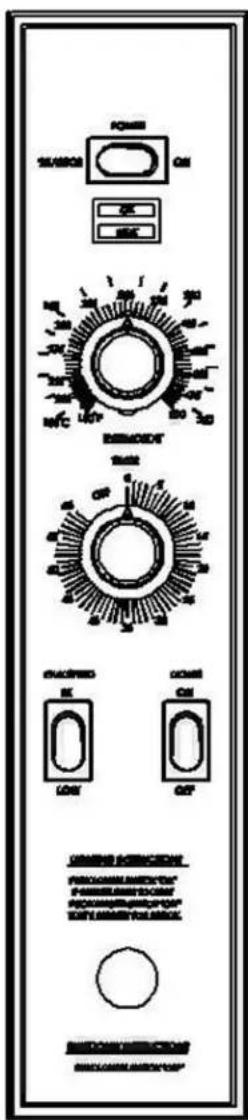
ON — Turns oven control circuits on.
OFF — Turns oven control circuits off.
SHABBOS — Puts oven in Sabbath mode allowing oven to operate when doors are open.
On Light (Amber) — Lit when Master Switch is ON or in Shabbos mode.
Heat Light (White) — Lit when thermostat calls for more heat.
Thermostat — Controls oven temperature during cooking operation.
Timer (1 Hour) — Sets the bake time. Buzzer sounds continuously after timer counts down to 0. Oven does not turn off. Turn Timer to OFF to stop buzzer. When oven is not in use, keep timer in OFF position.
Fan Speed — Allows you to select HI or LOW Fan Speed.
Lights Switch — Turns the oven lights ON or OFF.
BEFORE FIRST USE
Before using the oven for the first time, it must be “burned in” to release any odors that might result from heating the new surfaces in the chamber.
- Using a clean, damp cloth, wipe the inside of the oven including the racks.
- Close the oven doors.
- Push the Master Switch to ON.
- Turn the Thermostat to 300^ F ( 149^ C) and allow the oven to cycle for 2 hours or until no odor is detected before pushing the Master Switch to OFF.
LIGHTING MODEL VC4GD AND VC6GD OVENS
- Turn the main gas supply ON.
- Push the Master Switch to ON.
- If the burner fails to light, push Master Switch OFF. Wait 5 minutes for retrial.
If the oven does not light after three trials, turn off the main gas valve and call a qualified servicer.
SHUTDOWN INSTRUCTIONS
- Turn Master Switch to OFF.
EXTENDED SHUTDOWN
- Push Power Switch to OFF.
- Turn gas and electrical power supplies OFF.
USING MODEL VC4GD AND VC6GD OVENS
Preheating
- Select the proper rack arrangement for the product to be cooked. Refer to RACK ARRANGEMENTS, page 18.
- Make sure the doors are closed.
- Push Master Switch to ON. The amber ON light will come on, indicating that power to the oven is on.
- Set the two-speed FAN SWITCH to the desired setting (without Roast & Hold models).
- Set thermostat as desired. The HEAT light will come on and remain on until the oven reaches set temperature (approximately 10 to 15 minutes for settings from 300 to 400°F (149 to 204°C)). Refer to SUGGESTED COOKING GUIDELINES for temperatures and times for various products.
If the burner fails to light, the red IGNITION light will come on and remain on. - Prepare product and place in suitable pans. When the white HEAT light goes off, the oven has reached the desired preheat temperature.
⚠ WARNING The oven fan continues to run when the oven door is opened. The oven contains hot air and steam. Stay clear while opening the door.
- Turn on main gas supply.
- With Master Switch in OFF position, lift access door in lower trim, light pilot while holding red button on control panel.
- Keep holding button for 30 seconds after pilot ignites.
- Once steady pilot flame in achieved, close access door.
- Set to desired temperature and fan speed.
- Turn Master Switch to ON for weekly operation or SHABBOS for Sabbath Mode operation.
- If ignition fails, turn Master Switch to OFF position. Wait 5 minutes and repeat steps 1 through 6.
SHUTDOWN INSTRUCTIONS
- Turn Master Switch to OFF position.
EXTENDED SHUTDOWN
- Turn Master Switch to OFF position.
- Turn main gas and electrical power supplies off.
Cooking
- Open doors and load the product into the oven. Place pans in the center of the racks. Close doors.
- Set the Timer. After the preset time lapses, turn Timer to OFF position to stop alarm.
- When product is done, open doors and carefully remove cooked product from the oven. Care should be taken when wiping up spills, as oven is still hot.
End of Day
- Turn Thermostat to OFF setting.
- Push Master Switch to OVEN COOL. Leave door ajar while the fan is on to cool the oven.
- When oven has cooled sufficiently, flip Master Switch to OFF.
- Turn gas valve to OFF and clean oven.
Extended Shutdown
Repeat Steps 1 through 3 of End of Day. Unplug oven and shut off manual gas valve.
CONSERVING ENERGY—ALL MODELS
- Turn off unused equipment.
- Adjust menu patterns and cooking/baking schedules for optimum equipment use.
- Reduce thermostat settings in slack periods since gas equipment heats up and recovers quickly.
- Preheat only to required cooking temperature for specific food — not higher.
- Do not open the oven door unless absolutely necessary.
- Keep area around the oven door clean and free of food particles.
- Any obstruction that prevents the door from closing completely will adversely affect oven efficiency.
PROGRAMMABLE CONTROLS
QUICK START / MANUAL SETTINGS
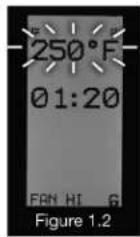
Turn the oven on and the display will show the last used setting.
TEMPERATURE:
-
Press the TEMP 🎨 button, the set temperature will flash. (Fig. 1.2)
-
Enter the desired temperature using the keypad. The new temperature will flash. (If needed, press the TEMP key and hold for 3 seconds, to display the internal oven temperature. The actual internal oven temperature will continue to be displayed as long as the key is depressed and for 3 seconds after the key is released. The default temperature display is the set temperature.)
-
Press the ok button to accept.
COOK TIME:
- Press the TIME ⏻ button, the set time will flash. (Fig. 2.2)
- Enter the desired time in hours and minutes using the keypad. The new time will flash. (Example: Enter 1, display shows "00:01." Enter 120, display shows "01:20")
- Press the OK button to accept or the X key to cancel.
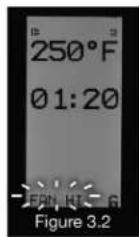
FAN SPEED:
- Press the FAN button to toggle through fan speeds: HI, LOW, or OFF. (Fig. 3.2) (If gas heat source is selected, choosing fan off will disable heat. Verify that this setting matches the heat source of your oven.)
START COOK CYCLE:
- Press the button. Display will show count down time. (More than 1 hour = HR:MIN, Less than 1 hour = MIN:SEC)
ADD TIME FEATURE:
- ADD TIME to the current cooking cycle by pressing any of the Number Pad keys.
- You may add from 1 to 10 minutes by pressing a number pad key during the timing cycle of any cook time. (Note the "0" key represents 10 minutes of add time)
NOTE: When the actual temperature is more than 10^ F, below set temperature, the display will say HEATING (Fig. 4.2), with a heating progress bar shown below the HEATING. When the actual temperature is less than 10^ F, below the set point, the HEATING display will change to READY.
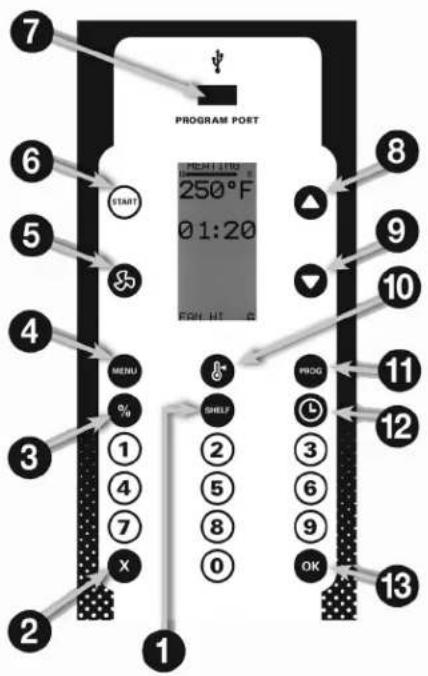
DISPLAY PANEL GUIDE
1 SHELF key, used to assign menu items to up to 6 different shelves. The computer will track up to 6 menu items in 6 shelf positions.
② X key, used to EXIT or cancel programming or operational functions.
3 % key, used to program the power level in 10% increments.
4 MENU key, used to select a menu item.
⑤ FAN key, used to set the fan speed.
6 START key, used to start a cooking timing cycle.
7 PROG. PORT, used with standard USB thumb drive, to import software updates and to upload cooking menus created externally with the C3700 menu editor.
8 UP arrow, used to scroll through menu and programming functions in the UP direction.
9 DOWN arrow, used to scroll through menu and programming functions in the DOWN direction.
10 TEMP key, used to set the cooking temperature, manually. Press and hold for 3 seconds to display the actual internal oven temperature.
11 PROG key, used to access all programming functions.
12 TIME key, used to set the cook time, manually.
13 OK key, used to accept programmed inputs.
flowchart
graph TD
    A["PROGRAM POST"] --> B["START"]
    B --> C["250°F 01:20"]
    C --> D["MENU %"]
    D --> E["1"]
    D --> F["4"]
    D --> G["7"]
    D --> H["X"]
    C --> I["3"]
    C --> J["2"]
    C --> K["1"]
    C --> L["8"]
    C --> M["0"]
    C --> N["9"]
    C --> O["OK"]
    C --> P["12"]
    C --> Q["13"]
    C --> R["1"]
    C --> S["8"]
    C --> T["9"]
    C --> U["10"]
    C --> V["11"]
    C --> W["12"]
    C --> X["13"]
    C --> Y["1"]
RECOMMENDED TEMPERATURES AND TIMES FOR ROASTING
Meat roasting is most satisfactory at temperatures of 225 to 325°F (107 to 163°C) for beef, lamb, poultry and ham; 325°F (163°C) for fresh pork as recommended by USDA and American Meat Institute.
A pan, approximately 12 x 20 x 1" (305 x 508 x 25 mm) full of water, may be placed in the oven bottom. This water supplies humidity to reduce shrinkage. Water should be added if necessary during roasting.
Roasting pans should be no deeper than necessary to hold drippings (usually 2 to 2^1/2 " (51 to 64 mm).
Cooking time and shrinkage may vary with roasting temperature, cut, grade of meat and degree of doneness. Smaller cuts will generally show greater time savings than larger cuts at a given temperature.
ROASTING TEMPERATURE CHART
| TEMPPRODUCT °F (°C) APPROXIMATE TIMES | ||
| Standing Rib Roast — Oven Ready 250 (121) 3 to 4 Hrs. — Rare4 to 4Rolled Rib Roasts — 20 to 22 lb (9.1 to 10 kg) 275Veal Roast — 15 lb (6.8 kg)Turkeys — 15 to 20 lb (6.8 to 9.1 kg)Meat Loaf — 8 to 10 lb (3.6 to 4.5 kg) | (135) 4 Hrs. — Med.300 (149) 3 Hrs. — Med. Well300 (149) 3 Hrs.350 (177) 45 to 60 Minutes | ^1/_2 Hrs. — Med. |
COOKING HINTS
Forced air convection cooking is faster than conventional oven cooking, and therefore overcooking is more common. Do not cook products faster than is practical for the best results. Since forced air convection supplies heat to the surface of the product, the thicker or more massive a product is for its type, the longer it will take to absorb enough heat to cook.
The oven will cook or bake full or partial loads at standard recipe temperatures. As with any oven, you may wish to use a temperature of up to 25 F^ (-4 C°) higher or lower than the recipe for the particular product result that you prefer.
When established, convection oven times and control settings should be noted on your recipe.
SUGGESTED COOKING GUIDELINES
Recommended temperatures, times and number of racks are intended as a guide only. Adjustments must be made to compensate for variations in recipes, ingredients, preparation and personal preference in product appearance.
The oven does not require special recipes. Excellent results can be obtained from any good commercial recipe with reduced cooking times.
RECOMMENDED TEMPERATURES, TIMES AND NUMBER OF RACKS FOR BAKING
| TEMPERATURE TIME IN NO. OF PRODUCT °F | (°C) | MINUTES | RACKS |
| Cakes | |||
| Sheet Cakes | |||
| 18 x 26 x 1" (457 x 660 x 25 mm) pan | |||
| Scaled 4 1/2 to 6 lb (2 to 2.7 kg)/pan 325-360 (163-182) 20 to 23 5 | |||
| Scaled 6 to 7 1/2 lb (2.7 to 3.4 kg)/pan 335-350 (168-177) 22 to 25 4 | |||
| Sheet Cakes | |||
| 18 x 26 x 2" (457 x 660 x 51 mm) pan | 300-325 (149-163) 25 to 35 4 | ||
| Scaled 10 to 12 lb (4.5 to 5.4 kg)/pan | 300-325 (149-163) 25 to 35 3 | ||
| Or, two 12 x 18 x 2" (305 x 457 x 51 mm) pans | |||
| Scaled 5 to 6 lb (2.3 to 2.7 kg)/pan | |||
| Angel or Sponge Cakes | |||
| Sheet Pans 18 x 26 x 1" (457 x 660 x 25 mm) | |||
| Scaled 5 to 6 lb (2.3 to 2.7 kg)/pan | 300-325 (149-163) 15 to 20 4 | ||
| Loaf or Tube Pans | 315-340 (157-171) | 20 to 30 | 3 - 4 |
| Cupcakes | 350-400 (177-204) | 6 to 12 | 4 |
| Frozen Fruit Pies | 350-375 (177-191) | 30 to 45 | 3 - 4 |
| Pumpkin or Custard Pies | 300-350 (149-177) | 30 to 45 | 3 - 4 |
| Cobblers | |||
| 12 x 18 x 2" (305 x 457 x 51 mm) or 350-400 (177-204) 30 to 45 | 3 - 4 | ||
| 12 x 20 x 2 1/2" (305 x 508 x 64 mm) | |||
| Meringue Pies | 350-425 (177-218) | 6 to 10 | 2 - 4 |
| Fruit Turnovers | |||
| 18 x 26 x 1" (457 x 660 x 25 mm) pans 350-375 (177-191) 15 to 25 | 3 - 5 | ||
| NOTE: Pies and cobblers; fruit, custard and pumpkin pies in pie pans should be placed on 18 x 26 x 1" (457 x 660 x 25 mm) pans for baking. | |||
| Cookies | |||
| Rolled or Pressed | 350-400 (177-204) | 6 to 12 | 3 - 5 |
| Drop | 350-400 (177-204) | 6 to 15 | 3 - 5 |
| Brownies | 350 (177) | 12 to 20 | 4 - 5 |
| Yeast Breads NOTE: Yeast breads should be fully proofed for best results. | |||
| Rolls — 1 oz (28 g) | 350-400 (177-204) | 5 to 10 | 3 - 4 |
| 1 1/2 to 2 1/2 oz (43 to 71 g) | 350-400 (177-204) | 8 to 15 | 3 - 4 |
| Loaf Bread — 1 lb (453.4 g) | 325-375 (163-191) | 20 to 40 | 3(30) Pans2(20) Pans |
| Sweet Rolls & Danish Pastry | 325-375 (163-191) | 5 to 15 | 3 - 4 |
| Biscuits — Rolled 1/2" (13 mm) Thick | 350-400 (177-204) | 5 to 15 | 3 - 4 |
| Muffins | 325-375 (163-191) | 6 to 18 | 3 - 4 |
| 18 x 26 x 1" (457 x 660 x 25 mm) pan, 5 to 7 lb (2.3 to 3.2 kg)/pan | 335-400 (168-204) 10 to 20 4 | ||
| 18 x 26 x 2" (457 x 660 x 51 mm) pan, 8 to 20 lb (3.6 to 9 kg) per pan | 335-400 (168-204) 15 to 25 4 | ||
| Corn Muffins | 335-385 (168-196) | 10 to 20 | 3 - 4 |
REHEATING PREPARED FOODS
| TEMPERATURE TIME IN NO. OFPRODUCT °F (°C) MINUTES RACKS | |||
| Frozen French Fries 400-450 (204-232) 6 to 8 4 | |||
| Frozen TV Dinners | 350-400 (177-204) | 10 to 12 | 2 – 5 |
| Frozen Entrees | 300-350 (149-177) | 10 to 20 | 2 – 5 |
| ^3/_4 to 1” (19 to 25 mm) thick | |||
| Frozen Meals, 8 oz (226 g) Foil Pkg. | 350-400 (177-204) | 20 to 30 | 2 – 5 |
| Fish Sticks & Portions | |||
| Frozen Breaded, 1 oz (28 g) | 350-400 (177-204) | 6 to 10 | 2 – 4 |
| 2^1/_2 to 3 oz (71 to 85 g) | 350-375 (177-191) | 8 to 15 | 2 – 4 |
| Chicken Pieces | |||
| Broiled or Oven Fried | |||
| 2 to 2^1/_2 lb (0.9 to 1.1 kg)/bird | 375-425 (191-218) | 8 to 15 | 2 – 5 |
| 2^1/_2 to 3 lb (1.1 to 1.4 kg)/bird | 350-400 (177-204) | 15 to 25 | 2 – 4 |
| Lobsters — 1 to 1^1/_2 lb (0.45 to 0.7 kg) | 400-450 (204-232) | 8 to 14 | 2 – 4 |
| Lobster Tails — Frozen | |||
| ^1/_2 to ^3/_4 lb (0.2 to 0.3 kg) | 350-400 (177-204) | 10 to 15 | 2 – 4 |
| Hamburger Patties | |||
| 8 per lb (0.45 kg), med. to well done | 400-450 (204-232) | 5 to 6 | 2 – 6 |
| 6 per lb (0.45 kg) | 400-450 (204-232) | 7 to 10 | 2 – 6 |
| 4 per lb (0.45 kg) | 375-450 (191-232) | 8 to 12 | 2 – 6 |
| CASSEROLES | |||
| Food Service Pans | |||
| 2 to 3” (51 to 76 mm) deep | 325-375 (162-191) | 15 to 25 | |
| 3 to 4” (76 to 102 mm) deep | 325-375 (162-191) | 20 to 35 | 2 – 4 |
| Ramekins or Foil Pans | 350-400 (177-204) | 5 to 6 | 4 – 5 |
| Up to 1^1/_2 ” (38 mm) deep | 2 – 4 | ||
| Frozen | 10 to 15 | ||
| MISCELLANEOUS PRODUCTS | |||
| Baked Potatoes | |||
| 120 count per 50 lb (22.7 kg) | 400-450 (204-232) | 20 to 25 | 2 – 5 |
| 100 count per 50 lb (22.7 kg) | 400-450 (204-232) | 25 to 40 | 2 – 5 |
| 80 count per 50 lb (22.7 kg) | 400-425 (204-218) | 30 to 45 | 2 – 5 |
| Pizzas — Frozen or With | |||
| Prebaked Crust | 425-475 (218-247) | 5 to 10 | 2 – 4 |
| Grilled Cheese Sandwiches | 400-425 (204-218) | 8 to 10 | 2 – 4 |
CLEANING
⚠ WARNING Disconnect the electrical power to the machine and follow lockout / tagout procedures.
Allow the oven to cool before cleaning.
Snorkel
The snorkel (heat circulation tube), located in the back of oven cavity, should never be blocked. The snorkel should be kept clean at all times for proper operation of the oven. Clean with standard oven cleaner at least once a week. Be sure to thoroughly clean all cleansing solution off before using the oven again. It is also recommended that the oven be run at 400^ F ( 204^ C) for 20 minutes before using to burn off any cleaning solution that was not thoroughly rinsed from the snorkel.
Daily
Exterior stainless steel oven panels should be cleaned with a damp cloth. Stubborn soil may be removed with detergent. (DO NOT USE DAWN®.) Rinse thoroughly and wipe dry with a soft, clean cloth.
Clean porcelain oven interior daily with soap or detergent and water. Rinse thoroughly and wipe dry with a soft, clean cloth.
Nickel-plated racks and rack supports are dishwasher-safe and may be removed for cleaning.
For exterior burned-on foods and grease which resist simple soap and water cleaning, an abrasive cleanser (scouring powder) mixed into a paste may be used. Apply with stainless steel wool or sponge, always rubbing with the “grain.” This treatment is equally effective for “heat tint” (slightly darkened areas caused by oxidation). Again, remember to rub in the direction of the polish lines. Rinse with clear water and dry with a soft cloth.
Do not use scouring powder on the glass window; it will scratch and fog the glass.
After processing some foods at low temperatures, odors may linger in the oven. These odors may be cleared by setting the thermostat to 500^ F ( 260^ C) and allowing the oven to run unloaded for 30 to 45 minutes.
GUIDELINES FOR MAINTAINING STAINLESS STEEL SURFACES
There are three basic things that can break down the surface layer of stainless steel and allow corrosion to develop: 1) Abrasion; 2) Deposits and water and 3) Chlorides.
Avoid abrasion from rubbing with steel pads, wire brushes or scrapers that can leave iron deposits on stainless steel; instead, use plastic scouring pads or soft cloths. For stubborn stains, use products such as Cameo, Talc or Zud First Impression. Always rub parallel to the polish lines or with the grain.
Hard water can leave deposits that promote rust on stainless steel. Treated water from softeners or certain filters can eliminate these mineral deposits. Deposits from food must be properly removed by cleaning. Use mild detergent and nonchloride cleaners. Rinse thoroughly. Wipe dry. If using chloride-containing cleaners or sanitizers, rinse repeatedly to avoid stainless steel corrosion. Where appropriate, apply a polish recommended for stainless steel (such as Benefit or Super Sheen) for extra protection and lustre.
MAINTENANCE
⚠ WARNING The oven and its parts are hot. Use care when operating, cleaning or servicing the oven.
⚠ WARNING Disconnect the electrical power to the machine and follow lockout / tagout procedures.
LUBRICATION
The fan motor comes with sealed bearings and requires no lubrication.
VENT
Periodically check the flue, when the oven is cool, to be sure it is free of obstructions.
REPLACING LAMPS
- Allow oven to cool.
- Remove all racks by pulling forward, lifting up and out.
- Unscrew glass dome from light body.
- Replace the bulb.
- Reassemble glass dome and racks.
TROUBLESHOOTING
| Problem | Possible Cause | Suggested Corrective Action |
| Uneven browning or overcooked edges. | 1. Oven is too hot.2. Too many racks used. | 1. Reduce temperature setting (refer to Cooking Guidelines).2. Use fewer racks to allow better circulation. |
| Product pulling to edge of pan or spilling. | 1. Oven is not level.2. Sheet pans are warped. | 1. Level oven racks - side to side and front to back. The rack should be level side to side and level to 1/8 " (3 mm) low at the front from front to back.2. Keep pans used for baking batter separate from general purpose pans. If any pan shows a tendency to warp, remove it from the baking group. |
| Excessive shrinkage. | 1. Failure to maintain water in oven.2. Roasting temperature too high. | 1. Place pan of water in bottom of oven measuring 12 x 20 x 1" (305 x 508 x 25 mm).2. Reduce temperature. |
| Ignition light remains lit for more than 20 seconds after 3 trials. | No gas supply. | Turn oven off for 5 minutes before attempting to relight.Check gas supply valves to be sure they are open. |
SERVICE AND PARTS INFORMATION
To obtain service and parts information concerning this model, contact the Vulcan-Hart Service Agency in your area (refer to our website, www.vulcanhart.com for a complete listing of Authorized Service and Parts depots).
MODE D'INSTALLATION ET
MODE D'EMPLOI
FOURS À CONVECTION AU GAZ
MODÈLES
VC4GD
VC4GC
VC6GD
VC6GC
HGC5
HGC5X
HGC5D
HGC5DX
WKGD
natural_image
Front view of a stainless steel electric bulation with dual doors and control knobs (no visible text or symbols)INSTALLATION, FONCTIONNEMENT ET ENTRETIEN FOURS À CONVECTION AU GAZ
DOCUMENT À CONSERVER EN CAS DE BESOIN.
GÉNÉRALITÉS
text_image
AFFÈRE AVANT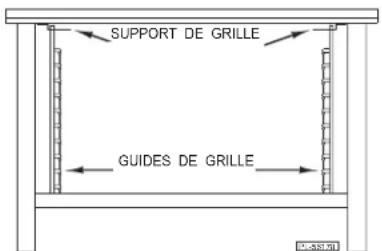
text_image
SUPPORT DE GRILLE GUIDES DE GRILLEFig. 2
text_image
CONDUIT D'ÉVACUATION DE SUPERPOSITION FL-53564Fig. 3