97001L - Radio SW-Stahl - Free user manual and instructions
Find the device manual for free 97001L SW-Stahl in PDF.


User questions about 97001L SW-Stahl
0 question about this device. Answer the ones you know or ask your own.
Ask a new question about this device
Download the instructions for your Radio in PDF format for free! Find your manual 97001L - SW-Stahl and take your electronic device back in hand. On this page are published all the documents necessary for the use of your device. 97001L by SW-Stahl.
USER MANUAL 97001L SW-Stahl
natural_image
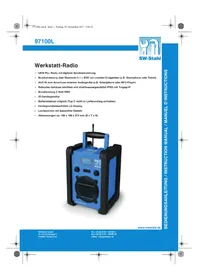
Blue and black SW-Stand radio device with digital display and speaker, no visible text or symbols on bodywww.swstahl.de
97100L

SW-Stahl
INHALT
text_image
- UM-2 SIZE C UM-2 SIZE C + - UM-2 SIZE C UM-2 SIZE C3 + + UM-2 SIZE C UM-2 SIZE C -natural_image
Two identical line diagrams of a trash bin with diagonal lines crossing it, each with no text or symbols.• VHF PLL radio with digital transmitter adjustment
• Music streaming over Bluetooth 2.1 + EDR from mobile terminal units (e.g. smartphone or tablet)
- AUX IN for the connection of external audio equipment (e.g. smartphone or MP3 Player)
• Rugged housing (shockproof and splash-proof IPX5) with carrying handle
• Music power 5 Watt RMS
• 20 station memory
• Battery operation possible (Type C not included in the scope of delivery)
• Background illuminated LCD display
• Loudspeaker with bass reflex system
• Dimensions 198 x 188 x 274 mm (W x D x H) approx.
natural_image
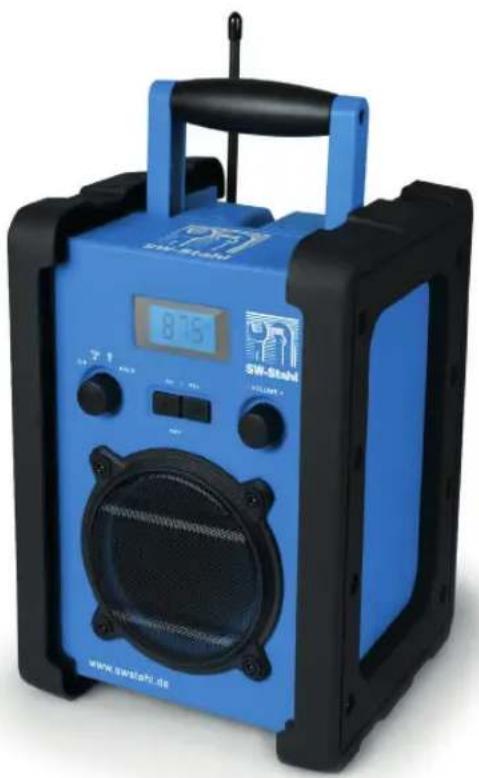
Blue and black SW-Stand radio device with digital display and speaker, no visible text or symbols on bodywww.swstahl.de
97100L

SW-Stahl
CONTENTS
- Thank you for your trust! 29
- General .....29
- Safety instructions ....31
- Scope of supply 35
- Preparation ....35
- Parts and operating elements ....36
- Power supply 39
- Connections .....41
- Basic operation ....42
- Radio ....43
10.1 Setting the station ....43
10.2 Saving/opening the stations ....43 - Bluetooth connection .....44
- Cleaning 45
- Disposal 45
- Troubleshooting ....46
- Technical data ....48
- Warranty ....49


97100L

SW-Stahl
1. THANK YOU FOR YOUR TRUST!
We congratulate you on the purchase of your new workshop radio, and are convinced that you will be satisfied with this modern device.
In order to guarantee optimal functioning and performance from your workshop radio at all times, and to ensure your personal safety:
Before using the device for the first time, read through the operating instructions carefully and ensure you comply with the safety instructions!
| Article Workshop radio | |
| Model 97100L | |
| Manual ID PO51 | 001437 / PE / 2017 |
| Manufacturer G | globaltronics GmbH & Co. KG Domstraße 19 D-20095 Hamburg Germany |
| Web www.gt-support.de | |
2. GENERAL
Keeping the manual for reference
- All activities in relation to using or servicing this device must only be performed in the manner described in these operating instructions.
- Keep these instructions for reference.
- If you pass the device on to someone else, please include these operating instructions.
www.swstahl.de


97100L

SW-Stahl
Intended purpose
This device is...
... an entertainment electronics device.
... intended for audio playback from audio devices.
... intended for the reception and playback of radio stations.
The device is intended for private use, and is not suitable for commercial use.
Any other use or modification is excluded from the intended purpose.
Markings/symbols
If necessary, you will find the following warnings in these operating instructions:

DANGER! High risk: failure to observe this warning may result in injury to life and limb.

WARNING! Moderate risk: failure to observe this warning may result in injury or serious material damage.
CAUTION: low risk: failure to observe this warning may result in minor injury or material damage.
NOTE: circumstances and specifics that must be observed when handling the device.
• Information in the display is written in italics (slanted text). Example: FM appears in the display.
- Buttons to be pressed are always written in bold.
Example: Press the button POWER ON/OFF.
- Instructions with a specific sequence are always numbered (1., 2., 3. etc.).
Information on the declaration of conformity

Globaltronics GmbH & Co. KG hereby declares that this product is in compliance with the fundamental requirements and other relevant regulations of the RED Directive 2014/53/EU, EMC Directive 2014/30/EU, ErP Directive 2009/125/EC, Low Voltage Directive 2014/35/EU and ROHS Directive 2011/65/EC.
The full declaration of conformity and a PDF version of these operating instructions can be found on the internet under www.tool-is.com.
97100L

SW-Stahl
Saving energy: fully automatic!
NOTE: new automatic shutdown system!
For reasons of statutory regulations regarding energy saving, this device has an automatic shutdown system. The device automatically switches over to standby mode if it has not received an audio signal for 15 minutes and has not been operated.

This symbol identifies the product as a device of protection class II. Devices with this protection class possess reinforced or double insulation.
Rating plate
The rating plate with the technical details can be found on the underside of the device.
3. SAFETY INSTRUCTIONS

DANGER for children and people with disabilities
• Children must not play with packing material. Do not allow children to play with plastic bags. Danger! Risk of suffocation!
- This device can be used by children aged 8 and over and by people with reduced physical, sensory or intellectual abilities or lack of experience and knowledge, provided that they are supervised or have been instructed in the device's use and have understood the resulting hazards.
• Children must not play with the device. Cleaning and maintenance by the user must not be performed by children without supervision.
- Ensure that children never insert foreign objects into the openings of the device. Failure to observe this instruction may result in an electrical shock hazard.
www.swstahl.de


97100L

SW-Stahl

DANGER! Risk of electric shock due to moisture
These safety instructions apply to the device during battery operation, if the following openings are not properly closed:
- battery compartment
- AUX IN compartment
- socket for the mains lead
With properly closed openings, the device is protected against water jets (protection type IPX5), but it must not be immersed in water.
- Protect the device from moisture, water drops and water splashes: failure to observe this instruction may result in an electrical shock hazard. For example, never place vases or similar items full of liquid on or in the vicinity of the device.
- The device is not intended for operation in rooms with high humidity (e.g. bathrooms). Observe the ambient conditions specified in the technical data.
- Avoid foreign bodies and liquids entering the device.
- Should liquids or foreign objects get into the device, remove the mains plug from the power socket immediately. Have the device checked before reusing.

DANGER! Risk of electric shock
- If the mains lead or the device is damaged, immediately pull the mains plug out of the power socket.
- Do not use the device if there is visible damage to the housing or the mains lead.
- It is not permitted to make modifications to the device. Repairs to the housing and mains lead may only be carried out by the service centre. If the mains lead of this device is damaged, it must be replaced by a special power cable that is available from our service centre.
- Only connect the mains lead to a properly installed, easily accessible power socket. The power socket must still be easily accessible after connection.
- Lay all cables in such a way that they do not represent a tripping hazard.
97100L

SW-Stahl
- When setting up the device, make sure that the mains lead is not pinched or squeezed. Keep the mains lead away from hot surfaces and sharp edges.
- To disconnect the device completely from the mains, remove the mains plug from the power socket.
- Disconnect the mains plug from the power socket, ... ... when you are not using the device, ... if you want to clean the device, and ... during thunderstorms.
- Never open the casing of the device; it contains no parts requiring maintenance! When the casing is open, there is danger of death from electric shock.
- The device is not disconnected from the power supply when it is switched off.

FIRE HAZARD
• Candles and other open flames must be kept away from the product at all times in order to prevent the spread of fire.
- Protect the device against heat: there is a fire hazard. If you set up the device in a shelving unit, leave a clearance of at least 10cm on all sides.

DANGER from batteries
- Keep new and old batteries out of the reach of children.
- Batteries can be life-threatening. Therefore you should store batteries and the remote control out of the reach of young children. If a battery has been swallowed, medical assistance must be sought immediately. Otherwise the person who swallowed it may experience serious internal burns within 2 hours, which may prove fatal.
- Batteries must not be charged or reactivated in any other way, must not be disassembled, disposed of in a fire, or short-circuited.
• Clean the battery and device contacts before you insert the battery. - There is a danger of explosion if the battery is not correctly replaced. Replace only with the same or an equivalent type.
- When inserting the battery, make sure the polarity is correct (+/-).
www.swstahl.de


97100L

SW-Stahl
- Remove the battery from the device if you intend not to use it for an extended period. The battery could leak and damage the device.
- Do not subject the battery to extreme conditions, e.g. do not place the device on radiators or expose it to direct sunlight. Otherwise there is an increased danger of the battery leaking.
- If battery fluid has leaked out, avoid contact with the skin, eyes and mucous membranes. In the event of contact with the liquid, rinse the affected areas with copious amounts of clean water and consult a doctor immediately.
- If the battery compartment fails to securely close, stop using the product and keep it away from children.

WARNING! Risk of material damage
- If the device is moved from a cold location to a warm location, condensate may form inside the device. Leave the device switched off for a few hours.
- Place the device on a stable, flat surface.
- Please ensure adequate ventilation around the device. Keep a distance of at least 10 cm on all sides. Do not cover the device (e.g. with magazines, tablecloths, curtains, etc.).
- Set up the device in a location where it is not exposed to direct sunlight.
- The device is fitted with non-slip plastic feet. As furniture is coated with a variety of different varnishes and acrylics, and treated with different cleaning agents, it cannot be completely ruled out that components are contained in some of these substances that could damage and soften the plastic feet. If necessary, place a non-slip mat under the device.
- Use a soft, dry cloth for cleaning. Do not use any corrosive or abrasive cleaning agents. These could damage the surface of the device.


97100L

SW-Stahl
4. SCOPE OF SUPPLY
1 workshop radio 97100L
1 mains lead
1 set of operating instructions
5. PREPARATION
• Completely remove all packaging components.
- Place the device on a stable, flat surface.
www.swstahl.de
97100L

SW-Stahl
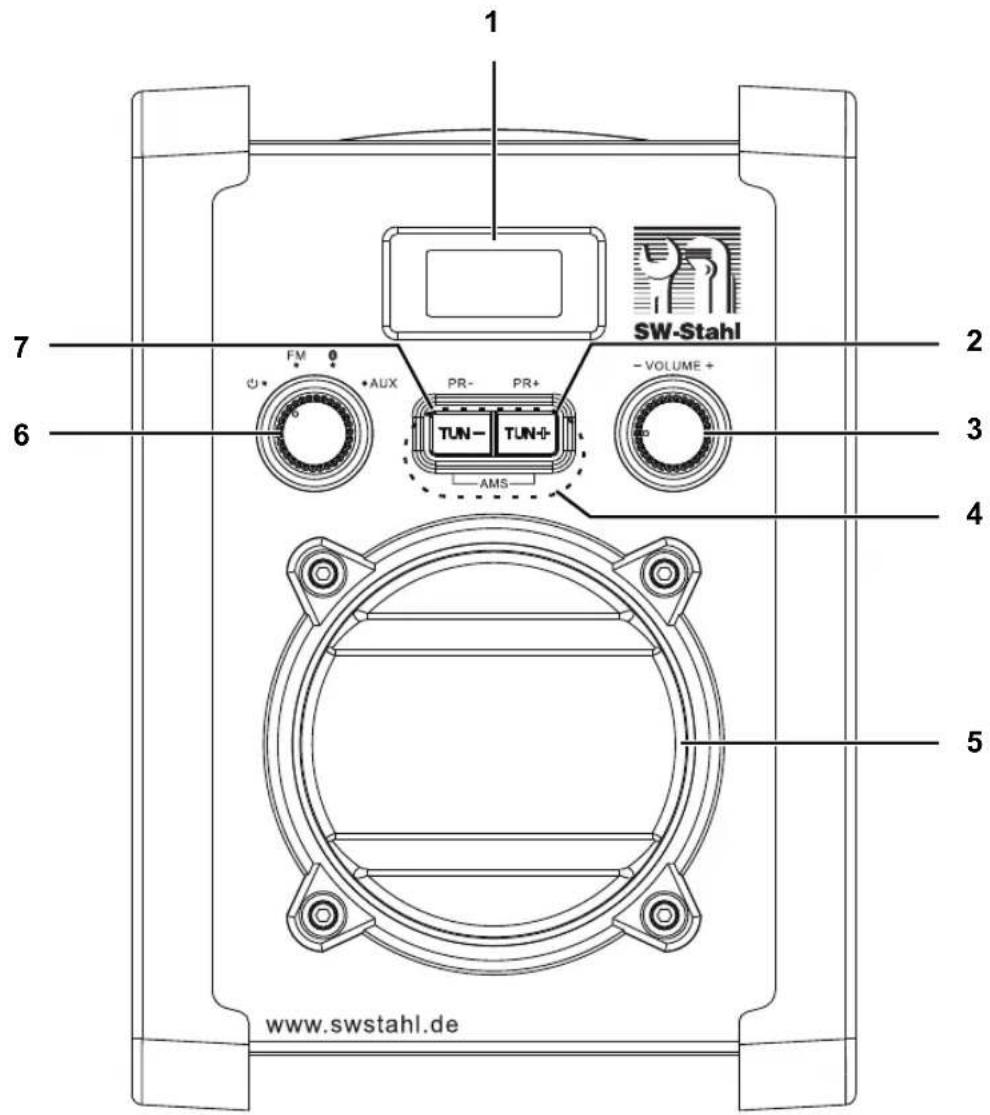
6. PARTS AND OPERATING ELEMENTS
Front view
text_image
1 SW-Stahl 2 FM AUX PR- PR+ -VOLUME+ TUN- TUN+ AMS 7 6 3 4 5 www.swstahl.de

INSTRUCTION MANUAL


97100L

SW-Stahl
Front view
1 Display: displays symbols and written text
2 TUN + / PR + in radio mode press briefly: next saved radio station in radio mode press for approx. 1 second: automatic station search forwards
Bluetooth: next track
3 - V O L U M E + volume down/up
4 A M S in radio mode press both buttons simultaneously for approx. 5 seconds: automatic station search with station memory on (up to 20 stations)
5 loudspeaker
6 ⏻ / FM / ✕ AUX switch to standby mode: ⏻ Selecting an operating mode: FM (radio), ✕ (Bluetooth), AUX
7 TUN - / PR - switch device on again after automatic shutdown in radio mode press briefly: previous saved radio station in radio mode press for approx. 1 second: automatic station search backwards
Bluetooth: beginning of the track, previous track
www.swstahl.de
97100L

SW-Stahl
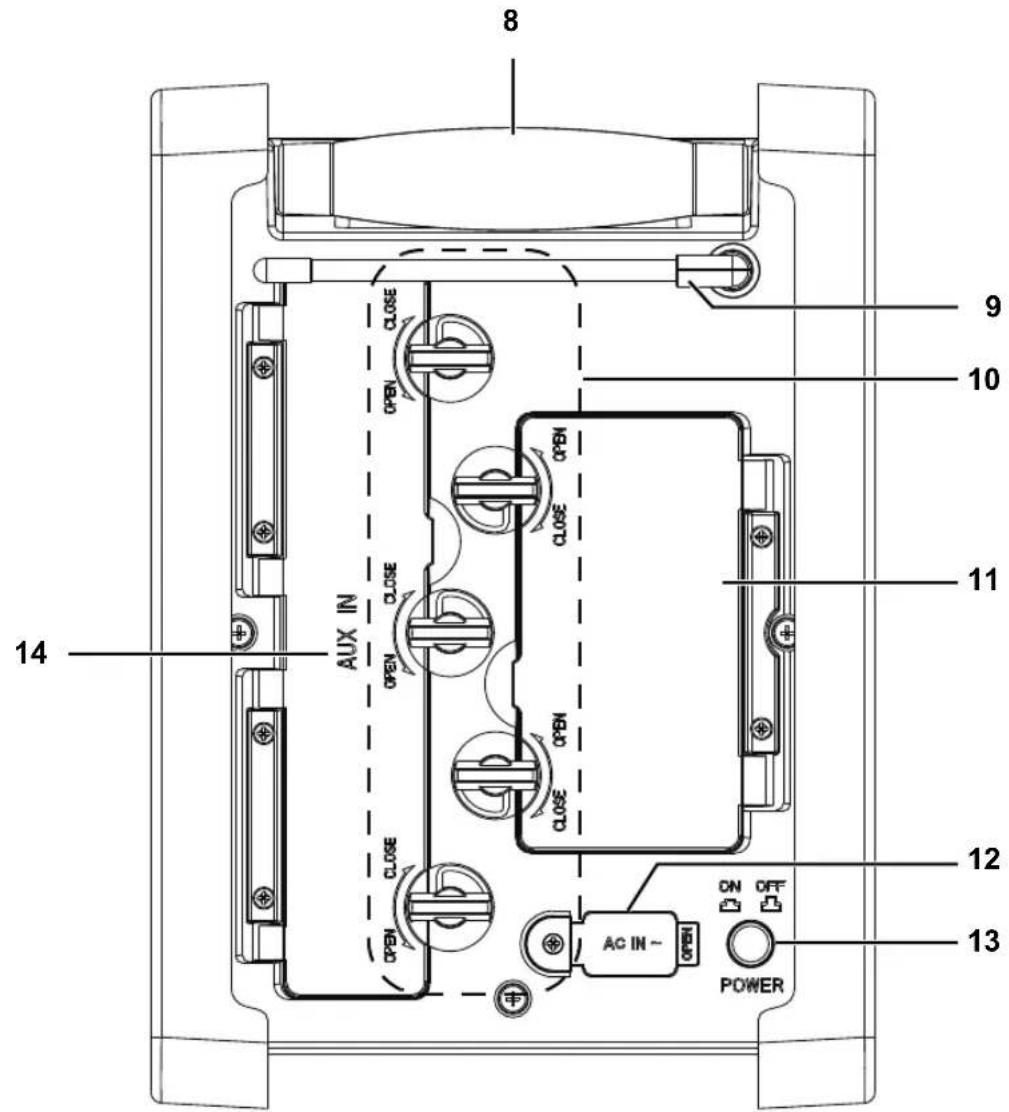
Rear view
text_image
8 9 10 11 12 13 14 CLOSE CLOSE AUX IN CLOSE CLOSE AC IN - POWER


INSTRUCTION MANUAL

97100L

SW-Stahl
Rear view
8 Folding handle
9 Rotating rod antenna
10 OPEN / CLOSE Toggle for opening (OPEN) / closing (CLOSE) the battery compartment and the AUX IN compartment
11 Battery compartment cover for the battery compartment below
12 AC IN \~ Rubber seal for the mains lead socket below
13 POWER ON/OFF Power switch: Switch device on (ON) / off (OFF)
14 AUX IN Cover for compartment below with connection (3.5 mm jack plug) for external playback device
7. POWER SUPPLY
Power supply connection
- Connect all devices before you connect the power supply.
- Open the rubber seal and connect the mains lead to the AC IN \~ connection on the device.
- Insert the mains plug into a readily accessible power socket whose voltage matches the voltage stated on the rating plate of the device. The power socket must still be easily accessible after connection.
NOTE: to disconnect the device from the mains pull out the mains plug out of the power socket.
www.swstahl.de
97100L

SW-Stahl
Inserting/changing batteries

DANGER!
- When inserting the batteries, make sure the polarity is correct (+/-).
-
Remove the batteries from the device if you intend not to use the device for an extended period of time.
-
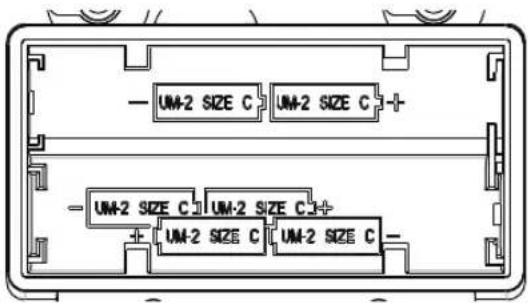
Rotate the two toggles anticlockwise (OPEN) and open the battery compartment at the rear of the device.
text_image
- UM-2 SIZE C UM-2 SIZE C + - UM-2 SIZE C UM-2 SIZE C3 + + UM-2 SIZE C UM-2 SIZE C -- Insert 6 batteries of type LR14 (1.5 V) (not included in the scope of supply). For polarity, see the diagram inside the battery compartment (+/-).
- Close the battery compartment and rotate the two toggles clockwise until they stop (CLOSE).
Switching between battery/mains mode
- Without a connected mains lead, the device is in battery mode. When the mains lead is plugged into the device, it switches over to mains mode.
- Battery mode is not possible while the mains lead is connected.
- Ensure that the device is switched off after use (POWER OFF) in order to avoid unnecessary power or battery consumption.


97100L

SW-Stahl
8. CONNECTIONS
CAUTION: ensure that the workshop radio and the devices to be connected are switched off before you connect them. Also read the operating instructions for the devices you wish to connect.
AUX
The jack plug of the stereo input AUX IN allows you to connect external media playback devices, e.g. an mp3 player, and to use the loudspeaker of the workshop radio for purposes of playback.
- Turn down the volume using - VOLUME +.
- Rotate the three toggles anticlockwise (OPEN) and open the AUX IN compartment at the rear of the device.
- Connect an external media playback device to the jack plug of the workshop radio while it is still switched off.
- Close the AUX IN compartment and rotate the three toggles clockwise until they stop (CLOSE).
- Set the left-hand control dial to AUX.
- Start playback on the media playback device.
- Control the volume using - VOLUME + and on the media playback device.
www.swstahl.de
97100L

SW-Stahl
9. BASIC OPERATION
Switching the device on/off
- In order to switch the device on using the power switch, set the POWER ON/OFF switch to ON.
- In order to switch the device off using the power switch, set the POWER ON/OFF switch to OFF.
• After approx. 15 minutes without signal, the device automatically switches to power saving mode. - From power saving mode, you can switch the device on by turning the left-hand control dial.
- To disconnect the device from the mains pull out the mains plug out of the power socket.
Setting the volume
- Use the right-hand control dial – VOLUME + to set the volume higher/ lower.
Selecting an operating mode
- When the device is switched on, rotate the left-hand control dial to choose between the operating modes FM (radio), ⚙ (Bluetooth) and AUX.


97100L

SW-Stahl
10. RADIO
• Use the left-hand control dial to select the operating mode for radio (FM).
10.1 SETTING THE STATION
The display shows what frequency is set.
- Rotate the rod antenna. Try out different positions in order to improve the FM reception quality, and change the location of the device if necessary.
- Press the button TUN - / PR - or TUN + / PR + for approx. 1 second in order to activate the automatic search process. The search process ends the first time it finds a radio station with a sufficiently strong signal.
10.2 SAVING/OPENING THE STATIONS
You can save up to 20 FM stations.
Automatic station search
The automatic station search (AMS) automatically searches for and saves the first 20 stations with sufficient reception.
- Use the left-hand control dial to select the operating mode for radio (FM).
- Press the buttons TUN - / PR - and TUN + / PR + (AMS) simultaneously for approx. 5 seconds. The station search starts, and the first 20 stations found are automatically stored in order of ascending frequency in program slots 1 to 20. The station in the first program slot plays automatically.
Opening saved stations
- Press the button TUN - / PR - or TUN + / PR + in order to access the saved radio stations.
www.swstahl.de
97100L

SW-Stahl
11. BLUETOOTH CONNECTION
- Use the left-hand control dial to select the operating mode ⚙, in order to switch to the operating mode for Bluetooth (bt). An audio signal will sound, and the display will show the symbol ⚙
- Switch on the media playback device (e.g. smartphone) and start the Bluetooth connection from there. The media playback device should now be receiving the device code "97100L".
- Now use the media playback device to connect to the workshop radio. If you are asked for a password, enter "0000". The two devices are now connected with one another. The symbol ⚙ will light up.
- Now use the media playback device to start playback of a music track. The sound will be played back by the workshop radio.
- Use the buttons TUN - / PR - and TUN + / PR + to select the music tracks.
NOTE:
• Media playback devices may save the ID code of the device. When a new connection is created, it may not be necessary to create the connection manually if the Bluetooth function is active.
- If the smartphone receives a call during playback, the playback will be interrupted. The telephone call will not be played over the loudspeaker. After the telephone call is over, playback will continue.
Sever the connection
Sever the Bluetooth connection by switching off the Bluetooth function on the media playback device.


97100L

SW-Stahl
12. CLEANING
CAUTION: solvents, alcohol, thinning agents etc. must never be used, as these can damage the surface of the device.
- If necessary, clean the device using a soft, dry cloth.
13. DISPOSAL
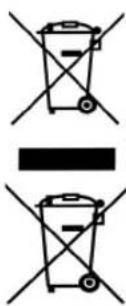
Old devices and batteries must not be disposed of in the normal domestic waste.
Keep the packaging if possible until the expiration of the warranty period. After that, please dispose of it in an environmentally friendly manner.
The device must be disposed of at a proper waste disposal facility, in accordance with the Waste Electrical & Electronic Equipment Directive 2012/19/EU. Plastics and electronic parts must be recycled. Please check with your local waste disposal authority.
text_image
Diagram showing two crossed-out bins with prohibition signs, indicating no waste or non-renewable waste.Used batteries must be disposed of properly. For this purpose, retailers selling batteries and the municipal waste collection points provide containers for disposing of batteries.
As a consumer, you are legally obliged to return standard and rechargeable batteries to a collection point in your municipality, neighbourhood or to the retail trade.
Only in this way is it possible to dispose of standard and rechargeable batteries in a manner which is environmentally-friendly.
Standard and rechargeable batteries which are marked with the letters listed contain the following harmful substances, among others: Cd (cadmium), Hg (mercury), Pb (lead).
www.swstahl.de
97100L

SW-Stahl
14. TROUBLESHOOTING
If your device fails to function as required, please try this checklist first. Perhaps it is just a small problem that you can resolve yourself.

DANGER! Do not attempt to repair the device yourself under any circumstances. If you cannot resolve the fault, please contact our service centre.
| Fault Possible causes / action | |
| The device cannot be switched on. | Is the mains lead connected properly?Check the connection. |
| No sound | Is the volume turned down? |
| Are connected devices switched on (e.g. mp3 player)? | |
| Is the volume on the media playback device set too low? | |
| Is the correct operating mode selected? | |
| Bluetooth:- Is Bluetooth activated on the media playback device?- Is the media playback device connected to another device? | |
| Has the playback been interrupted? | |
| Poor radio reception | Is the rod antenna aligned properly? |
| Static noise during operation | If static noise is heard, remove any mobile telephones, tablets or other devices that use radio waves from the immediate vicinity of the workshop radio. |
| Unexplained malfunction | Switch off device and pull out mains plug. Reconnect the mains plug after approx. 5 seconds and switch device back on. |
97100L

SW-Stahl
If you cannot resolve the fault, please contact our hotline:
0800 5000 136
(Monday to Friday, from 8am to 6pm / free of charge from landlines as well as mobile networks)
or by email at:
GT-support@servicecenter-muenster.de
www.swstahl.de
97100L

SW-Stahl
15. TECHNICAL DATA
Electrical data
Mains voltage: 230 V \~ 50 Hz
Battery mode: 6x LR14, C (1.5 V)

Power consumption: Maximum approx. 9 W
In standby mode: < 0.5 W
Audio
Audio output port: 5 W (RMS)
System
VHF (FM): 87.5 – 108 MHz
playable formats: MP3, WMA
Bluetooth: Bluetooth v2.1 (A2DP, AVRCP)
Frequency range: 2402 - 2480 MHz
Transmitting power: Maximum 2.5 mW
Range: up to 15 m
Connections
AUX: Input: 1x 3.5 mm jack plug
General
Protection type: IPX5 (protected against water jets with openings correctly closed)
Dimensions (W x D xH): approx. 198 x 188 x 274 mm
Weight: approx. 4.66 kg
Ambient conditions: Operating temperature: 5 °C – 35 °C
Humidity: 40% to 80% relative
Specifications subject to change without notice.



97100L

SW-Stahl
16. WARRANTY
Dear Customer,
Thank you for selecting a product from our company. Our product corresponds to the legal requirements, and was manufactured with continuous quality control. The technical data correspond to the current state of the art at the time of printing. Specifications are subject to change without notice.
The warranty period for electronic devices corresponds to the statutory provisions at the time of purchase.
If a technical problem should unexpectedly occur with the device, please note the following points:
The guarantee and warranty period for your device are valid for 24 months after the purchase date. Please retain the proof of purchase for this purpose.
The guarantee and warranty relate only to defects that are attributable to manufacturing or material faults.
No guarantee or warranty can be accepted for damage caused by improper handling or improper interventions or for damage resulting from a lightning strike, overvoltage, power failures, fire or any other natural catastrophes. If the device should nevertheless be repaired, you will be given a cost estimate.
The guarantee and warranty also expire if the product has been modified or repaired by an unauthorised person, the serial number of the product has been changed or removed, the product has been / is used outside the scope of its intended use or if the warranty period has expired.
Please always retain the receipt of purchase and the original packaging. If your product needs to be returned to the service centre and you do not have sufficient transport packaging, this can be sent to you for a charge.
If a technical problem occurs, please contact our hotline.
Within the framework of the warranty, we retain the right to repair the device or to replace it with a comparable device.
This guarantee does not restrict your statutory rights.
www.swstahl.de
97100L

SW-Stahl
notes:
INSTRUCTION MANUAL
50
SW-Stahl GmbH
Tel. +49 (0) 2191 / 46438-0
An der Hasenjagd 3 Fax +49 (0) 2191 / 46438-40
D-42897
Remscheid
E-Mail:
info@swstahl.de
97100L

SW-Stahl
SERVICE CARD
Product data:
Model 97100L
Serial number
Purchase date
(as shown on enclosed receipt)
Owner data:
Name
Telephone number
Address
Description of fault:
www.swstahl.de
97100L

SW-Stahl
INSTRUCTION MANUAL
52
SW-Stahl GmbH
Tel. +49 (0) 2191 / 46438-0
An der Hasenjagd 3 Fax +49 (0) 2191 / 46438-40
D-42897
Remscheid
E-Mail:
info@swstahl.de
97100L

SW-Stahl
Radio d'atelier
natural_image
Blue and black electronic device with speaker grille and digital display (no visible text or symbols on main body)www.swstahl.de
97100L

SW-Stahl
SOMMAIRE
text_image
- UM-2 SIZE C UM-2 SIZE C + - UM-2 SIZE C UM-2 SIZE C3 + + UM-2 SIZE C UM-2 SIZE C -MANUEL D'INSTRUCTION
76
SW-Stahl GmbH
An der Hasenjagd 3
D-42897 Remscheid
Tel. +49 (0) 2191 / 46438-0
Fax +49 (0) 2191 / 46438-40