the Smart Grinder BCG800XL - Food Processor BREVILLE - Free user manual and instructions
Find the device manual for free the Smart Grinder BCG800XL BREVILLE in PDF.


| Product Type | Electric Coffee Grinder |
| Brand | Breville |
| Model | the Smart Grinder BCG800XL |
| Hopper Capacity | 450 g (1 lb) of coffee beans |
| Coffee Types | Espresso, French press, percolator, drip coffee |
| Grind Settings | 25 settings (from extra-fine to coarse) |
| Display | Backlit LCD screen displaying grind setting, number of cups/infusions and amount |
| Grind Types | Automatic (auto-stop) and manual (start/stop) |
| Dosing Modes | Portafilter, grind container or filter basket |
| Included Accessories | Grind container with lid, 2 portafilter cradles (50-54 mm and 58 mm), cleaning brush |
| Power Supply | 120 V ~ 60 Hz |
| Power | Not explicitly specified, estimated 165 W (standard) |
| Housing Material | Stainless steel and plastic |
| Burrs | Conical steel burrs, removable upper burr |
| Safety | Hopper lock (message "LOCK BEAN HOPPER"), overheat protection, Assist™ plug |
| Maintenance | Clean burrs with provided brush, wash accessories in soapy water, do not put in dishwasher |
| Warranty | Limited one-year |
Frequently Asked Questions - the Smart Grinder BCG800XL BREVILLE
User questions about the Smart Grinder BCG800XL BREVILLE
0 question about this device. Answer the ones you know or ask your own.
Ask a new question about this device
Download the instructions for your Food Processor in PDF format for free! Find your manual the Smart Grinder BCG800XL - BREVILLE and take your electronic device back in hand. On this page are published all the documents necessary for the use of your device. the Smart Grinder BCG800XL by BREVILLE.
USER MANUAL the Smart Grinder BCG800XL BREVILLE
Breville Customer Service Center
US Customers
Mail: Breville USA
19400 S. Western Ave
Torrance CA
CA 90501-1119
Phone: Customer Service
1(866)BREVILLE
Email: Customer Service:
askus@brevilleusa.com
Canada Customers
Mail: Breville Canada
Phone: Customer Service
1(866)BREVILLE
Email: Customer Service:
askus@breville.ca
www.breville.com
Breville is a registered trademark of Breville Pty. Ltd. A.R.N. 98 000 092 978.
Copyright: BANLLIE PG, Ltd. 2010
Due to continued product improvement, the products illustrated/photographed
In this booklet may vary slightly from the ethical product.
Model BCG800XL Issue - A10
Breville®
the Smart Grinder ^TM
Instruction Booklet
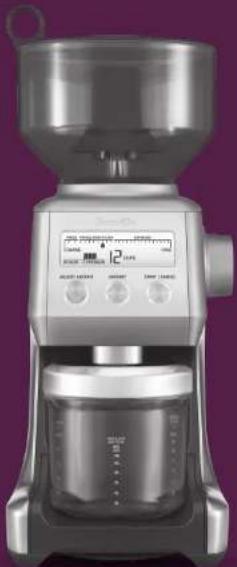
natural_image
Exterior view of a modern kitchen graser with digital display and control buttons (no visible text or symbols)on the purchase of your new Breville Smart Grinder™
CONTENTS
4 Breville recommends safety first
7 Know your Breville Smart Grinder™
10 Assembling your Breville Smart Grinder™
12 Operating your Breville Smart Grinder ^™
18 Care & cleaning for your Breville Smart Grinder™
20 Hints & tips
22 Troubleshooting
25 One Year Limited Warranty
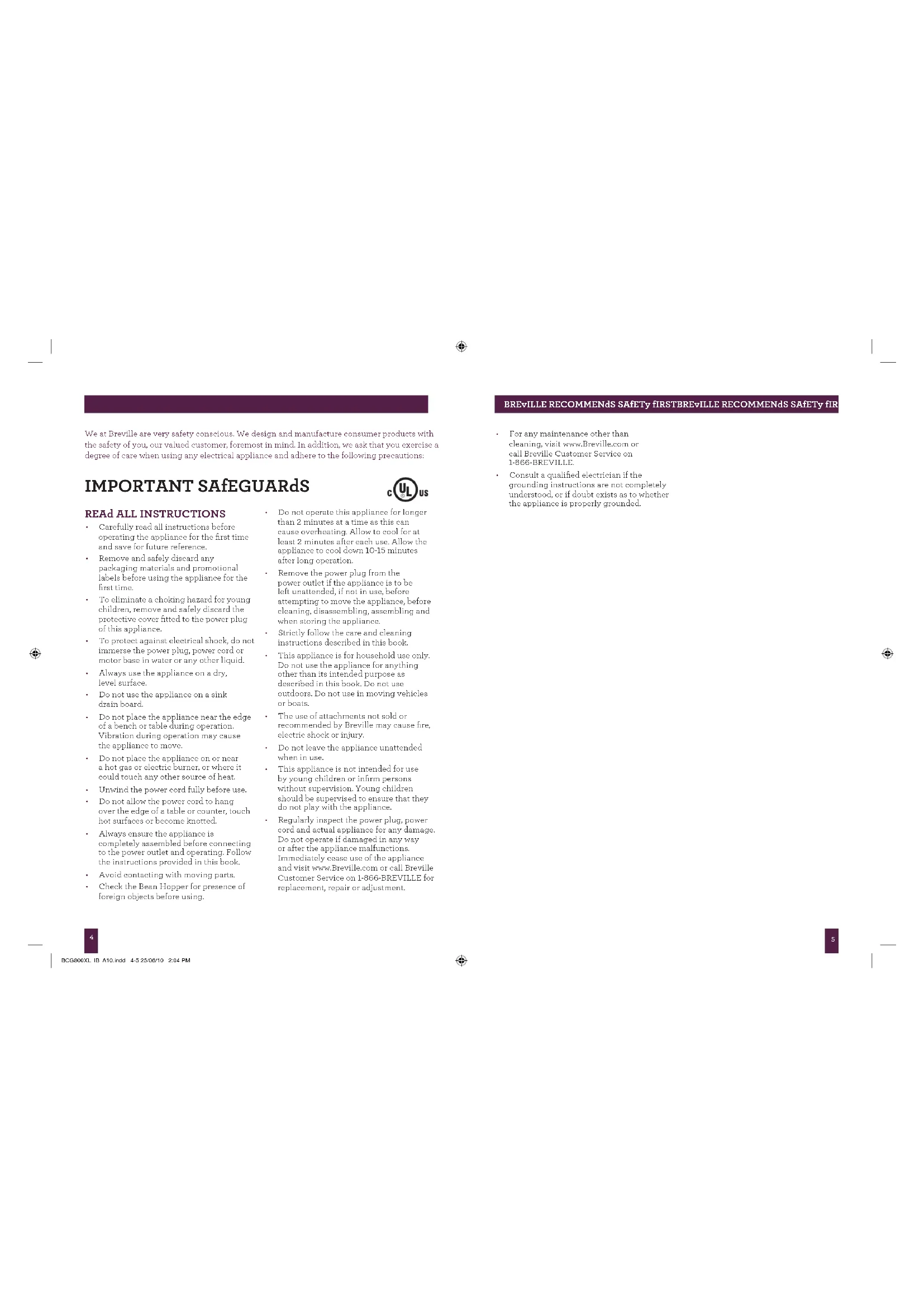
We at Breville are very safety conscious. We design and manufacture consumer products with the safety of you, our valued customer, foremost in mind. In addition, we ask that you exercise a degree of care when using any electrical appliance and adhere to the following precautions:
IMPORTANT SAFEGUARDS

READ ALL INSTRUCTIONS
- Carefully read all instructions before operating the appliance for the first time and save for future reference.
- Remove and safely discard any packaging materials and promotional labels before using the appliance for the first time.
• To eliminate a choking hazard for young children, remove and safely discard the protective cover fitted to the power plug of this appliance.
• To protect against electrical shock, do not immerse the power plug, power cord or motor base in water or any other liquid.
• Always use the appliance on a dry, level surface. - Do not use the appliance on a sink drain board.
- Do not place the appliance near the edge of a bench or table during operation. Vibration during operation may cause the appliance to move.
- Do not place the appliance on or near a hot gas or electric burner, or where it could touch any other source of heat.
• Unwind the power cord fully before use. - Do not allow the power cord to hang over the edge of a table or counter, touch hot surfaces or become knotted.
• Always ensure the appliance is completely assembled before connecting to the power outlet and operating. Follow the instructions provided in this book. - Avoid contacting with moving parts.
-
Check the Bean Hopper for presence of foreign objects before using.
-
Do not operate this appliance for longer than 2 minutes at a time as this can cause overheating. Allow to cool for at least 2 minutes after each use. Allow the appliance to cool down 10-15 minutes after long operation.
- Remove the power plug from the power outlet if the appliance is to be left unattended, if not in use, before attempting to move the appliance, before cleaning, disassembling, assembling and when storing the appliance.
• Strictly follow the care and cleaning instructions described in this book. - This appliance is for household use only. Do not use the appliance for anything other than its intended purpose as described in this book. Do not use outdoors. Do not use in moving vehicles or boats.
• The use of attachments not sold or recommended by Breville may cause fire, electric shock or injury. - Do not leave the appliance unattended when in use.
- This appliance is not intended for use by young children or infirm persons without supervision. Young children should be supervised to ensure that they do not play with the appliance.
- Regularly inspect the power plug, power cord and actual appliance for any damage. Do not operate if damaged in any way or after the appliance malfunctions. Immediately cease use of the appliance and visit www.Breville.com or call Breville Customer Service on 1-B66-BREVILLE for replacement, repair or adjustment.
BREvILLE RECOMMENDS SAFETY FIRSTBREvILLE RECOMMENDS SAFETY FIR
• For any maintenance other than cleaning, visit www.Breville.com or call Breville Customer Service on 1-866-BREVILLE.
- Consult a qualified electrician if the grounding instructions are not completely understood, or if doubt exists as to whether the appliance is properly grounded.

BCG800XL_B_A10.indd 4-5 25/06/10 2:04 PM


BREvILLE RECOMMENDS SAFETY FIRST
BREvILLE ASSIST™ PLUG
Your Breville appliance comes with a unique Assist™ Plug, conveniently designed with a finger hole in the power plug for easy and safe removal from the wall outlet. For safety reasons it is recommended you plug your Breville appliance directly into its own electrical outlet on a dedicated circuit separate from other appliances. If the electric circuit is overloaded with other appliances, your appliance may not function properly. Use in conjunction with a power strip or extension cord is not recommended.
SHORT CORD INSTRUCTIONS
Your Breville appliance is fitted with a short power supply cord as a safety precaution to prevent personal injury or property damage resulting from pulling, tripping or becoming entangled with a longer cord. Do not allow children to use or be near this appliance without close adult supervision. Longer detachable power supply cords or extension cords are not recommended but may be used if care is exercised. If an extension cord is used, (1) the marked electrical rating of the cord set or extension cord should be at least as great as the electrical rating of the appliance, (2) the cord should be arranged so that it will not drape over the countertop or tabletop where it can be pulled on by children or tripped over unintentionally and (3) the extension cord must include a 3-prong grounding plug.
FOR HOUSEHOLD USE ONLY SAvE THESE INSTRUCTIONS

BCG800XL_B_A10.indd 6-7 25/06/10 2:04 PM
KNOW
your Breville Smart Grinder™
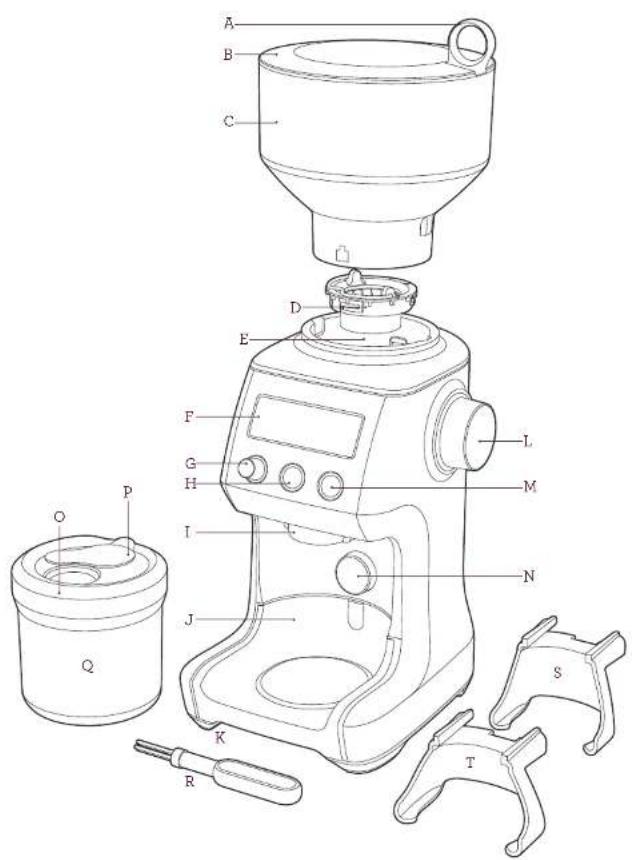

BCG800XL_B_A10.indd 8-9 25/06/10 2:04 PM

KNOW YOUR BREVILLE SMART GRINDER ^72 KNOW YOUR BREVILLE SMART
A. Breville Assist™ Ring-Pull Removal
B. Bean Hopper Lid
C. 1lb Bean Hopper
With locking system for easy removal, storage and transfer of coffee beans.
D. Upper Conical Burr (removable)
E. Lower Conical Burr
F. Backlit LCD Screen
Displays the grind setting, number of cups or shots and customized grind amount.
G. ADJUST AMOUNT dial
Adjust the preset grind amount with less grinds ('WEAKER') or more grinds ('STRONGER').
H. AMOUNT button
On the Espresso setting, choose the number of shots. On the French Press, Percolator and Drip Filter settings, choose the number of cups.
I. Grind Outlet
J. Grinds Catcher
Catches grind overspill. Removable for easy cleaning.
K. Cord Wrap
L. Grind Size Dial
25 grind settings from the finest Espresso to the coarsest French Press grind.
M. START | CANCEL button
N. Portafilter Activation Switch
ACCESSORIES
O. Grinds Container Lid
P. Grinds Container Sealing Cap
Q. Grinds Container
R. Conical Burr Cleaning Brush
S. Portafilter Cradle - Small 50-54mm diameter compatible
T. Portafilter Cradle – Large 58mm diameter compatible

ASSEMBLING
your Breville Smart Grinder™
ASSEMBLING
BEFORE FIRST USE
Before first use, remove and safely discard all promotional labels and packing materials attached to your Breville Smart Grinder ^™ . Wash the Grinds Container and Lid, Bean Hopper and Lid and Portafilter Cradles in warm asapy water, rinse and dry thoroughly. Wipe exterior of grinder with a soft damp cloth and dry thoroughly.
ASSEMBLING YOUR BREvILLE SMART GRINdER™
Bean Hopper
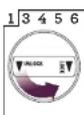
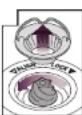
Ensure the Locking Dial is in the 'UNLOCK' position ie, it should not rotate counterclockwise. Align the tabs on the Bean Hopper with the groves on the top of the grinder and place into position. Turn the Locking Dial clockwise to lock the Bean Hopper into position. Place beans into the Bean Hopper and cover with the Bean Hopper Lid.
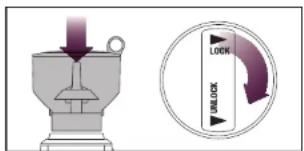
The Bean Hopper can be removed by turning the Locking Dial counterclockwise and lifting upwards. This locking system allows you to remove and transfer the Bean Hopper without having to remove the beans
NOTE
If the Bean Hopper has not been locked into position, 'LOCK BEAN HOPPER' will be displayed on the LCD screen disabling the operation of the grinder for safety.
OPERATING
your Breville Smart Grinder™
BCG800XL_IB_A10.indd 12-13 25/06/10 2:04 PM
OPERATING YOUR BREVILLE SMART GRINDER™
STEP 1:
Selecting your Grind Size
There are 25 grind size settings for 4 different coffee styles - French Press, Percolator, Drip Filter and Espresso. Within each coffee style, there are a range of sub-settings. See the Coffee Chart on page 14.
Experiment with different grind settings to achieve the brew that best suits your taste.
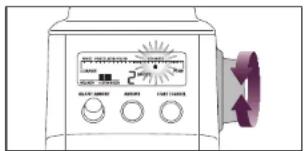
NOTE
The finer the grind setting, the longer it takes to grind a certain amount of coffee. For example, on a very coarse setting, the machine will grind more coffee in 30 seconds than on a very fine setting.
NOTE
If the Grind Size Dial is tight, empty then replace the Bean Hopper, refer to page 11. Then briefly run the grinder empty by pressing the START | CANCEL button while simultaneously turning the Grind Size Dial.
STEP 2:
Selecting your Grind Amount
Select the desired amount of grinds required by pressing the AMOUNT button.
On the Espresso setting, you can choose the number of shots; while on the French Press, Percolator and Drip Filter settings, you can choose the number of cups.
To increase the number of shots/cups, keep pressing the AMOUNT button to the maximum number of shots/cups shown in the Coffee Chart on page 14.
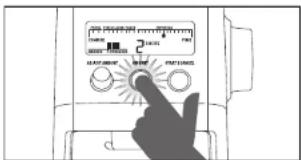
The amount dispensed will vary depending on the grind setting. The Breville Smart Grinder ^™ will automatically adjust the dose for the grind size selected.
NOTE
You can increase the amount already selected during operation by pressing the AMOUNT button.
COFFEE CHART
| COFFEE TYPE | FRENCH PRESS | PERCOLATOR/DRIP FILTER | ESPRESSO(Fine Wall Stents) | ESPRESSO(Single Wall Stents) | |
| GRIND SIZE | COARSE | MEDIUM COARSE | MEDIUM | FINE | EXTRA FINE |
| GRIND SETTING | 1-2 | 3-5 | 6-10 | 11-20 | 17-25 |
| AMOUNT | 1 UP TO 12 CUPS | 1 UP TO 12 CUPS | 1 UP TO 18 CUPS | 1 UP TO 8 SHOTS | 1 UP TO 8 SHOTS |
| USE SETTING FOR | FRENCH PRESS | PERCOLATORS(wide commissure Steel)DRIP COFFEE(wide Muffin Steel) | PERCOLATORS(wide commissure Steel)DRIP COFFEE(wide Muffin Steel)STEAM ESPRESSO(Non pure) | ESPRESSO MACHINES(Crusal Wall Stents)FULLY AUTO ESPRESSOSTOVETOP PERCOLATOR/KODIA MACHINES | ESPRESSO MACHINES(Single wall steel) |
STEP 3:
Using Auto or Manual Grinding Mode You can START and STOP the grinding operation in 2 ways.
A. Automatic Grinding (AUTO STOP)
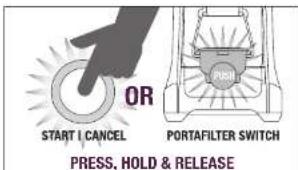
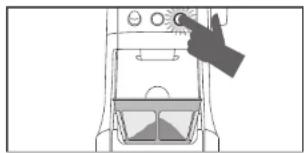
- 'Press & Release' either the START | CANCEL button or PORTAFILTER ACTIVATION SWITCH. Grinding will automatically stop when the selected grind amount is dispensed.
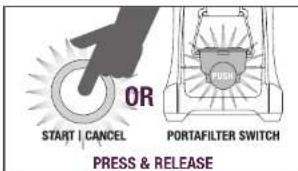
B. Manual Grinding (MANUAL START/STOP)
- 'Press & Hold' either the START | CANCEL button or PORTAFILTER ACTIVATION SWITCH for as long as you require. - 'Release' the START | CANCEL button or PORTAFILTER ACTIVATION SWITCH and the grinding will stop.
OPERATING YOUR BREVILLE SMART GRINDER™ OPERATING YOUR BREVIL
STEP 4:
Grinding into your Portafilter, Grinds Container or Drip Coffee Filter Basket.
A. Grinding into Portafilter
- Choose the Portafilter Cradle size that fits your portafilter (either small 50-54mm or large 58mm).
- Align the Portafilter Cradle with the Grind Outlet and slide into position. Be sure to fully press the Portafilter Cradle back into position and engage the retaining magnet.
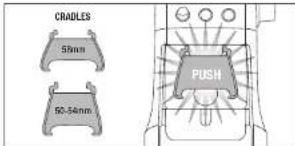
- Insert portafilter into the Portafilter Cradle.
• Use AUTOMATIC or MANUAL grinding function to start operation using the START | CANCEL button or PORTAFILTER ACTIVATION SWITCH.
NOTE
You can grind directly into your portafilter even if it does not fit into one of the cradles supplied. Without the cradle attached, press the PORTAFILTER ACTIVATION SWITCH with your finger or portafilter.
NOTE
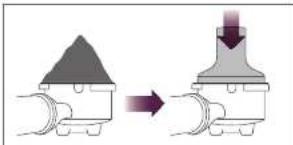
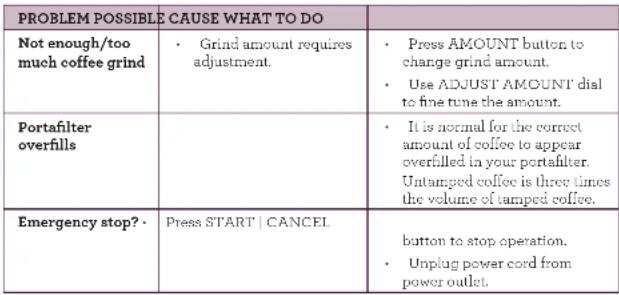
It is normal for the correct amount of coffee to appear overfilled in your portafilter. Untamped coffee is three times the volume of tamped coffee.
natural_image
Diagram showing a mechanical component before and after processing, with no visible text or symbols.B. Grinding into Grinds Container
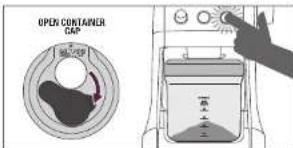
- Slide Grinds Container with cap open under Grind Outlet.
• Use AUTOMATIC or MANUAL grinding function to start operation using the START | CANCEL button on the control panel.
You can grind into the Grinds Container without the lid. However, we recommend keeping the lid on to prevent coffee grinds from escaping.
NOTE
Never let ground coffee exceed the 'MAX' mark on the Grinds Container. Too much coffee in the Grinds Container can back-up into the Grind Outlet. If grinding continues, this can burn out the motor.
OPERATING YOUR BREVILLE SMART GRINDER™
NOTE
Before removing the Grinds Container, tap the grinder a few times. This will relieve some of the static build-up which occurs when grinding.
C. Grinding into Drip Filter Basket
- Slide drip filter basket under Grind Outlet.
- Use AUTOMATIC or MANUAL grinding function to start operation using the START | CANCEL button on the control panel.
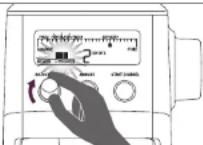
Decreasing the Grind Amount - 'WEAKER'
To decrease the preset grind amount, turn the ADJUST AMOUNT dial to the left. Each bar adjustment will decrease the grind amount by 5%, up to a minimum of 25% less.
natural_image
Diagram of a hand pointing to a control panel with no visible text or symbols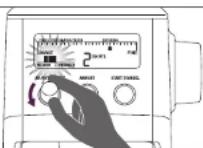
CUSTOMIZING YOUR GRIND AMOUNT
The ADJUST AMOUNT dial gives you the ability to modify the preset amount to deliver more or less grinds into your portahilter, Grinds Container or drip coffee filter basket.
ENERGY SAVING FEATURE
The grinder will automatically enter 'Stand By' mode if not used after 5 minutes.
To reactivate the machine whilst in 'Stand By' mode, press any button on the grinder control panel.
Increasing the Grind Amount - 'STRONGER'
To increase the preset grind amount, turn the ADJUST AMOUNT dial to the right. Each bar adjustment will increase the grind amount by 5%, up to a maximum of 25% more.
CARE & CLEANING
for your Breville Smart Grinder ^TV
CARE & CLEANING
- Unplug power cord from power outlet before cleaning.
- Wash the Grinds Container and Lid, Bean Hopper and Lid and Portafilter Cradles in warm soapy water, rinse and dry thoroughly.
- Wipe and polish exterior of the grinder with a soft damp cloth.
- Wipe the LCD screen with a soft damp cloth. Apply cleanser to the cloth and not the LCD surface. Cleaning with dry cloth or abrasive cleaners may scratch the surface.
NOTE
Do do not use alkaline or abrasive cleaning agents, steel wool or scouring pads, as these can damage the stainless steel surface and LCD screen.
NOTE
We recommend you do not clean any grinder parts or accessories in the dishwasher.
CLEANING CONICAL BURRS
Regular cleaning helps the burrs achieve consistent grinding results which is especially important when grinding for espresso coffee.
Dark oily beans require that the Grind Outlet be cleaned more often than medium brown non-oily beans. Coffee oils can deposit inside the Grind Outlet and become rancid.
Unlock Bean Hopper
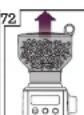
Remove Bean Hopper
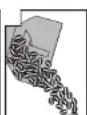
Remove beans RunAgindean. Hopper int: veillon and
until empty
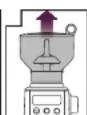
Remove Bean Hopper
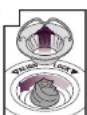
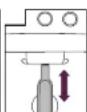
Remove Upper
Burr
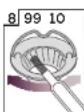
Clean Upper
Burr with
Cleaning Pro
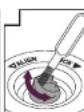
Clean Lower
Burr with
Cleaning Bras
Clean Grind
Outlet with
Cleaning Brush

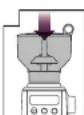
Push Upper
Bare firmly into
position
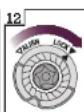
Lock Upper Buzz
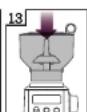
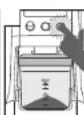
Align Bean Hopper into position

Lock Bean Hopper
HINTS & TIPS
BCG800XL_IB_A10.indd 20-21 25/06/10 2:04 PM
HINTS & TIPS
HINTS & TIPS
• Fresh grinds are the key to making coffee with more flavor and body.
• Coffee flavor and strength is a personal preference. Vary the type of coffee beans, amount of coffee and fineness of grind to achieve the flavor you prefer.
• Use freshly roasted coffee beans, preferably with a 'roasted on' date
• Store coffee beans in a dark, cool and dry place. Vacuum seal if possible.
- Buy coffee beans in small batches to reduce the storage time and store no more than one week's supply at any time.
• Once coffee is ground it quickly loses its flavor and aroma. For best results, grind beans immediately before brewing.
- Only grind the amount of coffee you will use for preparing coffee within the next hour. Ground coffee looses its aroma and flavor very fast and attracts other odors.
• Do not store beans in the Bean Hopper for a prolonged period.
- When storing the grinder, run the grinder empty to clear the Grind Outlet of any beans.
- Run grinder for 2 seconds before each use for maximum freshness.
- Clean the Bean Hopper and Conical Burrs regularly.
- When using espresso pump machines and automatic coffee centers: If your coffee or espresso brews too fast, try a finer grind size setting. If your coffee or espresso brews too slow, try a coarser grind size setting.
- For French Press: Please follow the instructions of your French Press coffee maker (after pouring water over the ground coffee, stir thoroughly to prevent the ground coffee from clogging).
- Dark, oily beans: Grind dark oily beans one or two settings coarser than medium or light brown beans. On the finest settings, it is possible that oil residue from dark, oily beans can clog the Grind Outlet.
- Clogging and Overflow: If your grinder cannot process the water through the grounds, overflow or clogging might occur. Choose a coarser grind size setting.
TROUBLESHOOTING
BCG800XL_IB_A10.indd 22-23 25/06/10 2:04 PM
TROUBLESHOOTING
| PROBLEM POSSIBLE CAUSE WHAT TO DO | ||
| Grinder does not start after pressing the START | CANCEL button | • Grinder not plugged in. • | Plug power cord into power outlet. |
| • Grinder is overheated. Thermal Safety Shut Off has been activated. | • Remove power plug from power outlet. Leave for 20 minutes to cool down before using again. | |
| • Bean Hopper not attached correctly, 'LOCK BEAN HOPPER' will be displayed on LCD screen. | • Lock Bean Hopper into position | |
| Motor starts but no ground coffee coming from Grind Outlet | • Incorrect button pressed. • | Press START | CANCEL button or PORTAFILTER ACTIVATION SWITCH to commence grinding. |
| • No coffee beans in Bean Hopper. | • Fill Bean Hopper with fresh coffee beans. | |
| • Grinder/Bean Hopper is blocked. | • Remove Bean Hopper. Inspect Bean Hopper, Upper and Lower Burr and Grind Outlet for blockage. Replace parts and try again. | |
| Motor starts but operates with a loud 'racket' noise | • Grinder is blocked with foreign item or chute is blocked. | • Remove Bean Hopper. Inspect Bean Hopper, and Upper and Lower Burrs. Remove any foreign body.• Clean burr heads and Grind Outlet (refer to Care & Cleaning instructions on Page 19). |
| • Moisture clogging grinder. | • Leave burrs to dry thoroughly before re assembling. It is possible to use a hair dryer to blow air into grinder inlet (Lower Burr) to dry. | |
| Grinder suddenly stops | • Grinder is overhested. Thermal Safety Shut Off has been activated. | • Remove power plug from power outlet. Leave for 20 minutes to cool down before using again. |
| Unable to lock Bean Hopper into position | • Coffee beans obstructing Bean Hopper locking device. | • Remove Bean Hopper. Clear coffee beans from top of burrs. Re-lock Bean Hopper into position and try again. |
TROUBLESHOOTING ONE YEAR LIMITED WARRANTY
 |


BCG800XL_IB_A10.indd 24-25 25/06/10 2:04 PM

Subject to the conditions below, HWI Breville® warrants for one year from the date of purchase that this Breville® appliance is free of defects in material and workmanship. This warranty does not cover damages to the appliance or to any of its parts that are caused by abuse, misuse, neglect, wear and test, including damages caused by using the appliance in a manner not contemplated by the instruction manual, including use on current or voltage other than that marked on the product, or by failing to follow safety, operating, care or cleaning instructions or alteration or repair not authorized by HWI Breville®. Where applicable, this warranty covers the repair and/or replacement of a defective product at HWI Breville®s option. This warranty provides specified rights. Consumers may also have other rights which vary from state to state, or province to province.
TERM OF WARRANTY:
The warranty extends for one year from the date of original purchase by a consumer, and does not apply to purchases by retailers or distributors, or to purchases for commercial use. If a replacement product is sent, it will carry the remaining warranty of the original product.
Please contact our Customer Service Center at www.Breville.com or call the toll free number below for instructions on the repair and/or replacement of the appliance if a covered defect occurs within the one year warranty period.
CONDITIONS:
In order to be eligible for this warranty, the consumer must purchase the Breville® appliance from an "Authorized Retailer" and must provide proof that the product was purchased within one year prior to making any claim under the warranty. Registering the product with HWI Breville®, while appreciated, is not required, and is not a substitute for proof of purchase.
DISCLAIMER:
This warranty covers the repair and/or replacement of products. HWI Breville® expressly disclaims all responsibility for consequential damages for incidental losses caused by use of this appliance. Some states or provinces do not allow this exclusion or limitation for incidental or consequential losses, so the foregoing disclaimer may not apply to you.
Fitness and merchantability: any warranty of merchantability or fitness with respect to this product is also limited to the one year limited warranty period. The warranties set forth herein are exclusive and not other warranties, express or implied, are made by HWI Breville ^® or are authorized to be made with respect to the product.
If the appliance should become defective within the warranty period, do not return the appliance to the store. Please visit us online at www.Breville.com on:
Toll free phone number:
USA: 1-866-BREVILLE (1-866-273-8455)
CANADA: 1-866-BREVILLE (1-866-273-8455)
Email:
USA: AskUs@BrevilleUSA.com
CANADA: AskUs@Breville.ca
fÉLICITATIONS

FAITES LA CONNAISSANCE DE VOTRE SMART GRINDER ^1c DE BREVILLEFA
A. Boucle Assist ^HC de Breville
NOTE
natural_image
Diagram showing a mechanical component before and after processing, with no visible text or symbolsnatural_image
Diagram of a hand pointing at a control panel with no visible text or symbols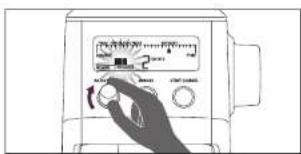
MODIFIER À VOTRE GOÛT LA QUANTITÉ DE GRAINS
Retirez la meale
supérieure
BCG800XL_IB_A10.indd 44-45 25/06/10 2:04 PM
TRUCS ET ASTUCES
TRUCS ET ASTUCES
- Breville Customer Service Center
- Breville®
- CONTENTS
- IMPORTANT SAFEGUARDS
- READ ALL INSTRUCTIONS
- BREvILLE RECOMMENDS SAFETY FIRSTBREvILLE RECOMMENDS SAFETY FIR
- BREvILLE RECOMMENDS SAFETY FIRST
- BREvILLE ASSIST™ PLUG
- SHORT CORD INSTRUCTIONS
- FOR HOUSEHOLD USE ONLY SAvE THESE INSTRUCTIONS
- KNOW
- KNOW YOUR BREVILLE SMART GRINDER 72 KNOW YOUR BREVILLE SMART
- ACCESSORIES
- ASSEMBLING
- BEFORE FIRST USE
- ASSEMBLING YOUR BREvILLE SMART GRINdER™
- Bean Hopper
- NOTE
- OPERATING
- your Breville Smart Grinder™
- OPERATING YOUR BREVILLE SMART GRINDER™
- STEP 1:
- Selecting your Grind Size
- STEP 2:
- Selecting your Grind Amount
- STEP 3:
- Automatic Grinding (AUTO STOP)
- Manual Grinding (MANUAL START/STOP)
- OPERATING YOUR BREVILLE SMART GRINDER™ OPERATING YOUR BREVIL
- STEP 4:
- Grinding into your Portafilter, Grinds Container or Drip Coffee Filter Basket.
- Grinding into Portafilter
- Grinding into Grinds Container
- Grinding into Drip Filter Basket
- Decreasing the Grind Amount - 'WEAKER'
- CUSTOMIZING YOUR GRIND AMOUNT
- ENERGY SAVING FEATURE
- Increasing the Grind Amount - 'STRONGER'
- CARE & CLEANING
- CLEANING CONICAL BURRS
- HINTS & TIPS
- TROUBLESHOOTING
- TERM OF WARRANTY:
- CONDITIONS:
- DISCLAIMER:
- Toll free phone number:
- Email:
- fÉLICITATIONS
- FAITES LA CONNAISSANCE DE VOTRE SMART GRINDER 1c DE BREVILLEFA
- MODIFIER À VOTRE GOÛT LA QUANTITÉ DE GRAINS
- TRUCS ET ASTUCES
Brand : BREVILLE
Model : the Smart Grinder BCG800XL
Category : Food Processor