DS-TVL121-9-6D - LED Lighting Hikvision - Free user manual and instructions
Find the device manual for free DS-TVL121-9-6D Hikvision in PDF.




User questions about DS-TVL121-9-6D Hikvision
0 question about this device. Answer the ones you know or ask your own.
Ask a new question about this device
Download the instructions for your LED Lighting in PDF format for free! Find your manual DS-TVL121-9-6D - Hikvision and take your electronic device back in hand. On this page are published all the documents necessary for the use of your device. DS-TVL121-9-6D by Hikvision.
USER MANUAL DS-TVL121-9-6D Hikvision
Entrance/Exit LED Display
Quick Start Guide
© 2020 Hangzhou Hikvision Digital Technology Co., Ltd. All rights reserved.
This Manual is the property of Hangzhou Hikvision Digital Technology Co., Ltd. or its aliates (hereinaer referred to as "Hikvision"), and it cannot be reproduced, changed, translated, or distributed, parally or wholly, by any means, without the prior written permission of Hikvision. Unless otherwise expressly stated herein, Hikvision does not make any warranties, guarantees or representations, express or implied, regarding to the Manual, any informaon contained herein.
About this Manual
The Manual includes instrucons for using and managing the Product. Pictures, charts, images and all other informaon hereinaer are for descripon and explanaon only. The informaon contained in the Manual is subject to change, without noce, due to rmware updates or other reasons. Please nd the latest version of this Manual at the Hikvision website (hps://www.hikvision.com/).
Please use this Manual with the guidance and assistance of professionals trained in supporting the Product.
Trademarks Acknowledgement
- HIKVISION and other Hikvision's trademarks and logos are the properes of Hikvision in various jurisdicons. Other trademarks and logos menoned below are the properes of their respective owners.
- Other trademarks and logos menoned are the properes of their respective owners.
Legal Disclaimer
TO THE MAXIMUM EXTENT PERMITTED BY APPLICABLE LAW, THIS MANUAL AND THE PRODUCT DESCRIBED, WITH ITS HARDWARE, SOFTWARE AND FIRMWARE, ARE PROVIDED "AS IS" AND "WITH ALL FAULTS AND ERRORS". HIKVISION MAKES NO WARRANTIES, EXPRESS OR IMPLIED, INCLUDING WITHOUT LIMITATION, MERCHANTABILITY, SATISFACTORY QUALITY, OR FITNESS FOR A PARTICULAR PURPOSE. THE USE OF THE PRODUCT BY YOU IS AT YOUR OWN RISK. IN NO EVENT WILL HIKVISION BE LIABLE TO YOU FOR ANY SPECIAL, CONSEQUENTIAL, INCIDENTAL, OR INDIRECT DAMAGES, INCLUDING, AMONG OTHERS, DAMAGES FOR LOSS OF BUSINESS PROFITS, BUSINESS INTERRUPTION, OR LOSS OF DATA, CORRUPTION OF SYSTEMS, OR LOSS OF DOCUMENTATION, WHETHER BASED ON BREACH OF CONTRACT, TORT (INCLUDING NEGLIGENCE), PRODUCT LIABILITY, OR OTHERWISE, IN
CONNECTION WITH THE USE OF THE PRODUCT, EVEN IF HIKVISION HAS BEEN ADVISED OF THE POSSIBILITY OF SUCH DAMAGES OR LOSS.
YOU ACKNOWLEDGE THAT THE NATURE OF THE INTERNET PROVIDES FOR INHERENT SECURITY RISKS, AND HIKVISION SHALL NOT TAKE ANY RESPONSIBILITIES FOR ABNORMAL OPERATION, PRIVACY LEAKAGE OR OTHER DAMAGES RESULTING FROM CYBER-ATTACK, HACKER ATTACK, VIRUS INFECTION, OR OTHER INTERNET SECURITY RISKS; HOWEVER, HIKVISION WILL PROVIDE TIMELY TECHNICAL SUPPORT IF REQUIRED.
YOU AGREE TO USE THIS PRODUCT IN COMPLIANCE WITH ALL APPLICABLE LAWS, AND YOU ARE SOLELY RESPONSIBLE FOR ENSURING THAT YOUR USE CONFORMS TO THE APPLICABLE LAW. ESPECIALLY, YOU ARE RESPONSIBLE, FOR USING THIS PRODUCT IN A MANNER THAT DOES NOT INFRINGE ON THE RIGHTS OF THIRD PARTIES, INCLUDING WITHOUT LIMITATION, RIGHTS OF PUBLICITY, INTELLECTUAL PROPERTY RIGHTS, OR DATA PROTECTION AND OTHER PRIVACY RIGHTS. YOU SHALL NOT USE THIS PRODUCT FOR ANY PROHIBITED END-USES, INCLUDING THE DEVELOPMENT OR PRODUCTION OF WEAPONS OF MASS DESTRUCTION, THE DEVELOPMENT OR PRODUCTION OF CHEMICAL OR BIOLOGICAL WEAPONS, ANY ACTIVITIES IN THE CONTEXT RELATED TO ANY NUCLEAR EXPLOSIVE OR UNSAFE NUCLEAR FUEL-CYCLE, OR IN SUPPORT OF HUMAN RIGHTS ABUSES.
IN THE EVENT OF ANY CONFLICTS BETWEEN THIS MANUAL AND THE APPLICABLE LAW, THE LATER PREVAILS.
Regulatory Informaon
FCC Informaon
Please take aenon that changes or modicaon not expressly approved by the party responsible for compliance could void the user's authority to operate the equipment.
FCC compliance: This equipment has been tested and found to comply with the limits for a Class A digital device, pursuant to part 15 of the FCC Rules. These limits are designed to provide reasonable protecon against harmful interference when the equipment is operated in a commercial environment. This equipment generates, uses, and can radiate radio frequency energy and, if not installed and used in accordance with the instrucon manual, may cause harmful interference to radio communicaons. Operaon of this equipment in a residential area is likely to cause harmful interference in which case the user will be required to correct the interference at his own
expense.
FCC Conditions
This device complies with part 15 of the FCC Rules. Operaon is subject to the following two conditions:
- This device may not cause harmful interference.
- This device must accept any interference received, including interference that may cause undesired operaon.
EU Conformity Statement

This product and - if applicable - the supplied accessories too are marked with "CE" and comply therefore with the applicable harmonized European standards listed under the
EMC Direcve 2014/30/EU, the LVD Direcve 2014/35/EU, the RoHS Direcve 2011/65/EU.
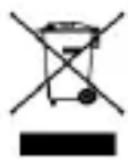
2012/19/EU (WEEE direcve): Products marked with this symbol cannot be disposed of as unsorted municipal waste in the European Union. For proper recycling, return this product to your local supplier upon the purchase of equivalent new equipment, or dispose of it at designated collecon points. For more informaon see: www.recyclethis.info
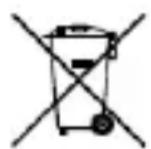
2006/66/EC (baery direcve): This product contains a baery that cannot be disposed of as unsorted municipal waste in the European Union. See the product documentaon for speci baery informaon. The baery is marked with this symbol, which may include leering to indicate cadmium (Cd), lead (Pb), or mercury (Hg). For proper recycling, return the baery to your supplier or to a designated collecon point. For more informaon see: www.recyclethis.info
Industry Canada ICES-003 Compliance
This device meets the CAN ICES-3 (A)/NMB-3(A) standards requirements.
Safety Instrucons
- Use of the product must be in strict compliance with the local laws and regulaons. Please shut down the device in prohibited area.
-
Use of the product must be in strict compliance with the local electrical safety regulaons.
-
Use the power adapter provided by qualified manufacturer. Refer to the product specicaon for detailed power requirements.
- It is recommended to provide independent power adapter for each device as adapter overload may cause over-heang or a re hazard.
- Make sure that the power has been disconnected before you wire, install, or disassemble the device in the authorized way according to the descripon in the manual.
- To avoid electric shock, DO NOT directly touch exposed contacts and components once the device is powered up.
- DO NOT use damaged power supply devices (e.g., cable, power adapter, etc.) to avoid electric shock, re hazard, and explosion.
- DO NOT directly cut the power supply to shut down the device. Please shut down the device normally and then unplug the power cord to avoid data loss.
- DO NOT block the power supply equipment to plug and unplug conveniently.
- Make sure the power supply has been disconnected if the power adapter is idle.
- Make sure the device is connected to the ground rmly.
- To avoid heat accumulaon, good venlaon is required for a proper operang environment.
- Store the device in dry, well-ventilated, corrosive-gas-free, no direct sunlight, and no heang source environment.
- Avoid fire, water, and explosive environment when using the device.
- Install the device in such a way that lightning strikes can be avoided. Install a lightning arrester if necessary.
- Keep the device away from magnec interference.
- Avoid device installaon on vibratory surfaces or places. Failure to comply with this may cause device damage.
- DO NOT touch the heat dissipacn component to avoid burns.
-
DO NOT expose the device to extremely hot, cold, or humidity environments. For temperature and humidity requirements, see device specicaon.
-
If smoke, odor, or noise arises from the device, immediately turn o the power, unplug the power cable, and contact the service center.
- If the device cannot work properly, contact the store you purchased it or the nearest service center. DO NOT disassemble or modify the device in the unauthorized way (For the problems caused by unauthorized modicaon or maintenance, the company shall not take any responsibility).
- Keep all packaging aer unpacking them for future use. In case of any failure occurred, you need to return the device to the factory with the original packaging. Transportaon without the original packaging may result in damage to the device and the company shall not take any responsibility.
- Please enforce the protecon for the personal informaon and the data security as the device may be confronted with the network security problems when it is connected to the Internet. Contact us if network security risks occur.
- Please understand that you have the responsibility to congregate all the passwords and other security sengs about the device, and keep your user name and password.
- DO NOT disconnect the power during formang, uploading, and downloading. Or les may be damaged.
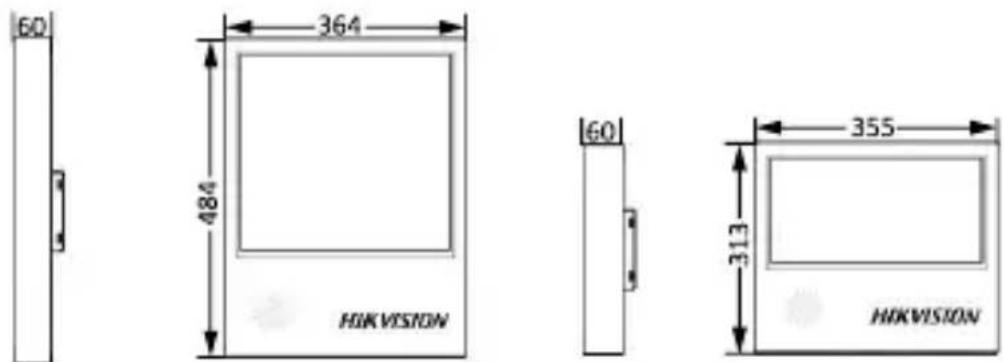
Dimension
(Unit: mm)
Installaon
Here we take the installaon of one type of devices for example.
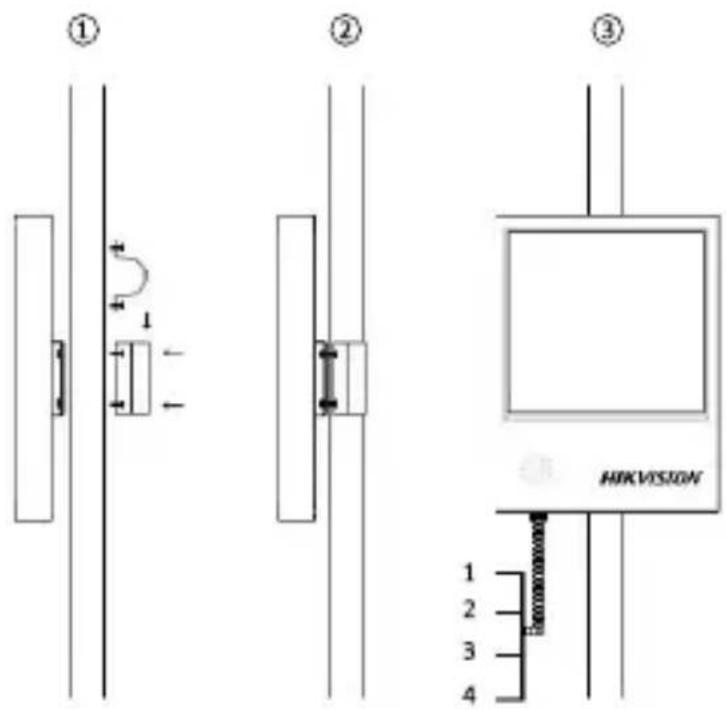
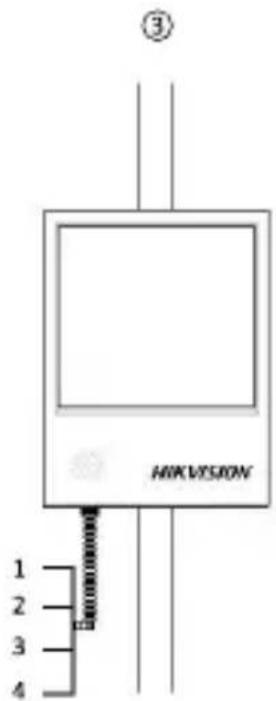
- Install the hoop to the vercal pole.
- Fix the device with the hoop via screws.
- Connect the interfaces of the device (1: Power, 2: RS-485, 3: RJ45, 4: Audio).
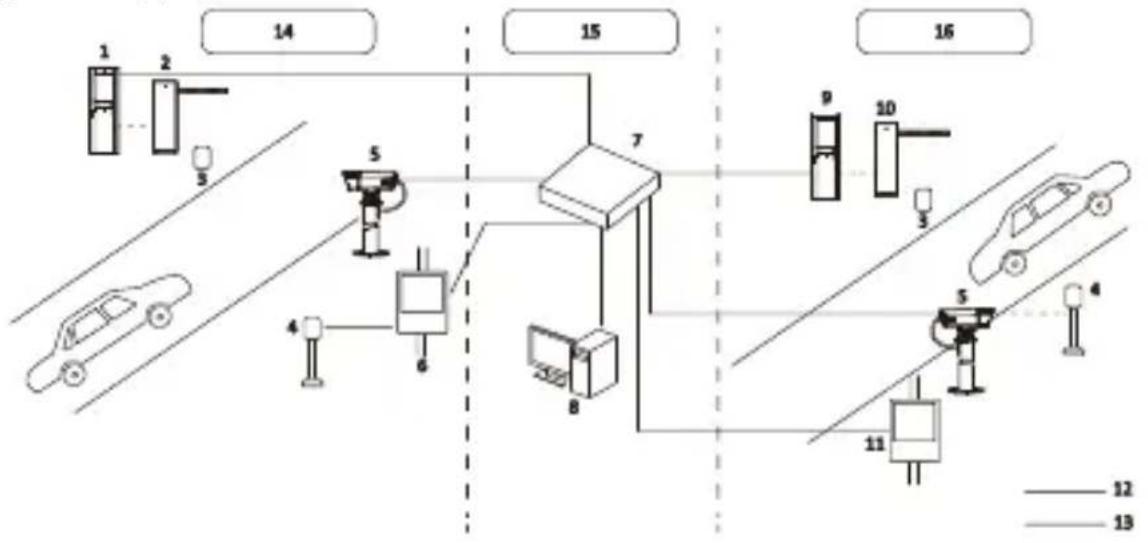
Typical Applicaon
flowchart
graph TD
    subgraph Lane 12
        A["1"] --> B["2"]
        B --> C["3"]
    end
    subgraph Lane 13
        D["4"] --> E["5"]
        E --> F["6"]
    end
    subgraph Lane 14
        G["7"] --> H["8"]
        H --> I["9"]
        I --> J["10"]
        J --> K["11"]
        K --> L["12"]
        K --> M["13"]
    end
    style Lane 12 fill:#f9f,stroke:#333
    style Lane 13 fill:#f9f,stroke:#333
    style Lane 14 fill:#ccf,stroke:#333
| No. | Descripon | No. | Descripon |
| 1 | Entrance staon | 9 | Exit staon |
| 2 | Entrance barrier gate | 10 | Exit barrier gate |
| 3 | An-fall radar | 11 | Exit LED display |
| 4 | Capture-trigger radar | 12 | RS-485/Control cable |
| 5 | ANPR camera | 13 | Ethernet cable |
| 6 | Entrance LED display | 14 | Entrance |
| 7 | Switch | 15 | Booth/Center |
| 8 | Entrance and exit management soware | 16 | Exit |
flowchart
graph TD
    A["1"] --> B["2"]
    B --> C["3"]
    C --> D["4"]
    D --> E["5"]
    E --> F["6"]
    F --> G["7"]
    G --> H["8"]
    H --> I["9"]
    I --> J["10"]
    J --> K["11"]
    K --> L["12"]
    K --> M["13"]
    N["14"] --> O["15"]
    O --> P["16"]
    style N stroke:#000,stroke-width:2px
    style O stroke:#000,stroke-width:2px
    style P stroke:#000,stroke-width:2px
    style Q stroke:#000,stroke-width:2px
    style R stroke:#000,stroke-width:2px
    style S stroke:#000,stroke-width:2px
    style T stroke:#000,stroke-width:2px
    style U stroke:#000,stroke-width:2px
    style V stroke:#000,stroke-width:2px
    style W stroke:#000,stroke-width:2px
    style X stroke:#000,stroke-width:2px
    style Y stroke:#000,stroke-width:2px
    style Z stroke:#000,stroke-width:2px
    style AA stroke:#000,stroke-width:2px
    style AB stroke:#000,stroke-width:2px
    style AC stroke:#000,stroke-width:2px
    style AD stroke:#000,stroke-width:2px
    style AE stroke:#000,stroke-width:2px
    style AF stroke:#000,stroke-width:2px
    style AG stroke:#000,stroke-width:2px
    style AH stroke:#000,stroke-width:2px
    style AI stroke:#000,stroke-width:2px
    style AJ stroke:#000,stroke-width:2px
    style AK stroke:#000,stroke-width:2px
    style AL stroke:#000,stroke-width:2px
    style AM stroke:#000,stroke-width:2px
    style AN stroke:#000,stroke-width:2px
    style AO stroke:#000,stroke-width:2px
    style AP stroke:#000,stroke-width:2px
    style AQ stroke:#000,stroke-width:2px
    style AR stroke:#000,stroke-width:2px
    style AS stroke:#000,stroke-width:2px
    style AT stroke:#000,stroke-width:2px
    style AU stroke:#000,stroke-width:2px
    style AV stroke:#000,stroke-width:2px
flowchart
graph TD
    A["1"] --> B["2"]
    B --> C["3"]
    C --> D["4"]
    D --> E["5"]
    E --> F["6"]
    F --> G["7"]
    G --> H["8"]
    H --> I["9"]
    I --> J["10"]
    J --> K["11"]
    K --> L["12"]
    K --> M["13"]
    N["14"] --> O["15"]
    O --> P["16"]
    style N stroke:#000,stroke-width:2px
    style O stroke:#000,stroke-width:2px
    style P stroke:#000,stroke-width:2px
    style Q stroke:#000,stroke-width:2px
    style R stroke:#000,stroke-width:2px
    style S stroke:#000,stroke-width:2px
    style T stroke:#000,stroke-width:2px
    style U stroke:#000,stroke-width:2px
    style V stroke:#000,stroke-width:2px
    style W stroke:#000,stroke-width:2px
    style X stroke:#000,stroke-width:2px
    style Y stroke:#000,stroke-width:2px
    style Z stroke:#000,stroke-width:2px
    style AA stroke:#000,stroke-width:2px
    style AB stroke:#000,stroke-width:2px
    style AC stroke:#000,stroke-width:2px
    style AD stroke:#000,stroke-width:2px
    style AE stroke:#000,stroke-width:2px
    style AF stroke:#000,stroke-width:2px
    style AG stroke:#000,stroke-width:2px
    style AH stroke:#000,stroke-width:2px
    style AI stroke:#000,stroke-width:2px
    style AJ stroke:#000,stroke-width:2px
    style AK stroke:#000,stroke-width:2px
    style AL stroke:#000,stroke-width:2px
    style AM stroke:#000,stroke-width:2px
    style AN stroke:#000,stroke-width:2px
    style AO stroke:#000,stroke-width:2px
    style AP stroke:#000,stroke-width:2px
    style AQ stroke:#000,stroke-width:2px
    style AR stroke:#000,stroke-width:2px
    style AS stroke:#000,stroke-width:2px
    style AT stroke:#000,stroke-width:2px
    style AU stroke:#000,stroke-width:2px
    style AV stroke:#000,stroke-width:2px
flowchart
graph TD
    A["1"] --> B["2"]
    B --> C["3"]
    C --> D["4"]
    D --> E["5"]
    E --> F["6"]
    F --> G["7"]
    G --> H["8"]
    H --> I["9"]
    I --> J["10"]
    J --> K["11"]
    K --> L["12"]
    K --> M["13"]
    N["14"] --> O["15"]
    O --> P["16"]
    style N stroke:#000,stroke-width:2px
    style O stroke:#000,stroke-width:2px
    style P stroke:#000,stroke-width:2px
    style Q stroke:#000,stroke-width:2px
    style R stroke:#000,stroke-width:2px
    style S stroke:#000,stroke-width:2px
    style T stroke:#000,stroke-width:2px
    style U stroke:#000,stroke-width:2px
    style V stroke:#000,stroke-width:2px
    style W stroke:#000,stroke-width:2px
    style X stroke:#000,stroke-width:2px
    style Y stroke:#000,stroke-width:2px
    style Z stroke:#000,stroke-width:2px
    style AA stroke:#000,stroke-width:2px
    style AB stroke:#000,stroke-width:2px
    style AC stroke:#000,stroke-width:2px
    style AD stroke:#000,stroke-width:2px
    style AE stroke:#000,stroke-width:2px
    style AF stroke:#000,stroke-width:2px
    style AG stroke:#000,stroke-width:2px
    style AH stroke:#000,stroke-width:2px
    style AI stroke:#000,stroke-width:2px
    style AJ stroke:#000,stroke-width:2px
    style AK stroke:#000,stroke-width:2px
    style AL stroke:#000,stroke-width:2px
    style AM stroke:#000,stroke-width:2px
    style AN stroke:#000,stroke-width:2px
    style AO stroke:#000,stroke-width:2px
    style AP stroke:#000,stroke-width:2px
    style AQ stroke:#000,stroke-width:2px
    style AR stroke:#000,stroke-width:2px
    style AS stroke:#000,stroke-width:2px
    style AT stroke:#000,stroke-width:2px
    style AU stroke:#000,stroke-width:2px
    style AV stroke:#000,stroke-width:2px
flowchart
graph TD
    A["1"] --> B["2"]
    B --> C["3"]
    C --> D["4"]
    D --> E["5"]
    E --> F["6"]
    F --> G["7"]
    G --> H["8"]
    H --> I["9"]
    I --> J["10"]
    J --> K["11"]
    K --> L["12"]
    K --> M["13"]
    N["14"] --> O["15"]
    O --> P["16"]
    style N stroke:#000,stroke-width:2px
    style O stroke:#000,stroke-width:2px
    style P stroke:#000,stroke-width:2px
    style Q stroke:#000,stroke-width:2px
    style R stroke:#000,stroke-width:2px
    style S stroke:#000,stroke-width:2px
    style T stroke:#000,stroke-width:2px
    style U stroke:#000,stroke-width:2px
    style V stroke:#000,stroke-width:2px
    style W stroke:#000,stroke-width:2px
    style X stroke:#000,stroke-width:2px
    style Y stroke:#000,stroke-width:2px
    style Z stroke:#000,stroke-width:2px
    style AA stroke:#000,stroke-width:2px
    style AB stroke:#000,stroke-width:2px
    style AC stroke:#000,stroke-width:2px
    style AD stroke:#000,stroke-width:2px
    style AE stroke:#000,stroke-width:2px
    style AF stroke:#000,stroke-width:2px
    style AG stroke:#000,stroke-width:2px
    style AH stroke:#000,stroke-width:2px
    style AI stroke:#000,stroke-width:2px
    style AJ stroke:#000,stroke-width:2px
    style AK stroke:#000,stroke-width:2px
    style AL stroke:#000,stroke-width:2px
    style AM stroke:#000,stroke-width:2px
    style AN stroke:#000,stroke-width:2px
    style AO stroke:#000,stroke-width:2px
    style AP stroke:#000,stroke-width:2px
    style AQ stroke:#000,stroke-width:2px
    style AR stroke:#000,stroke-width:2px
    style AS stroke:#000,stroke-width:2px
    style AT stroke:#000,stroke-width:2px
    style AU stroke:#000,stroke-width:2px
    style AV stroke:#000,stroke-width:2px
flowchart
graph TD
    A["1"] --> B["2"]
    B --> C["3"]
    C --> D["4"]
    D --> E["5"]
    E --> F["6"]
    F --> G["7"]
    G --> H["8"]
    H --> I["9"]
    I --> J["10"]
    J --> K["11"]
    K --> L["12"]
    K --> M["13"]
    N["14"] --> O["15"]
    O --> P["16"]
    style N stroke:#000,stroke-width:2px
    style O stroke:#000,stroke-width:2px
    style P stroke:#000,stroke-width:2px
    style Q stroke:#000,stroke-width:2px
    style R stroke:#000,stroke-width:2px
    style S stroke:#000,stroke-width:2px
    style T stroke:#000,stroke-width:2px
    style U stroke:#000,stroke-width:2px
    style V stroke:#000,stroke-width:2px
    style W stroke:#000,stroke-width:2px
    style X stroke:#000,stroke-width:2px
    style Y stroke:#000,stroke-width:2px
    style Z stroke:#000,stroke-width:2px
    style AA stroke:#000,stroke-width:2px
    style AB stroke:#000,stroke-width:2px
    style AC stroke:#000,stroke-width:2px
    style AD stroke:#000,stroke-width:2px
    style AE stroke:#000,stroke-width:2px
    style AF stroke:#000,stroke-width:2px
    style AG stroke:#000,stroke-width:2px
    style AH stroke:#000,stroke-width:2px
    style AI stroke:#000,stroke-width:2px
    style AJ stroke:#000,stroke-width:2px
    style AK stroke:#000,stroke-width:2px
    style AL stroke:#000,stroke-width:2px
    style AM stroke:#000,stroke-width:2px
    style AN stroke:#000,stroke-width:2px
    style AO stroke:#000,stroke-width:2px
    style AP stroke:#000,stroke-width:2px
    style AQ stroke:#000,stroke-width:2px
    style AR stroke:#000,stroke-width:2px
    style AS stroke:#000,stroke-width:2px
    style AT stroke:#000,stroke-width:2px
    style AU stroke:#000,stroke-width:2px
    style AV stroke:#000,stroke-width:2px
natural_image
Pure electrical circuit lines without any symbols
natural_image
Pure electrical circuit lines without any symbols