KG240YE3 - Monitor ACER - Free user manual and instructions
Find the device manual for free KG240YE3 ACER in PDF.


User questions about KG240YE3 ACER
0 question about this device. Answer the ones you know or ask your own.
Ask a new question about this device
Download the instructions for your Monitor in PDF format for free! Find your manual KG240YE3 - ACER and take your electronic device back in hand. On this page are published all the documents necessary for the use of your device. KG240YE3 by ACER.
USER MANUAL KG240YE3 ACER
Copyright © 2022. Acer Incorporated.
EU Declaration of Conformity
We,
Acer Incorporated
8F, 88, Sec. 1, Xintai 5th Rd., Xizhi, New Taipei City 221
And,
Acer Italy s.r.l.
Viale delle Industrie 1/A, 20044 Arese (MI), Italy
Tel: +39-02-939-921, Fax: +39-02 9399-2913
www.acer.it
Product:
LCD Monitor
Trade Name:
acer
Model Number:
KG240Y
SKU Number:
KG240Y xxxxxxxxx
("x" = 0\~9, a \~ z, A \~ Z, or blank)
We, Acer Incorporated, hereby declare under our sole responsibility that the product described above is in conformity with the relevant Union harmonization legislations as below Directive and following harmonized standards and/or other relevant standards have been applied:
EMC Directive: 2014/30/EU
EN 55032:2015+AC:2016 Class B
EN 61000-3-3:2013+A1:2019
EN 61000-3-2:2014 Class D
EN 55035:2017+A11:2020
EN 55024:2010+A1:2015
LVD Directive: 2014/35/EU
EN 62368-1:2014+A11:2017
RoHS Directive: 2011/65/EU
EN IEC 63000:2018
ErP Directive: 2009/125/EC
(EU) 2019/2021; EN 50564:2011
Year to begin affixing CE marking: 2022.
RU Jan / Manager
Acer Incorporated (New Taipei City)
Sep. 30, 2022
Date

Federal Communications Commission Declaration of Conformity
This device complies with Part 15 of the FCC Rules. Operation is subject to the following two conditions: (1) this device may not cause harmful interference, and (2) this device must accept any interference received, including interference that may cause undesired operation.
The following local Manufacturer / Importer is responsible for this declaration:
| Product: | LCD Monitor |
| Model Number: | KG240Y |
| SKU Number: | KG240Y xxxxxxxx(“x” = 0~9, a ~ z, A ~ Z, or blank) |
| Name of Responsible Party: | Acer America Corporation |
| Address of Responsible Party: | 333 West San Carlos St., Suite 1500San Jose, CA 95110,U. S. A. |
| Contact Person: | Acer Representative |
| Phone No.: | 254-298-4000 |
| Fax No.: | 254-298-4147 |
EU Declaration of Conformity
We,
Acer Incorporated
8F, 88, Sec. 1, Xintai 5th Rd., Xizhi, New Taipei City 221
And,
Acer Italy s.r.l.
Viale delle Industrie 1/A, 20044 Arese (MI), Italy
Tel: +39-02-939-921, Fax: +39-02 9399-2913
www.acer.it
Product:
LCD Monitor
Trade Name:
acer
Model Number:
KG270
SKU Number:
KG270 xxxxxxxxx
("x" = 0\~9, a \~ z, A \~ Z, or blank)
We, Acer Incorporated, hereby declare under our sole responsibility that the product described above is in conformity with the relevant Union harmonization legislations as below Directive and following harmonized standards and/or other relevant standards have been applied:
EMC Directive: 2014/30/EU
EN 55032:2015+AC:2016 Class B
EN 61000-3-3:2013+A1:2019
EN 61000-3-2:2014 Class D
EN 55035:2017+A11:2020
EN 55024:2010+A1:2015
LVD Directive: 2014/35/EU
EN 62368-1:2014+A11:2017
RoHS Directive: 2011/65/EU
EN IEC 63000:2018
ErP Directive: 2009/125/EC
(EU) 2019/2021; EN 50564:2011
Year to begin affixing CE marking: 2022.
RU Jan / Manager
Acer Incorporated (New Taipei City)
Sep. 30, 2022
Date

Federal Communications Commission Declaration of Conformity
This device complies with Part 15 of the FCC Rules. Operation is subject to the following two conditions: (1) this device may not cause harmful interference, and (2) this device must accept any interference received, including interference that may cause undesired operation.
The following local Manufacturer / Importer is responsible for this declaration:
| Product: | LCD Monitor |
| Model Number: | KG270 |
| SKU Number: | KG270 xxxxxxxx(“x” = 0~9, a ~ z, A ~ Z, or blank) |
| Name of Responsible Party: | Acer America Corporation |
| Address of Responsible Party: | 333 West San Carlos St., Suite 1500San Jose, CA 95110,U. S. A. |
| Contact Person: | Acer Representative |
| Phone No.: | 254-298-4000 |
| Fax No.: | 254-298-4147 |
natural_image
Line drawing of a flat-screen monitor with three legs (no text or symbols)
text_image
JXCR USER GUIDE
natural_image
Isometric technical drawing of a multi-chamber plastic housing or enclosure with internal compartments and mounting holes (no text or symbols)natural_image
Technical line drawing of a rectangular electronic device with ventilation grilles and internal components (no text or symbols)natural_image
Technical line drawing of a flat-panel electronic device with four legs and a screen (no text or symbols)natural_image
Simple line drawing of a flat-screen monitor with no text or symbols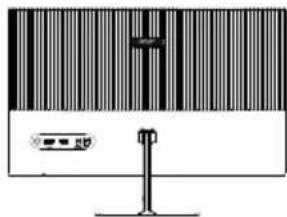
natural_image
Illustration of a computer monitor with a barcode bar and indicator lights (no text or symbols)natural_image
Pure electrical connector diagram without any text or symbols| NO. BROCHE | DESCRIPTION | NO. BROCHE | DESCRIPTION |
| 1 | RED | 2 | GREEN |
| 3 | BLUE | 4 | GND |
| 5 | VGA_DET | 6 | GND |
| 7 | GND 8 GND | ||
| 9 | VGA5V | 10 | GND |
| 11 | GND | 12 | DDC_SDA |
| 13 | HSYNC | 14 | VSYNC |
| 15 | DDC_SCL-P |
text_image
Input HDMI Auto Source On Move Enter Exittext_image
Modes G¹ Action G² Racing G³ Sports User Standard EDD Graphics HDR Move Entertext_image
Brightness 75 Adjust OKMenu principal
La page Fonction
-
Auto Config: Press this button to activate the Auto Adjustment function. The Auto adjustment function is used to set the HPos, VPos, Clock and Focus. (Only available on VGA port.)
-
H. Position: Adjust the horizontal position of the picture.
-
V. Position: Adjust the vertical position of the picture.
-
Focus: Adjust clk phase to ADC.
-
Clock: Adjust ADC Clock Fast Lock.
Couleur
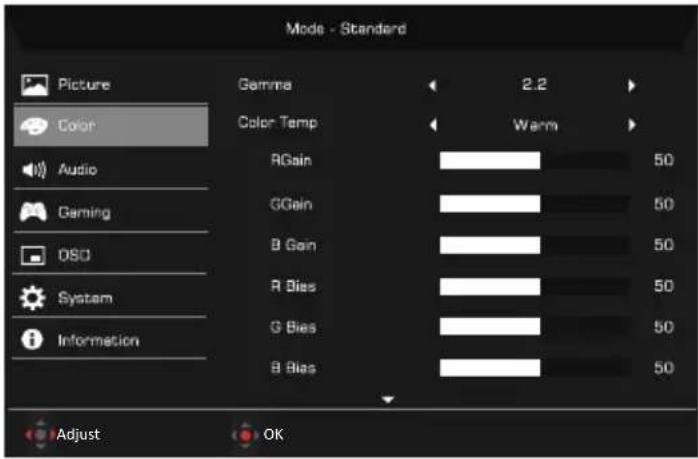
text_image
Mode - Standard Picture Color Audio Gaming DSO System Information Gamma 2.2 Color Temp Warm RGain 50 GGain 50 B Gain 50 R Bias 50 G Bias 50 B Bias 50 Adjust OK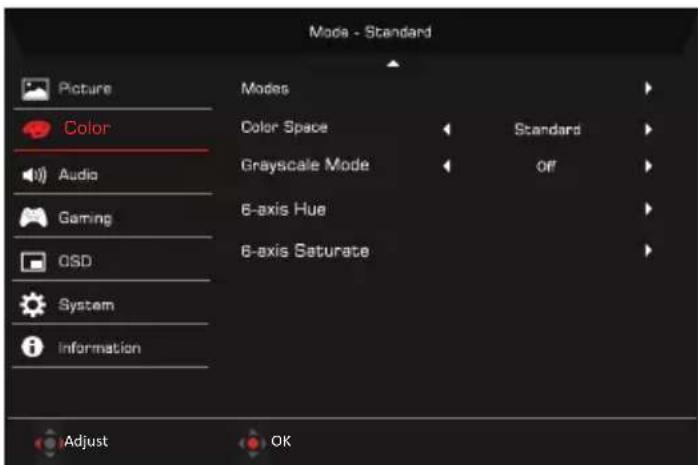
text_image
Mode - Standard Picture Color Audio Gaming OSD System Information Modes Color Space Grayscale Mode 6-axis Hue 6-axis Saturate Standard Off Adjust OKtext_image
Mode - Standard Picture Color Deming DSO System Information Main Source HDMI Resolution 1920x1080 HV Frequency H: 95K@S V: Hz Mode SDR Series Number Reset All Settings Adjust OKtext_image
Mode - User Picture Color Gaming OSO System Information Save Settings to . . Game Mode: Action Game Mode: Racing Game Mode: Sports Adjust OKtext_image
QR code image containing encoded data, no visible human-readable text
text_image
QR code image containing encoded data, no visible human-readable textKG240Y KG270