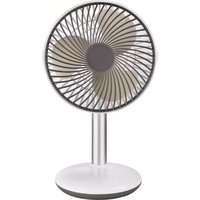
TKG VT 1048 USB - Fan KALORIK - Free user manual and instructions
Find the device manual for free TKG VT 1048 USB KALORIK in PDF.



| Product Type | Portable Table Fan |
| Brand | Kalorik |
| Model | TKG VT 1048 USB |
| Power Supply | USB (mini-USB) |
| Battery | Built-in lithium-ion, non-replaceable |
| Charge Indicator | Red LED flashing (charging), green LED flashing (charged) |
| Number of Speeds | 4 (low, low-medium, medium-high, high) |
| Natural Mode | Yes (refreshing breeze) |
| Vertical Tilt | Up to 40° |
| Max Operating Time | 4 continuous hours |
| Auto Shut-off | Yes (battery drained) |
| Power On/Off | Press and hold the On/Off button for 3 seconds |
| Safety | Do not immerse, do not use without grilles, do not insert objects |
| Cleaning | Damp cloth, vacuum cleaner on grille |
| Maintenance | Unplug before cleaning, store away from dust and moisture |
| Minimum Age for Use | 8 years and older (supervised) |
| Charging Ambient Temperature | Between 0°C and 40°C |
| After-Sales Service | See warranty card |
Frequently Asked Questions - TKG VT 1048 USB KALORIK
User questions about TKG VT 1048 USB KALORIK
0 question about this device. Answer the ones you know or ask your own.
Ask a new question about this device
Download the instructions for your Fan in PDF format for free! Find your manual TKG VT 1048 USB - KALORIK and take your electronic device back in hand. On this page are published all the documents necessary for the use of your device. TKG VT 1048 USB by KALORIK.
USER MANUAL TKG VT 1048 USB KALORIK
Rechargeable desk Fan
Please read these instructions carefully before using the appliance, and always follow the safety and operating instructions.
Important : This appliance can be used by children over 8 years old and people with reduced physical, sensory or mental capacities or with a lack of experience or knowledge if they have been given supervision or instructions concerning the safe use of the appliance and the risks involved. Children shall not play with the appliance. Cleaning and user maintenance shall not be made by children unless they are older than 8 years and supervised.
Never leave the appliance and its cord unsupervised and within reach of children less than 8 years old or irresponsible persons when it is plugged into the wall or when it is cooling down.
☐ Check that your mains voltage corresponds to that stated on the appliance.
□ Never leave the appliance unsupervised when in use.
From time to time check the appliance and the cable for damages. Never use the appliance if it shows any signs of damage. Repairs and disassembly should always be made by a competent qualified electrician(*) in order to avoid all danger.
☐ Only use the appliance for domestic purposes and in the way indicated in these instructions.
☐ Never use accessories that are not recommended by the producer. They could constitute a danger to the user and risk to damage the appliance.
□ Unplug the appliance before cleaning it.
□ Never try to open, disassemble or modify the appliance.
□ Never immerse the appliance in water or any other liquid for any reason whatsoever. Avoid splashes on the appliance.
☐ Do not touch the appliance with wet hands.
□ Always use or store the appliance in a dry environment.
Avoid using the appliance in bathroom or humid atmospheres.
□ Make sure the assembly is correctly made before plugging in the appliance. Never try to start the appliance without its protection guard.
☐ Do not insert your fingers, pencils, or any other objects in the protection guard.
☐ Do not point the fan in the direction of a sick or sleeping person.
☐ Do not put the fan on an unsteady place to avoid it to fall and make sure the surface is flat in order to avoid vibrations.
☐ This appliance contains lithium-ion non-replaceable batteries.
☐ When charge is complete, disconnect the USB cable.
☐ Don’t use or charge the appliance near hot surfaces or if the room temperature exceed 40° C or is below 0° C.
□ Never throw this appliance into fire.
□ Don’t use or charge the product on a surface highly flammable.
☐ If the product deforms itself while charging, disconnect the USB cable from the adapter and contact the customer service.
☐ Do not reverse input and output connectors.
☐ If some liquid run out of the appliance and contacts your hands or eyes, do not rub it: only rinse with clean water and seek for medical advice.
□ When used in an inappropriate manner the appliance could constitute a danger to the user, in that case the producer cannot be held responsible for any kind of possible damages.
(*) Competent qualified electrician: after-sales department of the producer or importer or any person who is qualified, approved and competent to perform this kind of repairs in order to avoid all danger. In case of need you should return the appliance to this electrician.
CHARGE AND BATTERY RECOMMANDATIONS
To charge the battery, follow these steps :
- Connect the input of micro USB cable to a USB plug or a charging adaptor.
- Connect the output to the plug at the back of the appliance's base.
- The LED indicator light will flash red while charging
- When the charge is complete, the LED indicator light will flash green.
• After the charge, always disconnect the USB cable.
Notes :
The appliance won't charge is the cable is defective. Try another cable.
• While in use, when the battery is running low, the LED indicator light will flash red.
- While in use, when the battery is empty, the appliance will shut off and the LED indicator light will flash flickering red.
USE
- To start the appliance, press the On/Off button for 3 seconds. The speed and natural wind LED indicators will light up.
• To switch off the appliance, press the On/Off button for 3 seconds. - Use the fan continuously for maximum 4 hours. Make a pause of minimum 1 hour or until the appliance is completely cooled down before using it again.
Speed settings :
- There is 4 speed levels: low – medium low – medium high – high
- Set the desired speed by pressing the On/Off button: the speed LED indicator will flash one more blade for each level.
- The natural wind mode mimics the feeling of a natural breeze and switch speeds itself. You can activate it by pressing the On/Off button one more time after reaching the 4th speed level.
![graph LR A["Leaf"] --> B["Leaf"] B --> C["Leaf"] C --> D["Leaf"] D --> E["Leaf"]](/content/2026/04/642786/images/3c77c6e07f1f2ddb4b513aa77ec1929a34db682899cd2b48e05260ae27ff62f0.jpg)
Vertical inclination (high-low):
Adjust it up to 40° by orienting the appliance motor block in the desired angle.
CLEANING AND MAINTENANCE
- Shut off and unplug the appliance before cleaning it.
- Clean the appliance with a soft slightly damped cloth; do not use abrasive products.
- Do not immerse in water or other liquid
- Use a vacuum cleaner to remove dust and lint.
- If the fan will not be used for long periods, it must be protected from dust and humidity.
PROTECTION OF THE ENVIRONMENT – DIRECTIVE 2012/19/EU
In order to preserve our environment and protect human health, the waste electrical and electronic equipment should be disposed of in accordance with specific rules with the
implication of both suppliers and users. For this reason, as indicated by the symbol on the rating label or on the packaging, your appliance should not be disposed of as unsorted municipal waste. The user has the right to bring it to a municipal collection point performing waste recovery by means of reuse, recycling or use for other applications in accordance with the directive.
ERP DECLARATION - REGULATION 1275/2008/EC
We, TKG Sprl/Bvba, hereby confirm that our product meets the requirements of regulation 1275/2008/EC. Admittedly, our product does not dispose of a function to minimize the power consumption, which should according to regulation 1275/2008/EC put the product in off or standby mode after finishing the main function, but this is practically impossible, as it would compromise the main function of the product so strongly, that using the product would no longer be possible!
For this reason we always tell the customer in our instruction manual to unplug the appliance immediately after use.
The user manual is by simple request also available in electronic format from the after-sales service (see warranty card).

DEUTSCH
(*) Competent qualified electrician: after-sales department of the producer or importer or any person who is qualified, approved and competent to perform this kind of repairs in order to avoid all danger. In case of need you should return the appliance to this electrician.

Brand : KALORIK
Model : TKG VT 1048 USB
Category : Fan