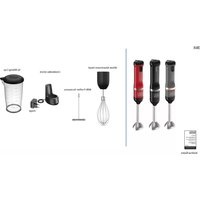
BCKM101 - Blender BLACK & DECKER - Free user manual and instructions
Find the device manual for free BCKM101 BLACK & DECKER in PDF.



| Product type | Cordless multifunction immersion blender |
| Brand | Black & Decker |
| Model | BCKM101 |
| Power supply | Integrated rechargeable lithium-ion battery, 120 V, 60 Hz charger |
| Variable speed | 5 speeds (rotary dial) |
| Included accessories | Immersion blender, whisk, frother, corkscrew, can opener, spice grinder, mixing cup, charger, charging station, 2 storage bins |
| Battery type | Integrated non-removable lithium-ion |
| Charge indicator | 3 LEDs on top |
| Safety | Double unlock and start button, automatic stop after 5 seconds, overload and overheating protection |
| Cleaning | Some accessories are dishwasher safe (top rack); motor unit and charger wipe clean with a damp cloth |
| Operating temperature | 10°C to 40°C |
| Charging temperature | 4.5°C to 40°C |
| Approximate weight | 1.5 kg (with accessories and storage boxes) |
| Dimensions (main box) | Approximately 30 x 20 x 15 cm |
| Repairability | No user-serviceable parts; contact an authorized service center |
| Warranty | 2-year limited (domestic use) |
Frequently Asked Questions - BCKM101 BLACK & DECKER
User questions about BCKM101 BLACK & DECKER
0 question about this device. Answer the ones you know or ask your own.
Ask a new question about this device
Download the instructions for your Blender in PDF format for free! Find your manual BCKM101 - BLACK & DECKER and take your electronic device back in hand. On this page are published all the documents necessary for the use of your device. BCKM101 by BLACK & DECKER.
USER MANUAL BCKM101 BLACK & DECKER
English (original instructions) 10
Components
1 Appliance
2 Unlock button
3 Power button
4 Variable-speed dial
5 LEDs
6 Motor
7 Charging pegs
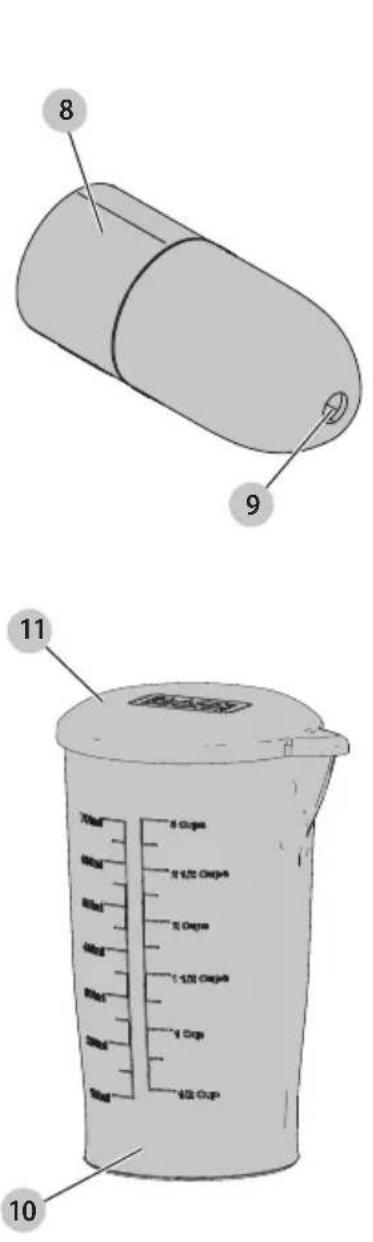
8 Adaptor
9 Adaptor hole
10 Mixing cup
11 Mixing cup lid
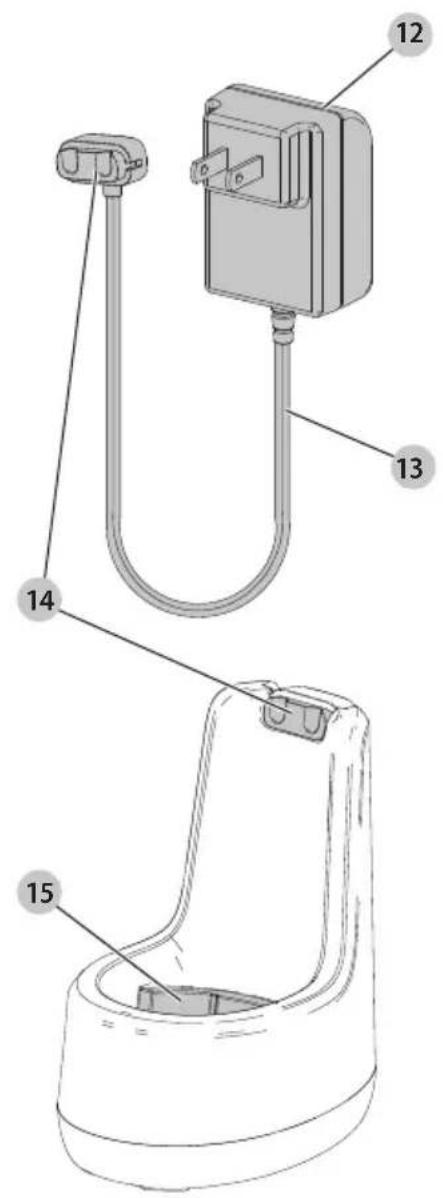
12 Charger
13 Charger cord
14 Charger connector
15 Charging dock
Composants
16 Small storage bin
17 Large storage bin
18 Storage bin bump
19 Storage bin recess
20 Storage stop ribs
21 Storage bin connector
22 Storage bin channels
23 Storage bin charging notch
24 Immersion blender
25 Immersion blender head
26 Immersion blender blade
27 Immersion blender slots
28 Guard
29 Guard detents
30 Wine opener
31 Wine opener corkscrew
32 Wine opener spring
33 Wine opener windows
34 Foil cutter
35 Foil cutter blades
36 Can opener
37 Can opener blade
38 Can opener lever
39 Can center line
40 Can opener base
41 Can opener side wall
42 Can opener recess
natural_image
Simple line drawing of a vertical cylindrical device with an arrow indicating rotation or movement (no text or symbols)
natural_image
Simple line drawing of a table with no text, numbers, or symbols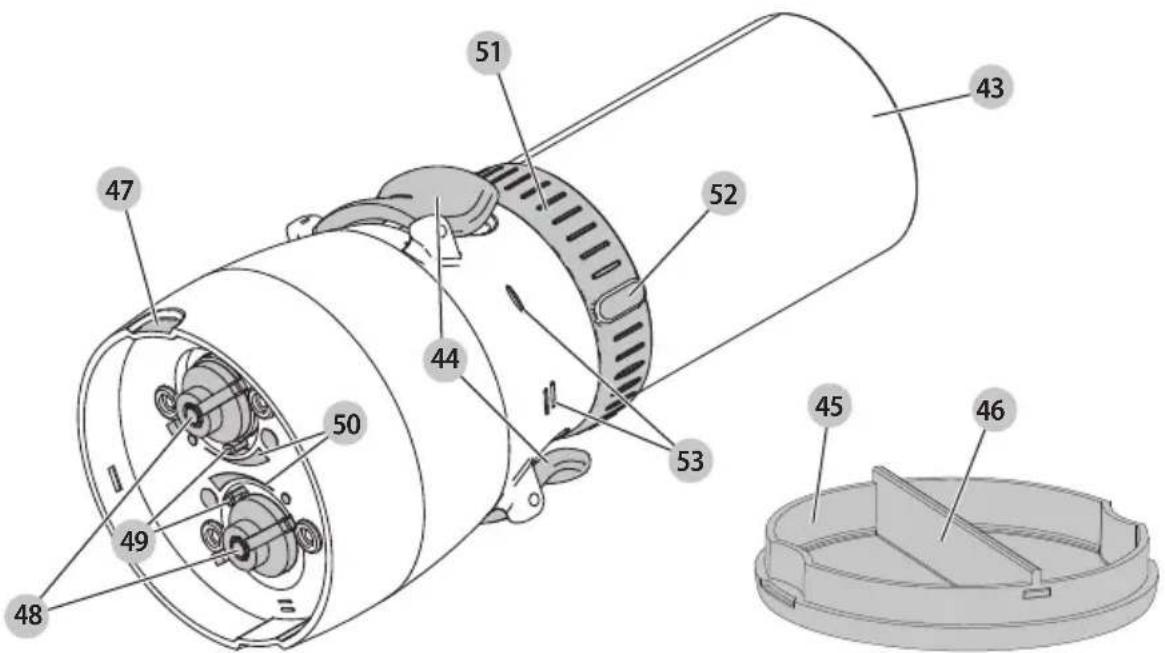
43 Spice grinder
44 Spice grinder doors
45 Spice grinder cap
46 Spice grinder cap wall
47 Spice grinder recess
48 Spice grinder dials
49 Spice grinder coarseness indicator
50 Spice grinder coarseness scale
51 Spice grinder collar
52 Spice grinder spice selector
53 Spice grinder door lines
natural_image
Technical line drawing of a whisk with coiled wire and a rod, labeled with numbers 54 and 55 (no text or symbols beyond labels)54 Whisk
55 Whisk pole
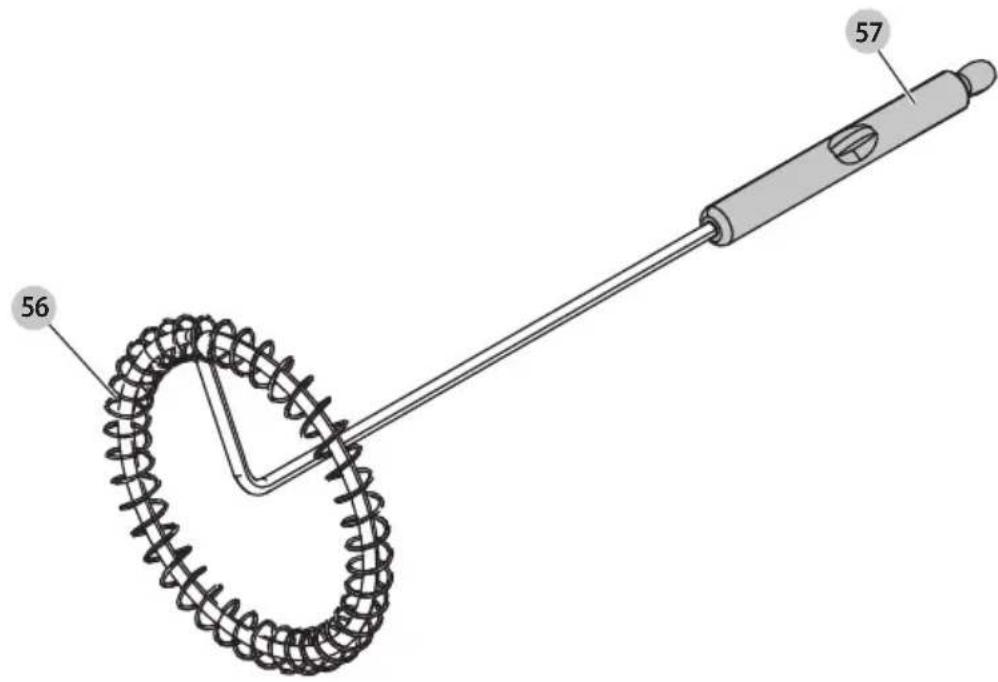
56 Frother
57 Frother pole
WARNING: Read all safety warnings and all instructions. Failure to follow the warnings and instructions may result in electric shock, fire and/or serious injury.

WARNING: To reduce the risk of injury, read the instruction manual.
Definitions: Safety Alert Symbols and Words
This instruction manual uses the following safety alert symbols and words to alert you to hazardous situations and your risk of personal injury or property damage.
DANGER: Indicates an imminently hazardous situation which, if not avoided, will result in death or serious injury.
WARNING: Indicates a potentially hazardous situation which, if not avoided, could result in death or serious injury.
CAUTION: Indicates a potentially hazardous situation which, if not avoided, may result in minor or moderate injury.
(### without word) Indicates a safety related message.
NOTICE: Indicates a practice not related to personal injury which, if not avoided, may result in property damage.
IMPORTANT SAFEGUARDS
When using electrical appliances, basic safety precautions should always be followed to reduce the risk of fire, electric shock, and/or injury, including the following:
- Read and save all instructions.
- To protect against risk of electrical shock, do not immerse appliance, motor, cord, or plug in water or other liquid. Do not use the appliance in the bathroom, near water, or outdoors.
- This appliance should not be used by children or by persons with reduced physical, sensory, or mental capabilities, or lack of experience and knowledge. Close supervision is necessary when any appliance is used near children. Children should be supervised to ensure that they do not play with the appliance.
- Do not operate in explosive atmospheres, such as in the presence of flammable liquids or gases
- Do not operate any appliance after the appliance malfunctions, or is dropped or damaged in any manner. Call the appropriate toll-free number in this manual.
- The use of attachments not recommended or sold by the appliance manufacturer may cause fire, electric shock, or injury; do not use attachments or appliances for anything other than intended use.
- This appliance is not intended for commercial, professional, or industrial use. It is designed and built exclusively for household use.
- Do not place appliance on, near, or in a hot item such as a stove, oven, pot, or container. Only use metal attachments with hot liquids or food items.
- Do not touch moving parts, disks or blades. The blades are sharp. Handle carefully with your hands away from cutting edge. Always store out of reach of children with cutting edge away from you.
- When mixing liquids, especially hot liquids, use a tall container or make small quantities at a time to reduce spillage.
- Do not leave appliance unattended. Store away when not in use.
- Do not use the appliance with wet hands.
• Always operate appliance with attachment and/or lid locked securely in place.
- Do not attempt to override any lid interlock mechanism.
- Never blend hot oil or fat. Use care when working with other hot liquids to avoid splattering.
- Never add ingredients to a container or attachment compartment while the appliance is running.
- Do not operate the appliance continuously for more than 2 minutes. Allow the motor to rest for 1 minute between each use.
- Never mix dry, thick or heavy mixtures for more than 30 seconds. Stop the operation and stir the ingredients with a suitable utensil after the motor has stopped before continuing. Allow the motor to rest for 1 minute between each use.
- When used with heavy load, the appliance should not be operated for more than 15 seconds.
- Do not remove the appliance with attachment from ingredients during operation. Ensure the appliance is off and has stopped before removing to avoid contact with moving blades or whisk.
- Keep fingers, hands, hair, clothing, jewelry, and utensils away from any moving parts including blades and disks.
- Do not wear loose clothing or jewelry such as long necklaces that can dangle into the food preparation area.
- Turn appliance off, allow motor to stop, and keep away from the power button when adjusting, removing/installing, or cleaning attachments or accessories.
- Never modify the appliance, attachments, or any parts thereof.
SAVE THESE INSTRUCTIONS.
This product is for household use only.
The label on your tool may include the following symbols. The symbols and their definitions are as follows:
V....volts OPM....oscillationsper Hz....hertz minute
min....minutes RPM....revolutionsper ---- or DC.....direct current minute
Class I Construction (grounded) sfpm surface feet per minute
.../min.....per minute SPM.....strokes per minute
BPM.....beats per minute A.....amperes
IPM....impacts per minute W....watts Wh....watt hours
Ah.....amp hours
\~ or AC......alternating current
or AC/DC.... alternating or direct current
Class II Construction (double insulated)
n_0 ...... no load speed
n......rated speed
PSI..... pounds per square inch
± ......earthing terminal
⚠️ ......safety alert symbol
▲......visible radiation do not stare into the light
......wearrespiratory protection
wear eye protection
O....wearhearing protection
read all documentation
do not expose to rain
READ ALL INSTRUCTIONS
Important Safety Instructions for All Integral Battery Tools
WARNING: Read all safety warnings, instructions, and cautionary markings for the battery, charger and product. Failure to follow the warnings and instructions may result in electric shock, fire and/or serious injury.
- NEVER force a charger plug to fit the tool.
- DO NOT modify the charger plug of a non-compatible charger in any way to fit the tool as the battery may rupture causing serious personal injury.
- DO NOT charge or use the battery in explosive atmospheres, such as in the presence of flammable liquids, gases or dust. Inserting or removing the charger plug from the tool may ignite the dust or fumes.
- Only charge the battery with the provided charger.
• DO NOT splash or immerse in water or other liquids.
• DO NOT allow water or any liquid to enter tool.
- DO NOT store or use the tool in locations where the temperature may reach or exceed 104 °F (40 °C) (such as outside sheds or metal buildings in summer). For best life store tools in a cool, dry location. NOTE: Do not store the tool with the switch locked on. Never tape the switch in the ON position.
- DO NOT incinerate the tool even if it is severely damaged or is completely worn out. The battery can explode in a fire. Toxic fumes and materials are created when lithium-ion batteries are burned.
- If battery contents come into contact with the skin, immediately wash area with mild soap and water. If battery liquid gets into the eye, rinse water over the open eye for 15 minutes or until irritation ceases. If medical attention is needed, the battery electrolyte is composed of a mixture of liquid organic carbonates and lithium salts.
- Contents of opened battery cells may cause respiratory irritation. Provide fresh air. If symptoms persist, seek medical attention.
- Battery liquid may be flammable if exposed to spark or flame.
- Never attempt to open the tool for any reason. If the tool case is cracked or damaged, do not charge. Do not crush, drop or damage the tool. Do not use a tool or charger that has received a sharp blow, been dropped, run
over or damaged in any way (e.g., pierced with a nail, hit with a hammer, stepped on). Damaged tools should be returned to the service center for recycling.
Storage Recommendations
The best storage place is one that is cool and dry, away from direct sunlight and excess heat or cold. Store the fully charged tool disconnected from the charger.
Transportation
NOTE: Integral Li-ion tools should not be put in checked baggage on airplanes and must be properly protected from short circuits if they are in carry-on baggage.
Tool Disposal
This product uses a lithium-ion rechargeable and recyclable battery. When the battery no longer holds a charge, the tool should be recycled. The tool should not be

incinerated or placed in the trash or curbside recycling.
The tool can be taken for disposal to an Authorized Service Center. Some local retailers are also participating in a national recycling program (refer to RBRC®). For more information visit www.call2recycle.org or call the toll-free number in the RBRC Seal. RBRC is a registered trademark of Call 2 Recycle, Inc. If you bring the tool to an Authorized Service Center, the Center will arrange to recycle the tool and its battery. Or, contact your local municipality for proper disposal instructions in your city/town.
Important Safety Instructions for All Battery Chargers
WARNING: Read all safety warnings, instructions, and cautionary markings for the battery, charger and product. Failure to follow the warnings and instructions may result in electric shock, fire and/or serious injury.
- DO NOT attempt to charge the battery with any chargers other than a BLACK+DECKER charger. BLACK+DECKER chargers and batteries are specifically designed to work together.
• These chargers are not intended for any uses other than charging BLACK+DECKER rechargeable batteries. Charging other types of batteries may cause them to overheat and burst, resulting in personal injury, property damage, fire, electric shock or electrocution.
- Do not expose the charger to rain or snow.
- Do not allow water or any liquid to enter charger.
- Pull by the plug rather than the cord when disconnecting the charger. This will reduce the risk of damage to the electric plug and cord.
• Make sure that the cord is located so that it will not be stepped on, tripped over or otherwise subjected to damage or stress.
- Do not place any object on top of the charger. Place the charger in a position away from any heat source.
- Do not operate the charger with a damaged cord or plug—have them replaced immediately.
ENGLISH
- Do not operate the charger if it has received a sharp blow, been dropped or otherwise damaged in any way. Take it to an authorized service center.
- Do not disassemble the charger; take it to an authorized service center when service or repair is required. Incorrect reassembly may result in a risk of electric shock, electrocution or fire.
- The charger is designed to operate on standard 120V household electrical power. Do not attempt to use it on any other voltage. This does not apply to the vehicular charger.
- Foreign materials of a conductive nature, such as, but not limited to, grinding dust, metal chips, steel wool, aluminum foil or any buildup of metallic particles should be kept away from the charger connector.
• Always unplug the charger from the power supply when there is no battery being charged.
Charging a Battery (Fig. B)
WARNING: For use only with the supplied charger.
NOTE: Ensure the charging dock 15 is placed securely on a flat level countertop surface.
- Plug the charger 12 into any standard 120 Volt 60 Hz electrical outlet. Do not use an extension cord.
- Insert unit into the charging dock with the charging pegs 7 on the appliance aligned with the notches on the charger connector 14. Ensure the charger connector is fully attached to the charging dock. To ensure charger connector is properly assembled, press on lower section of the connector with 2 thumbs to fully seat connector in correct position.
NOTE: The charger connector can be removed from the charging dock to charge the unit separately or in the storage bins.
- The LEDs 5 on the top of the appliance will illuminate while charging.
| 1 flashing LED < 33% charged | |
| First LED solid, second flashing | 33 - 66% charged |
| 2 solid LEDs, third flashing 66 | - 99% charged |
| 3 solid LEDs 100% charged |
- The LEDs will turn off upon completion of charging.
NOTE: While charging, the charger may get warm, this is perfectly normal and safe. It is safe to leave the appliance connected to the charger indefinitely. The charger automatically reduces power consumption when charging is complete.
NOTE: The appliance can be charged while in the storage bin. Refer to the CHARGING IN STORAGE BIN section.
- When discharging:
| 1 LED < 33% charged | |
| 2 LEDs < 66% charged | |
| 3 LEDs > 66% charged |
Hot/Cold Delay
When the charger detects a battery that is too hot or too cold, it automatically starts a Hot/Cold Pack Delay, suspending charging until the battery has reached an appropriate temperature. The charger then automatically switches to the charging mode. This feature ensures maximum battery life.
A cold battery may charge at a slower rate than a warm battery. The hot/cold pack delay will be indicated by all 3 LEDs continuously flashing a short ON followed by a longer ON. Once the battery has reached an appropriate temperature, the charger will resume the charging procedure.
Electronic Protection System
Li-Ion tools are designed with an Electronic Protection System that will protect the battery against overloading, overheating or deep discharge. The tool will automatically turn off and the battery will need to be recharged.
Important Charging Notes
-
Longest life and best performance can be obtained if the battery pack is charged when the air temperature is between 65^ F – 75^ F ( 18^ C– 24^ C). DO NOT charge when the battery pack is below +40^ F (+ 4.5^ C), or above +104^ F (+ 40^ C). This is important and will prevent serious damage to the battery.
-
The charger and tool may become warm to the touch while charging. This is a normal condition and does not indicate a problem. To facilitate the cooling of the tool after use, avoid placing the charger or tool in a warm environment such as in a metal shed or an uninsulated trailer.
-
If the battery does not charge properly:
a. Check operation of receptacle by plugging in a lamp or other appliance.
b. Check to see if receptacle is connected to a light switch which turns power off when you turn out the lights.
c. If charging problems persist, take the tool and charger to your local service center.
- You may charge a partially used battery whenever you desire with no adverse effect on the battery.
Charger Cleaning Instructions
WARNING: Shock hazard. Disconnect the charger from the AC outlet before cleaning. Soiling may be removed from the exterior of the charger using a cloth or soft non-metallic brush. Do not use water or any cleaning solutions.
SAVE THESE INSTRUCTIONS FOR FUTURE USE
ASSEMBLY AND ADJUSTMENTS
WARNING: To reduce the risk of serious personal injury, turn unit off and keep hands away from the switch before making any adjustments or removing/installing attachments or accessories.
An accidental start-up can cause injury.
Installing and Removing Attachments (Fig. C)

NING: Ensure LEDs are off and the system is not on.
Blender / Wine Opener / Can Opener / Spice Grinder
- To install, slide the attachment head 55 of the attachment onto the motor 6 and turn clockwise (as viewed from the end of the attachment) until it securely locks in.
NOTE: The attachment can be installed on the motor in four different locations, so it does not need to be placed in any one specific orientation.
- To remove, turn counterclockwise and pull attachment off.
Whisk / Frother
- To install, slide the whisk pole 55 or frother pole 57 into the adaptor hole 9 until it clicks into place and is secure.
- Slide the adaptor 8 onto the motor 6 and turn clockwise (as viewed from the end of the attachment) until it locks in securely.
NOTE: The attachment can be installed on the motor in four different locations, so it does not need to be placed in any one specific orientation.
- To remove, turn adaptor counterclockwise and pull it off, then pull the whisk or frother from the adaptor.
OPERATION
WARNING: To reduce the risk of serious personal injury, turn unit off and keep hands away from the switch before making any adjustments or removing/installing attachments or accessories.
An accidental start-up can cause injury.
On / Off (Fig. D)
IMPORTANT: Never turn the motor on unless attachments are securely attached.
NOTE: Optimal temperature for use is between 50–104 °F (10–40 °C).
-
To turn unit on, either:
-
Press unlock button 2, then press power button 3.
- Press power button, then press unlock button.
- Press unlock and power buttons simultaneously.
NOTE: There is a slight delay between pressing both buttons and the appliance starting.
- When the appliance is ready to use, the LEDs 5 will illuminate and remain solid. If they do not, refer to the TROUBLESHOOTING section.
NOTE: If LEDs go off during use, or don't light when starting unit, release buttons and go back to step 1.
- Once the unit is on, the buttons may be released for up to 5 seconds. The motor will stop running after the buttons are released but the appliance remains active for 5 seconds. As long as the power button is pressed at least once within 5 seconds after releasing, the appliance will turn back on.
- To turn off, release both buttons. The appliance will remain active for 5 seconds before turning off.
WARNING: The LEDs will stay on after buttons are released. Ensure the LEDs are off and the unit has fully stopped before removing attachments.
Speed Control (Fig. E)
The appliance has a variable-speed dial 4. Turn the dial to the appropriate speed for the attachment being used (1 is the lowest speed, 5 is the highest speed).
| ATTACHMENT SPEED | |
| Immersion Blender Start at 1, increase as needed | |
| Wine Opener 5 | |
| Can Opener 5 | |
| Spice Grinder 5 | |
| Whisk Start at 1, increase as needed | |
| Frother Start at 5, decrease as desired | |
NOTE: With a 5-second delay before the unit turns off, you can release the buttons and use your thumb to adjust speed without turning the unit off.
Proper Hand Position (Fig. F)
WARNING: To reduce the risk of serious personal injury, ALWAYS use proper hand position as shown.
WARNING: To reduce the risk of serious personal injury, ALWAYS hold securely in anticipation of a sudden reaction.
Hold the appliance 1 so your palm presses down the unlock button 2 and use your thumb or a finger to push down the power button 3.
Storage Bins
The storage bins 16 and 17 can be connected horizontally or stacked vertically for convenient storage.
Stacking Storage (Fig. G)
- Line up the bump 18 of the top bin with the recess 19 of the bottom bin.
- Place the first bin on top of the second bin so it is engaged with the stop ribs 20 to prevent shifting. The bins will not lock together so tipping may dislodge the bins.
NOTE: It is not recommended to stack higher than two bins.
NOTE: Two small bins can be stored on top of a large bin.
Side-by-Side Storage (Fig. H)
- Slide the storage bin connector 21 onto the storage bin channel 22 of one bin until it clicks into place and is secure.
- Slide the channel of a second bin along the connector until it clicks into place and is secure.
NOTE: It is not recommended to connect two large bins side by side.
Charging in Storage Bin (Fig. I)
- Place the charger connector 14 into the connector detent 56 of the large bin 17.
- Run the charger cord 13 through the cord channel 57 of the bin and out of the charging notch 23.
- Lay the unit in the bin so the charging pegs 7 on the unit fully engage with the charger connector.
English
- Ensure the LEDs on the top of the unit illuminate. If they do not, check the connection between the unit and charger connector.
- Plug the charger 12 into an outlet.
IMMERSION BLENDER
BCKM101MB
Intended Use
This immersion blender is intended for residential use only. It blends liquids such as sauce, soup, and smoothies, mixes batters, and purees fruits and vegetables.
DO nOT let children come into contact with the appliance.
OPERATION
WARNING: To reduce the risk of serious personal injury, turn unit off and keep away from the power button before making any adjustments or removing/installing attachments or accessories.
An accidental start-up can cause injury.
WARNING: Ensure the immersion blender attachment model is assembled to the motor as detailed in the INSTALLING AND REMOVING ATTACHMENTS section.
NOTE: Do not use the immersion blender 24 with non-stick cookware as it may scratch or mark non-stick coatings.
Blending (Fig. J)
- Place food to be processed in mixing cup 10. The container should only be 1/2 full or less when blending liquids or when making a puree of fruit and/or vegetables to prevent food from overflowing.
- Immerse the blender head 25 as deeply as possible into the mixing cup.
- Set the variable-speed dial 4 to 1 and increase speed by turning the dial. This will help avoid splattering and over processing.
- Turn the unit on as described in the ON / OFF section.
- Blend the ingredients by moving the appliance up and down and in circles. Do not pull immersion blender head out of food
iIMPORTAnT: The continuous operating time must be less than 30 seconds. Never blend hot oil, fat, or meat.
- After you have completed blending, release the unlock button 2 and power button 3 to stop the motor 6.
- If the blade 26 becomes blocked:
- Turn unit off while keeping the blender head submerged,
- Allow the blade to stop,
- Wait until the LEDs turn off,
- Lift the blender out of the container
- Disassemble the blender from the motor by turning the attachment counterclockwise,
- Remove blockage,
- Securely reattach the blender.
NOTE: Do not pull blender out quickly. Blending creates suction at the bottom of the cup which can cause contents to splatter.
- Keep blender attachment inside the mixing cup to prevent dripping on counter.
- After processing, disassemble the immersion blender from the motor by turning the attachment counterclockwise
- Clean the attachment as needed. For more information, refer to cleaning section.
Immersion Blender Tips and Tricks
- The immersion blender blends foods and liquids rapidly, therefore it is easy to overprocess. Stop the motor and check food throughout the operation to avoid overprocessing.
- When pureeing and blending, cut food into uniform sizes. This will ensure smooth and consistent results.
- Allow hot food to cool slightly before blending.
Attaching and Removing Blender Guard (Fig. K)
CAUTION: Do not attach or remove immersion blender guard. 28 while the immersion blender attachment is installed to the motor. Avoid contact with the blade while attaching and removing the blender guard.
- To attach the blender guard, align detents 29 with the slots 27 on the immersion blender attachment. Slide the blender guard onto the immersion blender attachment. Ensure the guard clicks firmly into the detents.
- To remove, depress the detents and slide the guard off.
- Clean the blender guard as needed. For more information, refer to cleaning section.
WINE OPENER
BCKM101Wn
Intended Use
This wine opener is intended for residential use only for the removal of corks from wine bottles. Do not use on bottles with carbonated contents.
DO nOT let children come into contact with the appliance.
OPERATION
WARNING: To reduce the risk of serious personal injury, turn unit off and keep away from the power button before making any adjustments or removing/installing attachments or accessories.
An accidental start-up can cause injury.
WARNING: Ensure the wine opener attachment head is assembled to the motor as detailed in the INSTALLING AND REMOVING ATTACHMENTS section.
WARNING: Do not touch corkscrew or cutter blades. They are sharp and may cause serious injury.
WARNING: Do not place objects into the wine opener other than those described below.
Cutting Foil (Fig. L)
NOTE: Foil on top of the wine bottle must be removed before using the wine opener 30.
- Remove the foil cutter 34 from the wine opener.
- Place the foil cutter on top of the wine bottle so the foil cutter blades 35 surround the neck of the bottle.
- Squeeze the sides and turn the cutter around the bottle until the foil is fully cut.
- Remove cutter and foil.
Removing the Cork (Fig. M)
- Ensure the foil cutter is removed from the wine opener.
- Place wine bottle on a flat surface.
- Set the variable-speed dial 4 to 5.
- Place the wine opener vertically on top of the bottle and press down until you feel resistance. The corkscrew 31 will be slightly above the cork.
- Turn the unit on as described in the ON / OFF section. The corkscrew will move down into the cork.
- Once the cork is fully removed, you will see it freely spinning above the bottle's neck. Release the unlock button 2 and power button 3 to stop the motor 6.
- Ensure the motor has completely stopped before lifting the wine opener off the bottle.
- Once the wine opener is off, the internal spring 32 will automatically push the cork to the end of the corkscrew and drop the cork out of the wine opener. Place your hand under the wine opener to catch the cork.
- If the cork does not come all the way off of the corkscrew, manually twist it off.
- If the cork is jammed, place a small, flat object into one of the windows 33 to unjam the cork so it can be ejected by the spring. Do not turn appliance on when doing this.
- After the bottle is open, disassemble the wine opener from the motor by turning the attachment counterclockwise
- Clean the attachment as needed. For more information, refer to cleaning section.
Storing Wine Opener (Fig. N)
It is recommended to store the wine opener with the foil cutter 34 attached to the bottom.
- Snap the cutter onto the bottom of the wine opener.
Wine Opener Tips and Tricks
- When you can see the cork begin to move freely outside the bottle, pull the bottle away from the unit.
- Place your hand under the wine cork after removing from the bottle to easily grab it when releasing.
CAN OPENER BCKM101Cn
Intended Use
This can opener is intended for residential use only. It cuts the side of cans to open them.
DO nOT let children come into contact with the appliance.
OPERATION
WARNING: To reduce the risk of serious personal injury, turn unit off and keep away from the power button before making any adjustments or removing/installing attachments or accessories.
An accidental start-up can cause injury.
WARNING: Do not touch blade. It is sharp and may cause serious injury.
WARNING: Ensure the can opener attachment is assembled to the motor as detailed in the INSTALLING AND REMOVING ATTACHMENTS section.
Opening a Can (Fig. O-Q)
iIMPORTAnT: The can needs to remain vertical at all times.
NOTE: Can opener cuts cans from the side below the can's end seam 61 instead of the top.
- Set the variable-speed dial 4 to 5.
- Ensure the lever 38 on the can opener 36 is vertical as shown in Fig. O.
- Slide the can opener onto the can so the blade 37 comes in contact with the side of the can.
- Align the can opener center line 39 with the center of the can as shown in Fig. P.
- Ensure the can sits flush against the can opener base 40 the side wall 41, and inside the can opener recess 42 as shown in Fig. P. The can must stay in contact with the base, wall, and recess at all times.
- Push the lever down to puncture the can as shown in Fig. P. Ensure the lever is engaged and the can is fully punctured. Keep lever down while opening the can.
- After puncturing, lift the can slightly off the surface so it rotates freely while opening.
- Turn the unit on as described in the ON / OFF section.
- Once the top of the can is fully cut off, release the unlock button 2 and power button 3 to stop the motor 6.
- Ensure the motor has completely stopped before lifting the can opener off the can. The can lid will be attached to the can opener as long as the lever is still down.
- Hold the can opener over the garbage and pull the lever up as shown in Fig. Q to release the can top.
- After opening the can, disassemble the can opener from the motor by turning the attachment counterclockwise
- Clean the attachment as needed. For more information, refer to cleaning section.
English
Can Opener Tips and Tricks
- Do not release the lever until you are over the trash can to prevent the need of grabbing the can lid.
- Do not begin using until the lever is completely horizontal.
- Once you have begun, raise the can off of the counter to remove the resistance to rotating.
- Keep the can perpendicular to the counter and just slightly off the countertop to prevent messes.
- If draining the can is needed, angle can lid slightly and move to the sink. Rotate the can to allow excess liquid to exit while holding the lid in place.
SPICE GRINDER
BCKM101sP
Intended Use
This spice grinder is intended for residential use only. It grinds hard spices such as salt and pepper for use in food.
DO nOT let children come into contact with the appliance.
OPERATION
WARNING: To reduce the risk of serious personal injury, turn unit off and keep away from the power button before making any adjustments or removing/installing attachments or accessories.
An accidental start-up can cause injury.
WARNING: Do not adjust grinder dials 48 while in use. They may cause serious injury.
WARNING: Ensure the spice grinder attachment head is assembled to the motor as detailed in the INSTALLING AND REMOVING ATTACHMENTS section.
Loading Grinder (Fig. R)
NOTE: Use hard spices only. Soft and wet ingredients may obstruct and damage the spice grinder 43 and its internal grinding wheels.
- Pull grinder doors 44 open from the top.
- Load spices into the dedicated compartment. Place one spice in the door marked with and another spice in the door marked with if you only want to grind one spice, either door may be used.
- Close the door until it clicks, ensuring it is fully closed so spices do not come out while grinding.
Grinder Cap (Fig. S)
- Take cap 45 off to grind spices directly on food. To remove the cap, pull off at the spice grinder recess 47.
- Put cap on by lining it up with the bottom of the spice grinder and snapping it into place. The cap wall 46 will separate spices so they don't mix and keep the spices off your counter.
Adjust Spice Coarseness (Fig. T)
- Remove the cap if needed.
- Set the spice selector 52 to the side you wish to adjust. If the spice selector is not lined up with the matching door
line (−or ) ≡ 53, the dial will rotate but not change the coarseness.
- Set the coarseness of the spice by turning the grinder dials 48:
- Clockwise for more fine spices.
- Counterclockwise for more coarse spices.
nOTE: There is one dial for each side of the grinder.
- The level of coarseness is shown by where the coarseness indicator 49 sits along the coarseness scale 50.
Grinding (Fig. U)
- Turn the collar 51 left or right to choose which side to grind.
- Select the desired spice by aligning the door selector52 with the door line (or) = 53 that matches the line on the door itself.
nOTE: Only one side of the grinder can be used at a time.
- Set the variable-speed dial 4 to 5.
-
Turn the unit on as described in the ON / OFF section.
-
If the dials 48 become blocked:
-
Turn unit off,
- Disassemble the grinder from the motor 6 by turning the attachment counterclockwise,
- Remove cap if needed,
- Remove blockage,
-
Reattach the grinder.
-
After you have completed grinding, release the unlock button 2 and power button 3 to stop the motor.
-
After grinding, disassemble the spice grinder from the motor by turning the attachment counterclockwise
-
Clean the attachment as needed. For more information, refer to cleaning section.
Spice Grinder Tips and Tricks
- Use a funnel to help load the spice grinders.
- If you want to adjust the size of the spice being ground, rotate the grinder dials on the bottom of the grinder as described in the SETTING SPICE COARSENESS section.
- Place the cap on the unit when not in use to prevent excess spice spills.
WHISK
BCKM101Wh
Intended Use
This whisk is intended for residential use only. It can be used to beat eggs, mix batters, and make meringue and whip cream.
DO nOT let children come into contact with the appliance.
OPERATION
WARNING: To reduce the risk of serious personal injury, turn unit off and keep away from the power button before making any adjustments or removing/installing attachments or accessories.
An accidental start-up can cause injury.
WARNING: Ensure the whisk pole is assembled to the adaptor and that the adaptor is assembled to the motor as detailed in the INSTALLING AND REMOVING ATTACHMENTS section.
NOTE: Do not use the whisk 54 with non-stick cookware as it may scratch or mark non-stick coatings.
Whisking (Fig. V)
- Place ingredients to be whisked into a bowl.
NOTE: To incorporate air into the ingredients when whisking, use a deep and wide container and move the whisk 54 in gentle up-and-down and side-to-side motions.
- Immerse the whisk completely in the ingredients, to the bottom of the container.
- Set the variable-speed dial 4 to 1 and increase speed by turning the dial as desired.
NOTE: If selecting a higher speed, it is recommended that you start on low speed and then increase to high speed to avoid splattering and over processing.
- Turn the unit on as described in the ON / OFF section. Do not remove whisk from bowl while motor 6 is running.
- Whisk ingredients by moving the appliance slowly up and down and in circles. Do not remove whisk from food.
- If your whisk becomes blocked:
- Turn unit off while keeping the whisk submerged,
- Lift whisk out of the container,
- Disassemble the whisk and adaptor 35 from the motor by turning the adaptor counterclockwise,
- Remove blockage,
- Securely reattach the whisk and adaptor.
IMPORTANT: The continuous operating time must be less than 2 minutes. Never whisk hot oil, fat, or meat.
- After you have completed whisking, release the unlock button 2 and power button 3 to stop the motor.
- Ensure the motor has completely stopped before lifting the whisk out of the container.
- After use, pull the whisk from the adaptor and remove the adaptor from the motor by turning the adaptor counterclockwise
- Clean the attachment as needed. For more information, refer to cleaning section.
Whisk Tips and Tricks
- For whipping cream, always use fresh chilled cream.
- For egg whites, whisk fresh, room temperature eggs in a glass bowl to achieve greater and more stable volume.
- It is recommended to use the highest speed when whisking egg whites and cream.
FROTHER
BCKM101MF
Intended Use
This frother is intended for residential use only. It can be used to froth cream or milk for drinks.
DO NOT let children come into contact with the appliance.
OPERATION
WARNING: To reduce the risk of serious personal injury, turn unit off and keep away from the power button before making any adjustments or removing/installing attachments or accessories.
An accidental start-up can cause injury.
WARNING: Ensure the frother pole is assembled to the adaptor and that the adaptor is assembled to the motor as detailed in the INSTALLING AND REMOVING ATTACHMENTS section.
- Do not use frother with non-stick cookware as it may scratch or mark non-stick coatings.
Frothing (Fig. W)
- Place ingredients to be frothed into a cup.
- For best results, hold the frother 56 in the middle of the liquid. Do not push to the bottom.
- Set the variable-speed dial 4 to 5 and decrease speed by turning the dial as desired.
- Turn the unit on as described in the ON / OFF section.
- Hold the frother in the middle of the cup for best results.
IMPORTANT: The continuous operating time must be less than 2 minutes. Never froth hot oil, fat, or meat.
- If your frother becomes blocked:
- Lift frother out of the cup,
- Remove blockage,
-
Reattach the frother and adaptor.
-
Turn unit off while keeping the frother submerged,
-
Disassemble the frother and adaptor from the motor by turning the adaptor counterclockwise,
-
After you have completed frothing, release the unlock button 2 and power button 3 to stop the motor.
-
Ensure the motor has completely stopped before lifting the frother out of the container.
-
After use, pull the frother pole from the adaptor and remove the adaptor from the motor by turning the adaptor counterclockwise
-
Clean the attachment as needed. For more information, refer to cleaning section.
Frother Tips and Tricks
- It is recommended to use at the top speed to create the greatest froth quickly. Use with whole milk or cream.
Troubleshooting
Unit not running: Place the appliance on charger until all LEDs are on and solid. Then try using the unit again.
Splatters food outside container: Adjust the variable-speed dial. Start with the speed on the lowest setting to prevent making a mess and adjust to higher speeds as ingredients become well mixed, and as you feel more comfortable with the speed.
If unit is not charging:
- Ensure the charger is plugged in.
- Wipe down the charging pegs on the appliance as well as the charger connector. Use a cloth dampened only with water and mild soap.
• Temperature fault or overcurrent conditions may have occurred. - Temperature fault: LEDs will blink in the following pattern - . - . (250ms ON, 250ms OFF, 10ms ON, 250ms OFF).
- Over current: unit will shut down with no flashing.
- Refer to the HOT/COLD DELAY section for more information.
MAINTENANCE
WARNING: To reduce the risk of serious personal injury, turn unit off and keep away from power button before making any adjustments or removing/installing attachments or accessories.
An accidental start-up can cause injury.
Your BLACK+DECKER appliance has been designed to operate over a long period of time with a minimum of maintenance. Continuous satisfactory operation depends upon proper appliance care and regular cleaning.
Cleaning
WARNING: Never use solvents or other harsh chemicals for cleaning the non-metallic parts of the tool. These chemicals may weaken the plastic materials used in these parts. Use a cloth dampened only with water and mild soap. Never let any liquid get inside the tool; never immerse any part of the tool into a liquid.
CANTION: Blender guard, whisk, frother, mixing cup, and mixing cup lid are top rack only, dishwasher safe. It is recommended that you manually rinse before placing them in the top rack of the dishwasher.
- Remove the attachment from the motor 6 as detailed in the INSTALLING AND REMOVING ATTACHMENTS section.
- Blender guard, whisk, frother, mixing cup and mixing cup lid are dishwasher safe on top rack only on normal setting. All other attachments and components, clean by hand with a cloth and warm, soapy water.
- Ensure the attachment or component is dry before reinstalling.
Optional Accessories
WARNING: Since accessories, other than those offered by BLACK+DECKER, have not been tested with this product, use of such accessories with this appliance could be hazardous. To reduce the risk of injury, only BLACK+DECKER recommended accessories should be used with this product.
Consult your dealer for further information on the appropriate accessories.
Repairs
The charger and internal battery are not serviceable. There are no serviceable parts inside the charger or appliance.
Register Online
Thank you for your purchase. Register your product now for:
- WARRANTY SERVICE: Registering your product will help you obtain more efficient warranty service in case there is a problem with your product.
- CONFIRMATION OF OWNERSHIP: In case of an insurance loss, such as fire, flood or theft, your registration of ownership will serve as your proof of purchase.
- FOR YOUR SAFETY: Registering your product will allow us to contact you in the unlikely event a safety notification is required under the Federal Consumer Safety Act.
- Register online at www.BlackandDecker.com / NewOwner
TWO-YEAR LIMITED WARRANTY
Black & Decker (U.S.) Inc. warranties this product to be free from defects in material or workmanship for a period of two (2) years following the date of purchase, provided that the product is used in a home environment. This limited warranty does not cover failures due to abuse, accidental damage or when repairs have been made or attempted by anyone other than BLACK+DECKER and its Authorized Service Centers. A defective product meeting the warranty conditions set forth herein will be replaced or repaired at no charge in either of two ways:
The first, which will result in exchanges only, is to return the product to the retailer from whom it was purchased (provided that the store is a participating retailer). Returns should be made within the time period of the retailer's policy for exchanges. Proof of purchase may be required. Please check with the retailer for its specific return policy regarding time limits for returns or exchanges. The second option is to take or send the product (prepaid) to a BLACK+DECKER owned or authorized Service Center for repair or replacement at BLACK+DECKER's option. Proof of purchase may be required. BLACK+DECKER owned and authorized service centers are listed online at www.blackanddecker.com. This warranty does not apply to accessories. This warranty gives you specific legal rights and you may have other rights which vary from state to state or province to province. Should you have any questions, contact the manager of your nearest BLACK+DECKER Service Center. This product is not intended for commercial use, and accordingly, such commercial use of this product will void this warranty. All other guarantees, express or implied, are hereby disclaimed.
LATIN AMERICA: This warranty does not apply to products sold in Latin America. For products sold in Latin America, check country specific warranty information contained in the packaging, call the local company or see the website for such information.
Imported by Black & Decker (U.S.) Inc., 701 E. Joppa Rd.
Towson, MD 21286

portezdes protections auditives
Importé par. Black & Decker (U.S.) Inc.,
701 E. Joppa Rd.
Towson, MD 21286

Imported by. Black & Decker (U.S.) Inc.,
701 E. Joppa Rd.
Towson, MD 21286

BlackandDecker.com
(1-800-544-6986)
- Components
- Composants
- Definitions: Safety Alert Symbols and Words
- IMPORTANT SAFEGUARDS
- SAVE THESE INSTRUCTIONS.
- This product is for household use only.
- READ ALL INSTRUCTIONS
- Important Safety Instructions for All Integral Battery Tools
- Storage Recommendations
- Transportation
- Tool Disposal
- Important Safety Instructions for All Battery Chargers
- ENGLISH
- Charging a Battery (Fig. B)
- Hot/Cold Delay
- Electronic Protection System
- Important Charging Notes
- Charger Cleaning Instructions
- SAVE THESE INSTRUCTIONS FOR FUTURE USE
- ASSEMBLY AND ADJUSTMENTS
- Installing and Removing Attachments (Fig. C)
- Blender / Wine Opener / Can Opener / Spice Grinder
- Whisk / Frother
- OPERATION
- On / Off (Fig. D)
- Speed Control (Fig. E)
- Proper Hand Position (Fig. F)
- Storage Bins
- Stacking Storage (Fig. G)
- Side-by-Side Storage (Fig. H)
- Charging in Storage Bin (Fig. I)
- IMMERSION BLENDER
- BCKM101MB
- Intended Use
- Blending (Fig. J)
- Immersion Blender Tips and Tricks
- Attaching and Removing Blender Guard (Fig. K)
- WINE OPENER
- BCKM101Wn
- Cutting Foil (Fig. L)
- Removing the Cork (Fig. M)
- Storing Wine Opener (Fig. N)
- Wine Opener Tips and Tricks
- CAN OPENER BCKM101Cn
- Opening a Can (Fig. O-Q)
- Can Opener Tips and Tricks
- SPICE GRINDER
- BCKM101sP
- Loading Grinder (Fig. R)
- Grinder Cap (Fig. S)
- Adjust Spice Coarseness (Fig. T)
- Grinding (Fig. U)
- Spice Grinder Tips and Tricks
- WHISK
- BCKM101Wh
- Whisking (Fig. V)
- Whisk Tips and Tricks
- FROTHER
- BCKM101MF
- Frothing (Fig. W)
- Frother Tips and Tricks
- Troubleshooting
- If unit is not charging:
- MAINTENANCE
- WARNING: To reduce the risk of serious personal injury, turn unit off and keep away from power button before making any adjustments or removing/installing attachments or accessories.
- Cleaning
- Optional Accessories
- Repairs
- Register Online
- TWO-YEAR LIMITED WARRANTY
Brand : BLACK & DECKER
Model : BCKM101
Category : Blender