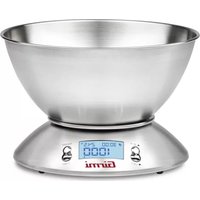
PS85 - Kitchen scales GIRMI - Free user manual and instructions
Find the device manual for free PS85 GIRMI in PDF.



| Product Type | Kitchen Scale |
| Brand | Girmi |
| Model | PS85 |
| Power Supply | 2 AAA 1.5V batteries |
| Maximum Capacity | 5 kg / 11 lb |
| Division | 1 g / 0.1 oz |
| Display | Backlit LCD |
| Container | Stainless Steel |
| Functions | Weighing, tare, timer, ambient temperature, unit change |
| Measurement Units | kg, g, lb, oz |
| Timer Range | 0 to 99 minutes 59 seconds |
| Thermometer Range | 0°C to 40°C, division 0.5°C |
| Auto Off | Yes (after 2 minutes of inactivity) |
| Low Battery Indicator | Display shows "Lo" |
| Overload Indicator | Display shows "Err" |
| Cleaning | Soft damp cloth, non-abrasive detergent |
| Use | Domestic only |
| Warranty | Valid if used according to the instructions |
Frequently Asked Questions - PS85 GIRMI
User questions about PS85 GIRMI
0 question about this device. Answer the ones you know or ask your own.
Ask a new question about this device
Download the instructions for your Kitchen scales in PDF format for free! Find your manual PS85 - GIRMI and take your electronic device back in hand. On this page are published all the documents necessary for the use of your device. PS85 by GIRMI.
USER MANUAL PS85 GIRMI
natural_image
Close-up of a metallic analog kitchen scale with a digital display showing 1000°F, no visible text or symbols on the bowl itself.Electronic kitchen scale
ITA: INDICE
Safety instruction.... p. 6
PS85 p. 6
Display.... p. 6
Buttons.... p. 7
Install battery pack.... p. 7
Operating.... p. 7
Timer....p. 8
Error.... p. 8
Shutdown.... p. 8
Cleaning.... p. 8
Technical features.... p. 8
Waste of electric and electronic equipment /WEEE
Directive).... p. 18
PORTUGUES:....p. 9
FRANCAIS:....p. 13
AVVERTENZE PER L'UTILIZZO
Unità di misura
ENGLISH: SAFETY INSTRUCTION
The following are important notes on the installation, use and maintenance; save this instruction manual for future reference; use the equipment only as specified in this guide; any other use is considered improper and dangerous; therefore, the manufacturer cannot be held responsible in the event of damages caused by improper, incorrect or unreasonable use.
Before use, ensure the equipment is undamaged; if in doubt, do not attempt to use it and contact the authorized service center; do not leave packing materials (i.e. plastic bags, polystyrene foam, nails, staples, etc.) within the reach of children as they are potential sources of danger; always remember that they must be separately collected. In case of failure and / or malfunction do not tamper with the unit; to repair the appliance, always contact the service center authorized by the manufacturer and request the use of original spare parts; failure to comply with the above may compromise the unit safety and invalidate the warranty.
- Do not handle or touch the appliance with wet hands or bare feet.
- Do not expose the appliance to harmful weather conditions such as rain, moisture, frost, etc.. Store the unit in a dry place.
- Children should be supervised to ensure that they do not play with the appliance; do not allow incapable persons to use the product without supervision.
- Place it on flat and stable surface to ensure a correct operation. Keep at a distance of 2 meters from microwave ovens in operation, which can cause malfunctions due to electromagnetic interference.
- Keep the unit out of the reach of children and away from heat sources and steam.
- Place the food inside a containers and not directly on the scale. Gently put the containers on the scale. Failure to comply with these instructions may invalidate the warranty in case of damages.
- After finishing weight operation, empty the scale.
- The buttons should be pushed gently and only with fingers. If the display does not light up, it could be a battery problem: check that they are correctly installed and they are not exhausted.
- Not suitable for commercial use. Suitable only for household use.
- Do not immerse in water or other liquids and avoid splashing of water; clean it with a damp cloth only.
- Do not subject the product to strong impacts, serious damage may result.
- Do not use as a shelf for supporting objects.
DESCRIPTION PS85
1 ON/OFF button
2 T-SET button
3 LCD display
4 UNIT button
5 Z/T button
6 Stainless steel bowl
DISPLAY
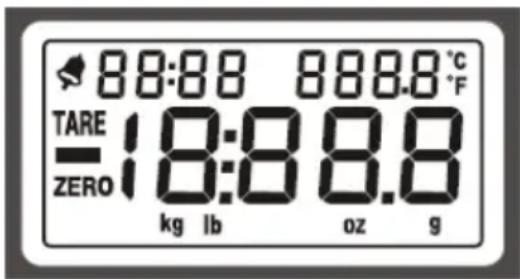
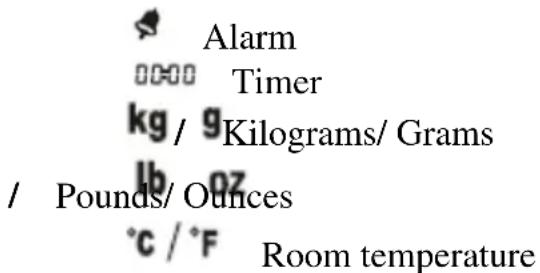
BUTTONS DESCRIPTION
ON/OFF button (1): Press to turn on/off the unit
T-SET button (2): Press enter timer setting
UNIT button (4): Press to change unit and set timer
Z/T button (5): Press to use Tare
HOW TO INSTALL THE BATTERY
Battery compartment is located below the scale. The scale requires 2xAAA, 1.5V battery.
- Open the door by pulling the locking tab.
- Remove the battery (if present).
- As shown in the figure, a connector is present inside in the housing; insert the battery pack, paying attention to the correct polarity power.
- Close the cover.
BATTERY WARNINGS
- Only use AAA batteries.
- Be sure to insert the battery according to the correct polarity, otherwise it may leak and damage the scale. Such damage is not covered by warranty.
- When you are going not to use the unit for a long time, it is advisable to remove the battery to prevent run out.
- Do not heat, open, or incinerate battery.
- Batteries are separately collected. Throw them in the appropriate containers.
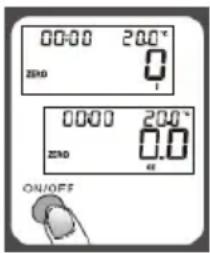
OPERATING
How to weigh
- Locate the scale on a stable surface.
- Place the bowl (6) on the scale.
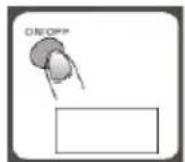
- Press the ON/OFF (1) and wait for the scale to display 0.0 (see figure for reference).
- Carry out the weighing.
Tare / Zero function
Tare function should be used when you want to perform several weighing using different containers, or to display zero.
- Press the Z / T (5)
- If the display (3) shows "0g" and the word TARE (or ZERO), keep on weighing.
- If the display (3) shows "----", it means that the value is not stable. Wait a few seconds.
Note: if you turn on the balance AFTER having placed the container on the weighing pan is not necessary to calibrate.
Measuring unit
You can set the units in kg (kilograms), g (grams), lb (pounds), oz (ounces). Press the UNIT (4) button to select one of these units.
Room temperature
At the top right of the display (2), you can see the room temperature in Celsius ( ^ C).
TIMER
The scale is equipped with timer function. The timer can be set from 0 min up to 99 minutes e 59 seconds.

- Turn on the scale by pressing ON / OFF button (1).
- Press T-SET (2) to enter timer mode.
- Set first digit using the keys ▲▼ (buttons 4 and 5) and press T-SET (2) to move to next digit.
- Repeat the process until you have set all the digits.
- Press T-SET button (2) to start the timer.
Stop the timer by pressing any button; to reset the timer, press T-SET button (2). When the timer reaches "0:00" an alarm will sound for 60 times, then the scale will automatically turn off.
ERROR AND LOW BATTERY
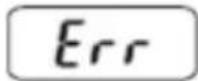
Exceeding maximum load
The scale can weigh up to 5 kg of food. If you exceed this value the display shows "Err".
Heavy loading may break the unit. Respect the maximum limit of 5 kg.
If there are heavy containers on the scale, the maximum capacity will be reduced by the weight of the container itself.
Low battery indication
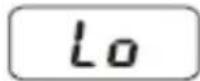
When the battery is low, the display shows the symbol "Lo".
Replace the battery with a new one, following the steps on "How to install battery" section.
SHUTDOWN
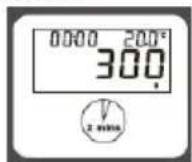
- Automatic: the scale turn off automatically if the display shows the same load for more than 2 minutes.
- Manual: the scale can be manually shut off by pressing ON/OFF button (1). To preserve battery lifetime, it is advised to always turn off the scale after each use.
CLEANING
Clean the unit by using wet and soft cloth and non-abrasive cleaners to avoid ruining the aesthetics of the appliance.
TECHNICAL FEATURES
• Power supply: DC 3V (2 x AAA, 1.5V)
• Capacity: 5Kg, 11 lb. Division: 1g, 0.1oz
- LCD backlit display
- Timer with alarm
• Room temperature (Range 0-40°C, division 0.5°C)
• Tare and zero regulation
• Automatic shut-off
The product is made of non-biodegradable and potentially polluting substances if not properly disposed of; other parts can be recycled. It’s our duty to contribute to the ecological health of the environment following the correct procedures for disposal. The crossed out wheelie bin symbol indicates the product complies with the requirements of the new directives introduced to protect the environment (2002/96/EC, 2003/108/EC, 2002/95/EC, 2012/19/EC) and must be properly disposed at the end of its lifetime. If you need further information, ask for the dedicated waste disposal areas at your place of residence. Who does not dispose of the product as specified in this section shall be liable according to the law.
To find the nearest service center, please call the telephone number 0541 694246, fax number 0541 756430 or contact us at assistenzatecnica@trevidea.it asking for the service centers supervisor.
Appliance is conform to the pertinent European
regulation and is therefore marked with the CE mark.

www.girmi.it TREVIDEA S.r.l.
TREVIDEA S.R.L. – Strada Consolare Rimini – San Marino n. 62 – 47924 – RIMINI (RN) - ITALY
MADE IN CHINA


- ITA: INDICE
- AVVERTENZE PER L'UTILIZZO
- Unità di misura
- ENGLISH: SAFETY INSTRUCTION
- DESCRIPTION PS85
- DISPLAY
- BUTTONS DESCRIPTION
- HOW TO INSTALL THE BATTERY
- BATTERY WARNINGS
- OPERATING
- How to weigh
- Tare / Zero function
- Measuring unit
- Room temperature
- TIMER
- ERROR AND LOW BATTERY
- Exceeding maximum load
- Low battery indication
- SHUTDOWN
- CLEANING
- TECHNICAL FEATURES
Brand : GIRMI
Model : PS85
Category : Kitchen scales