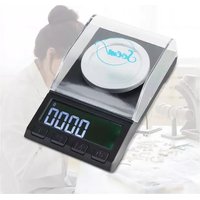
PSP301 - Kitchen scales SOEM - Free user manual and instructions
Find the device manual for free PSP301 SOEM in PDF.


| Product Type | Digital Kitchen Scale |
| Brand | SOEM |
| Model | PSP301 |
| Dimensions | 120 x 70 x 38 mm |
| Weight | 100 g |
| Color | Anthracite |
| Material | Stainless steel and ABS plastic |
| Power supply | 2 AAA batteries (included) |
| Weighing range | 0.001 - 50 g / 0.001 - 100 g |
| Accuracy | 0.001 g |
| Measurement units | g, mg, oz, tl, gn, ct, dwt, ozt |
| Main functions | Tare function, LCD display, auto-off after 2 min, calibration |
| Included accessories | Platform, tweezers, calibration weight, 2 AAA batteries, manual |
| Care and cleaning | Clean with a clean damp cloth. Do not use detergents or solvents. Do not immerse. |
| Safety | Keep out of reach of children. Do not use near water. Do not apply continuous weight. |
| Spare parts and repairability | Contact customer service by email: service@soemproducts.nl |
| Warranty | 2 years from date of purchase, upon presentation of original proof of purchase |
| Operating temperature | 10 - 30 °C |
| Storage temperature | -10 - 45 °C |
| Humidity | 90% RH |
Frequently Asked Questions - PSP301 SOEM
User questions about PSP301 SOEM
0 question about this device. Answer the ones you know or ask your own.
Ask a new question about this device
Download the instructions for your Kitchen scales in PDF format for free! Find your manual PSP301 - SOEM and take your electronic device back in hand. On this page are published all the documents necessary for the use of your device. PSP301 by SOEM.
USER MANUAL PSP301 SOEM
natural_image
Line drawing of a digital laboratory balance with an open lid and control buttons (no text or symbols)CE
Introductie
Thank you for choosing one of our SOEM products. For the best and safest user experience, we recommend following the safety instructions at all times. If you have any questions about the product, please get in touch with us via e-mail: service@soemproducts.nl
The digital scale from SOEM products is indispensable for anyone who wants to weigh accurately. Weigh the right and most accurate quantities. The scale can weigh in grams, oz, lb and ml. You easily read the quantities on the large LCD screen. The tare function allows you to set a zero point, including the included tray. To save battery power, the scale switches off automatically after 2 minutes.
Warnings and safety instructions
- Take care that the packaging material does not get into the hands of children. Children may choke on it.
- Before use, read the manual carefully and keep it in a safe place.
General
- There are risks and consequences associated with the misuse of digital scales.
- Misuse of the digital scale may result in personal injury and damage to the device and to products used in conjunction with the scale.
- Use the digital scale only for purposes specified in this manual.
- Is the digital scale not functioning properly? Has it been dropped and/or damaged? Then DO NOT use the digital scale, but consult our Customer Service.
- The digital scale is specially designed and intended for private use. The digital scale is not intended for commercial purposes.
● The parts of the scale are plastic and vulnerable to prolonged pressure. Do not put weight on the scale when not in use. - Do not drop the device from a great height.
- Make sure the appliance cannot fall off your worktop.
- Use the digital scale indoors only.
- Place the device on a flat and stable surface.
- Use soft objects to remove the remaining dirt.
Persons and usage
- Keep the digital scale out of the reach of children and people with physical or mental disabilities. Use of the device is allowed only when a supervisor is present who is responsible for the user's safety.
- The batteries pose a choking hazard. Keep batteries away from children and pets.
Electricity
- DO NOT repair or restore the device. This may damage the device. For your own safety, these parts should only be replaced by authorised service personnel. Always send the digital scale to a service centre for repairs to prevent damage and personal injury.
• DO NOT use the digital scale near water. Think of a bath, a shower, a swimming pool, or near a (laundry) tub filled with water. - Do NOT allow the device to come into contact with water. DO NOT immerse the appliance in water. If water gets in or on the appliance, turn off the appliance immediately and contact our customer service department.
- Do not touch the device with wet hands.
- Keep it away from moisture, heat, rooms where the temperature is relatively high and heat sources such as ovens.
- Remove the batteries from the device if you do not use the scale for a long time.
• DO NOT use the digital scale near devices that may cause electromagnetic interference that prevents the scale from weighing accurately. - Do not move the appliance when it is on. Always turn off the appliance before moving or cleaning it.
Control of received shipment
- Check that the contents of the package match the packing slip when you receive the device.
- Inform your supplier if any parts are missing.
- Does the digital scale appear damaged? If so, file a complaint with the carrier immediately and give the supplier a detailed description of the damage. Keep the damaged packaging to substantiate your complaint.
Content Packaging
SOEM products digital scale - Model PSP30
Included accessories
-2x AAA batteries
-1x Manual
-Tray
-Tweezers
-Calibration weight
Product Features
| Size 120x70x38 mm | |
| Weight 100 gr | |
| Colour Antraciet | |
| Material Roestvrij staal, ABS plastic | |
| Power supply 2x AAA-batterijen | |
| Weighing range 0,001 - 50 gram / 0,001 - 100 gram | |
| Units of measurement g, mg, oz, tl, gn, ct, dwt, ozt | |
| Weighing accuracy 0,001 gram | |
| Operating temperature 10 - 30°C | |
| Storage temperature -10 - 45°C | |
| Humidity 90% RH | |
Other features:
-Tare function;
-LCD display;
-Automatically switches off after 2 minutes;
-Batteries included.
Instructions for use
-Do not put weight on the scale when it is out of use. The parts of the scale are made of plastic are vulnerable to prolonged pressure.
-The batteries pose a choking hazard. Keep batteries away from children and pets.
LCD display
- Low battery indicator
2.Minus sign
3.Tare - Weight unit
- Liquid Unit
Notes:
-Replace the batteries when the LCD displays "LO" and the unit turns off.
-If the weight on the scale exceeds 50 grams, the LCD displays "Err". Remove the weight from the scale to prevent damage to the scale.
Use
Calibration:
- Turn on the device.
- Wait until the scale displays "0.000g", and press and hold the MODE button until the display shows. CAL and indicates the weight to be calibrated.
- Place the calibration weight in the centre of the platform.
- The display shows the text PASS when calibration is complete.
- Turn off the scale. Calibration is complete.
Repeat this process if the scale is inaccurate.
Weighing
- Open the battery cover and insert the two AAA batteries as indicated in the device.
- Place the scale on a flat and stable surface.
- Press the "ON / OFF / TARE" button to turn on the scale. When the weight is on the scale for 3 seconds, the digits on the LCD display will remain still and indicate the correct weight. - If you use a tray to weigh something, first place the empty tray on the scale. The scale will now indicate the weight of the tray. Press the "ON / OFF / TARE" button once. The scale will now switch on the tare function, and the digits on the LCD display will go back to 0 g. Then place the items you want to weigh in the tray.
- To reset the scale to 0 g after use, press the "ON / OFF / TARE" button once.
- When the LCD shows 0 g, you can press the "ON / OFF / TARE" button to turn off the device.
Adjusting the unit of measurement
- Turn on the device.
- Press the "UNIT" button to switch between "q, mq, oz, tl, qn, ct, dwt, ozt".
- After choosing the desired unit of measurement, you can start weighing. The device remembers the unit of measurement you last chose.
Maintenance and cleaning
Clean the digital scale with a clean, damp cloth. Do not use harsh detergents or solvents to clean the scale. Do not get the digital scale wet.
Storage
-Store the digital scale in a dry, clean place. Do not store it in extremely high or low temperatures.
Disposal - Recycling
- Consider the environment and contribute to a cleaner living environment! Do not dispose of the digital scale with normal household waste. Return the scale to a government-designated collection point to have it recycled.
Service and warranty
Do you have any questions or need information regarding digital scales? Then we would love to hear from you! You can send an e-mail to service@soemproducts.nl.
You have a 2-year warranty on the product. The customer must show the original proof of purchase, and the warranty applies within a period of 2 years from the date of purchase.
Note the warranty does not apply:
-In case of damage caused by improper use or repair;
-For parts subject to wear;
-For defects of which the customer was aware at the time of purchase;
-For defects caused by the customer's own fault, and for damage caused by third parties.
Disclaimer
-The text in this manual may be subject to change; specifications are subject to change without notice.
-The manufacturer is not responsible for any incorrect measurements.