XC6640 - Loudspeaker CLARION - Free user manual and instructions
Find the device manual for free XC6640 CLARION in PDF.


| Product Type | 6-Channel Amplifier |
| Brand | Clarion |
| Model | XC6640 |
| Frequency Response | < 10 Hz to 74 kHz |
| Output Power (4 Ω stereo) | 85 W x 6 (CEA-2006A, 1% THD) |
| Output Power (2 Ω stereo) | 125 W x 6 (CEA-2006A, 1% THD) |
| Output Power (4 Ω bridged) | 250 W x 3 (CEA-2006A, 1% THD) |
| Signal-to-Noise Ratio | > -88 dBA (1 W, 4 Ω) |
| Efficiency at Full Power (4 Ω) | 83.2% |
| Input Sensitivity | 200 mV to 6 V |
| Filter Range | 50 Hz to 500 Hz (12 dB/octave) |
| Power Supply | 12 V DC (vehicle electrical system) |
| Fuses | 2 x 35 A |
| Dimensions (W x D x H) | 288 x 173.3 x 55 mm |
| Weight | Not specified |
| Key Features | Ultra high-speed digital switching, MOFSET power supply, auto-sense turn-on, BC2 remote control, variable high-pass/low-pass filters, bass boost circuit, balanced differential inputs |
| Care and Cleaning | Clean with a dry, lint-free cloth. Avoid moisture and chemicals. |
| Safety | Professional installation recommended. Disconnect the battery before any connections. Use fuses of appropriate rating. |
| Spare Parts and Repairability | Replacement 35 A fuses, BC2 remote controller. For repairs, contact an authorized Clarion dealer. |
| General Information | Designed for installation in a vehicle with a 12 V system and common ground. Warranty: see included document. |
Frequently Asked Questions - XC6640 CLARION
User questions about XC6640 CLARION
0 question about this device. Answer the ones you know or ask your own.
Ask a new question about this device
Download the instructions for your Loudspeaker in PDF format for free! Find your manual XC6640 - CLARION and take your electronic device back in hand. On this page are published all the documents necessary for the use of your device. XC6640 by CLARION.
USER MANUAL XC6640 CLARION
Congratulations on your purchase of a Clarion XC Series amplifier. This series of ultra high speed digital switching amplifiers was designed in the United States to offer sound quality that exceeds that of many conventional Class AB designs while offering excellent efficiency.
When installed and configured properly, XC amplifiers will bring a new level of realism and impact to your mobile entertainment system. To get the best performance from your amplifier Clarion recommends that you have this amplifier installed and configured by an experienced professional.
TABLE OF CONTENTS
3 Features
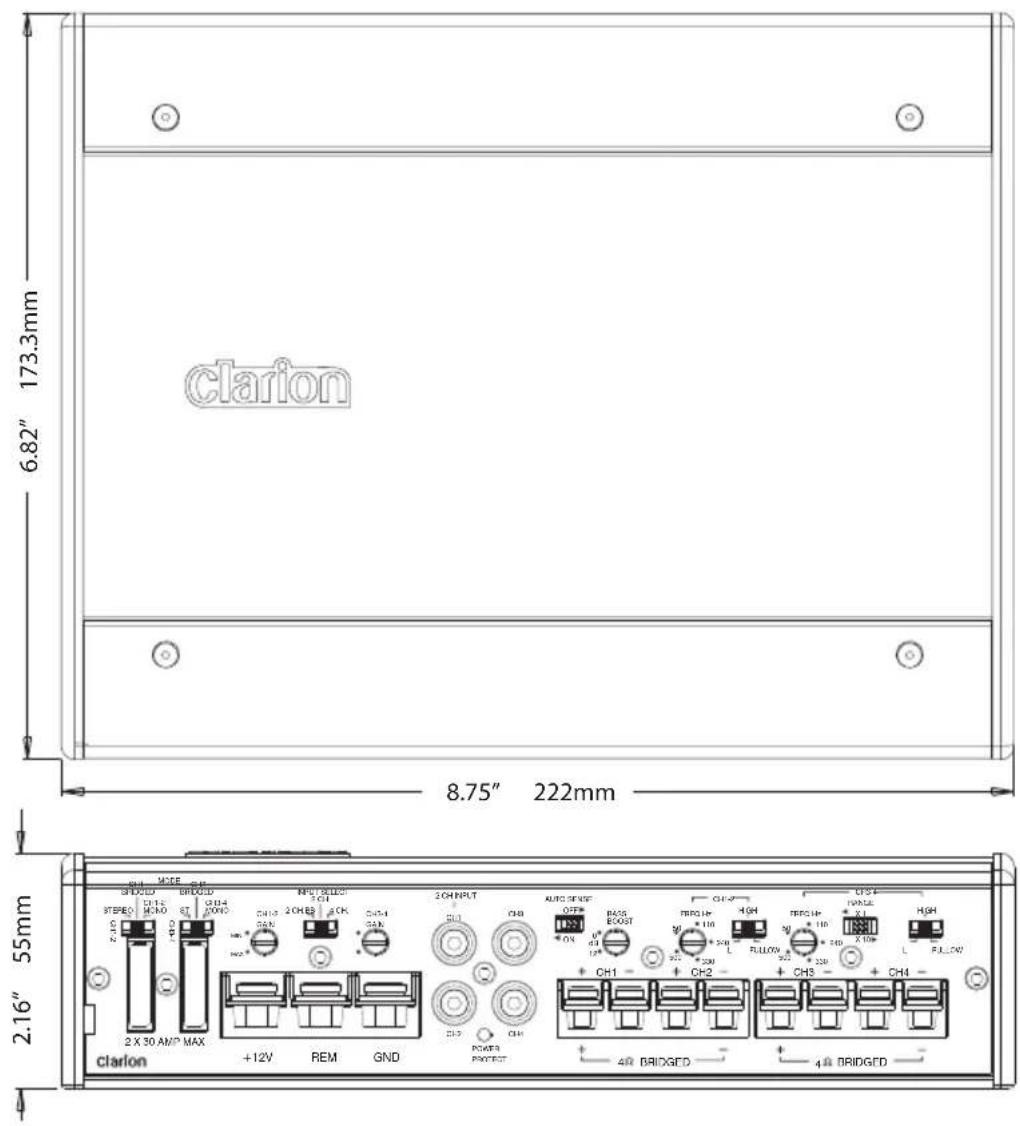
4 XC6440 Connections and Controls
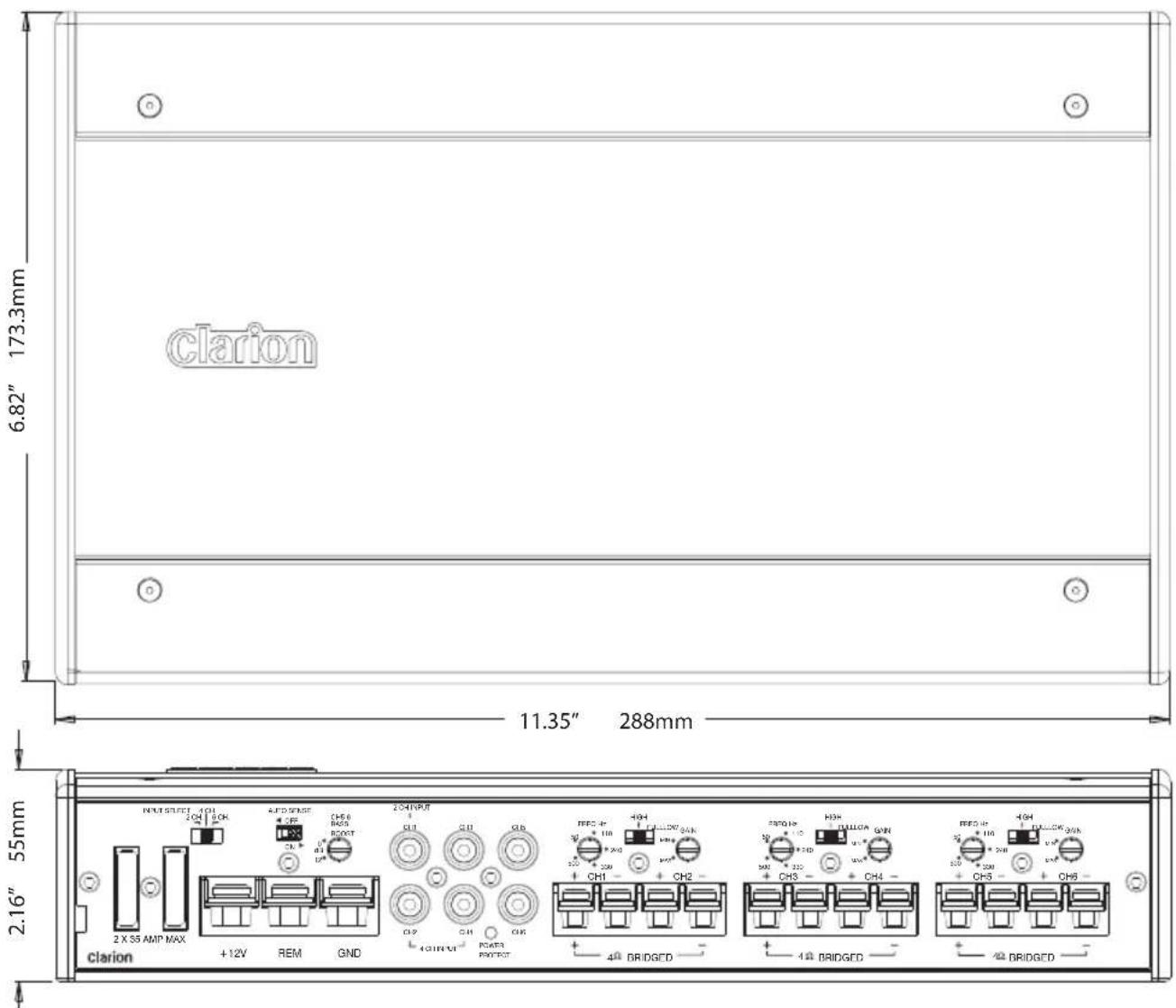
5 XC6640 Connections and Controls
6 Installation Planning and Considerations
7 General Function Explanations
8 Speaker Wiring Diagrams
11 Signal Distribution
13 XC6440 Signal Distribution Flow Chart
14 XC6640 Signal Distribution Flow Chart
15 Power Connections
16 Installation
16 Subwoofer Level Control Installation
17 Troubleshooting
This manual describes the basic requirements to install the Clarion XC6440 and XC6640 amplifiers. The installation and configuration of these amplifiers can be quite complex. If you do not possess the necessary knowledge, experience and/or tools to perform this installation, please contact your location authorized Clarion dealer to arrange for professional installation. Keep all instructions and your sales receipt for future reference and warranty purposes.
FEATURES
The Clarion XC Series of amplifiers are designed with performance and convenience in mind. Through the use of state-of-the-art signal processing and high speed output devices, these amplifiers offer a level of sound quality that has been unheard of in a high speed switching amplifier. The XC series of amplifiers incorporates the following features:
- Ultra High Speed output devices (>600kHz) for extended frequency response
- Pulse Width Modulated MOSFET Power Supply for efficient power delivery
- Remote Turn-On with muting for silent start-up
- Variable High-Pass and Low-Pass electronic crossover with -12dB/Octave Slope
- Adjustable input level controls with ground loop isolation
• 2-Ohm Stereo, 4-Ohm Bridged stable
• Corrosion resistant power, speaker and RCA connections - BC2 Remote Subwoofer Level control Included
- Speaker level input RCA adapters included
• Auto-Sense turn-on detection for OEM integration - Circuit Boards with a conformal coating to resist moisture damage
- Low Profile design with corrosion resistant high efficiency aluminum heat sink
WARNING
Clarion products are capable of producing high sound pressure levels that can damage your hearing and make it difficult for the driver to hear other cars or emergency vehicles. Clarion wants you as a customer for life - please be responsible at all times when enjoying your audio system.
Clarion takes no responsibility for any personal injury, loss or damage associated with the use, or miss-use of this product. Please refer to the included warranty statement for details.
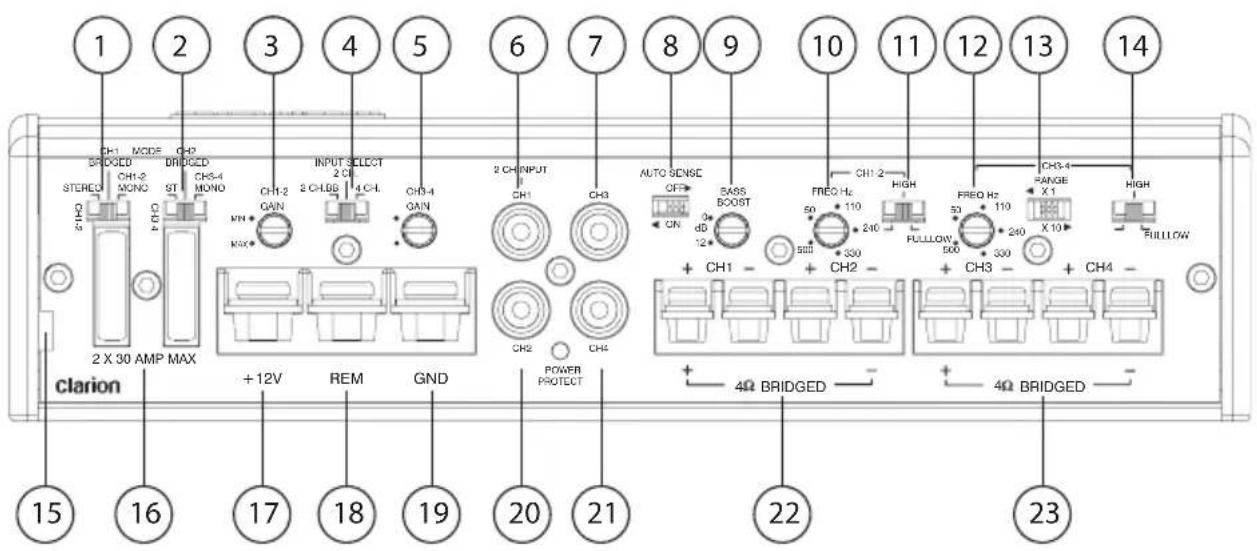
- Channel 1&2 Mode Select Switch
- Channel 3&4 Mode Select Switch
- Channel 1&2 Input Sensitivity Control (Gain)
- Input Selection Switch
- Channel 3&4 Input Sensitivity Control (Gain)
- Channel 1 Input RCA Connection
- Channel 3 Input RCA Connection
- Channel 1 Auto Sensing Control switch
- Channel 1&2 Bass Boost Level Control
- Channel 1&2 Crossover Frequency Control
- Channel 1&2 Crossover Function Switch
- Channel 3&4 Crossover Frequency Control
- Channel 3&4 Crossover Frequency Multiplier Control Switch
- Channel 3&4 Crossover Function Switch
- Slot for remote level control wire
- Two 30A Fuses
- +12V Constant Power Source
- Remote Turn-On Connection
- Ground Connection
- Channel 2 Input RCA Connection
- Channel 4 Input RCA Connection
- Channel 1&2 Speaker Connections
- Channel 3&4 Speaker Connections
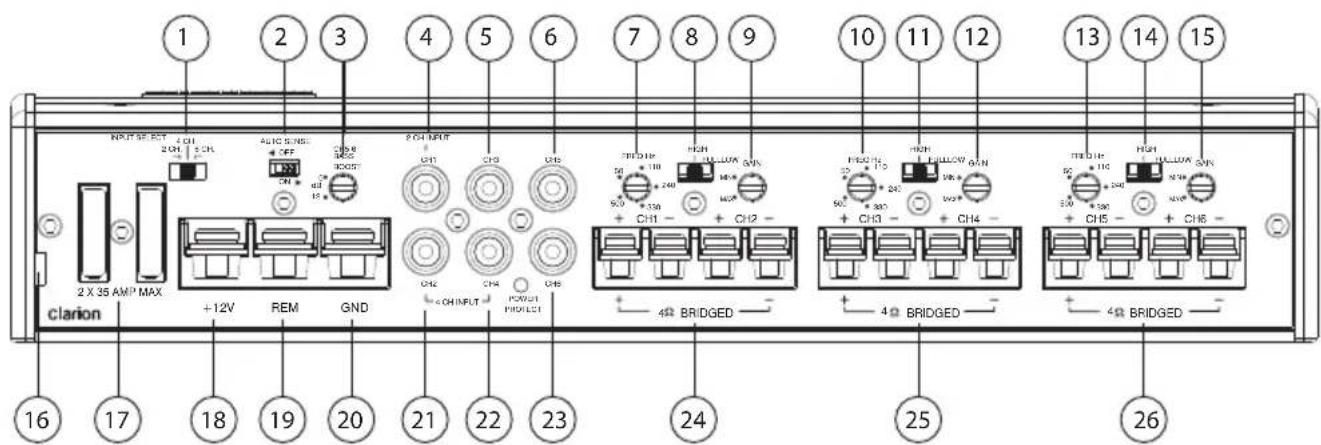
- Input Selection Switch
- Channel 1 Auto Sensing Control switch
- Channel 5&6 Bass Boost Control Switch
- Channel 1 Input RCA Connection
- Channel 3 Input RCA Connection
- Channel 5 Input RCA Connection
- Channel 1&2 Crossover Frequency Control
- Channel 1&2 Crossover Function Switch
- Channel 1&2 Input Sensitivity Control (Gain)
- Channel 3&4 Crossover Frequency Control
- Channel 3&4 Crossover Function Switch
- Channel 3&4 Input Sensitivity Control (Gain)
- Channel 5&6 Crossover Frequency Control
- Channel 5&6 Crossover Function Switch
- Channel 5&6 Input Sensitivity Control (Gain)
- Slot for remote level control wire
- Two 35A Fuses
- +12V Constant Power Source
- Remote Turn-On Connection
- Ground Connection
- Channel 2 Input RCA Connection
- Channel 4 Input RCA Connection
- Channel 6 Input RCA Connection
- Channel 1&2 Speaker Connections
- Channel 3&4 Speaker Connections
- Channel 5&6 Speaker Connections
Clarion XC amplifiers are designed for installation in vehicles with 12V electrical systems and a common ground configuration. While Clarion strongly recommends professional installation of our products to maximize the performance of the product, installing the amplifier yourself can certainly produce impressive results. Please take into consideration the following when planning your installation.
• Take care in choosing a mounting location for the amplifier. Clarion does not recommend mounting an amplifier to a subwoofer enclosure. Vibration could damage internal components of the amplifier.
- Ensure that the screws used to mount the amplifier will not damage anything underneath the mounting location. This can include interconnects and speaker wires, factory wiring harnesses, computers modules, factory fluid lines, fuel tanks and more. Mounting hardware should be sufficient to ensure that the amp will not come loose in the event of a vehicle accident.
- All wiring running to and from the amplifier should be planned so that its route does not bring it in proximity of any high current devices or computer modules. This will help to prevent noise from being induced in the audio system.
- XC Amplifiers incorporate balanced differential inputs. As such, Clarion recommends the use of twisted pair interconnects to ensure that the signal on the center pin and shield of the interconnect allow this circuitry to perform to the best of its ability in terms of rejecting unwanted noise.
- Although the XC amplifiers are suitable for marine installations, they are in no way water resistant. They should be mounted in a dry, well-ventilated location. The marine features of the amp are designed to handle humid conditions commonly associated with installations in boats.
- Amplifiers dramatically increase the load on the vehicles electrical system. Please confirm that the vehicle battery and alternator are in good condition. Clarion recommends the use of a heavy duty AGM style battery to increase current delivery and play time and the use of a stiffening capacitor to provide increased instantaneous current to the amplifier.
- Properly supplying current to your amplifier may require that some of the factory electrical connections under the hood of your vehicle be upgrades. The industry refers to these upgrades as 'The Big 3'. These upgrades include a new ground wire from the engine in your vehicle to the battery ground terminal. A new ground wire from the ground terminal of your battery to the chassis of the vehicle. A new power wire from the output of your alternator to the positive terminal of your battery. Performing these upgrades are optional, but will increase the performance and longevity of any electrical component you add to your vehicle.
Sensitivity Control (Gain)
This adjustment is provided to adjust the amplifier sensitivity so that it will produce maximum power given a variety of different input signal voltages. Setting this correctly will ensure that you get maximum performance from your amplifier and is critical to ensuring that minimal noise and distortion is produced.
Clarion recommends the use of an Oscilloscope or distortion detecting device such as the SMD DD-1 Distortion Detector to properly set amplifier sensitivity. A headroom setting of 10dB will help to ensure that music that is recorded at low levels can still be reproduced at high volume levels. With this setting, it is the responsibility of the operator to use the amplifier in a manner that will not produce audible distortion.
Procedure (Oscilloscope) Method:
- Obtain a test disc with a selection of Sine Waves recorded at -10dB.
- Turn the gain all the way down on the amplifier (to the left).
- Connect the ground terminal of the scope lead to the shield of the RCA cable coming from the source unit. Do no connect this to the speaker output terminals.
- Connect the scope probe to a speaker terminal on the channel you want to adjust.
- Select a Sine wave frequency that is well away from the chosen crossover frequency. For midrange speakers use 1kHz, use 40Hz for subwoofers.
- Turn the source unit up as high as possible without distortion.
- Monitor the output waveform of the amp on the scope.
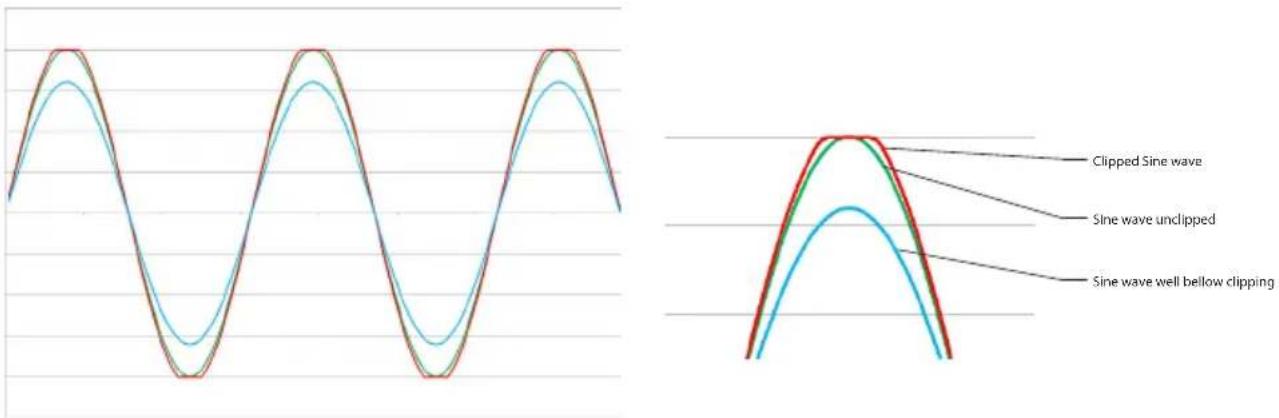
- Increase the sensitivity of the amplifier until the scope waveform shows a small flat spot on the top or bottom of the waveform. See Figure 2 for an example of what to look for.
line
| Condition | Wave Shape | | ----------------------------- | ----------------------- | | Clipped Sine wave | Solid red | | Clipped Sine wave | Solid green | | Clipped Sine wave | Solid blue | | Sine wave unclipped | Solid green | | Sine wave unclipped | Solid blue | | Sine wave unclipped | Solid red | | Sine wave well below clipping | Solid blue | | Sine wave well below clipping | Solid red |Fig 1 - Sine Wave at different Levels Fig 2 - Close-Up of waveforms
SMD DD-1 Method:
- Following the instructions provided with the DD-1, use the 0dB track to confirm the output of the source unit is unclipped.
- Connect the DD-1 to the output of the amplifier and use an appropriate -10dB track. Increase the gain on the amplifier until the Distortion LED illuminates
You should be able to turn the volume up to almost full volume without hearing distortion from your amplifier. If you can't turn the volume up most of the way without distortion, the gains are not set properly.
Auto Sensing Control Switch
The XC6440 and XC6640 feature an automatic turn-on circuit that will activate the amplifier without the need for a connection to the REM terminal. If you are connecting a wire to the REM connection, set the Auto Sensing Control Switch to Off.
Bass Boost Level Control
This control allows you to add up to 12dB of boost, centered at 45Hz to the audio signal. This will add impact and depth to the sound of your system. Be judicious with this control, as it can dramatically increase the current requirements of your amplifier, drive the amplifier into clipping and cause damage to your speakers.
Crossover Function Switch
This switch allows you to set the internal crossover to function in a high-pass or low-pass mode, or to be shut off altogether for full range speakers or when used with external signal processors. High-pass crossovers are used on midrange and high frequency speakers to prevent low frequency (bass) information from damaging them due to excessive excursion requirements. Low-Pass crossovers are typically used on subwoofers to prevent midrange and high frequency information from being passed to them. Large drivers are not capable of reproducing these frequencies accurately.
Crossover Frequency Control
This adjustment allows the use to alter the -3dB frequency of the crossover. The settings are the same whether the crossover is set to high-pass or low-pass mode. On the XC6440 and XC6640, the crossover frequency is adjustable from 50Hz to 500Hz. The XC6440 includes a x10 multiplier switch which changes the crossover range to 500-5,000Hz.
Remote Turn-On Connection
When +12V is applied to this terminal, the amplifier will turn on. When installing the amplifier with an after market source unit, this wire is typically Blue with a White stripe. Some OEM source units have a wire that behaves similarly.
Speaker Connections
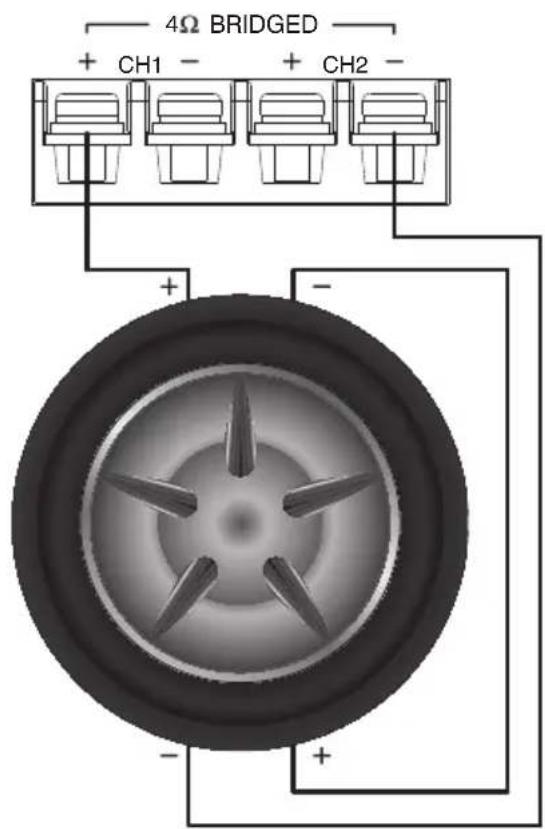
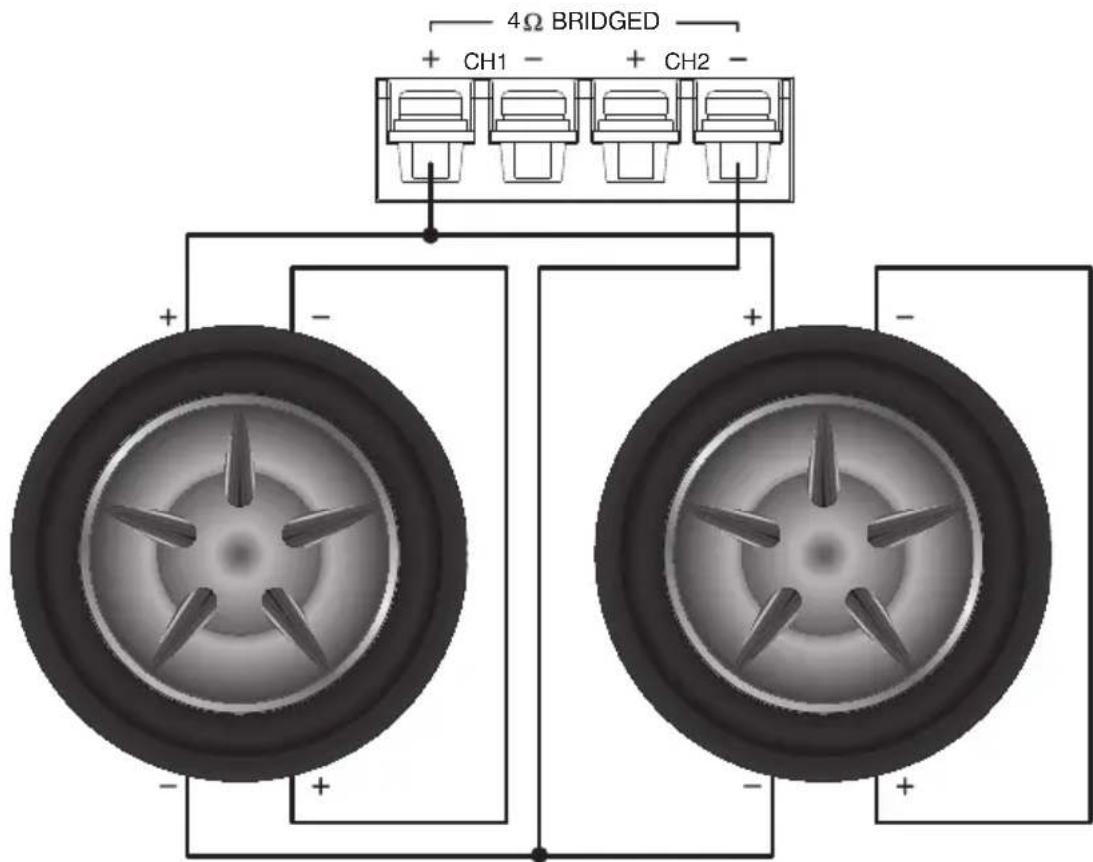
The XC6440 and XC6640 amplifiers are capable of driving reactive loads with a minimum nominal impedance of 2 Ohms when wired in stereo and 4 Ohms when bridged. When wiring speakers in stereo, the positive and negative leads from the speakers should connected to the respective channels positive and negative connections. When bridging the amplifier to drive a mono load, only the outside terminals should be used. The positive connection is on the left and negative is on the right. Please refer to the speaker wiring diagrams for details
Input RCA Connections
The RCA Input connections should be connected to the RCA Pre-amp outputs of an after market head unit. If you are using a head unit that only has speaker level outputs, adapters are included with each amp. Please wire them according to the adjacent image. Note, there are components in these connectors used to attenuate the signal. Do
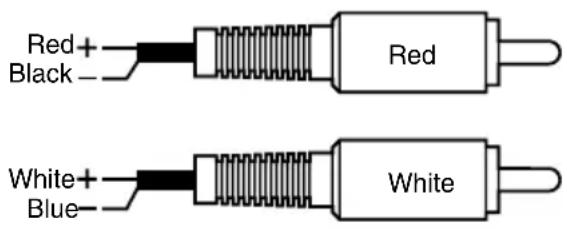
not substitute conventional RCA terminals for these or damage may occur.
4 Ohm Stereo (XC6440 or XC6640)
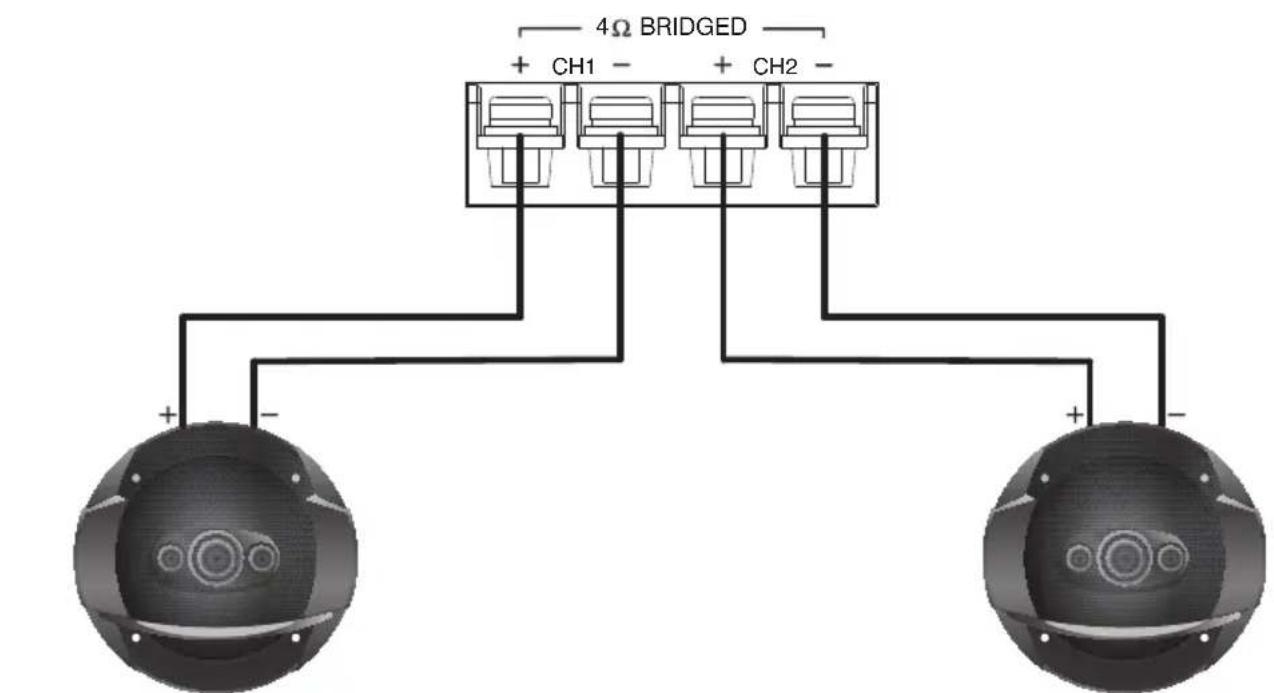
2 Ohm Stereo (XC6440 or XC6640)
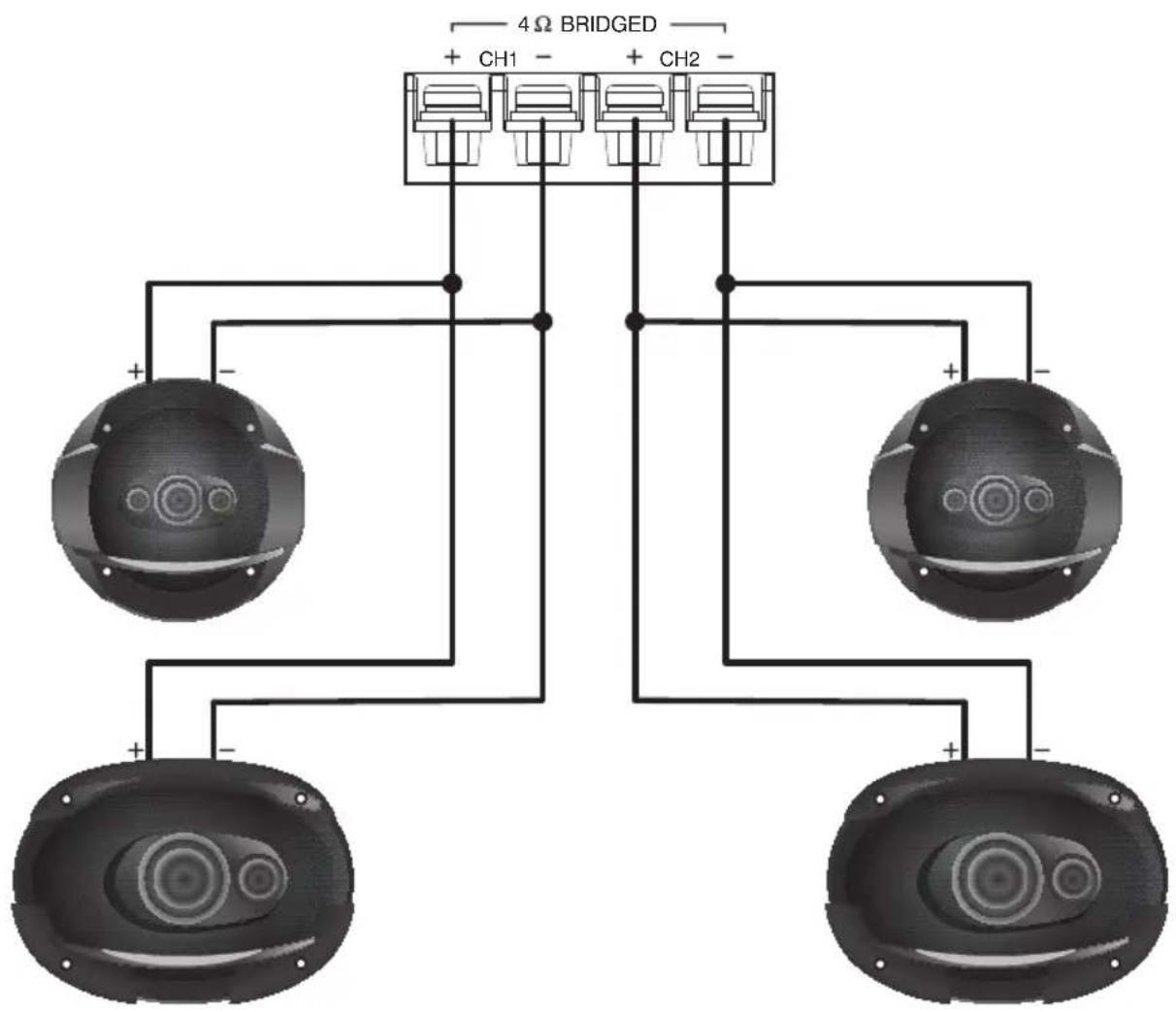
flowchart
graph TD
    A["4Ω BRIDGED"] --> B["Ch1"]
    A --> C["CH2"]
    B --> D["Speaker 1"]
    B --> E["Speaker 2"]
    C --> F["Speaker 3"]
    C --> G["Speaker 4"]
4 Ohm Mono - One 4 Ohm Single Voice Coil Subwoofer
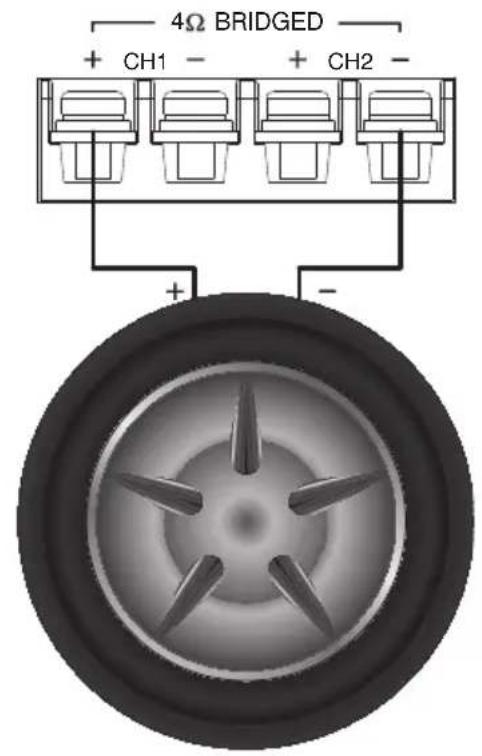
4 Ohm Mono - One Dual 2 Ohm Voice Coil Subwoofer
4 Ohm Mono - Two Dual 4 Ohm Voice Coil Subwoofers
Signal Distribution
The XC6440 is quite complex in terms of its ability to distribute signals through the amplifier. The combination of the Input Selection Switch and Mode Select Switch allow the amp to be used as a 2-Channel, 3-Channel or 4-Channel amp using one or two pairs of signal inputs.
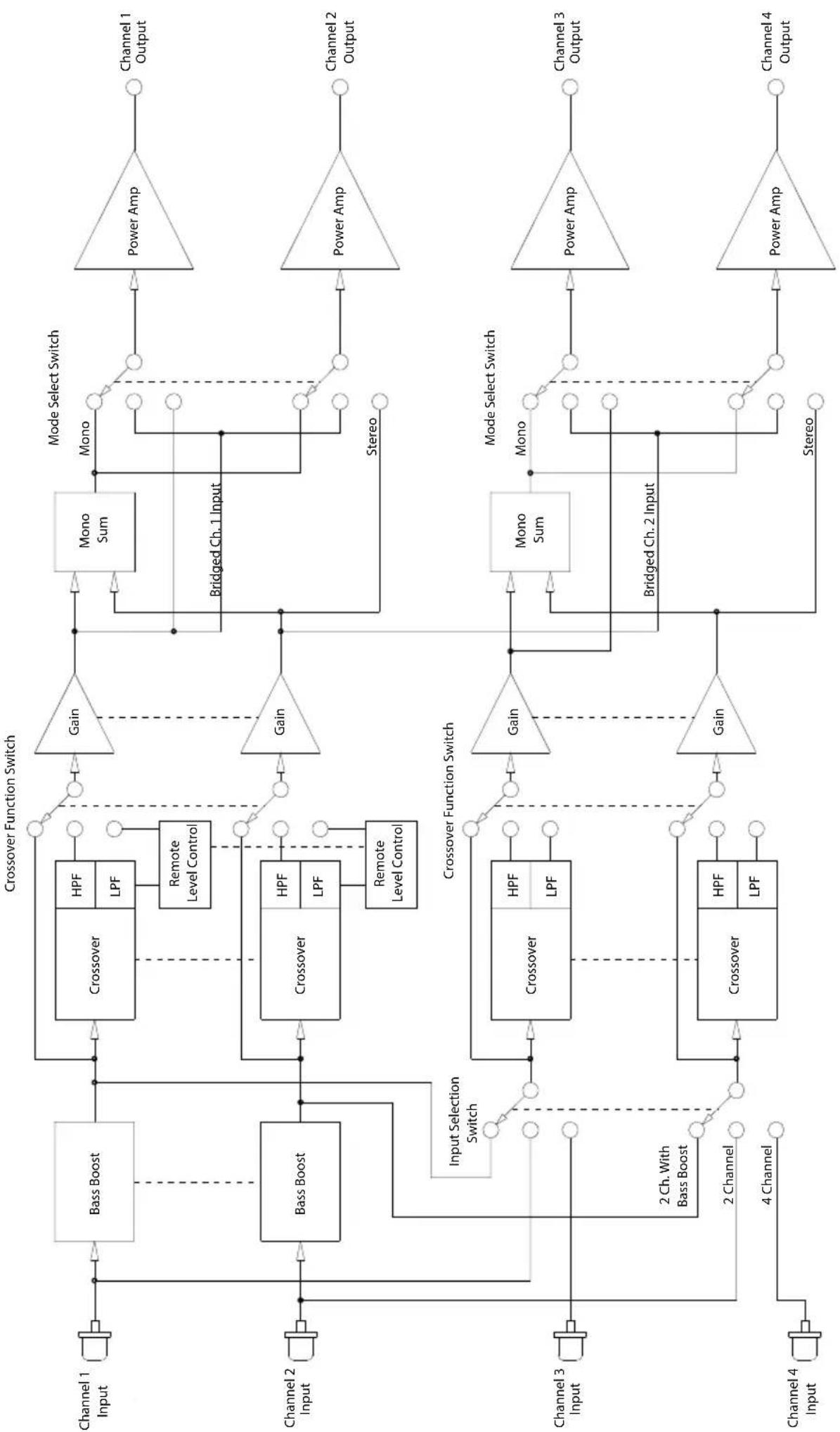
The XC6640 is capable of providing signal distribution to all six channels from 1, 2 or 3 pair(s) of inputs.
As there many different possible configurations, block diagrams have been provided to explain the internal connectivity and signal routing for each model of amplifier.
Notes:
On the XC6440, the Remote Level Control functions only when channels 1 & 2 are put in Low-Pass mode. On the XC6640, Remote Level Control functions only when channels 5 & 6 are put in Low-Pass mode.
If you have questions regarding the configuration of the amplifier for your application, please do not hesitate to contact the Clarion dealer you purchased the amplifier from.
XC6440 Input Selection Switch
• 4 Channel - Routes all inputs direct to all outputs. Channel 1 to Output 1, etc.
- 2 Channel - Copies the input of Channel 1 to Channel 3 and Channel 2 to Channel 4. This can be used to drive all 4 channels with only a single pair of input connections.
- 2 Channel Bass Boost - Similar to 2 Channel mode, but allows the Bass Boost circuit to affect Channel 3 and Channel 4.
XC6440 Mode Select Switch
- Stereo - Audio signals are passed through to the outputs unaltered.
- Mono - Sums the input of both channels equally and sends identical signals to the outputs. This function operates independently on each pair of channels.
- Bridged - On Channels 1 and 2, in Bridged mode, the input of Channel 1 is sent to the outputs of both channels 1 and 2. On Channels 3 and 4, the input of Channel 2 is sent to the outputs of both channels 3 and 4. With both Mode Select switches set to Bridged, the XC6440 becomes a 2 x 250W 2-channel amplifier.
XC6640 Input Selection Switch
- 6 Channel - Routes all inputs directly to all outputs. Channel 1 to Output 1, etc.
- 4 Channel - The inputs of Channels 1 through 4 are directly sent through the amplifier unaltered. Channel 5 is fed from the sum of channels 1 and 3 while channel 6 is fed from the sum of channels 2 and 4.
- 2 Channel - Input 1 is copied to Input 3 and Input 5. Input 2 is copied to Input 4 and Input 6. This allows a single pair of interconnects to feed all six channels.
flowchart
graph TD
    subgraph Channel 1
        A["Input"] --> B["Bass Boost"]
        C["Input"] --> D["Bass Boost"]
        E["Input"] --> F["Output"]
    end

    subgraph Channel 2
        G["Input"] --> H["Bass Boost"]
        I["Input"] --> J["Bass Boost"]
        K["Input"] --> L["Input Selection Switch"]
        M["Input"] --> N["2 Ch. With Bass Boost"]
        O["Input"] --> P["2 Channel"]
        Q["Input"] --> R["4 Channel"]
    end

    subgraph Channel 3
        S["Input"] --> T["Crossover"]
        U["Input"] --> V["Crossover"]
        W["Input"] --> X["Crossover"]
        Y["Input"] --> Z["Crossover"]
        AA["Input"] --> AB["Crossover"]
    end

    subgraph Channel 4
        AC["Input"] --> AD["Crossover"]
        AE["Input"] --> AF["Crossover"]
        AG["Input"] --> AH["Crossover"]
    end

    B --> B1["Crossover"]
    D --> D1["Crossover"]
    H --> H1["Crossover"]
    J --> J1["Crossover"]
    L --> L1["Crossover"]
    T --> T1["Crossover"]
    V --> V1["Crossover"]
    X --> X1["Crossover"]
    Y --> Y1["Crossover"]
    AB --> AB1["Crossover"]
    AH --> AH1["Crossover"]
    Z --> Z1["Crossover"]
    AA --> AA1["Crossover"]

    B1 --> B2["Crossover"]
    D1 --> D2["Crossover"]
    H1 --> H3["Crossover"]
    V1 --> V3["Crossover"]
    X1 --> X3["Crossover"]

    B2 --> B3["Crossover"]
    D2 --> D3["Crossover"]
    H3 --> H4["Crossover"]
    V3 --> V4["Crossover"]

    B3 --> B4["Crossover"]
    D3 --> D5["Crossover"]

    B4 --> B5["Crossover"]
    D5 --> D6["Crossover"]

    B5 --> B7["Crossover"]
    D6 --> D8["Crossover"]

    B6 --> B9["Crossover"]
    D7 --> D10["Crossover"]

    B7 --> B10["Crossover"]

    D8 --> D11["Crossover"]

    B9 --> B11
    D10 --> D12
    B11 --> B12
    D12 --> B13
    B12 --> B14
    D13 --> B15
    B14 --> B16
    D15 --> B17
    B16 --> B18
    D17 --> B19
    B19 --> B20
    D20 --> B20
    B20 --> B21
    D21 --> B22
    B22 --> B23
    D23 --> B24
    B24 --> B25
    D25 --> B26
    B26 --> B27
    D27 --> B28
    B28 --> B29
    D29 --> B30
    B30 --> B31
    D30 --> B31
    B31 --> B32
    D32 --> B33
    B33 --> B34
    D34 --> B35
    B35 --> B36
    D36 --> B37
    B37 --> B38
    D38 --> B39
    B40 --> B40
    style A fill:#f9f,stroke:#333
    style C fill:#f9f,stroke:#333
HS179NE

flowchart
graph TD
    subgraph Channel 1
        A["Input"] --> B["Crossover"]
        C["Input"] --> D["Crossover"]
        E["Input"] --> F["Crossover"]
        G["Input"] --> H["Crossover"]
    end

    subgraph Channel 2
        I["Input"] --> J["Crossover"]
        K["Input"] --> L["Crossover"]
        M["Input"] --> N["Crossover"]
        O["Input"] --> P["Crossover"]
    end

    subgraph Channel 3
        Q["Input"] --> R["Crossover"]
        S["Input"] --> T["Crossover"]
        U["Input"] --> V["Crossover"]
        W["Input"] --> X["Crossover"]
    end

    subgraph Channel 5
        Y["Input"] --> Z["Crossover"]
        AA["Input"] --> AB["Crossover"]
        AC["Input"] --> AD["Crossover"]
        AE["Input"] --> AF["Crossover"]
    end

    subgraph Channel 5
        AG["Input"] --> AH["Bass Boost"]
        AI["Input"] --> AJ["Bass Boost"]
        AK["Input"] --> AL["Bass Boost"]
        AM["Input"] --> AN["Bass Boost"]
        AO["Input"] --> AP["Bass Boost"]
        AQ["Input"] --> AR["Bass Boost"]
        AS["Input"] --> AT["Bass Boost"]
        AU["Input"] --> AV["Bass Boost"]
        AW["Input"] --> AX["Bass Boost"]
        AY["Input"] --> AZ["Bass Boost"]
        BA["Input"] --> BB["Bass Boost"]
        BC["Input"] --> BD["Bass Boost"]
        BE["Input"] --> BF["Bass Boost"]
        BG["Input"] --> BH["Bass Boost"]
        BI["Input"] --> BJ["Bass Boost"]
        BK["Input"] --> BL["Bass Boost"]
        BM["Input"] --> BN["Bass Boost"]
        BO["Input"] --> BP["Bass Boost"]
        BQ["Input"] --> BR["Bass Boost"]
        BS["Input"] --> BT["Bass Boost"]
        BU["Input"] --> BV["Bass Boost"]
        BW["Input"] --> BX["Bass Boost"]
        BY["Input"] --> BZ["Bass Boost"]
        CA["Input"] --> CB["Bass Boost"]
        CC["Input"] --> CD["Bass Boost"]
        DE["Input"] --> DF["Bass Boost"]
        DG["Input"] --> DH["Bass Boost"]
        DI["Input"] --> DJ["Bass Boost"]
        DK["Input"] --> DL["Bass Boost"]
        DM["Input"] --> DN["Bass Boost"]
        DO["Input"] --> DOA["Bass Boost"]
        DQ["Input"] --> DQA["Bass Boost"]
        DB["Input"] --> DBA["Bass Boost"]
        DC["Input"] --> DCB["Bass Boost"]
        DDY["Input"] --> DDYA["Bass Boost"]
        DZY["Input"] --> DZYA["Bass Boost"]
        DZY --> DZYA["Bass Boost"]
    end

    subgraph Channel 6
        E1["Input"] --> AF
        AF --> AG
        AG --> AH
        AH --> AI
        AI --> AJ
        AJ --> AK
        AK --> AL
        AL --> AM
        AM --> AN
        AN --> AO
        AO --> AP
        AP --> AQ
        AQ --> AR
    end

    B -->|Gain| B1["Power Amp"]
    B1 --> B2["Channel 1 Output"]

    D -->|Gain| D1["Power Amp"]
    D1 --> D2["Channel 2 Output"]

    J -->|Gain| J1["Power Amp"]
    J1 --> J2["Channel 3 Output"]

    R -->|Gain| R1["Power Amp"]
    R1 --> R2["Channel 4 Output"]

    Z -->|Gain| Z1["Power Amp"]
    Z1 --> Z2["Channel 5 Output"]

    AA -->|Gain| AA1["Power Amp"]
    AA1 --> AA2["Channel 6 Output"]

    AB -->|Gain| AB1["Power Amp"]
    AB1 --> AB2
    AC -->|Gain| AC1["Power Amp"]
    AC1 --> AC2
    AD -->|Gain| AD1["Power Amp"]
    AD1 --> AD2
    AE -->|Gain| AE1["Power Amp"]
    AE1 --> AE2
    AF -->|Gain| AF1["Power Amp"]
    AF1 --> AF2
    AG -->|Gain| AG1["Power Amp"]
    AG1 --> AG2
    AH -->|Gain| AH1["Power Amp"]
    AH1 --> AH2
    AI -->|Gain| AI1["Power Amp"]
    AI1 --> AI2
    AJ -->|Gain| AJ1["Power Amp"]
    AJ1 --> AJ2
    AK -->|Gain| AK1["Power Amp"]
    AK1 --> AK2
    AL -->|Gain| AL1["Power Amp"]
    AL1 --> AL2
    AM -->|Gain| AM1["Power Amp"]
    AM1 --> AM2
    AN -->|Gain| AN1["Power Amp"]
    AN1 --> AN2
    AO -->|Gain| AO1["Power Amp"]
    AO1 --> AO2
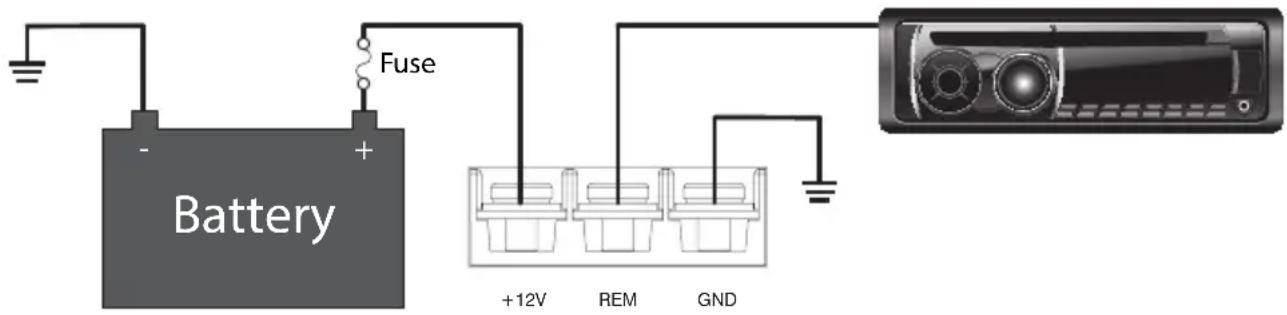
Your amplifier can only produce power if it is fed power efficiently. Clarion recommends the use of at least 4 AWG wire for power and ground connections. Clarion also recommends performing “The Big Three” upgrade to your electrical system when any high power amplifier is being installed. This includes upgrading the power wire between your battery and the alternator for both positive and ground connections, as well as the ground connection between the battery and the chassis and/or rear ground location.
The amplifier ground connection is the most important in terms of the reliable and efficient operation of your amplifier. This connection should be made to a solid and secure point on the vehicle chassis, or directly to the battery. Do not use a seat or seatbelt bolt as a ground location. All of the sound deadening, paint and primer should be removed from the chosen ground location and the wire should be secured with a bolt and locking fastener.
Wiring Precautions
Read all of the wiring precautions prior to making any connections. If you are unsure and/or don't have the necessary installation hardware, contact your local Clarion dealer to perform the installation.
- Before you begin the installation, make sure the vehicle is not running and is in the OFF position.
- Disconnect the negative (-) lead of the battery (or batteries) before making any power connections.
- When making connections, be sure that each connection is clean and secure.
- Insulate connections with heat shrink tubing where possible.
- A fuse holder and fuse must be installed on the lead coming from the positive (+) terminal of the battery. This fuse should located as close a possible to the battery terminal for maximum protection. Clarion does not recommend the use of a circuit breaker as a protection device.
- The battery fuse rating should equal the total current consumption at full output of the amplifier(s) connected to that wire. Do not install the fuse until the entire installation has been completed.
- When replacing the amplifier or power wire fuse, always use one having the same amperage rating. Substituting a higher rating fuse or a slow-blow type can result in serious damage to the amplifier or vehicle.
- When creating passage holes for power wire, interconnect cables and speaker wires, use grommets and wire loom to eliminate any sharp edges created during drilling. This will protect the wire from being damaged and help to prevent a short circuit.
Installation
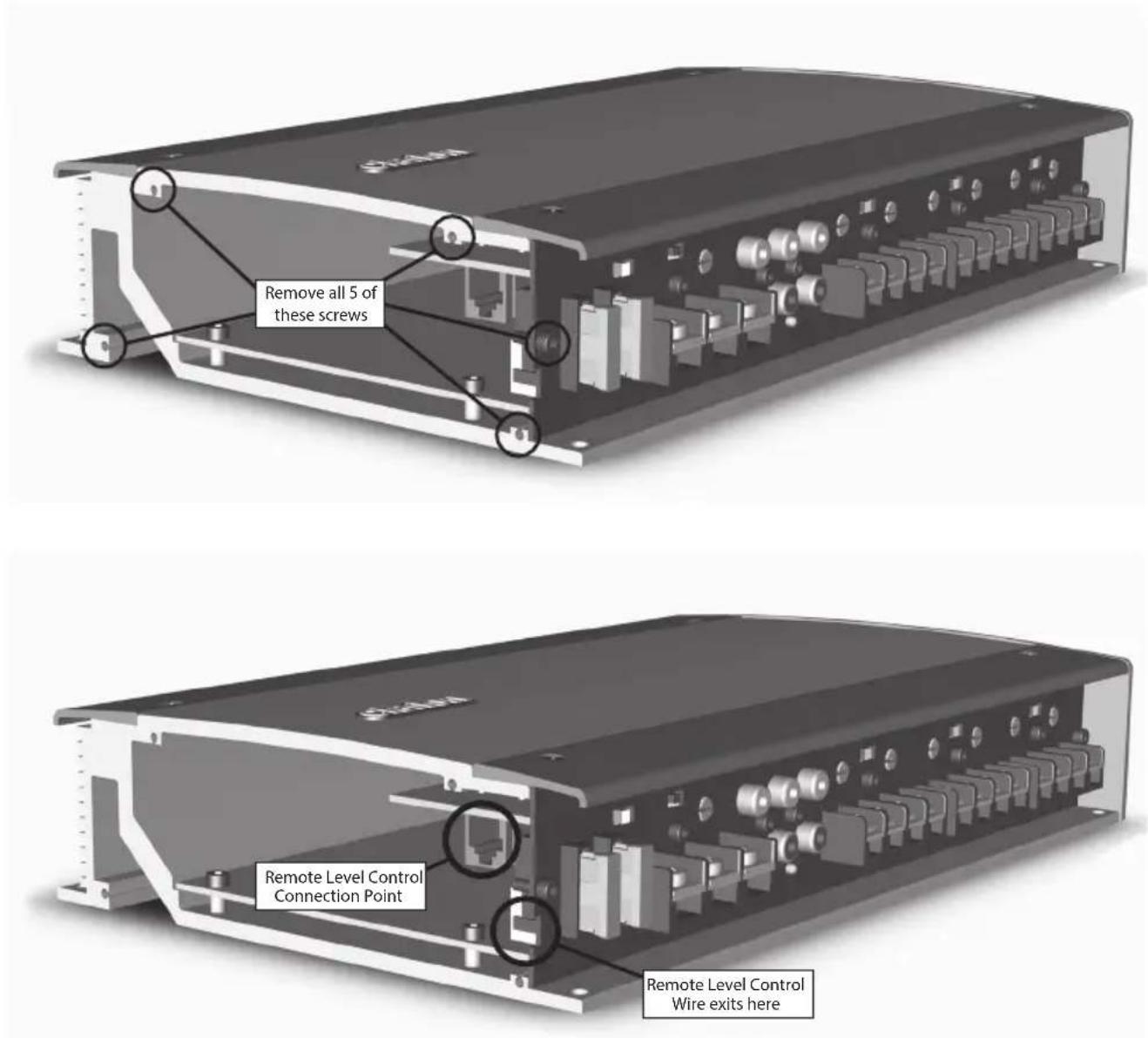
- Once a safe and suitable location has been chosen for your amplifier, remove both top trim pieces from the amplifier using a 2mm hex driver. Store the four screws and trim pieces in a safe location.
- Locate the amplifier and mark the mounting hole locations.
- Remove the amp and pre-drill the mounting holes.
- Replace the amplifier and secure with adequate hardware.
- Replace the upper trim panel and secure.
- Make all the power, signal and speaker connections to the amp.
- Complete the remainder of the installation and finish tuning the amplifier and system.
- Install the lower trim panel and secure.
Subwoofer Level Control Installation
Clarion offers an remote subwoofer level control called the BC2 included in the box with the XC6440 and XC6640. When connected to the XC6440 or XC6640, it gives you the ability to increase or decrease the output level of the associated channels to allow you to fine tune the subwoofer level for the selection of music that is playing.
| Problem Solution | |
| Amplifier will not turn on - Power LED off | - Using a digital multi-meter, check for 12V at the +12V and REM Connection- If the Auto Sensing circuit is being used, try reversing the + and - connections to the High Level RCA Adapters |
| Audio stops playing - Th | ermal protection circuit has shut down amp to protect the circuitry. Ensure there is adequate ventilation around the amplifier.- Fuse at the battery or amplifier is blown. Inspect and replace as required.- Amplifier is loaded below 2 Ohms Stereo or 4 Ohms mono. Check wiring and reconfigure as required. |
| Amp shuts off at high volumes | - Amplifier may not be getting enough power from your vehicle electrical system. Ensure that during operation, the voltage at the amplifier does not drop below 10V. Clarion recommends at least 4 AWG power wire for both +12V and GND connections. |
| Distorted Audio - Input gain is not set properly. Adjust as per instructions.- Source signal is distortion. Reduce source output level.- Speaker is damaged. Replace as necessary. | |
| Less bass than expected | - One speaker may be wired in reverse polarity. Switch the + and - leads on one channel.- Crossover may be set to high. Adjust lower. |
| Fuse Blows - Amplifier output may be shorted. Check all wiring- Amplifier may be damaged. Remove all speaker wires and check functionality. If the fuse blows with no speakers connection, send the amplifier to Clarion for repair. | |
| Whining or ticking noise | - The amplifier may picking up electrical noise that is traveling on the ground shield of the interconnect.1. Check for solid ground connections at the source unit and amplifier.2. Run a ground wire from the amplifier to the source unit.3. Re-route the interconnect cables away from sources of electrical noise. Ensure you are using good quality shielded interconnects.- The speaker wire or a passive crossover network may be picking up electrical noise. Reroute wiring as needed. |
XC6440
Frequency Response: <10Hz to 74kHz
4 Ohm Stereo Power Output (CEA-2006A) 85W x 4 @ 1.0% THD
2 Ohm Stereo Power Output (CEA-2006A) 125W x 4 @ 1.0% THD
4 Ohm Bridged Power Output (CEA-2006A) 250W x 2 @ 1.0% THD
Signal to Noise Ratio (CEA-2006A) @ 1W/4 Ohms > -88 dBA
Efficiency at Full Power (4 Ohms) 83.4%
Input Sensitivity 200mV to 6V
Crossover Range 50Hz to 500Hz
Crossover Slope -12dB/Octave HPF or LPF
XC6640
Frequency Response: <10Hz to 74kHz
4 Ohm Stereo Power Output (CEA-2006A) 85W x 6 @ 1.0% THD
2 Ohm Stereo Power Output (CEA-2006A) 125W x 6 @ 1.0% THD
4 Ohm Bridged Power Output (CEA-2006A) 250W x 3 @ 1.0% THD
Signal to Noise Ratio (CEA-2006A) @ 1W/4 Ohms > -88 dBA
Efficiency at Full Power (4 Ohms) 83.2%
Input Sensitivity 200mV to 6V
Crossover Range 50Hz to 500Hz
Crossover Slope -12dB/Octave HPF or LPF
LIMITED WARRANTY
This Clarion product, when purchased from AND installed by an authorized Clarion dealer in good standing, is warranted against defects in materials and workmanship for a two (2) year period from the date of original purchase.
All Clarion cables, wires and other accessories, if purchased from an authorized Clarion dealer are warranted against defects in materials and workmanship for ninety (90) days from the date of original purchase.
ALL PURCHASES OF CLARION PRODUCTS FROM NON-AUTHORIZED CLARION DEALERS ARE SUBJECT TO FURTHER WARRANTY RESTRICTIONS AS DESCRIBED BELOW.
The conditions of this Limited Warranty and the extent of responsibility of Clarion Corporation of America and Clarion Canada Incorporated (“Clarion”) under this Limited Warranty are as follows:
- IN THE CASE OF THE TWO (2) YEAR LIMITED WARRANTY FOR CLARION PRODUCTS, PROOF OF DATE OF PURCHASE AND PROOF OF INSTALLATION BY AN AUTHORIZED CLARION DEALER IS REQUIRED.
- This Limited Warranty will become void if service performed by anyone other than an approved Clarion Warranty Service Center results in damage to the products.
- This Limited Warranty does not apply to any product which has been subject to misuse, neglect or accident, or which has had the serial number altered, defaced or removed, or which has been connected, installed, adjusted, operated or repaired, other than in accordance with the instructions furnished by Clarion. This Limited Warranty does not cover static, noise or other electrical interferences or labor costs for the removal or re-installation of the unit for repair.
- The sole responsibility of Clarion under this Limited Warranty shall be limited to the repair of the products or replacement of the product, at the sole discretion of Clarion.
- Product must be shipped in its original carton or equivalent carton, fully insured, with shipping charges prepaid. Clarion will not assume any responsibility for any loss or damage incurred in shipping.
- CLARION PRODUCTS PURCHASED FROM A SOURCE OTHER THAN AN AUTHORIZED CLARION DEALER, INCLUDING ANY AND ALL PURCHASES VIA THE INTERNET FROM A NON INTERNET AUTHORIZED CLARION DEALER, SHALL NOT BE COVERED BY ANY CLARION LIMITED WARRANTY TO THE EXTENT ALLOWED BY APPLICABLE LAW. IN THE EVENT AND TO THE EXTENT APPLICABLE LAW PROHIBITS ELIMINATION OF WARRANTIES UNDER THESE CIRCUMSTANCES, THE APPLICABLE LIMITED WARRANTY PERIOD SHALL BE DEEMED TO BE FIFTEEN (15) DAYS FROM THE DATE OF ORIGINAL PURCHASE.
- ALL IMPLIED WARRANTIES EXCEPT TO THE EXTENT PROHIBITED BY APPLICABLE LAW SHALL HAVE NO GREATER DURATION THAN THE WARRANTY PERIOD SET FORTH ABOVE. UNDER NO CIRCUMSTANCES SHALL CLARION BE LIABLE FOR ANY LOSS OR DAMAGE, DIRECT OR CONSEQUENTIAL, ARISING OUT OF THE USE OR INABILITY TO USE THE PRODUCT. BECAUSE SOME STATES DO NOT ALLOW LIMITATIONS ON HOW LONG AN IMPLIED WARRANTY LASTS OR EXCLUSIONS OR LIMITATIONS OF INCIDENTAL OR CONSEQUENTIAL DAMAGES, THE ABOVE LIMITATIONS OR EXCLUSIONS MAY NOT APPLY TO YOU.
- THIS LIMITED WARRANTY GIVES YOU SPECIFIC LEGAL RIGHTS, AND YOU MAY ALSO HAVE OTHER RIGHTS WHICH VARY FROM STATE TO STATE.
- The laws of the State of California shall govern and control this limited warranty, its interpretation and enforcement.
MERCI
This Clarion product, when purchased from AND installed by an authorized Clarion dealer in good standing, is warranted against defects in materials and workmanship for a two (2) year period from the date of original purchase.
All Clarion cables, wires and other accessories, if purchased from an authorized Clarion dealer are warranted against defects in materials and workmanship for ninety (90) days from the date of original purchase.
ALL PURCHASES OF CLARION PRODUCTS FROM NON-AUTHORIZED CLARION DEALERS ARE SUBJECT TO FURTHER WARRANTY RESTRICTIONS AS DESCRIBED BELOW.
The conditions of this Limited Warranty and the extent of responsibility of Clarion Corporation of America and Clarion Canada Incorporated (“Clarion”) under this Limited Warranty are as follows:
- IN THE CASE OF THE TWO (2) YEAR LIMITED WARRANTY FOR CLARION PRODUCTS, PROOF OF DATE OF PURCHASE AND PROOF OF INSTALLATION BY AN AUTHORIZED CLARION DEALER IS REQUIRED.
- This Limited Warranty will become void if service performed by anyone other than an approved Clarion Warranty Service Center results in damage to the products.
- This Limited Warranty does not apply to any product which has been subject to misuse, neglect or accident, or which has had the serial number altered, defaced or removed, or which has been connected, installed, adjusted, operated or repaired, other than in accordance with the instructions furnished by Clarion.
This Limited Warranty does not cover static, noise or other electrical interferences or labor costs for the removal or re-installation of the unit for repair. - The sole responsibility of Clarion under this Limited Warranty shall be limited to the repair of the products or replacement of the product, at the sole discretion of Clarion.
- Product must be shipped in its original carton or equivalent carton, fully insured, with shipping charges prepaid. Clarion will not assume any responsibility for any loss or damage incurred in shipping.
- CLARION PRODUCTS PURCHASED FROM A SOURCE OTHER THAN AN AUTHORIZED CLARION DEALER, INCLUDING ANY AND ALL PURCHASES VIA THE INTERNET FROM A NON INTERNET AUTHORIZED CLARION DEALER, SHALL NOT BE COVERED BY ANY CLARION LIMITED WARRANTY TO THE EXTENT ALLOWED BY APPLICABLE LAW. IN THE EVENT AND TO THE EXTENT APPLICABLE LAW PROHIBITS ELIMINATION OF WARRANTIES UNDER THESE CIRCUMSTANCES, THE APPLICABLE LIMITED WARRANTY PERIOD SHALL BE DEEMED TO BE FIFTEEN (15) DAYS FROM THE DATE OF ORIGINAL PURCHASE.
- ALL IMPLIED WARRANTIES EXCEPT TO THE EXTENT PROHIBITED BY APPLICABLE LAW SHALL HAVE NO GREATER DURATION THAN THE WARRANTY PERIOD SET FORTH ABOVE. UNDER NO CIRCUMSTANCES SHALL CLARION BE LIABLE FOR ANY LOSS OR DAMAGE, DIRECT OR CONSEQUENTIAL, ARISING OUT OF THE USE OR INABILITY TO USE THE PRODUCT. BECAUSE SOME STATES DO NOT ALLOW LIMITATIONS ON HOW LONG AN IMPLIED WARRANTY LASTS OR EXCLUSIONS OR LIMITATIONS OF INCIDENTAL OR CONSEQUENTIAL DAMAGES, THE ABOVE LIMITATIONS OR EXCLUSIONS MAY NOT APPLY TO YOU.
- THIS LIMITED WARRANTY GIVES YOU SPECIFIC LEGAL RIGHTS, AND YOU MAY ALSO HAVE OTHER RIGHTS WHICH VARY FROM STATE TO STATE.
- The laws of the State of California shall govern and control this limited warranty, its interpretation and enforcement.
Clarion Canada Inc.
All Rights Reserved. Copyright 2014 Clarion Canada Inc.
Printed in China



- TABLE OF CONTENTS
- FEATURES
- WARNING
- Sensitivity Control (Gain)
- Procedure (Oscilloscope) Method:
- SMD DD-1 Method:
- Auto Sensing Control Switch
- Bass Boost Level Control
- Crossover Function Switch
- Crossover Frequency Control
- Remote Turn-On Connection
- Speaker Connections
- Input RCA Connections
- Signal Distribution
- Notes:
- XC6440 Input Selection Switch
- XC6440 Mode Select Switch
- XC6640 Input Selection Switch
- Wiring Precautions
- Installation
- Subwoofer Level Control Installation
- LIMITED WARRANTY
- MERCI
- Clarion Canada Inc.
Brand : CLARION
Model : XC6640
Category : Loudspeaker