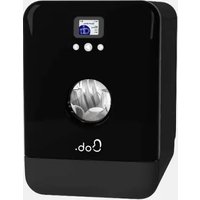
USER MANUAL Bob Daan Tech
1 | Settings and locations for use 2
1.1 | Potential applications 2
1.2 | Places of use 2
2 | Set-up and Connection guide 3
2.1 | Water inlet 3
2.2 | Water outlet 3
2.3 | Anti-theft Bob lock (optional) 4
2.4 | Power plug 5
3 | Getting started 5
4 | Sensor door opening 8
5 | Configuring your basket 8
6 | The Bob cassette 9
7 | The Bob Tablette 10
2 | QUICK USE GUIDE
1 | Screen Interface 11
1.1 | Navigating the Bob OS interface 11
1.2 | Menu options on the home screen 12
1.3 | Parameters 13
1.4 | Bob cassette menu 15
1.5 | Bob ultraviolet program 16
2 | Basket Set-up 16
2.1 | Maximum size of plates 16
2.2 | Recommendations for placing kitchenware inside Bob 17
2.3 | Confi guring the basket to your needs 18
3 | Wash cycles 20
3.1 | How a wash cycle works in Bob 20
3.2 | Standard programs 21
3.3 | Creating and deleting a custom program 23
4 | Detergent options for Bob 24
4.1 | Bob cassette 24
4.2 | Bob Tablette 24
4.3 | Other detergents 25
5 | Managing Bob from your Daan Tech account 26
6 | Bob+ 27
3 | QUICK MAINTENANCE GUIDE
Product description 30
1 | Filters 30
2 | Heating Mechanisms 32
3 | Tubes 32
4 | Exterior and Screen 33
5Spray arm 33
4 | QUICK TROUBLESHOOTING GUIDE
1 | List of possible issues 34
2 | Repair and customer service 38
Product sheet 38
Safety instructions
PLEASE READ THE SAFETY INSTRUCTIONS CAREFULLY BEFORE USING BOB - THE MINI DISHWASHER - AND KEEP THEM FOR FUTURE REFERENCE.
- Bob, the mini dishwasher, is intended to be used as a domestic home appliance and for similar purposes, including: professional environments such as kitchenettes used by personnel at the office and for use in any residential room, including hotels and motels.

- Bob can be used from the age of 8 years as well as by people with physical or mental disabilities as long as a proper supervision is guaranteed or if the former has been provided with the following safety guidelines and is aware of the possible risks involved with the usage of Bob. Children shall not play with Bob. Cleaning and maintenance of the appliance shall not be carried out by unsupervised children.
- If the power cable is damaged, it shall be replaced either by the manufacturer, its after sales service or by any similarly qualified person in order to avoid hazard occurring.
- To inform yourself how and when to clean the appliance, please refer to the Quick maintenance guide page 30.
- The door shall not remain fully open to avoid potential incidents, yet it is highly recommended to slightly leave it open guaranteeing air circulation and thereby decreasing standby energy consumption.
- WARNING: Knives and other cutlery must be put in the cutlery basket module with its blades and pikes pointing downwards.
- Only the new tubes and power cable provided with Bob shall be used while used ones should not be used.
- Information on how to load the basket is provided within the section Basket configuration according to your needs on page 17.
The pressure within the water inlet shall be between 0,05 Mpa and 1 Mpa.
The power plug shall be easily accessible after Bob's set-up.
- According to standard EN 60436, this dishwasher shall not be used to clean more than three place-settings.
IMPORTANT SAFETY GUIDELINES:
- Bob, the mini dishwasher, shall only be used to clean plates, glasses, forks, and knives and sanitize objects with UV-C (if and only if you added the UV-C sanitization option).
- Never unplug Bob from the power network by pulling the power cable, always pull the power plug instead.
- Before plugging Bob to the power network, please check if the tension recommended on the type plate matches the one of the power network. Bob has to be placed on a stable and/or even surface. Daan Tech is not liable for damage resulting from the use of Bob on an uneven and/or unstable surface.
- Do not touch Bob when your hands or feet are wet.
- Never open the door during a wash cycle. You may on Bob's door, open carefully and be exposed to steam or hot water. To pause an ongoing program, please press ⑥ and wait for 3 seconds.
- Do not let children climb on Bob's door and do not place heavy objects on the door while it is open. It may result in the dishwasher tipping over.
- Do not put living creatures, animals or pets inside Bob! ;)
1 | QUICK SET-UP GUIDE
1 | SETTINGS AND LOCATIONS FOR USE
1.1 | Potential applications
When you receive your Bob, humidity inside is normal. This is residual water from being tested before shipment (empty cycle with clean water)

Bob's 4 feet can be adjusted up to +1cm (+0,4in) to ensure it is in a perfectly horizontal position.
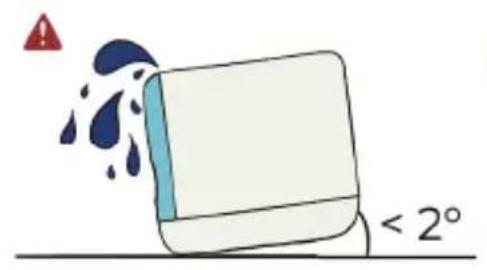

Warning: Bob's inclination should not exceed 2^ in order to avoid possible flooding.
Precautions against frost: Bob should not be stored in a place with a temperature lower than 0^ / 32^ . If this situation could occur, ensure that Bob has been drained using the draining program within the settings menu (refer to page 13) and remove the inlet water hose.
1.2 | Locations for use
You can put Bob anywhere you want, but here are some guidelines.
3 options
ON TOP OF A SHELF
The shelf should be able to withstand a weight of 55.1 lbs (25kg) (weight of Bob + water + dishes).
ON A WORK SURFACE
The provided water outlet's length is 4^ 11^ (1.5m)

Put Bob on a water-resistant surface to avoid stains. When fi I ling Bob's water tank or taking out dishes, water droplets may end up on the work surface.
UNDER A SINK

During a cycle, ensure that nothing hinders the automatic opening of the door at the completion of the program, or proper drying won't occur.
Warning : In the long run, the steam released while drying may damage wooden surfaces.
2 | SET-UP AND CONNECTION GUIDE
2.1 | Water inlet
2 options
Bob.easywater

Plug the water inlet hose Bob.easymater to the back of Bob on one end and to a water inlet on the other via the 19 mm threaded end (3/4 inch) and ensure it is a tightly attached and secured.

WARNING: Close the water supply tap after each use.
2 Bob.carafe
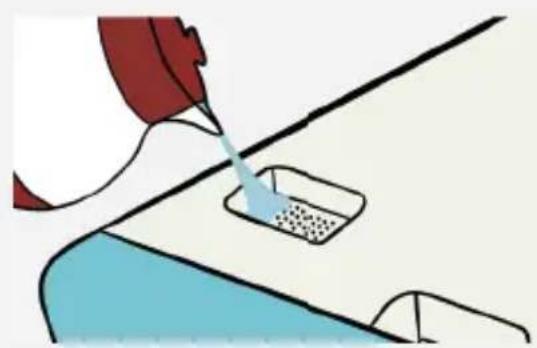
Using Bob as an autonomous free-standing dishwasher with its built-in water tank. In this case, no water inlet hose is needed! Use the Bob Carafe to fill the water tank with water not exceeding 140^ .
Before each use, fill the water tank with the door open, until you hear the sound signaling that the tank is full.

Do not overfill the tank! If you overfill the water tank (1gal/4L), the excess water will spill into Bob's interior.

Warning: Do not block the inlet for the water tank. This must always remain unblocked.

2.2 | Water outlet
Connect the water drain hose to the back of Bob.

Warning: To prevent leaks, use a screwdriver to attach the water outlet.
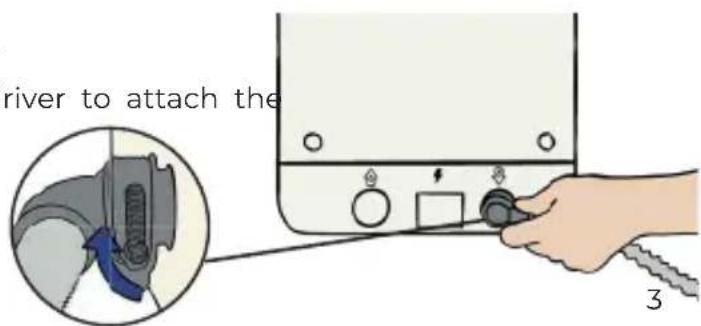
2 options for draining wastewater
Siphon drain pipe
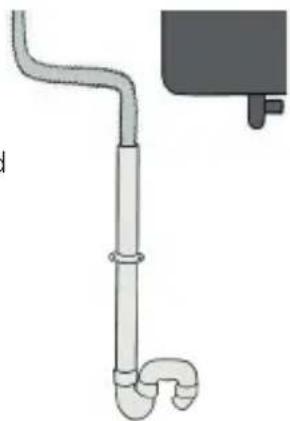
Connect the water outlet hose to a siphon drain pipe (usually located under the sink).

Warning: Wastewater draining from Bob can reach temperatures of up to 158^ / 70^ .
2 Bob.easyfix
Secure the water outlet drain hose in a fixed or flexible mode by using the equipment provided with your Bob.
Fixed installation
Place the drain hose directly in your sink and secure it with the attachment head.
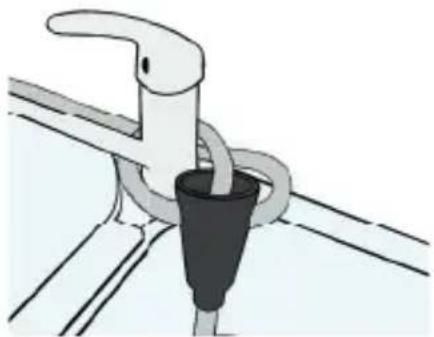

Flexible installation
Place the drain hose in a container (jerrican, bucket, etc...) and secure it with the attachment head.
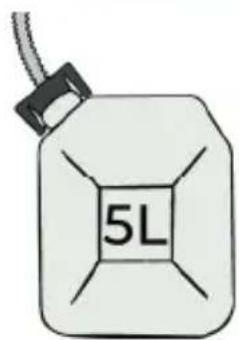
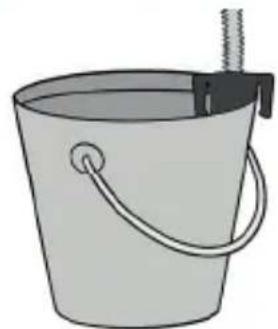

To avoid possible flooding, the container should have a capacity of at least 1.5 gal/5 L.
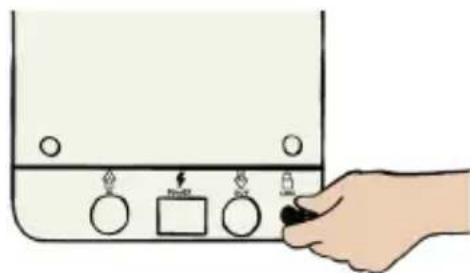
2.3 | Anti-theft (optional)
Because your Bob is precious, it comes with a built-in anti-theft feature. All you need to do is lock the anti-theft device on the back with one of the two provided keys.
2.4 | Power plug

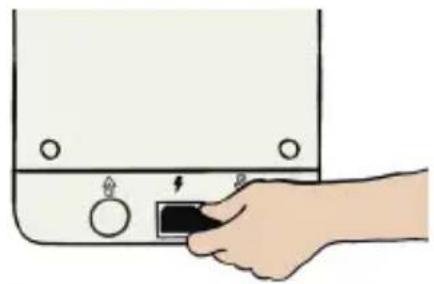
WARNING: Turn the power supply off before installing Bob.
Connect the power cable to Bob's electric outlet
Connect the power cable to a 220-240V 50Hz plug (for US 110-120 V, 50-60Hz)
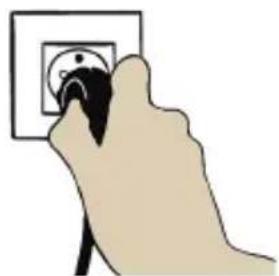

Before you connect Bob to the power supply, make sure that the voltage on the type plate corresponds to the voltage of your power supply.
The appliance must be placed on an even and stable surface. Daan Tech is not liable for any damage caused by placing the device on an uneven and/or unstable surface during use.
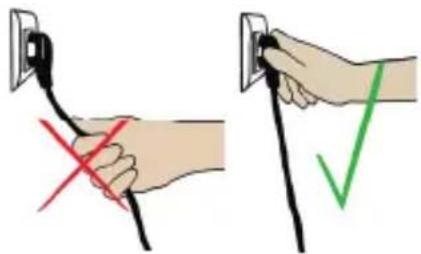
Do not plug or unplug by pulling the cord, always pull the plug directly.
3 | GETTING STARTED
When you turn Bob on for the first time, you will need to config gure its settings.
Bob OS is the operating system developed by Daan tech. Its colourful interface allows you to easily navigate the different menus.
Bob OS also enables you to connect Bob to WiFi, allowing for automatic updates, enabling new features instantly.
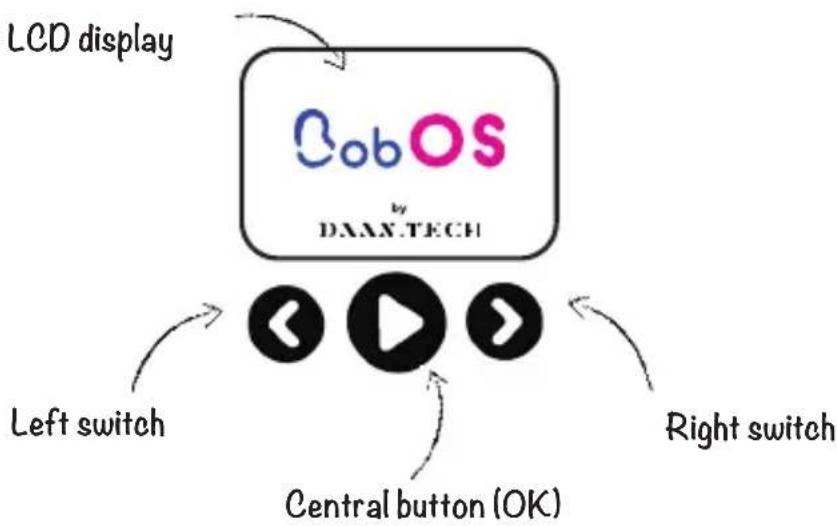
To select an option scroll from left to right until the icon indicating the desired menu or option appears, press the central button to choose it.
A confirmation message appears, which you can either confirm using or reject using the latter also redirects you to the previous screen.
2.4" colour LCD display
STEP 1: SELECT YOUR LANGUAGE.
Bob speaks 6 languages: English, French, Spanish, Italian, German and Dutch.
Once you have chosen your language, a message will appear asking you to agree to the Terms and Conditions, which can be found on our website. You have to agree to our Terms and Conditions to operate Bob.
STEP 2: SELECT THE WATER SUPPLY METHOD
2 options:

Use the water inlet pipe (available on our website). The water tank will fill
automatically before each cycle, so there will be no need to fill it manually. This is the recommended method if you want to use Bob as a built-in dishwasher or have easy access to a water supply.

Use the built-in water tank: this option makes Bob completely autonomous to use
anywhwere. Fill the built-in water tank with the Bob Carafe (available on our website).
This is the recommended method if you intend to regularly move Bob around or if you do not have access to a water inlet.
STEP 3: ADD FEATURES TO BOB by pairing Bob to your Daan
Tech account (free & simple on www.daan.tech)
To learn about the benefits of pairing Bob to your account, refer to pages 27 and 29.


Connect Bob?
Access many more functionalities by connecting Bob to your Daan Tech account


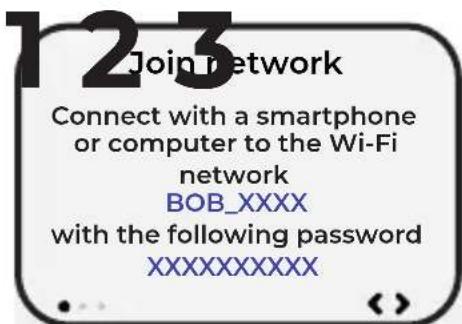
Step 1/3
Connect your smartphone or a computer to the Wi-Fi network "Bob_XXX" with the following password:XXXXXXXXX
Once you are connected, select to continue to the next step.
If you can't connect to Bob, restart your smartphone or computer and try again.
On the Internet
Enter in your browser 10.10.0.1
Choose Wi-Fi
Choose a Wi-Fi network to connect to Bob


Step 2/3
Enter the following in the address bar of your web browser :
10.10.0.1
Once the website is loaded please select to continue to the next step.
Step 3/3
In your web browser on your smartphone or computer, select the Wi-Fi network you want to connect Bob to.

Using a private network secured with a password is recommended.

Once the Wi-Fi network is selected, Bob connects and a confirmation message appears.
BRAVO, your Bob is now connected to the internet. Now, you need to pair it to your Daan Tech account.
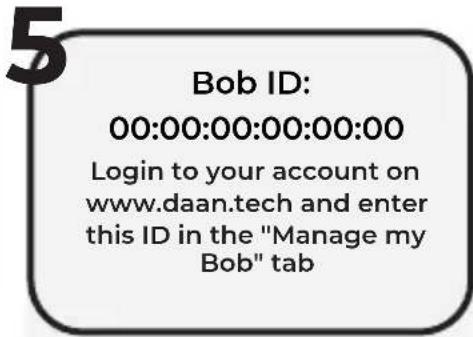
Your Bob is unique and therefore has a unique ID or MAC address in the following format: 00:00:00:00:00:00
Connect to your Daan Tech
account on www.daan.tech
In your account under My account Select the "Manage my Bob" tab. Enter the unique ID of your Bob in the dedicated fi eld. Validate
If the connection is lost during the pairing process, an error message will appear.

You can either try again or cancel your connection and not connect Bob to your account (for more information, please refer to page 27).
If needed, a video tutorial for connecting to Wi-Fi is available on our website.
Please scan the QR code to check it out.


To complete pairing Bob to your account, you need to confirm your email address
BRAVO! Your Bob is nov paired with your Daan Tech account.
If your Bob is connected to WIFI, we will automatically send the latest updates: Bob OS.
You will receive an email when a new update is available.
Your Bob will automatically be updated when you restart it.
4 | SENSOR DOOR OPENING
Simply tap the top of the door to automatically open it.

Convenient to use when your hands are full, you can open the door of your Bob with just a touch of pressure (like from your elbow)!
To avoid overstimulation, the sensor door is deactivated for 3 seconds after the door is closed.
When Bob is disconnected from the power supply you can still open the door, but you will feel more resistance due to the deactivation of the door's sensor system.

5 | CONFIGURING YOUR BASKET
Bob adapts to numerous kitchenware combinations thanks to its basket accessories, and can thus be used for all sorts of occasions.


Position forks and knives so that the door can properly close. Sharp elements can damage the seal and cause leaks.
The basket allows you to mix and match accessories for a custom design.
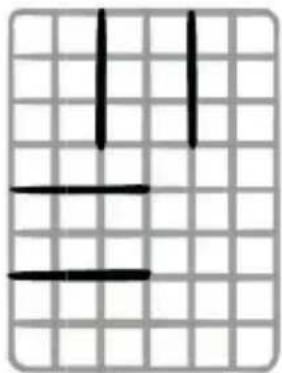
You can attach the plate module in the middle of the basket or on one of the two sides.
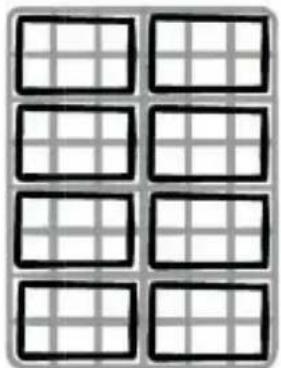
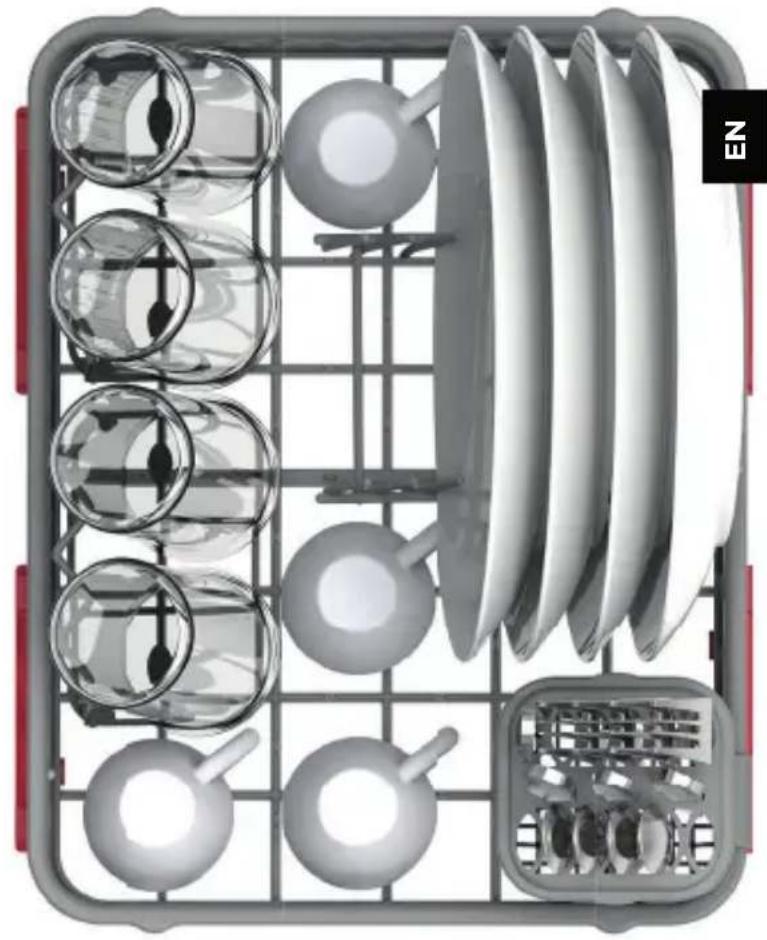
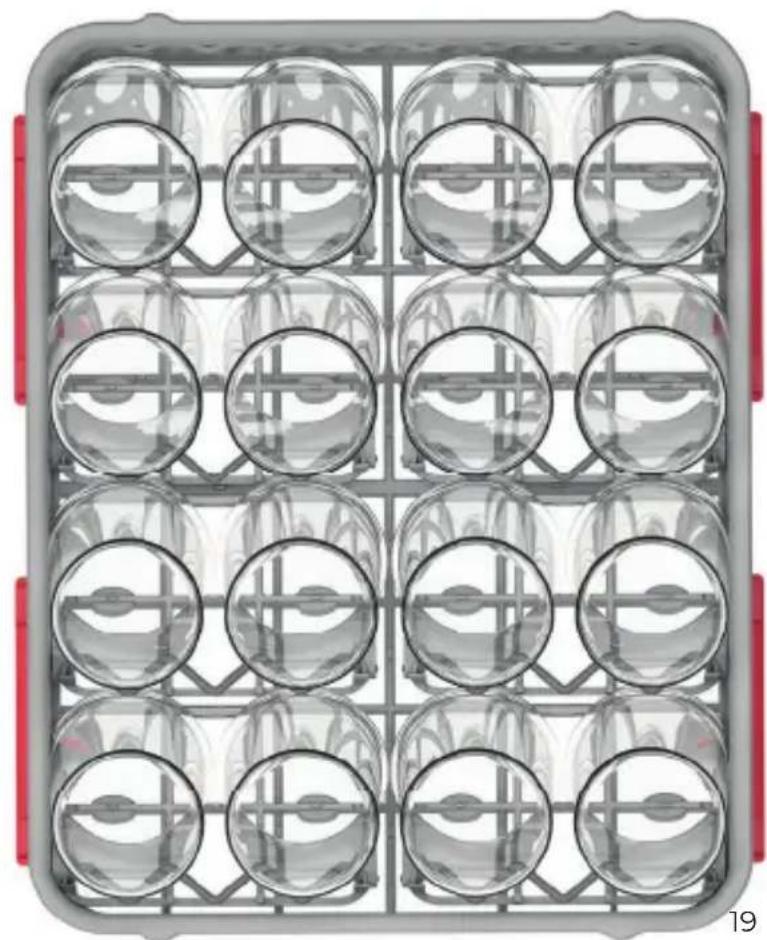
You can place up to 8 glass accessories in the basket with Bob. extraglass! (Optional)
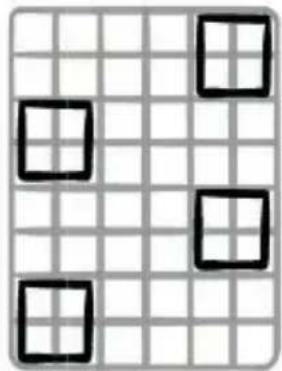

Place the cutlery basket anywhere along the edge, or simply remove it if you don't need it!
6 THE Bob.cassette
(Availability may differ based on your country)

You do not have to use Bob cassette for the detergent. However, we recommend that a Bob cassette be or remain inserted in order to protect the nozzles and connector in the cassette tray, even if the cassette is empty.
Daan Tech offers several types of Bob cassettes, including washing detergent and rinse aid tailored to Bob.
pop cassette For your dishes
30 cycles/cassette
= 1 month of use
(Based on a daily use)
To learn more about the pop cassette, please refer to page 24.

All-in-one

Highly concentrated
rock'n'roll cassette For Bob
1 maintenance cycle for Bob
= a program to run when Bob is empty to clean the dishwasher itself (spray arm, pipes, heating mechanism)
To learn more about the rock'roll cassette, please refer to page 32.

The maintenance program
extends Bob's lifetime

Removes oil and grease. Removes the limescale
Installation of a Bob.cassette
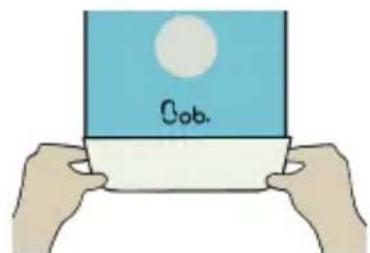
To use a Bob cassette, insert it into the tray located at the bottom of Bob's face.
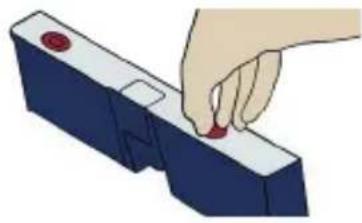
Warning: Remove the plastic film and the two plastic caps before inserting the Bob cassette.
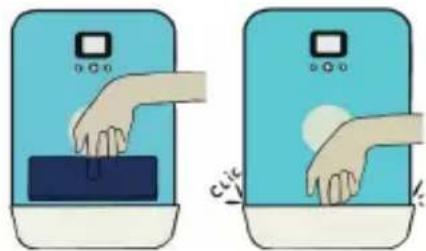
Firmly push the cassette into the tray until it clicks (the text on the top of the cassette should be read correctly).
If you insert a cassette while your Bob is on, the cassette will not be detected automatically. This is normal, you have to start a cycle or unplug and re-plug in your Bob for the cassette to be detected.
7 THE Bob.Tablette

For detergent, there is also the efficienl and environmentally friendly Bob Tablette. This detergent has been designed for the longer cycles (longer than 30 min).
Comparative table of detergents
| Cycles | Bob.Tablette | Bob.cassette |
| Glass | | |
| Express | | |
| Daily | Bob | |
| Intensive | Bob | |
| Eco | Bob | |
2 | QUICK USE GUIDE
1 | SCREEN INTERFACE
1.1 | Navigating the Bob OS interface
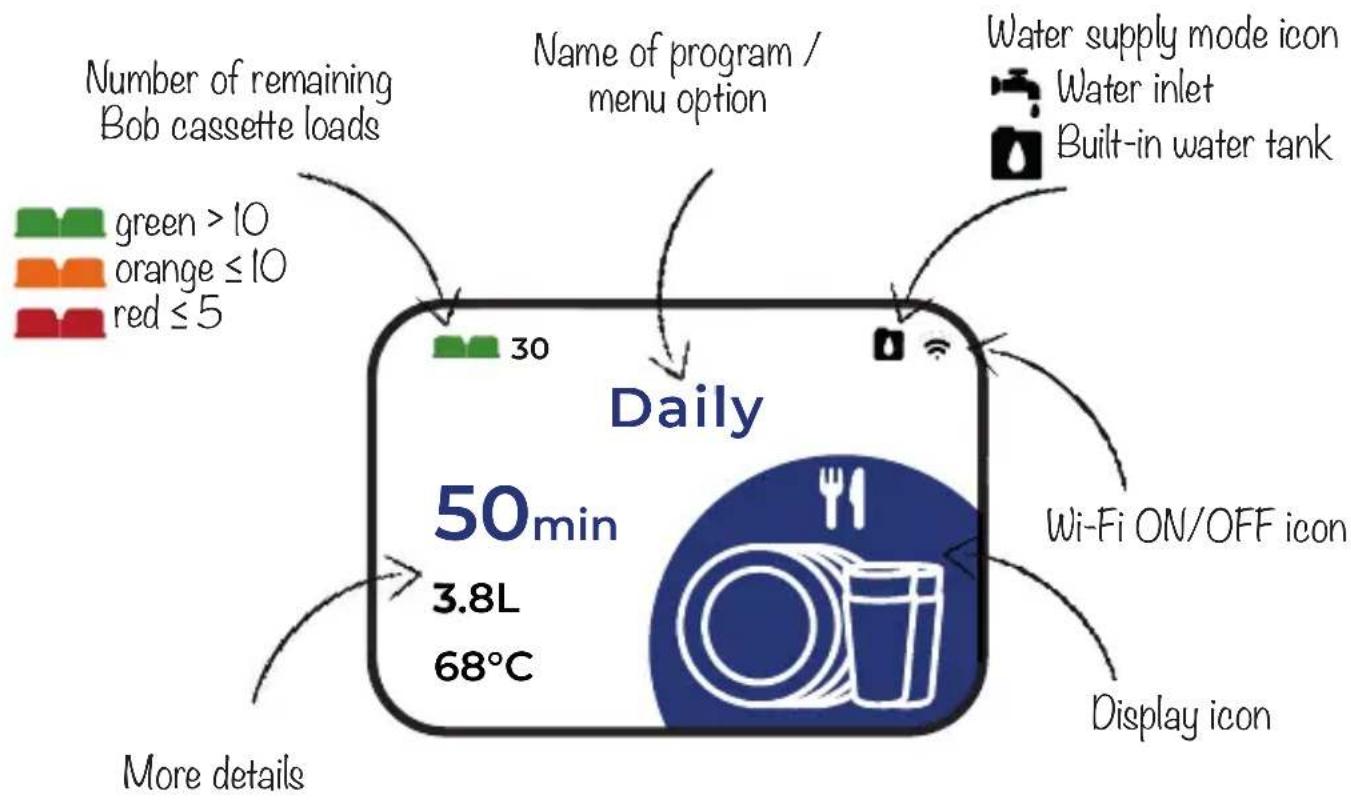

Start a program
- Pause a program
Confirm
- Enter a menu option
Navigate right or left by pressing and
The following menu options are available.


Parameters Bob cassette Glasses

Express

Intensive

Eco

Daily
Factory reset start screen
You can change your start screen by selecting your preferred program in the "Setting" menu. The selected preferred program becomes your new start screen.
For further information, please refer to page 13.
Optional
UVC sanitizer
Available only if you added the Bob.ultraviolet option in your Bob purchase. This screen allows you to run a UV-C cycle without any water to sanitize items with UV-C rays. For further information, please refer to page 16.
1.3 | Parameters

Screen 1/15
This screen allows you to create a new cycle, including the duration, temperature, and custom icon. You can create up to 4 custom programs.
To learn more, please either refer to page 23 or visit our website.

Screen 2/15
This screen allows you to delete a cycle.

Screen 3/15
This screen allows you to select your favourite cycle as your start screen.

Screen 4/15
This screen allows you to select a custom sound effect (only available with Bob+)
To learn more, please refer to page 29.

Screen 5/15
This screen allows you to select the degree of lighting (only available with Bob+)
To learn more, please refer to page 29.

Screen 6/15
This screen allows you to add a customized image when starting Bob or when Bob is running. This feature is available only with Bob+ To learn more, please refer to page 28.

Screen 7/15
This screen allows you to select your water supply mode (water inlet or water tank). To learn more, please refer to page 3.

Screen 8/15
This screen allows you to completely drain Bob (main interior, water tank, and pipes). Always drain Bob completely when you do not use it for a long time or when the temperature is likely to go below 0^ .
Screen 9/15
This screen allows you to pair Bob with your Daan Tech account. To learn more, please refer to page 27.



Screen 10/15
This screen allows you to change the Wi-Fi settings, like if you move to a new place or change your internet provider.
Screen 11/15
This screen allows you to change the interface's language.
Screen 12/15
This screen allows you to reset Bob to factory settings and delete all saved data.
Warning: deleted data cannot be recovered.



Screen 13/15
This screen allows you to activate the delayed start feature. When the delayed start is activated, you will have the possibility to choose whether you want to delay the start of the cycle by 3h, 6h, 9h or 12h or to start it immediately each time you select a cycle.
Screen 14/15
Within this menu, you can:
Screen 15/15
This screen allows you to close the settings menu and go back to the home screen.
See how much water you the settings menu and go back have saved using Bob. to the home screen.
- Display the Bob OS version installed on your Bob: Bob OS. The MAC address of your device (required for pairing Bob with your Daan Tech account)
Display a QR code for reading the latest user manual version in PDF format.
1.4 | Cebu cassette
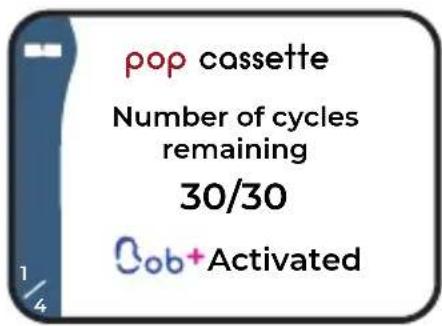
Screen 1/4
This screen displays how many remaining loads are available in the pop cassette and also shows your Bob+ status.

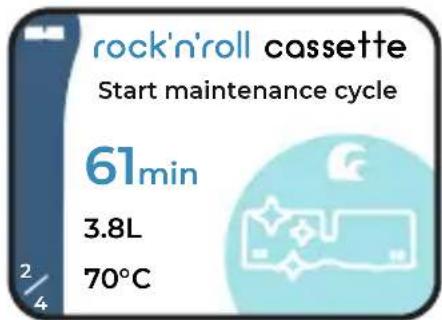
Screen 2/4
This screen allows you to launch the maintenance program with a rock'n'roll cassette.
To learn more, please refer to page 32.

Screen 3/4
This screen allows you to order a new Bob cassette. Several options are available:
1 pop cassette
rock'n'roll cassette
1 compilation with several Bob cassettes
If your Bob is paired with your Daan Tech account, you can order a cassette with 1 push of a button.
For more information, please refer to page 25.
If your Bob is not connected to Wi-Fi, you can scan the displayed QR code to order a new cassette directly on our website.
Screen 4/4
This screen allows you to close the Bob cassette menu and go back to the home screen.
1.5 | borgartroviolet

How does it work?
Open the door and place objects to sanitize in the basket. Only the side exposed to UV-C will be sanitized. Run the program several times to sanitize the object from every side.
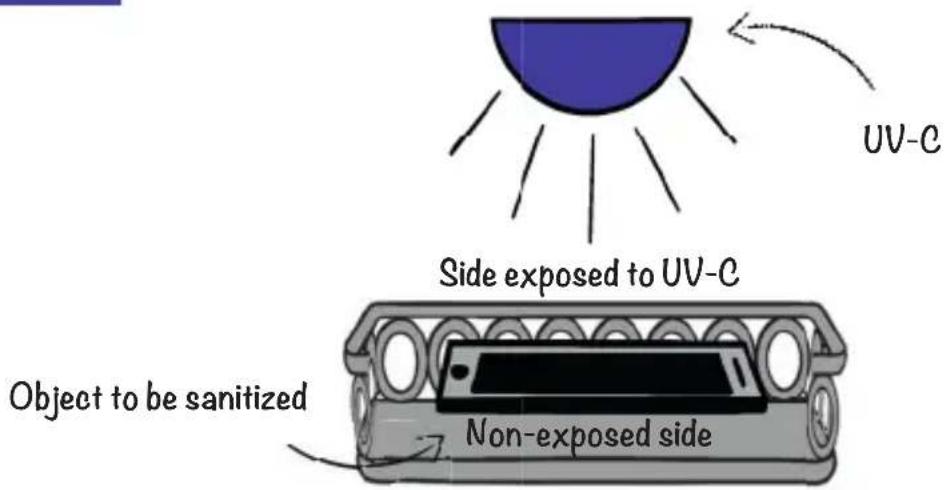
You can choose between two durations for this program: 20 or 60 min.
For safety, Bob instantly shuts off the UV-C rays when you open the door. In addition, Bob's porthole is made of a plastic type that only lets visible light through and blocks UV-C rays.
The UV-C program ends with the opening of the door and a signal sound.
For further information on the UV-C sanitization mode, please visit our website.

Bob is not a medical device and is not intended to be used as such. Daan Tech shall not be liable for any consequence of improper use, such as using Bob instead of a sterilizer. Daan Tech does not provide warranty of any kind regarding the removal of micro-organisms and viruses on objects.
2 | BASKET SET-UP
2.1 | Maximum size of plates
The dimensions of Bob's interior are the following: 29 cm (11.4 in) height / 28 cm (11 in) width / 35 cm (13.8 in)depth
Even considering its small size, Bob fi ts items of varying dimensions and shapes.
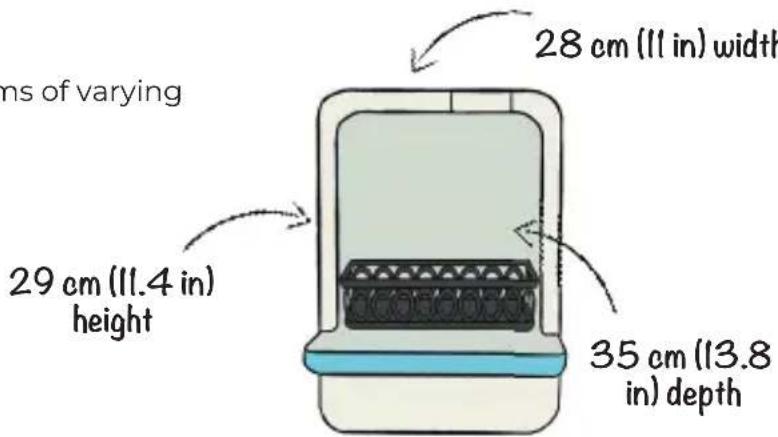
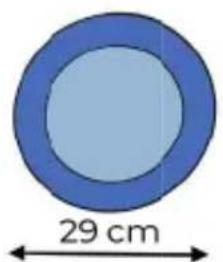
Plates of a diameter up to 29 cm (11.4 in).

Pans or saucepans
Use pans and saucepans with removable handles to save even more space.
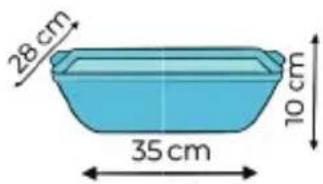
Platters, up to 35 cm (13.8 in) length x 28 cm (11 in) width x 10 cm (3.9 in) height

Baby bottles, pitchers, and more.
2.2 | Recommendations for placing kitchenware inside Bob
Bob's customizable basket allows for all kinds of kitchenware.
When putting kitchenware inside Bob, please consider these recommendations:
- Remove any food waste, as it might block the filter or the spray arm.
- Soak (sauce) pans with hot water if there are burnt stains before placing them in the basket.
- Check that your kitchenware (in particular lightweight items) such as plastic containers are secure so that they do not flip or impede the spray arm while the program is running.
- Place objects such as pans, cups, glasses, etc., so that they do not collect water while the cycle is running.


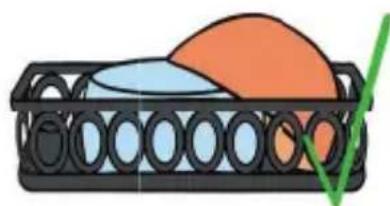

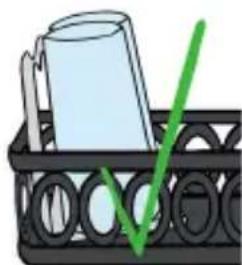
Some items should not be cleaned using a dishwasher, and may include:
Kitchenware items that are made from stuck or welded parts and cannot withstand heat.
- Kitchenware items made of copper, tin, crystal, aluminium, zinc, that are likely to rust, wood, synthetic fibres, or materials which cannot withstand heat.
Kitchenware with handles made of wood, horn, porcelain or nacre.
Very often, items that can be cleaned with a dishwasher have one of the following label on the packaging.




Knives and kitchenware with long blades may be hazardous if they are not pointing downwards. Please make sure to load items so that the blades pointing to the bottom.

Warning: Never start a program without the main basket installed.
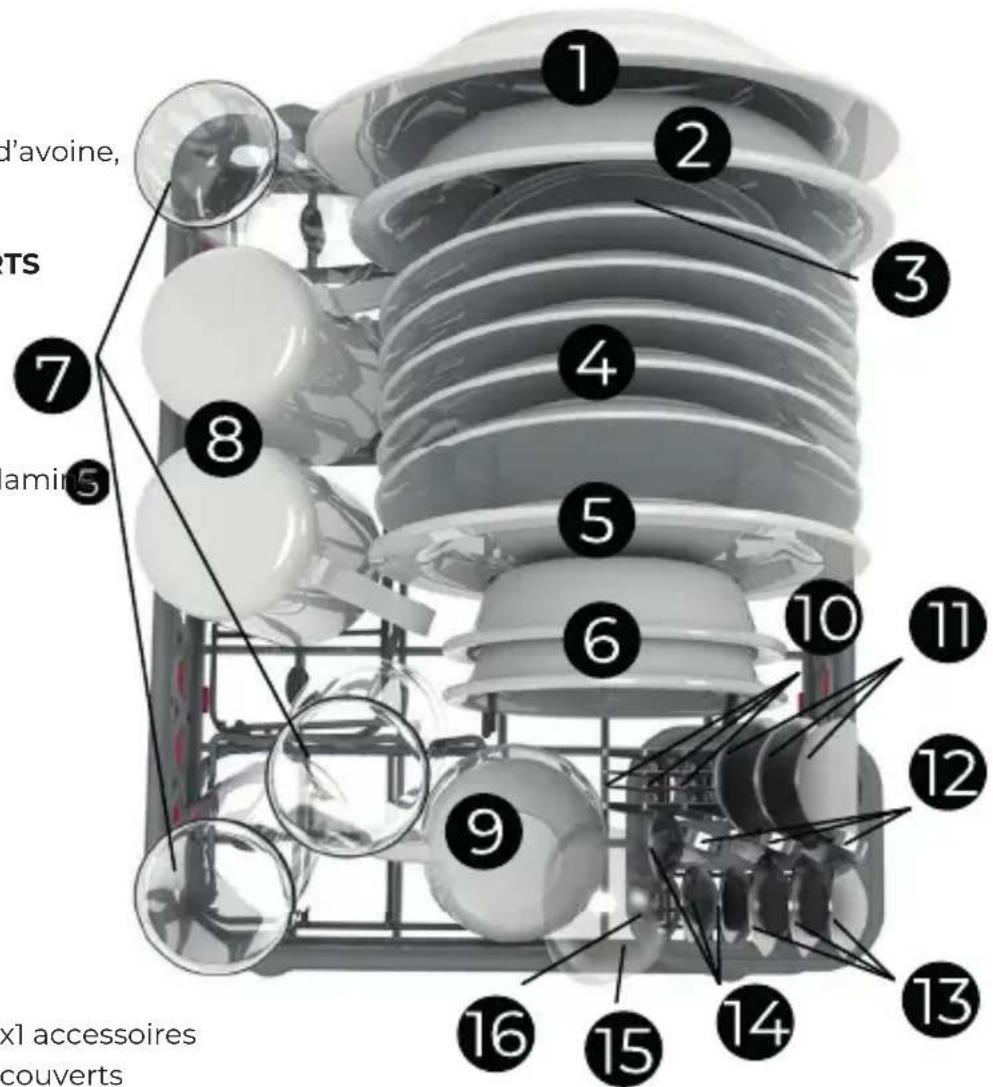
2.3 | Configuring the basket to your needs
Basket configuration according to European standards:
Recommended cycle
ECO-180min - 3.8L(lgal) of water
Level of dirtiness
Stained on or dried up / eggs, oats, milk, tea, margarine, spinach.
CYCLE FOR 3 STANDARD PLACE
SETTINGS
1 melamine dessert plate 5
1 soup pla
1 melamine bov 2
1 sauc3
5 dessert plate
2 dessertbow
3 gla
2mug
1 small cu
3 for 10
3 soup spoon
3 knife12
3 dessert spoon
3 small spoon14
1lad15
1 serving for!
x2 Plate
x3 Glass
xl Cutlery
accessories
accessories
basket

Here are a few examples of basket configurations using different accessories, according to the time of day:
DINNER WITH GUESTS
Recommended cycle
Intensive - 90 min - 3.8L (1gal) of water
Level of dirtiness
Stained on or dried up / gluten, plant fibres, alcohol, etc...
(4 people)
x1 Plate
4 big plates
accessory
4 knives
x2Glass
4 forks
accessories
4 small spoons
xl Cutlery
4 glasses
basket
PARTY
Recommended cycle
Glasses - 15 min - 1.9L (.5gal) of water
Level of dirtiness
Slightly stained and not dried-up
- Between 12 and 16 glasses per cycle, depending on the diameter of the glasses.
x8 Class accessories
3 | WASH CYCLE
3.1 | How a wash cycle works in Bob
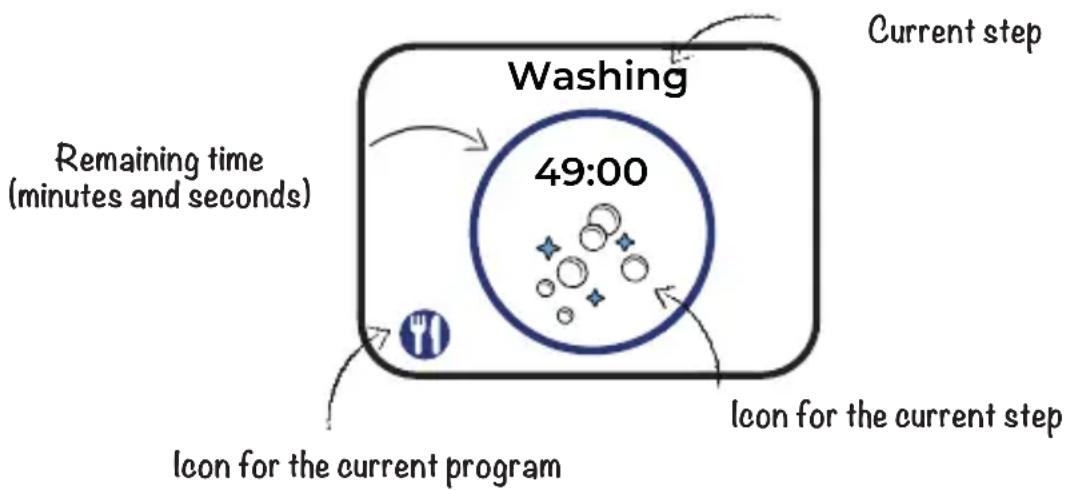
A wash cycle comprises several steps. You can follow the progress of the current wash cycle on Bob's home screen
You can see several information on the screen:
Before starting a wash cycle
- Make sure that your dishes are positioned correctly in the basket, as recommended on page 17.
- Close the door. Warning: the cycle cannot be initiated if the door is open or not properly closed.
- Check if a Bob cassette is correctly inserted. If you don't use Bob cassette, use another detergent such as Bob Tablette.
- Choose the most appropriate program according to your dishes and the degree of soiling.
- Start the cycle on Bob's colour display (see page 12).
- Fill the water tank until the signal sound occurs if your Bob is in the water supply mode "built-in water tank."
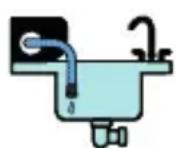

Warning: Ensure that the drain hose is correctly attached to a drain or a container during the entire cycle. Water is drained several times during a cycle.
Let's go! The cycle is running!
During a wash cycle
Cancelling an ongoing cycle
- Press the central button to pause the current cycle.
- Select to abort the current cycle and to initiate draining.
You will automatically be redirected to the home screen.
- Press the central button to pause the current cycle.
- Open the door and be careful of potential hot steam escaping
- Place the additional item in the basket
- Close the door
- Select to continue the cycle


Warning: If you want to cancel a cycle or add additional items, you must press the central button to interrupt the program.
At the end of the wash cycle

When the timer is close to zero, the "Drying in progress" screen is displayed.

At this point, the door opens automatically and remains half-open at a 10 degree angle.

Warning Please note that hot steam is released when door opens
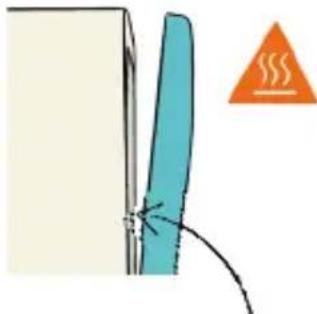
Depending on the program, drying might take several minutes, but will not consume additional energy. The program is not completed yet; please wait a few minutes for drying to finish before removing your dishes.

Warning Please note that some items are very hot and could cause burns if removed too soon. Daan Tech shall not be responsible for such incidents, which occur when dishes are removed before the offical end of the cycle.
Please note that some water residue may remain on your dishes if you do not wait for drying to finish.
When the program is completed, a signal sound occurs (unless you have turned off the sound in "Settings") and Bob will automatically go into standby mode.
Upon completion of the program, leave Bob's door open (10^) to prevent stale air buildup inside the main chamber. This also reduces energy consumption in standby mode.
3.2 | Standard programs
Bob offers various programs dedicated to: specific occasions, different dish types, and different degrees of staining. Please consult the following overview to find out which program is the best fit for your needs.

CYCLE NAME
Classes

Express

Daily

Intensive

Eco

Maintenance
DURATION (MIN)*
| 15 min | 20 min | 50 min | 91 min | 180 min | 61 min |
WATER CONSUMPTION (L/GAL)
| 1.9 L/0.5gal | 2.9 L/0.75gal | 3.8 L/1gal | 3.8 L/1gal | 3.8 L/1gal |
DEGREE OF SOILING
EXAMPLES
| ** | ** | *** | **** | **** |
| Glasses and cups | Slightly dirty but no dried-on stains. | Dirty but not dried-on or baked-on stains. | Dirty and dried-on and possibly baked-on stains. | Soiled and dried-on but not baked-on stains. |
| After a coffee break or a wine tasting | Breakfast | Lunch or dinner | (Sauce)pans, dishes, and cutlery | Lunch or dinner | Every 90 cycles |
CYCLE STEPS AND TEMPERATURE (T^ / F)
ENERGY CONSUMPTION (KWH)
| Washing at 65°C/150°F | Washing at 70°C/158°F | Pre-washing at 65°C/150°F | Pre-washing at 68°C/154°F | Pre-Washing at 50°C/122°F | Pre-washing 65°C/150°F |
| Rinsing | Rinsing | Washing at 40°C/104°F | Washing at 40°C/104°F | Washing at 40°C/104°F | Washing 50°C First hot rinsing |
| Hot rinsing at 65°C/150°F | Hot rinsing at 65°C/150°F | Rinsing | Cold rinsing | Cold rinsing | at 50°C/122°F |
| Drying at 70°C/158°F | Drying at 65°C/150°F | Hot rinsing at 65°C/150°F | Hot rinsing at 65°C/150°F | Hot rinsing at 65°C/150°F | Second hot rinsing at 65°C/150°F |
| | Drying at 65°C/150°F | Drying at 70°C | Drying at 65°C/150°F | Drying at 72°C |
| 0,23 kWh | 0,26 kWh | 0,35 kWh | 0,48 kWh | 0,43 kWh | 0,41 kWh |
* (Drying time not included)
3.3 | Creating and deleting a custom program
Bob allows you to create your own program to adapt to your personal needs and to optimise the washing of your dishes.
Before creating your own program:
When creating your own program, you have the option to fine-tune 3 settings:

The program duration (not including drying)
The maximum temperature during the program
The icon for your custom program
For instance, you can create a custom program at 60^ for special dishes.
If you have particularly fragile dishes, you should prefer a longer duration of about 90 minutes but a lower temperature (e.g. 50^ / 122^ ). If 20 minutes does not seem sufficient for you, you might add some additional time. It's up to you to create an adapted program for your dishes!
You can create up to 4 custom programs. Once the limit is reached, you must delete a program (on the screen Settings > Delete cycle) to create a new one.
Daan Tech does not commit to the washing performance of a custom program.
Rename a custom program
If Bob is connected to Wi-Fi and paired to your Daan Tech account, you can change the name of your custom programs from the "Manage my Bob" tab.
How to create a custom program?

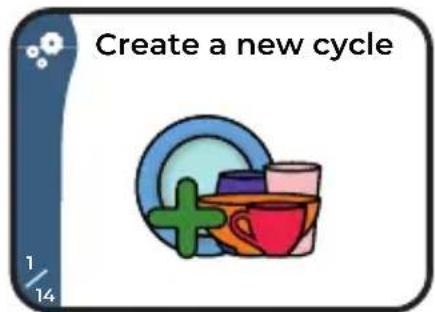
- Go to "Settings" and choose "Create new cycle"
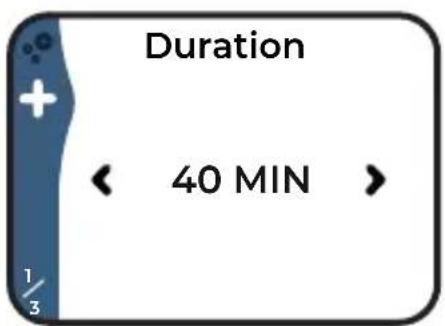
Use the buttons and to choose a duration from 10 to 120 minutes.
- Confirm your choice by pressing the central button.
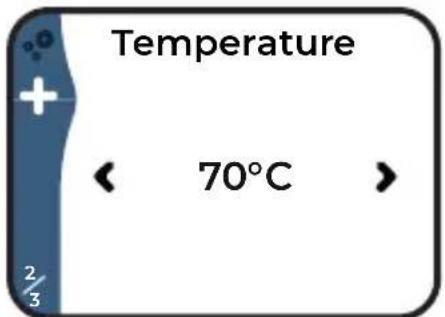
Use the buttons and to choose the temperature from 30^ to 70^ (86^ to 158^)
- Confirm your choice by pressing the central button.

Use the button and to choose an icon for your program.
Take your time, you have 12 icons to choose from!
- Confirm your choice by pressing the central button.
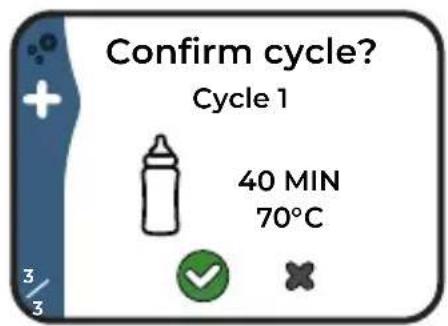
- Once those 3 settings are selected, you will be asked to confirm your custom program.
- Select to save your custom program.
- Select to cancel the custom program and be redirected to the "Create a cycle" screen.
In case of an incorrect entry: unfortunately, it is not possible to go back if you have selected a parameter you did not want to. Thus, you must continue with the remaining steps and cancel it on the final release screen. You can then re-start the program creation process.
4 | DETERGENT OPTIONS FOR BOB (Availability may differ based on your country)

Only use dishwasher detergents. Using other detergents, such as hand soap, may damage the product and end the warranty. Please note that dishwasher detergents are corrosive and dangerous. Keep them out of reach of children.

4.1 Bob.cassette

To simplify Bob's handling, Daan Tech has developed the Bob cassette: an efficient detergent dispensing system for dishwashers. It replaces all conventional dishwasher products and makes it possible to control the injection of various detergents and rinsing products during the cycle.
4.2 | Bob.Tablette
You also have the option of using the Bob Tablette. This detergent has been designed for long cycles (longer than 30 min).

Bob Tablette
- Place Bob Tablette (with water soluble fi lm) in the tablet slot provided.
- Run a cycle longer than 30 min to guarantee the best washing quality (increased efficiency from 45^ C / 113^ F ).
4.3 | Other detergents

The Bob cassette is not required
If you don't want to use a Bob cassette or Tablette, you should still use a dishwasher detergent such as dishwasher gel that you can put directly on Bob's door from the inside (door open). However, we recommend that a Bob cassette be or remain inserted in order to protect the nozzles and the connectors where the Bob cassette is inserted, even if this cassette is empty.

Warning: Do not put detergent pods, liquids, powders or anything else in the Bob cassette tray.
Caution: Dishwasher detergent causes severe burns and eye damage. Keep out of reach of children. If swallowed, rinse mouth, do not induce vomiting. In case of skin contact: Remove all contaminated clothing immediately. Rinse skin with water for several minutes. In case of contact with eyes: Rinse thoroughly with water for several minutes. Remove contact lenses, if present and easily removable, then rinse further. Call a TOXIC INFORMATION CENTER or doctor immediately. Keep the product container or label available.

Where can you buy a Bob Cassette?
There are 3 ways to buy a new Bob cassette:
9 Directly on our website www.daan.tech
Log on to our website using any device (smartphone, computer, etc.), add one or several Bob cassettes to your shopping cart, complete your order and receive it at your given address.
One-click order directly on your Bob
Even more convenient and accessible, order on your Bob when it is connected to Wi-Fi and paired to your Daan Tech account (for more details on how to pair Bob, please refer to page 27)

Within the "Settings" menu go to the Bob cassette screen.

Navigate to the "Order cassette" screen. Choose the type of Bob cassette you want and confirm with the central button.
You will receive your order to the registered address in your Daan Tech account.
If you subscribed to Bob+, you will never run out of Bob cassettes!
A new Bob cassette will be sent when your current one is almost empty. For more information, please refer to page 28.
Warning: Products used in the Bob cassette are corrosive and require precaution, you cannot refill it yourself.
Where can you buy a Bob Tablette?
You can buy Bob Tablets directly on our website www.daan.tech
5 | MANAGING BOB FROM YOUR DAAN TECH ACCOUNT
Bob's unique ID numbers
Every Bob has three unique ID numbers:
- A unique birth number created during the manufacturing process! You can find this number on the label on the backside of Bob, in the form of "Bob #000000"
- A unique software ID that allows you to link Bob to your Daan Tech account. You can find the software ID (or MAC address) of your Bob when you connect Bob to Wi-Fi or in "Settings" > "Informations". Format 00:00:00:00:00
A serial number linked to the week the Bob was manufactured. Format XXXXX-XXXXXX This number should be used to register your Bob in case you have not purchased it from our website.
How you can manage Bob from your account
Every Bob ordered on www.daan.tech is linked to a customer account. If you purchased a Bob from one of our partners, you can create a Daan Tech account and manually add your Bob to your account. Once you are logged into your account, you can see its profile directly on the dashboard in your "My Account" area.
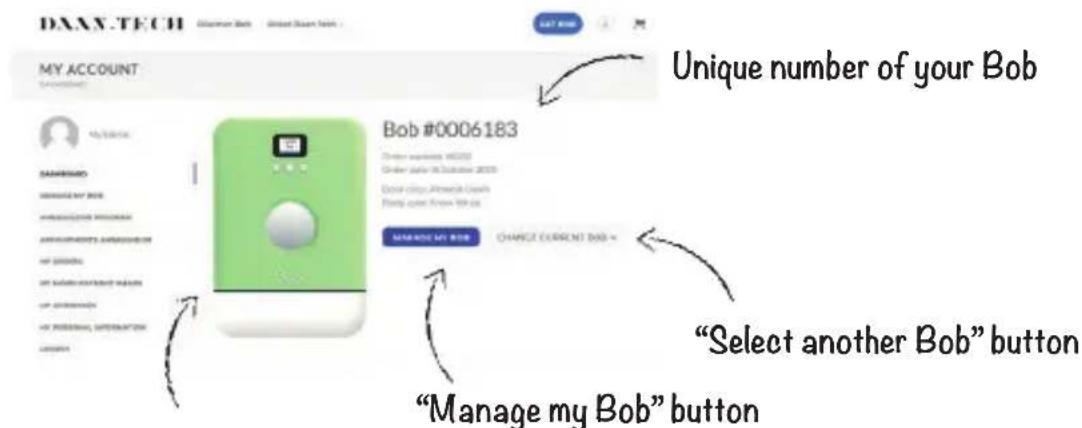
Miniature of your Bob with its colour
If you have ordered several Bobs with the same Daan Tech customer account, you can switch from one Bob to the next using the drop-down menu "Select another Bob" Warning: Each option or service must be activated separately and independently for each Bob.
Transferring the ownership of your Bob (gifts, sale)
Every Bob is linked to a customer. If you have ordered a Bob for a relative or friend, or if you would like to sell it, you must transfer ownership to the customer account of the future owner.
To do so, follow these steps:
Within the Daan Tech customer area, go to "Manage my Bob"
- Select the Bob you want to transfer using the drop-down menu "Select another Bob"
- Now click on the "Transfer my Bob" button at the bottom of the page.
A new window opens
- Enter the email address of the future owner in the dedicated field (Note: the future owner must have a user account on www.daan.tech)
- Enter the text transfer-my bob to confirm the transfer and then validate the option.
A confirmation email will be sent to both you and the new owner.
Connecting Bob to Wi-Fi and pairing it with your Daan Tech account
Bob can be connected to Wi-Fi and paired with your Daan Tech account thanks to its MAC address (for more information, please refer to page 26).
If your Bob is not connected yet, connect by going to "Settings" > "Connect my Bob". For more information, please refer to page 6 of the Quick Set-Up Guide.
Once your Bob is paired with your account, you can activate Bob+.
6130b+
What is Bob+?
Bob+ is a non-binding service that allows you to access additional features for your Bob.
| Oob. | Oob+ | Software functions |
| √ | √ | 5 standard cycles (Express, Daily, Intensive, Glasses, and Eco) |
| √ | √ | Creating a custom program (page 23) |
| √ | √ | Renaming the custom program (page 23) |
| √ | √ | Choice of a favourite cycle |
| √ | √ | Wi-Fi Connection (pages 6 and 27) |
| √ | √ | Choice of language (6 available languages) |
| √ | √ | Choice of water supply mode |
| √ | √ | Order a new Bob cassette in one click on Bob (page 25) |
| √ | √ | Choice of sound volume (mute, medium and loud) |
| √ | Choice of the signal tone (at start and end of cycle) (page 29) |
| √ | Choice of lighting (page 29) |
| √ | A custom image can be added when starting Bob (page 28) |
| √ | Access to a fl exible dishwasher detergent subscription where you only pay for what you use. You can choose whether or not you active it. (page 28) |
(Availability may differ based on your country)
Automatic renewal of your Bob.cassette
You will receive your cassette according to your needs rather than receiving a cassette on a regular basis.
- Bob+ monitors the remaining loads and can therefore anticipate a low level load status of your current cassette.
- Before your cassette is empty, an order is automatically placed via Bob+ in connection with your Daan Tech account.
- You will find your orders for the cassette and the corresponding invoices in your My account > My orders section on www.daan.tech
Choose the offer that suits you
Cassette by cassette Compilation
You will receive a new pop cassette when your current one is almost empty. Sent individually and adapted according to your needs.
30 loads = 30 runs
pop cassette
of several cassettes
Economic package offer: You will receive a compilation with several cassettes. Different compilations are available. More info on our website.
compilation
Your order will be delivered directly to your home. Simply replace your current cassette once it is completely empty with the new, full cassette. For information on replacing the cassette, please refer to page 10
Adding a custom image when starting Bob
With Bob+ you can select custom image that will be displayed when you start your Bob
On the Daan Tech website ("My Account")
- Log in to your Daan Tech account using your smartphone or computer.
- Click on"Manage my Bob"
- Click the "Custom image" button, then click the button "Browse" and then Select the image you want to upload to your Bob.
Accepted format: JPEG. The recommended resolution is 320 × 240 pixels. There is no limit to the resolution and size of the file, but the image is processed by our servers after being uploaded to be optimised for the Bob display.
On Bob's display
- Once the image has been uploaded to your Daan Tech account, you should restart your Bob (unplug the power plug and plug it in again).

Selection of the signal sound and sound effects (at the beginning and end of the cycle)
With Bob+ you can select the signal tones of your Bob:
At the start
At the end of a cycle
On the Daan Tech Website ("My Account")
- On the page "Manage my Bob" within your Daan Tech account, you can view the list of available signal sounds.
On Bob's display

- Navigate to the Settings menu and then to "Sound effects" to access this feature.
Even without Bob+, you can still change the volume between: Mute, medium and loud.
Choice of lighting
Bob+ allows you to select the lighting inside your Bob:
White (basic), blue, green, cyan, red, magenta, yellow, no lighting (LEDs off).
On Bob's display

- Navigate to the Settings menu and then "Lighting" to access this feature.
How can you activate Bob+?
The activation of Bob+ can only be done via your Daan Tech account in "My Account" on www.daan.tech
To activate Bob+, you have to follow the fi rst 3 steps on your dashboard.
- Step 1: Fill in a delivery address
Step 2: Connect your Bob to Wi-Fi
Activate Bob+ from the "Manage my Bob" tab.
You will receive a confirmation email confirming the activation of your Bob+ subscription.
The Bob+ service is not binding and you can deactivate it at any time at the bottom of the "Manage my Bob" page.
3 | QUICK MAINTENANCE GUIDE
PRODUCT DESCRIPTION
Bob is designed to last at least 10 years as long as it is regularly and appropriately maintained. To ensure a long life for Bob, please follow the recommendations found in this maintenance guide. If you encounter a problem and need help please refer to page 38.
Maintenance calendar
| Tasks Timing Tools |
| Filters | After each cycle Water | |
| Once a week or every 10 cycles | Water
Soft bristle brush |
| Heating mechanisms Once | per month or every 30 cycles | Non abrasive sponge and degreasing product |
| Tubes and inner tank Every | 3 months or 90 cycles | Use a Bob rock'n'roll cassette to thoroughly clean your Bob. For further information please refer to page 32. |
| Plastic shell, screen and button | Depending on the amount of grime on Bob. | Damp cloth or wipe |

Always unplug the appliance before cleaning.
1 | FILTERS
Bob's fi lter system, designed by Daan Tech, consists of 3 fi ltration stages
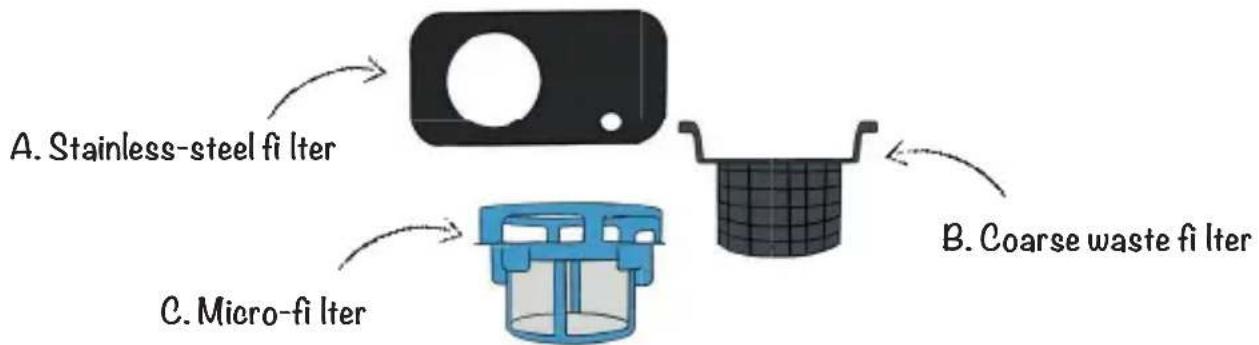
A. Stainless-steel filter: The first filtration of soil and food particles through a perforated stainless steel mesh. This first filtration stage allows the water to pass through, while redirecting the debris to the second filtration stage.
B. Filter for coarse waste: Second filtration and recovery of coarse waste. Large lumps of food are collected in this coarse waste filter.
C. Micro-filter: Third filtration stage, and filtration of fine particles thanks to a 120 micron microfiiter.
Filter maintenance
After each cycle
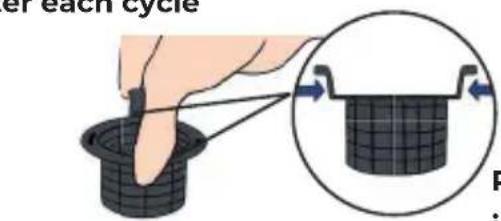
Remove the coarse waste filter with one hand using its two grip tabs.


Dispose the waste in the bin, clean the coarse waste filter with clean water and put it back in place.
Once a week or every 10 cycles

Turn the microfilter counter-clockwise to unlock the microfilter/ coarse fi tter combination.
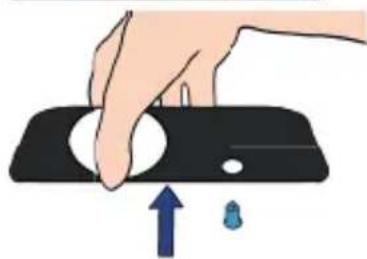
Lift out the stainless steel filter.
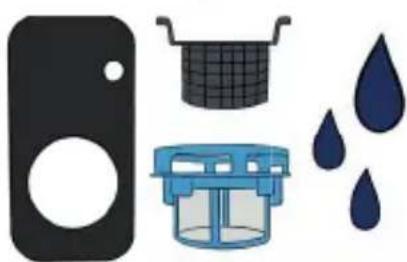
Rinse the 3 fi liters under running tap water and clean them with a soft bristle brush

Put the stainless steel fi Iter back into Bob.

Now reinsert the micro filter/coarse waste filter combination by turning it clockwise until it clicks to ensure its correct position.

Warning: Never start a cycle without the fi Iters in place.
If your microfilter is damaged, please contact Daan Tech
customer service (page 38).
2 | HEATING MECHANISMS
The heating disk must be cleaned thoroughly to avoid clogging and reduced rinsing performance.

Once per month or every 30 cycles
To access the heating disc, please remove the 3 fi Iters (see page 31). Remove the protection cover of the heating disc and clean it.
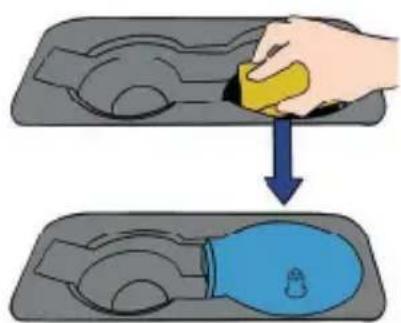
You then have access to the heating disc, clean it with a non-abrasive sponge in order to avoid damaging (scratching) the non-stick coating.

Put the protection cover back in place.
Then reinsert the 3 fi Iters.
3 | TUBES
Once every 3 months or 90 cycles
rock'n'roll cassette
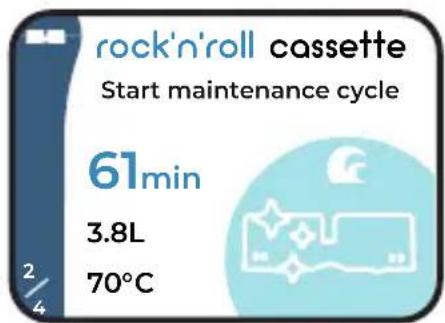

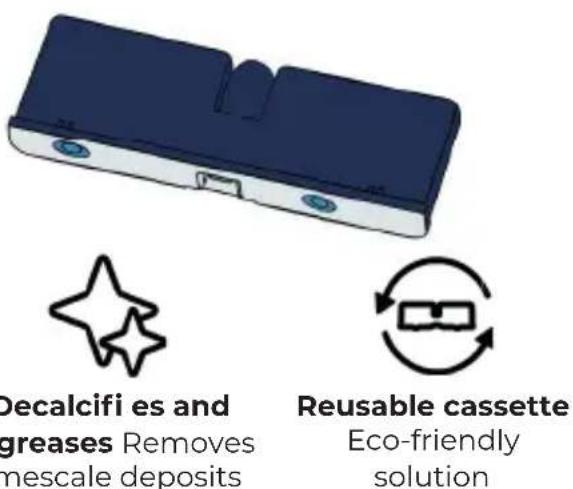
How does it work?
- Remove all the dishes from Bob and only leave the fi Iters and the main basket inside.
-
Insert the rock'n'roll cassette into your Bob
-
Go to the Bob cassette screen and navigate to the rock'n'roll cassette (maintenance cycle) and then press to start the cycle
-
The cycle takes about 60 minutes and cleans your Bob thoroughly: pumps, hoses, basket...
-
Each rock'n'roll cassette is intended for one-time use (all the contents are used up during 1 maintenance cycle)
-
Once the rock'n'roll cassette is empty, you can return it to Daan Tech to avoid throwing it away. We take care of refill ing it.
-
Use a rock'n'roll cassette every 90 cycles to keep your Bob in good shape!
Conventional dishwashers have a regenerating salt tank for anti-calcifying the water, which must continuously be monitored and frequently refi lled.
Bob does not require any dishwasher salt as everything is contained in the cassette! The limescale is automatically removed with the "rock'n'roll" cassette solution.
4 | EXTERIOR AND SCREEN
Depending on the amount of grime on your Bob.
To clean the exterior of Bob, simply wipe it with a damp cloth or wipe

Do not use any scouring agents, chemical solvents, or strong detergents as they could damage the coating on Bob.
To prevent water from getting into the electronic components, screen, buttons or door lock system, do not use a cleaning spray.
5 | SPRAY ARM
If you encounter problems with the spray arm or have noticed that it no longer turns, then may be a nozzle blockage that is preventing it from turning. In this case, please follow the instructions below to clean the spray arm.
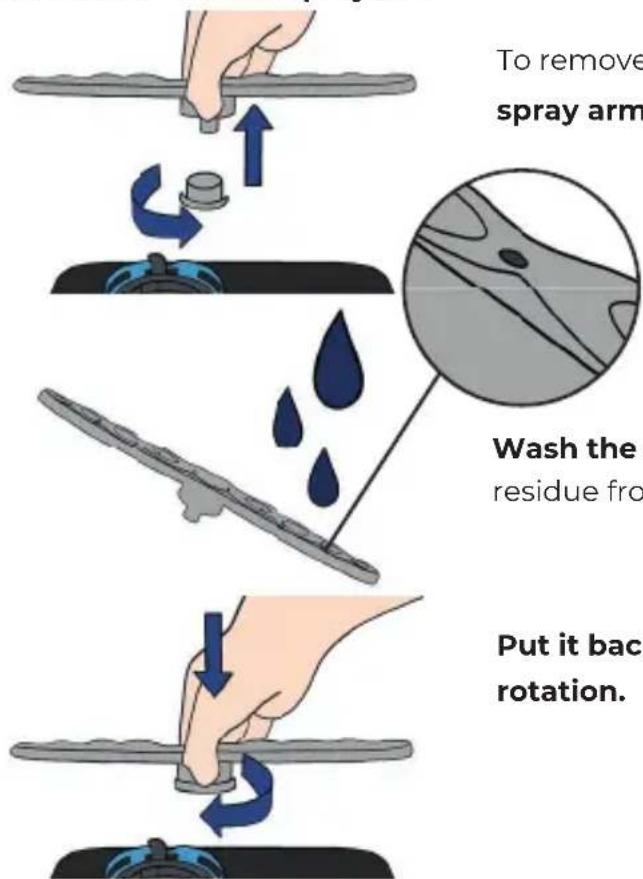
To remove the spray arm, unscrew the ring at the base of the spray arm with one hand.
Wash the spray arm under running water and remove any food residue from the spray nozzles.
Put it back in place and make sure that nothing hinders its rotation.
4 | QUICK TROUBLESHOOTING GUIDE
LIST OF POSSIBLE ISSUES
| Issue Possible causes Known solutions | |
| Bob does not turn on. | A fuse has blown in your electrical system or the circuit breaker has tripped. | Unplug all other appliances connected to the same electrical circuit as Bob. Replace the fuse or reset the circuit breaker. |
| The power supply is not activated. | Check that the power cord is properly plugged in at both ends, into either the wall outlet or on Bob's side. |
| The cycle does not start. | The door is open. Close the door. | |
| The door remains open, impossible to close it. | Check whether something is blocking the closing of the door or the seal. If it is not the case, please contact the After Sales Service. |
| No water or not enough water in the tank. | If you are in the "integrated tank" mode: fi ll the tank up until the signal sounds.
If you are in the "water supply" mode: check your installation (tap open, sufficient pressure). |
| The screen is frozen and the buttons no longer respond. | Wait 3 seconds until Bob has started. If the screen is still frozen, disconnect and reconnect Bob. |
| Water does not drain out of Bob. | The drain hose is bent. | Check the drain hose and fi x it with "Bob Easyfi x". |
| The water outlet is blocked (under the fi Itter). | Clean the bottom of the interior and the fi Itters. |
| The drain hose is blocked by a foreign body/material. | Contact the After Sales Service. |
| Formation of foam inside the tank during a cycle. | Inappropriate detergent. | Avoid special dishwasher detergents to avoid foaming.
However, if this happens, open the dishwasher door and allow the foam to evaporate.
Close the door and start a wash program to drain the water. Repeat the procedure if necessary. |
| Debris that generates foam. | Different types of debris generate more or less foam. However, if there is too much foam during a cycle it can block the spray arm.
In this case, empty the basket and run an empty cycle before you start washing your dishes again. |
| Stains on interior surfaces. | Limescale may appear on the surfaces. | Run a maintenance cycle at least once every 90 cycles with a rock'n'roll cassette (refer to page 32) |
| I live in an area with very hard water. | We recommend using a Bob Tablette instead of Bob cassette and run a maintenance cycle with a rock'n'roll cassette more frequently (every 30 cycles). |
| The dishes are not clean. | The dishes are not placed correctly in the basket. | Avoid any contact between the different items in the basket. Please refer to page 17: Recommendations for the arrangement of dishes in the basket. |
| The selected wash program is unsatisfactory. | Choose a more intensive program.
Refer to page 22: Standard programs |
| Insuffcient amount of detergent, or unsatisfactory detergent. | We recommend using a Bob Tablette |
| The spray arm is blocked by dishes. | Change the arrangement of the dishes so that the spray arm can rotate freely. |
| One or more of the spray arm nozzles is/are clogged. | Disassemble and clean the spray arm as described on page 33 |
| The fi iters are not clean or are not correctly arranged. | Disassemble and clean the fi iters as described on page 30. |
| Issue Possible causes Known solutions |
| The dishes do not properly dry. | The dishes are incorrectly arranged within the basket | Refer to page 17: Recommendation for the arrangement of dishes in the basket. |
| Insuffiient amount of detergent, or unsuitable detergent. | We recommend using a Bob Tablette. |
| The selected program is not suitable. | Choose a program with a longer washing time. |
| The door did not open at the end of the cycle. | Check that nothing prevents the door from opening automatically at the end of the cycle. |
| The dishes did not have suffiient time to dry. | Wait for the signal tone at the end of the cycle before taking out your dishes. |
| Water leaking out from under Bob | The tank fl oods. | The tank capacity is 4 litres. If you are in the "integrated-tank" mode, do not overfi it. If you are in the "water supply" mode: switch your water supply off and call the After Sales Service. |
| The door leaks. | Check the condition and position of the seals on the door and whether something prevents the door from closing completely. |
| Leak at the drain hose connection. | Use the supplied clamp and the screwdriver to tighten the drain hose on the back of Bob. (See page 3 and 4) |
| Leak at Bob's easywater connection.. | Check the connection and tighten it. (See page 3) |
| Leak in the tank Contact the After Sales Service |
| My dishes are damaged. Unsuitable cycle. | Do not put any fragile cutlery in Bob(see page 17) |
| Damp packaging | Every Bob is tested in the factory before delivery, which is why water residues may be present. | (N/A) |
| The inside of Bob is humid. | Every Bob is tested in the factory before delivery, which is why water residue may be present. | |
| Bob is not responsive (the screen is frozen, the buttons no longer react) | Malfunctioning | Restart Bob by unplugging and then plugging it in again. |
| Bob Cassette cannot be inserted. | The safety caps have not yet been removed. | Remove the safety cap before inserting Bob cassette (see page 10) |
| The cassette is inserted upside down. | Insert Bob cassette with the text in reading direction. |
| The inside of Bob cassette's tray is blocked. | Do not put anything other than a Bob cassette in the dedicated tray.
If you use a detergent other than Bob cassette, put it directly into Bob's main chamber. |
| Bob does not recognise the Bob cassette. | Communication error between the cassette and your Bob. | Unplug your Bob, remove the Bob cassette, reinsert the Bob cassette and plug Bob back in to restart it.
If the problem persists, try with a new Bob cassette. |
| Bad smell (inside the tank) | Bob has not been used for a long time. | Drain your Bob completely with the emptying cycle (Settings menu), then start an empty cycle.
Leave the door open at a 10° angle, if Bob is not in use. |
| No maintenance cycle has been run for more than 90 cycles. | Run a maintenance cycle at least once every 90 cycles with a rock'n'roll cassette. (see page 32) |
2 | REPAIRS AND CUSTOMER SERVICE
All information about the repair services for Bob can be found online on our website www.daan.tech.
All components are available for 11 years after the date of purchase of Bob. If you have a problem with a component for your Bob, please contact Daan Tech Customer service.
IMPORTANT:
In case a Daan Tech technician confirms that you need to return your Bob to us for analysis and repair, follow these steps:
If possible, drain your Bob completely with the emptying cycle (settings menu) Otherwise, flip Bob around.
2. Empty your Bob (especially the tank) in the sink or shower.
3. Reuse the original packaging and bag to return Bob to us. Unless otherwise instructed by our Daan Tech customer service team (in written form: e-mail, SMS, etc...) you are not allowed to use any other packaging.
4. Use tape to close the package.
5. Print and paste the RETURN VOUCHER on the package (which is sent to you by email) You will be informed of progress of the repairs on your Bob.
Any questions? Any recommendations?
Daan Technologies
ZA Mortier EST
85610 Cugand
France
After Sales Service: cs@daan.tech
PRODUCT SHEET
This product sheet complies with the European Directive N° 1369/2017.
| Brand name Bob | |
| Product name Bob the mini dishwasher 2020 | |
| Manufacturer name Daan Technologies SAS | |
| Origin of manufacturing France (Vendée) | |
| Number of standard place settings 3 | |
| Energy efficiency class1 | F |
| Annual energy consumption2 | 98 kWh/year |
| Energy consumption for a standard cycle 0,43 kWh/cycle | |
| Standby power consumption (door half-open) 0.5 W | |
| Standby mode duration 5 minutes | |
| Annual water consumption3 | 1064 litres |
| Drying performance class | |
| Standard cleaning cycle5 | Eco |
| Duration of the standard cleaning program 180 minutes | |
| Sound level 43 dB(A) re 1 pW | |
| Can be used as built-in dishwasher No | |
| Height 49 cm (19.3 in) | |
| Width 34 cm (13.4 in) | |
| Depth (with cables & water inlet / outlet) 49 cm (19.3 in) | |
| Power consumption 1000 W | |
| Voltage & Frequency 220-240V~ 50Hz | |
| Water pressure (water inlet) 0.5-10 bar = 0.05-1 MPa | |
NOTES
A (maximum effciency) to G (minimum effciency)
Energy consumption of 98 kWh based on 280 standard wash cycles with cold water supply and consumption of low power modes. The actual energy consumption may differ depending on the conditions.
Water consumption of 1064 litres a year based on 280 standard wash cycles. The actual energy consumption may differ depending on the conditions.
A (maximum efficiency) to G (minimum efficiency)
This program is suitable for cleaning medium solid dishes. It is the most efficient program in terms of the combined energy and water consumption for this type of dishwasher.
DISPOSAL
As a manufacturer, we commit to reduce the environmental footprint of our products. We highly recommend you to follow the disposal guidelines applicable in your country. This will help preserving natural resources by recycling Bob in an eco-friendly manner. Since Bob has built-in electronic parts, it shall not be disposed with household waste, and must be discarded according to the applicable law at the time of disposal. For more information about the disposal of electronic waste, please ask your local authorities.
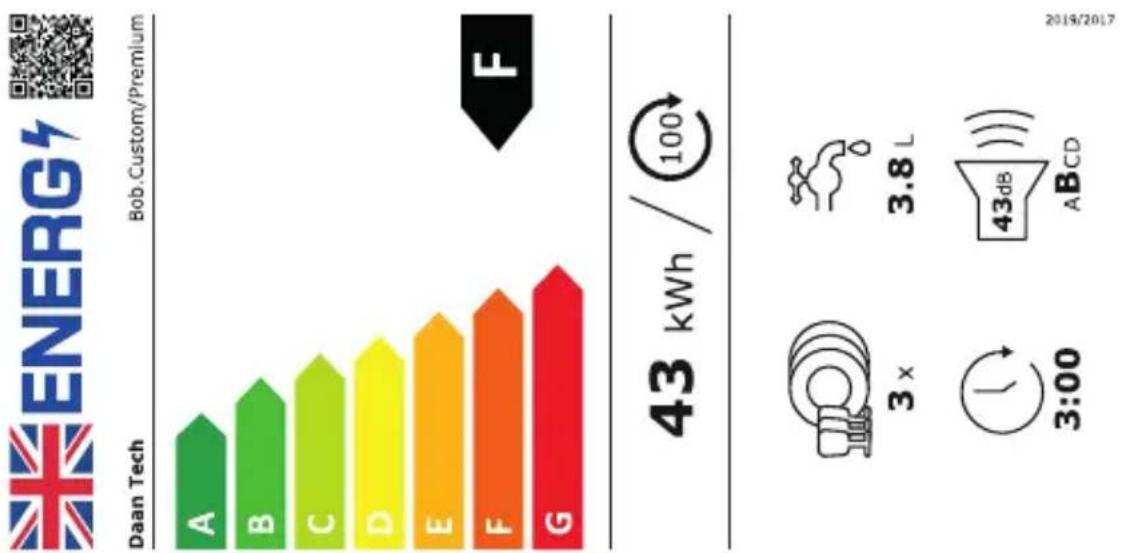
Table des matieres
1 | GUIDE RAPIDE D'INSTALLATION 42
2 | Installation et raccordements 43

x2 accessoires x3 accessoires x1 accessoires
assiettes verres couverts
(4 pers) x1 accessoire
4 grandes assiettes assiette
4couteaux
4 fourchettes x2 accesoires
4petitescuilleres verres
4verres
4 tasses Xraccessore couvert

SOIRÉE
Cycle préconisé
3.2 | Cycles standards
CONSOMMATION EAU (L)
1.9 L
2.9 L
3.8L
3.8 L
3.8L
3.8 L
DEGRE DE SALETE
**
**
***
****
****
Pre-lavage 65^
Rinçage
Rinçage
Lavage 40^ Rincage
Lavage 40^ Rinçage
Lavage 40^ Rincage
Lavage 50^ Premier rinseage
Rinçage chaud 65^
Rinçage chaud 65^
Rinçage chaud 65^
Rinçage chaud 65^
Rincage chaud 65^
chaud 50^ Second rincage
Sechage 70^
Sechage 65^
Sechage 65^
Sechage 70^
Sechage 65^
chaud 65^
Sechage 72^
CONSOMMATION ENÉRGIE (KWH)
0,23 kWh
0,26 kWh
0,35 kWh
0,48 kWh
0,43 kWh
0,41 kWh
Cassette
consignée Solution
eco-responsible
Une interrogation? Une suggestion?
ÉCRIVEZ-NOUS
Daan Technologies
ZA Mortier EST
85610 Cugand
France
Email SAV: sav@daan.tech
FICHE PRODUIT
6 | ENTDECKEN SIE DIE Bob.cassette
4 | SNELLE GIDS VOOR PROBLEEMOPLOSSING 154
1 | SNEL OPSTELLING GIDS
1 | TOEPASSINGSGEBIED EN PLAATS VAN GEBRUJK
STAP 1: KIES JE TAAL.
5 | BEHEER JE BOB VANUIT JE DAAN TECH ACCOUNT
30 ladingen = 30 runs pop cassette
4 | SNELLE GIDS VOOR PROBLEEMOPISSING
I | LIJST MET MOGELIJKE PROBLEMEN
2.3 | Anti-robotic (optional)
5 | GESTISCI IL TUO BOB DAL TUO ACCOUNT DAAN TECH
Come gesture Bob dalwhose account?
Sulito Daan Tech ("ll mio account")