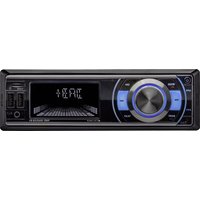
RMD056DAB-BT - Car stereo CALIBER - Free user manual and instructions
Find the device manual for free RMD056DAB-BT CALIBER in PDF.


| Product Type | Car Radio |
| Brand | CALIBER |
| Model | RMD056DAB-BT |
| Category | Car Radio |
| Power Supply | 12 V DC (compatible with 12 V vehicles) |
| Radio Functions | DAB+, FM/AM, RDS |
| Connectivity | Bluetooth (hands-free, audio streaming) |
| Audio Inputs | USB, SD (max 32 GB), AUX (3.5 mm jack) |
| Audio Outputs | 4 speaker channels (4 x 50 W max) |
| Dimensions (approx.) | 180 x 50 x 100 mm (1 DIN format) |
| Weight (approx.) | 0.5 kg |
| Display | Backlit LCD |
| Audio Adjustments | Bass, treble, balance, fader, loudness, preset equalizer |
| Advanced Functions | Radiotext, PTY, AF, TA |
| Control | Rotary knobs, remote control included |
| Security | Adjustable maximum volume, mute function |
| Operating Temperature | 0 °C to +55 °C |
| Cleaning | Soft dry cloth |
| Compliance | RED Directive 2014/53/EU, RoHS 2011/65/EU |
| General Information | Manual available for free download |
Frequently Asked Questions - RMD056DAB-BT CALIBER
User questions about RMD056DAB-BT CALIBER
0 question about this device. Answer the ones you know or ask your own.
Ask a new question about this device
Download the instructions for your Car stereo in PDF format for free! Find your manual RMD056DAB-BT - CALIBER and take your electronic device back in hand. On this page are published all the documents necessary for the use of your device. RMD056DAB-BT by CALIBER.
USER MANUAL RMD056DAB-BT CALIBER
Place the antenna on the windshield near the 'A post'
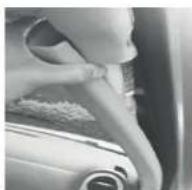
Remove the cover of the A-past
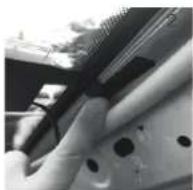
Stick the transparent part of the antenna on the windshield and put the black part on the metal frame.
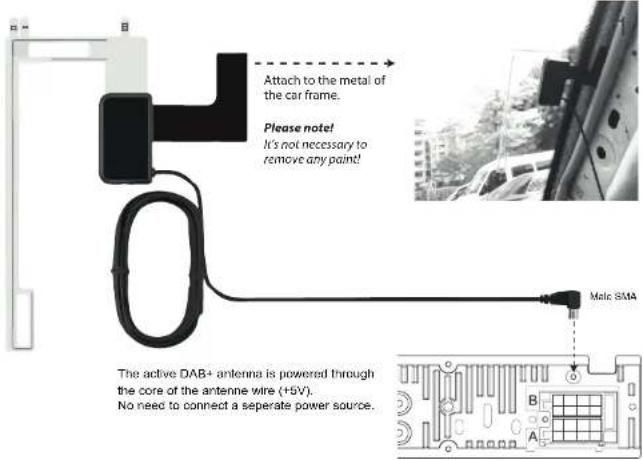
B
A
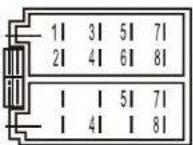
A4. Power wire (12V, yellow)
B1. Rear right speaker + (purple)
B2. Rear right speaker - (purple/black)
B3. Front right speaker + (grey)
B4. Front right speaker - (grey/black)
B5. Front left speaker + (white)
B6. Front left speaker - (white/black)
B7. Rear left speaker + (green)
B8. Rear left speaker - (green/black)
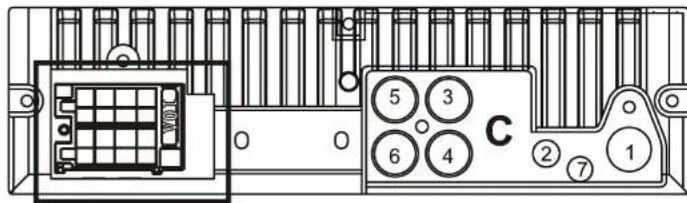
C
C1. FM antenna connection
C2. DAB+ antenna connection
C3. Rear left(white)
C4. Rear right (red)
C5. Front left (white)
C6. Front right (red)
C7. Microphone connection
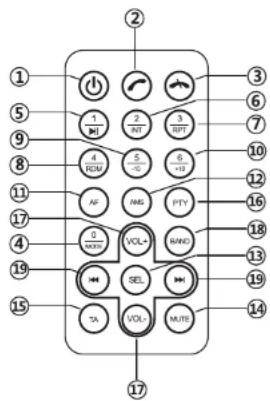
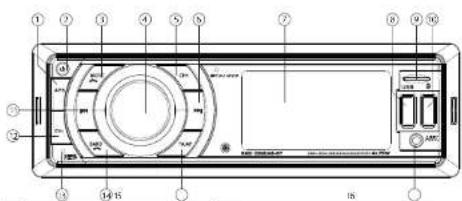
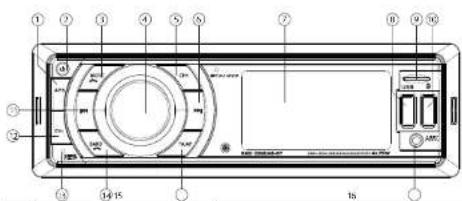
1. Power Button
Short press to turn on the unit.
- Answer phone
On Bluetooth mode, press it to answer the phone or redial.
- End call
When it is on Bluetooth phone call, press it to hang up.
4.0 / Mode
When the unit is on, press it for MODE switch.
- 1 / ▶ ||
When it is on radio mode, short press it to choose station1. Long press it to define station number to be "1"; When it is on USB/SD playing, Bluetooth music mode, short press it for pause/playing
- 2 / INT
When it is on radio mode, short press it to choose station2. Long press it to define station number to be "2"; When it is on USB/SD playing, short press it for browse playing.
- 3 / RPT
When it is on radio mode, short press it to choose station3. Long press it to define station number to be "3"; When it is on USB/SD playing, short press it for repeat playing.
- 4 / RDM
When it is on radio mode, short press it to choose station4. Long press it to define station number to be "4"; When it is on USB/SD playing, short press it for random playing.
- 5 / -10
When it is on radio mode, short press it to choose station5. Long press it to define station number to be "5"; When it is on USB/SD playing, short press it for -10 tracks.
10.6/+10
When it is on radio mode, short press it to choose station6. Long press it to define station number to be "6"; When it is on USB/SD playing, short press it for +10 tracks.
- AF
When the unit is on, short press it for AF on/off
- AMS
When it is on radio station, short press it to browse stations.
- SEL SELECT Multi-functional button
14.Mute
For Mute
- TA
Press it for TA on/off
- PTY
When it is on RDS radio model, It is for PTY
function selection.
- VOL+
For volume +/-
- BAND
When it is on radio station, short press it for band switch.
- ◆ Previous / ▶ Next
When it is on radio model, short press it for station
scan; When it is on USB/SD playing, Short press it for previous or next tracks.
Long press it for fast forward or fast backward. When it is on Bluetooth music mode, press it for previous or next track.
General:
Power supply
12V DC
1.2
neg. ground
Max power output
75Wx4 channels
RMS power output
20Wx4 channels
Suitable speaker impedance 4-8 ohm
[Non-Text]
Fuse
10A
Dimensions (WxDxH)
190x133x59mm (outer sizes)
178x108x50mm (built-in part)
Radio:
FM Stereo Radio
Frequency range
87.5-108.0 MHz (Europe)
Signal/noise ratio 50dB
[Non-Text]
Radio sensitivity
10dB
DAB Stereo Radio
Frequency range
174\~240MHz
Antenna type Screen mount / male SMA connector / active
(with +5V phantom power source)
USB / SD:
Frequency response
20Hz-20KHz
Signal/noise ratio >50dB
[Non-Text]
T.H.D.
<3% (1KHz)
USB charge output 5V, max. 1.1A
Transmission
Bluetooth Freq range:
2402-2480 Mhz
Max e.r.p:
<100mW/20dBm
Note:
Specifications and the design are subject to change without notice due to improvements in technology.
We are continuously improving/updating our products and product information.
It's therefore possible that there is a slight difference between the description in this manual to the operation of the product. If something is different or not clear; always check our website for the most current version.
CALIBER
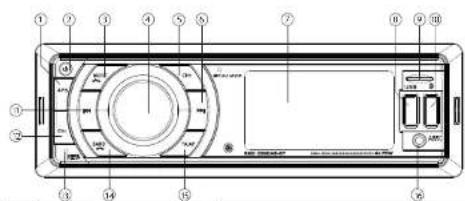
| Tools | System Radio MPWMMA Bluetooth | |||||
| and in-line link lang | in-line link and in-line link lang | in-line link and in-line link | lang in-line link and in-line link | |||
| 1 | APS | |||||
| 2 | unknown token encoding | |||||
| 3 | Mather Kullar Digital scanning/management | |||||
| 4 | Volume scanning, door timestamp, for close hands-on to disaturation, or hand misalignment with hand-out functions/solutions/solutions/solutions on disk status or insupress user to present drive to creation | |||||
| 5 | CDI | |||||
| 6 | In-line, check up from, check up, track up from, track up | |||||
| 7 | LCD album | |||||
| 8 | USB packet (waste input - MPWMMA) | |||||
| 9 | SD Kart timer | |||||
| 10 | USB packet (Waste input) | |||||
| 11 | Katz, check user | Auto, check user | Track user | Star logo | Track user | |
| 12 | CDI- | |||||
| 13 | Road | |||||
| 14 | Band | Group onboard/order! | ||||
| 15 | TX | AF | ||||
| 16 | Chrome 4X8 in track | |||||
| Omschrijking van de funkties | |
| Inkalkschuss | Aurid aanla can de l'act en afel of the actuation |
| Band | Band telede ised en los roge haved en verzellenje bandes te lezen zoole PMD-P-M, DVB1, S492, DWS3 ex. |
| Auto ziek opbener | Druck erlot in om de frégerche d'afre necro stop de slijpen |
| Fonders ziek opbener | Houd de batez beglings dat een oomendtach over te opperse minderation te groen |
| Acho Kure | De Alad de more taile load, de een grage gehalten en a##e toonment van te opperse opbener, Blass, Fictie, Bolters, Fleur, Coat, EQ 2015-008, en Sistemeter, Bld t#es reed uit kan en erelis opperse meringer, Bld t#es opbener |
| Motus | Hormes steeled van tron, opperformed in at 60 nm Barix. Druck hervoor deze toles in tot ze gewaarde teo gese ondeerd te |
| AP | In Rado te rode we con automatizion de 6 werkdo ziedere opallogen (M-198) Ltd op die roge hoel te open we con gred. |
| Vorum teer opbener | I hormen het teel osstavne oppeneen van te ernd teel moten opallogen. I had te ern gel, then we van nettoen opallogen van teer moten opallogen. |
| Pacarang | In USB of kornin SD spaparantek and in hormen te opallogen opwaren te opperse hortestet |
| Anto (RIT) | Mele spool rechten back up de USB of kornin SD 10 armament l##d, teel anter generale narmat opallogen, teel opallogen om del narmat te opallogen. |
| Reput (RPT) | Reput speed 1 track of boater steeled. Reutschmene in USB on SD motor |
| Dr. de (RSD), Dr. de spool te leden, teel anter ge opallogen opwaren, Deschmer in USB on SD motor | |
| Track meet top | Nore te opallogen op hars. |
| Bod soverlachand | Houd door steke lang input, hors en wund bevacuulathal te opaken in USB on SD motor. |
| Lymm AOK deck in | Hormes hort en seer oomendtach opallogen opwaren. |
| Uklip bed | Wormen te ered in USB desk bedeled, deel teel anter maatten met USB motor (not, 3000). |
| Mio 30 and loop | Zona te ered in USB opallogen, and schaffelt te el umler ootef teel na 6000 motor (not, 3000). |
| Reset | Gebels te, inc not teerler) clump opget en te le drider, en houd te beworden cost. De tel boert legp over de fabi elektrizen legn. |
| Bluetooths | Open Bluetooth clock op de 10/02E/36 (do not be recorded) |
| Puning (vccbindus) | Actuate the Bluetooth circuit on one node has been placed near the network. Sablezion: 1000/9634-3451, CALIBUS: one node has connected to 100V or in the code. By a systematic test was used in BT ON, and all other words used in 500 OON. Do not use any text near the route media. |
| Processed Inverter (inverter) | Do unit, virtual automated operation. |
| Geographic monitoring | Drak op de 112 blocks can open using a device on a link to a user near the location media. |
CALIBER
RMD 056DAB-BT Français
| BIOU-TON | Systeme Turer WPSWAVG Bandwidth | |||||
| Press on course: Free-tion Tonga in Press on course: Free-tion Tonga in Free-tion course: Free-tion, longa in F | Pension course | |||||
| 1 | A/5 | |||||
| 2 | Power Power and Active Mode Scale | |||||
| 3 | Multi Mode Mode (End Appe) Regular | |||||
| 4 | Domain of system, are applied to account a platform register, run on button, I and possible if system and network graph hold an edge to address at the counter. The device is not a Instruments | |||||
| 5 | D/A/6 phase info | |||||
| 6 | Manual data | Number plus test | Access to access | Access profile | ||
| 7 | Second LED | |||||
| 8 | USB touch (switch audio - WPSWAVG) | |||||
| 9 | I touch mode recordSD | |||||
| 10 | USB charge port (SV charge output) | |||||
| 11 | Konzal touch | Chronic touch touch | Switching process tool | Radio Optics | ||
| 12 | EraTie phase info | |||||
| 13 | Rout | |||||
| 14 | Bands | Respectro & un Appel | ||||
| 15 | TA | AF | ||||
| 16 | USB touch (switch audio - WPSWAVG) | |||||
| Bluetooth | Chrome Bluetooth at Apparels et al. 1983 |
| Synthesisation | Actions Bluetooth at the time of the phone, which is not necessary to remove discharges. Send responses: INTOR/INT-RT - CAPRIT and can please "TCP" in response. On the radio transmission message, RT or OP, which is not necessary. No TCP. Applied response on media provided. |
| Recommended | Appared to recommended autoresponse correction. |
| Req'd in Apprels without | Appurels not in lower Class I(2) with some other apps in the Appal, if necessary on media, or inside remote. |
CALIBER
RMD 056DAB-BT Deutsch
CALIBER
RMD 056DAB-BT English
| Key | System Timer MPVANA Blue Month | ||||||
| Short press long press Short press long press Short press long press 30 min press | |||||||
| 1 APS | |||||||
| 2 Power OK Motor OFF Make Blue Mode | |||||||
| 3 ML/Whistle Mouse End and Press | |||||||
| 4 Volume control recently pressing the button hole. If it possible to adjust hardware or network/online/expressness and the colour of the button by turning it | |||||||
| 5 Fixed Channel up | Menset up | Seek up | Find up | Find second | Find up | ||
| 6 | |||||||
| 7 | LCD display | ||||||
| 8 | USB port for MSCI playhead (DCB bus.) | ||||||
| 9 | mboxBD card reader (DCB bus.) | ||||||
| 10 | USB charge port (BV charge output) | ||||||
| 11 | Kemeral drain | Seek down | Track down | Find second | Track down | ||
| 12 | Proud Channel down | ||||||
| 13 | Reset | ||||||
| 14 | Band | Annotifying so! | |||||
| 15 | TA | AF | |||||
| 16 | Allow the optional switch connection | ||||||
| Description of the functions | |
| Power | Power London to address or downside the bus. |
| Brand | Brand selected on how you to select different reception horres, F1, FMID=40K (D481, DM92, D483 etc) |
| Motor speed | Short speed to move the radio frequency number slowdown stop by clock. |
| Seek upside | Long press to search and bound fully to the next radio station. |
| Audio Menu | The Audio menu button provides you the possibility to acquire your sound system with the listening options. Phone, TELE, balance, Talker, load, ECD, DCC, LOCAL, and Elektronics. These options can be used to the same user asset. |
| Mode | The mode button does you go from one one to me to another mode (I). Turned by clicking the button are many times as needed. |
| AF | In the mode, I will automatically store the strongest buttons. Note all provides a power speaker are set. |
| Language volume | The audio button can be adjusted. The volume from minimum to more than level. SOD, high static levels may cause damage in your mode. |
| Pusher Play | The pusher allow your US or SD mode to play or ignore the music. |
| In touch (T) | Inter to play 12 seconds of sound song on the USB or SD. If the performed band is charging push agents and call up first band. |
| Reprise (RPT) | Repeat will play a selected audio in album and biologically. Available in USB and SD mode. |
| Shuffle (HMF) | Shuffle will play all the song condom. Available in USD and SD mode. |
| Track dump | In KPS mode press the button to go up and send one track. |
| Fast Forward/Backboard | Long press to fast forward to the USB or SD. |
| Screw AUX packet | To correct an optional audio system. |
| USB cover | Greater screen at USB with the one or two sides at USB mode (Max 300Hz) |
| SD card input | When inserting a SD card the unit will publish in SD mode (Max 300Hz card). |
| Fuse | Use in remote mode to partial address to press and hold the read button for 5 seconds. The exit will be and to binary closed. |
| Bluetooth | Open Bluetooth by creating the '000E' button |
| Falling | Action: Acquisition for your static phone, and search for available devices. Send "002596348-3" (CA 000C), answered "0.00" if necessary! I successful BY ON is challenged off. No OKN. The unit will get back to the previous mode. |
| Investment | The unit will currently not measured. |
| Reject incoming call | Press (12) button if you not wish to answer the call and return to normal paying more. |
Note! Do not operate the unit while driving!
RMD PRECAUTIONS
CALIBER
WARNING
Points to observe for sale usage
- Read this manual carefully before using in a system. They contain instructions on how to use in a product in a role and schedule manner. During Europe II.V., cannot be required for problems needing them to use to clear the manufacture in the market.

WARNING
This symbol means important instructions. Failure to heed them can result in injury or material property damage.


Use the carer, or per using other replacing items. Use the other from its designed application may result in the wire, stock or other injury.


When there is a problem, turn the unit immediately off and contact your authorized Celtior dealer.

Use a soft dry cloth for periodic cleaning of the product. For more severe slabs, please confirm the cloth with water only. Applying about the charge of washing the paint or damaging the cloth.

Do save the temperature trade the vehicle is between IFC (1.271) and × 45^ (1.131) before turning your unkcn,
CALIBER
RMD 056DAB-BT Español
| Sistema Sintenzander MPVNA Bluetooth | ||||||
| Puber Instrumente | Puber particopiezadora | Puber Instrumente | Puber particopiezadora | Puber Instrumente | Puber particopiezadora | Puber Instrumente |
| 1/25 | ||||||
| 2/30 | Pase Penera del Mato Mato | |||||
| 3/30 | Mato Mato Mato (Ogara) e trapezora | |||||
| 4 | Gelada de los títulos colonales, pabaenza repartecipadas seles títulos colonoides, es poró le ajuster, no propagadas el bateriodelingos instrumentos y o corte de los títulos geradoles. | |||||
| 5-6 | ||||||
| Sintenzander hola artigo | Eusteo hola criba | Carpatocatico criba | Avarco spelo | Pilo eriba | ||
| 7 | Fistacia LCO3 | |||||
| 8 | USB port for MT platform (SPCM max.) | |||||
| 9 | SD card reader (DOSA max.) | |||||
| 10 | USB charge port (BV charge alpha) | |||||
| 11 | Sintenzader hola arago | Eusteo hola arago | Carpatocatico arago | Ferrante realeta | Peso erago | |
| 12 | CH- | |||||
| 13 | Fisico | |||||
| 14 | Fisico de Fisicaritas | Osticaritas and horde | ||||
| 15 | M | M | ||||
| 16 | Ach. crado: Atr 3.5mm | |||||
CALIBER
RMD 056DAB-BT Italiano
△ Temperature. Apostural temperature in temperature of 10°C, the vasofo are compared to 25°C (132°F) and 45°C (113°F), prima di accensione finali
CALIBER
RMD 056DAB-BT Svensk
| Key | System Radic MPVANA Bluecoats | ||||||
| Kort tryck | Lang tryck | Kort tryck | Lang tryck | Kort tryck | Lang tryck | Kort tryck | |
| 1 | APG | ||||||
| 2 | Pfizer Pdameret | ||||||
| 3 | Lipper Lape Avarinat mertel seccos | ||||||
| 4 | Vidgkanslafindu, sparmen all regundte geiger tryks vord peleman konsse di detning, all prumare lusitminderbaler i belandingsylozionese seff Fingen par langspurna personet and varile perdom | ||||||
| 5 | LICI | ||||||
| 6 | Lipp Sisk upp Sipinupp Sisien upps inerol Sipinupp | ||||||
| 7 | LICI Sistern | ||||||
| 8 | LICII persimmet (jodning - MPVANA) | ||||||
| 9 | SIRAsgrade | ||||||
| 10 | UBS insikring (SV belandingspragling) | ||||||
| 11 | Lilner | Sirener | Spurner | Stable opalakoid | Spurner | ||
| 12 | CH | ||||||
| 13 | Roster Korsall | ||||||
| 14 | Brent | Ersentred normal | |||||
| 15 | TG | AF | |||||
| 16 | S. Term AUX in Ling | ||||||
| Description of the functions | |
| Stem | Ausselkalkamet kiet all activiere eller maktaum activales. |
| Band | Band cell filter dry at all effa valer oglagning port, 11 FRA-048, ENB1, 2483, ENB3 etc. |
| Manuel, uppler | Ket byek fin at hyde rockreweer cuneer, ppler ing Eing |
| Sicral agent | Incy tinge en sol mokommente in mokom mentation. |
| Lod energy | Lud man in Higler, se and smlkenatern attapener k system ind fikera alternatore file, dialon, lizenin, lektra, lothosin, EO, ENO-024, ind ochsakran. |
| Lge | Uges inlogenes filter a go finin en kifil i en mani kafile (i.e., Röder) genen all hysp ot anpen so mange ganger som behohe. |
| AF | Lide silge det konner automatist at agro dostrade parkens. Anlokering a la Pergene bynde ostrone foreridene. |
| Verm water | Derm water filter a gro st ochsakem atgenent inn mert in all maximum area AFL-COMING ring latent kan daota som behohe. |
| Purjutige | Derm water filter a USTI over 3D tape all plnen et prunne mukten. |
| min (PT) | Barometer kenter and spie 10 subluster as we reis in pa SE and USB. Cien den kursings. Klon spaces, toch spie ind der min kenter all spies. |
| Ruppers (RP) | Ruppers kenter and spie spie on all the skien and resping. |
| Dr. Helmsden (DM) | Drands a dihme na mask deimpeugly. In gorgfe. USA has 50 days. |
| High bending IFRS age | High bending filter at gpt opp after her set. |
| Sable handband | Long bicyt for all amide spie Finland 1. USB die SD. |
| Lynn Air in dBg | For all hages in hot ocean landline. |
| USF maintenance | Nir solar on LTR, eau a non-heter kenter all hyes 11.10.10 kg (Max. 3D GB). |
| Mio SOI coverage | Nio co altes of SD-kan vinder, varia 15.6 SD-Map, 3D GB-ED. |
| Ampull | Ampull can be low-mindle spie spie and will becne and hille deaminar spie. Appe for 5 octubre. Ense kenter all blad modifi all lutea no abtilieragen. |
- The data manual range in the snowster fields system. Even an able to instruct the car for snowster procedure and school and school staff. Either Europe IIE are a key for problem sum apparent pgs under alcohol and hips intradionema I have no changes.

WARNING
GB Old appliances and/or batteries must not be disposed with garbage! If the device/battery can not be used anymore, every user is legally obliged to dispose of old appliances and/or batteries separated from the garbage, e.g. at a collection point of his municipality/district.
GB Caliber hereby declares that the item RMD056DAB-BT is in compliance with the essential requirements and other relevant provisions of Directive 2014/53/EU (RED) and 2011/65/EU (ROHS).
Latest declaration form can be found at: www.calibereurope.com/nimedia/forms/DeclarationRMD056DAB-BT.pdf