
Xenia 15G - Laptop ADATA - Free user manual and instructions
Find the device manual for free Xenia 15G ADATA in PDF.



| Product type | Gaming laptop |
| Brand | ADATA |
| Model | Xenia 15G |
| Dimensions (approx.) | 360 x 240 x 20 mm |
| Weight (approx.) | 2 kg |
| Power supply | AC adapter 20 V, 11.5 A (230 W) |
| Battery | Internal lithium-ion, non-removable |
| Operating temperature | 5°C to 35°C (41°F to 95°F) |
| Intended use | Desk, indoor, flat and hard surface |
| Maintenance and cleaning | Clean with a soft, dry cloth. Do not use liquids. |
| Safety - Warnings | Do not disassemble, crush, or puncture the battery. Do not throw into fire. |
| Safety - Adapter | Use only the supplied adapter. Do not use if damaged. |
| Safety - Ventilation | Do not block air vents. Avoid soft surfaces. |
| Safety - Medical devices | Maintain a distance of 20 cm from pacemakers. |
| Safety - Modifications | Do not modify internal components or the casing. |
| Spare parts and repairability | Contact ADATA customer service for any repair or replacement. |
| General information | Manual available in multiple languages (FR, EN, ES, ZH). |
| Warranty | See terms provided with the product. |
Frequently Asked Questions - Xenia 15G ADATA
User questions about Xenia 15G ADATA
0 question about this device. Answer the ones you know or ask your own.
Ask a new question about this device
Download the instructions for your Laptop in PDF format for free! Find your manual Xenia 15G - ADATA and take your electronic device back in hand. On this page are published all the documents necessary for the use of your device. Xenia 15G by ADATA.
USER MANUAL Xenia 15G ADATA
- Place the computer on a stable surface.
- When first setting up the computer use the following procedure (as to safeguard the computer during shipping, the battery will be locked to not power the system until first connected to the AC/DC adapter and initially set up as below): Attach the AC/DC adapter cord to the DC-In jack on the rear of the computer, then plug the AC power cord into an outlet, and connect the AC power cord to the AC/DC adapter. The battery will now be unlocked.
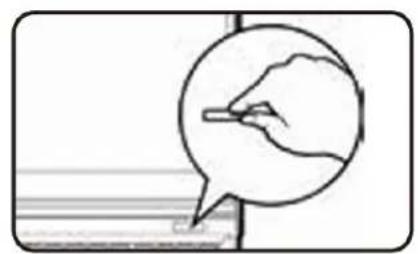
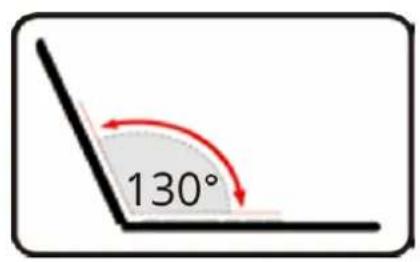
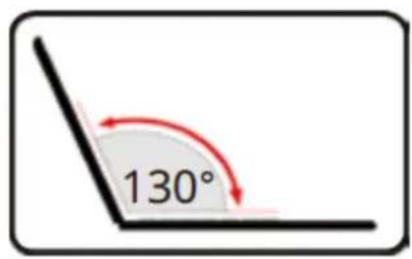
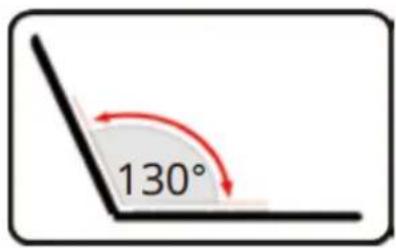
- Use one hand to raise the lid to a comfortable viewing angle (do not exceed 130 degrees); use the other hand to support the base of the computer (Note: Never lift the computer by the lid).
- Press the power button to turn the computer "on".

EN
Product Overview
Product Overview
- Webcam (When the camera is in use, the LED will be illuminated.)
- Built-In Array Microphone
- Power Button
- Air Vent (To prevent your computer from overheating make sure nothing blocks any vent while the computer is in use.)
- Security Lock Slot
- USB 3.2 Gen 1 Type-A Port
- Audio Combo Jack
- USB 3.2 Gen 2 Type-A Port
-
USB 3.2 Gen 2 Type-C Port with Power Delivery (DC-In)* *This port allows you to use a third party AC/DC adapter/power bank plugged into the port as a power supply. If you are using a power bank make sure that it complies with the USB-C PD (Power Delivery) standard specification. (20V/100W) If you are using a third party AC/DC adapter, the rating of the adapter must be 20V/100W and it should be appropriately certified.
-
RJ-45 LAN Jack
-
HDMI-Out Port
-
DC-In Jack
-
DisplayPort 1.4 over USB 3.2 Gen 2 Type-C Port




EN
Function Keys
| Keys | Function Keys & Visual Indicators |
| FN + [IMAGE] | Play/Pause (In Audio/Video Programs) |
| FN + [IMAGE] | Touchpad Toggle |
| FN + [IMAGE] | Turn Display Backlight Off(Press a key to or use Touchpad to turn on) |
| FN + [IMAGE] | Mute Toggle |
| FN + [IMAGE] | Volume Decrease/Increase |
| FN + [IMAGE] | Change Display Configuration |
| FN + [IMAGE] | Display Brightness Decrease/Increase |
| FN + [IMAGE] | Camera Power Toggle |
| FN + [IMAGE] | Airplane Mode Toggle |
| FN + [IMAGE] | Sleep Toggle |
| FN + [IMAGE] | Scroll Lock Toggle |
| FN + [IMAGE] | Control Center Toggle |
| FN + [IMAGE] | Fan Automatic Control/Full Power |
| FN + [IMAGE] | Power Modes Toggle |
| FN + [IMAGE] | Microphone Toggle |
| FN + [IMAGE] | Launch the LED Keyboard Application |
| FN + [IMAGE] | Toggle the Keyboard LED On/Off |
| FN + [IMAGE] | Keyboard LED Illumination Decrease/Increase |
EN
LED Indicators
| Icon | Color | Description |
 | Orange | The AC/DC adapter is plugged in. |
| Green | The computer is on. | |
| Blinking Green | The Computer is in Sleep mode. | |
 | Orange | The battery is charging. |
| Green | The battery is fully charged. | |
| Blinking Orange | The battery has reached critically low power status. | |
 | Green | Storage device activity. |
EN
Recovering software failures
In case your operating system becomes unstable or unusable, your XPG Laptop has a preloaded Windows software recovery solution that is separate from the operating system partition.
To enable the software recovery functionality, please press F8 to enter Windows recovery menu when the XPG logo first appears while booting your device.
Select Troubleshoot and Windows allows you to do any of the following options:
- Reset this PC - This option reset your device to factory setting, please backup your personal files before doing this option.
- Advanced startup - This option allows you to recovery with advanced options such as: Startup Repair, Uninstall Updates, Startup Settings, UEFI Firmware Settings, Command Prompt, System Restore and System Image Recovery.
Important!
- Please backup all your personal data and files before you start any recovery option.
- Ensure your device is plugged in to a power source during the process of recovery.
- If your recovery option becomes unavailable, like in the case of an SSD change, please contact our Customer
Service from xpg.com/us/support for additional help on obtaining a copy of the original factory software image.
ES Arranque del sistema



Tecla de Función

TC 產品訊息

TC 功能鍵
 |
TC
LED燈效說明
In the aim to provide the best Policy for our Customers, XPG grants one-year limited warranty for your XPG Notebook Product.
If the product fails during normal and proper use within the warranty period, XPG will, at its own discretion, repair or replace the defective parts within the product, or the product itself, with functionally equivalent components as originally supplied.
To start the warranty period validity, users must register their product online at our website xpg.com/us/member_xpg/login. When a repair request is made after the product has been registered, users will have to provide a proof of purchase in the form of an invoice, stamped warranty card or delivery receipt to show the purchase date, which will be the start date of the warranty. If there is no proof of purchase provided or the product has not been registered, then the product's date of manufacturing will become the effective start date for the warranty period. This date is calculated based on the XPG Serial Number printed on the back cover of the product.
Note: Warranty terms may vary depending on different distributing channels. Please confirm first with the location where the product was purchased to verify if any restriction apply before contacting XPG.
EN
XPG NOTEBOOK LIMTIED WARRANTY SUMMARY
Battery and AC Adapter
Due to their consumable nature based on standard use, Batteries and the AC Adapters are covered by a one-year warranty from the date of purchase, unless specified differently by local regulations.
Pre-Installed Software
Software and other accessories that may be bundled with the product are not covered by this warranty, but by acceptance of the standard End-User License Agreement (EULA) of each software before use.
LCD Panel
While LCD panels are rigorously tested and screened for quality at the factory, over time they might present individual pixel imperfections given their physical nature. Based on each panel's manufacturing standards, this limited warranty grants up to a maximum of three (3) non-contiguous bright pixels and up to five (5) non-contiguous black pixels, and in any case no more than eight (8) defective pixels, to be identified as normal functionality. Therefore, under the 1-year display limited warranty from the date of purchase, the LCD panel will be replaced only if the defective pixel count exceeds the aforementioned limits.
EN
XPG NOTEBOOK LIMTIED WARRANTY SUMMARY
User Replaceable Parts
Most XPG Notebook designs may allow standard parts like additional SSDs and memory modules (in limited models only) to be added or replaced by the end user. While XPG strongly recommends to only use validated parts to be installed into XPG notebooks to avoid unexpected behavior, given the open nature of PC design and to match our customers' desires, XPG warranties will not be voided in the event of using replacement parts that have not been validated by XPG. However, in the event that a user decides to replace parts, the following limitations may apply:
1) XPG will NOT be responsible for incompatibility issues or any damage caused by the affected change, for example if a thermal pad for a new SSD is not installed or does not contact properly, ending in heat or damage of the part, or if the new part damaged the existing board.
2) XPG will NOT guarantee that a non-validated part will keep the level of advertised performance or battery life for the device.
3) XPG will only cover defects that are limited to the standard design of the machine as manufactured and within the original aforementioned warranty period.
4) XPG will NOT be responsible for any data loss after replaceable parts have been installed. However, customers can always request to obtain the original manufacturing image that the machine was originally shipped with by opening a request in our RMA system, or by request to the local service provider in your territory, if original licensed software was shipped with the purchased configuration.
EN
XPG NOTEBOOK LIMTIED WARRANTY SUMMARY
Disclaimer
1) XPG will not be held responsible for any damages caused by the user due to negligence, accidental damage or abuse or caused by acts of nature. This includes, but it's not limited to: procurement of substitute goods or services; loss of use, data or profits; business interruption caused by a product that has been physically damaged, abused or damaged due to environmental factors; unauthorized repairs or tampering; liquid damage; usage not conforming to the proper operating instructions as laid out by this user guide, etc. In those cases, this warranty will be considered void.
2) XPG shall not be responsible for any lost or damaged data, software or other materials stored or preserved on the product. XPG strongly recommends that customers back up their data and have a disaster recovery plan.
3) It is recommended to keep the original packaging for transportation to the authorized repair center. XPG will not cover any loss or damages that occur during transportation.
Related news and other content can be found on our website (www.xpg.com). The information contained herein is subject to change without notice.
For technical support or assistance, please visit xpg.com/us/support.
For additional services, advice and support, please contact your local distributor.

Product Page
ES
RESUMEN DE LA GARANTÍ A LIMITADA DEL PORTATIL XPG
EN Safety and Caution Information

Warning:
To reduce the risk of fire or burns, do not disassemble, crush, puncture; do not short external contacts; do not dispose of in fire or water.

Danger:
Never attempt to disassemble or reassemble. Risk of explosion if battery is incorrectly replaced. Replace only by the manufacturer with the same type used by the manufacturer.

AC Power Adapter:
Risk of electric shock, fire, or burn if using an AC adapter other than the one provided with the device. Indoor use only and in dry locations. Device must only be repaired by a professional. Do not open enclosure. The adapter is rated for use between 5°C and 35°C (41°F and 95°F). Connect only to a properly wired and grounded outlet. 20V, 11.5A (230 Watts) Caution: Risk of shock or fire. Do not use power cord if damaged. Please reach out to place of purchase for replacement.

Operating Temperature:
This device is intended for use in ambient temperatures between 5° C and 35° C ( 41° F and 95° F). Avoid using or storing next to heat sources, in direct sunlight, or outside the intended temperature ranges to avoid damages.
EN Safety and Caution Information
Additional Medical Precautions:
This device may interfere with the operation of some pacemakers, hearing aids or other medical devices. To reduce the risk, maintain a separation distance of 20 cm (8 inches) between the device and the medical device. Refer to the medical device for additional information.
Modifications:
Modification of the wireless solution, thermal solution, device components or enclosure shall violate regulatory compliance requirements and may induce safety hazards.
Battery:
The product may contain an internal lithium manganese dioxide, vanadium pentoxide, or alkaline battery or battery pack. To reduce the risk of fire or burns, do not disassemble, crush, puncture; do not short external contacts; do not dispose of in fire or water. Never attempt to disassemble or reassemble. Risk of explosion if battery is incorrectly replaced. Replace only by the manufacturer with the same type used by the manufacturer. Contact the seller before sending the full product for battery replacement and follow the instruction for safe transport of lithium and li-ion batteries.
EN Safety and Caution Information

Heat:
Do not place the mobile computer directly on your lap or obstruct the computer air vents. Use the mobile computer only on a hard, flat surface. Do not allow another hard surface, such as an adjoining optional printer, or a soft surface, such as pillows or rugs or clothing, to block airflow. Also, do not allow the AC adapter to contact the skin or a soft surface, such as pillows or rugs or clothing, during operation.

Potential Safety Concerns:
If you notice any of the following conditions (or if you have other safety concerns), do not use the computer: crackling, hissing, or popping sound, or a strong odor or smoke coming from the computer. It is normal for these conditions to appear when an internal electronic component fails in a safe and controlled manner. However, these conditions may also indicate a potential safety issue. Do not assume it is a safe failure. Turn off the computer, disconnect it from its power source, and contact technical support for assistance.
ES
Regulatory Information
FCC Statement
(Federal Communications Commission)
You are cautioned that changes or modifications not expressly approved by the party responsible for compliance could void the user's authority to operate the equipment.
This equipment has been tested and found to comply with the limits for a Class B digital device, pursuant to Part 15 of the FCC Rules. These limits are designed to provide reasonable protection against harmful interference in a residential installation. This equipment generates, uses and can radiate radio frequency energy and, if not in- stalled and used in accordance with the instructions, may cause harmful interference to radio communications. However, there is no guarantee that interference will not occur in a particular installation. If this equipment does cause harmful interference to radio or television reception, which can be determined by turning the equipment off and on, the user is encouraged to try to correct the interference by one or more of the following measures:
• Re orient or relocate the receiving antenna.
- Increase the separation between the equipment and receiver.
- Connect the equipment into an outlet on a circuit different from that to which the receiver is connected.
- Consult the service representative or an experienced radio/TV technician for help.
Operation is subject to the following two conditions:
- This device may not cause interference. And
- This device must accept any interference, including interference that may cause undesired operation of the device.
Regulatory Information
FCC RF Radiation Exposure Statement:
- This Transmitter must not be co-located or operating in conjunction with any other antenna or transmitter.
- This equipment complies with FCC RF radiation exposure limits set forth for an uncontrolled environment. This equipment should be installed and operated with a minimum distance of 20 centimeters between the radiator and your body.
CE Marking
This device has been tested to and conforms to the regulatory requirements of the European Union and has attained CE Marking. The CE Mark is a conformity marking consisting of the letters “CE”. The CE Mark applies to products regulated by certain European health, safety and environmental protection legislation. The CE Mark is obligatory for products it applies to: the manufacturer affixes the marking in order to be allowed to sell his product in the European market.
This product conforms to the essential requirements of the RE Directive 2014/53/EC in order to attain CE Marking. A notified body has determined that this device has properly demonstrated that the requirements of the directive have been met and has issued a favorable certificate of expert opinion. As such the device will bear the notified body number 0560 after the CE mark.
The CE Marking is not a quality mark. Foremost, it refers to the safety rather than to the quality of a product. Secondly, CE Marking is mandatory for the product it applies to, whereas most quality markings are voluntary.
Regulatory Information
We, ADATA Technology Co., Ltd hereby certify that:
The device bearing the trade name and model specified above has been shown to comply with the applicable technical standards as indicated in the measurement report and was tested in accordance with the measurement procedures specified in RE Directive 2014/53/EU. And Our laboratories is the accredited laboratories and are approved according to ISO/IEC 17025. The device was passed the test performed according to:
Standards:
This device is in compliance with the essential requirements and other relevant provisions of the R&TTE Directive 1999/5/EC.
This device will be sold in the following EEA countries: Austria, Italy, Belgium, Liechtenstein, Denmark, Luxembourg, Finland, Netherlands, France, Norway, Germany, Portugal, Greece, Spain, Iceland, Sweden, Ireland, United Kingdom, Cyprus, Czech Republic, Estonia, Hungary, Latvia, Lithuania, Malta, Slovakia, Poland, Slovenia.
Regulatory Information
ErP Off Mode Power Consumption Statement:
The figures below note the power consumption of this computer in compliance with European Commission (EC) regulations on power consumption in off mode:
Off Mode < 0.5W
NOM-208 Statement:
Regulatory Information
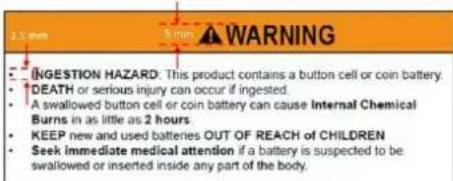
WARNING
• INGESTION HAZARD: This product contains a button cell or coin battery.
• DEATH or serious injury can occur if ingested.
- A swallowed button cell or coin battery can cause Internal Chemical Burns in as little as 2 hours.
- KEEP new and used batteries OUT OF REACH OF CHILDREN.
- Seek immediate medical attention if a battery is suspected to be swallowed or inserted inside any part of the body.

Nominal voltage: 3Vdc
Battery Type: CR2032
- Remove and immediately recycle or dispose of used batteries, batteries from equipment not used for an extended period of time according to local regulations and keep away from children. Do NOT dispose of batteries in household trash or incinerate.
- Even used batteries may cause severe injury or death.
- Call a local poison control center for treatment information.
- Non-rechargeable batteries are not to be recharged.
- Do not force discharge, recharge, disassemble, heal above (manufacturer's specified temperature rating) or incinerate. Doing so may result in injury due to venting, leakage or explosion resulting in chemical bums.
- The product contains non-replaceable batteries.
PS. 字體要求如右圖
Regulatory Information
Taiwan NCC警語
Taiwan RoHS : www.adata.com/rohs/

R33A23
RoHS

HIGH-DEFINITION MULTIMEDIA INTERFACE
限用物質含有情況標示聲明書
Declaration of the Presence Condition of the Restricted Substances Marking
Equipment name : Laptop Type designation (Type) : XENIA 15G
備考1. “超出0.1 wt %” 及 “超出0.01 wt %” 係指限用物質之百分比含量超出百分比含量基準值。
Note 1: “Exceeding 0.1 wt %” and “exceeding 0.01 wt %” indicate that the percentage content of the restricted substance exceeds the reference percentage value of presence condition.
備考2. “○”係指該項限用物質之百分比含量未超出百分比含量基準值。
Note 2: “○” indicates that the percentage content of the restricted substance does not exceed the percentage of reference value of presence.
備考3. “-”係指該項限用物質為排除項目。
Note 3 : The “-” indicates that the restricted substance corresponds to the exemption.
Specification
| Processor | Intel® CoreTM i7-14700HX (2.1GHz, up to 5.5GHz) |
| Graphics | NVIDIA® GeForce RTXTM 4070 | GeForce RTXTM 4060 | GeForce RT X4050 |
| Memory | ADATA DDR5 Memory |
| 2x SO-DIMM slot, speed support to 5600MT/s | |
| Storage | ADATA Legend 850 SSD |
| 3x PCIe Gen4 x 4 SSD slot | |
| M.2 Slot | Slot 1 – Wireless & Bluetooth module | Slot 2 / 3 / 4 – PCIe Gen4 x 4 SSD |
| Display | 15.6" (39.62cm) FHD Panel |
| 1920 x 1080 | 16:9 | 144Hz | 72% NTSC | |
| Keyboard | Single zone RGB backlit |
| Communication | Intel® Dual Band Wi-Fi 6E AX211 2x2 AX + BT CNVi M.2 2230 |
| I/O Ports | 1x USB-A 3.2 Gen2 | 1x USB-A 3.2 Gen1(Up to 900mA/10Gbps (USB3.2)) |
| 1x USB-C 3.2 Gen2 (900mA/10Gbps DP : 3840x2160, 60Hz)1x USB-C 3.2 Gen2 (PD : 20Vdc, 5A) | |
| 1x HDMI (3840x2160, 60Hz) | 1x RJ45 | |
| 1x 2-in-1 Audio Combo Jack (Headphone/Microphone) | |
| Battery | 4 cells Polymer battery pack | 53.35WH |
| Adapter | Input – 100-240V | 50-60Hz |
| Output – 20V | 11.5A | 230W |
產品規格
- PRODUCT OVERVIEW
- FUNCTION KEYS
- RECOVERING SOFTWARE FAILURES
- IMPORTANT
- ES ARRANQUE DEL SISTEMA
- TECLA DE FUNCIÓN
- TC 產品訊息
- TC 功能鍵
- LED燈效說明
- XPG NOTEBOOK LIMTIED WARRANTY SUMMARY
- BATTERY AND AC ADAPTER
- PRE-INSTALLED SOFTWARE
- LCD PANEL
- EN
- USER REPLACEABLE PARTS
- DISCLAIMER
- RESUMEN DE LA GARANTÍ A LIMITADA DEL PORTATIL XPG
- EN SAFETY AND CAUTION INFORMATION
- WARNING
- DANGER
- AC POWER ADAPTER
- OPERATING TEMPERATURE
- ADDITIONAL MEDICAL PRECAUTIONS
- MODIFICATIONS
- BATTERY
- HEAT
- POTENTIAL SAFETY CONCERNS
- ES
- REGULATORY INFORMATION
- FCC STATEMENT
- (FEDERAL COMMUNICATIONS COMMISSION)
- OPERATION IS SUBJECT TO THE FOLLOWING TWO CONDITIONS
- FCC RF RADIATION EXPOSURE STATEMENT
- CE MARKING
- STANDARDS
- ERP OFF MODE POWER CONSUMPTION STATEMENT
- NOM-208 STATEMENT
- PS. 字體要求如右圖
- TAIWAN NCC警語
- 限用物質含有情況標示聲明書
- DECLARATION OF THE PRESENCE CONDITION OF THE RESTRICTED SUBSTANCES MARKING
Brand : ADATA
Model : Xenia 15G
Category : Laptop