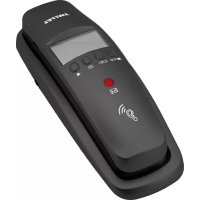
TF 510 - Telephone SWITEL - Free user manual and instructions
Find the device manual for free TF 510 SWITEL in PDF.



| Product type | Corded telephone with advanced features |
| Brand | Switel |
| Model | TF 510 |
| Power supply | 2 AA alkaline batteries 1.5 V (not included) |
| Display | Alphanumeric display with adjustable contrast |
| Phonebook | 30 entries (name and number up to 22 digits) |
| Call list | 15 entries with date and time |
| Direct selection | 3 programmable keys (M1, M2, M3) for emergency numbers |
| Flash key (R) | Call transfer and automatic recall function (100/300/600 ms) |
| Last number redial | Quick access to call list |
| Handset volume adjustment | 3 positions: normal, medium, amplification +35 dB |
| Ringer volume adjustment | 3 positions: off, low, high |
| Call notification LED | Flashing for new missed calls (activatable/deactivatable) |
| Menu languages | DE, NL, PL, SV, EN, FR, ES, IT (8 languages) |
| Wall mounting | Possible (mounting hardware included, 100 mm spacing) |
| Approximate dimensions | 22 x 20 x 10 cm (estimated) |
| Approximate weight | 0.5 kg (without batteries) |
| Care and cleaning | Soft, lint-free cloth, no solvents |
| Safety | Use only the provided cables, do not open the device, separate disposal |
| Warranty | 2 years (excluding batteries, user damage) |
Frequently Asked Questions - TF 510 SWITEL
User questions about TF 510 SWITEL
0 question about this device. Answer the ones you know or ask your own.
Ask a new question about this device
Download the instructions for your Telephone in PDF format for free! Find your manual TF 510 - SWITEL and take your electronic device back in hand. On this page are published all the documents necessary for the use of your device. TF 510 by SWITEL.
USER MANUAL TF 510 SWITEL
COMMUNICATION PRODUCTS
Conventional telephone
TF 510
natural_image
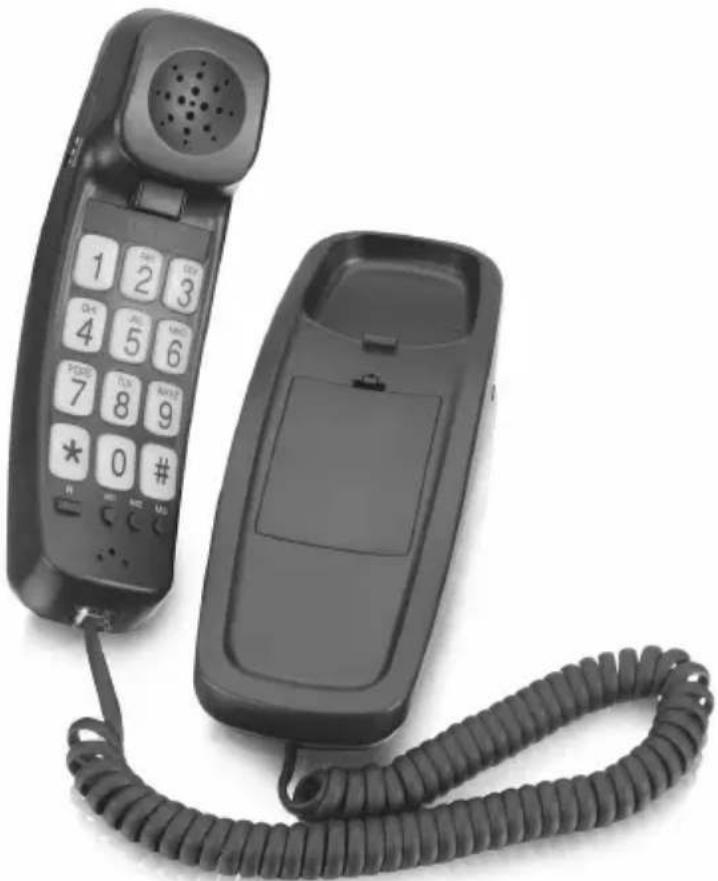
Black office telephone with keypad and cord, no visible text or symbols on device bodyBedienungsanleitung
Mode d'emploi
Operating Instructions
SWITEL
3 Bedienelemente
Please read this operating instruction manual thoroughly.
Intended use
The telephone is suitable for telephoning within a public telephone network system. Any other use is considered unintended use. Unauthorised modification or reconstruction is not permitted. Under no circumstances open the device or complete any repair work yourself.
Installation location
Prevent excessive exposure to smoke, dust, vibration, chemicals, moisture, heat and direct sunlight.
Disposal
You are legally obliged to dispose of consumable goods according to the applicable regulations. The adjacent symbol on the telephone indicates that electrical and electronic apparatus and batteries no longer required must be disposed of separate from domestic waste.
Electrical and electronic devices must be disposed of at a suitable collection point provided by the public waste authorities.
Packaging materials must be disposed of according to local regulations.


2 Preparing the Telephone
Connecting the telephone
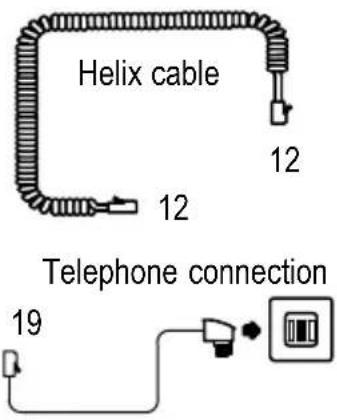
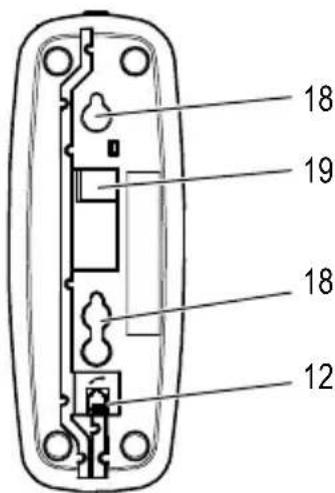
Connect the helix cable at positions 12 (refer to following page). Only use the helix cable supplied because the equipment may not function if another helix cable is used.
Connect the phone (19) to the telephone connection socket using the telephone connection line. Only use the telephone connection line supplied because the equipment may not function if another telephone connection line is used.
Wall mounting
The telephone can also be installed on a wall. You require two screws in order to fix the telephone on a wall. Drill two holes at a distance corresponding to the slots (100 mm apart) and insert the screws leaving approx. 5 mm projecting from the wall. Align the slots in the telephone to the screws, fit the screws in the slots and slide the telephone downwards a little.
Inserting batteries
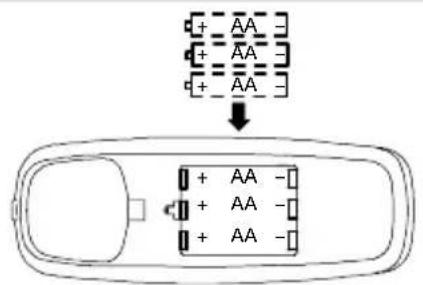
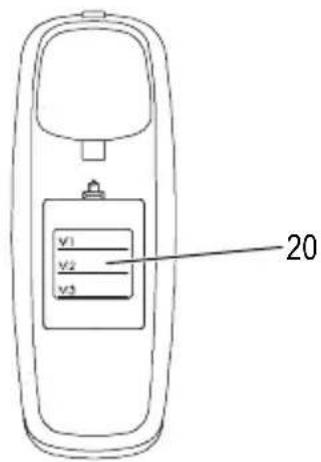
Insert the batteries in the open battery compartment (20). Only use batteries of the type AA Alkaline 1.5 V. Pay attention to correct polarity. Close the battery compartment cover.

The display is only active when batteries have been inserted. If the BATT. LOW message appears in the display, change the batteries.
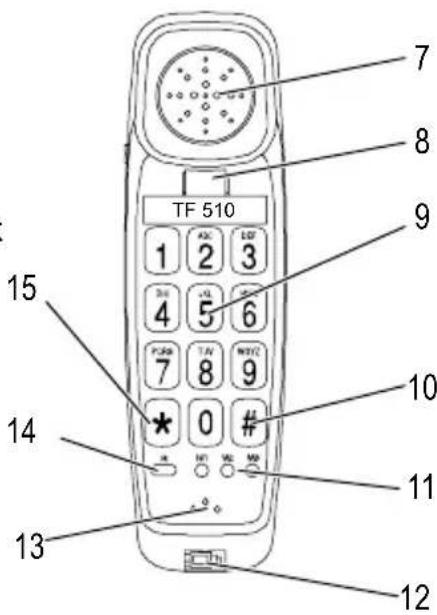
3 Operating Elements
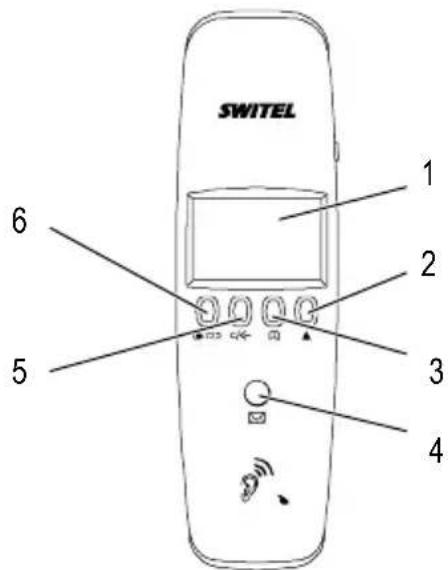
1 Display
2 Adjust setting button
3 Phone book
4 LED, "phone is ringing"
5 Delete button
6 Redialling
7 Earpiece
8 On-hook contact
9 Digit keys
10 Hash button
11 One-touch dialling buttons
12 Socket for helix cable
13 Microphone
14 R-button
15 Star button
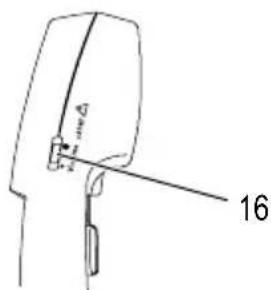
16 "Receiver volume" slide control
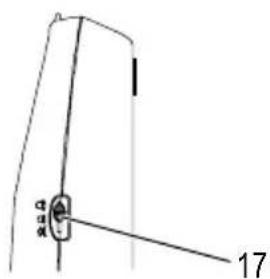
17 "Ringing volume" slide control
18 Wall mounting
19 Telephone line connection socket
20 Battery compartment
4 Menu Structure
Main menu
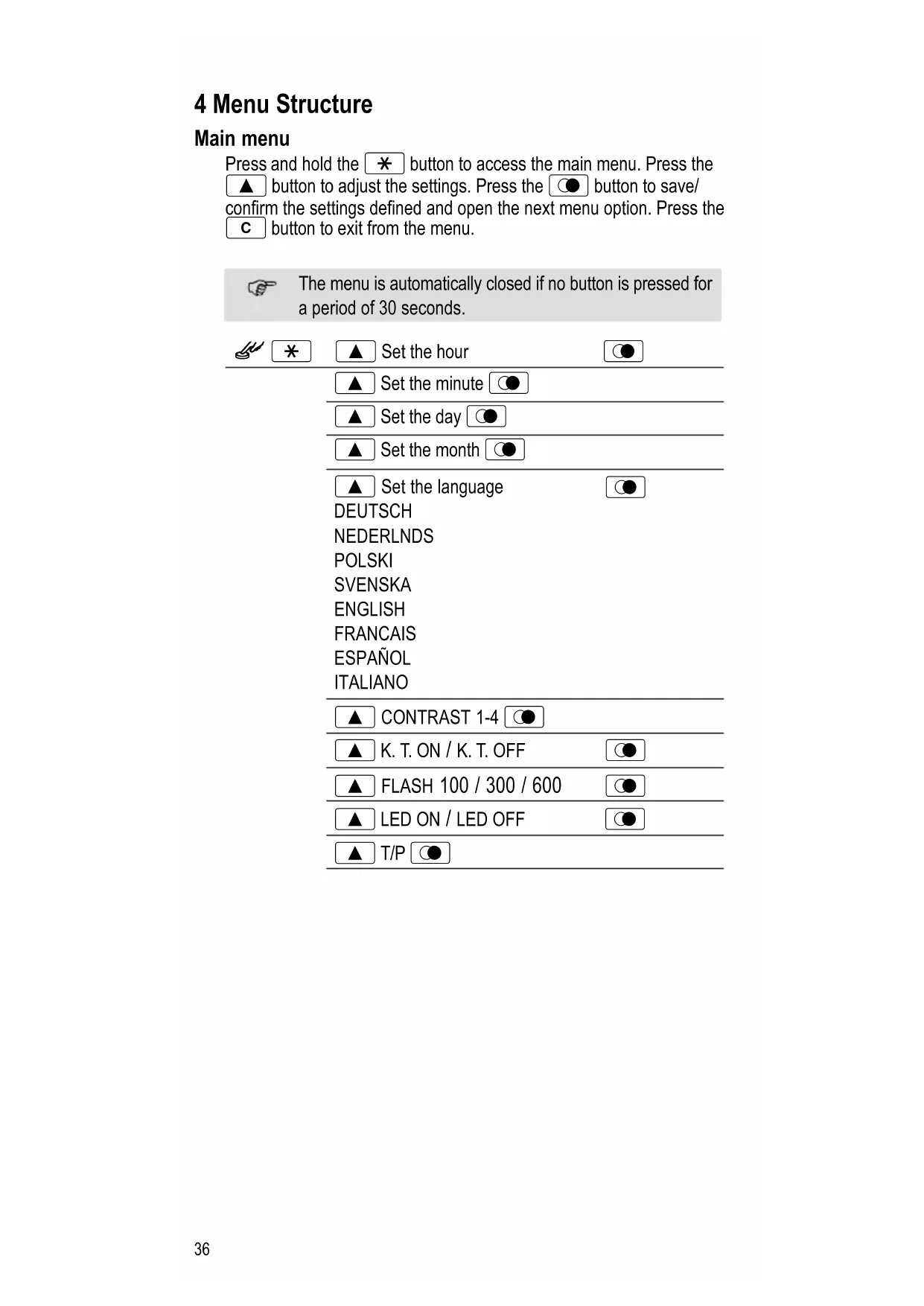
Press and hold the ✕ button to access the main menu. Press the ▲ button to adjust the settings. Press the Ⓐ button to save/confirm the settings defined and open the next menu option. Press the C button to exit from the menu.

The menu is automatically closed if no button is pressed for a period of 30 seconds.


Set the hour


Set the minute


Set the day


Set the month


Set the language

DEUTSCH
NEDERLNDS
POLSKI
SVENSKA
ENGLISH
FRANCAIS
ESPAÑOL
ITALIANO

CONTRAST 1-4


K. T. ON / K. T. OFF


FLASH 100 / 300 / 600


LED ON / LED OFF


T/P
Taking a call
When the phone rings, lift the receiver and take the call.
Ending a call (on-hook)
Replace the receiver to end the call.
Making a call
Lift the receiver. Wait until you hear the dialling tone. Dial the required phone number using the digit keys (9).
Flash button on private branch exchanges
If the telephone is connected to a private branch exchange, functions such as transferring calls and automatic call back can be used via the R button (14). Please refer to the manual supplied with your private branch exchange. The sales outlet where you purchased the exchange can provide information as to whether the telephone will work properly with the exchange.
Setting the receiver volume
The receiver volume is adjusted using a switch (16).
Slide the switch to the left: Low receiver volume.
Slide the switch to the middle: Medium receiver volume.
Slide the switch to the right: Amplification to +35 dB.

Attention: This phone is capable of providing extremely loud volumes when the amplifier is activated and the volume control is set to maximum.
The utmost caution is necessary when the phone is used jointly by people with normal hearing and other with impaired hearing.
Setting the ringing volume
The ringing volume is adjusted using a switch (17).
Slide the switch to the left: Ringing volume off.
Slide the switch to the middle: Medium ringing volume.
Slide the switch to the right: High ringing volume.
One-touch dialling
You can use the one-touch dialling buttons M1, M2, M3 as standard quick dial buttons or as memory locations for emergency calls. Press and hold the one-touch dialling button (11) for 2 seconds. When “_” flashes in the display, you can enter a telephone number with a maximum of 22 digits. Press the Redialling button (6) to confirm the number. You can then enter the corresponding name. Correct incorrect entries by pressing the Delete button (5).
Press the Hash button (10) to enter a space.
Phone book
You can use the phone book to store up to 30 phone numbers together with the associated names.
- Always enter the area access code with the phone numbers so that incoming local calls can also be assigned to a phone book entry.
- When the memory capacity is used up, the message “----100%” appears in the display. To create space, an existing entry must first be deleted.
Entering phone numbers/names in the phone book
Letters are also imprinted on the digit keys. Letters, digits and special characters are entered by pressing the relevant key the respective number of times.
Lift the receiver then press and hold the Phone Book button (3) for 2 seconds. When “_” flashes in the display, you can enter a phone number with a maximum of 22 digits. Press the Redialling button to confirm the phone number entered. You can then enter the corresponding name. Press the Redialling button (6) again to confirm the name entered. Correct incorrect entries by pressing the Delete button (5).
Press the Hash button (10) to enter a space.
Editing phone numbers/names in the phone book
To edit a phone book entry, search for the required name, then press and hold the Phone Book button (3). The entry can then be modified.
Dialling phone numbers stored in the phone book
There must be phone numbers stored in the phone book. Lift the receiver. Press the Phone Book button (3) and use the Adjust Setting button (2) to search for the name and phone number required. Press the Phone Book button (3) again to dial the selected number.
Deleting phone numbers stored in the phone book
You can delete phone numbers stored in the phone book. Press the Phone Book button (3) on the receiver and use the Adjust Setting button (2) to access the number you want to delete. Press and hold the Delete button (5) for 2 seconds. The corresponding phone book entry is deleted.
Call list
The call list stores the phone numbers of all the calls taken, missed and dialled.
A total of 15 phone numbers, each with 9 characters, are stored in the call list together with the date of the call.
If the "LED ON" function is selected (refer to Menu Structure), new calls missed are indicated by the LED flashing.
If the call list is full, the oldest entry in the list is automatically overwritten.

Attention: The caller number display (CLIP ^1 ) is a supplementary service offered by your telephone network provider. The caller's number appears in the display if the service is offered by your telephone network provider. Contact your network provider for further information.
Dialling phone numbers from the call list / redial list
With the receiver placed on-hook, use the Redialling button (6) to select the required phone number. Lift the receiver. The phone number is dialled.
Deleting phone numbers from the call list / redial list
Select the phone number required from the call list. Press and hold the Delete button (5) for 2 seconds to delete the entry from the call list.
Storing a phone number in the call list in the phone book
Phone numbers in the call list can be stored in the phone book. Lift the receiver. Press the on-hook contact with your finger. Keep the on-hook contact (8) pressed while making the entries. Select the phone number required from the call list. Press and hold the Star button for 2 seconds.
The first digit of the phone number flashes. Press the Redialling button (6). Enter the name using the keys ^2 . Press the Redialling button (6) again to confirm the entry. "OK" flashes in the display.
5 In Case of Problems
Service Hotline
In the case of technical problems, you can contact our hotline service, Tel. 0900 00 1675 within Switzerland (Swisscom fees at time of going to print: CHF 2.60/min). In the case of claims under the terms of guarantee, please contact your sales outlet. There is a 2 year period of guarantee.
1 CLIP: Calling Line Identification Presentation = Displays the caller's phone number.
^2 Letters are also imprinted on the digit keys.
Problems Solutions
No telephone calls possible
- The telephone line is not connected properly or is defective. Only use the telephone connection cable supplied.
6 Maintenance / Guarantee
Maintenance
- Clean the housing surfaces with a soft, fluff-free cloth.
- Do not use any cleaning agents or solvents.
Guarantee
SWITEL equipment is produced and tested according to the latest production methods. The implementation of carefully chosen materials and highly developed technologies ensure trouble-free functioning and a long service life. The terms of guarantee do not apply where the cause of equipment malfunction is the fault of the telephone network operator or any interposed private branch extension system. The terms of guarantee do not apply to the batteries or power packs used in the products. The period of guarantee is 24 months from the date of purchase.
All deficiencies related to material or manufacturing errors within the period of guarantee will be redressed free of charge. Rights to claims under the terms of guarantee are annulled following tampering by the purchaser or third parties. Damage caused as the result of improper handling or operation, normal wear and tear, incorrect positioning or storage, improper connection or installation or Acts of God and other external influences are excluded from the terms of guarantee. In the case of complaints, we reserve the right to repair defect parts, replace them or replace the entire device. Replaced parts or devices become our property. Rights to compensation in the case of damage are excluded where there is no evidence of intent or gross negligence by the manufacturer.
If your device does show signs of a defect within the period of guarantee, please contact the sales outlet where you purchased the SWITEL device, producing the purchase receipt as evidence. All claims under the terms of guarantee in accordance with this agreement can only be asserted at the sales outlet. No claims under the terms of guarantee can be asserted after a period of two years from the date of purchase and hand-over of the product.
Declaration of Conformity
This device fulfils the requirements stipulated in the EU directive:
1999/5/EC directive on radio equipment and telecommunications terminal equipment and the mutual recognition of their conformity. Conformity with the above mentioned directive is confirmed by the CE symbol on the device. To view the complete Declaration of Conformity, please refer to the free download available on our web site www.switel.com.

Notes
Notes
Notes
SWITEL
Declaration of Conformity
This equipment complies with the European R&TTE directive. To view the complete Declaration of Conformity, please refer to the free download available at our web site: www.switel.com.
Service Hotline
In the event of technical problems, you can contact our hotline service, Tel. 0900 00 1675 within Switzerland (cost via Swisscom at time of going to print: CHF 2.60/min).


- COMMUNICATION PRODUCTS
- SWITEL
- Bedienelemente
- Intended use
- Installation location
- Disposal
- Preparing the Telephone
- Connecting the telephone
- Wall mounting
- Inserting batteries
- Operating Elements
- Menu Structure
- Main menu
- Taking a call
- Ending a call (on-hook)
- Making a call
- Flash button on private branch exchanges
- Setting the receiver volume
- Setting the ringing volume
- One-touch dialling
- Phone book
- Entering phone numbers/names in the phone book
- Editing phone numbers/names in the phone book
- Dialling phone numbers stored in the phone book
- Deleting phone numbers stored in the phone book
- Call list
- Dialling phone numbers from the call list / redial list
- Deleting phone numbers from the call list / redial list
- Storing a phone number in the call list in the phone book
- In Case of Problems
- Service Hotline
- Problems Solutions
- Maintenance / Guarantee
- Maintenance
- Guarantee
- Declaration of Conformity
- Notes
Brand : SWITEL
Model : TF 510
Category : Telephone