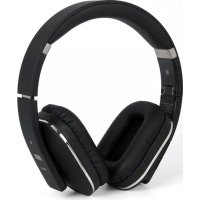
EP650C - Earphones August - Free user manual and instructions
Find the device manual for free EP650C August in PDF.


| Product Type | Wireless Bluetooth Headset |
| Brand | August |
| Model | EP650C |
| Dimensions | 176.6 x 188.6 x 71 mm |
| Weight | 235 g |
| Power Supply | Rechargeable Li-polymer battery 3.7V 220 mAh |
| Battery Life (playback) | Up to 10 hours |
| Charging Time | Approximately 2 hours |
| Standby Time | Up to 30 days |
| Bluetooth Connectivity | Bluetooth v4.1 with aptX, Class II, range up to 10 m |
| NFC | Yes (touch connection) |
| Multipoint Technology | Yes (connects up to 2 devices simultaneously) |
| Built-in Microphone | Yes (hands-free function) |
| Frequency Response | 60 Hz – 20 kHz |
| Output Power | 30 mW |
| Signal-to-Noise Ratio | ≥ 85 dB |
| Distortion | ≤ 1.0 % |
| Auxiliary Audio Input | 3.5 mm jack |
| USB Input | Yes (charging and audio) |
| Included Accessories | USB cable, 3.5 mm audio cable, case, user manual |
| Care and Cleaning | Clean with a soft, dry cloth; disconnect all cables before cleaning; do not use abrasive products, alcohol, benzene |
| Safety | Keep away from extreme temperatures, water, humidity, dust, oil, smoke; do not disassemble; avoid shocks |
| Spare Parts and Repairability | Not user-repairable; contact customer service |
| Warranty | 24 months from date of purchase |
| Customer Service | Tel: +44 (0) 845 250 0586, email: service-fr@augustint.com |
| Recycling | Compliant with WEEE directive; inquire with local authorities |
Frequently Asked Questions - EP650C August
User questions about EP650C August
0 question about this device. Answer the ones you know or ask your own.
Ask a new question about this device
Download the instructions for your Earphones in PDF format for free! Find your manual EP650C - August and take your electronic device back in hand. On this page are published all the documents necessary for the use of your device. EP650C by August.
USER MANUAL EP650C August
natural_image
Black and white photo of a modern multi-band headphones (no visible text or logos)August International Ltd
United Kingdom
Tel: +44 (0)845 250 0586
www.augustint.com

EN Bluetooth® Wireless Stereo Headphones
FR Casque Stéréo Sans-fil Bluetooth®
DE Kabellose Bluetooth® Stereo Kopfhörer
IT Cuffie Stereo Senza Fili Bluetooth®
ES Auriculares de Diadema Abiertos Bluetooth®
User Manual
Thank you for purchasing the August EP650C Bluetooth Wireless Stereo Headphones. This user manual is designed to familiarize you with all the features of this device. Please take the time to read this user manual carefully, even if you are already familiar with a similar product.
Safety
To ensure the safety of you and others, please read the Safety Instructions before using this device. Please do not disassemble the EP650C, it can be unsafe and will invalidate the manufacturer's warranty.
Disposal
Please ensure the product and accessories are disposed of in compliance with the WEEE (Waste Electrical and Electronic Equipment) Directive and any other regulations applicable to your country. Always check with the environment agency and any other relevant authorities for current disposal regulations.
Customer Service
You can contact us by phone on: +44 (0)845 250 0586 or by email at: service@augustint.com should you require further technical support or customer service.
1. Safety Instructions
■ Storage and Use
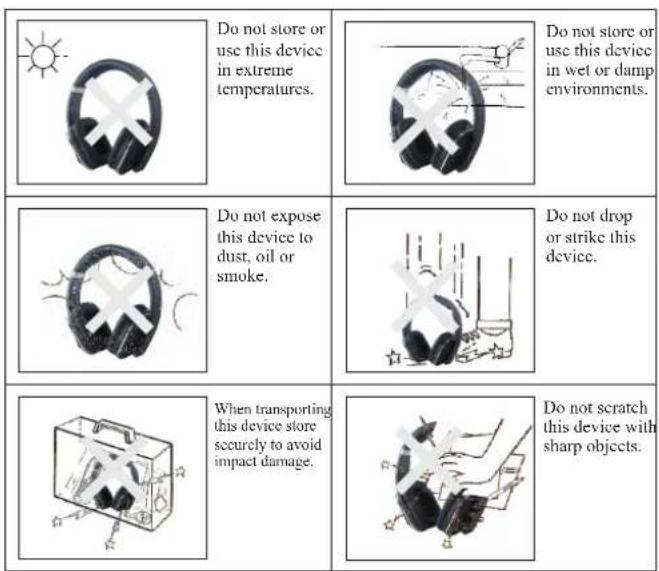
Do not store or use this device in extreme temperatures.
Do not store or use this device in wet or damp environments.
Do not expose this device to dust, oil or smoke.
Do not drop or strike this device.
When transporting this device store securely to avoid impact damage.
Do not scratch this device with sharp objects.
■ Maintenance
Please unplug all leads before cleaning this device.
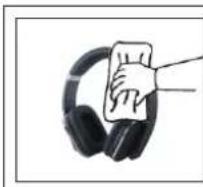
Wipe the device and buttons with a soft cloth.
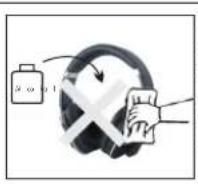
Never wipe this device with an abrasive cloth or apply detergent, alcohol or chemical based cleaning products.
2. Main Features
■ Wireless Headphones for Bluetooth Devices
■ Integrated Microphone for Hands-Free Calls
■ Multi-Point Technology to Connect to Two Devices
■ Bluetooth v4.1 and aptX for Enhanced Sound Quality
■ NFC Ready – Tap To connect
■ USB and Standard 3.5mm Audio-in Socket
■ Built-In Rechargeable Battery for over 10h Playback
3. Accessories
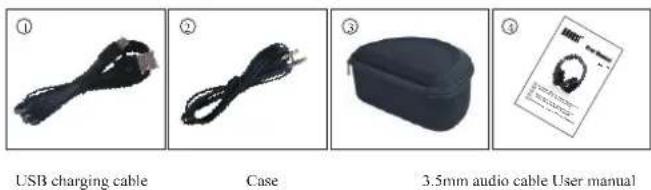
4. Part Names and Functions
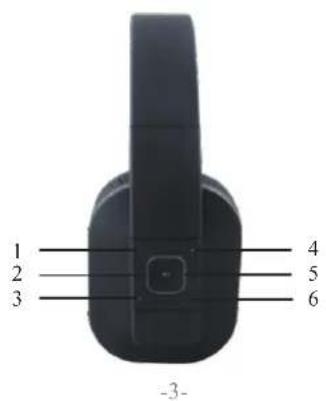
text_image
1 2 3 4 5 6 -3-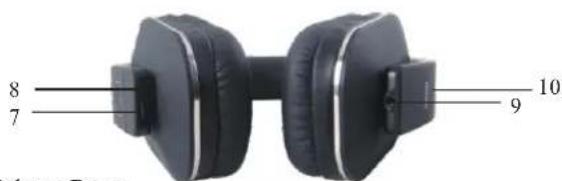
text_image
8 7 10 9- Volume Down
- Power / Play / Pause / Answer
- Previous Track
- Volume Up
- Status LED
- Next Track
- Power Socket
- Microphone
- Audio-In Socket
- NFC
5. Operations
5.1 Switch On / Off
To switch on the device, press and hold the ▶|| button for 2 seconds until there is a warning beep. The status LED flashes red after switching on.
To switch off the device, press and hold the ▶ button for 3 seconds to switch off the device until there is a warning beep. The status LED will fade up then fade down.
5.2 Bluetooth Connections
Turn the device on then press and hold the "and" "buttons for 3 seconds to enter pairing mode. In pairing mode, the LED flashes red and blue.
Note: If a passcode is required for pairing, use "0000".
- For mobile phones
- Scan for available Bluetooth devices on your mobile phone (see your mobile phone user manual for instructions if needed)
-
Select "EP650C" from the available devices and confirm connection.
-
The status LED flashes blue to indicate a successful connection.
Note: Accessing Bluetooth settings on mobile phones varies for each phone, to find the information for your phone, please refer to its user manual.
- Multipoint
Multipoint allows you to connect your EP650C headphones to two source devices at the same time. To create a multipoint connection:
- Hold the “+” and “—” buttons to put the EP650C into pairing mode
- Press “▶” to start multi-point pairing
- Pair your headphones to your first source device
- Switch your headphones off
- Press and hold “▶” until your headphones reenter pairing mode.
- Pair your headphones to your second source device
- Use the Bluetooth menu on your first source device to reconnect to your headphones
To switch between source devices, pause the music on the currently connected device then play music on the second device. Switching devices can take up to 10 seconds.
Note: When receiving a call on either source device, the music will automatically pause and resume once the call is finished.
- For computers
- Enable the Bluetooth function on your computer.
- Select "Devices and Printers" from the Control Panel and click "Add a Device".
- Select "EP650C" from the available devices, the system will install the driver automatically.
Note: For Windows XP and Vista, a third-party Bluetooth driver is needed (not included).
- The status LED flashes blue to indicate a successful connection.
- If the EP650C is not automatically set as your output device, select "Sound" from the control panel then highlight the EP650C and select "Set Default".
Note: When switched on, the EP650C will automatically reconnect to the last paired Bluetooth device if it is in range.
- NFC
- Enable Bluetooth and NFC functions on your source device.
- Switch on the EP650C and enter pairing mode.
- Touch the NFC area of your source device against the NFC area on the left side of the EP650C. They will autocratically pair with each other.
- Confirm Bluetooth pairing if prompted. "EP650C" will now be listed in your source device's Bluetooth device list.
- To disconnect your device, touch the NFC area of your device against the NFC area on the left side of the EP650C. Touch again to reconnect.
5.3 Remote Control
The EP650C is able to control the music playing on either a mobile phone or a computer with a Bluetooth connection.
Press “▶” to pause or resume playing music.
Press “ + ” or “ - ” to increase or decrease the volume.
Press "<" or "> " to select the previous or next track.
Note: Music playing control is only compatible with devices that support A2DP, please refer to your devices user manual for its A2DP compatibility.
5.4 Hands-free Calling
Whilst connected to your mobile phone, the EP650C will act as a hands-free system for calls.
Press ▶|| to pick up or hang up a call. Press and hold ▶|| for 2 seconds to reject the incoming call..
During a call, double press ▶ to transfer the call between the headphones and your mobile phone.
5.5 Audio-In
To use the EP650C as a pair of wired headphones, use a 3.5mm audio cable to connect the EP650C to your source device. Once the audio cable is connected to the EP650C, the device automatically switches to wired mode.
5.6 Wired Use USB Cable
To use the EP650C as an audio out device for your computer, ensure the EP650C is turned off, then connect it via the included USB cable. The driver will install automatically.
To set the EP650C as the current audio out device, select "sound" from the control panel, then highlight "Headphones" and click "Set Default".
Whilst connected to a computer as an audio out device, the EP650C battery will continue to charge.
6. Charging
When the power is low, the status LED flashes red.
To charge the EP650C, connect the micro USB lead to the device's power socket, and the other end of the USB cable to a powered USB port. The status LED constantly lights red whilst charging and lights blue once the battery is fully charged.
Note:
1) You must select a qualified charger from a regular manufacturer.
2) Make sure that the headphone is fully charged for at least 6 hours for the first time.
3) The headphone must be charged before use if it hasn't been used for more than 1 year.
- Specification
| Bluetooth Specification | Bluetooth v4.1 and aptX |
| Operating Range | Up to 10m |
| Frequency Response | 60Hz – 20KHz |
| Speaker Output | 30mW |
| SNR | ≥slant 85dB |
| Distortion | ≤slant 1.0% |
| Battery | 3.7V/220mAh Built-in Li-Polyme Battery |
| Working Time | 10 hours |
| Charging Time | 2 Hours |
| Standby Time | 30 Days |
| Weight | 235g |
| Dimensions | 176.6 x 188.6 x 71mm |
- Troubleshooting
| Problem | Solution |
| Won't turn on. | Please charge the EP650C. |
| Can't find the EP650C. | Confirm the EP650C is in pairing status and within 10 meters from the device. |
| Can't install the driver for EP650C on a computer. | Update the driver of the Bluetooth module on your computer. |
| The sound quality is intermittent in Bluetooth mode. | Disable the Wi-Fi on your source device. |
| No sound. | Check the volume on both the source device and the EP650C. |
9.Warranty
This product is guaranteed for twenty-four months from the date of the original purchase. In the unlikely event of any defect arising due to faulty materials or workmanship, the unit will be either replaced or repaired free of charge (where possible) during this period. An alternative product will be offered in case the product is no longer available or repairable.
This warranty is subject to the following conditions:
■ The warranty is only valid within the country where the product is purchased.
■ The product must be correctly installed and operated in accordance to the instructions given in this user manual.
■ The product must be used solely for domestic purposes.
■ The warranty only covers the main unit, and does not cover the accessories.
■ The warranty does not cover the damage caused by misuse, negligence, accident and natural disaster.
The warranty will be rendered invalid if the product is resold or has been damaged by inexpert repairs. The manufactures disclaim any liability for incidental or consequential damages.
■ Please consult our customer adviser before returning any product; we are not responsible for any unexpected product returns.
■ Any faulty product must be kept and returned in the original packaging with all the accessories and the original copy of the purchase receipt.
The warranty is in addition to, and does not diminish, your statutory or legal rights.
Customer Service:
Telephone: +44 (0) 845 250 0586
Email: service@augustint.com
This product is in compliance with the essential requirements and other relevant provisions of Directive 2014/53/EC. The declaration of conformity may be consulted at August International Ltd, Unit 5 Swains Mill, Crane Mead, Ware SG12 9PY, England.

Industry Canada Statement
This device complies with Industry Canada license-exempt RSS standard(s). Operation is subject to the following two conditions: (1) this device may not cause interference, and (2) this device must accept interference, including interference that may cause undesired operation of the device.
Note: This equipment has been tested and found to comply with the limits for a Class B digital device, pursuant to part 15 of the FCC Rules. These limits are designed to provide reasonable protection against harmful interference in a residential installation. This equipment generates uses and can radiate radio frequency energy and, if not installed and used in accordance with the instructions, may cause harmful interference to radio communications. However, there is no guarantee that interference will not occur in a particular installation. If this equipment does cause harmful interference to radio or television reception, which can be determined by turning the equipment off and on, the user is encouraged to try to correct the interference by one or more of the following measures:
■ Reorient or relocate the receiving antenna.
■ Increase the separation between the equipment and receiver.
■ Connect the equipment into an outlet on a circuit different from that to which the receiver is connected.
■ Consult the dealer or an experienced radio/TV technician for help.
No Unauthorized Modifications: Do not make any changes or modifications to this product without the prior express written approval of August International Ltd. Any changes or modifications made without express written approval could void the user's authority to operate this product.

For details of further relevant technical standards, please contact us at the address above.
Mode d'Emploi
natural_image
Close-up of two black hardcover headsets with labeled connectors (no text or symbols on body)- NFC (Near field communication)
Please keep this card together with the serial number below in a safe place. You will need to refer to this card to validate the warranty.