GH160 - Rice cooker BUFFALO - Free user manual and instructions
Find the device manual for free GH160 BUFFALO in PDF.



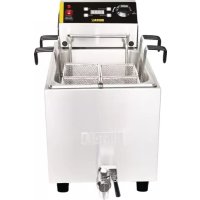
| Product type | Rice cooker |
| Brand | Buffalo |
| Model | GH160 |
| Dimensions (H x W x D) | 283 x 530 x 471 mm |
| Weight | 4.2 kg |
| Supply voltage | 230 V ~ 50 Hz |
| Power | 2.9 kW |
| Rated current | 13 A |
| Number of baskets included | 4 |
| Main functions | Boiling, keep warm, timer with 6 preset programs |
| Timer range | 1 second to 15 minutes |
| Audible alarm | Yes, 10 beeps then flashing until reset |
| Control type | Rotary thermostat and digital timer with START/STOP, UP, DOWN, PROGRAM buttons |
| Indicator lights | Orange (heating), Red (temperature reached) |
| Tank material | Stainless steel (estimated) |
| Non-slip feet | Yes, rubber |
| Drain tap | Yes |
| Maintenance and cleaning | Daily cleaning after cooling; do not immerse control box; clean with a damp cloth |
| Safety | Not for outdoor use; do not immerse enclosure; stable work surface; mandatory earthing |
| Spare parts and repairability | Contact a qualified technician or Buffalo service for repairs; use genuine parts |
| Compliance | LVD 2006/95/EC, EMC 2004/108/EC, RoHS 2011/65/EU |
| Intended use | Cooking pasta, rice and other foods in boiling water |
| Warranty | Not specified in the manual |
| WEEE code | Present, do not dispose of with household waste |
Frequently Asked Questions - GH160 BUFFALO
User questions about GH160 BUFFALO
0 question about this device. Answer the ones you know or ask your own.
Ask a new question about this device
Download the instructions for your Rice cooker in PDF format for free! Find your manual GH160 - BUFFALO and take your electronic device back in hand. On this page are published all the documents necessary for the use of your device. GH160 by BUFFALO.
USER MANUAL GH160 BUFFALO
natural_image
Exterior view of a white multiflorine gas washing machine (no visible text or symbols on the device body)Model . Modèle . Modell . Modello . Modelo . Malli GH160
Safety Tips
- Position on a flat, stable surface.
- A service agent/qualified technician should carry out installation and any repairs if required. Do not remove any components on this product.
- Consult Local and National Standards to comply with the following:
o Health and Safety at Work Legislation
- BS EN Codes of Practice
- Fire Precautions
○ IEE Wiring Regulations
○ Building Regulations
- DO NOT immerse the electrical control box assembly in water, or use jet/pressure washers to clean the appliance
- Do not use the appliance for anything other than its intended use.
- Always switch off and disconnect the power supply to the appliance when not in use.
- Not suitable for outdoor use.
- Keep all packaging away from children. Dispose of the packaging in accordance to the regulations of local authorities.
- If the power cord is damaged, it must be replaced by a BUFFALO agent or a recommended qualified technician in order to avoid a hazard.
- This appliance is not intended for use by persons (including children) with reduced physical, sensory or mental capabilities, or lack of experience and knowledge, unless they have been given supervision or instruction concerning the use of the appliance by a person responsible for their safety.
- Ensure water levels are maintained above the minimum indicated level in the Pasta Cooker. Failing to maintain the required level may result in element failure.
- The manufacturers of Buffalo products take every care to ensure that all products are safe. Steel cutting procedures used to manufacture these items results in sharp edges. These sharp edges are removed to the best of our ability; however we still insist the operator takes care when in contact with this piece of equipment.
- Switch off power to the Pasta Cooker, and remove the plug from the power socket whilst cleaning, draining water, or filling with water.
Introduction
Thank you for purchasing the Buffalo Electric Pasta Cooker. Before operating this product, you should read through the instructions in this manual. This will help you enjoy effective, trouble free results from using the product. Keep the instructions in a safe place for future reference.
Buffalo will not accept liability for product failures in the event that:
- The instructions in this manual have not been followed correctly.
- Un-qualified or un-authorized personnel have adjusted the Pasta Cooker.
• Non-original spare parts are used. - The Pasta Cooker has not been handled and cleaned correctly.
- The Pasta Cooker has been used for a purpose for which it was not intended.
Packaging
All Buffalo products are inspected and tested prior to packing.
This product consists of the following parts.
- Pasta Cooker
- Four Baskets
- Instruction Manual
If any of these parts are found to be missing or damaged after transit, you must contact your supplier immediately.
Installation
Remove the Pasta Cooker from the packaging, ensuring that all protective packaging, plastic and residues are thoroughly cleaned from its surfaces.
Appliances should always be placed on the table when in use.
Before locating and operating the Buffalo Pasta Cooker, it is the user's responsibility to ensure that all Health & Safety regulations concerning safe positioning, spacing, ventilation, electrical installation, and fire risk are complied with.
UK
Fitting the Element and Control Box to the Body
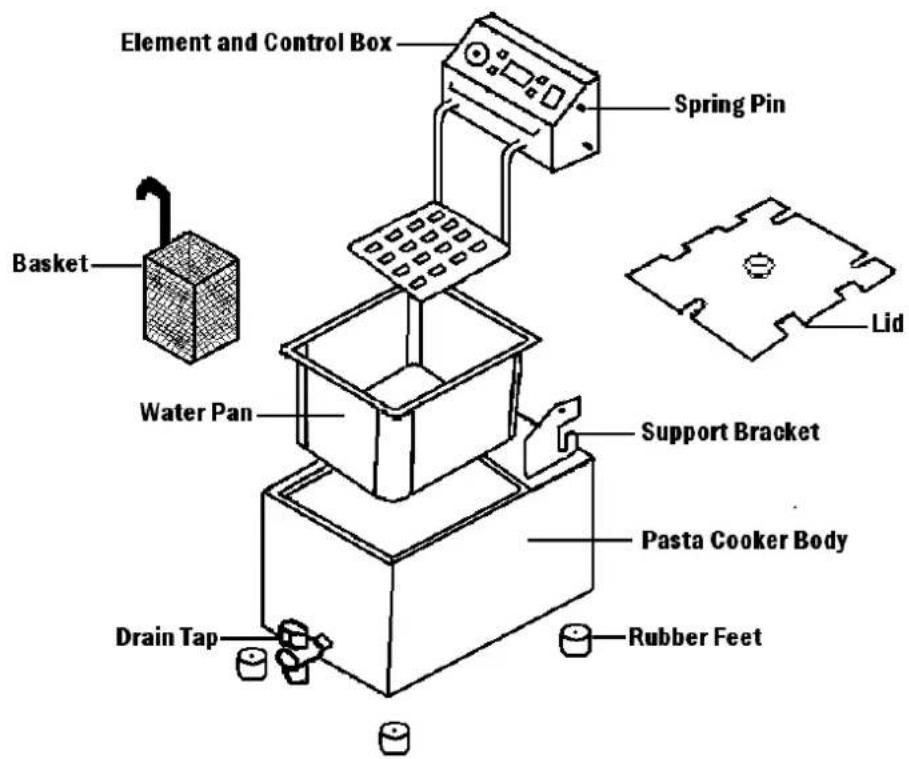
Place the Element/Control Box into the right and left support bracket at the rear of the Pasta Cooker body, then press the spring pin at the right of the box to position the Element/Control Box into the pan.
text_image
Element and Control Box Spring Pin Basket Water Pan Support Bracket Lid Pasta Cooker Body Drain Tap Rubber FeetThe Pasta Cooker can now be filled with water.
Connect the Pasta Cooker to the correct power supply and it is ready to operate.
Caution: Do not position and operate the Pasta Cooker near combustible or flammable, materials or objects.
Operation
- Turn the thermostat dial towards the "ON" position, the amber light will activate to confirm, adjust the dial to the required temperature setting.
- Allow time for the water temperature to reach the required setting. While the water is heating, the red light will be on, when the water has reached the required temperature; the red light will switch off.
- As the water temperature fluctuates, the thermostat will operate to maintain the set temperature, the indicator light will be lit when the Pasta Cooker is heating the water.
Using the Timer
The digital timer with audible alarm can be set from 1 second to 15 minutes
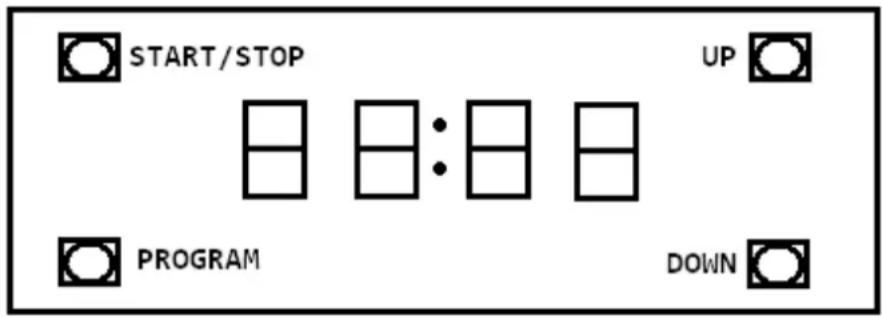
The timer provides an audible alarm, after the set time expires the unit will NOT switch off.
START/STOP. Press START/STOP to start timer, press again to stop. The timer will provide an audible alarm after the set time. The alarm will beep 10 times and the display will continue to flash until timer is reset (press START/STOP button)
UP: Press UP to add extra time
DOWN: Press DOWN to reduce time
PROGRAM There are a total of 6 programmable timer settings. The default factory program settings are given below
| Program | 1 | 2 | 3 | 4 | 5 | 6 |
| Factor Preset Time | 00:30 | 01:00 | 01:30 | 02:00 | 02:30 | 03:00 |
To change the length of a program select the program you want to change by scrolling using the PROGRAM button. Adjust the program time by using the UP and DOWN buttons. Press START/STOP to commence the countdown. The new program time will be automatically stored.
If the unit is left without power for more than 24hrs the timer settings will revert to the factory defaults
Cleaning, Care and Maintenance
The Pasta Cooker should be cleaned after each day's operation, however it may require cleaning more often, depending on the volume of use.
- Switch off the power and disconnect from the power supply, removing the plug from the socket.
- The Pasta Cooker must be left to cool before cleaning.
- Flush clean water through the drain tube after use
The control box cannot be immersed in water, but can be wiped down with a damp cloth.
Trouble Shooting
| Problem | Cause | Remedy |
| Water is not heating and indicator light is off. | Mains power supply | Check mains power supply |
| Element/ control unit not correctly located | Follow the steps on page 2 to correctly locate | |
| Plug and lead are damaged | Call service agent or qualified technician | |
| Internal wiring fault | Call service agent or qualified technician | |
| Water is heating & indicator light is on. | Thermostat or heating element has failed | Call service agent or qualified technician |
| Indicator light is not on but appliance is operating normally | Faulty pilot light | Call service agent or qualified technician |
| Water has reached the set temperature | Use Pasta Cooker normally |
If your Buffalo Pasta Cooker does not operate, please check the following before placing a service call.
- It is connected to the correct power supply.
- The machine is plugged in correctly and power is switched on.
- The thermostat dial has been set to the required temperature.
Technical Specification
| Model | Voltage | Power | Current | Dimensions h x w x d mm | Weight (kg) |
| GH160 | 230v 50hz | 2.9kw | 13A | 283 x 530 x 471 | 4.2kg |
Electrical Wiring
This appliance is supplied with a 3 pin, moulded, BS1363 plug and lead, with a 13 amp fuse as standard. The plug is to be connected to a suitable mains socket.
This appliance is wired as follows:
• Live wire (coloured brown) to terminal marked L
• Neutral wire (coloured blue) to terminal marked N
- Earth wire (coloured green/yellow) to terminal marked E
This appliance must be earthed, using a dedicated earthing circuit.
If in doubt consult a qualified electrician.
Electrical isolation points must be kept clear of any obstructions. In the event of any emergency disconnection being required they must be readily accessible.
Compliance
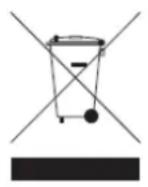
The WEEE logo on this product or its documentation indicates that the product must not be disposed of as household waste. To help prevent possible harm to human health and/or the environment, the product must be disposed of in an approved and environmentally safe recycling process. For further information on how to dispose of this product correctly, contact the product supplier, or the local authority responsible for waste disposal in your area.
BUFFALO parts have undergone strict product testing in order to comply with regulatory standards and specifications set by international, independent, and federal authorities.
BUFFALO products have been approved to carry the following symbol:

All rights reserved. No part of these instructions may be produced or transmitted in any form or by any means, electronic, mechanical, photocopying, recording or otherwise, without the prior written permission of BUFFALO.
Every effort is made to ensure all details are correct at the time of going to press, however, BUFFALO reserve the right to change specifications without notice
VEILIGHEIDSTIPS
text_image
Symbolic image showing a recycling bin with cross and minus signs, and the letters 'C' and 'E' below.Application of Council Directives(s)
Toepassing van Europese Richtlijn(en) • Application de la/des directive(s) du Conseil • Anwendbare
I, the undersigned, hereby declare that the equipment specified above conforms to the above Directive(s) and Standard(s).