LST02012S - Lawn mower Scotts - Free user manual and instructions
Find the device manual for free LST02012S Scotts in PDF.



| Product Type | Cordless String Trimmer (Edger) |
| Brand | Scotts |
| Model | LST02012S |
| Rated Voltage | 20 V |
| Battery Capacity | 2.0 Ah (Lithium-ion) |
| Rotational Speed | 8000 rpm |
| Cutting Width | 30 cm (12 in) |
| Weight | 2.27 kg (5 lb) |
| Cutting Line Diameter | 1.65 mm (0.065 in) |
| Line Feed Type | Automatic and Manual |
| Functions | Normal cutting and edging (5-position pivoting head) |
| Handle | Adjustable auxiliary handle, telescopic shaft |
| Compatible Battery Model | BL82120 |
| Included Charger Model | CHL82000 (120 V, 60 Hz) |
| Charging Time | Approximately 60 minutes (initial charge) |
| Warranty | 3 years on tool, 1 year on battery and charger |
| Noise Level | Wear hearing protection recommended |
| Safety | Lock button, protective guard, automatic shutoff |
| Maintenance | Clean with damp cloth and mild soap |
| Customer Service | 1-800-618-7474 (US) or scotts.americanlawnmower.com |
Frequently Asked Questions - LST02012S Scotts
User questions about LST02012S Scotts
0 question about this device. Answer the ones you know or ask your own.
Ask a new question about this device
Download the instructions for your Lawn mower in PDF format for free! Find your manual LST02012S - Scotts and take your electronic device back in hand. On this page are published all the documents necessary for the use of your device. LST02012S by Scotts.
USER MANUAL LST02012S Scotts
Copyright. All Rights Reserved.
Model LST02012S
BATTERY MUST BE CHARGED BEFORE FIRST USE. TWO TO THREE INITIAL CHARGING/DISCHARGING CYCLES MAY BE REQUIRED TO ACHIEVE MAXIMUM RUN TIME/ CAPACITY.
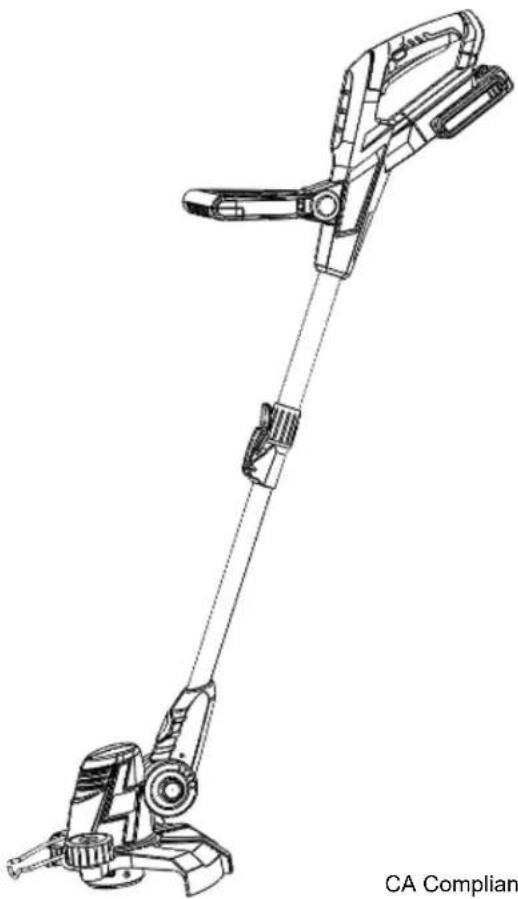
natural_image
Technical line drawing of a mechanical device with articulated arms and handle (no text or symbols)

CA Compliant Charger Included (Model No. CHL82000)
Your string trimmer has been engineered and manufactured to our high standard for dependability, ease of operation, and operator safety. Properly cared for, it will give you years of rugged, trouble-free performance.

WARNING: To reduce the risk of injury, the user must read and understand the owner's manual before using this product.
Thank you for your purchase.
DO NOT RETURN THIS PRODUCT TO THE STORE. OPERATING, ASSEMBLY, PART, SERVICE QUESTIONS? GO TO SCOTTS.AMERICANLAWNMOWER.COM OR CALL 1-800-618-7474 BETWEEN 8:00AM-5:00PM EST FOR ASSISTANCE.
IMPORTANT SAFETY WARNINGS
TO REDUCE RISK OF INJURY:
Before any use, be sure everyone using this tool reads and understands all safety instructions and other information contained in this manual.
CAUTION: Wear appropriate personal hearing protection during use. Under some conditions and duration of use, noise from this product may contribute to hearing loss.
KEEP CHILDREN AWAY - All visitors, children and pets should stay at a safe distance from the work area.
DRESS PROPERLY – Don't wear loose clothing or jewelry.
Wear protective hair covering to contain long hair. They can be caught in moving parts. Use of rubber gloves and substantial footwear is recommended when working outdoors. Always wear long pants while operating this string trimmer.
USE SAFETY GLASSES -Wear safety glasses with side shields or goggles that are marked to comply with ANSI Z87.1 standard when operating this product. Use face or dust mask if operation is dusty.
USE RIGHT APPLIANCE – Do not use appliance for any job except that for which it is intended.
REMOVE THE BATTERY FROM THE STRING TRIMMER when not in use or when servicing or cleaning. Do not leave unattended.
CHECK DAMAGED PARTS – Before further use of the string trimmer, a guard or other part that is damaged should be carefully checked to determine that it will operate properly and perform its intended function. Check for alignment of moving parts, binding of moving parts, breakage of parts, mounting and any other condition that may affect its operation. A guard or other part that is damaged should be properly repaired or replaced. Call our customer service help line at 1-800-618-7474 for assistance.
LIGHTING - Only operate trimmer in daylight or good artificial light. DON'T OVERREACH – Keep proper footing and balance at all times.
⚠ WARNING: Do Not use the string trimmer with any type of accessory or attachment. Such usage might be hazardous.
AVOID DANGEROUS ENVIRONMENTS – Don't use trimmer in rain, damp or wet locations. Do not operate trimmer in gaseous or explosive atmospheres. Motors in these tools normally spark, and the sparks might ignite fumes.
AVOID UNINTENTIONAL STARTING – Be sure switch trigger is in the locked or off position before inserting battery pack. Carrying tools with your finger on the switch trigger or inserting the battery pack into a tool with the switch on invites accidents.
DANGER: Risk of cut. Keep hands away from lines. Keep both hands on handles when power is on.
DANGER: Don't use tool if switch trigger does not turn it on or off. Call Customer Service for assistance.
⚠️ DANGER: Do not dispose of the batteries in a fire. The cell may explode. Check with local codes for possible special disposal instructions.
DANGER: Do not open or mutilate the batteries. Released electrolyte is corrosive and may cause damage to the eyes or skin. It may be toxic if swallowed.
WARNING: Keep guards in place and in working order.
WARNING: Keep hands and feet away from cutting area.
DO NOT ATTEMPT to remove cut material or hold material to be cut when lines are moving. Make sure trimmer switch is off when clearing jammed material from guard. Do not grasp the guard or lines when picking up or holding the trimmer.
⚠️ CAUTION: Lines coast after turned off.
DON'T FORCE STRING TRIMMER – It will do the job better and with less likelihood of a risk of injury at the rate for which it was designed.
STAY ALERT – Watch what you are doing. Use common sense. Do not operate string trimmer when you are tired or under the influence of medications, drugs or alcohol.
STORE IDLE STRING TRIMMER INDOORS – When not in use, your string trimmer should be stored indoors in a dry and high or locked-up place, out of reach of children.
WARNING: Do not operate the equipment while barefoot or when wearing sandals or similar lightweight footwear. Wear protective
Save these instructions and review frequently prior to use and in instructing others.
WARNING: When using electric gardening appliances, basic safety precautions should always be followed to reduce risk of fire, electric shock, and personal injury, including the following:
READ ALL INSTRUCTIONS
footwear that will protect your feet and improve your footing on slippery surfaces.
WARNING: Use only identical manufacturer's recommended replacement parts. Use of any other parts may create a hazard or cause product damage.
WARNING: Use only the manufacturer's recommended replacement string in the cutting head when using a string trimmer attachment. Do not use any other cutting attachment, for example, metal wire, rope, or the like. To install any other brand of cutting head to the string trimmer attachment can result in serious personal injury.
MAINTAIN TRIMMER WITH CARE – Keep guard and handles clean for best performance and to reduce the risk of injury. Keep handles dry and free from oil and grease.
WARNING: California Proposition 65: This product contains chemicals known to the State of California to cause cancer, birth defects or other reproductive harm.
WARNING: Some dust created by this product could contain chemicals known to the State of California to cause cancer and birth defects or other reproductive harm. Some examples of these chemicals are:
-chemicals in fertilizers
-compounds in insecticides, herbicides and pesticides -arsenic and chromium from chemically treated lumber
Your risk from exposure to these chemicals varies, depending on how often you do this type of work. To reduce your exposure to these chemicals, wear approved safety equipment such as dust masks that are specially designed to filter out microscopic particles.
WARNING: Cancer and Reproductive Harm - www.P65Warnings.ca.gov.
CAUTION: Use only the following type and size battery(ies): BL82120.
CAUTION: Exercise care in handling batteries in order not to short the battery with conducting materials such as rings, bracelets, and keys. The battery or conductor may overheat and cause burns. When battery pack is not in use, keep it away from other metal objects, like paper clips, coins, keys, nails, screws or other small metal objects, that can make a connection from one terminal to another. Shorting the battery terminals together may cause burns or a fire.
CAUTION: Disconnect the battery pack from the appliance before making any adjustments, changing accessories, or storing appliance. Such preventive safety measures reduce the risk of starting the appliance accidentally.
CAUTION: Do not use a battery pack or appliance that is damaged or modified. Damaged or modified batteries may exhibit unpredictable behavior resulting in fire, explosion or risk of injury.
CAUTION: Do not expose a battery pack or appliance to fire or excessive temperature. Exposure to fire or temperature above 130^ C (265°F) may cause explosion.
CAUTION: Follow all charging instructions and do not charge the battery pack or appliance outside of the temperature range specified in the instructions. Charging improperly or at temperatures outside of the specified range may damage the battery and increase the risk of fire.
CAUTION: Have servicing performed by a qualified repair person using only identical replacement parts. This will ensure that the safety of the product is maintained.
⚠️ CAUTION: Do not modify or attempt to repair the appliance or the battery pack (as applicable) except as indicated in the instructions for use and care.
FEATURES
PRODUCT SPECIFICATIONS
LST02012S
Input 20 V / 2.0 Ah, DC only
Speed 8000 RPM
Cutting Width 12 in.
Weight 5 lb.
String Type 0.065" single line
Automatic Feed - Edging Function - Adjustable Cutting Head
text_image
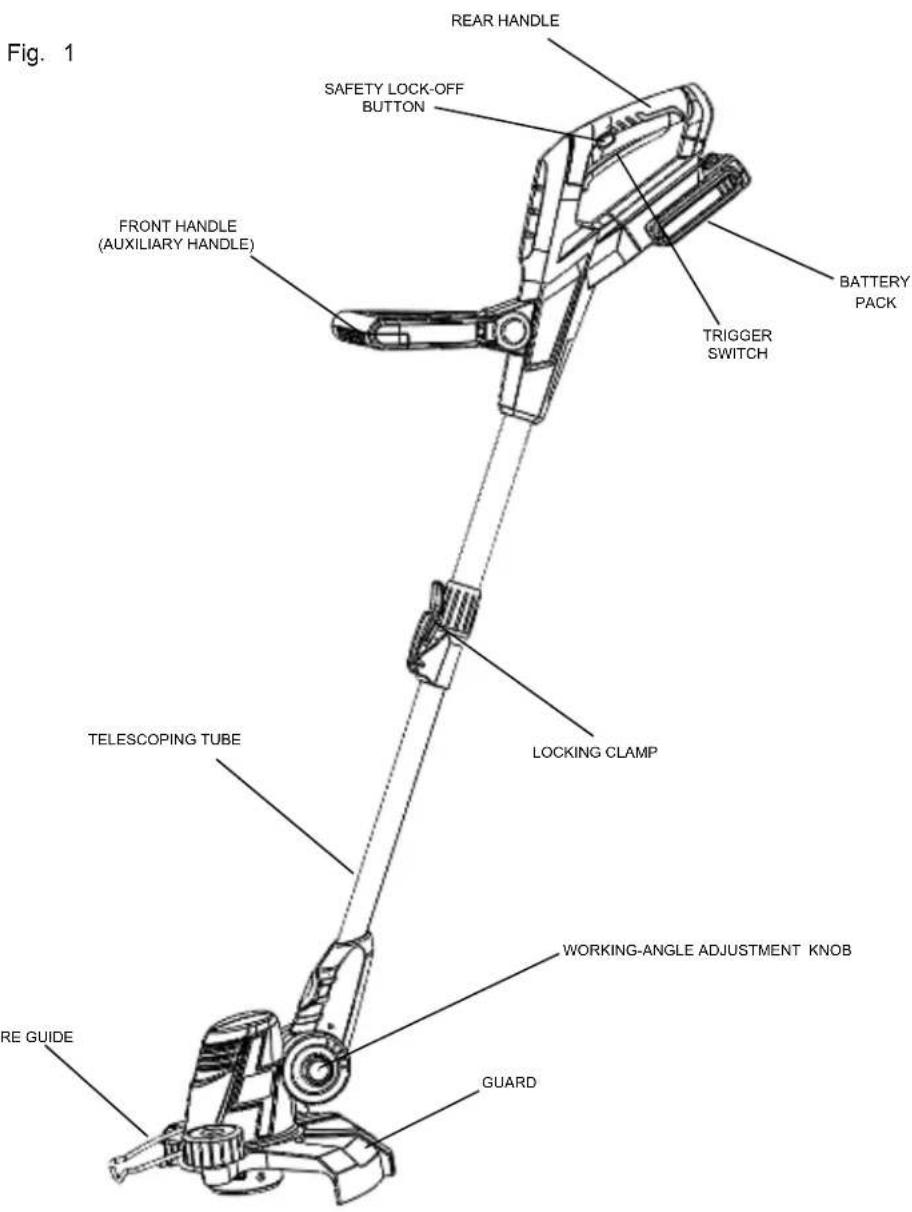
Fig. 1 REAR HANDLE SAFETY LOCK-OFF BUTTON FRONT HANDLE (AUXILIARY HANDLE) BATTERY PACK TRIGGER SWITCH TELESCOPING TUBE LOCKING CLAMP WORKING-ANGLE ADJUSTMENT KNOB RE GUIDE GUARDASSEMBLY
UNPACKING
This product requires some assembly.
PACKING LIST
- String Trimmer
- Safety Guard
- Front/Auxiliary Handle
- Charger and Battery Pack
- Owner's Manual
- Hardware Bag
⚠ WARNING: Do not install battery until assembly is complete. Failure to comply could result in accidental starting and possible serious personal injury.
WARNING: If any parts are damaged or missing do not operate this product until the parts are replaced. Failure to heed this warning could result in serious personal injury.
Carefully remove the product and any accessories from the box. Make sure that all items listed in the packing list are included. Inspect the product carefully to make sure no breakage or damage occurred during shipping.
Do not discard the packing material until you have carefully inspected and satisfactorily operated the product.
If any parts are damaged or missing, please call 1-800-618-7474 for assistance.
ATTACHING THE GUARD
WARNING: Do not operate the trimmer without the guard attached.
Always wear gloves when mounting or replacing the guard. Be careful of the blade on the guard and protect your hands from being injured by the blade.
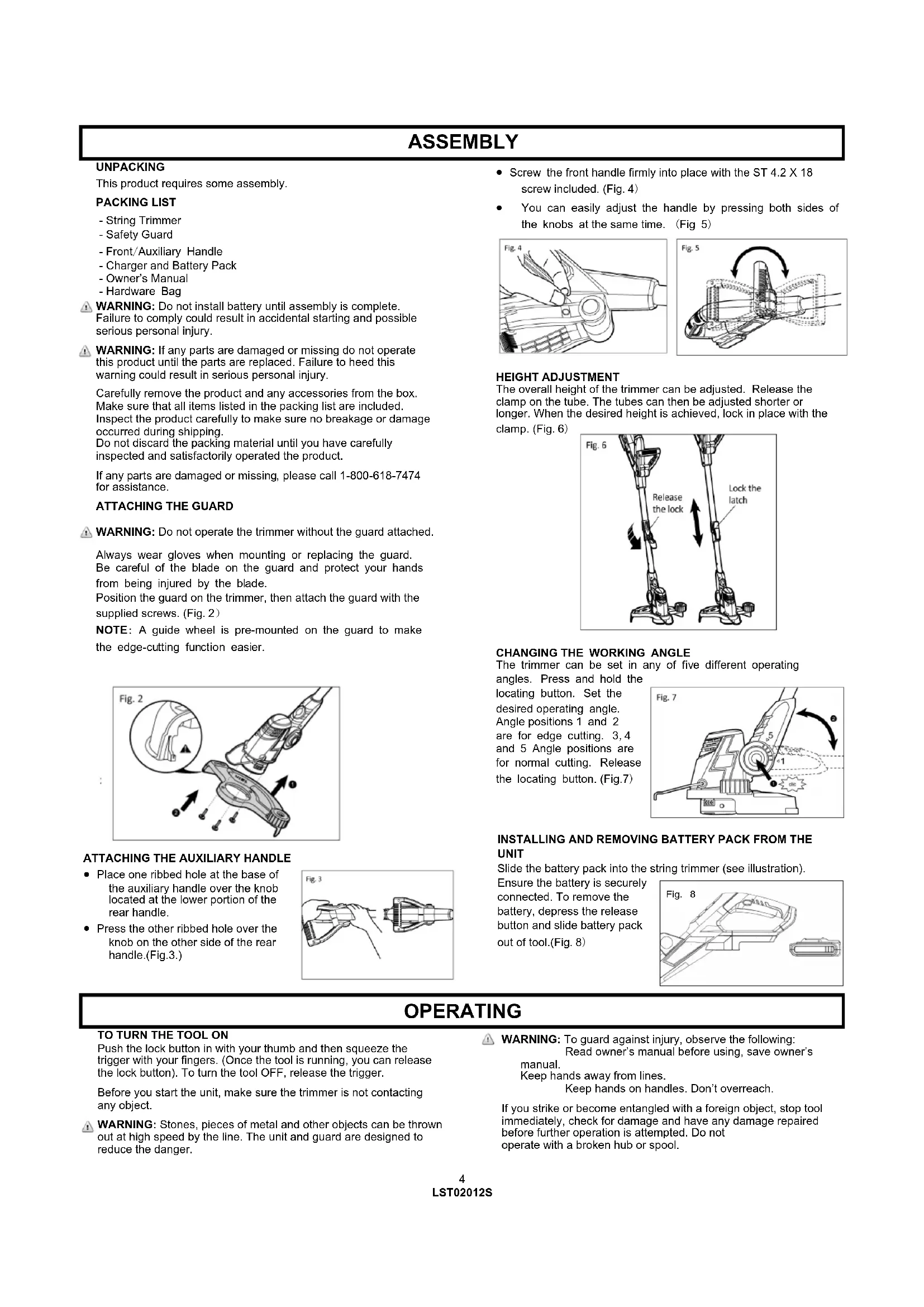
Position the guard on the trimmer, then attach the guard with the supplied screws. (Fig. 2)
NOTE: A guide wheel is pre-mounted on the guard to make the edge-cutting function easier.
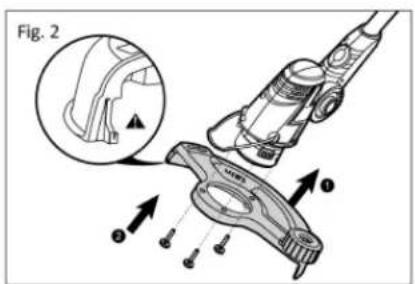
text_image
Fig. 2ATTACHING THE AUXILIARY HANDLE
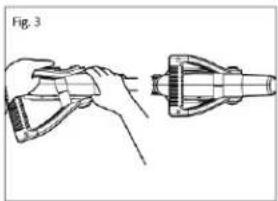
- Place one ribbed hole at the base of the auxiliary handle over the knob located at the lower portion of the rear handle.
- Press the other ribbed hole over the knob on the other side of the rear handle.(Fig.3.)
natural_image
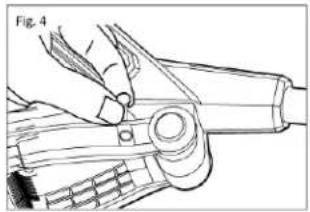
Technical line drawing of a hand holding a tool, with no visible text or symbols- Screw the front handle firmly into place with the ST 4.2 X 18 screw included. (Fig. 4)
- You can easily adjust the handle by pressing both sides of the knobs at the same time. (Fig 5)
natural_image
Technical line drawing of a hand using a tool to adjust or install a mechanical component (no text or symbols visible)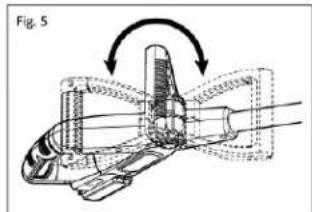
natural_image
Technical diagram of a mechanical component with directional arrows indicating motion or assembly (no text or symbols)HEIGHT ADJUSTMENT
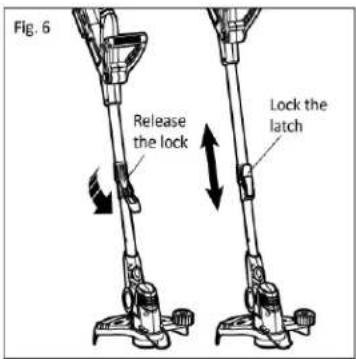
The overall height of the trimmer can be adjusted. Release the clamp on the tube. The tubes can then be adjusted shorter or longer. When the desired height is achieved, lock in place with the clamp. (Fig. 6)
text_image
Fig. 6 Release the lock Lock the latchCHANGING THE WORKING ANGLE
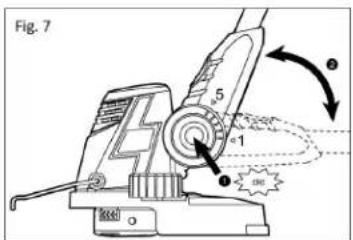
The trimmer can be set in any of five different operating angles. Press and hold the
locating button. Set the desired operating angle. Angle positions 1 and 2 are for edge cutting. 3, 4 and 5 Angle positions are for normal cutting. Release the locating button. (Fig.7)
text_image
Fig. 7 5 1 2 3INSTALLING AND REMOVING BATTERY PACK FROM THE UNIT
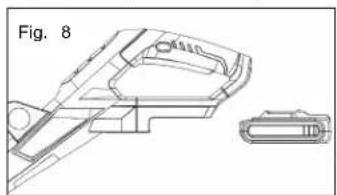
Slide the battery pack into the string trimmer (see illustration).
Ensure the battery is securely connected. To remove the battery, depress the release button and slide battery pack out of tool.(Fig. 8)
natural_image
Technical line drawing of a mechanical component with a separate view (no text or symbols)OPERATING
TO TURN THE TOOL ON
Push the lock button in with your thumb and then squeeze the trigger with your fingers. (Once the tool is running, you can release the lock button). To turn the tool OFF, release the trigger.
Before you start the unit, make sure the trimmer is not contacting any object.
⚠ WARNING: Stones, pieces of metal and other objects can be thrown out at high speed by the line. The unit and guard are designed to reduce the danger.
⚠ WARNING: To guard against injury, observe the following: Read owner's manual before using, save owner's manual.
Keep hands away from lines. Keep hands on handles. Don't overreach.
If you strike or become entangled with a foreign object, stop tool immediately, check for damage and have any damage repaired before further operation is attempted. Do not operate with a broken hub or spool.
OPERATING
CUTTING INSTRUCTIONS
CAUTION: Lines coasts after turn off. Do not use under wet conditions.
CAUTION: Inspect area to be trimmed and remove any wire, cord, or string-like objects which could become entangled in the rotating line or spool. Be particularly careful to avoid any wire which might be bent outwardly into the path of the tool, such as barbs at the base of a chain link fence.
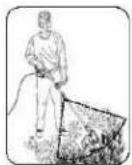
Proper Cutting Stance
Weight should be balanced with both feet on solid ground.
Basic Cutting Procedure
Slowly swing trimmer side-to-side as shown.
EDGING
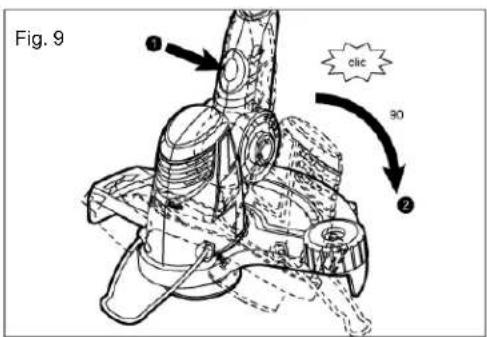
The edge cutting function enables precise and easy cutting along the lawn edge. Press the locating button on the angle adjustment knob and simultaneously turn the head of the trimmer 90 degree.
NOTE: To make working easier, in this position, the device can be guided along the ground on the guide wheel.
Return to trimming position by turning the tool off, push in the button and rotate the trimmer head clockwise until it stops. When using the tool in the trimmer mode you may choose to fold the wire edge guide up out of the way.
WARNING: Do not trim near electrical wires or buildings.
text_image
Fig. 9 ① ② clic 90WARNING: Do not allow familiarity with this type of product to make you careless. Remember that a careless fraction of a second is sufficient to inflict serious injury.
Do not operate a string trimmer in a tree, on a ladder, or on a scaffold; this is extremely dangerous.
Wear non-slip gloves for maximum grip and protection.
LINE FEEDING
Your trimmer uses .065" (1.65mm) diameter nylon line to cut grass and weeds quickly and easily. In time, the tip of the nylon line will become worn and the auto feed mechanism will automatically feed and trim a fresh length of line. The cutting line will wear faster if the cutting is done along sidewalks or other abrasive surfaces or heavier weeds are being cut. The line will extend approximately 14 in. with each stop and start of the switch trigger until the line reaches the length of the grass deflector blade. Do not bump unit on ground in attempt to feed line or for any other purpose.
Automatic feed
With each switching off and on, the line is adjusted out of the spool hub.
NOTE: Frequently switching on and off without reason results in increased line wear.
NOTE: If the cutting line becomes too short during operation due to wear, switch the device off and then back on again to extend the working length of the cutting line automatically.
Manual feed
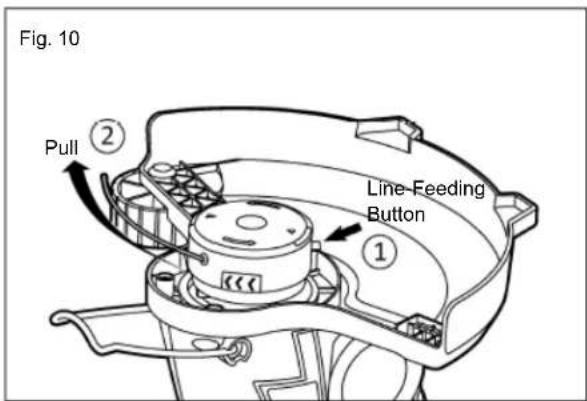
If your trimmer line hits sharp or abrasive objects, such as stones, metal pieces or concrete the trimmer line can be cut too short to continue trimming. In this case, you can manually extend the line (Fig 10):
- REMOVE THE BATTERY PACK.
- Press the line-feeding button with one hand while pulling the line out with the other.
- Press the button repeatedly to release line to the proper length. Each press of the button will release approximately 1/4 inch of line. (Note: Release only enough line to extend just beyond the blade. If too much line is released, the blade will be unable to cut it to the correct working length and it may become tangled on the rotating shaft.)
- Install the battery pack.
- Restart the trimmer and return to normal operation.
text_image
Fig. 10 Pull ② Line-Feeding Button ①OPERATING
REPLACING SPOOL / CLEARING JAMS AND TANGLED LINES
From time to time, especially when cutting thick or stocky weeds, the line feeding hub may become clogged with sap or other material and the line will become jammed as a result. To clear the jam, follow these steps.
- Turn off the trimmer and remove the battery.
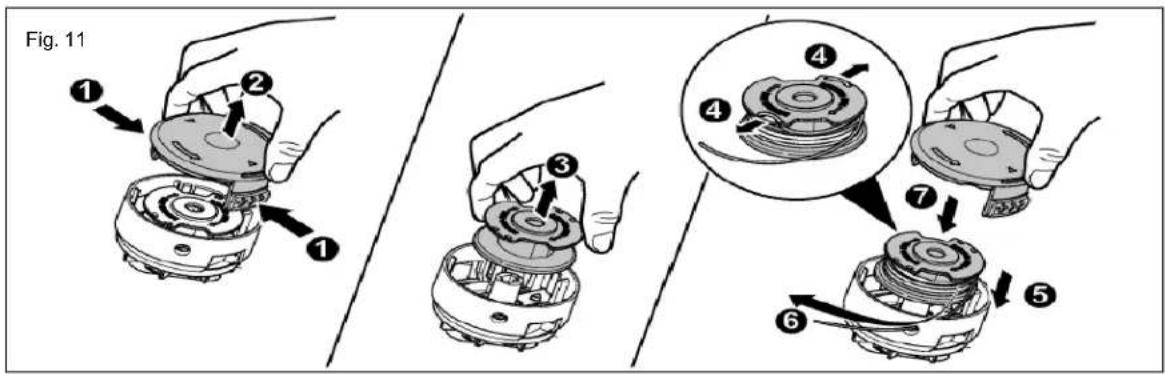
- Press the release tabs on the line spool retainer① and remove the cover② by pulling it straight off.
- Remove the line spool③. If necessary, remove any dirt.
- Extend the line jammed or tangled out of the spool fitting④.
- Insert the spool in the line receptacle ^5 .
- Thread the end of the line through the eyelet of the spool retainer⑥.
- Firmly press both tabs of the spool cover together at the same time, and push the cap onto the spool until it engages⑦.
REWINDING SPOOL FROM BULK LINE (USE ONLY .065" DIAMETER LINE)
Bulk line for your trimmer/edger is available at extra cost from your local dealer. To install bulk line, follow these steps:
- Turn off the trimmer and remove the battery.
- Press the release tabs on the line spool cover as shown in Fig. 11, and remove the cover by pulling it straight off. Remove the spool from the tool and remove and discard all line on the spool.
- Insert one end of the bulk line into the hole in the spool.
- Hold the line in the hole and pull the rest of the line through the slot in the spool.
- Snugly and evenly wind the bulk line onto the spool in the direction of the arrow until it is nearly full.
- Insert the line end through the eyelet in the spool hub. Pull the line through the hole to maintain tension while placing the spool down into the hub with the notched side exposed.
- Press the spool down GENTLY and rotate it until you feel it drop into place. (When in place, the spool will turn a few degrees left and right freely.)
- Snap the spool cover back on, insert the battery and turn the tool on. In a few seconds you'll hear the nylon line being cut automatically to the proper length.
text_image
Fig. 11 ① ② ③ ④ ⑤ ⑥ ⑦MAINTENANCE
CAUTION: Do not at any time let brake fluids, gasoline, petroleum based products, penetrating oils, etc., come in contact with plastic parts. They contain chemicals that can damage, weaken or destroy plastic.
Make sure the battery is detached from the unit, then use only mild soap and a damp cloth to clean the tool. Never let any liquid get inside the tool; never immerse any part of the tool into a liquid.
Fertilizers and other garden chemicals contain agents which greatly accelerate the corrosion of metals Do not store the tool on or adjacent to fertilizers or chemicals.
IMPORTANT: To assure product SAFETY and RELIABILITY, repairs, maintenance and adjustment should be performed by a qualified individual using only identical replacement parts.
If you drop the trimmer, carefully inspect it for damage. If the guard is bent or cracked, handles broken or if you see any other condition that may affect the trimmer's operation, it must be repaired before putting it back into use. Call our customer service help line at 1-800-618-7474 for assistance.
CHARGING THE BATTERY PACK
Charge the battery pack only with the charger provided.
Allow at least 60 minutes of charge time before initial use of the string trimmer.
Make sure the power supply is normal household voltage, 120volts, 60Hz, AC only.
The battery charger should be operated in temperatures between 39 and 104 degrees F.
The battery should be charged in a cool, dry place.
Two to three initial charging/discharging cycles may be required to achieve maximum run time/capacity.
Do not attempt to open the charger or the unit. There are no customer serviceable parts inside. Call the customer service help line at 1-800-618-7474 for assistance.
DO NOT incinerate battery packs even if they are severely damaged or completely worn out. They can explode in a fire causing injury.
Use the battery charger indoors only.
Disconnect charger from the power supply when not in use to prevent damage to the charger during a power surge.
When fully charged, the battery can be safety stored in temperatures down to -4^ F for a period of up to
four weeks, before requiring charging.
Fully charge battery pack every 90 days.
If over a period of time the battery pack quickly runs down after a full 60 minutes charging period, a replacement battery pack is needed.
To prevent permanent damage to the battery, never store in a fully discharged condition.
WINTER STORAGE—Fully recharge before storage and then again every 90 days.
Since the battery will not develop a memory, it does not have to be fully discharged before recharging.
A small leakage of liquid from the battery cells may occur under extreme usage, charging or temperature conditions.
This does not indicate a failure. However, if the outer seal is broken and this leakage gets on your skin.
a. Wash quickly with soap and water.
b. Neutralize with a mild acid such as lemon juice or vinegar.
c. If the battery liquid gets in your eyes, flush them with clean water for a minimum of 10 minutes and seek immediate medical attention.
TO CHARGE - SEE CHARGER MANUAL FOR COMPLETE INSTRUCTIONS
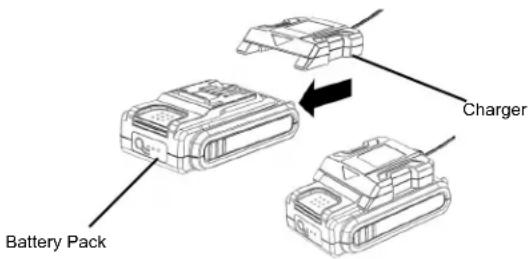
text_image
Battery Pack Charger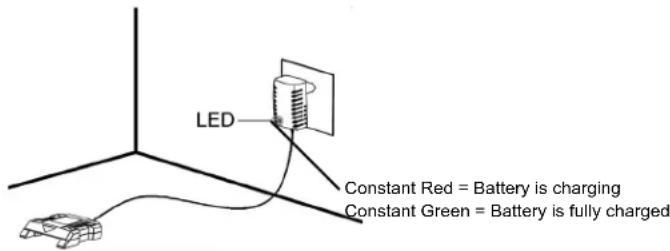
text_image
LED Constant Red = Battery is charging Constant Green = Battery is fully chargedTROUBLESHOOTING
| Problem Possible Couse Possible Solution | ||
| -Unit does not Run | -Battery not making contact | -Check battery is fully inserted |
| -Trigger switch not operational | -Check that lock off button is fully forward prior to moving trigger | |
| -Battery not installed properly | -Check battery installation | |
| -Battery not charged | -Check battery charging requirements | |
| -Line won't feed | -Line tangled in spool | -Unwrap 24" of line and re-wind |
| -Line fails to cut off | -Line cutter in guard is damaged or missing | -Replace guard |
| -Battery will not charge | -Battery not inserted into charger | -Insert battery into charger until red LED appears |
| -Charger not plugged in | -Plug charger into a working outlet | |
| -Check current at receptacle by plugging in a lamp or other appliance | ||
| -Check to see if receptacle is connected to a light switch which turns power off when you turn out the lights | ||
| -Surrounding air temperature too hot or too cold | -Move charger and tool to a surrounding air temperature of about 39 degree F (4 degree C) or below 104 degree F (40 degree C) | |
BATTERY DISPOSAL
Remove the battery pack from the string trimmer. Cover the terminals with heavy duty adhesive tape. Do not attempt to destroy or disassemble battery pack or remove any components. This product contains lithium-ion batteries which must be recycled or disposed of properly. Local, state or federal laws may prohibit disposal of these batteries in ordinary trash.

The RBRC seal on the li-ion battery pack indicates that the costs to recycle the battery pack at the end of its useful life has already been paid by The Great States Corporation American Lawn Mower Company. It is illegal to place spent li-ion batteries in the local municipal solid waste or in the trash. RBRC in cooperation with The Great States Corporation American Lawn Mower Company has provided an environmentally friendly and easy way to recycle spent li-ion batteries. Just contact your local recycling center or call 1-800-8BATTERY for information on where to drop off the spent battery.
PARTS AND SERVICE
For parts or service, please call 1-800-618-7474 or visit us online at SCOTTS.AMERICANLAWNMOWER.COM. Be sure to provide all relevant information when you call or visit.
REPAIR PARTS (KITS/ ITEMS)
The model/serial number of this tool is found on a plate or label attached to the housing. Please record the serial number in the space provided below.
MODEL NUMBER LST02012S
SERIAL NUMBER ____
Always mention the model number when ordering kits/items for this tool.
| No. | Kit/Item Number | Description | QTY |
| 1 | LST20-AHK-2 | Aux handle kit | 1 |
| 2 | LST20-PGK-2 | Protective Guard kit | 1 |
| 3 | RS90120 | Spool kit | 1 |
| 4 LST20-SRK-1 | Spool & Cover | 1 | |
| 5 | BL82120 | 20V battery | 1 |
| 6 | CHL82000 | 20V charger | 1 |
CALL US FIRST !!
Call us first with questions about operating or maintaining your string trimmer
at 1.800.618.7474 between 8:00 a.m. - 5:00 p.m. Eastern Standard Time,
or get assistance on scotts.americanlawnmower.com.
NOTES
OWNER'S MANUAL
CORDLESS STRING TRIMMER/20V LITHIUM-ION BATTERY PACK
Copyright. All Rights Reserved.
SCOTTS WARRANTY POLICY
- 3 Year limited warranty on all Scotts 20V lithium ion power tools from date of purchase when used for personal, household, or family use.
- 1 Year limited warranty on all Scotts 20V lithium ion batteries and chargers from date of purchase when used for personal, household, or family use.
The Great States Corp. (GSC) warrants to the original owner that this Scotts product and service part is free from defects in materials and workmanship and agrees to repair or replace any defective product or part for the warranty period as stated above.
- Warranty voided if used for commercial or industrial purposes or any other improper use as determined by GSC.
- Warranty does not include repairs necessary due to operator's abuse or negligence (including overloading the product beyond capacity or immersion in water), or the failure to assemble, operate, maintain or store the product according to the instructions in the owner's manual.
• This warranty does not cover
Wear items, including but not limited to - drive belts & gears, tines, cutting blades, mower blades, saw chains, mulching blades, blower fans, spool covers, trimmer line, blower and vacuum tubes, guide bars, high pressure hoses, wheels, handles, augers, worn bags, power cables, and other items subject to wear over time.
- Wear on batteries, including but not limited to – drops, wear and breakage on charger, exposure to extreme temperature swings (hot or cold), battery left on charger too long, battery left uncharged for too long, and misuse or abuse of the battery.
- This warranty does not cover damage caused by cold, heat, rain, excessive humidity or other environmental extremes.
- This warranty does not cover normal deterioration of the exterior finish or normal wear and tear on the products including, but not limited to scratches, cracks, dents, or damage caused by outside chemicals.
- This warranty is not transferable and only applies to new products sold directly from an authorized retailer. This warranty does not apply to any product, new or used, purchased through unauthorized third-party channels. For information on authorized dealers, contact our customer support hotline at 1-800-618-7474 (Mon-Fri 8am-5pm Est)
- Any incidental, indirect or consequential loss, damage, or expense that may result from any defect or malfunction of the products is not covered by the warranty.
- The warranty does not include installation, assembly or normal adjustments explained in the owner's manual. The expense of delivering the product to the vendor and the expense of returning the product or replacement parts to the owner is not covered by the warranty.
Additional Warranty Limitations
Some states do not allow the exclusion or limitation on how long an implied warranty lasts, so the above limitation may not apply to you. Products sold damaged or incomplete, sold —as is, or sold as reconditioned are not covered under the warranty.
Damage or liability caused by shipping, improper handling, improper assembly, incorrect voltage, improper wiring, improper maintenance, improper modification or the use of accessories and/or attachments not specifically recommended is not covered by this warranty.
Proof of purchase, original dated sales receipt, must accompany all warranty claims.
For claims go to scotts.americanlawnmower.com or call our customer support hotline from 8am-5pm EST, Mon-Fri at 1-800-618-7474

American Lawn Mower Company The Great States Corporation 7444 Shadeland Station Way Indianapolis, IN 46256 USA Phone 1-800-618-7474 scotts.americanlawnmower.com
MANUAL DEL OPERARIO
natural_image
Technical line drawing of a mechanical device with lever and handle (no text or symbols)

natural_image
Technical line drawing of a hand holding a tool, with no visible text or symbolsnatural_image
Line drawing of a hand using a tool to adjust or install a mechanical component (no text or symbols visible)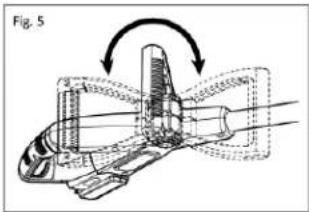
natural_image
Technical diagram of a mechanical assembly with directional arrows indicating motion (no text or symbols)AJUSTE DE LA ALTURA
text_image
Fig. 6 Release the lock Lock the latchnatural_image
Technical line drawing of a mechanical component with two views (no text or symbols)FUNCIONAMIENTO
text_image
Technical diagram illustrating the step-by-step assembly of a mechanical device, labeled with numbered components and an inset showing a close-up view.MANTENIMIENTO
American Lawn Mower Company The Great
States Corporation
7444 Shadeland Station Way,
Indianapolis, IN 46256
Estados Unidos
Phone 1-800-618-7474
scotts.americanlawnmower.com
MANUEL DE L'UTILISATEUR
TONDEUSE À FIL SANS CÂBLE 20V BATTERIE AU LITHIUM-ION
natural_image
Technical line drawing of a handheld device with labeled components and certification symbols (no readable text or labels)SPÉCIFICATIONS DU PRODUIT
LST02012S
natural_image
Technical line drawing of a hand holding a tool, shown in two views (no text or symbols)natural_image
Technical line drawing of a mechanical device with a hand operating the lever (no text or symbols)
natural_image
Technical illustration of a mechanical assembly with directional arrows indicating motion (no text or symbols)text_image
Fig. 6 Release the lock Lock the latchEN CHANGEANT
L'ANGLE DE TRAVAIL
natural_image
Technical line drawing of a mechanical component with no visible text or symbolsUTILISATION
MISE EN MARCHE DE L'OUTIL
American Lawn Mower Company The
Great States Corporation
7444 Shadeland Station Way