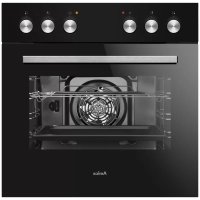
EH 923 630 SM - Oven AMICA - Free user manual and instructions
Find the device manual for free EH 923 630 SM AMICA in PDF.



| Product type | Built-in oven |
| Brand | Amica |
| Model | EH 923 630 SM |
| Dimensions (W x H x D) | 59.5 x 59.5 x 57.5 cm |
| Power supply | 230/400 V ~ 50 Hz, three-phase or single-phase |
| Rated power | 3.5 kW |
| Cooking functions | Convection, fan-assisted, grill, intensified grill, defrost, ECO, rapid heating |
| Oven lighting | Yes, 25 W bulb, E14 base or halogen G9 |
| Cleaning | Steam clean (Steam Clean), removable door, removable inner glass |
| Safety | Indicator lights, door hinge locking |
| Maintenance | Clean after each use, avoid abrasives on the glass |
| Supplied accessories | Grid, drip tray, side racks (depending on model) |
| Energy efficiency class | A+ (according to EN 60350-1) |
Frequently Asked Questions - EH 923 630 SM AMICA
User questions about EH 923 630 SM AMICA
0 question about this device. Answer the ones you know or ask your own.
Ask a new question about this device
Download the instructions for your Oven in PDF format for free! Find your manual EH 923 630 SM - AMICA and take your electronic device back in hand. On this page are published all the documents necessary for the use of your device. EH 923 630 SM by AMICA.
USER MANUAL EH 923 630 SM AMICA
natural_image
Line drawing of a standard oven with six control knobs (no text or symbols)3022C2.334eEDX / EH 923 630 E
3022C2.334eEX / EH 923 640 E
3022C2.20eX / EH 927 600 E
3022C1.20eX / EH 921 600 E
3022C2.334eEDSm / EH 923 630 SM
natural_image
Simple black-and-white line drawing of a cloud with two wavy lines at the base (no text or symbols)natural_image
Line drawing of a square frame with rounded corners and a central hole (no text or symbols)Backblech*
natural_image
Isometric line drawing of a rectangular metal grate or rack structure (no text or symbols)natural_image
Line drawing of a rectangular tray or container with a recessed slot (no text or symbols)Bratblech*
flowchart
graph TD
    A["Machine"] --> B["Internal Cable"]
    B --> C["Assembly Cable"]
    C --> D["Final Cable"]
Abb. B
natural_image
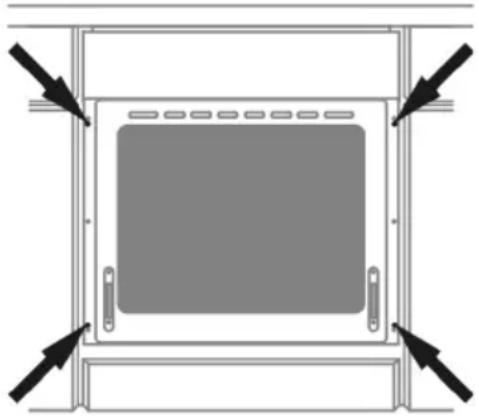
Top-down schematic of a cabinet or enclosure with directional arrows indicating movement or force (no text or symbols)Abb. C
Achtung!
Backofenfunktionen
natural_image
Technical line drawing of a rectangular electronic device casing with internal components and a small component at the bottom (no text or symbols)natural_image
Technical line drawing of a rectangular electronic device casing with internal components and an arrow pointing to a component (no text or symbols present)natural_image
Technical line drawing of a mechanical assembly with an inset showing a close-up of a component (no text or symbols present)natural_image
Technical line drawing of a rectangular electronic component with mounting brackets and a separate 3D panel below showing internal structure (no text or symbols)natural_image
Simple black-and-white line drawing of a tree with cloud-like canopy and two wavy lines at the base (no text or symbols)natural_image
Simple line drawing of a recycling symbol (three chasing arrows), no text or labels present.natural_image
Isometric line drawing of a square frame with rounded corners and a small circular hole at the top (no text or symbols)natural_image
Technical line drawing of a rectangular metal grate or rack structure (no text or symbols)(grille à gratiner)
natural_image
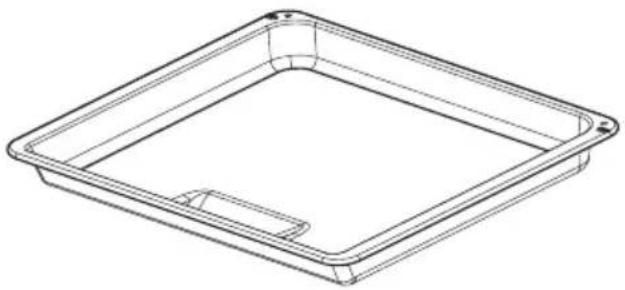
Line drawing of a rectangular tray or container with a recessed slot (no text or symbols)Plat à rôtissage*
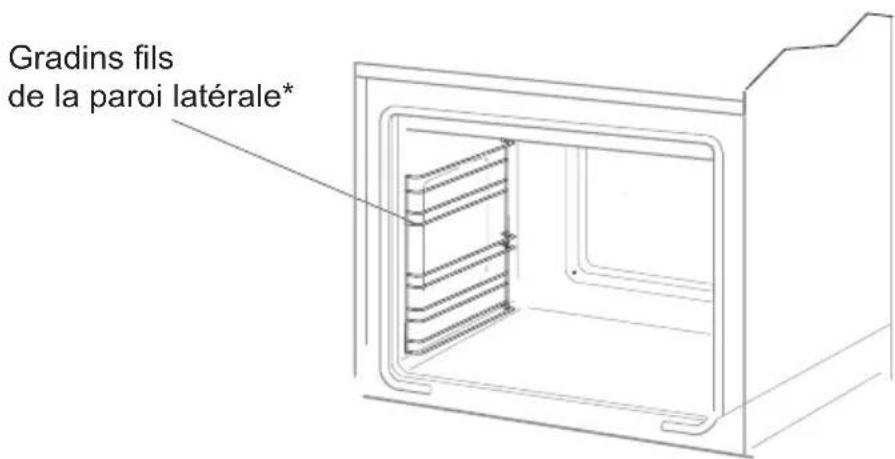
Schéma B
natural_image
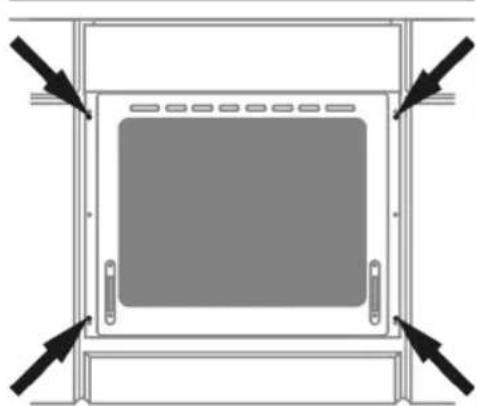
Diagram of a cabinet or enclosure with arrows pointing to the front panel (no text or symbols)Schéma C
Attention!
flowchart
graph TD
    A["Top circular component"] --> B["Arrow to outer ring"]
    B --> C["Circle with numbered positions: 0, 1, 2"]
    C --> D["Arrow back to inner circle"]
    D --> E["Circle with numbered positions: 0, 1, 2"]

Fonctions du four

natural_image
Technical line drawing of a rectangular electronic device casing with internal components and a small connector (no text or symbols)Lampe du four
natural_image
Technical line drawing of a rectangular electronic device casing with internal components and a small component on the right side (no text or symbols)Lampe du four
natural_image
Technical line drawing of a mechanical assembly with an inset showing a close-up of a component (no text or symbols present)natural_image
Technical line drawing of a rectangular electronic component with mounting holes and a separate panel below showing internal structure (no text or symbols)NETTOYAGE ET ENTRETIEN DE LA CUISINIÈRE
The cooker is exceptionally easy to use and extremely efficient. After reading the instruction manual, operating the cooker will be easy.
Before being packaged and leaving the manufacturer, the cooker was thoroughly checked with regard to safety and functionality.
Before using the appliance, please read the instruction manual carefully.
By following these instructions carefully you will be able to avoid any problems in using the appliance.
It is important to keep the instruction manual and store it in a safe place so that it can be consulted at any time.
It is necessary to follow the instructions in the manual carefully in order to avoid possible accidents.
Caution!
Do not use the cooker until you have read this instruction manual.
The cooker is intended for household use only.
The manufacturer reserves the right to introduce changes which do not affect the operation of the appliance.
This manual is prepared for appliances of different equipment. Therefore, functions may be described that do not necessarily apply to your product.
Warning: The appliance and its accessible parts become hot during use. Care should be taken to avoid touching heating elements. Children less than 8 years of age shall be kept away unless continuously supervised.
This appliance can be used by children aged from 8 years and above and persons with reduced physical, sensory or mental capabilities or lack of experience and knowledge if they have been given supervision or instruction concerning use of the appliance in a safe way and understand the hazards involved. Children shall not play with the appliance. Cleaning and user maintenance shall not be made by children without supervision.
During use the appliance becomes hot. Care should be taken to avoid touching heating elements inside the oven.
Accessible parts may become hot during use. Young children should be kept away.
Warning: Do not use harsh abrasive cleaners or sharp metal scrapers to clean the oven door glass since they can scratch the surface, which may result in shattering of the glass.
Warning: Ensure that the appliance is switched off before replacing the lamp to avoid the possibility of electric shock.
You should not use steam cleaning devices to clean the appliance.
Danger of burns! Hot steam may escape when you open the oven door. Be careful when you open the oven door during or after cooking. Do NOT lean over the door when you open it. Please note that depending on the temperature the steam can be invisible.
- Ensure that small items of household equipment, including connection leads, do not touch the hot oven as the insulation material of this equipment is usually not resistant to high temperatures.
- Do not leave the oven unattended when frying. Oils and fats may catch fire due to overheating or boiling over.
- Do not put pans weighing over 15 kg on the opened door of the oven.
- Do not use harsh cleaning agents or sharp metal objects to clean the door as they can scratch the surface, which could then result in the glass cracking.
- Do not use the oven in the event of a technical fault. Any faults must be fixed by an appropriately qualified and authorised person.
- In the event of any incident caused by a technical fault, disconnect the power and report the fault to the service centre to be repaired.
- The rules and provisions contained in this instruction manual should be strictly observed. Do not allow anybody who is not familiar with the contents of this instruction manual to operate the oven.
- The appliance has been designed only for cooking. Any other use (for example for heating) does not comply with its operating profile and may cause danger.

natural_image
Simple black-and-white line drawing of a tree with cloud-like canopy and two wavy lines at base (no text or symbols)Using energy in a responsible way not only saves money but also helps the environment. So let's save energy! And this is how you can do it:
- Do not uncover the pan too often (a watched pot never boils!).
Do not open the oven door unnecessarily often.
- Only use the oven when cooking larger dishes.
Meat of up to 1 kg can be prepared more economically in a pan on the cooker hob.
● Make use of residual heat from the oven.
If the cooking time is greater than 40 minutes switch off the oven 10 minutes before the end time.
● Make sure the oven door is properly closed.
Heat can leak through spillages on the door seals. Clean up any spillages immediately.
- Do not install the cooker in the direct vicinity of refrigerators/freezers.
Otherwise energy consumption increases unnecessarily.

natural_image
Simple line drawing of a recycling symbol (three chasing arrows), no text or labels present.During transportation, protective packaging was used to protect the appliance against any damage. After unpacking, please dispose of all elements of packaging in a way that will not cause damage to the environment.
All materials used for packaging the appliance are environmentally friendly; they are 100% recyclable and are marked with the appropriate symbol.
Caution! During unpacking, the packaging materials (polythene bags, polystyrene pieces, etc.) should be kept out of reach of children.
Old appliances should not simply be disposed of with normal household waste, but should be delivered to a collection and recycling centre for electric and electronic equipment. A symbol shown on the product, the instruction manual or the packaging shows that it is suitable for recycling.
Materials used inside the appliance are recyclable and are labelled with information concerning this. By recycling materials or other parts from used devices you are making a significant contribution to the protection of our environment.
Information on appropriate disposal centres for used devices can be provided by your local authority.
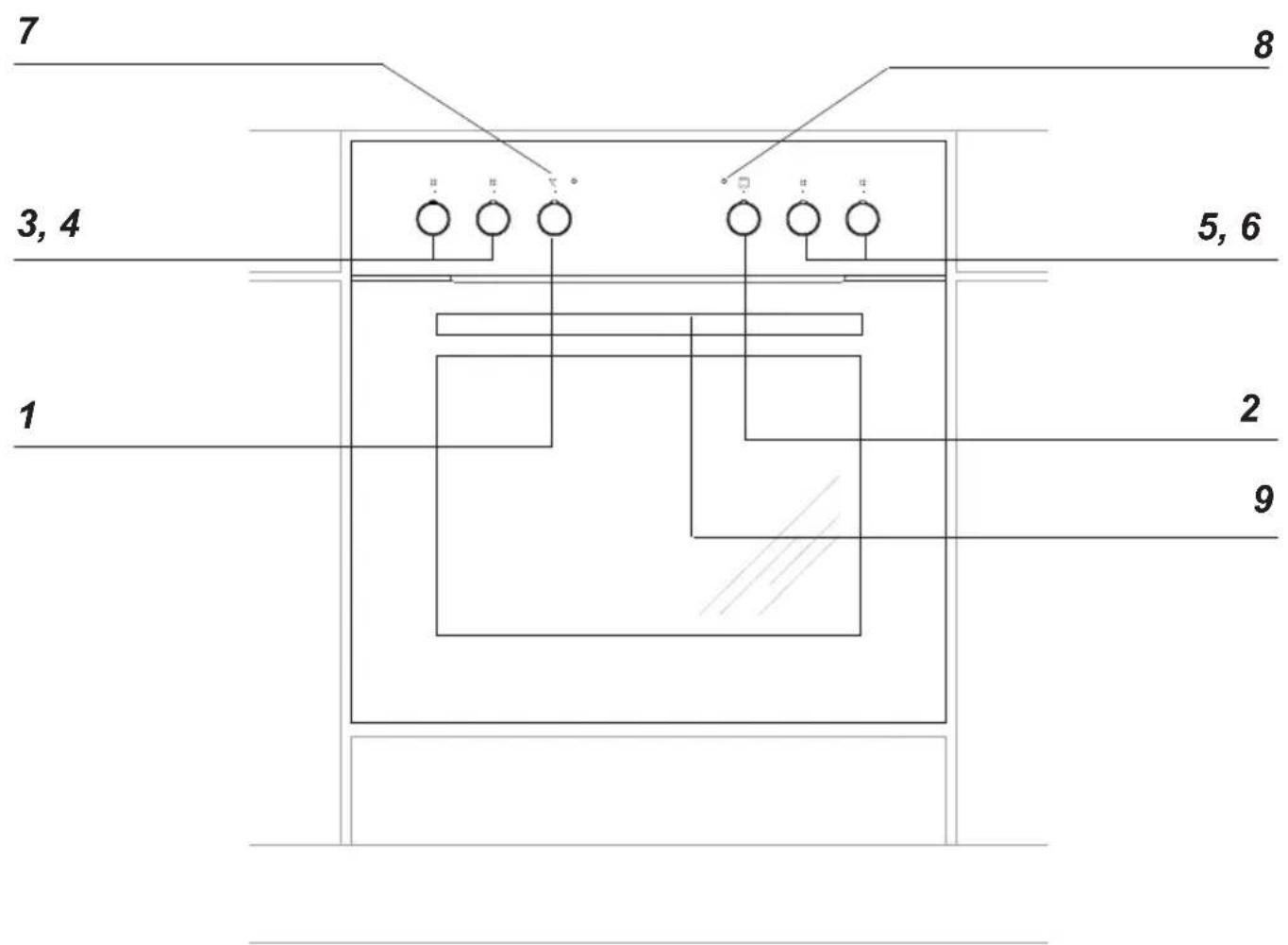
1 Temperature control knob
2 Oven function selection knob
3, 4, 5, 6 Heating zone control knobs
7 Temperatureregulatorsignal light red
8 Cooker operation signal light yellow
9 Oven door handle
Cooker fittings:
natural_image
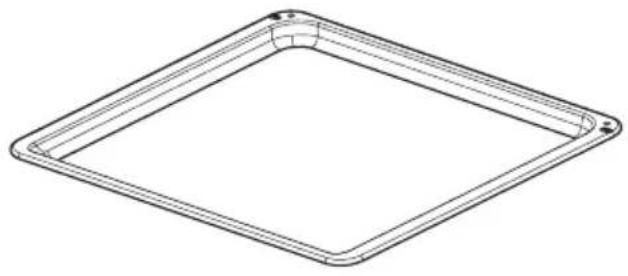
Isometric line drawing of a square frame with rounded corners and a central curved cutout (no text or symbols)Baking tray*
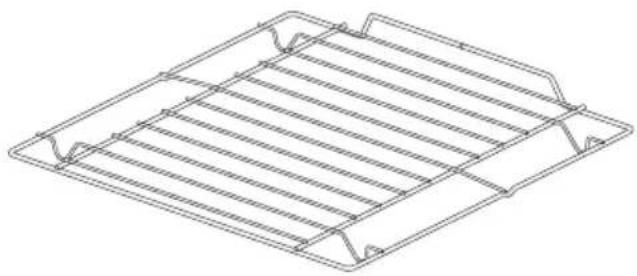
natural_image
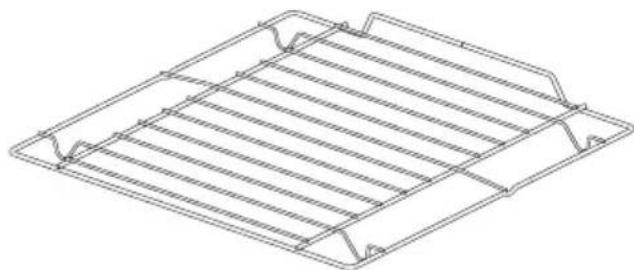
Technical line drawing of a rectangular metal grate or rack structure (no text or symbols)Grill grate (drying rack)
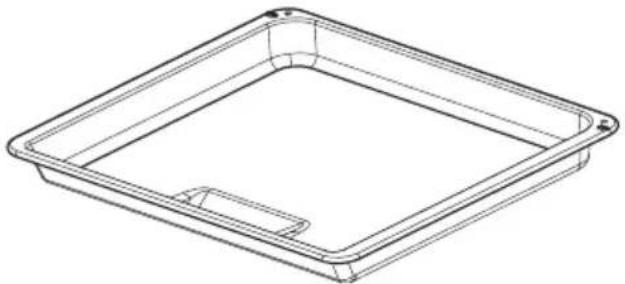
natural_image
Line drawing of a rectangular tray or container with a recessed slot (no text or symbols)Roasting tray*
*optional
Installing the oven
- The kitchen area should be dry and aired and equipped with efficient ventilation. When installing the oven, easy access to all control elements should be ensured.
- This is a Y-type design built-in oven, which means that its back wall and one side wall can be placed next to a high piece of furniture or a wall. Coating or veneer used on fitted furniture must be applied with a heat-resistant adhesive (100°C). This prevents surface deformation or detachment of the coating.
- Hoods should be installed according to the manufacturer's instructions.
Assembly of the oven:
● Make an opening with the dimensions given in the diagram for the oven to be fitted.(Fig.A)
● Make sure the mains plug is disconnected and then connect the oven to the mains supply.
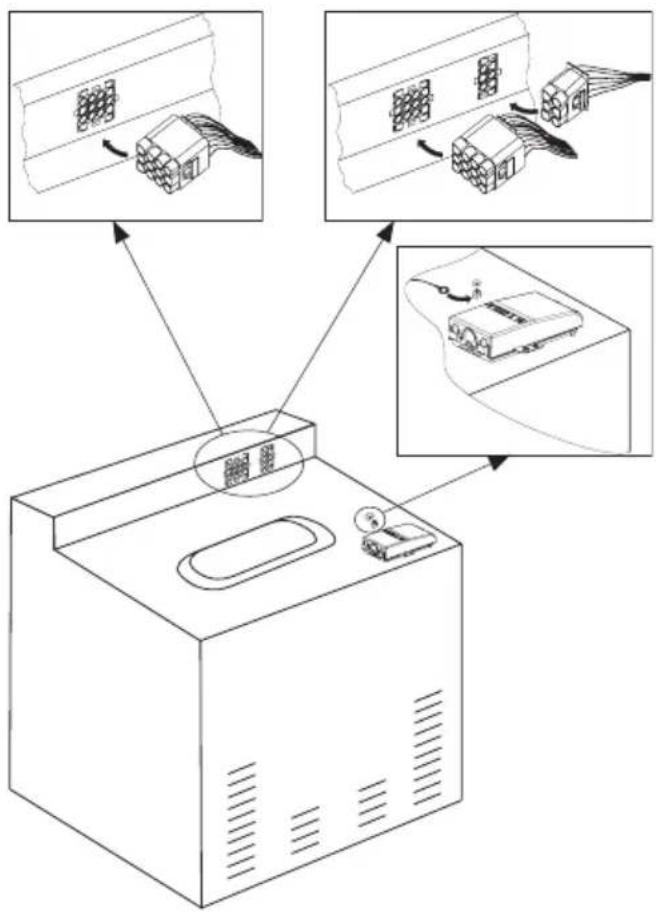
- Partially insert the oven into the prepared opening and connect the oven to the hob. (Fig.B)
- The appliance must be earthed. Connect the earth lead of the hob (yellow-green) with the earth terminal of the oven (marked ⏱ which is located near the connection box
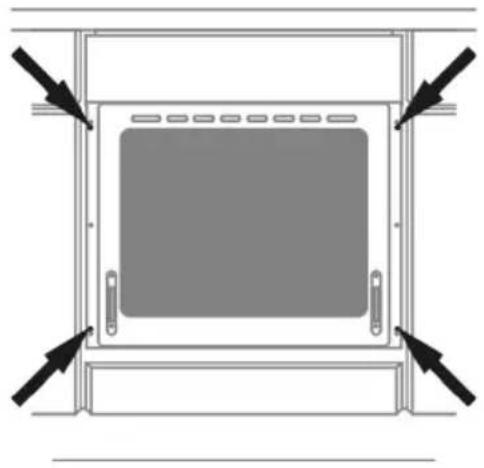
- Insert the oven completely into the opening without allowing the four screws in the places shown in the diagram to fall out. (Fig.C)
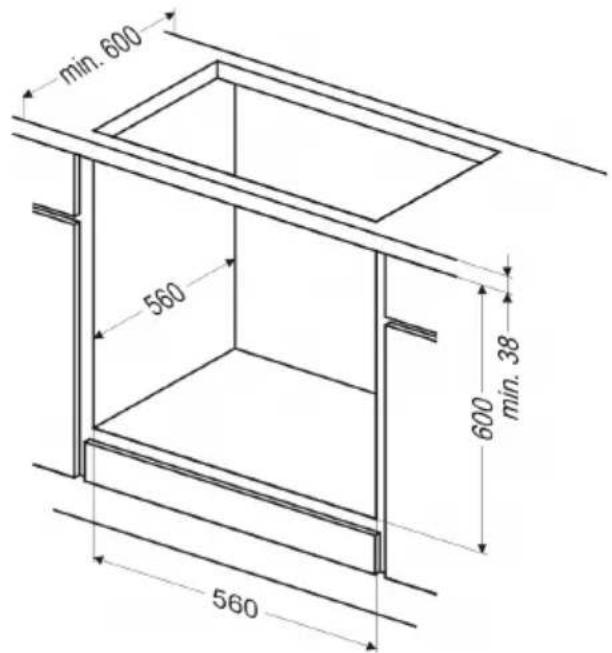
Fig. A
flowchart
graph TD
    A["Machine"] --> B{Cable Route}
    B --> C["Assembly Cable"]
    C --> D["Assembly Cable"]
    D --> E["Assembly Cable"]
    style A fill:#f9f,stroke:#333
    style B fill:#ccf,stroke:#333
    style C fill:#cfc,stroke:#333
    style D fill:#fcc,stroke:#333
    style E fill:#ffc,stroke:#333
Fig. B
natural_image
Diagram of a cabinet or enclosure with directional arrows indicating movement or force (no text or symbols present)Fig. C
The connection cable must be secured in a strain-relief clamp.
Warning!
Remember to connect the safety circuit to the connection box terminal marked with 12 The electricity supply for the cooker must have a safety switch which enables the power to be cut off in case of emergency. The distance between the working contacts of the safety switch must be at least 3 mm.
Before connecting the cooker to the power supply it is important to read the information on the data plate and the connection diagram.
Electrical connection
Warning!
All electrical work should be carried out by a suitably qualified and authorised electrician. No alterations or wilful changes in the electricity supply should be carried out.
Fitting guidelines
The cooker is manufactured to work with three-phase alternating current (400V 3N\~50Hz). The voltage rating of the cooker heating elements is 230V. Adapting the cooker to operate with one-phase current is possible by appropriate bridging in the connection box according to the connection diagram below. The connection diagram is also found on the cover of the connection box. Remember that the connection wire should match the connection type and the power rating of the cooker.
| CONNECTION DIAGRAMCaution! Voltage of heating elements 230V | 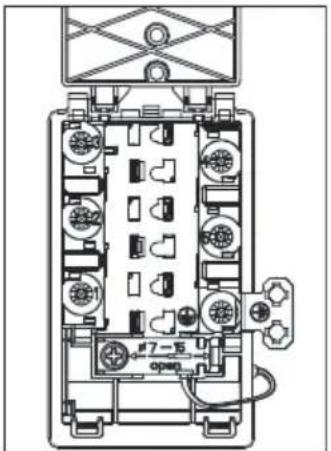 | Recommended type of connection lead | |||
| 1 For 230 V earthed one-phase connection, bridges connect 1-2-3 terminals and 4-5 terminals, safety wire to [IMAGE] | 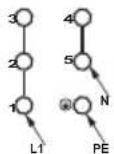 | H05VV-F3G4 | |||
| 2 For 400/230 V earthed two-phase connection, bridges connect 2-3 terminals and 4-5 terminals, the safety wire to [IMAGE] | 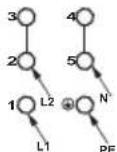 | H05VV-F4G4 | |||
| 3 For 400/230V earthed three-phase connection, bridges connect 4-5 terminals, phases in succession 1,2 and 3, earth to 4-5, the safety wire to [IMAGE] | 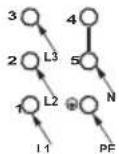 | H05VV-F5G1,5 | |||
| L1=R, L2=S, L3=T, N=earth terminal, PE= safety wire terminal | |||||
Before first use
- Remove packaging, clean the interior of the oven.
- Take out and wash the oven fittings with warm water and a little washing-up liquid.
- Switch on the ventilation in the room or open a window.
- Heat the oven (to a temperature of 250^ C, for approx. 30 min.), remove any stains and wash carefully.
Important!
The inside of the oven should only be washed with warm water and a small amount of washing-up liquid.
Heat level selection
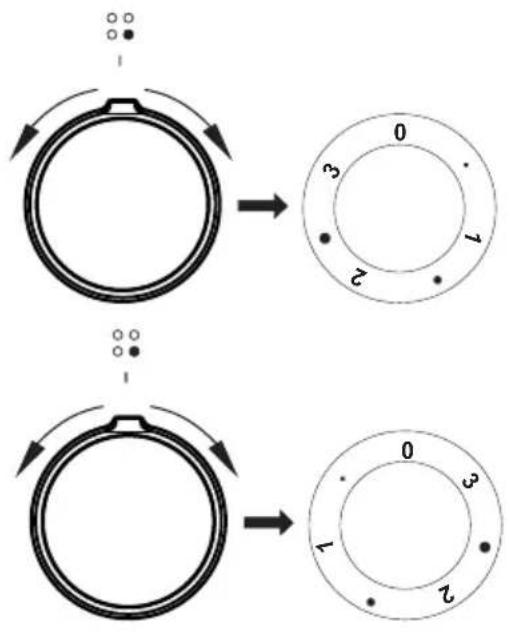
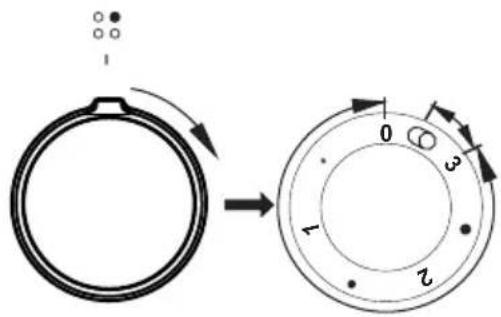
The heating zones have different levels of heat. The level of heat can be adjusted gradually by turning the appropriate knob to the right or left.
0 Switch off
• MIN. Warming up
1 Stewing vegetables, slow cooking
• Cooking soups, larger dishes
2 Slow frying
- Grilling meat, fish
3 MAX. Fast heating up, fast cooking, frying
flowchart
graph TD
    A["Top: Initial state with dots"] --> B["Step 0: Rotation to outer ring"]
    B --> C["Step 1: Rotation to inner ring"]
    C --> D["Step 2: Rotation to outer ring"]
Switching on the wider heating zone
Important!
Only switch on a heating zone by turning the knob clockwise. Turning the knob in the opposite direction can cause damage to the switch.
With the settings 0 ● 1 ● 2 ● 3 the knob operates the internal heating zone and it is possible to smoothly control the amount of heat transferred to a pan. Turning the knob temporarily to the position marked causes the external heating zone to be switched on. From that point, you can smoothly control the amount of heat trasferred to a pan by both heating zones (internal and external) as the internal switch will switch both zones off only after the knob is set to position 0.
Oven functions and operation.
Oven with conventional heating (including top + bottom heaters)
Model EH 921 600 E
The oven can be warmed up using the bottom and top heaters, as well as the grill. Operation of the oven is controlled by the oven function knob – to set a required function you should turn the knob to the selected position,
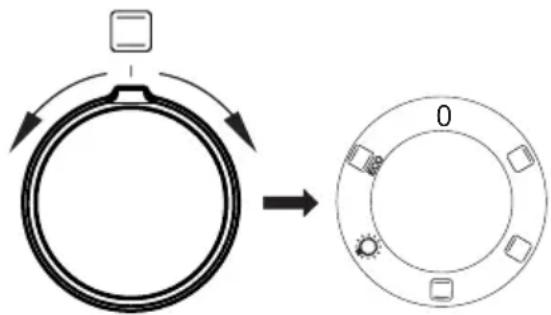
as well as the temperature regulator knob – to set a required function you should turn the knob to the selected position.
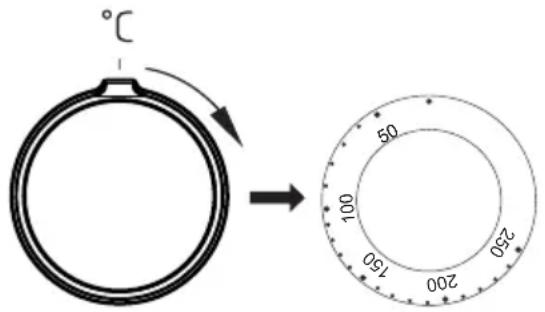
The oven can be switched off by setting both of these knobs to the position “●”/“0”.
Caution!
When selecting any heating function (switching a heater on etc.) the oven will only be switched on after the temperature has been set by the temperature regulator knob.
Possible settings of the oven function knob
0 Oven is off

Top heater on
Setting the knob to this position allows the oven to be heated only with the top heater switched on, e.g. use for final baking from above.

Bottom heater on
When the knob is set to this position the oven is heated using only the bottom heater. Use for e.g. final baking from the bottom.

Bottom and top heaters on
Setting the knob to this position allows the oven to be heated conventionally.

Separate oven lighting
By setting the knob to this position the lighting inside the oven is switched on, e.g. use when washing the oven chamber.

ECO Heating
This is an optimised heating function designed to save energy when preparing food. At this knob position, the oven lighting is off.
Switching on the oven is indicated by two signal lights, R, L, turning on. The R light turned on means the oven is working. If the L light goes out, it means the oven has reached the set temperature. If a recipe recommends placing dishes in a warmed-up oven, this should be not done before the L light goes out for the first time. When baking, the L light will temporarily come on and go out (to maintain the temperature inside the oven). The R signal light may also turn on at the knob position of "oven chamber lighting".

Oven with automatic air circulation (including a fan and top and bottom heaters)
Model EH 927 600 E
The oven can be warmed up using the bottom and top heaters, as well as the grill. Operation of the oven is controlled by the oven function knob – to set a required function you should turn the knob to the selected position, as well as the temperature regulator knob – to set a required function you should turn the knob to the selected position.
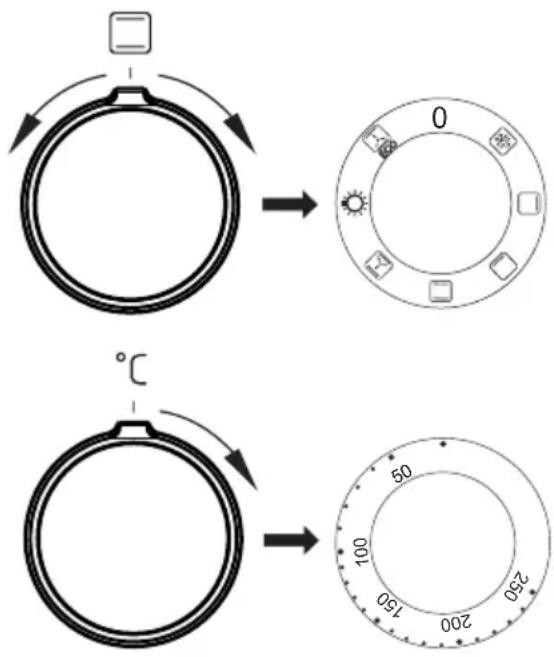
The oven can be switched off by setting both of these knobs to the position “●”/“0”.
Caution!
When selecting any heating function (switching a heater on etc.) the oven will only be switched on after the temperature has been set by the temperature regulator knob.
0 Oven is off

Defrosting
Only fan is on and all heaters are off.

Top heater on
Setting the knob to this position allows the oven to be heated only with the top heater switched on, e.g. use for final baking from above.

Bottom heater on
When the knob is set to this position the oven is heated using only the bottom heater. Baking of cakes from the bottom until done (moist cakes with fruit stuffing).

Top and bottom heaters on
Set the knob in this position for conventional baking. This setting is ideal for baking cakes, meat, fish, bread and pizza (it is necessary to preheat the oven and use a baking tray) on one oven level.

Top heater, bottom heater and fan are on.
This knob setting is most suitable for baking cakes. Convection baking (recommended for baking).
When the functions have been selected but the temperature knob is set to zero only the fan will be on. With this function you can cool the dish or the oven chamber.

Independent oven lighting
Set the knob in this position to light up the oven interior.

ECO Heating
This is an optimised heating function designed to save energy when preparing food. At this knob position, the oven lighting is off.
Switching on the oven is indicated by two signal lights, R, L, turning on. The R light turned on means the oven is working. If the L light goes out, it means the oven has reached the set temperature. If a recipe recommends placing dishes in a warmed-up oven, this should be not done before the L light goes out for the first time. When baking, the L light will temporarily come on and go out (to maintain the temperature inside the oven). The R signal light may also turn on at the knob position of "oven chamber lighting".

Oven with automatic air circulation (including a fan and top and bottom heaters)
Model EH 923 630 E, EH 923 630 W, EH 923 640 E, EH 923 630 SM
The oven can be warmed up using the bottom and top heaters, as well as the grill. Operation of the oven is controlled by the oven function knob – to set a required function you should turn the knob to the selected position, as well as the temperature regulator knob – to set a required function you should turn the knob to the selected position.
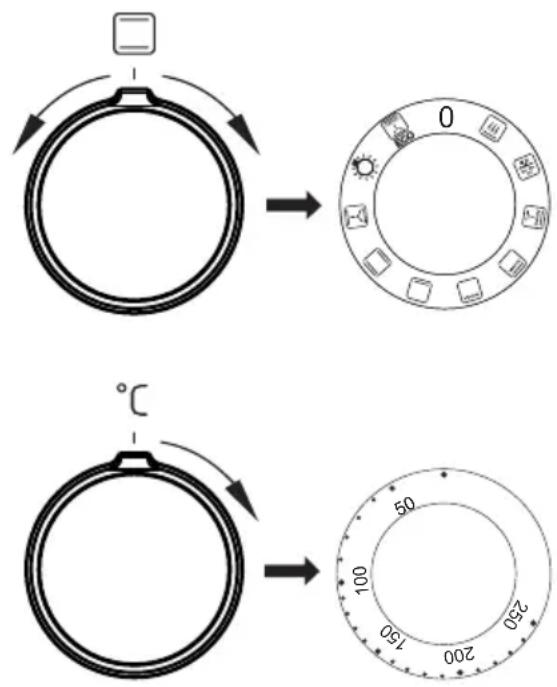
The oven can be switched off by setting both of these knobs to the position “●”/“0”.
Caution!
When selecting any heating function (switching a heater on etc.) the oven will only be switched on after the temperature has been set by the temperature regulator knob.
0 Oven is off

Rapid Preheating
Top and bottom heater, roaster and fan on. Use to preheat the oven.

Defrosting
Only fan is on and all heaters are off.

Fan and combined grill on
When the knob is turned to this position, the oven activates the combined grill and fan function. In practice, this function allows the grilling process to be speeded up and an improvement in the taste of the dish. You should only use the grill with the oven door shut.

Enhanced roaster (super roaster)
In this setting both roaster and top heater are on. This increases temperature in the top part of the oven's interior, which makes it suitable for browning and roasting of larger portions of food.

Roaster on.
Roasting is used for cooking of small portions of meat: steaks, schnitzel, fish, toasts, Frankfurter sausages, (thickness of roasted dish should not exceed 2-3 cm and should be turned over during roasting).

Bottom heater on
When the knob is set to this position the oven is heated using only the bottom heater. Baking of cakes from the bottom until done (moist cakes with fruit stuffing).

Top and bottom heaters on
Set the knob in this position for conventional baking. This setting is ideal for baking cakes, meat, fish, bread and pizza (it is necessary to preheat the oven and use a baking tray) on one oven level.

Top heater, bottom heater and fan are on.
This knob setting is most suitable for baking cakes. Convection baking (recommended for baking).
When the ☐functions have been selected but the temperature knob is set to zero only the fan will be on. With this function you can cool the dish or the oven chamber.

Independent oven lighting
Set the knob in this position to light up the oven interior.
ECO Heating
This is an optimised heating function designed to save energy when preparing food. At this knob position, the oven lighting is off.
Switching on the oven is indicated by two signal lights, R, L, turning on. The R light turned on means the oven is working. If the L light goes out, it means the oven has reached the set temperature. If a recipe recommends placing dishes in a warmed-up oven, this should be not done before the L light goes out for the first time. When baking, the L light will temporarily come on and go out (to maintain the temperature inside the oven). The R signal light may also turn on at the knob position of "oven chamber lighting".
Use of the grill\*
The grilling process operates through infrared rays emitted onto the dish by the incandescent grill heater.
In order to switch on the grill you need to:
- Set the oven knob to the position marked grill,
- Heat the oven for approx. 5 minutes (with the oven door shut).
- Insert a tray with a dish onto the appropriate cooking level; and if you are grilling on the grate insert a tray for dripping on the level immediately below (under the grate).
- Close the oven door.
For grilling with the function grill and combined grill the temperature must be set to 250^ C, but for the function fan and grill it must be set to a maximum of 190^ C.
Warning!
When using function grill it is recommended that the oven door is closed.
When the grill is in use accessible parts can become hot.
It is best to keep children away from the oven.
*optional
Baking
- we recommend using the baking trays which were provided with your cooker;
- it is also possible to bake in cake tins and trays bought elsewhere which should be put on the drying rack; for baking it is better to use black trays which conduct heat better and shorten the baking time;
- shapes and trays with bright or shiny surfaces are not recommended when using the conventional heating method (top and bottom heaters), use of such tins can result in undercooking the base of cakes;
- when using the ultra-fan function it is not necessary to initially heat up the oven chamber, for other types of heating you should warm up the oven chamber before the cake is inserted;
- before the cake is taken out of the oven, check if it is ready using a wooden stick (if the cake is ready the stick should come out dry and clean after being inserted into the cake);
- after switching off the oven it is advisable to leave the cake inside for about 5 min.;
- temperatures for baking with the ultra-fan function are usually around 20 – 30 degrees lower than in normal baking (using top and bottom heaters);
- the baking parameters given in Table are approximate and can be corrected based on your own experience and cooking preferences;
- if information given in recipe books is significantly different from the values included in this instruction manual, please apply the instructions from the manual.
Roasting meat
- cook meat weighing over 1 kg in the oven, but smaller pieces should be cooked on the gas burners.
- use heatproof ovenware for roasting, with handles that are also resistant to high temperatures;
- when roasting on the drying rack or the grate we recommend that you place a baking tray with a small amount of water on the lowest level of the oven;
- it is advisable to turn the meat over at least once during the roasting time and during roasting you should also baste the meat with its juices or with hot salty water – do not pour cold water over the meat.
ECO Heating
- ECO Heating an optimised heating function designed to save energy when preparing food.
- You cannot reduce the cooking time by setting a higher temperature; preheating the oven is not recommended.
- Do not change the temperature setting and do not open the oven door during cooking.
Recommended setting for ECO Heating
| Type of dish | Oven functions | Temperature Level ^ C | Level Time(°C) | in minutes(°C) |
 |  | 180 - 200 2 - 3 | 25 - 40 | 1) |
 |  | 180 - 200 2 - 3 | 25 - 40 | 1) |
 |  | 190 - 210 2 - 3 | 25 - 100 | 2) |
 |  | 200 - 220 2 90 | - 120 | 2) |
 |  | 200 - 220 2 90 | - 160 | 2) |
 |  | 180 - 200 2 80 | - 100 | 2) |
^1) Recommended for baking under 40 minutes.
2) Recommended for baking more than 1 kg of meat.
ECO Heating
- ECO Heating an optimised heating function designed to save energy when preparing food.
- You cannot reduce the cooking time by setting a higher temperature; preheating the oven is not recommended.
- Do not change the temperature setting and do not open the oven door during cooking.
Recommended setting for ECO Heating
| Type of dish | Oven functions | Temperature Level °C | Level Time (°) | in minutes |
 |  | 180 - 200 2 - 3 | 50 - 70 | |
 |  | 180 - 200 2 50 | - 70 | |
 |  | 190 - 210 2 - 3 | 45 - 60 | |
 |  | 200 - 220 2 90 | - 120 | |
 |  | 200 - 220 2 90 | - 160 | |
 |  | 180 - 200 2 80 | - 100 |
ECO Heating
- ECO Heating an optimised heating function designed to save energy when preparing food.
- You cannot reduce the cooking time by setting a higher temperature; preheating the oven is not recommended.
- Do not change the temperature setting and do not open the oven door during cooking.
Recommended setting for ECO Heating
| Type of dish | Oven functions | Temperature Level °C | Time (°) | in minutes |
 |  | 180 - 200 2 - 3 | 50 - 70 | |
 |  | 180 - 200 2 50 | - 70 | |
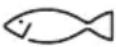 |  | 190 - 210 2 - 3 | 45 - 60 | |
 |  | 200 - 220 2 90 | - 120 | |
 |  | 200 - 220 2 90 | - 160 | |
 |  | 180 - 200 2 80 | - 100 |
Oven with conventional heating (including top and bottom heaters) Model EH 921 600 E
| Type of dish | Type of heating | Temperature Level °C | Time ( min.) | |
 | 160 - 200 2 - 3 | 30 - 50 | ||
 | 160 - 170^1) | 3 25 - 40 | 2) | |
 | 220 - 240^1) | 2 15 - 25 | ||
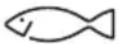 | 210 - 220 2 45 | - 60 | ||
 | 225 - 250 2 120 | - 150 | ||
 | 160 - 230 2 90 | - 120 | ||
 | 160 - 180 2 45 | - 60 | ||
 | 190 - 210 2 40 | - 50 | ||
The times are apply to dish that is placed into a cold oven. For the preheated oven, the times should be reduced by about 5-10 minutes.
^1) Preheat
^2) Baking smaller items
Note: The figures given in Tables are approximate and can be adapted based on your own experience and cooking preferences.
Oven with automatic air circulation (including a fan and top and bottom heaters) Model EH 927 600 E
| Type of dish | Type of heating | Temperature Level °C | Time (°) | (min.) |
 | [56VH] | 160 - 200 2 - 3 | 30 - 50 | |
 |  | 150 3 25 - 35 | ||
| [DB48] | [KKZH] | 160 - 170 1) | 3 25 - 40 | 2) |
| [SAH7] | [OC5X] | 155 - 170 1) | 3 25 - 40 | 2) |
| [KBTX] |  | 220 - 240 1) | 2 15 - 25 | |
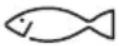 |  | 210 - 220 2 45 | - 60 | |
 |  | 225 - 250 2 120 | - 150 | |
 |  | 160 - 230 2 90 | - 120 | |
 | [C3KZ] | 160 - 180 2 45 | - 60 | |
| [3KXY] |  | 190 - 210 2 40 | - 50 |
The times are apply to dish that is placed into a cold oven. For the preheated oven, the times should be reduced by about 5-10 minutes.
^1) Preheat
^2) Baking smaller items
Note: The figures given in Tables are approximate and can be adapted based on your own experience and cooking preferences.
Oven with automatic air circulation (including a fan and top and bottom heaters) Model EH 923 630 E, EH 923 630 W, EH 923 640 E, EH 923 630 SM
| Type of dish | Type of heating | Temperature Level °C | Time ( min.) |
 |  | 160 - 200 2 - 3 | 30 - 50 |
 |  | 150 3 25 - 35 | |
 | [2ACS] | 160 - 170 1) | 3 25 - 40 |
 |  | 155 - 170 1) | 3 25 - 40 |
 |  | 220 - 240 1) | 2 15 - 25 |
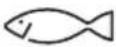 |  | 210 - 220 2 45 | - 60 |
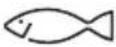 |  | 190 2 - 3 60 | - 70 |
 |  | 230 - 250 4 14 | - 18 |
 |  | 225 - 250 2 120 | - 150 |
 |  | 160 - 230 2 90 | - 120 |
| [7DB4] |  | 180 - 190 2 70 | - 90 |
 |  | 160 - 180 2 45 | - 60 |
 |  | 190 - 210 2 40 | - 50 |
 |  | 170 - 190 3 40 | - 50 |
The times are apply to dish that is placed into a cold oven. For the preheated oven, the times should be reduced by about 5-10 minutes.
^1) Preheat
^2) Baking smaller items
Note: The figures given in Tables are approximate and can be adapted based on your own experience and cooking preferences.
Baking
| Type of dish Accessory Level Type | of heating | Temperature (°C) | Baking time 2) (min.) | ||
| Small cakes | Baking tray 3 | 160 - 170 |  | 1) | 25 - 40 2) |
| Baking tray 3 | 155 - 170 |  | 1) | 25 - 40 2) | |
| Baking tray 3 | 155 - 170 | [HW6S] | 1) | 25 - 40 2) | |
| Baking tray Roasting tray | 2 + 42 - baking tray or roasting tray4 - baking tray |  | 155 - 170 1) | 25 - 50 2) | |
| Shortbread | Baking tray 3 | 150 - 160 |  | 1) | 30 - 40 2) |
| Baking tray 3 | 150 - 170 |  | 1) | 25 - 35 2) | |
| Baking tray 3 | 150 - 170 |  | 1) | 25 - 35 2) | |
| Baking tray Roasting tray | 2 + 42 - baking tray or roasting tray4 - baking tray | [DDHS] | 160 - 175 1) | 25 - 35 2) | |
| Fatless sponge cake | Wire rack + black baking tin diameter 26cm | 3 170 - 180 |  | 1) | 30 - 45 2) |
| Apple pie | Wire rack + 2 black baking tins diameter 20cm | 2 black baking tins placed after the diagonal, back right, front left |  | 180 - 200 1) | 50 - 70 2) |
^1) Preheat, do not use Rapid preheat function.
^2) The times are apply to dish that is placed into a cold oven. For the preheated oven, the times should be reduced by about 5-10 minutes.
TEST DISHES. According to standard EN 60350-1.
Grilling
| Type of dish | Accessory Level | Type | of heating | Temperature (°C) | Time (min.) |
| White bread toast | Wire rack 4 250 |  | 1) | 1,5 - 2,5 | |
| Wire rack 4 250 |  | 2) | 2 - 3 | ||
| Beef burgers | Wire rack + roasting tray (to gather drops) | 4 - wire rack 3 - roasting tray |  | 250 1) | 1st side 10 - 15 2nd side 8 - 13 |
^1) Preheat for 5 minutes, do not use Rapid preheat function.
^2) Preheat for 8 minutes, do not use Rapid preheat function.
Roasting
| Type of dish | Accessory Level | Type | of heating | Temperature (°C) | Time (min.) |
| Whole chicken | Wire rack + roasting tray (to gather drops) | 2 - wire rack1 - roasting tray |  | 180 - 190 70 | - 90 |
| Wire rack + roasting tray (to gather drops) | 2 - wire rack1 - roasting tray |  | 180 - 190 80 | - 100 |
The times are apply to dish that is placed into a cold oven. For the preheated oven, the times should be reduced by about 5-10 minutes.
By ensuring proper cleaning and maintenance of your cooker you can have a significant influence on the continuing fault-free operation of your appliance.
Before you start cleaning, the cooker must be switched off and you should ensure that all knobs are set to the “●”/“0” position. Do not start cleaning until the cooker has completely cooled.
Oven
- The oven should be cleaned after every use. When cleaning the oven the lighting should be switched on to enable you to see the surfaces better.
- The oven chamber should only be washed with warm water and a small amount of washing-up liquid.
● After cleaning the oven chamber wipe it dry.
- Steam Cleaning function:
-pour 250ml of water (1 glass) into a bowl placed in the oven on the first level from the bottom,
- close the oven door,
- set the temperature knob to 50^ C, and the function knob to the bottom heater position ☐
- heat the oven chamber for approximately 30 minutes,
- open the oven door, wipe the chamber inside with a cloth or sponge and wash using warm water with washing-up liquid.,
- After cleaning the oven chamber wipe it dry.
Caution!
Do not use cleaning products containing abrasive materials for the cleaning and maintenance of the glass front panel.
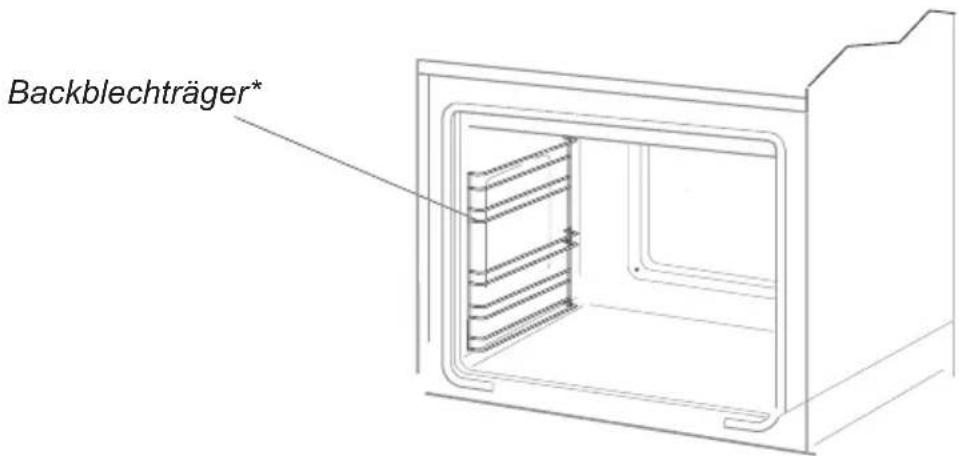
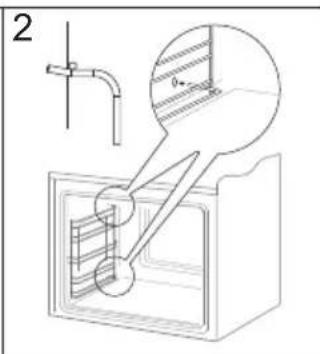
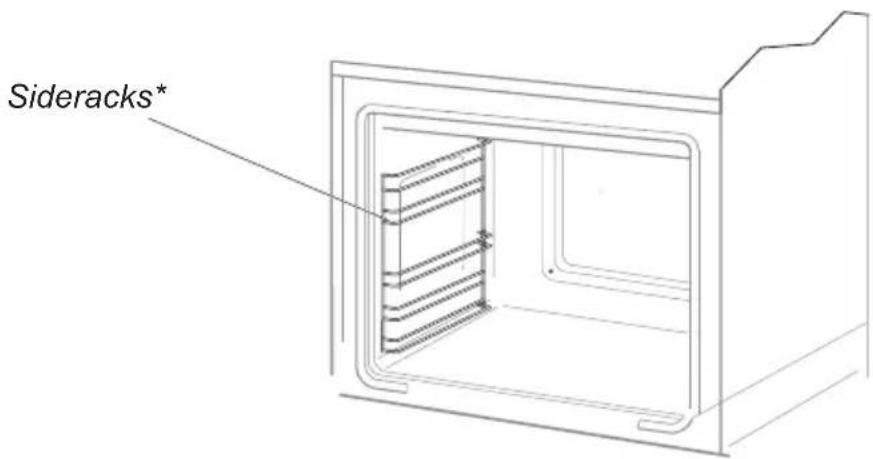
- Ovens in cookers marked with the letter D* are equipped with easily removable wire shelf supports. To remove them for washing, pull the front catch, then tilt the support and remove from the rear catch.
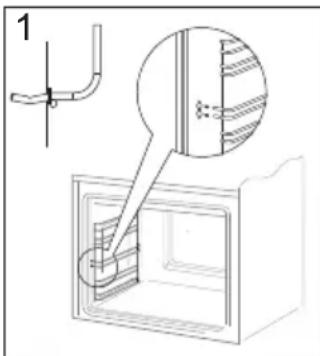
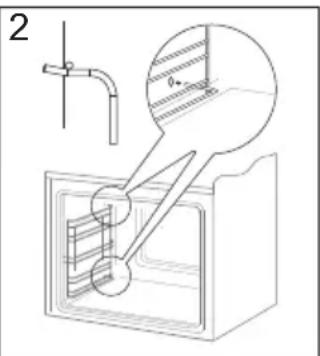
Removing wire shelf supports
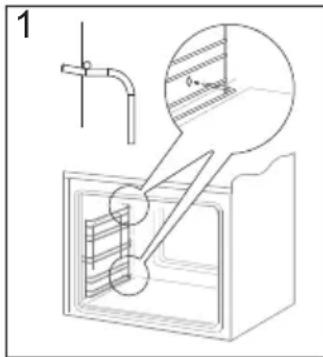
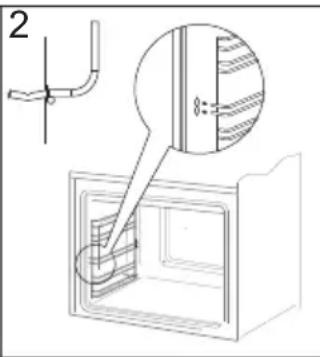
Installing wire shelf supports
*optional
Replacement of the oven light bulb\*
In order to avoid the possibility of an electric shock ensure that the appliance is switched off before replacing the bulb.
- Set all control knobs to the position “●”/“0” and disconnect the mains plug,
- unscrew and wash the lamp cover and then wipe it dry.
- unscrew the light bulb from the socket, replace the bulb with a new one – a high temperature bulb (300°C) with the following parameters:
- voltage 230 V
- power 25 W
- thread E14.
- Screw the bulb in, making sure it is properly inserted into the ceramic socket.
- Screw in the lamp cover.
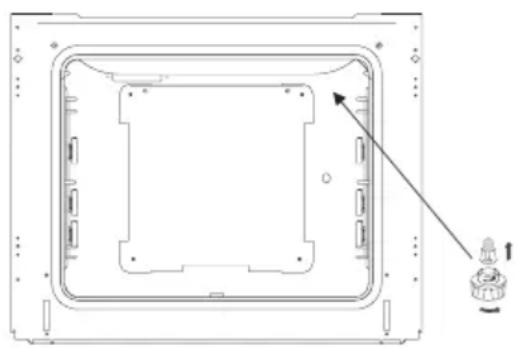
natural_image
Technical line drawing of a rectangular electronic device casing with internal components and a small component on the right side (no text or symbols)Oven light
Replacing the halogen bulb in the oven\*
Before replacing the halogen bulb, make sure the appliance is disconnected from the electric mains to avoid a possible electric shock.
- Set all control knobs to the position “●”/“0” and disconnect the mains plug,
- Unscrew and wash the lamp cover and then wipe it dry.
- Pull the halogen bulb out using a cloth or paper. If necessary, replace the halogen bulb with a new one.
- voltage 230V
- power 25W
- G9
- Replace the halogen bulb in its socket.
- Screw in the lamp cover.
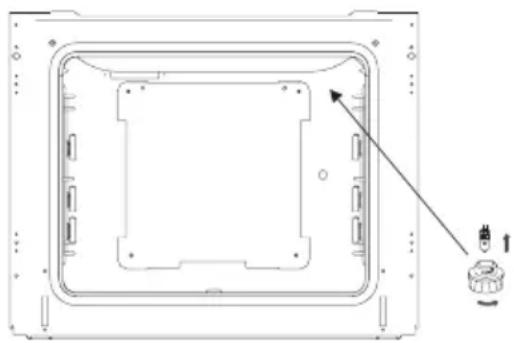
natural_image
Technical line drawing of a rectangular electronic device casing with internal components and a small component on the right side (no text or symbols)Oven lighting
Note! Make sure not to touch the halogen directly with your fingers.
*optional
Door removal
In order to obtain easier access to the oven chamber for cleaning, it is possible to remove the door. To do this, tilt the safety catch part of the hinge upwards (fig. A). Close the door lightly, lift and pull it out towards you. In order to fit the door back on to the cooker, do the inverse. When fitting, ensure that the notch of the hinge is correctly placed on the protrusion of the hinge holder. After the door is fitted to the oven, the safety catch should be carefully lowered down again. If the safety catch is not set it may cause damage to the hinge when closing the door.
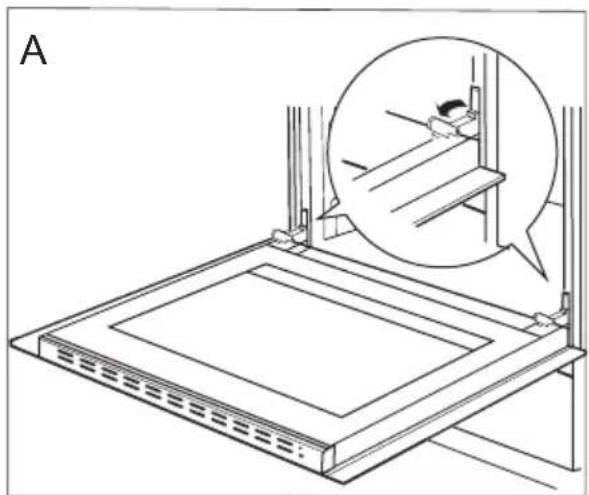
natural_image
Technical line drawing of a mechanical assembly with an inset showing a close-up of a component (no text or symbols present)Tilting the hinge safety catches
Removing the inner panel
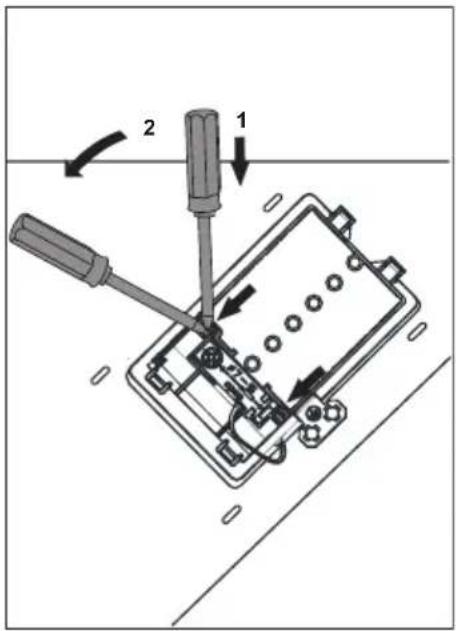
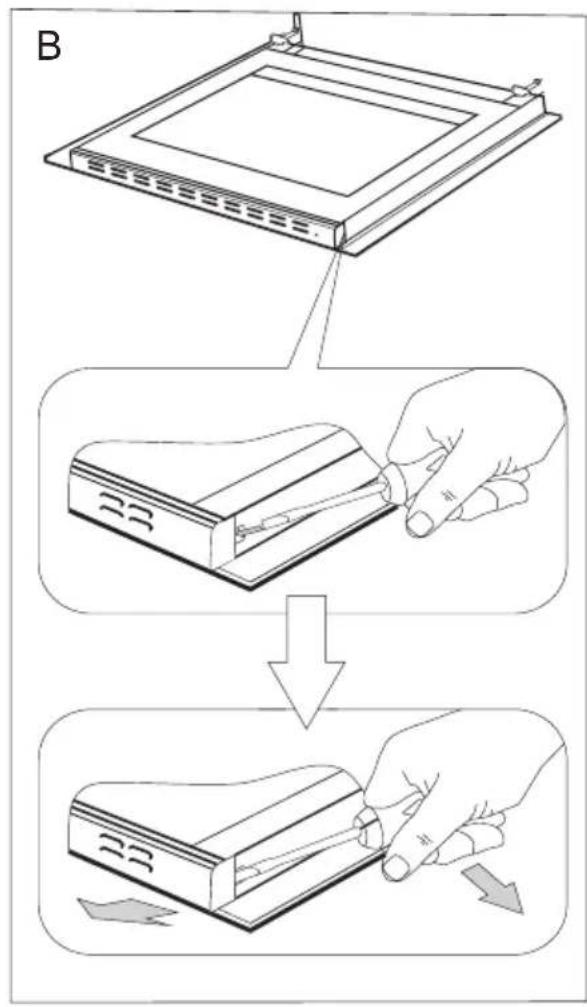
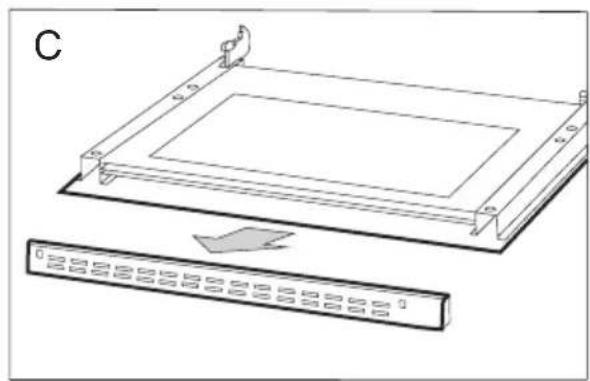
- Using a flat screwdriver unhook the upper door slat, prying it gently on the sides (fig. B).
- Pull the upper door slat loose. (fig. B, C)
natural_image
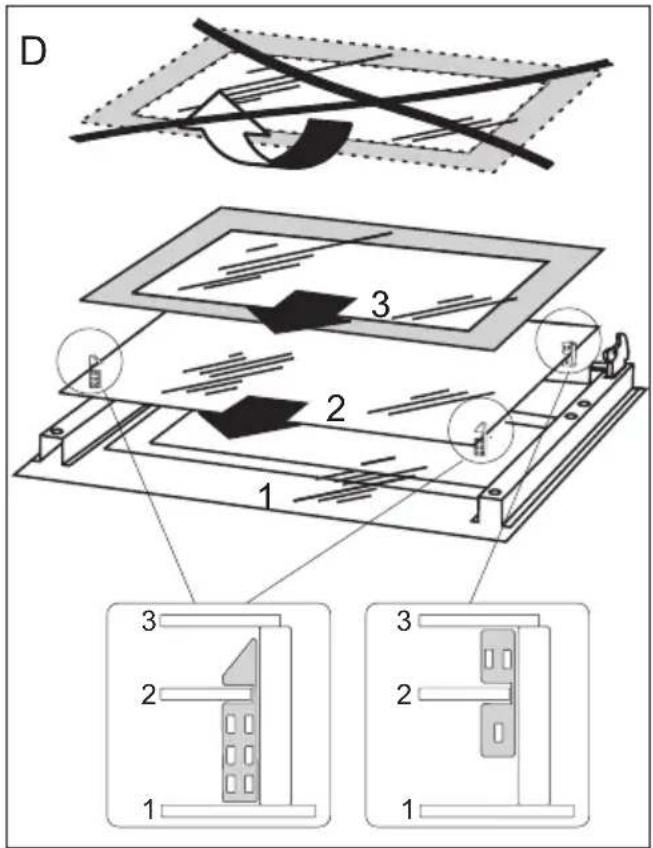
Technical line drawing of a rectangular electronic component with mounting brackets and a separate panel labeled 'C' (no text or symbols on the diagram itself)- Pull the inner glass panel from its seat (in the lower section of the door). Remove the inner panel (fig. D).
- Clean the panel with warm water with some cleaning agent added.
Carry out the same in reverse order to reassemble the inner glass panel. Its smooth surface shall be pointed upwards.
Important! Do not force the upper strip in on both sides of the door at the same time. In order to correctly fit the top door strip, first put the left end of the strip on the door and then press the right end in until you hear a "click". Then press the left end in until you hear a "click".
Removal of the internal glass panel
Regular inspections
Besides keeping the oven clean, you should:
- carry out periodic inspections of the control elements and cooking units of the cooker. After the guarantee has expired you should have a technical inspection of the cooker carried out at a service centre at least once every two years,
- fix any operational faults,
- carry out periodical maintenance of the cooking units of the oven.
Caution!
All repairs and regulatory activities should be carried out by the appropriate service centre or by an appropriately authorised fitter.
Regular inspections
Besides keeping the oven clean, you should:
- carry out periodic inspections of the control elements and cooking units of the cooker. After the guarantee has expired you should have a technical inspection of the cooker carried out at a service centre at least once every two years,
- fix any operational faults,
● carry out periodical maintenance of the cooking units of the oven.
Caution!
All repairs and regulatory activities should be carried out by the appropriate service centre or by an appropriately authorised fitter.
OPERATION IN CASE OF EMERGENCY
In the event of an emergency, you should:
- switch off all working units of the oven
- disconnect the mains plug
- call the service centre
- some minor faults can be fixed by referring to the instructions given in the table below. Before calling the customer support centre or the service centre check the following points that are presented in the table.
| PROBLEM REASON ACTION | ||
| 1. The appliance does not work. | Break in power supply. Check the household fuse box; if there is a blown fuse replace it with a new one. | |
| 2. The oven lighting does not work. | The bulb is loose or damaged. Tighten up or replace the blown bulb (see ‘Cleaning and Maintenance’). | |
| Model identifier EH 923 630 E | EH 923 640 EEH 923 630 SM | EH 927 600 EEH 921 600 E |
| Voltage rating 230/400V ~ 50 Hz | ||
| Power rating 3,5 kW 2,0 kW | ||
| Cooker dimensions H/W/D 59,5 x | 59,5 x 57,5 cm | |
The product meets the requirements of European standards EN 60335-1; EN60335-2-6.
The data on the energy labels of electric ovens is given according to standard EN 60350-1 / IEC 60350-1. These values are defined with a standard workload a with the functions active: bottom and top heaters (conventional heating) and fan assisted heating (forced air heating), if these functions are available.
The energy efficiency class was assigned depending on the function available in the product in accordance with the priority below:
| Forced air circulation ECO (ring heater + fan) |  |
| Forced air circulation ECO (bottom heater + top + roaster + fan) |  |
| Forced air circulation ECO (bottom heater + top + fan) |  |
| Conventional mode ECO (bottom heater + top) |  |
During energy consumption test, remove the telescopic runners (if the product is fitted with any).
Certificate of compliance CE
The Manufacturer hereby declares that this product complies with the general requirements pursuant to the following European Directives:
● The Low Voltage Directive 2014/35/EC,
● Electromagnetic Compatibility Directive 2014/30/EC,
● ErP Directive 2009/125/EC,
and therefore the product has been marked with the symbol and the Declaration of Conformity has been issued to the manufacturer and is available to the competent authorities regulating the market.
natural_image
Simple black-and-white line drawing of a tree with cloud-like canopy and two wavy lines at base (no text or symbols)natural_image
Simple line drawing of a recycling symbol (three chasing arrows), no text or labels present.natural_image
Isometric line drawing of a square frame with rounded corners and a central hole (no text or symbols)natural_image
Technical line drawing of a rectangular metal grate or rack structure (no text or symbols)natural_image
Line drawing of a rectangular tray or container with a recessed slot (no text or symbols)*Bepaalde modellen
Montage van de oven
natural_image
Top-down schematic of a cabinet or enclosure with directional arrows indicating movement or force (no text or symbols)Fig. C

natural_image
Technical line drawing of a rectangular electronic device casing with internal components and a small component on the right side (no text or symbols)Ovenverlichting
natural_image
Technical line drawing of a rectangular electronic device casing with internal components and a small component on the right side (no text or symbols)Ovenverlichting
natural_image
Technical line drawing of a mechanical assembly with an inset showing a close-up of a component (no text or symbols present)Wegnemen van de deur
natural_image
Technical line drawing of a rectangular electronic component with mounting brackets and a separate panel below showing internal structure (no text or symbols)REINIGING EN ONDERHOUD VAN HET FORNUIS
The Ground Truth image displays a single, solid horizontal line, which is a stylistic or background element (like a rule line on paper). According to Rule 2, such lines must be ignored by the OCR result. The OCR content provided is "", which consists of no characters. Since the OCR output correctly ignores the stylistic line, it complies with Rule 2. Therefore, the OCR result is consistent with the Ground Truth.
- Achtung!
- Backofenfunktionen
- Attention!
- Fonctions du four
- NETTOYAGE ET ENTRETIEN DE LA CUISINIÈRE
- Caution!
- Installing the oven
- Assembly of the oven:
- Warning!
- Electrical connection
- Fitting guidelines
- Before first use
- Important!
- Heat level selection
- Switching on the wider heating zone
- Oven functions and operation.
- Oven with conventional heating (including top + bottom heaters)
- Possible settings of the oven function knob
- Top heater on
- Bottom heater on
- Bottom and top heaters on
- Separate oven lighting
- ECO Heating
- Defrosting
- Top and bottom heaters on
- Top heater, bottom heater and fan are on.
- Independent oven lighting
- Oven with automatic air circulation (including a fan and top and bottom heaters)
- Rapid Preheating
- Fan and combined grill on
- Enhanced roaster (super roaster)
- Roaster on.
- Use of the grill\*
- Baking
- Roasting meat
- TEST DISHES. According to standard EN 60350-1.
- Oven
- - Steam Cleaning function:
- Replacement of the oven light bulb\*
- Replacing the halogen bulb in the oven\*
- Door removal
- Removing the inner panel
- Regular inspections
- OPERATION IN CASE OF EMERGENCY
- Certificate of compliance CE
- Montage van de oven
- REINIGING EN ONDERHOUD VAN HET FORNUIS
Brand : AMICA
Model : EH 923 630 SM
Category : Oven