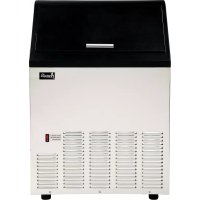
CIM102U3S - Ice machine Avanti - Free user manual and instructions
Find the device manual for free CIM102U3S Avanti in PDF.


| Product Type | Ice Machine |
| Brand | Avanti |
| Model | CIM102U3S |
| Electrical Supply | 115 V ~ 60 Hz, 15 A, grounded |
| Ice Production | Approximately 50 lb (23 kg) per day |
| Storage Bin Capacity | Approximately 25 lb (11 kg) |
| Dimensions (H × W × D) | 33 × 15 × 18 inches (84 × 38 × 46 cm) |
| Net Weight | Approximately 80 lb (36 kg) |
| Required Water Pressure | 14.5 to 80 psi (1 to 5.5 bar) |
| Operating Ambient Temperature | 13 °C to 32 °C (55 °F to 90 °F) |
| Supply Water Temperature | 5 °C to 25 °C (41 °F to 77 °F) |
| Water Connection | 1/4 in OD supply line, 5 ft drain hose |
| Ice Types | Cube-shaped ice cubes, adjustable size |
| Main Functions | Automatic ice making, harvest cycle, full bin auto shut-off, ice size adjustment |
| Controls and Indicators | ON/OFF, Mode, Adjust, Clean buttons; Full Bin LED (red), Making (green), Harvest (yellow) |
| Cleaning Mode | Automatic cycle with ice machine cleaner solution |
| Materials | Stainless steel (door), plastic interior |
| Cleaning and Maintenance | Interior cleaning with bleach, descaling every 6 months, condenser cleaning |
| Safety | Grounding required, do not use extension cord, surge protection recommended |
| Leveling Feet | Casters with height adjustment |
| Included Accessories | Ice scoop, water supply hose (6 ft), drain hose (5 ft), instruction manual |
| Warranty | 1 year parts and labor, compressor 2 to 5 years |
Frequently Asked Questions - CIM102U3S Avanti
User questions about CIM102U3S Avanti
0 question about this device. Answer the ones you know or ask your own.
Ask a new question about this device
Download the instructions for your Ice machine in PDF format for free! Find your manual CIM102U3S - Avanti and take your electronic device back in hand. On this page are published all the documents necessary for the use of your device. CIM102U3S by Avanti.
USER MANUAL CIM102U3S Avanti
natural_image
Line drawing of a white industrial machine with a black lid and ventilation slots (no text or symbols)BEFORE USE, PLEASE READ AND FOLLOW ALL SAFETY RULES AND OPERATING INSTRUCTIONS.
Avanti has a policy of continuous improvement on its products and reserves the right to change materials and specifications without notice.
Avanti Products LLC
P.O. Box 520604
Miami, FL 33152
www.avantiproducts.com
TABLE OF CONTENTS
| Appliance Safety | 3 |
| Important Safeguides | 4 |
| Electrical Connection | 5 |
| Help Us Help You | 6 |
| Parts and Features | 7 |
| Important Safety Instructions | 8 |
| Installation Instructions | 8 |
| Before Using Your Appliance | 8 |
| Installation of Your Appliance | 9 – 10 |
| Electrical Connection | 11 |
| Water Supply / Drain | 12 |
| Operating Your Appliance | 13 – 14 |
| How Your Machine Makes Ice | 15 |
| Care and Maintenance | 16 – 20 |
| Troubleshooting Guide | 21 – 22 |
| Service for Your Appliance | 23 |
| Wiring Diagram | 23 |
| Your Avanti Products Warranty | 24 |
| Instrucciones en Español | 25 – 40 |
| Instructions en Français | 41 - 63 |
| Registration Information and Registration Card | Last page |
APPLIANCE SAFETY
Your safety and the safety of others are very important.
We have provided many important safety messages in this manual and on your appliance. Always read and obey all safety messages.

This is the Safety Alert Symbol. This symbol alerts you to potential hazards that can kill or injure you and others.
All safety messages will follow the Safety Alert Symbol and either the wards" DANGER", "WARNING" or "CAUTION".

DANGER


WARNING

CAUTION
Danger means that failure to heed this safety statement may result in severe personal injury or death.
Warning means that failure to heed this safety statement may result in extensive product damage, serious personal injury, or death.
Caution means that failure to heed this safety statement may result in minor or moderate personal injury, or property or equipment damage.
All safety messages will alert you to what the potential hazard is, tell you how to reduce the chance of injury, and let you know what can happen if the instructions are not followed.

PROP. 65 WARNING FOR CALIFORNIA RESIDENTS
WARNING:
Cancer And Reproductive Harm
www.p65warnings.ca.gov
IMPORTANT SAFEGUARDS

Before the beverage cooler is used, it must be properly positioned and installed as described in this manual, so read the manual carefully. To reduce the risk of fire, electrical shock or injury when using the beverage cooler, follow basic precautions, including the following:

DANGER

- Plug into a grounded 3-prong outlet, do not remove grounding prong, do not use an adapter, and do not use an extension cord
- Replace all panels before operating
- It is recommended that a separate circuit, serving only your beverage cooler, be provided. Use receptacles that cannot be turned off by a switch or pull chain
- Never clean appliance parts with flammable fluids. These fumes can create a fire hazard or explosion. And do not store or use gasoline or other flammable vapors and liquids in the vicinity of this or any other appliance. The fumes can create a fire hazard or explosion.
- Before proceeding with cleaning and maintenance operations, make sure the power line of the unit is disconnected.
- Do not connect or disconnect the electric plug when your hands are wet
- Unplug the appliance or disconnect the power before cleaning or servicing. Failure to do so can result in electrical shock or death.
- Do not attempt to repair or replace any part of your appliance unless it is specifically recommended in this material. All other servicing should be referred to a qualified technician.

WARNING

- Use two or more people to move and install the appliance. Failure to do so can result in back or other injury.
- To ensure proper ventilation for your appliance, the unit must be completely unobstructed. Choose a well-ventilated area with temperatures above 55^ (13°C) and below 90^ (32°C). This unit must be installed in an area protected from the elements, such as wind, rain, water spray or sunlight.
- The appliance should not be located next to ovens, grills or other sources of high heat.
- The appliance must be installed with all electrical, water and drain connections in accordance with state and local codes. A standard electrical supply (115 V AC only, 60 Hz), properly grounded in accordance with the National Electrical Code and local codes and ordinances is required.
- Do not kink or pinch the power supply cord of the appliance.
- The fuse (or circuit breaker) size should be 15 amperes.
- It is important for the appliance to be leveled in order to work properly. You may need to make several adjustments to level it.
- All installation must be in accordance with local plumbing code requirements.
- Make certain that the pipes are not pinched or kinked or damaged during installation.
- Check for leaks after connection.
- Never allow children to operate, play with or crawl inside the appliance
- Do not use solvent-based cleaning agents or abrasives on the interior. These cleaners may damage or discolor the interior.
- Do not use this apparatus for other than its intended purpose.
Electrical Connection
\~ Warning\~
Improper use of the grounded plug can result in the risk of electrical shock. If the power cord is damaged, have it replaced by an authorized Avanti Products service center.
This appliance should be properly grounded for your safety. The power cord of this appliance is equipped with a three-prong plug which mates with standard three prong wall outlets to minimize the possibility of electrical shock.
Do not under any circumstances cut or remove the third ground prong from the power cord supplied.
This appliance requires a standard 115Volts\~/60Hz electrical outlet with three-prong ground.
The cord should be secured behind the appliance and not left exposed or dangling to prevent accidental injury.
Never unplug the appliance by pulling the power cord. Always grip the plug firmly and pull straight out from the receptacle.
Do not use an extension cord with this appliance. If the power cord is too short, have a qualified electrician or service technician install an outlet near the appliance.
ÿ EXTENSION CORD
Because of potential safety hazards under certain conditions, it is strongly recommended that you do not use an extension cord with this unit. However, if you must use an extension cord it is absolutely necessary that it be a UL/CUL-Listed, 3-wire grounding type appliance extension cord having a grounding type plug and outlet and that the electrical rating of the cord be 115 volts and at least 10 amperes.
ÿ SURGE PROTECTOR
Most electrical appliances use a series of electric control boards to operate. These boards are very susceptible to power surges and could be damaged or destroyed.
If the appliance is going to be used in an area or if your city / country is prone to power surges / outages; it is suggested that you use a power surge protector for all electrical devices / appliances you use. The surge protector that you select must have a surge block high enough to protect the appliance it is connected to. If you have any questions regarding the type and size of surge protector needed contact a licensed electrician in your area.
Damages due to power surges are not considered a manufacturer covered defect and will void your product warranty.
HELP US HELP YOU...
Read this guide carefully.
It is intended to help you operate and maintain your new Icemaker properly.
Keep it handy to answer your questions. If you don't understand something or you need more assistance, please call:
Avanti Customer Service 800-220-5570
Keep proof of original purchase date (such as your sales slip) with this guide to establish the warranty period.
CAUTION:
THE ICEMAKER IS NOT DESIGNED FOR THE STORAGE OF MEDICINE OR OTHER MEDICAL PRODUCTS.
Write down the model and serial numbers.
You'll find them on a plate located on the rear wall of the Icemaker
Please write these numbers here:
Date of Purchase
Model Number
Serial Number
Use these numbers in any correspondence or service calls concerning your Icemaker
If you received a damaged Icemaker, immediately contact the dealer (or builder) that sold you the Icemaker
Save time and money. Before you call for service, check the Troubleshooting Guide. It lists causes of minor operating problems that you can correct yourself.
If you need service
We're proud of our service and want you to be pleased. If for some reason you are not happy with the service you receive, here are some steps to follow for further assistance.
FIRST, contact the people who serviced your Icemaker. Explain why you are not pleased. In most cases, this will solve the problem.
NEXT, if you are still not pleased, write all the details, including your telephone number, and send it to:
Customer Service
Avanti Products
10880 NW 30 Street
Miami, FL 33172 USA
PARTS AND FEATURES
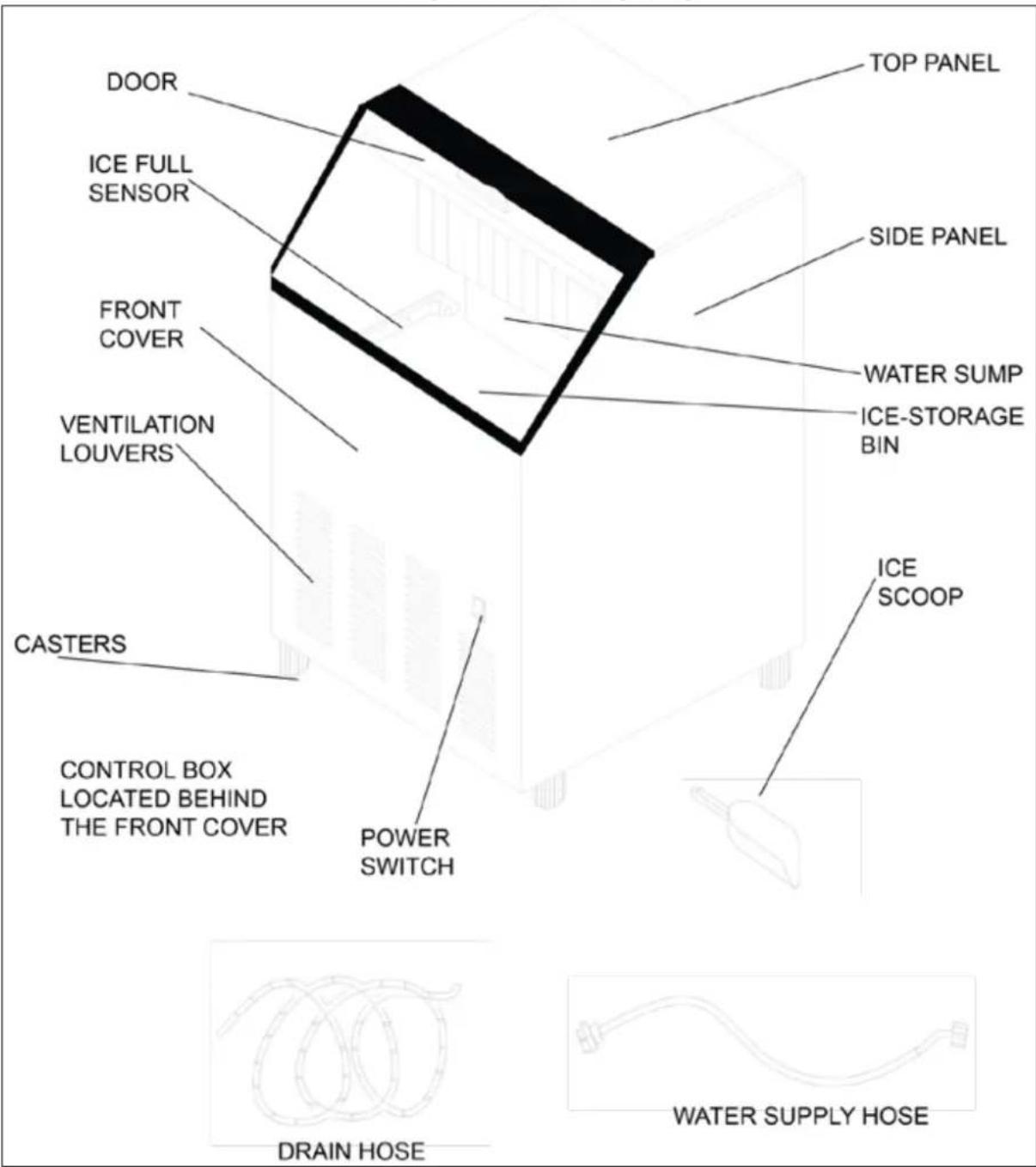
IMPORTANT SAFETY INSTRUCTIONS
| ~ WARNING~ | To reduce the risk of fire, electrical shock, or injury when using your icemaker, follow these basic precautions: |
This Unit Is For Indoor Use Only - SAVE THESE INSTRUCTIONS -
- Read all instructions before using the icemaker.
- DANGER or WARNING: Risk of child entrapment. Child entrapment and suffocation are not problems of the past. Junked or abandoned icemakers are still dangerous . . . even if they will “just sit in the garage a few days”.
- Before you throw away your old icemaker: take off the doors. Leave the shelves in place so that children may not easily climb inside.
- Never allow children to operate, play with, or crawl inside the icemaker.
- Never clean icemaker parts with flammable fluids. The fumes can create a fire hazard or explosion.
- Do not store or use gasoline or any other flammable vapors and liquids in the vicinity of this or any other icemaker. The fumes can create a fire hazard or explosion.
INSTALLATION INSTRUCTIONS
Before Using Your Icemaker
- Remove the exterior and interior packing.
- Check to be sure you have all of the following parts:
- 1 Ice Scoop
- 1 Water Supply Hose
- 1 Water Drain Hose
-
Instruction Manual
-
Before connecting the unit to the power source, let it stand upright for approximately 2 hours. This will reduce the possibility of a malfunction in the cooling system from handling during transportation.
- Clean the interior surface with lukewarm water using a soft cloth.

WARNING

EXCESSIVE WEIGHT HAZARD
USE TWO OR MORE PEOPLE TO MOVE AND INSTALL THE ICEMAKER
FAILURE TO DO SO CAN RESULT IN BACK OR OTHER INJURY
Installation of Your Icemaker
- THIS ICEMAKER SHOULD BE PROPERLY INSTALLED BY A QUALIFIED PROFESSIONAL This icemaker MUST be installed with electrical and water connections in accordance with all state and local codes.
- Place your icemaker on a floor that is strong enough to support the icemaker when it is fully loaded. To level your icemaker, adjust the legs at the front of the icemaker.
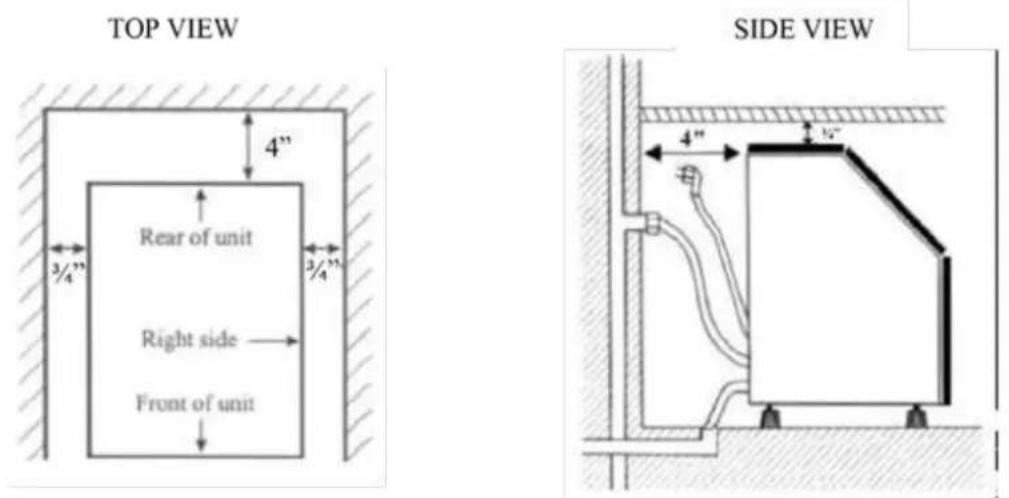
- Allow a minimum of 34 inch of space between the top and sides of the icemaker and a minimum of 4 inches at the back, which allows the proper air circulation to cool the compressor. Ensure the front of the unit is completely unobstructed.
- Locate the icemaker away from direct sunlight and sources of heat (stove, heater, radiator, etc.). Direct sunlight may affect the acrylic coating and heat sources may increase electrical consumption. Extreme cold ambient temperatures may also cause the icemaker not to perform properly.
- Choose a well ventilated area with temperatures above 55°F (13°C) and below 90°F (32°C). This unit MUST be installed in an area protected from the elements.
- Avoid locating the icemaker in moist areas. Too much moisture in the air will cause frost to form quickly on the evaporator requiring more frequent defrosting of the icemaker.
INSTALLATION CLEARANCES:
- The installation of this icemaker requires a cold water supply inlet of 14 (6.35mm) soft copper tubing with a shut off valve.
- The icemaker requires a continuous water supply with a minimum pressure of 14.5 psig and a static pressure not to exceed 80 psig. The temperature of the water supply into the icemaker should be between 41^ (5°C) and 77^ (25°C) for proper operation.
- It is strongly recommended that a water filter be used. A filter, if it is of the proper type, can remove taste and odors as well as particles. Some water is very hard, and softened water may result in white, mushy cubes that stick together. De-Ionized water is NOT recommended.
| Warning | Operation of the icemaker for extended periods outside of the normal temperature ranges as described above may affect product performance. |
Leveling the ice maker
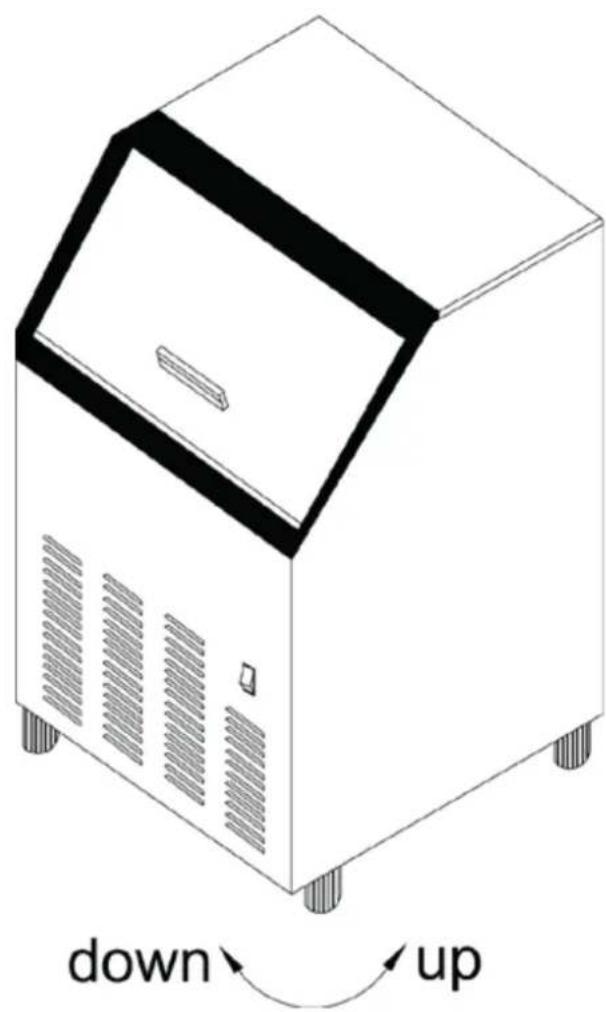
It is important for the icemaker to be leveled in order to work properly. It can be raised or lowered by rotating the plastic sheaths around each of the four casters on the bottom of the machine .If you find that the surface is not level, rotate the casters until the ice maker becomes level .You may need to make several adjustments to level it. We recommend using a carpenter's level to check the machine.
You will find that the casters make it easy for one person to move the machine. This is useful for cleaning and sanitizing the surface on which the icemaker is installed because it allows you to move the unit and have easy access to the surface to be cleaned.
IMPORTANT: Once you are ready to install it in a cabinet or directly on the floor, you must adjust the feet to level the ice maker. If the floor is level, just revolve the two front casters to touch the floor.
Electrical Connection
\~ Warning\~
Improper use of the grounded plug can result in the risk of electrical shock. If the power cord is damaged, have it replaced by an authorized Avanti Products service center.
This appliance should be properly grounded for your safety. The power cord of this appliance is equipped with a three-prong plug which mates with standard three prong wall outlets to minimize the possibility of electrical shock.
Do not under any circumstances cut or remove the third ground prong from the power cord supplied.
This appliance requires a standard 115Volts\~/60Hz electrical outlet with three-prong ground.
The cord should be secured behind the appliance and not left exposed or dangling to prevent accidental injury.
Never unplug the appliance by pulling the power cord. Always grip the plug firmly and pull straight out from the receptacle.
Do not use an extension cord with this appliance. If the power cord is too short, have a qualified electrician or service technician install an outlet near the appliance.
ÿ EXTENSION CORD
Because of potential safety hazards under certain conditions, it is strongly recommended that you do not use an extension cord with this unit. However, if you must use an extension cord it is absolutely necessary that it be a UL/CUL-Listed, 3-wire grounding type appliance extension cord having a grounding type plug and outlet and that the electrical rating of the cord be 115 volts and at least 10 amperes.
ÿ SURGE PROTECTOR
Most electrical appliances use a series of electric control boards to operate. These boards are very susceptible to power surges and could be damaged or destroyed.
If the appliance is going to be used in an area or if your city / country is prone to power surges / outages; it is suggested that you use a power surge protector for all electrical devices / appliances you use. The surge protector that you select must have a surge block high enough to protect the appliance it is connected to. If you have any questions regarding the type and size of surge protector needed contact a licensed electrician in your area.
Damages due to power surges are not considered a manufacturer covered defect and will void your product warranty.
Water Supply
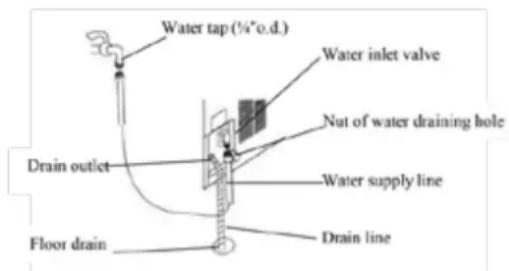
The water supply should be ready at the point of installation. The water supply pressure should be a minimum of 15 psig with a static pressure not more than 80 psig. (A wall outlet directly behind the ice machine will make installation easier.)
IMPORTANT:
- All installations must be in accordance with local plumbing code requirements. Professional installation is recommended.
- Make certain the hoses are not pinched or kinked or damaged during installation.
- Check for leaks after connection.
Tools required: 12 -in. open-end wrench, Phillips screwdriver
Connecting the water line:
- Turn off main water supply. Turn on the nearest faucet long enough to clear line of water.
- Find a 12 -in. to 34 -in. vertical cold water pipe near the installation location. The distance should be less than 6 feet. The water supply hose provided with the ice maker is about 6 feet long.
- A shut-off valve must be installed to the main water supply. If the water pipe has a plain piece of copper tubing, attach a 14 " O.D. compression union to the tubing and remove the nut.
- Connect the nut of the water supply hose to the tap, and connect the other end with the water
inlet. Tighten firmly by hand, then one-half turn with wrench.
- Turn on main water supply and tap. Check for water supply connection leaks. Tighten every connection (including connection at the water inlet).
IMPORTANT: When you connect the water supply hose and the drain hose, pay attention to the indications of "Water inlet" and "Drain outlet" on the machine.
Drain
You must connect the drain line before using the ice maker. Follow the steps outlined below. Connecting the drain line:
NOTE: A gravity drain system is used in this type of icemaker. If there is a drain line near the ice maker, the best choice is to drain water to the drain line through the drain water hose provided with ice maker.
-
Locate the floor drain near the ice maker. The distance should be less than 5 feet since the length of the long drain water hose provided with the ice maker is about 5 feet.
-
Find the drain outlet on the back of ice maker. Connect the drain outlet to the water draining hose, and insert the other end of the hose into the drain line.
NOTE: Never allow the drain hose to hang or loop higher than the floor of the ice storage bin.
-
All horizontal runs of drain lines must have a fall of 14 " per foot. An air gap will likely be required between the ice maker drain tube and the drain/waste receptacle. A standpipe with a trap below it would be acceptable for the drain/waste receptacle. A floor drain is also acceptable.
-
Pour 1 gallon of water into the ice storage bin to check for leaks in the drainage system. Tighten any connections that leak.
IMPORTANT: Infrequent drainage will cause a high rate of melting in the ice storage bin.
Description of LEDs and buttons:
1. Bin Full (Red) LED: Bin full indicator light
When this is lit, the ice storage bin is full of ice or there is something blocking the bin-full probe. The unit will stop working. When ice cubes are removed from the ice storage bin, freeing the bin-full probe, the red LED will remain flashing for 3 minutes, then the unit will restart and return to the ice making mode.
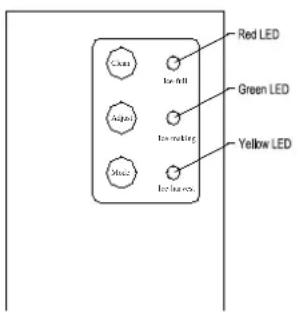
2. Ice Making(Green) LED: Ice making indicator light
When this is lit, the unit is working in the ice making mode controlled by a temperature probe on the evaporator. When the green LED flashes, the unit is working in the ice making mode controlled by a fixed timer.
3. Ice Harvest (Yellow) LED: Ice harvest indicator light
When this is lit, the unit is working in the ice harvest mode controlled by the ice-full probe.
4. Mode button: Mainly for service. When this is pressed, the ice making mode changes to the ice harvest mode or vice versa. The mode can be judged from the status of the green and yellow LEDs.
5. Adjust button: Mainly for service. When it is pressed over 3 seconds, the unit will enter the Ice Size Adjustment mode. The mode can be judged from the status of the yellow LED.
6. Clean button: When this button is press, the unit enters the "CLEANING" mode. The green and yellow LED's flash together. Top stop the cleaning mode simple
Ice Size Adjustment Guide:
-
Press and hold the "Adjust" button for at least 3 seconds. The unit will enter the Ice Size Adjustment mode. The "HARVEST" LED (yellow) will be blinking continuously during the ice size adjustment. Release the button when the LED blinks continuously to adjust the ice size.
-
While in the Ice Size Adjustment mode, press the "Clean" (-) button or the "Mode" (+) button for the desired ice size.
Smaller ice setting:
By pressing the "Clean" (-) button, you can decrease the size of the ice cubes. The "ICE" LED (green) will flash as you lower the ice size and will finally be blinking at the setting of smallest ice size.
Larger ice setting:
By pressing the "Mode" (+) button, you can increase the size of the ice cubes. The "BIN FULL" LED (red) will flash as the larger size is set and will blink when the setting of largest ice size has been reached.
After 10 seconds without any operation, the unit will return to the previous mode.
NOTE:
- If during the ice size adjustment mode the "BIN FULL", "ICE" and "HARVEST" LEDS blink all at
once, this indicates that the unit is in the regular (middle) setting of the ice size.
- When the machine is in the cleaning stage or ice full stage, the ice size adjustment mode cannot be accessed
Operating method
- Turn on the water tap, let the water trough fill, then press the ON/OFF button on the front panel. The ice maker will start working automatically.
| Ice Making Stage | Ice-Harvest Stage |
- After approximately 3 minutes, the machine will automatically go to the ice-making stage, and the sound of water flowing will be heard.
- When the batch of ice has been fully formed, ice will automatically be harvested to the ice storage bin.
- When the ice storage bin is full, the machine stops making ice automatically.
- The unit will start making ice again after the ice cubes are removed.
IMPORTANT:
- Although the unit has been tested and cleaned at the factory, due to long-term transit and storage, the first batch of cubes must be discarded.
• Never turn the water supply tap off when the ice maker is working.
• Never touch the evaporator when unit is running! - Except to take ice from the unit, keep the door closed to reduce melting and insure proper ice formation.
How the machine makes ice
Set the ON/OFF button to the ON position.
The machine will automatically go to the ice making stage.
There are two distinct cycles: ice making and harvest.
The freeze cycle happens when water flows to the evaporator surface. The harvest cycle is when the ice is released and water enters the machine. A complete cycle takes about 20 minutes, but it depends on temperature and operating conditions.
Freeze: During the freeze cycle the compressor is pumping refrigerant, the fan motor is blowing air, and the water pump is circulating water. When the batch of ice has been fully formed, the ice maker stops the freeze cycle and the harvest cycle begins.
Harvest: During the harvest cycle the compressor is still operating, but the water pump has stopped. The hot gas valve opens, diverting hot refrigerant gas into the evaporator. The hot refrigerant gas warms the evaporator, causing the cubes to slide as a unit off the evaporator and into the storage bin. The freeze cycle will restart when all the cubes have been harvested.
How the machine uses the water
The ice maker begins with a fixed charge of water that is contained in the water trough. As the water flows on the freezing evaporator surface, the portion of water that does not contain mineral impurities freezes and sticks to the ice cube molds. The water containing impurities falls back into the water trough. During the ice making process, fresh water enters into the water trough continuously as the water in the trough freezes continuously in the evaporator.
Normal sounds
Your new ice maker may make sounds that are not familiar to you. Most of the new sounds are normal. Hard surfaces like the floor and walls can make the sounds louder than they actually are. The following list describes the sounds that might be new to you and what may be causing them.
- Rattling noises may come from the flow of the refrigerant or the water line. Items stored on top of the ice maker can also make noises.
- The high efficiency compressor may make a pulsating or high-pitched sound.
• Water running may make a splashing sound. - You may hear air being forced over the condenser by the condenser fan.
- During the harvest cycle, you may hear the sound of ice cubes falling into the ice storage bin.
CARE AND MAINTENANCE
Preparing the ice maker for long storage
If the ice maker will not be used for a long time, or is to be moved to another place, it will be necessary to drain the system of water.
- Shut off the water supply at the main water source.
- Disconnect the water supply line from the water inlet.
- Shut off the electric supply at the main electrical power source.
- Take out the ice storage bin to remove any remaining ice and water. Dry the bin.
- Pull off the drainage tube of the water trough to drain off all water.
- Leave the door open to allow for circulation and to prevent mold and mildew.
- Leave water supply line and power cord disconnected until ready to reuse.
IMPORTANT:
- Do not touch the power plug when your hands are wet.
- Never unplug the unit by pulling on the cord. Grasp the plug and pull out firmly.
Cleaning The Icemaker
CAUTION
Periodic cleaning and proper maintenance will ensure efficiency, top performance, and long life. The maintenance intervals listed are based on normal conditions. You may want to shorten the intervals if you have pets, or there are other special considerations.
Important Note:
Never keep anything in the ice storage bin that is not ice: objects like wine and beer bottles are not only unsanitary, but the labels may slip off and plug up the drain.
! WARNING
Before proceeding with cleaning and maintenance operations, make sure the power line of the unit is disconnected and the water line is shut off.
Exterior cleaning
The door and cabinet may be cleaned with a mild detergent and warm water solution such as 1 oz. of dishwashing liquid mixed with 2 gallons of warm water. Do not use solvent-based or abrasive cleaners. Use a soft sponge and rinse with clean water. Wipe with a soft clean towel to prevent water spotting.
If the door panel is stainless steel, it may discolor when exposed to chlorine gas and moisture. Clean stainless steel with a mild detergent and warm water solution and a damp cloth. Never use an abrasive cleaning agent.
Interior Cleaning
The ice storage bin should be sanitized occasionally. Clean the bin before the ice maker is used for the first time and reused after stopping for an extended period of time. It is usually convenient to sanitize the bin after the ice making system has been cleaned, and the storage bin is empty.
- Disconnect power to the unit.
- Open the door and with a clean cloth, wipe down the interior with a sanitizing solution made of 1 ounce (29.5ml) of household bleach or chlorine and 2 gallons (7.5L) of hot water 95°F (35 °C) to 115 °F (46 °C).
- Rinse thoroughly with clear water. The waste water will be drained off through the drainpipe.
- Reconnect power to the unit.
The ice scoop should be washed regularly. Wash it just like any other food container.
! WARNING
DO NOT use solvent cleaning agents or abrasives on the interior. These cleaners may transmit taste to the ice cubes, or damage or discolor the interior.
Ice Making System Cleaning
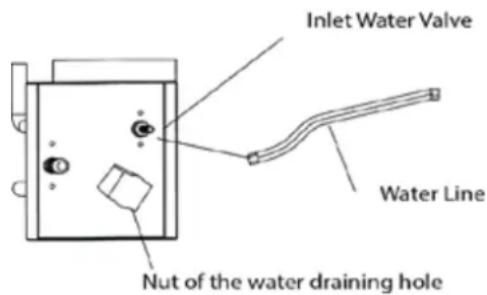
Minerals that are removed from water during the freezing cycle will eventually form a hard scaly deposit in the water system. Cleaning the system regularly helps remove the mineral scale buildup. How often you need to clean the system depends upon how hard your water is. With hard water of 4 to 5 grains/liter, you may need to clean the system as often as every 6 months.
-
Turn off power to the ice maker. Keep the ice nd drainpipe.
-
Open the door and scoop out all of the ice cubes. Either discard them or save them in an ice chest or cooler.
- Remove the screws in the front cover, push forward to remove the front cover. Locate the control box.
Notice: Do not use too much force, as the wire leads connected to the power switch can be inadvertently disconnected. Use care in the area of the control box. Do not expose it to moisture.
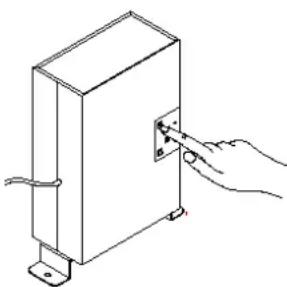
- Turn on the power to the ice maker. Pour 8 ounces of Nickel-Safe Ice Maker Cleaning Solution into the water bin. Add 8 ounces of tap water. After about 5 minutes, press down the "clean" button on the Control Box. (See figure below and following section.) The machine will run the Automatic Clean Mode.
Allow 30 minutes for proper cleaning. After cleaning, shut off the power switch, and unscrew the nut of the water-draining hole. Drain off the waste water to some container, and then screw the nut on tightly when the waste water is fully drained off.
- The dirty water must be drained out completely. Perform steps 2 and 3 in the Interior Cleaning section.
- Repeat steps 4 and 6 above 3 times (without Ice Maker Cleaning Solution) to rinse the ice making system completely. Note: The use of the Ice Maker Cleaner Solution in the water bin during the rinse is not needed.
- Reassemble the front cover.
- Turn on the power again. The machine will return to the regular ice making mode. Discard the first batch of ice.
natural_image
Line drawing of a hand inserting a small component into a rectangular box (no text or symbols)WARNING
Sanitizing the Ice-Making System
- Turn off power to the ice maker.
- Remove all ice cubes from the storage bin.
- Prepare a sanitizing solution made of 1 ounce of household bleach and 2 gallons of hot water 95°F (35°C) to 115°F (46 °C). Remove the flake covers and slide away from the water bin and wipe the entire bin inside and out, covering the entire surface of the walls.
- Fill a spray bottle with the sanitizing solution and spray all corners and edges, making sure to cover all surfaces with the solution. Soak the flake cover and slide away in the solution and put back in place after drying.
- Keep the ice maker connected to the water supply. Turn on the power to the ice maker. Within 5 minutes, press the CLEAN button. The machine will run the Automatic Clean mode.
- Allow 30 minutes for proper cleaning. After cleaning, shut off the power switch, and unscrew the nut of the water-draining hole. Drain off the waste water to some container, and then screw the nut on tightly when the waste water is fully drained off.
- The dirty water must be drained out completely. Perform steps 2 and 3 in the Interior Cleaning section.
- Repeat steps 5 to 7 above three times with fresh water to rinse the ice-making system completely.
- Reassemble the front cover.
- Turn on the power again. The machine will return to the regular ice making mode. Discard the first batch of ice.
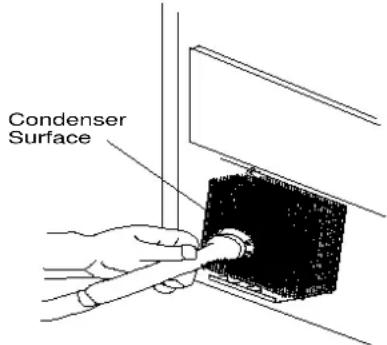
Condenser cleaning
A dirty or clogged condenser prevents proper airflow, reduces ice making capacity, and causes higher than recommended operating temperatures that may lead to component failure. Have the condenser cleaned at least once every six months.
- Unplug the ice maker or disconnect power.
- Gently pull off the lower front louver.
- Remove dirt and lint from the condenser and the unit compartment with the brush attachment of a vacuum cleaner.
- Reassemble the lower front louver.
- Plug in the ice maker or reconnect power.
Power Failure
Most power failures are corrected within a few hours and should not affect the temperature of your icemaker if you minimize the number of times the door is opened. If the power is going to be off for a longer period of time, you need to take the proper steps to protect your food.
Vacation Time
Short vacations: Leave the unit operating during vacations of less than three weeks.
Long vacations: If the icemaker will not be used for several months, remove all food and unplug the power cord. Clean and dry the interior thoroughly. To prevent odor and mold growth, leave the door open slightly: blocking it open if necessary
Moving Your Icemaker
- Remove all the food.
- Securely tape down all loose items inside your unit.
- Turn the leveling screws up to the base to avoid damage.
- Tape the doors shut.
- Be sure the unit stays in the upright position during transportation.
Energy Saving Tips
- The unit should be located in the coolest area of the room, away from heat producing icemakers or heating ducts, and out of direct sunlight.
- Let hot foods cool to room temperature before placing them in the unit. Overloading the unit forces the compressor to run longer. Foods that freeze too slowly may lose quality, or spoil.
- Be sure to wrap foods properly, and wipe containers dry before placing them in the unit. This cuts down on frost build-up inside the freezer.
- Organize and label food to reduce door openings and extended searches. Remove as many items as needed at one time, and close the door as soon as possible.
TROUBLESHOOTING
Before Calling for Service
If the unit appears to be malfunctioning, read through the OPERATION section of this manual first. If the problem persists, check the Troubleshooting Guide on the following pages. Some of the problems mentioned in the Guide can be solved easily without a service call.
| Problem | Possible Cause | Probable Correction |
| The machine doesn't operate. | The ice maker is unplugged. | Plug the ice maker in. |
| The fuse is blown. | Replace fuse. If it happens again, call for service to check for a short circuit in the unit. | |
| The ice maker power button is set at OFF. | Switch the ice maker power button to ON. | |
| The ice storage bin is full of ice. | Remove some ice cubes. Be sure the ice-full probe is free of ice. | |
| The water doesn't feed in after the machine starts. | The water supply tap is turned off. | Turn on the water supply tap. |
| The water supply pipe is not properly connected. | Reconnect the water supply pipe. | |
| Machine makes ice, but bin does not fill up with ice. | The condenser may be dirty. | Clean the condenser. |
| The air flow to the ice maker may be obstructed. | Check the installation. | |
| The ambient temperature and water temperature are high, or unit is near some heat source. | Check the installation. | |
| Water is leaking out of the unit. | Some water falls to the floor when you open the door to remove ice from storage bin. | Normal condensation on the door or some water together with ice. Take care when you take out ice. |
| Water supply connection is leaking. | Tighten fitting. See Connecting the water line. | |
| Drain pipe higher than drain outlet. | Lower drain pipe. | |
| Cubes are partially formed or are white on the bottom. | Not enough water in the water trough. | Check if the water supply pressure is below 15 psig. |
| Check water supply or filter may be restricted. | ||
| Check for a water leak at the water trough. | ||
| Noise during operation | The feet are not leveled and locked. | Level and lock the feet. See Leveling the Ice Maker. |
| Certain sounds are normal. | See Normal Sounds. | |
| The ice maker stops suddenly while making ice. | The electricity is off. | Reconnect the power supply line. |
| The room temperature is out of the stated range. | Cut off the electricity and leave the ice maker disconnected until the temperature returns to within the stated range. | |
| The ice storage bin is full of ice. | Remove some ice cubes; make sure the ice-full probe is free of ice. | |
| The body of the ice maker is electrified | The ground line isn't in the socket. | Use a socket meeting the grounding requirements. |
| Scaling occurs frequently inside the machine. | The hardness level of the water is too high. | Install a water-softening device in front of the water inlet. |
| Water leaks from the ice storage bin | The drainhole below the ice storage bin is blocked. | Remove the ice storage bin and clean the drainhole. |
| The drain hose is kinked or improperly placed higher than the floor of the ice storage bin. | Check the drain hose to be sure water can be drained out unhindered. | |
| SERVICE FOR YOUR APPLIANCE | ||
| We are proud of our customer service organization and the network of professional service technicians that provide service on your Avanti appliances. With the purchase of your Avanti appliance, you can have the confidence that if you ever need additional information or assistance the Avanti Products Customer Service team will be here for you. Just call us toll-free. | ||
| AVANTI PRODUCTS CUSTOMER SERVICES | ||
| Product Information800-323 5029 | Whatever your questions are about our products, help is available. | |
| Part Orders800-220 5570 | You may order parts and accessories that will be delivered directly to your home.You may order these items by personal check, money order, Master Card, or Visa. | |
| In-Home Repair Service800-220 5570 | An Avanti Products authorized service center will provide expert repair service, scheduled at a time that is convenient for you. Our trained servicers know your appliance inside and out. | |
WIRING DIAGRAM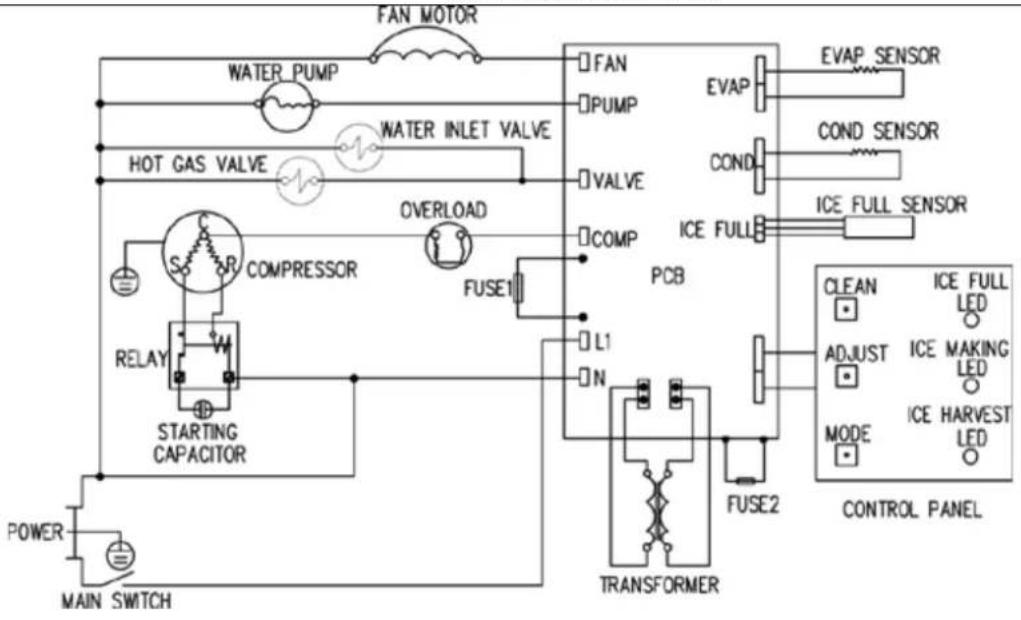 | ||
| YOUR AVANTI PRODUCTSWARRANTY | Staple your sales receipt here. Proof of original purchase date is needed to obtain service under warranty. | |
| WHAT IS COVERED – LIMITED ONE-YEAR WARRANTYAvanti Products warrants that the product is free from defects in materials and/or workmanship for a period of twelve (12) months from the date of purchase by the original owner. The foregoing timeline begins to run upon the date of purchase, and shall not be stalled, tolled, extended, or suspended for any reason whatsoever unless described in detail in the warranty document. For one year from the date of purchase by the original owner, Avanti products will, at its option, repair or replace any part of the product which proves to be defective in material or workmanship under normal use. Avanti Products will provide you with a reasonably similar product that is either new or factory refurbished. During this period Avanti Products will provide all parts and labor necessary to correct such defects free of charge, so long as the product has been installed and operated in accordance with the written instructions in this manual. In rental or commercial use, the warranty period is 90 days. All Avanti appliances of 4.4 cubic feet capacity or less must be brought/sent to the appliance service center for repair. | ||
| LIMITED SECOND THROUGH FIFTH YEAR WARRANTYFor the second through the fifth year from the date of original purchase, Avanti Products will provide a replacement compressor free of charge due to a failure. You are responsible for the service labor and freight charges. In rental or commercial use, the limited compressor warranty is one year and nine months. Costs involved to move the product to the service center and back to the user's home, as maybe required, are the user's responsibility. | ||
| WARRANTY EXCLUSIONS / WHAT IS NOT COVERED:The warranty coverage described herein excludes all defects or damage that are not the direct fault of Avanti Products, including without limitation, one or more of the following: | ||
| A failure to comply with any applicable state, local, city, or county electrical, plumbing and/or building codes, regulations, or laws, including failure to install the product in strict conformity with local fire and building codes and regulations.Any external, elemental and/or environmental forces and factors, including without limitation, rain, wind, sand, floods, fires, mud slides, freezing temperatures, excessive moisture or extended exposure to humidity, lightning, power surges, structural failures surrounding the appliance, and acts of God. | ||
| Content losses of food or other content due to spoilage.Incidental or consequential damagesParts and labor costs for the following will not be considered as warranty:Evaporator doors, door springs, and/or frames.Inner door panels, door shelves, door rails, and/or door supports.Light bulbs and/or plastic housing.Plastic cabinet liners.Punctured evaporator that voids the warranty on the complete sealed system. | Shipping and handling costs associated with the replacement of the unit.Repairs performed by unauthorized servicers.Service calls that are related to external problems, such as abuse, misuse, inadequate electrical power, accidents, fire, floods, or any other acts of God.Failure of the product if it is used for other than it intended purpose.The warranty does not apply outside the Continental USA.Surcharges including but not limited to, any after hour, weekend, or holiday service calls, tolls, ferry trip charges, or mileage expense for service calls to remote areas. | |
| In no event shall Avanti Products have any liability or responsibility whatsoever for damage to surrounding property, including cabinetry, floors, ceilings, and other structures and/or objects around the product. Also excluded from this warranty are scratches, nicks, minor dents, and other cosmetic damages on external surfaces and exposed parts; Products on which the serial numbers have been altered, defaced or removed; service visits for customer education, or visits where there is nothing wrong with the product; correction of installation problems (you are solely responsible for any structure and setting for the product, including all electrical, plumbing and/or other connecting facilities, for proper foundation/flooring, and for any alterations including without limitation cabinetry, walls, floors, shelving etc., as well as the resetting of breakers or fuses. | ||
| OUT OF WARRANTY PRODUCTAvanti Products is under no obligation, at law or otherwise, to provide you with any concessions, including repairs, pro-rates, or product replacement, once this warranty has expired.WARRANTY – REFRIGERATION - COMPRESSORINSTRUCCIONES DE SEGURIDAD | ||
Drainer
DO NOT use solvent cleaning agents or abrasives on the interior. These cleaners may transmit taste to the ice cubes, or damage or discolor the interior.
natural_image
Line drawing of a hand inserting a small component into a rectangular block (no text or symbols)Panne électrique
Thank you for purchasing this fine Avanti product. Please fill out this form and return it to the following address within 100 days from the date of purchase and receive these important benefits:
Avanti Products, LLC. P.O.Box 520604 – Miami, Florida 33152
ÿ Protect your product:
We will keep the model number and date of purchase of your new Avanti product on file to help you refer to this information in the event of an insurance claim such as fire or theft.
ÿ Promote better products:
We value your input. Your responses will help us develop products designed to best meet your future needs.
-(detach here)-
Avanti Registration Card
| Name | Model # | Serial # | ||
| Address | Date Purchased | Store / Dealer Name | ||
| City | State | Zip | E-mail Address | |
| Area Code | Phone Number | Occupation | ||
| Did You Purchase An Additional Warranty | As your Primary Residence, Do You: | |||
| £ Extended£ None | £ Own | £ Rent | ||
| Your Age: | ||||
| Reason for Choosing This Avanti Product:Please indicate the most important factorsThat influenced your decision to purchase this product: | £ under 18 | £ 18-25 £ 26-30 | ||
| £ 31-35 | £ 36-50 £ over 50 | |||
| Marital Status: | ||||
| £ Married | £ Single | |||
| £ Price£ Product Features£ Avanti Reputation£ Product Quality£ Salesperson Recommendation£ Friend / Relative Recommendation£ Warranty£ Other: | Is This Product Used In The:£ Home £ Business | |||
| How Did You Learn About This Product:£ Advertising£ In-Store Demo£ Personal Demo | ||||
Comments:
| CIM102U3S 08152019 | PRINTED IN CHINA |
- APPLIANCE SAFETY
- Your safety and the safety of others are very important.
- IMPORTANT SAFEGUARDS
- DANGER
- WARNING
- Electrical Connection
- \~ Warning\~
- ÿ EXTENSION CORD
- ÿ SURGE PROTECTOR
- HELP US HELP YOU...
- Read this guide carefully.
- Avanti Customer Service 800-220-5570
- CAUTION:
- Write down the model and serial numbers.
- If you need service
- IMPORTANT SAFETY INSTRUCTIONS
- This Unit Is For Indoor Use Only - SAVE THESE INSTRUCTIONS -
- INSTALLATION INSTRUCTIONS
- Before Using Your Icemaker
- Installation of Your Icemaker
- Leveling the ice maker
- Water Supply
- IMPORTANT:
- Drain
- Description of LEDs and buttons:
- Bin Full (Red) LED: Bin full indicator light
- Ice Making(Green) LED: Ice making indicator light
- Ice Harvest (Yellow) LED: Ice harvest indicator light
- Mode button: Mainly for service. When this is pressed, the ice making mode changes to the ice harvest mode or vice versa. The mode can be judged from the status of the green and yellow LEDs.
- Adjust button: Mainly for service. When it is pressed over 3 seconds, the unit will enter the Ice Size Adjustment mode. The mode can be judged from the status of the yellow LED.
- Clean button: When this button is press, the unit enters the "CLEANING" mode. The green and yellow LED's flash together. Top stop the cleaning mode simple
- Ice Size Adjustment Guide:
- Smaller ice setting:
- Larger ice setting:
- NOTE:
- Operating method
- How the machine makes ice
- Set the ON/OFF button to the ON position.
- The machine will automatically go to the ice making stage.
- There are two distinct cycles: ice making and harvest.
- How the machine uses the water
- Normal sounds
- CARE AND MAINTENANCE
- Preparing the ice maker for long storage
- Cleaning The Icemaker
- CAUTION
- Important Note:
- ! WARNING
- Exterior cleaning
- Interior Cleaning
- Ice Making System Cleaning
- Sanitizing the Ice-Making System
- Condenser cleaning
- Power Failure
- Vacation Time
- Moving Your Icemaker
- Energy Saving Tips
- TROUBLESHOOTING
- Before Calling for Service
- Drainer
- Panne électrique
- Avanti Products, LLC. P.O.Box 520604 – Miami, Florida 33152
- ÿ Protect your product:
- ÿ Promote better products:
Brand : Avanti
Model : CIM102U3S
Category : Ice machine