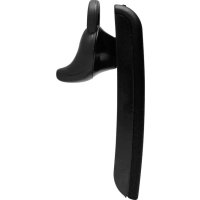
300 - Earplug SoundID - Free user manual and instructions
Find the device manual for free 300 SoundID in PDF.


| Product Type | Bluetooth Earplug |
| Weight | 8 g (0.28 oz) |
| Talk time | Up to 6 hours |
| Standby time | Up to 9 days (220 hours) |
| Charging time | Approximately 2.5 hours (first charge: 4 hours minimum) |
| Battery type | Advanced lithium polymer, no memory effect |
| Bluetooth technology | Bluetooth 2.1 + EDR with eSCO |
| Range | 9.14 m (30 feet) |
| Noise reduction | NoiseNavigationMC (dual microphones + DSP algorithms) |
| Sound amplification modes | 3 PersonalSoundMC modes (normal, moderate, strong) + 1 mode without noise reduction |
| Microphone | Dual microphones |
| Ear tips | 3 sizes (large, medium, small) + ear cushion option + possibility of custom molded tips |
| Charging connector | Micro USB (compatible with phone chargers) |
| Operating temperature | Not specified (avoid direct sunlight, radiator exposure) |
| Compatibility | Bluetooth mobile phones (hands-free profile) |
| Warranty | 1 year (defects in materials and workmanship) |
Frequently Asked Questions - 300 SoundID
User questions about 300 SoundID
0 question about this device. Answer the ones you know or ask your own.
Ask a new question about this device
Download the instructions for your Earplug in PDF format for free! Find your manual 300 - SoundID and take your electronic device back in hand. On this page are published all the documents necessary for the use of your device. 300 by SoundID.
USER MANUAL 300 SoundID
Quick Start Guide and User Manual
Please take a few moments to read this user manual. It contains instructions for operating your Sound ID 300, along with other important information.
For customer support please call 1-866-703-7480
To Achieve the Best Performance with Your Sound ID 300 Headset:
- Place the phone in a belt holder or maintain a line-of-sight. Holding the phone in your hand reduces the wireless signals.
- Having the mobile phone on the opposite side as your headset or behind you will reduce wireless signals. Keep the mobile phone and headset on the same side, preferably line-of-sight. If you experience intermittent static, reposition the phone to find the best reception.
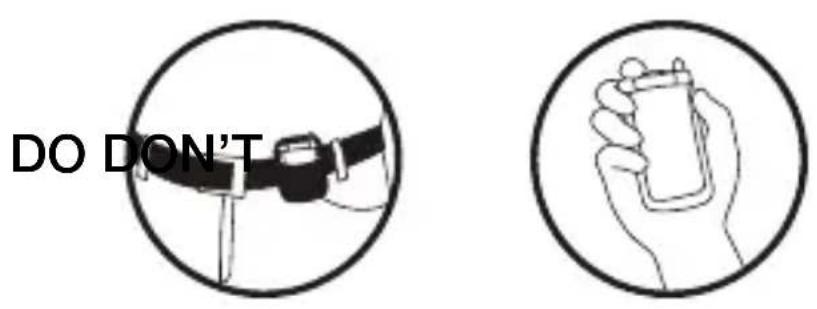
- As you increase the separation between your phone and your headset the wireless signal strength will be reduced and will produce static and/or disconnect. Reduce the distance.
- If you put your phone in a purse or briefcase, keep the purse or briefcase on the same side as the headset.
Personal Sound Update
Sound ID has added a fourth Personal Sound mode that turns the noise reduction off. To turn noise reduction off, hold the Volume/Personal Sound button down for two seconds to cycle through the modes until you hear four beeps. The Personal Sound settings are as follows:
One beep: Normal listening enhancement.
Two beeps: Moderate listening enhancement.
Three beeps: Strong listening enhancement.
Four beeps: Noise reduction off.
Welcome.
Thank you for purchasing the Sound ID 300 Headset.
Important Notices
The volume control should be set at a reasonable sound level. Prolonged exposure to excessive volume over time can lead to hearing impairment. If you suspect hearing problems, consult with your physician or an audiologist.
The Sound ID 300 enables hands-free operation of mobile phones. Please obey mobile phone laws while driving and pay full attention to the operation of the vehicle.
Register Your Sound ID 300 Online
Visit www.soundid.com to register your product online so we can provide you with the best possible service and support.
Questions & Support
Please contact Sound ID Customer Support at CS@soundid.com
For a Spanish version of this manual please visit www.soundid.com.
Quick Start Guide
IMPORTANT INFORMATION PRIOR TO USE:
It is important to charge your Sound ID 300 battery for a minimum of four hours before you use the headset for the first time. Subsequent charges take up to 2.5 hours. When the headset is charging, the light is red. When fully charged, it is green.
About Your Sound ID 300 Headset
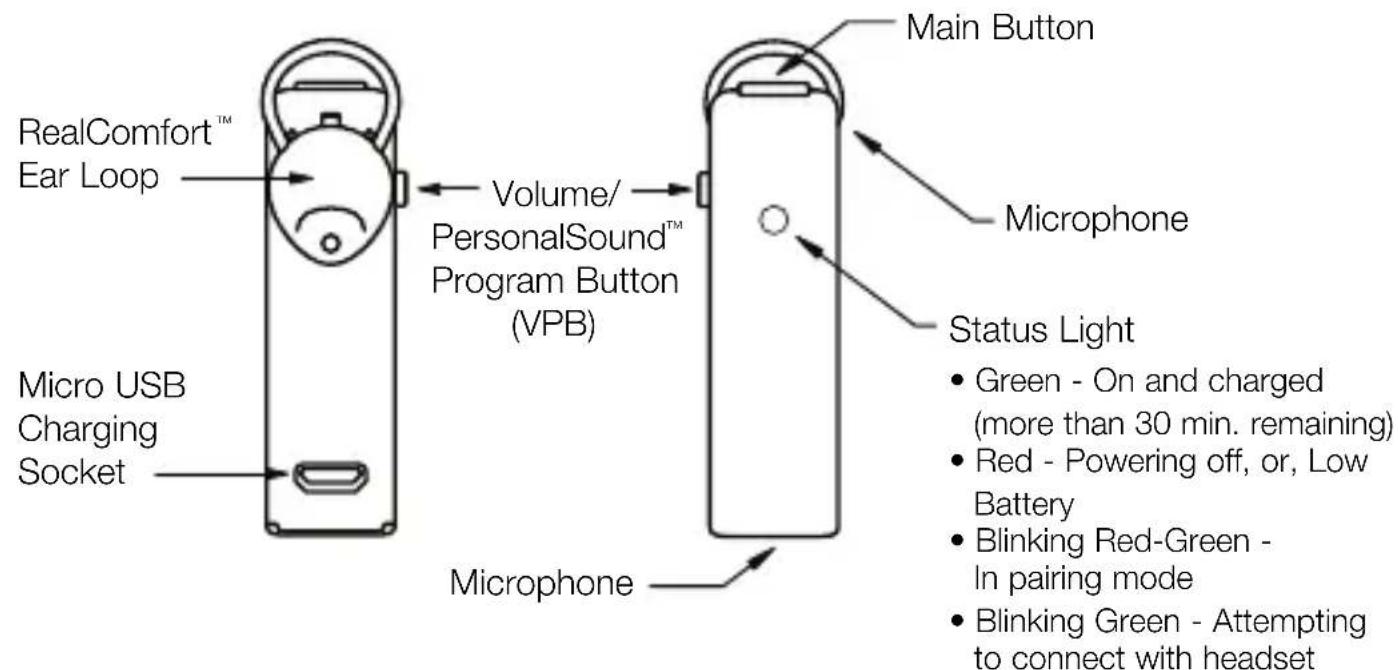
BACK VIEW FRONT VIEW
How It Works
To turn it ON: Press and hold the Main Button for approximately three seconds. The status light will flash green when the headset is on.
To change the volume: Most handsets will allow you to change the headset volume using the volume control on the phone. In this case the Sound ID 300 remembers the new volume level.
The volume can also be changed on the headset. The headset has four volume settings which can by cycled through by pressing the Volume/PersonalSound™ Program Button (VPB) briefly for each step. You will hear a beep at the maximum volume step; upon the next press, the volume goes back to lowest step.
To answer a phone call: Press the Main Button when the Sound ID 300 rings.
To end a phone call: Press the Main Button.
To make a phone call: Use the mobile phone to initiate the call. The audio will automatically transfer to your Sound ID 300 headset.
To turn it OFF: Press and hold the Main Button for three seconds. The status light will turn red when the headset turns off.
Choose a PersonalSound™ Level
You can customize your listening experience when on a call by choosing one of three PersonalSound™ levels. Use the Volume/PersonalSound™ Program Button to cycle through the three available enhancement levels. To cycle to the next level, hold the button down for approximately two seconds until you hear a corresponding beep (one, two, or three beeps for normal, medium, or strong enhancement). Your headset is set to "normal" by default.
There is a fourth setting, indicated by four beeps, that turns off all sound enhancement and noise reduction. This setting can be used to demonstrate the noise reduction capabilities of the Sound ID 300.
Pair Your Sound ID 300 with Your Bluetooth® Mobile Phone
You must pair your headset with your mobile phone before it will work. Consult your phone manual for pairing instructions for your specific phone model. In general, here's how:
- Turn OFF the headset if it is on. Turn ON the phone and navigate to "Bluetooth Link".
- Press and hold down the Main Button on the Sound ID 300 for eight seconds until the light flashes red and green. Note: the Sound ID 300 is automatically placed in pairing mode with the LED flashing red and green each time it is powered on until successfully paired.
- Select LOOK FOR DEVICES on the mobile phone, and then select "Sound ID 300" when it appears on the menu screen.
- If asked to pair, select YES.
- If asked for a pin, passcode, or passkey, enter "0000".
- After successfully pairing, the Sound ID 300 status light will stop flashing and the device will remain ON.
Wearing Your Sound ID 300 Headset
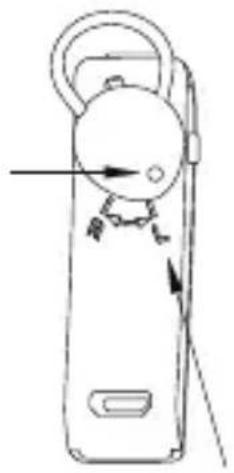
Holding the Sound ID 300 vertically, gently insert the eartip into your ear. Ensure that the Ear Loop is securely tucked into the bowl of your ear and rotate the Sound ID 300 until it points towards your mouth and fits snugly in your ear. For the right ear, rotate the headset counterclockwise; for the left ear, clockwise. Then, align the headset toward the mouth. You may need to use a mirror to confirm the position for the first time.
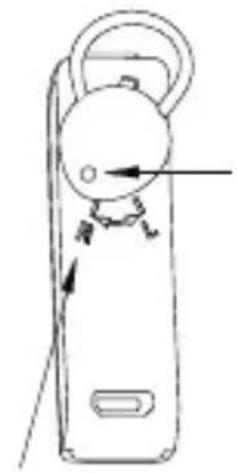
Rotate Tip to Line Up With R
Ear Tip Hole
Rotate Tip to Line Up With L (Approximately 45 degrees)
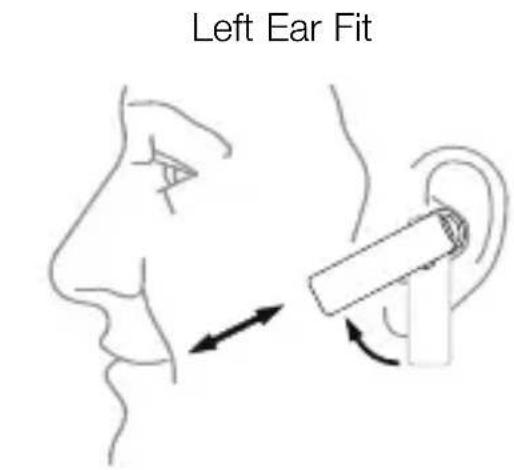
Sound ID 300 Microphones are Positioned Towards Mouth
Learn More
For additional information about this device and its features, please refer to the user manual section of this booklet or visit our website at www.soundid.com.
Sound ID 300 User Manual
Installing the RealComfort™ Ear Loop
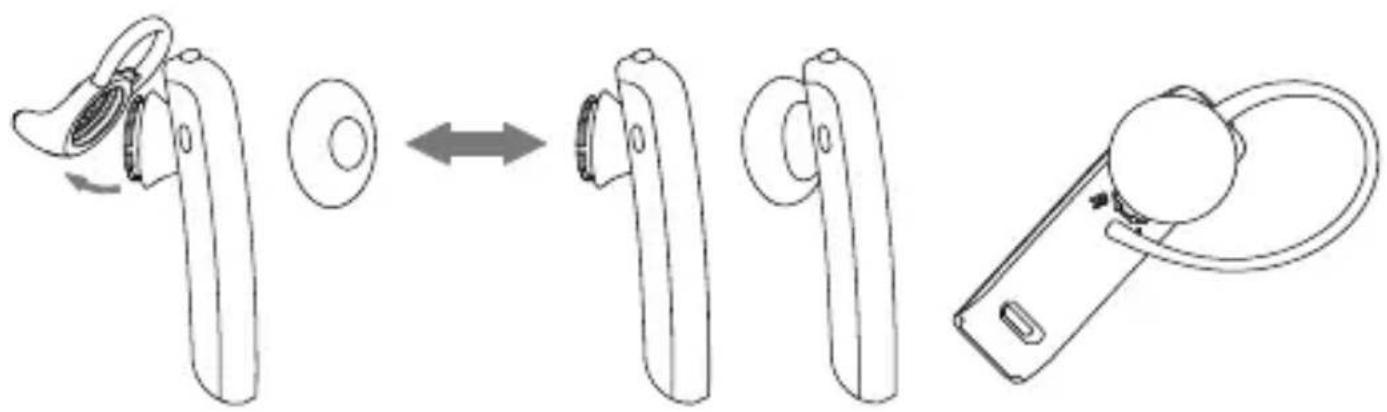
Three ear pieces are provided each with a different size RealComfort™ Ear Loop (large, medium, and small). The ear piece with the medium Ear Loop comes pre-installed on the headset, so check its fit first. If it's not comfortable, try the other two to find the best fit. If you need to change the ear piece, gently pull it away from the headset, then snap on the desired ear piece and line the tip up with the left or right ear preference (as shown on the Sound ID 300 below).
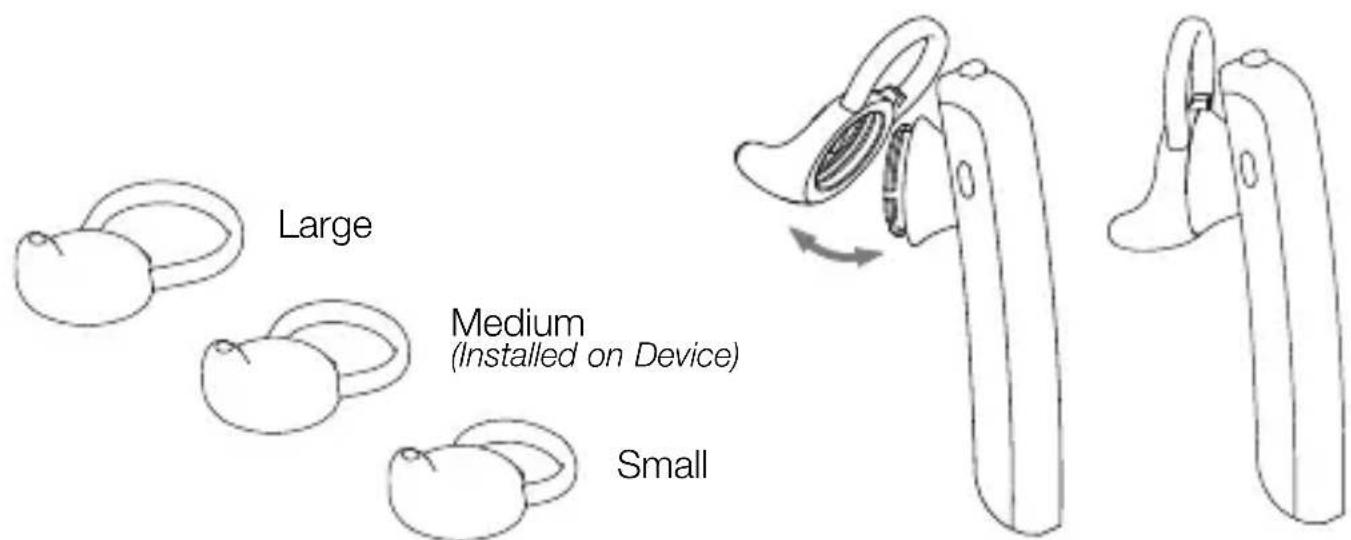
Over-the-Ear Option
The Sound ID 300 design allows an Over-the-Ear wearing style.
Simply snap the Over-the-Ear Hook to the neck of the headset corresponding to "Left Ear" or "Right Ear" configuration as shown below.
For users who do not wish to use a RealComfort™ Ear Loop an ear cushion has been provided. In this case replace your eartip with the ear cushion as indicated in the diagram below.
Attaching the Ear Hook:
Left Ear Configuration
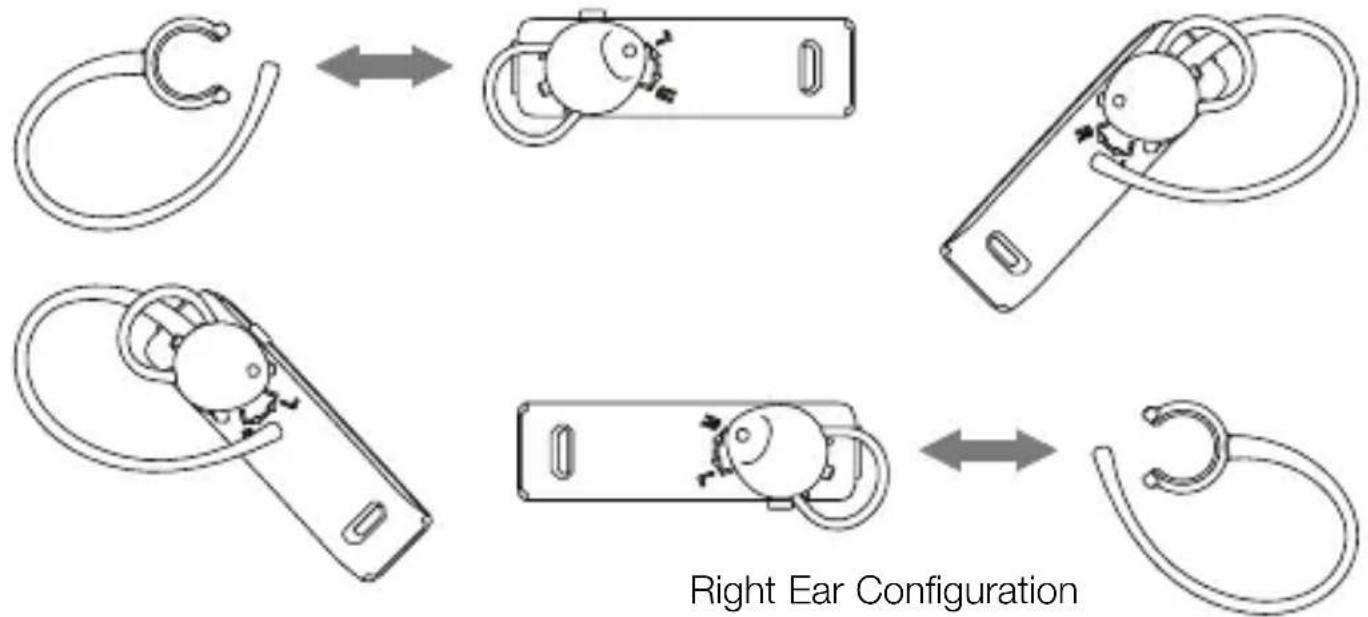
Right Ear Configuration
Attaching the ear cushion:
Custom Eartip Option
Sound ID's Custom Ear Mold Option
Soft Custom Ear molds can be individually made for your ear to provide enhanced comfort, security and sound quality.
Doctors of Audiology or Audiologists are hearing professionals that can advise you about your hearing and take an impression of your ear. The process takes about 15 minutes. The impression is sent to a laboratory, a custom ear mold is fabricated, and sent directly to you. Sound ID has made arrangements with a number of Audiologists who can procure and adjust a custom eartip for you. For an Audiologist nearest you please visit www.soundid.com.
NoiseNavigation
Your Sound ID 300 headset employs technologies and techniques to optimize speech intelligibility at both ends of the conversation. Dual microphones help isolate speech. Advanced DSP algorithms reduce wind and general background noise to enhance what is heard by the other party. Additionally, the Sound ID 300 uses Sound ID's proprietary technology to enhance what you hear. NoiseNavigation™ is always active. The Sound ID 300 can be further customized to individual hearing preference with the PersonalSound™ feature.
PersonalSound
PersonalSound™ enhances selected frequencies to increase speech intelligibility. The Sound ID 300 provides three different listening modes tuned to the most common hearing preferences.
When first selecting the PersonalSound™ mode, we recommend you call your voice mail or other repetitive message source and try each setting to see which sounds best to you, then adjust the volume. You may prefer a different mode depending on the listening situation.
To Change Hearing Enhancement programs (PersonalSound™ levels), press the Volume/PersonalSound™ Program Button for approximately two seconds to cycle to the next of the Sound ID 300's three different sound settings:
One beep: Normal Listening Enhancement.
Two beeps: Moderate Listening Enhancement.
Three beeps: Strong Listening Enhancement.
You can demonstrate the noise reduction capabilities of the Sound ID 300 by turning Noise Navigation off and on during a call. To turn all noise reduction off, press and hold the Volume button for two seconds to cycle through the Personal Sound modes, until you hear four beeps. To turn noise reduction back on, press and hold the Volume button until you hear one beep.
Automatic Volume Control
The Sound ID 300 has built-in Automatic Volume Control. Your headset will automatically adjust the volume based on the surrounding noise level. The amount of volume increase or decrease is dependent on a number of factors such as the PersonalSound™ setting.
Advanced Options
The following advanced functions can can be controlled from most phones, or from your headset as follows.
Call Mute: To activate or deactivate mute, briefly press the Main and VPB buttons simultaneously. You will then hear either two falling tones (mute) or two rising tones (unmute). You will hear a reminder beep once every 30 seconds when a call is on mute. Most phones will also allow you to mute a call from the handset if desired. In this case you must also unmute the call from the phone.
Call Reject*: To reject an incoming call, simultaneously press the Main and VPB buttons for approximately two seconds until you hear a beep.
Answer Call Waiting*: When you hear the Call Waiting alert tone, press the Main Button. The first caller will be placed on hold and the new call will be answered.
To Swap Active Call and Held Call*: Press the Main and VPB buttons for approximately two seconds until you hear a beep. If your handset does not respond to this command, try pressing the Main button twice quickly.
Redial*: To redial the last number called, quickly press the Main Button twice.
Voice Dialog*: Simultaneously press and hold the Main and VPB buttons for one second until you hear a beep. Your phone will then prompt you.
Re-establish Connection with the mobile phone: The Sound ID 300 will automatically attempt a re-connection with the mobile phone within 30 seconds of being disconnected. If the connection is not made it will not attempt another re-connection. The following manual reconnection method can be used:
- Move the Sound ID 300 within the 30 feet range.
-
Do a short press on the main button of the Sound ID 300 to reestablish connection.
-
These are phone-specific features. In order to use them, you'll need to verify that the phone supports and has them activated.
Charging Your Headset
It is important to charge your Sound ID 300 battery for a minimum of four hours before you use the headset for the first time. Subsequent charges take up to 2.5 hours for a full charge. When the headset is charging, the light is red. When fully charged, it is green.
Note: To ensure a full first-time charge, please disregard the green status light until at least four hours have passed.
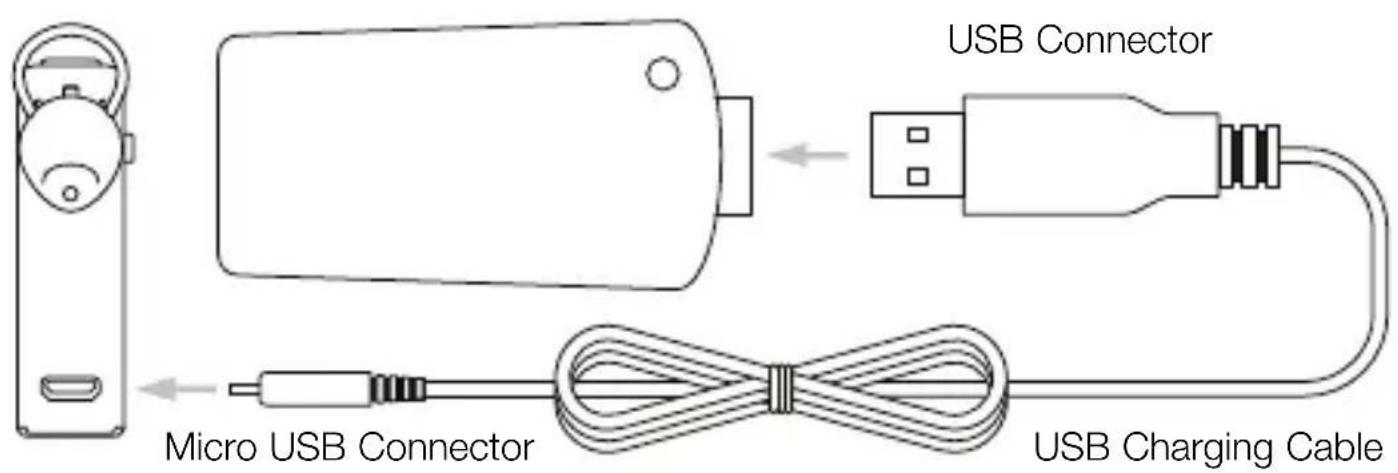
Micro USB Charging
To charge your Sound ID 300 connect the USB connector into the charger and plug the Micro USB connector into your headset. The USB Charging Cable can also be used to charge your headset from any device with a powered USB source such as a Personal Computer.
Your Sound ID 300 Headset incorporates a Micro USB socket for charging. Your phone may also use a charger with a Micro USB connector for charging. In this case you may be able to use your phone charger to charge the Sound ID 300 eliminating the need to carry two chargers.
Note: Do not use the Sound ID 300 charger to charge your phone.
Status Indicators
On/Off/Battery Level Indicator: Momentarily press the main button and if the Green Status Light turns on, then the device is ON. If the Red Status Light turns ON, then the device is ON but the battery is low and should be charged soon as there is less than 30 minutes of battery life remaining. No status light will show if the headset is off.
Connection Status: A momentary press of the main button can also produce a "blinking green light" indicating that the Sound ID 300 is ON and is searching for the handset. The search may take several seconds. If the headset is already connected you will hear a beep and will not see the blinking indicator.
Care & Maintenance
To keep your Sound ID 300 headset in best condition:
- Never leave it in direct sunlight, on a radiator, or in a closed car during hot weather.
- Avoid improper handling.
- Never immerse your Sound ID 300 in any liquid. Avoid hair spray, perfume, and sunscreens as they can cause damage to the housing or electronic components.
- For the highest quality sound, you'll need to keep your Sound ID 300 clean and free from earwax. You can do this by removing the eartip and washing it with warm water and mild soap. Rinse and be sure to let it dry before use.
SafetyWarnings
- The volume control should be set at a reasonable sound level. Prolonged exposure to excessive volume over time can lead to hearing impairment. If you suspect hearing problems, consult with your physician or an audiologist.
- This package contains small parts that may be hazardous to children under the age of five.
- The Sound ID 300 enables hands-free operation of mobile phones. Please obey mobile phone laws while driving and pay full attention to the operation of the vehicle.
- Do not attempt to use this device if it is or has been submerged in liquid.
- If you have a pacemaker or other electrical medical devices, you should consult your physician before using mobile phones or the Sound ID 300 headset.
- The use of wireless devices and their accessories may be prohibited or restricted in certain areas. Always obey the laws and regulations on the use of these products.
Battery Information and Specifications
Talk Time = Up to 6 hours depending on your phone. Talk time varies by phone and usage conditions.
Stand By Time = Up to 9 days (220 hours)
Charge Time = Approximately 2.5 hours
Battery Type = Advanced Lithium-Polymer with no "memory effect"
Low Battery Warning: Indicated by a series of three staccato beeps and a flashing red light every 30 seconds
Bluetooth Technology: Bluetooth Version 2.1+EDR with eSCO
Weight (including battery) = 8 grams (.28 oz.)
Designed in Palo Alto, California, USA
Made in China
Design and specifications are subject to change without notice.
Sound ID Limited Warranty
Sound ID warrants to the original end user ("Customer") that new Sound ID branded products will be free from defects in workmanship and materials, under normal use, for one (1) year from the original purchase date. Sound ID does not cover shipping costs to our repair facility. Sound ID will cover shipping for repaired or replaced product to the consumer.
EXCLUSIONS
This warranty excludes, physical damage to the surface of the product caused by wear and tear; damage caused by misuse, neglect, attempts to open, repair, or modify the product, or any other cause beyond the range of the intended use; damage caused by accident, fire, power changes, other hazards, or acts of God; or use of the product with any non-Sound ID device. Only batteries whose fully charged capacity falls below 80% of their rated capacity are covered by this limited warranty.
EXCLUSIVE REMEDIES
Should a covered defect occur during the warranty period and you notify Sound ID, your sole and exclusive remedy shall be, at Sound ID's sole option and expense, to repair or replace the product. If Sound ID cannot reasonably repair nor replace then Sound ID may, in its sole discretion, refund the purchase price paid for the product. Replacement products or parts may be new or reconditioned or comparable versions of the defective item.
OBTAINING WARRANTY SERVICE
Customer must contact Sound ID within the applicable warranty period to obtain warranty service authorization. Dated proof of original purchase is required. Contact Sound ID Technical Support or Customer Service at www.soundid.com.
Sound ID is not responsible for Customer products received without a warranty service authorization.
WARRANTIES EXCLUSIVE: THE FOREGOING WARRANTYES AND REMEDIES ARE EXCLUSIVE AND IN LIEU OF ALL OTHER WARRANTYES, TERMS OR CONDITIONS, EXPRESS, IMPLIED OR STATUTORY, INCLUDING WARRANTYES OF MERCHANTABILITY, FITNESS FOR A PARTICULAR PURPOSE, ACCURACY, CORRESPONDENCE WITH DESCRIPTION, SATISFACTORY QUALITY AND NON-INFRINGEMENT, ALL OF WHICH ARE EXPRESSLY DISCLAIMED BY SOUND ID AND ITS SUPPLIERS.
LIMITATION OF LIABILITY: NEITHER SOUND ID NOR ITS SUPPLIERS SHALL BE LIABLE FOR INCIDENTAL, CONSEQUENTIAL, INDIRECT, SPECIAL, OR PUNITIVE DAMAGES OF ANY KIND, LOSS OF INFORMATION OR DATA, LOSS OF REVENUE, LOSS OF BUSINESS OR OTHER FINANCIAL LOSS ARISING OUT OF OR IN CONNECTION WITH THE SALE OR USE OF THIS PRODUCT. SOUND ID'S ENTIRE LIABILITY SHALL BE LIMITED TO REPLACEMENT, REPAIR, OR REFUND OF THE PURCHASE PRICE PAID, AT SOUND ID'S OPTION.
DISCLAIMER: When implied warranties may not be excluded in their entirety, they will be limited to the duration of the applicable written warranty. This warranty gives you specific legal rights; you may have other rights that may vary depending on local law.
GOVERNING LAW: This Limited Warranty shall be governed by the laws of the State of California, U.S.A., and by the laws of the United States.
CAUTION - No operator-serviceable parts inside unit.
FCC Notice
The Sound ID 300 complies with part 15 of the FCC Rules. Operation is subject to the two following conditions:
- This device may not cause harmful interference.
- This device must accept any interference received, including interference that may cause undesired operation.
Information for the User
This equipment has been tested and found to comply with the limits for a Class B digital device, pursuant to Part 15 of the FCC Rules. These limits are designed to provide reasonable protection against harmful interference in a residential installation. This equipment generates, uses, and can radiate radio frequency energy and, if not installed and used in accordance with the instructions, may cause harmful interference to radio communications. However, there is no guarantee that interference will not occur in a particular installation. If this equipment does cause harmful interference to radio or television reception, which can be determined by turning the equipment off and on, the user is encouraged to try to correct the interference by one or more of the following measures:
- Reorient or relocate the receiving antenna.
- Increase the separation between the equipment and receiver.
- Connect the equipment into an outlet on a circuit different from that to which the receiver is connected.
- Consult the dealer or an experienced radio/TV technician for help.
The user may find the following publication prepared by the FCC helpful: "How to Identify and Resolve Radio-TV Interference Problems" (Stock No. 004-000-00345-4). Available exclusively from: Superintendent of Documents, Government Printing Office, Washington, DC 20402.
Users are not permitted to modify or make changes to the device in any way.
FCC Warning
Changes or modifications not expressly approved by the party responsible for compliance to part 15 of the FCC Rules could void the user's authority to operate the equipment.
Disposal of rechargeable batteries must comply with local environmental and recycling regulations.
Trademarks and Registered Trademarks
Sound ID and the Sound ID logo are among the registered and unregistered trademarks of Sound ID. The Bluetooth trademarks are used by Sound ID under license.
© Sound ID 2009
The information contained in the Sound ID user manual is believed to be correct at the time of printing. Sound ID reserves the right to change or modify any information or specifications without notice. The contents of Sound ID's user manuals are provided "as is". Except as required by applicable law, no warranties of any kind, either express or implied, including, but not limited to, the implied warranties or merchantability and fitness for a particular purpose, are made in relation to the accuracy, reliability, or contents of the manual.
Certifications and Compliance
CE
FCC ID: U3N300
IC: 6975A-300
Bluetooth ID: B14203
RoHS Compliant
Contact Information
For general information about the Sound ID 300 from Sound ID, please visit www.soundid.com. If you are having difficulty operating your device or desire more information, please contact Customer Service at CS@soundid.com
© 2009 Sound ID. All rights reserved
Notes
Micro charginment USB
Sound ID brings together the world of wireless communications and hearing science to create powerful, personalized audio enhancement. Sound ID was founded by an entrepreneurial ear doctor at Stanford University who hired top scientists and engineers in the hearing industry to design and develop signal processing algorithms, dual microphone, and noise reduction technology to create a truly exceptional product.
Sound ID and the Sound ID logo are among the registered and unregistered trademarks of Sound ID. The Bluetooth trademarks are used by Sound ID under license.

Bluetooth
Sound ID 2009
www.soundid.com
95005901
- QUICK START GUIDE AND USER MANUAL
- TO ACHIEVE THE BEST PERFORMANCE WITH YOUR SOUND ID 300 HEADSET
- PERSONAL SOUND UPDATE
- WELCOME
- IMPORTANT NOTICES
- REGISTER YOUR SOUND ID 300 ONLINE
- QUESTIONS & SUPPORT
- QUICK START GUIDE
- IMPORTANT INFORMATION PRIOR TO USE
- ABOUT YOUR SOUND ID 300 HEADSET
- HOW IT WORKS
- TO CHANGE THE VOLUME: MOST HANDSETS WILL ALLOW YOU TO CHANGE THE HEADSET VOLUME USING THE VOLUME CONTROL ON THE PHONE. IN THIS CASE THE SOUND ID 300 REMEMBERS THE NEW VOLUME LEVEL
- CHOOSE A PERSONALSOUND™ LEVEL
- PAIR YOUR SOUND ID 300 WITH YOUR BLUETOOTH® MOBILE PHONE
- WEARING YOUR SOUND ID 300 HEADSET
- LEARN MORE
- SOUND ID 300 USER MANUAL
- INSTALLING THE REALCOMFORT™ EAR LOOP
- OVER-THE-EAR OPTION
- ATTACHING THE EAR HOOK
- ATTACHING THE EAR CUSHION
- CUSTOM EARTIP OPTION
- SOUND ID'S CUSTOM EAR MOLD OPTION
- NOISENAVIGATION
- PERSONALSOUND
- AUTOMATIC VOLUME CONTROL
- ADVANCED OPTIONS
- CHARGING YOUR HEADSET
- MICRO USB CHARGING
- STATUS INDICATORS
- CARE & MAINTENANCE
- SAFETYWARNINGS
- BATTERY INFORMATION AND SPECIFICATIONS
- SOUND ID LIMITED WARRANTY
- EXCLUSIONS
- EXCLUSIVE REMEDIES
- OBTAINING WARRANTY SERVICE
- FCC NOTICE
- INFORMATION FOR THE USER
- FCC WARNING
- TRADEMARKS AND REGISTERED TRADEMARKS
- CERTIFICATIONS AND COMPLIANCE
- CONTACT INFORMATION
- MICRO CHARGINMENT USB
Brand : SoundID
Model : 300
Category : Earplug