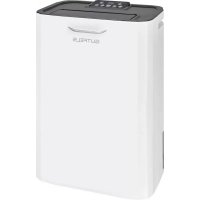
LE 60933 we - Dehumidifier Exquisit - Free user manual and instructions
Find the device manual for free LE 60933 we Exquisit in PDF.



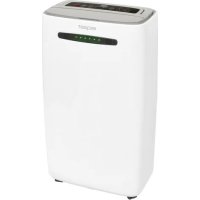
| Product type | Dehumidifier |
| Brand | Exquisit |
| Model | LE 60933 we |
| Extraction capacity | 9 L/day (at 30°C, 80% RH) |
| Tank volume | 5 L |
| Dimensions (W × D × H) | 340 × 232 × 511 mm |
| Net weight | 7.5 kg |
| Power supply | 220–240 V, 50 Hz |
| Power consumption (Turbo) | 730 W |
| Power consumption (Sleep) | 385 W |
| Maximum airflow | 200 m³/h |
| Number of fan speeds | 3 (Sleep, Normal, Turbo) |
| Operating temperature range | 1 to 32 °C |
| Timer | 1 to 24 hours |
| Continuous drainage | Yes (hose not included, inner Ø 11 mm) |
| Operating modes | Auto, Drying clothes, Sleep, Normal, Turbo, Air purification |
| Humidity setting | Continuous, 40%, 50%, 60%, 70% |
| Air filter | Washable + activated carbon filter (replaceable approx. every 6 months) |
| HEPA filter option | Available as accessory (ref. HEPA_Filter_LE60933) |
| Safety | Tilt switch, anti-tip protection, self-diagnosis (codes E1–E7) |
| Display | LED: ambient humidity, setting, temperature, timer; front color indicator (blue/green/red) |
| Cleaning | Body: soft cloth; Filter: vacuum cleaner or warm water (except activated carbon); Do not use flammable products |
| Professional maintenance | Recommended periodically; disassembly only by an authorized professional |
| Included accessories | User manual |
Frequently Asked Questions - LE 60933 we Exquisit
User questions about LE 60933 we Exquisit
0 question about this device. Answer the ones you know or ask your own.
Ask a new question about this device
Download the instructions for your Dehumidifier in PDF format for free! Find your manual LE 60933 we - Exquisit and take your electronic device back in hand. On this page are published all the documents necessary for the use of your device. LE 60933 we by Exquisit.
USER MANUAL LE 60933 we Exquisit
natural_image
White outdoor air purifier with black lid and 'GUTFELS' logo (no additional text or symbols visible)
24012
Gebrauchsanleitung
Instruction Manual
Mode d'emploi
Instructies
Where to position 19
Before use 19-22
Parts 23
Programming Feature 24-27
Operation 28-29
Drainage 30-31.
Maintenance 31-33
Trouble shooting 33
Spécification 34
Emplacement 35
natural_image
Line drawing of a portable air conditioner unit with ventilation grilles and control panel (no text or symbols)Programmierfunktion
natural_image
Line drawing of a cylindrical electronic device with lid and handle (no text or symbols)natural_image
Technical line drawing of a device with two components, one larger and one smaller, connected by an arrow indicating assembly (no text or symbols present)QR codes (Quick Response codes) are graphic codes, which are read by means of a Smartphone camera and lead quickly and easily to further information (e.g. seeinternet site, product video or contact information).
And this is how it works
To scan the QR codes all you need is a Smartphone, a QR code reader app (available free of charge in the App Store) and an internet connection. *
When reading QR codes additional costs may be incurred for the internet connection depending on the rate you pay.

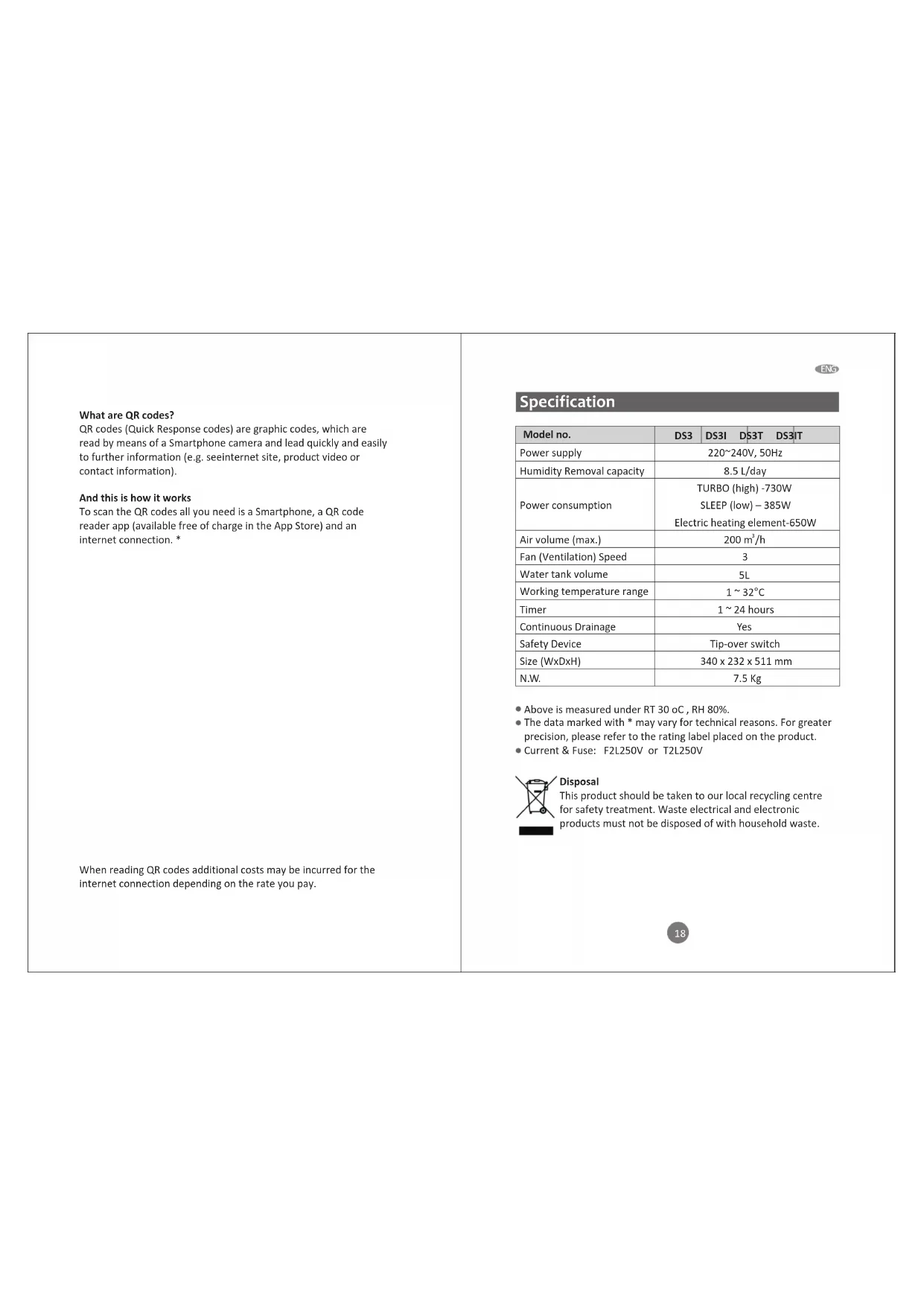
Specification
| Model no. | DS3 | DS3I | DS3T | DS3IT |
| Power supply | 220~240V, 50Hz | |||
| Humidity Removal capacity | 8.5 L/day | |||
| Power consumption | TURBO (high) -730WSLEEP (low) – 385WElectric heating element-650W | |||
| Air volume (max.) | 200 m^3/h | |||
| Fan (Ventilation) Speed | 3 | |||
| Water tank volume | 5L | |||
| Working temperature range | 1 ~ 32°C | |||
| Timer | 1 ~ 24 hours | |||
| Continuous Drainage | Yes | |||
| Safety Device | Tip-over switch | |||
| Size (WxDxH) | 340 x 232 x 511 mm | |||
| N.W. | 7.5 Kg | |||
- Above is measured under RT 30 oC, RH 80%.
- The data marked with * may vary for technical reasons. For greater precision, please refer to the rating label placed on the product.
- Current & Fuse: F2L250V or T2L250V
Disposal
This product should be taken to our local recycling centre for safety treatment. Waste electrical and electronic products must not be disposed of with household waste.
Where to position
Excess moisture will travel throughout your home. For this reason, the dehumidifier should be positioned, so that it can draw this moist air towards it from all over the home.
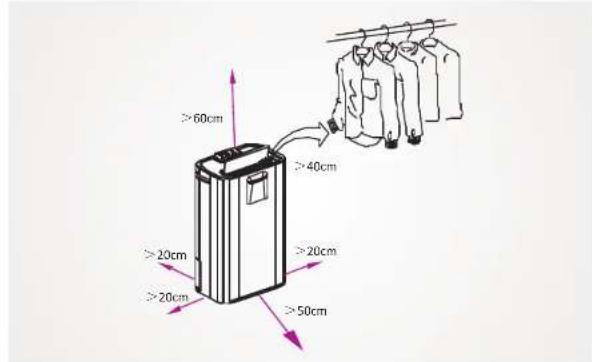
When positioning the dehumidifier, ensure that it is placed on a level surface and that there is a minimum of 20 cm (8") of space on either side of the unit to allow for efficient airflow.
Heater advice for Dryer function. The distance between air vent & clothes must be kept at least 40cm to avoid water drop into machine and cause damage.
Suitable to use in basement, kitchen, living room etc
Before use
Caution!
- Operate this unit on a firm, flat surface to avoid water leak. Ensure that it is kept upright at all times (including transport and store).
- It is suggested to run the unit continuously for 24hrs on its first use.
- Do not place on soft surfaces.
- Ensure that there is at least 400mm between the sides of the appliance and any flammable materials.
- Ensure that there is at least 900mm from the top of the appliance and any flammable materials.
- The unit contains a chemical substance. The unit will emit a chemical smell during the 1st hour of operation without any dangerous consequences.
- The unit features an anti-tip safety device that will switch the unit off if it was tipped during operating.
ENG
- Only connect the unit to a properly installed and easily accessible outlet so that you can quickly pull the plug in an emergency.
• DO NOT OBSTRUCT THE AIR INTAKES AND EXHAUSTS.
• FOR INDOOR USE ONLY.
• NOT FOR COMMERCIAL AND INDUSTRIAL USE.
• DO NOT EXPOSE THE UNIT TO DIRECT SUNLIGHT. - DO NOT USE IN CABINET, CLOSET, BOATS, CARAVANS OR SIMILAR LOCATIONS.
- DO NOT USE THE UNIT IN BATHROOMS, SWIMMING POOLS, WASHROOMS OR SIMILAR WET AREAS.
- DO NOT USE THE UNIT CLOSE TO A BATHTUB, SHOWER, SINK AND THE LIKE.
- Do not use the appliance in locations where paint, petrol or other flammable liquids are used or stored.
- Do not allow the appliance to fall over when there is water in the bucket.
- AVOID THE UNIT FROM SPLASH. DO NOT LET ANY LIQUID ENTER THE UNIT.
• DO NOT PLACE A CONTAINER WITH LIQUID ON TOP OF THE UNIT. - THE CONDENSED WATER IS NOT FOR DRINKING EITHER FOR HUMAN OR ANIMALS.
- DO NOT USE BUG SPRAYS OR OTHER FLAMMABLE CLEANSERS ON THE UNIT.
- Do not lay the cord under carpets/rugs so that you can regularly check its condition.
• DO NOT TOUCH THE PLUG OF THE UNIT WITH WET HANDS. - Never use the cord of the unit as a carrying strap.
- Before moving the unit, first switch off, then unplug and empty the water tank. Basically, it takes around 2 minutes to stop the unit and this allows the heater to cool down.
• Always unplug the unit from the mains and wait for at least one
hour before carrying out any maintenance, transport or cleaning of the unit.
• Always switch the unit off and pull the plug out of the outlet :
√ If you are not using the unit.
√ Before you clean the unit.
√ Before you assemble the accessories.
√ If a fault occurs.
• In the event of a storm.
- AVOID OVER-TWISTING, -COILING, -PULLING THE POWER CORD, NEVER USE NYLON OR IRON WIRE TO TIDE THE POWER CORD.
• DO NOT USE EXTENSION CORDS.
- IF THE SUPPLY CORD IS DAMAGED, IT MUST BE REPLACED BY AN ELECTRICIAN OR SIMILARLY QUALIFIED PERSON, TO AVOID HAZARD.
- THE MAINS SUPPLY MUST CONFORM TO THE SPECIFICATION SHOWN ON THE RATING PLATE AT THE BACK OF THE UNIT.
- THE APPLIANCE SHALL BE INSTALLED IN ACCORDANCE WITH NATIONAL WIRING REGULATIONS.
- NEVER REACH TO RETRIEVE THE UNIT IF IT HAS FALLEN IN WATER. IN SUCH CASE, IMMEDIATELY PULL THE PLUG. HAVE THE UNIT CHECKED BEFORE USING IT AGAIN.
- This appliance can be used by children aged from 8 years and above and persons with reduced physical, sensory or mental capabilities or lack of experience and knowledge if they have been given supervision or instruction concerning use of the appliance in a safe way and understand the hazards involved. Children shall not play with the appliance. Cleaning and user maintenance shall not be made by children without supervision.
• Appliances intended for indoor use (excluding laundry room).
- While using DRYER mode for clothes, please keep the unit AT LEAST 40CM away from the objects (ex. the clothes) and ensure no water will drip into the air vent of unit.

- SUGGEST TO SEND THE UNIT FOR PROFESSIONAL MAINTENANCE PERIODICALLY.
- ONLY A LICENSED PROFESSIONAL IS ALLOWED TO DISMANTLE OR MODIFY THE APPLIANCE.
- THE MACHINE IS TO BE USED ONLY FOR ITS PRESCRIBED PURPOSE. ANY OTHER USE IS DEEMED TO BE A CASE OF MISUSE. THE USER/OPERATOR, NOT THE MANUFACTUER WILL BE LIABLE FOR ANY DAMAGE OR INJURIES OF ANY KIND CAUSED AS A RESULT OF THIS.

Exposed to the weather outdoors

Near water

If the power cable wires are frayed or cut

Where small children may be left unattended

If an extension lead may become overloaded

Where the power cable may be damaged

On a slope or uneven surface

Where there is risk of fire or close to a naked flame

Where it may be damaged by chemicals

Where there is a risk of interference by foreign objects

This product is not made for DIY repair

If there is a risk of water falling on the unit
DO NOT USE YOUR DESICCANT UNDER THE FOLLOWING
(*) Competent qualified electrician: after-sales department of the producer or importer or any person who is qualified, approved and competent to perform this kind of repairs in order to avoid all danger. In case of need you should return the appliance to this electrician (www.ggv-service.de).
Parts

23

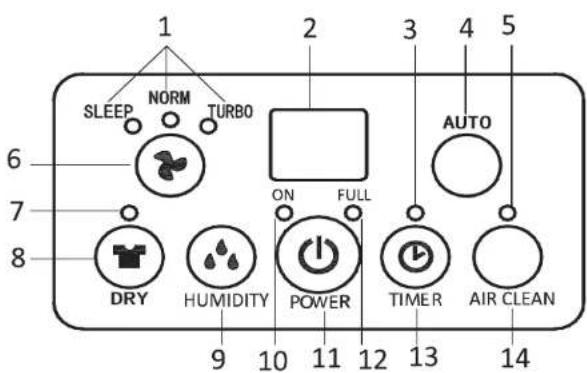
Programming Feature
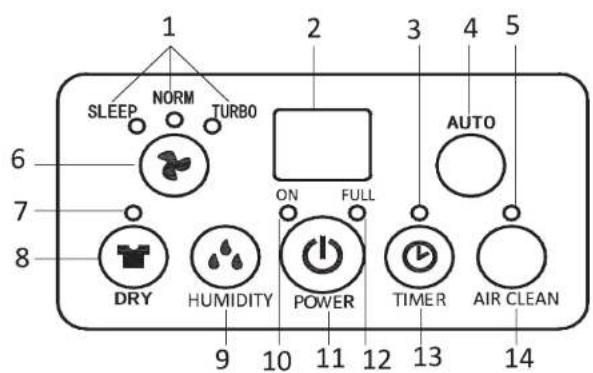
- FAN SPEED Indicator (Sleep, NORM, TURBO)
- Humidity/Timer Display Window
3.TIMER Indicator - AUTO button
5.AIR CLEAN Indicator
6.FAN SPEED Button
7.DRYER Indicator
8.DRY(TURBO) Button
9.Humidity Button
10.ON Indicator (heat element operation indicator)
11.Power (ON/OFF) Button
12. "Full Water" indicator
13.TIMER button
14.AIR CLEAN Button
FAN SPEED BUTTON There are 3 selections under this button:
◆ SLEEP (MUTE): the unit will run at low fan speed with low heat, thus, the unit is quieter. And, if the ambient humidity is less than set humidity, it will run at low fan (ventilation) only, no heat. Note! In sleep mode, the humidity indicator in the front plate will not light on.
24
♦ NORM (standard): the unit will run at MEDIUM fan speed with HIGH heat setting. And, if the ambient humidity is below set humidity, the unit will run at Medium fan speed only, no heat.
◆ TURBO: the unit will run at HIGH fan with HIGH Heat. And, when the ambient humidity is below set humidity, the unit will run at HIGH fan speed only, no heat.
Indicator for the set mode will light on.
♦ AUTO BUTTON By pressing this button, the unit will work automatically as below:
• Above 70% .... unit works in TURBO mode.
• Between 55% and 70% .... unit works in SLEEP model.
• Less than 55%, .... unit stops for 30 minutes before rechecking room humidity. Will not restart until humidity is above 55%.
DRY (LAUNDRY) BUTTON (40% RH / high fan speed/high heat) This mode is ideal for creating a great environment for drying clothes. The unit will work for 8hrs continuously with the desired humidity set at 40% before resting for 30 minutes. The unit will then check the humidity of the room. If it is above 40%, the unit will work for another 8hrs before repeating the process. If the humidity of the room is found to be below 40%, the unit will rest for another 30 minutes before rechecking the humidity of the room. The LED above the button is lit when DRY (LAUNDRY) mode is selected.
☆ Under this mode, the fan speed is always fixed at HIGH speed, not adjustable.
HUMIDITY BUTTON Set the humidity level you need: CO (continuous dehumidify), 40%, 50%, 60% or 70%. The set HUMIDIFY level will show on the LED display. Please Note:
- After 8hrs of the heater running continuously, the unit will rest for 30 minutes before resuming the previously selected operation.
- If the HUMIDITY button is not set, the unit will work at the default setting: 50% RH /low fan speed/low heat.
※Continuous dehumidify mode
For safety reason, the machine will stop automatically after running for 8hrs. After rest for 30 minutes, resumes to work. Repeat in this cycle.
※ Continuous dehumidify mode + Ambient humidity less than 35% the heater works for 15minutes -> rest for a few minutes, repeats in this cycle, unless the humidity rises up.
※Ambient temperature higher than 36°C
the heater stops, the fan keeps running to check humidity (last set mode) / temperature, then follows the general logic of stopping for 30 minutes if humidity is reached.
※Working with humidity setting: 40%, 50%, 60% or 70% the machine will stop automatically after running for 8 hours, no matter the setting humidity is reached or not. After rest for 30 minutes, resumes to work. Repeat in this cycle.
POWER BUTTON Press this button to start or turn off the machine. Please note it may take a few minutes for the unit to turn off once pressed.
TIMER BUTTON
-
Press TIMER button to set the working hours you need. While pressing the button, the LED display will show the hour you set (starting from , 1 to 24 in a cycle). The TIMER Indicator will light on at the same time. When the set time has been reached, the machine will turn off automatically.
-
By pressing the timer but without turning on the other functions, you can PRE-SET the time for the machine to work. For example, if you press the timer to '2', the unit will turn on automatically 2 hours after and works in the previous mode.
AIR CLEAN BUTTON This mode runs the fan without dehumidifying the air. This is great for purifying the air when the
desired room humidity has been reached, especially when the optional HEPA filter is installed. AIR CLEAN indicator will light on at the same time. The fan speed is adjustable in this mode.
Customer can choose HEPA_Filter_LE60933 to this LE60933WE dehumidifier as optional for air purification improvement. If it's needed, please contact customer service EGS GmbH with email and telephone as followed: Hotline für DE +49 2944 / 9716791 Hotline für AT +43 820 / 200 170 Hotline für BENELUX +49 2944 / 9716791 Email: kontakt@egs-gmbh.de
Please Note: If using a HEPA filter while dehumidifying, the performance of the unit may be reduced by 10%.
DISPLAY WINDOW
• Displays the room temperature (0 \~ 50oC )
• Displays the room humidity (35\~95%RH).
• Displays the set humidity, while pressing the HUMIDITY button.
• Displays the set time while pressing the TIMER, after 8 seconds, return to room humidity.
ON INDICATOR (heat operation indicator)
• lights on in GREEN as the heat element is working.
• lights on in RED and blink as the unit is tipped over.
WATER FULL INDICATOR It turns to RED and blink when the water tank is full or the tank is not in proper position.
HUMIDITY INDICATOR IN THE FRONT
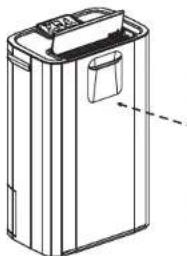
This unit is equipped with an intelligent humidity display on the front, giving the user an immediate visual indication of the ambient humidity. The front LED's will change color to indicate the current humidity level.
ENG
natural_image
Line drawing of a rectangular electronic device with a lid and handle (no text or symbols)Blue light – room humidity > 70% Green light – room humidity 50\~70% Red light – room humidity < 50%
☆In SLEEP mode, this indicator will not work.
Operation
- Plug the unit into a correct mains socket. (Please refer to the rating label at the rear of the unit.)
- OPEN THE AIR DEFLECTOR at the top.
- Press button POWER to turn on the unit. The unit will start to work in LOW FAN/LOW HEAT/LOW DEHUMIDIFY (humidity setting: 50%)
- Press button HUMIDITY to set the room humidity you need: continuous de-humidifying, 40%, 50%, 60% or 70% (the set level will appear on the LED display)
- Press button FAN SPEED ⚙ to choose the ventilation speed, MUTE, NORM (normal/standard) or TURBO.
- Press button TIMER to set the working hour you need (1\~24 hours).
- To turn off the unit, press button POWER again.
☆You may set the unit in AUTO mode or DRY mode, please refer to the description in the previous page.
IMPORTANT!
- After switching off the unit, it takes at least 2 minutes to OFF the unit completely, which allows the heater to cool down. DO NOT DISCONNECT THE PLUG DIRECTLY FOR QUICK-OFF.
-
Do not operate the unit without the AIR FILTER.
-
While using DRYER mode for clothes, please keep the air vent (air outlet) of the unit AT LEAST 40CM away from the objects (ex. the clothes) and ensure no water will drip into the air vent of unit.
☆ ATTENTION! DO NOT use in the closet, wardrobe.
-
Tip Over protection This unit is equipped with tilt switch for overheat protection. While the unit is tipped, the unit will stop automatically. The ON indicator will turn into RED and blink for warning, also the display window will show E5. After repositioning the unit upright, press POWER button to re-start.
-
Self-Diagnosis: This machine is equipped with self-diagnosis function. If something is wrong in the machine, the LED will show the signal from E1 to E7 (each represents different situation).
E5 means the unit is tipped over. Please re-posit the unit upright, press POWER button to re-start.
For the other signal, please call your service centre. DO NOT dismantle the machine by yourselves in any case.
29
ENG
Drainage
While the water tank is full, the unit will stop working for self-protection. The water full indicator will blink in red and the unit will buzz for warning.
To empty the tank, please follow the steps:
- Hold the unit with one hand to make it stand firmly.
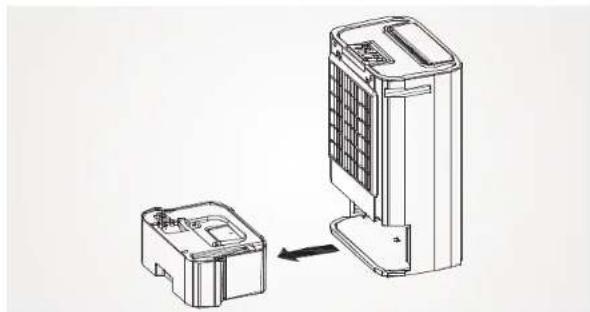
- Pull out the tank squarely from the unit.
- Grasp the water tank handle, remove the cover of the tank, and empty the water from the drain.
- After the tank was empty, return the water tank to its position, make sure it is properly positioned, so the 'water full' sign can go out and your dehumidifier is operating again.
Please note, if the water tank has not been positioned well, the water full indicator will turn into red and the unit will keep buzzing.
natural_image
Technical line drawing of two electronic devices with one connected to a larger device (no text or symbols present)CONTINUOUS DRAINAGE
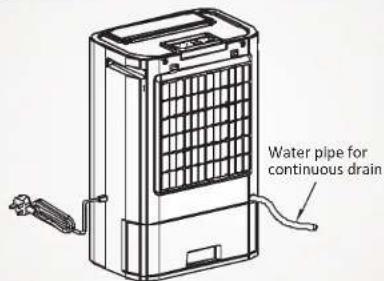
When the dehumidifier is operated in very high humidity, the water tank will require more frequent drainage. In this condition, it may be more convenient to set the unit up for continuous drainage with the following procedures:
30
- Connect the drain hole with a water tube of inner diameter 11mm. ☆ Please note, the water tube is not supplied with the unit.
- Ensure the water will always drain away freely and the tube will remain in right place. Note! In very cold weather conditions, precautions should be taken to prevent the water tube from freeing.
- When you don't need it, please remove the water tube, then the water will go again to the water tank.
Maintenance
Always unplug the unit from the mains and wait for at least one hour before carrying out any maintenance or cleaning of the unit.
CLEANING THE BODY
Use soft cloth to wipe the unit clean.
Don't ever use volatile chemicals, gasoline, detergents, chemically treated clothes, or other cleansing solutions. These all could possibly hurt the cabinet.
ENG
CLEANING THE FILTER
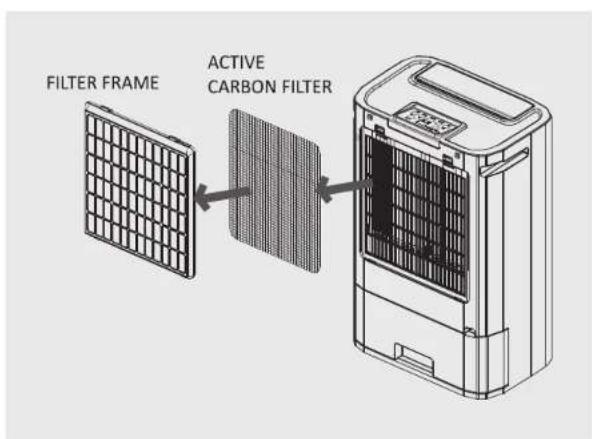
Draw out the air filter from the rear of the unit.
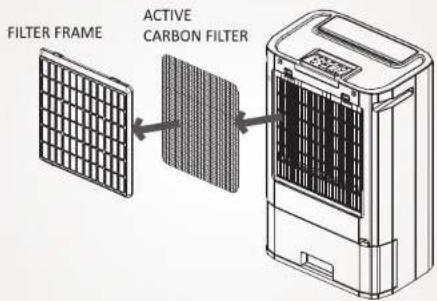
For dust filter (washable filter) -
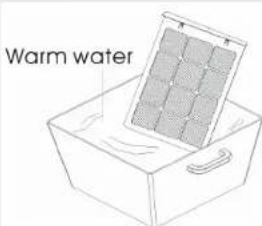
- Use a vacuum cleaner or tap the filter lightly for easy cleaning. If the filter is particularly dirty, use warm water with a small amount of medium strength.
- Make sure the filter is completely dry before replacing.
- Do not expose the filter to sunlight.
For active carbon filter -
This filter is not washable. Its life span is variable and depends on the ambient conditions where the appliance is used. The filter should be checked periodically (about every 6 months) and replaced if necessary.

STORAGE
If not use the unit for an extended period of time. Please:
• Turing the unit off, unplug and tidy AC cord.
• Completely empty the water tank and wipe it clean.
• Cover the unit and store where it will not receive direct sunlight.
Trouble shooting
| PROBLEM POSSIBLE REASON | |
| The unit doesn't work at all. | 1.Bad connection of the main plug2.Water tank not positioned well or full.3.Is the unit standing upright and level? |
| The unit not work dehumidifying | 1.Too heavy dust on air filter.2.Any things stuck on intake or air vent.3.Too low room humidity already. |
| Dehumidifying efficiency not good | 1.Too many doors and windows open.2.Any room equipment increases the room humidity. |
| Abnormal noises from the motor | 1.Check and clean the air filter2.Is the unit standing upright and on a level surface? |
| The unit leaks water | 1.Has the unit been tipped?2.Check if the float of the water tank is blocked by foreign material. |
| After the unit has been switched off, the fan motor is still running | 1.After the unit stops, about 2 minutes are needed to cool down the electric heater by running the internal fan. |
natural_image
Technical line drawing of a device with two components, one larger and one smaller, connected by an arrow indicating assembly (no text or symbols present)DRAINAGE CONTINU
natural_image
Diagram showing two electronic devices with a right-hand arrow indicating transformation (no text or symbols present)CONTINUE DRAINAGE
natural_image
Line drawing of a portable air conditioner unit with ventilation grille and control panel (no text or symbols)
- Programmierfunktion
- And this is how it works
- Disposal
- Where to position
- Before use
- Caution!
- DO NOT USE YOUR DESICCANT UNDER THE FOLLOWING
- TIMER BUTTON
- DISPLAY WINDOW
- ON INDICATOR (heat operation indicator)
- HUMIDITY INDICATOR IN THE FRONT
- Operation
- IMPORTANT!
- Drainage
- CONTINUOUS DRAINAGE
- Maintenance
- CLEANING THE BODY
- CLEANING THE FILTER
- For dust filter (washable filter) -
- For active carbon filter -
- STORAGE
- DRAINAGE CONTINU
- CONTINUE DRAINAGE
Brand : Exquisit
Model : LE 60933 we
Category : Dehumidifier