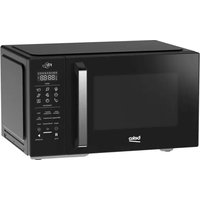
USER MANUAL BMOB20231G BEKO
EN-DE-FR-IT-NL-PL-CZ-HR-SK-SQ-SL-SR-MK
CONTENTS
| ENGLISH | 03-19 |
| DEUTSCH | 20-38 |
| FRANÇAIS | 39-55 |
| ITALIANO | 56-74 |
| NEDERLANDS | 75-91 |
| POLSKI | 92-110 |
| ČESKY | 111-128 |
| HRVATSKI | 129-144 |
| SLOVENSKÍ | 145-162 |
| SHQIPTARE | 163-179 |
| SLOVENŠČINA | 180-195 |
| CPПСКИ 196-212 |
| MAKЕДОHСКИ 213-234 |
Please read this manual first!
Dear Customer,
Thank you for purchasing a Beko product. We hope that you get the best results from your product which has been manufactured with high quality and state-of-the-art technology. Therefore, please read this entire user manual and all other accompanying documents carefully before using the product and keep it as a reference for future use. If you handover the product to someone else, give the user manual as well. Follow all warnings and information in the user manual.
Meanings of the symbols
Following symbols are used in the various section of this user manual:
| i | Important information and useful hints about usage. |
| ! | Warnings for dangerous situations concerning the safety of life and pro-perty. |
| Warning for hot surfaces. |
| Warning for electric shock. |

This product has been manufactured in environmental friendly modern plants without giving any harm to the nature.
1 Important safety and environmental instructions
Important Safety Instructions Read Carefully And Keep For Future Reference
1.1 Safety warnings
This section contains safety instructions that will help protect from risk of fire, electric shock, exposure to leak microwave energy, personal injury or property damage. Failure to follow these instructions shall void any warranty.
- Beko Microwave Ovens comply with the applicable safety standards; therefore, in case of any damage on the appliance or power cable, it should be repaired or replaced by the dealer, service center or a specialist and authorized service alike to avoid any danger. Faulty or unqualified repair work may be dangerous and cause risk to the user.
-
This appliance is intended to be used in household and similar applications such as:
-
Staff kitchen areas in shops, offices and other working environments;
-
Farm houses
-
By clients in hotels, and other residential type environments;
-
Bed and Breakfast type environments.
-
It is not intended for industrial or laboratory use.
- Do not attempt to start the oven when its door is open; otherwise you may be exposed to harmful microwave energy. Safety locks should not be disabled or tampered with.
- The microwave oven is intended for heating food and beverages. Drying of food or clothing and heating of warming pads, slippers, sponges, damp cloth and similar may lead to risk of injury, ignition or fire.
- Do not place any object between the front side and the door of the oven. Do not allow dirt or cleaning agent remnants to build up on the closure surfaces.
Any service works involving removal of the cover that provides protection against exposure to microwave energy must be performed by authorized persons/ service. Any other approach is dangerous.
1 Important safety and environmental instructions
- Your product is intended for cooking, heating and defrost food at home. It must not be used for commercial purposes.
- Your oven is not designed to dry any living being.
- Do not use your appliance to dry clothes or kitchen towels.
- Do not use this appliance outdoors, bathrooms, humid environments or in places where the it can get wet.
- No responsibility or warranty claim shall be assumed for damages arising from misuse or improper handling of the appliance.
- Never attempt to dismantle the appliance. No warranty claims are accepted for damage caused by improper handling.
- Only use the original parts or parts recommended by the manufacturer.
- Do not leave this appliance unattended while it is in use.
Always use the appliance on a stable, flat, clean dry, and non-slip surface.
-
The appliance should not be operated with an external clock timer or separate remote control system.
-
Before using the appliance for the first time, clean all parts. Please see the details given in the "Cleaning and Maintenance" section.
- Operate the appliance for its intended purpose only as described in this manual.
- Appliance becomes very hot while it is in use. Pay attention not to touch the hot parts inside the oven.
- Do not operate the oven empty.
- Cooking utensil may get hot due to the heat transferred from the heated food to the utensil. You may need oven gloves to hold the utensil.
- Utensils shall be checked to ensure that they are suitable for use in microwave ovens.
- Do not place the oven on stoves or other heat generating appliances. Otherwise, it may be damaged and the warranty becomes void.
- Steam may come out while opening the covers or the foil after cooking the food.
- The appliance and its accessible surfaces may be very hot when the appliance is in use.
- Door and outer glass may be very hot when the appliance is in use.
1 Important safety and environmental instructions
- Make sure that your mains power supply complies with the information supplied on the rating plate of the appliance.
- The only way to disconnect the appliance from the power supply is to remove the power plug from the power outlet.
- Use the appliance with a grounded outlet only.
- Never use the appliance if the power cable or the appliance itself is damaged.
- Do not use this appliance with an extension cord.
- Never touch the appliance or its plug with damp or wet hands.
- Place the appliance in a way so that the plug is always accessible.
- Prevent damage to the power cable by not squeezing, bending, or rubbing it on sharp edges. Keep the power cable away from hot surfaces and naked flame.
-
Make sure that there is no danger that the power cable could be accidentally pulled or that someone could trip over it when the appliance is in use.
-
Unplug the appliance before each cleaning and when the appliance is not in use.
- Do not pull the power cable of the appliance to disconnect it from its power supply and never wrap its power cable around the appliance.
- Do not immerse the appliance, power cable, or power plug in water or any other liquids. Do not hold it under running water.
- When heating food in plastic or paper containers, keep an eye on the oven due to the possibility of ignition.
- Remove the wire strings and/or metal handles of paper or plastic bags before placing bags to the oven.
- If smoke is observed, switch off or unplug the appliance if safe to do so and keep the door closed in order to stifle any flames.
- Do not use microwave oven for storage. Do not leave paper items, cooking material or food inside the oven when it is not being used.
- The contents of feeding bottles and baby food jars should be stirred or shaken and the temperature checked before consumption, in order to avoid burns.
1 Important safety and environmental instructions
- This appliance is a Group 2 Class B ISM equipment. Group 2 contains all ISM (Industrial, Scientific and Medical) equipment in which radio-frequency energy is intentionally generated and/or used in the form of electromagnetic radiation for the treatment of material, and spark erosion equipment.
Class B equipment is suitable for use in domestic establishments and establishments directly connected to a low voltage power supply network.
- Do not use cooking oil in the oven. Hot oil may damage the components and materials of the oven, and it may even cause skin burns.
- Pierce food with thick crust such as potatoes, courgettes, apples and chestnuts.
- Appliance must be placed so that the rear side is facing the wall.
- Before moving the appliance, please secure the turntable to prevent damage.
- Eggs in their shell and whole hard-boiled eggs must not be heated in microwave ovens since they may explode, even after microwave heating has ended.
WARNING: If the door or door seals are damaged, the oven must not be operated until it has been repaired by a competent person.
WARNING: It is hazardous for anyone other than a competent person to carry out any service or repair operation which involves the removal of a cover which gives protection against exposure to microwave energy.
WARNING: Liquids and other foods must not be heated in sealed containers since they are liable to explode.
1 Important safety and environmental instructions
- This appliance can be used by the children who are at the age of 8 or over and by the people who have limited physical, sensory or mental capacity or who do not have knowledge and experience, as long as they are supervised with regard to safe use of the product or they are instructed accordingly or understand the risks of using the product. Children should not play with the appliance. Cleaning and user maintenance procedures should not be performed by children unless they are controlled by their elders.
- Danger of choking! Keep all the packaging materials away from children.
- Due to excessive heat that arises in grill and combination modes, children should only be allowed to use these modes under supervision of an adult.
- Keep the product and its power cable so that they are inaccessible by children under 8 years old.
- Do not cook food directly on the glass tray. Put the food in / on appropriate kitchen utensils before placing them in the oven.
Metallic containers for food and beverages are not allowed during microwave cooking. Otherwise, sparking may occur.
- This product is not designed to be built-in. Do not place the product in a cabinet or box while it is in use.
1.2 Compliance with the WEEE Directive and Disposing of the Waste Product:
This product complies with EU WEEE Directive (2012/19/EU). This product bears a classification symbol for waste electrical and electronic equipment (WEEE).
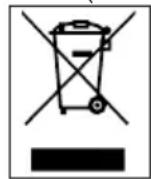
This symbol indicates that this product shall not be disposed with other household wastes at the end of its service life. Used device must be returned to official collection point for
recycling of electrical and electronic devices. To find these collection systems please contact to your local authorities or retailer where the product was purchased. Each household performs important role in recovering and recycling of old appliance. Appropriate disposal of used appliance helps prevent potential negative consequences for the environment and human health.
1.3 Compliance with RoHS Directive
The product you have purchased complies with EU RoHS Directive (2011/65/EU). It does not contain harmful and prohibited materials specified in the Directive.
1 Important safety and environmental instructions
Packaging materials of the product are manufactured from recyclable materials in accordance with our National Environment Regulations. Do not dis
pose of the packaging materials together with the domestic or other wastes. Take them to the packaging material collection points designated by the local authorities.
2 Your microwave oven
2.1 Overview
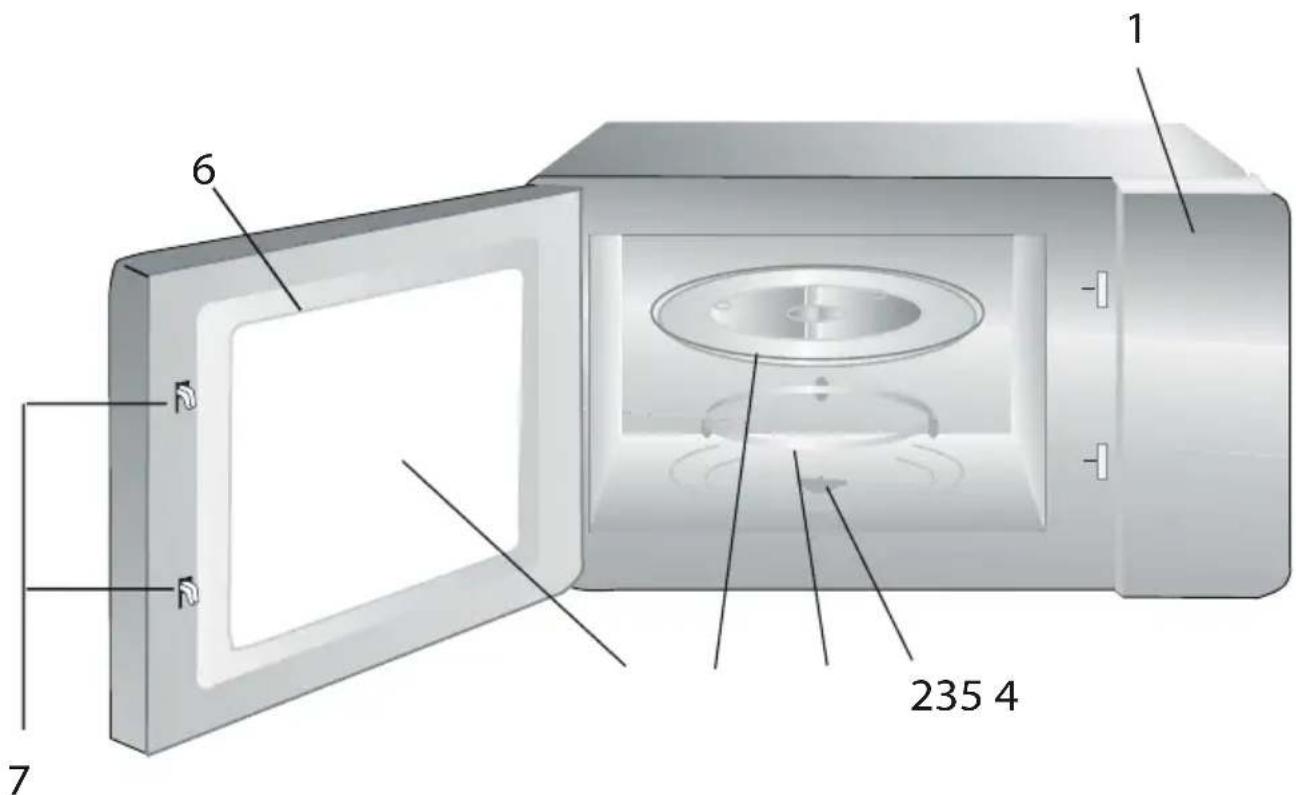
Controls and parts
- Control panel
- Turntable shaft
- Turntable support
- Glass tray
- Oven window
- Door group
- Door safety interlock system
2.2 Technical data
| Power consumption | 230 V~50 Hz
1250 W (Microwave) |
| Output | 800 W |
| Operating frequency | 2450 MHz |
| External dimensions
(H*W*D) | 289.1*461*340 mm |
| External dimensions-kit contents (H*W*D) | 382*594*340 mm |
| Oven capacity | 20 litres |
| Net weight | 12 kg |
| Net weight (kit contents) | 13 kg |
Technical and design modification rights are reserved.
Markings on the product or the values stated in other documents supplied with the product are values obtained under laboratory conditions as per relevant standards. These values may vary according to the usage of the appliance and ambient conditions. Power values are tested at 230V.
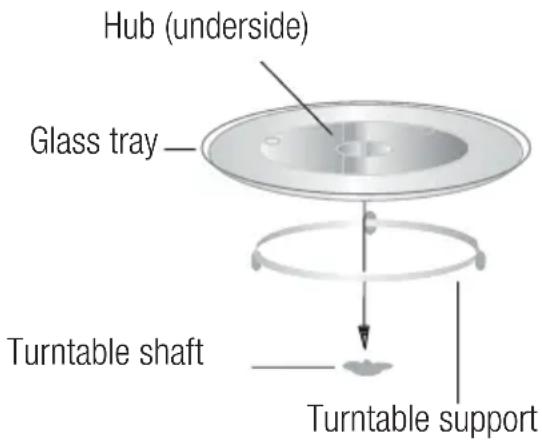
2.3 Installing the turntable
- Never place the glass tray upside down. The glass tray should never be restricted.
- Both glass tray and turntable support must always be used during cooking.
- All food and containers of food must always place on the glass tray for cooking.
- If glass tray or turntable support crack or break, contact your nearest authorized service center.
3 Installation and connection
3.1 Installation and connection
- Remove all packing material and accessories. Examine the oven for any damage such as dents or broken door. Do not install if oven is damaged.
- Remove any protective film found on the microwave oven cabinet surface.
- Do not remove the light brown Mica cover that is attached to the oven cavity to protect the magnetron.
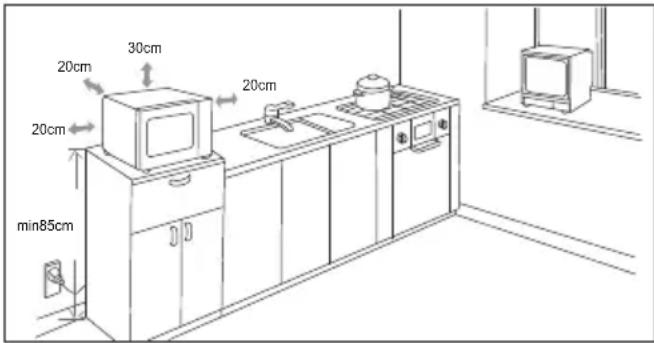
- Select a flat surface that provides sufficient space for inlet and outlet ducts.
-
Minimum installation height is 85cm .
-
Rear surface of the appliance should not be placed against a wall. Leave a clearance of min. 30 cm above the oven; the minimum distance between the oven and adjacent walls, if any, should be 20 cm .
- Do not remove the spacers beneath the oven.
- Obstructing the inlet and outlet openings may damage the oven.
- The appliance is fitted with a plug and must only be connected to a properly installed grounded socket.
- The mains voltage must correspond to the voltage specified on the rating plate.
- If the plug is no longer accessible after installation, an all-pole isolating switch must be present on the installation side with a contact gap of at least 3mm .
- Adapters, multi-way sockets and extension cords must not be used. Overloading can result with a risk of fire.

WARNING: Do not place the oven onto a hob or any other appliance that emits heat. Placing the oven on or close to a heat resource may damage the oven and consequently, the warranty will become void.
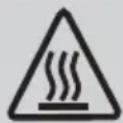
The accessible surface may be hot during operation.
Do not trap or bend the power cable.

For built-in use, refer to the installation information contained in kit with the model code MOK20232X.
3.2 Radio interference

Operation of the microwave oven may cause interference on radios, TVs and similar appliances.
- Place the oven as far away from radios and TVs as possible. Operation of microwave oven may cause interference to your radio or TV reception. 2. Plug your oven into a standard household outlet. Be sure the voltage and the frequency is the same as the voltage and the frequency on the rating plate.
- In case of interference, it may be reduced or eliminated by taking the precautions given below:
- Clean the door and sealing surface of the oven.
- Set the antenna direction of the radio or TV again.
- Reposition the oven based on the location of the receiver.
- Place microwave oven away from the receiver.
- Plug the microwave oven to another outlet, thus microwave oven and receiver shall be on different lines.
3.3 Microwave cooking principles
- Prepare the food carefully. Place the remaining parts to the outside of the dish.
- Pay attention to the cooking time. Cook in the shortest time specified and add some more time if required. Overcooked food may cause smoke or may be burnt.
- Cover the food while cooking. Covering the food prevents any splashing and helps to ensure that food is cooked evenly.
- Turn over food such as poultry and hamburgers while cooking them in a microwave oven in order to accelerate cooking of this kind of food. Larger food such as roast must be turned over at least once.
- Turn food such as meatballs upside down in the middle of the cooking and replace them with each other from the center of the dish to the outside.
3.4 Grounding instructions
This appliance must be grounded. This oven has a grounding cable with a grounded plug. Appliance must be plugged to a wall outlet installed and grounded correctly. Grounding system allows a leak wire for the electrical current in case of a short circuit and reduces the risk of electric shock. We recommend using an electrical circuit dedicated to the oven. Operating with high voltage is dangerous and may cause fire or other accidents that would cause damage to the oven.

WARNING: Misuse of grounding plug may cause electric shock.
If you have any questions on grounding and electrical instructions, please consult a qualified electric technician or service personnel.
3 Installation and connection

Manufacturer and/or dealer would not accept any responsibility for injuries or damages on the oven that may occur when electrical connection procedures are not followed.
3.5 Utensil test
Never operate the microwave oven empty. The only exception is the utensil test described in the following section. Some certain non-metal utensils may not be suitable for using in microwave. If you are not sure whether your utensil is suitable for microwave, you can perform the following test.
- Place the empty utensil to be tested into the microwave oven together with a microwave-compatible glass filled with 250 ml water.
- Operate the microwave oven at max power for 1 minute.
- Check carefully the temperature of the utensil being tested. If it is warmed up, it is not suitable for use in microwave.
- Never exceed the operating time limit of 1 minute. If you notice arcing during 1 minute of operation, stop the microwave. Utensils causing arcing are not suitable for use in microwave.
Following list is a general guide that would help you in selecting the right utensil.
| Cooking utensil Microwave Grill Combination | | |
| Heat-resistant glass | Yes | Yes | Yes |
| Non-heat-resistant glass No No No | | | |
| Heat-resistant ceramics | Yes | Yes | Yes |
| Plastic dish suitable for microwave oven YesNo No | | | |
| Paper kitchenware YesNo No | | | |
| Metal tray | No YesNo | | |
| Metal rack | No YesNo | | |
| Aluminum foil and foil covers | No YesNo | | |
| Foam materials | No No No | | |
4.1 Control panel
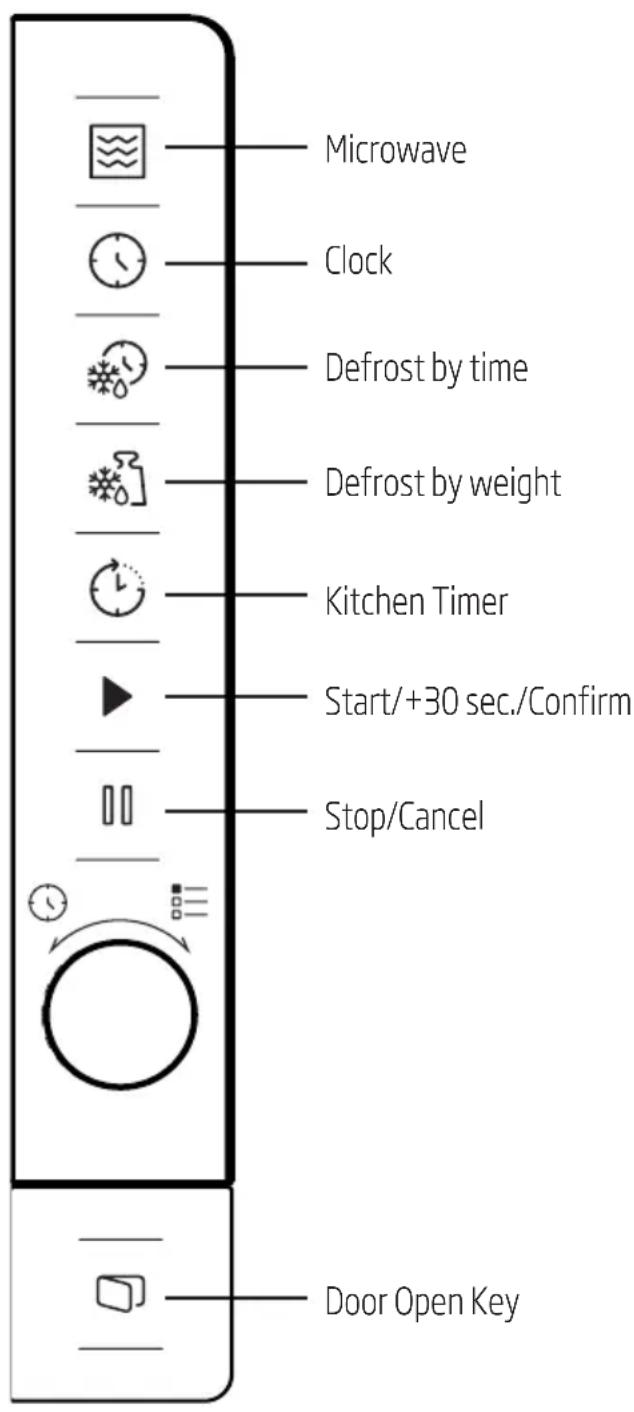
4.2 Setting the time
When the microwave oven is energized, "0:00" will be displayed in LED screen and buzzer will ring once.
- Press "S" the figures for hours will start flashing.
- Turn "O" to adjust the hour; the input value should be between 0 and 23.
- Press " " and the figures for minutes will start flashing.
- Turn "Q" to adjust the minutes; the input value should be between 0 and 59.
- Press "O" to finish time setting. ":" symbol will flash, and the time will light.

If you press during time setting, oven will automatically return back to previous mode.
4.3 Cooking with microwave oven
- Press "and "P100" will be displayed in LED screen.
- Press "again or turn to select the desired power. Each time you press the key, "P100", "P80", "P50", "P30" or "P10" will be displayed respectively.
- Press "▶" to confirm and turn "▶" to set the cooking time to a value between 0:05 and 95:00.
- Press "▶" again to start cooking.

Example: If you want to use 80% microwave power to cook for 20 minutes, you can operate the oven with the following steps.
-
Press "☑" once and "P100" will be displayed in the screen.
-
Press "once again or turn " to set 80 % microwave power.
- Press "▶" to confirm and "P 80" will be displayed in the screen.
- Turn "O" to adjust the cooking time until the oven displays "20:00".
- Press "▶" to start cooking.
| Setting the duration | Increment amount |
| 0-1 minute 5 seconds | |
| 1-5 minutes 10 seconds | |
| 5-10 minutes 30 seconds | |
| 10-30 minutes 1 minute | |
| 30-95 minutes 5 minutes | |
Microwave keypad instructions
| Order Screen Micro wave Power |
| 1 P100 100% | |
| 2 P80 | 80% | |
| 3 P50 | 50% | |
| 4 | P30 | 30% |
| 5 P10 | 10% | |
4.4 Quick start
- In standby mode, press "▶" to start cooking with 100% microwave power. Each time you press the key, cooking time will increase until 95 minutes with steps of 30 seconds.
- In microwave oven cooking cooking or defrost by time modes, the cooking time will increase by 30 seconds each time you press "▶".
- In standby mode, turn "O" counterclockwise to set the cooking time in order to start cooking with 100% microwave power and press "to start cooking.

In auto menu and defrost by weight modes, pressing "▶" will not increase the cooking time.
4.5 Defrost by time
- Press "for once.
- Turn "Q" to select the defrost time. The maximum time is 95 minutes.
- Press "▶" to start defrost. Defrost power is P30 and cannot be changed.
4.6 Defrost by weight
- Press "or once.
- Turn "Q" to select the weight of food from 100 to 2000 g.
- Press "▶" to start defrost.
4.7 Kitchen timer (counter)
Your oven is equipped with an automatic counter which is not linked with the oven functions and can be used separately at the kitchen ( it can be set to max. 95 minutes.)
- Press "L" for once and 00:00 will be displayed in LED screen.
- Turn "Q" to enter the correct time.
- Press "▶" to confirm the setting.
- When the countdown from the entered time reaches to 00:00, the buzzer will ring for 5 times. If the time is set (24-hour system), current time will be displayed in LED screen.
Press "I" to abort the timer at anytime.

Kitchen timer functions different than 24-hours system. Kitchen timer is just a timer.
4 Operation
- Turn "clockwise to select the desired menu. Menus between "A-1" and "A-8", namely pizza, meat, vegetable, pasta, potato, fish, beverage and popcorn, will be displayed.
- Press "▶" to confirm.
- Turn " to choose the default weight in accordance with the menu chart.
- Press "▶" to start cooking.

Example: If you want to use "Auto Menu" to cook 350 g fish:
- Turn "9" clockwise until "A-6" is displayed in the screen.
- Press "▶" to confirm.
- Turn "to select the weight of fish until "350" is displayed in the screen.
- Press "▶" to start cooking.
Auto cooking menu
| Menu Weight | Screen | |
| A-1 Pizza | 200 g 200 | |
| 400 g 400 | |
| A-2 Meat | 250 g 250 | |
| 350 g 350 | |
| 450 g 450 | |
| A-3 Vegetable | 200 g 200 | |
| 300 g 300 | |
| 400 g 400 | |
| A-4 Pasta | 50 g (with 450 ml cold water) | 50 |
| 100 g (with 800 ml cold water) | 100 |
| A-5 Potato | 200 g 200 | |
| 400 g 400 | |
| 600 g 600 | |
| A-6 Fish | 250 g 250 | |
| 350 g 350 | |
| 450 g 450 | |
| A-7 Beverage | 1 glass (120 ml) 1 | |
| 2 glasses (240 ml) 2 | |
| 3 glasses (360 ml) 3 | |
| A-8 Popcorn | 50 g 50 | |
| 100 g 100 | |
4.9 Multi-step cooking
At most 2 steps can be set for cooking. In multistep cooking, if one step is defrosting, then defrosting must be placed in the first step.

If you want to thaw food for 5 minutes and then cook with 80% microwave power for 7 minutes, perform the following steps:
- Press "..." for once.
- Turn "Q" to select the defrost time until "5:00" is displayed in the screen.
- Press "☑" once and "P100" will be displayed in the screen.
- Press "once again or turn to set 80% microwave power.
- Press "▶" to confirm and "P 80" will be displayed in the screen.
- Turn "Q" to adjust the cooking time until the oven displays "7:00".
4 Operation
- Press "▶ to start cooking. Buzzer will sound once for the first step and defrost time countdown will start. Buzzer will sound once again when entering the second cooking step. Buzzer will sound for 5 times at the end of cooking.
4.10 Query function
- In microwave modes, press and the current power level will be displayed for 3 seconds. After 3 seconds, the oven will return to the previous mode.
- While cooking, press " ⑦ " and the current time will be displayed for 3 seconds.
4.11 Child lock
- Locking: In standby mode, press for 3 seconds and a buzzer will sound indicating that the child lock is activated. If the time is already set, current time will also be displayed; otherwise "t" will be displayed in the LED screen.
- Unlocking: To disable the child lock, press for 3 seconds and a long "beep" will sound indicating that the child lock is disabled.
4.12 Opening the oven door
Press "and the oven door will be opened.
5.1 Cleaning

WARNING: Never use gasoline, solvent, abrasive cleaning agents, metal objects or hard brushes to clean the appliance.
WARNING: Never immerse the appliance or its power cable in water or in any other liquid.
- Turn the appliance off and disconnect it from wall socket.
- Wait for the appliance to completely cool down.
- Keep the inside of the oven clean. Wipe with a damp cloth when splashed food or spilled liquids stick on the walls of the oven. A mild detergent may be used if the oven gets very dirty. Avoid using sprays and other harsh cleaning agents as they may cause stains, marks, and opaqueness on the door surface.
- Outer surfaces of the oven must be cleaned with a damp cloth. Do not allow water ingress from ventilation openings to prevent damage to the operating parts in the oven.
- Wipe both sides of the door and the glass, door gaskets and parts near the gaskets frequently with a damp cloth in order to remove the over- lowing and splashing stains. Do not use abrasive cleaning agents.
- Do not allow control panel to get wet. Clean with a soft damp cloth. Leave the door of the oven open to prevent inadvertent operation while cleaning the control panel.
- If steam accumulates inside or around the oven door, wipe with a soft cloth. This may occur when the microwave oven is operated under high humidity conditions. It is normal.
-
In some cases, you may need to remove the glass tray for cleaning. Wash the tray in warm soapy water or in a dishwasher.
-
The roller ring and oven floor should be cleaned regularly to avoid excessive noise.
- It would be sufficient to wipe the lower surface of the oven with a mild detergent. Roller ring may be washed in warm soapy water or in a dishwasher. When you remove the roller ring from oven internal floor for cleaning, ensure that you install it in the correct position while replacing it.
- In order to remove bad odors in your oven, put a glass of water and juice and peel of a lemon to a deep bowl suitable for use in microwave and operate the oven for 5 minutes in microwave mode. Wipe thoroughly and dry with a soft cloth.
- Please contact the authorized service when the oven lamp needs to be replaced.
- The oven should be cleaned regularly and any food deposits should be removed. If the oven is not kept clean, this may cause surface defects that would affect the lifecycle of the appliance negatively and that would possibly cause risks.
- Please do not dispose this appliance with household waste; old ovens shall be disposed to special waste centers provided by the municipalities.
- When the microwave oven is used in grill function, a small amount of smoke and odor may occur which will disappear after a certain time of usage.
5.2 Storage
If you do not intend to use the appliance for a long time, please store it carefully.
- Please make sure that the appliance is unplugged, cooled down and totally dry.
- Store the appliance in a cool and dry place.
- Keep the appliance out of the reach of children
5 Cleaning and maintenance
5.3 Handling and transportation
-
During handling and transportation, carry the appliance in its original packaging. The packaging of the appliance protects it against physical damages.
-
Do not place heavy loads on the appliance or the packaging. The appliance may be damaged.
- Dropping the appliance will render it non-operational or cause permanent damage..
6 Troubleshooting
| Normal |
| Microwave oven interferes with TV reception Radio and TV reception may be interfered when microwave oven is operating. It is similar to the interference caused by small electrical appliances, like mixer, vacuum cleaner, and electric fan. It is normal. |
| Oven light is dimmed In low power microwave cooking, oven light may be dimmed. It is normal. |
| Steam accumulating on door, hot air coming out of vents During cooking, steam may arise from the food. Most of this steam will get out from vents. But some may accumulate on a cool place like oven door. It is normal. |
| Oven started accidentally with no food in it. It is not allowed to run the appliance without any food inside. It is very dangerous. |
| Problem Possible Reason Solution | | |
| Oven cannot be started. 1) Power cable is not plugged in properly. | Unplug. Then plug again after 10 seconds. | |
| 2) Fuse is blown or circuit breaker is activated. | Replace fuse or reset circuit breaker (repaired by professional personnel of our company). | |
| 3) Trouble with outlet. Test the outlet with other electrical appliances. | | |
| Oven does not heat. 4) Door is not closed | properly. Close the door properly. | |
| Glass turntable makes noise when microwave oven operates | 5) Turntable and bottom of the oven is dirty. | Refer to "Cleaning and Maintenance" section to clean dirty parts. |
Chere cliente, cher client,
5.3 Rokovanje in transport
To 3aDpKByBame npabOTO Ha TexHnUKN npOMeHN INPOMeHN BO dN3ajHOT.
O3NaKITHe Ha ypeoT nIbveHocHTe HabeDeHN BO DOkymeHTaunjata Koja ja do6nBte co ypeoT ce BpeHocTn Do6neHN Bo Ia6opatOpNcKu YcNoBn CO peNeBaHTHn CTAHapDN. Obne BpeHocTm MoKe da ce pa3nkybaat BO 3aBnCHocT od ynoTpe6bata Ha ypeoT, ycNoBtE noKpyxByaHeTo. BpeHocTte Ha eJekTpnuHaTa eHeprJa TecTnpaHn ce Ha 230V.
IorpeuHaTa ynoTpe6a Ha 3a3eMjeHnot npNKnyOK MOKe Da IpeiN3BnKa CTrpyeh ydap.
Ako NMaTe npaShaBa BO Bpcka co 3a3emjyBaHbeto n eJekTpHuHTe HnCTaJaun, Be moJIme KOhcyItnapajte ce co KBaIINΦkUyBaH eJekTpHuAp IJIco cepBncepTe.

ПюИЗВОДИТЕЛOT n/nлдпстрибутерOT hema da npифати OДROВОРНOC 3a NOВpeNi NN WTeTa COЗдаденпо-ради HENOчNTyBaHbe Ha npoцeДурпte 3a NOВP3yBaHbe Ha cTpyja.
3.5 Tectnpahe Ha caIoT
Hnkoraa He BknyuBajTe ja npa3-Hata neka. eDnHCTBeH NCKnyOKe TectpaHBeTO ONIuHaHO BO TECTOT wTO CneDN. OndeHn HEmTaJHn caIOBV MoKebn Hema Da 6uDaT aKeBAHTN 3a yNoTpeBa BO MKNpObpaHObAta Neka. Ako He cTe cnrypHn DeKa Baunot cae aKeBAteH 3a yNoTpeBa BO MKNpObpaHObAta Neka, HanpaBeTe ro CneHNOB Tect.
1.Пocтавete ro npa3Hnot caJ KOJ ce TecTnpa BO MmKpO6paHObata NeUka NyaSha Koja MoKe Da ce KOpNCTn BO MmKpO6paHObata NeUka HAnOJHeTa co 250 ml Boda.
2.Bknyute ja Mnkpo6paHOBaTa neka Ha MaKcImaJIHa Cnla BO TpaeHe o1 MNHyTa.
3.BHnMaTeJHo CneJeTa TeMnepaTypaTHa caIOT uTo ce Tectnpa.Ako Ce 3arpeBa He MoKe Da ce KopncTu BO MmKpO6paHObata neUka.