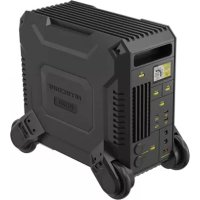
NES2000 - Battery charger Nitecore - Free user manual and instructions
Find the device manual for free NES2000 Nitecore in PDF.



| Product Type | Portable Power Station |
| Brand | Nitecore |
| Model | NES2000 |
| Dimensions (approx.) | 400 x 250 x 300 mm |
| Weight (approx.) | 18 kg |
| Battery Capacity | 2000 Wh (estimated) |
| Input Power | AC 1200W, solar panel 100W, cigarette lighter charger 12V/24V, PD 100W adapter |
| Charging Time (AC) | min. 2 hours |
| Charging Time (solar 100W) | min. 21 hours (depending on conditions) |
| Outputs | AC (outlets), USB-A QC, USB-C PD, cigarette lighter 12V, DC 5525 |
| Max AC Output Power | 2000W (estimated based on model) |
| Display | LCD to display power, charge, battery life |
| Main Functions | Charging and powering multiple devices, NNERGY app for remote control |
| Maintenance | Fully charge before storage, discharge and recharge every 3 months, store between 20-30°C |
| Safety | Thermal protection, automatic shutdown on overload or low battery, low power alarm |
| Operating Temperature | -10 to 40°C |
| Storage Temperature | -20 to 60°C |
| Box Contents | AC power cable, user manual, cigarette lighter cable (not mentioned but probable) |
| Warranty | Check Nitecore official website |
Frequently Asked Questions - NES2000 Nitecore
User questions about NES2000 Nitecore
0 question about this device. Answer the ones you know or ask your own.
Ask a new question about this device
Download the instructions for your Battery charger in PDF format for free! Find your manual NES2000 - Nitecore and take your electronic device back in hand. On this page are published all the documents necessary for the use of your device. NES2000 by Nitecore.
USER MANUAL NES2000 Nitecore
Before using or storing, please plug the power station into the power outlet until it is fully charged.

IMPORTANT NOTICE CONCERNING WARRANTY SERVICE
Thank you for purchasing! Before using this product, please find your verification code in the package box, and go to http://charger.nitecore.com/validation (or scan the QR code in the verification code to visit on your mobile phone). Type in your verification code personal information as required, and submit the page. After verification, NITECORE will send you a warranty service email for a free warranty extension of 6 months. This email and registration email address are essential to your possible warranty application.
Contents
English 1
Deutsch 4
Francais 7
Pycckn 10
yKpaIHcbka 13
简体中文 16
Technical Specifications
| Model NES2000 | ||
| Cell 21700 Li-ion Batteries | ||
| Capacity 2016Wh (25.2V, 80Ah) (560000mAh) | ||
| DC Input 12V-36V, up to 20A (Total 720W max) | ||
| AC Input 200-240V~ 50/60Hz (1200W max) | ||
| USB-C Input | 5V=3A / 9V=3A / 12V=3A / 15V=3A / 20V=5A | 100W max per port |
| AC Output 220V~9.09A 50Hz, Pure Sine Wave 2000W, 4000W surge | ||
| DC1 (Cig Lighter) Output 12V-10A Total 120W max | ||
| DC2 Output 24V-20A 500W max | ||
| USB-A Output | 5V=3A / 9V=2A / 12V=2A / 20V=1.5A | 30W max per port |
| USB-C Output | 5V=3A / 9V=3A / 12V=3A / 15V=3A / 20V=5A | 100W max per port |
| Shelf-life | Charge every 3-6 months | |
| Lifecycles | 500 cycles to 80% (discharge rate: 1C, full charge/discharge, Temp 25°C) | |
| Operating Temperature | -10~40°C (14~104°F) | |
| Dimensions | 464mm x 270.4mm x 403.4mm (18.27" x 10.65" x 15.88") | |
| Weight | 22.41kg (49.41 lbs) | |
| Accessories | AC Power Cord, Car Charger | |
How It Works
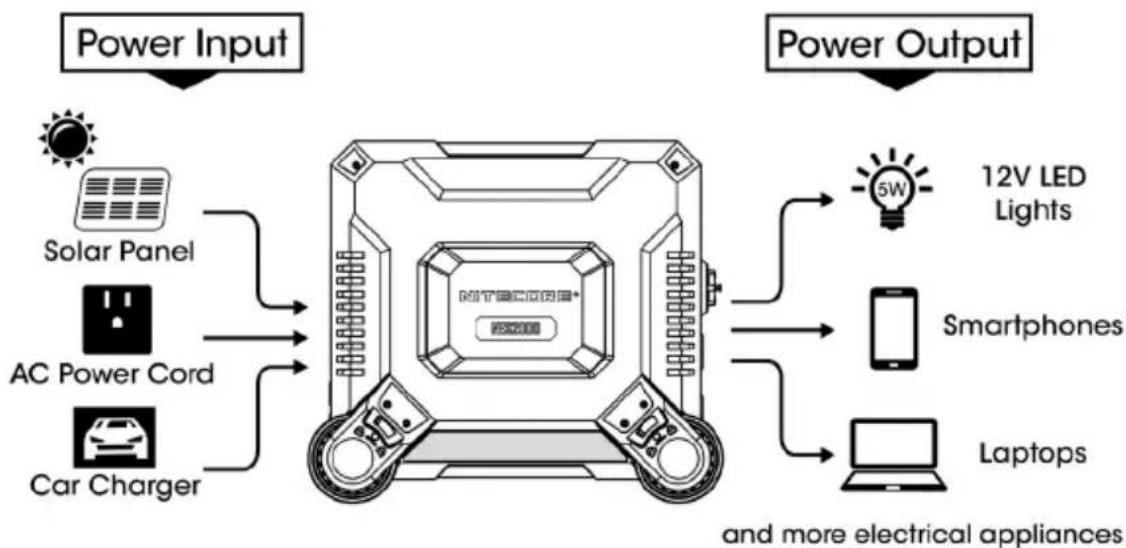
Note: The power outlets shown in this manual are for reference only. The actual product may vary depending on regional variations.
Get Familiar With Your Gear
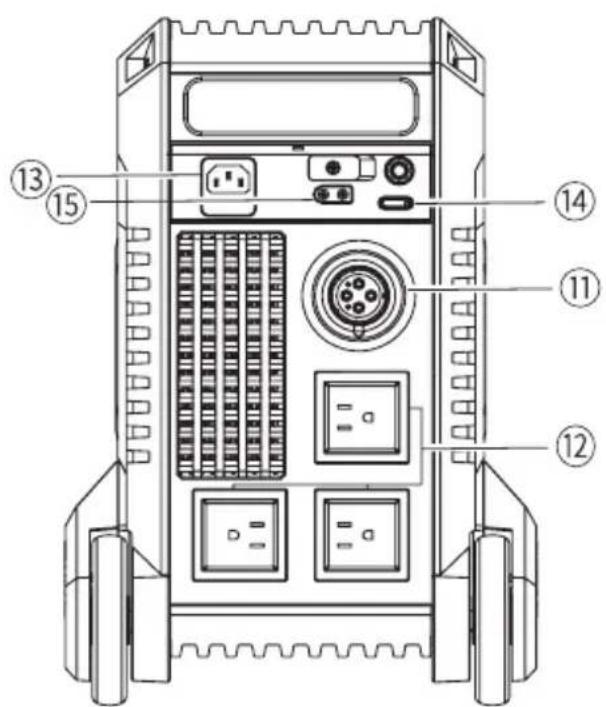
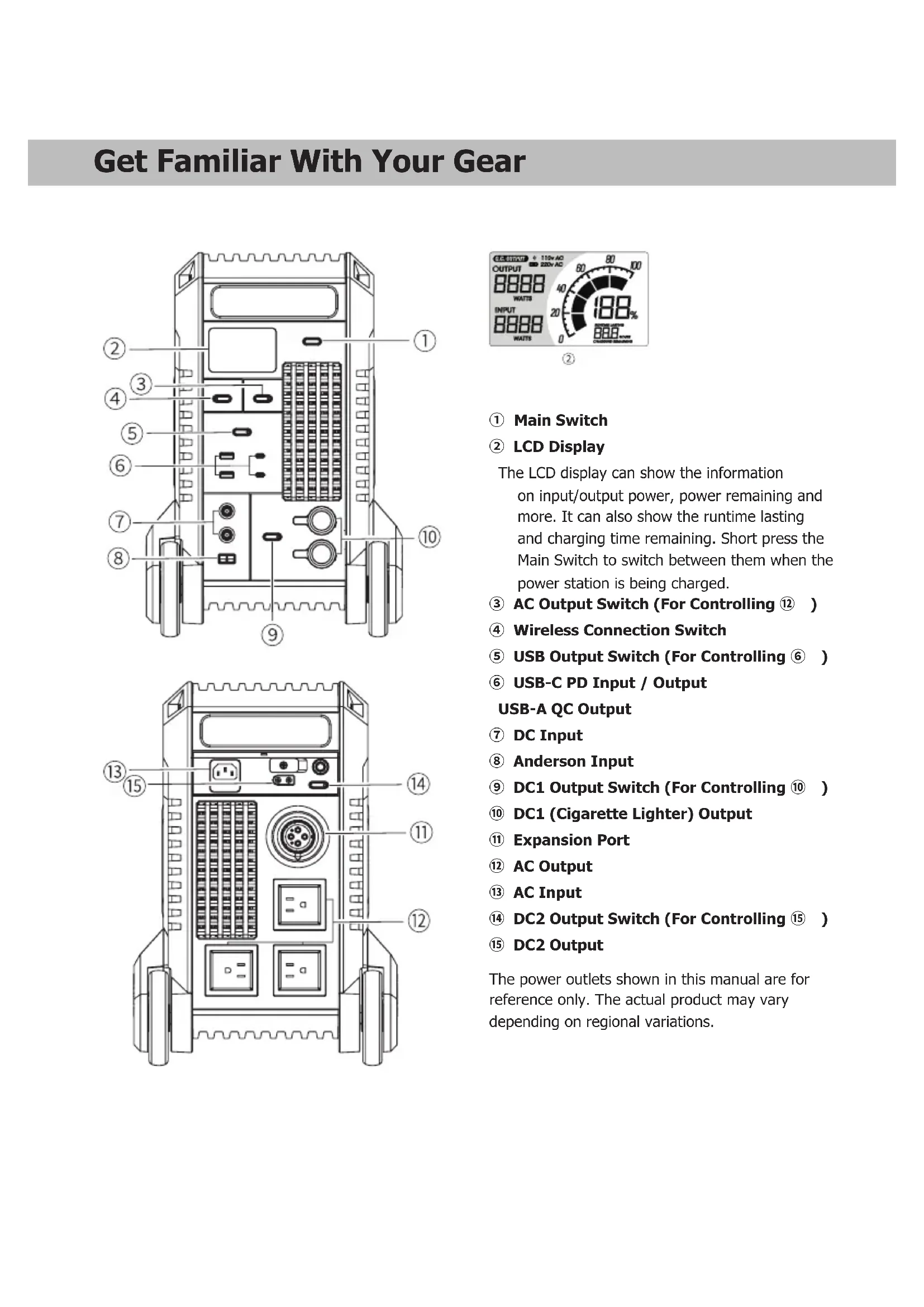
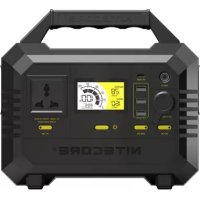
① Main Switch
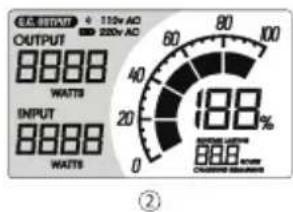
② LCD Display
The LCD display can show the information on input/output power, power remaining and more. It can also show the runtime lasting and charging time remaining. Short press the Main Switch to switch between them when the power station is being charged.
③ AC Output Switch (For Controlling 12)
④ Wireless Connection Switch
USB Output Switch (For Controlling 6
USB-C PD Input / Output USB-A QC Output
⑦ DC Input
Anderson Input
9 DC1 Output Switch (For Controlling 10)
DC1 (Cigarette Lighter) Output
1 Expansion Port
12 AC Output
13 AC Input
DC2 Output Switch (For Controlling 15)
DC2 Output
The power outlets shown in this manual are for reference only. The actual product may vary depending on regional variations.
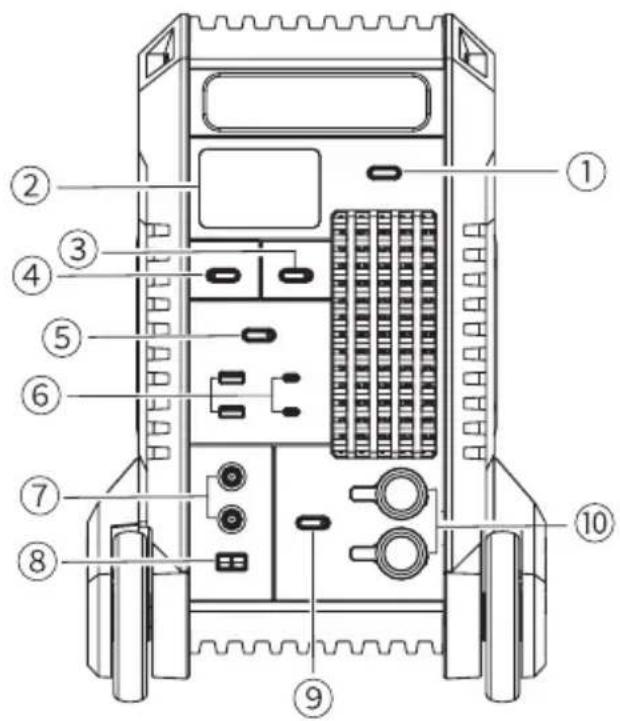
① Main Switch
② LCD Display
The LCD display can show the information on input/output power, power remaining and more. It can also show the runtime lasting and charging time remaining. Short press the Main Switch to switch between them when the power station is being charged.
③ AC Output Switch (For Controlling 12)
④ Wireless Connection Switch
USB Output Switch (For Controlling 6)
USB-C PD Input / Output USB-A QC Output
⑦ DC Input
⑧ Anderson Input
9 DC1 Output Switch (For Controlling 10)
DC1 (Cigarette Lighter) Output
Expansion Port
⑫ AC Output
AC Input
DC2 Output Switch (For Controlling 15)
DC2 Output
The power outlets shown in this manual are for reference only. The actual product may vary depending on regional variations.
Charging Function
The power station can be charged via the AC power cord while compatible with the solar panel (Output Port: 7.9mm*5.5mm / Anderson Plug), car charger (12V / 24V), PD adapter and more. Before using or storing, it is recommended to use the power cord included to fully charge the product.
Power Connection: When the power station is on/off, connect it to an external power via the input port(s) to charge the product.
Charging Indication: During the charging process, the display will show the input power and the power bar will flash to inform the user. When the power station is fully charged, the power bar will stop flashing and the power level will show 100% .
Charging Time:
| 1200W AC Input min. 2h | |
| 100W Solar Panel (Depending on the sunlight intensity, temperature, etc.) | min. 21h |
| Car Charger min. 21h | |
| 100W PD Adapter min. 21h |
Note:
- Except for AC input, the product can be charged via 2 input ports to achieve an increased input power.
- The AC output port is not available when using the AC input port.
- Please use power supplies with the same voltage when using both DC input ports. Otherwise, the low-voltage power supply will not be available for input.
- Please use USB-C charging cables with support of 100W power transfer to achieve a max USB-C input / output power of 100W.
Operating Instructions:
- Long press the Main Switch to turn on/off the power station.
- When the power station is turned on, short press the output switches to turn on the respective output port and its indicator to power the external devices.
Note:
- When the output power exceeds the rated specifications, the AC output will be automatically turned off to ensure that the power station will not be damaged due to power overload.
- When the power level is near depletion or the battery temperature is high, the AC output will not be available for use and will be automatically turned off. The power station will set off a warning alarm to inform the user.
- Please turn off the AC output to save power if it is left unused for a prolonged time.
- When the power station is on without any input or output, it will be automatically turned off to save power in 5 minutes.
- The power station has an intelligent thermal protection. It will automatically activate the cooling system according to the working condition to effectively protect the batteries and prolong their lifespan.
Compatible Devices
AC Output: Laptops, monitors, etc.
USB Output: Smartphones, digital cameras, tablets, e-readers, etc.
12V Cig Lighter Output: Portable fridge, lighting appliances, car chargers, etc.
| Cig Lighter Output | 12V/5W LED Light Approx. 307h | |
| Portable Fridge 40W Approx. 73h | ||
| AC Output | Drone 38W Approx. 40 Charges | |
| Fan 40W Approx. 38h | ||
| Electric Blanket 60W Approx. 25h | ||
| Projectile 100W Approx. 15h | ||
| LCD TV 150W Approx. 10h | ||
| Desktop Computer 200W Approx. 7.6h | ||
| Electric Drill 500W Approx. 2-4h | ||
| Electric Kettle 800W Approx. 19h | ||
| Rice Cooker 1000W Approx. 1.5h | ||
| Hammer Drill 1080W Approx. 1.1-2.2h | ||
| Microwave 1300W Approx. 0.9-2.2h | ||
| Electric Kettle 1500W Approx. 1h | ||
| Electric Oven 1650W Approx. 0.9h | ||
| USB Output | Mate 40 Pro Approx. 94 Charges | |
| iPhone 12 Pro Approx. 147 Charges | ||
| iPhone 14 Pro Max Approx. 92 Charges | ||
| iPhone 14 Pro Approx. 124 Charges | ||
| MacBook Pro 16" Approx. 15 Charges | ||
| iPad Pro 12.9" | Approx. 41 Charges | |
| Switch Approx. 96 Charges | ||
Note: The stated data is tested in the NITECORE Lab for reference only. The data may vary in real world use due to different power of the devices or environmental conditions.
Low Power Warning: The power station needs to be recharged when it sets off a warning alarm in the output status to inform the user that the power level is below 10% .
NNERGY APP

Scan to Download Our MySQL App.
In NNERGY, you can remotely control and monitor the information and data of the NES2000.
For the download link and more information, please scan the QR code or access the following link:
https://charger.nitecore.com/Server/detail/cd/498
Important Safety Instructions
±b Warnings!
- Please read the user manual carefully before using the product.
- Ambient Temperature of Usage: -10 40^ (14\~104°F); Temperature of Storage: -20 60^ (-4\~140°F)
- Please only use charging accessories included or sold officially to charge the product.
- Please connect the applicable external devices only according to the specifications in this user manual. The total power of the external devices should be no more than the rated specifications of the power station.
- The product is designed for adults. Use of the product by kids under age must be under supervision. Operation, using or cleaning of the product may NOT be done by kids aged 8 years or younger.
- DO NOT leave the product unattended when it is working. Unplug the product at any sign of malfunction.
- It is risky to use accessories made by unprofessional manufacturers or sold by unauthorized dealers.
- DO NOT operate the product if the power outlet or the power cord is damaged.
-
Please unplug the product when it is left unused.
-
Store the device in ventilated areas. DO NOT expose the device in rain or moist environment. Keep it at least 20cm (7.87") away from other objects and away from any combustible material. DO NOT place or cover other objects over the device or use the device in environments with a temperature over 40^ (104°F).
- DO NOT expose the device to open flames. DO NOT store or use the product in an environment where the temperature is extremely high / low or changes rapidly, or in a confined area with a high temperature.
- Please use a dry or anti-static cloth to keep the device clean.
- Avoid any shock or impact to the device.
- If the product has fallen into water, please place it in a safe and open area and keep a distance until it is fully dried. DO NOT use the product again in this case. Please strictly follow the local regulations to recycle or dispose of the product.
- DO NOT place any conductive or metal object in the device to avoid short circuiting and explosions.
- DO NOT disassemble or modify the device as this could result in battery explosion, cracking or leaking, causing personal injury, property damage and/or other unpredictable risks.
- Dispose of the device/batteries in accordance with applicable local laws and regulations.
Troubleshooting
-
If the external device cannot be recharged by the power station, please follow these steps:
-
Check the LCD display. The AC output will be automatically turned off if the power level is too low. In that case, please recharge the product as soon as possible.
- Ensure that the output port has been turned on when being used, which is indicated by the respective indicator on the switch.
- Check if the total power of the external devices exceeds the rated specifications of the power station.
- Check if there is an unstable contact with the external devices.
- About solar panels:
The power efficiency of the solar panels may vary depending on the sunlight intensity, temperature, etc. It might suffer from a reduced power when in cloudy or windy environments. To ensure a high efficiency and charging safety, it is recommended to use official NITECORE solar panels (sold separately) to charge the product.
Maintenance
- Please stop using this product and recharge it as soon as possible when it sets off a warning alarm to inform the user that the power level is below 10% .
- When the power is significantly insufficient during a long-time storage, it will do an irreversible harm to the battery cells and shorten the lifespan of the product. Therefore, it is recommended to fully charge the product before storage.
- When it is left unused for a prolonged time, please discharge and recharge the product every 3 months.
- It is recommended to use or store the product in an environment between 20^ 30^ ( 68^ 86^ ).
Scans to Download Our Downloads
https://charger.nitecore.com/Server/detail/cd/498
Scans Downloaded OurMonday, 2017, 14:30 PM
https://charger.nitecore.com/Server/detail/cd/498
Scan to Download Our
M
B npnloKeHH NNERGY Bbl MoKeTe nctaHcHNOHc KOHTpOInpoBaT b OCTeKbA Tb HOpMaIIO u daHbIe o NES2000. 4To6bl nOlyuHt B CbIky dRg cKaUHbHn rnpnoKeHH, a TaXke DOnoHHTeJbHyIO HOpMaIIO, OTCKaHpyTe QR-KOD nn nepeiDte no CcbIke HIXe:
https://charger.nitecore.com/Server/detail/cd/498
Baxkhble HHctpykuu no 6e3onachoctn

Mepblpeoctopoxhocn!
- IoxaIyIcTa, BHIMATEIbHO npOHTaTe pyKOBOCTBO nOJIb3OBaTeI nepeD 3KCIpyaTaeN yCTpoIcTba.
- Tempepatya Okpykaocei cpebl npn 3kcnnyataun: -10\~40°C (14\~104°F); Tempepatya xpanenra: -20\~60°C (-4\~140°F)
3.Дязардкусгстba nCnoIb3yIte TOnbko 3apdHbIe ycTpoIcTBa, BXOJaIeN B KOMJIeK T C TobApOM IIN Jx e OΦuHaJIbHO kynIeHHbIe.
4.Подклочаite COOTBETCTBYUOUINE BHEWHHne yCTPOINCTBa,ИСКЛIOUHTeJIbHO CInEDy Yka3aHnIМ,ПиBEeHHbIM B DaHHOM pyKOBOcTBe nOLb3OBaTeJI. CymMapHЯ MOUHOCTb BHeuHIX yCTPOINCTB DoJxHa 6bITb He 6Oone Yka3aHHoH HOMHaJIbHO MOnuHOCTn 3JIeKTPoCTaHcII.
5. IpoyKT npEHa3Hauhen I nB3pocbIx. IcnoIb3ObaHne npOyKTA HecOBepeHHoJIeTHMn DOJIKHO OcyueCTbIaTbcN IOH a6IIODeHNEM B3pocbIx. DeTAM B03pacte 8 net mnaJe 3anpeuaetcKcnIpyaHTPOBaTb, IcnoIb3ObaTb NIn YnCtNTb N3deJIe.
6. HE octablaIte npodykt B pa6ooyem coctoHm 6e3 npncMoTpa. BbiklnouaTe n3dJeNe npn IIO6bIX npn3hakax HencnPabHOCTN.
7. Onacno nCIOJIb3OBAbTa akceccyapbl, nI3ROTOBIIeHHbIe HeoΦnuaJIbHbIMn npOn3BOJNTeJIaMn IIN pOdaHHbIe HeABTOpN3OBaHHbIMn dIJIepaMn.
8. HE nCnoJb3yIte n3dJeIne, ecn HcToUHKn nHTaHn nn Hyp noBpeXKeHbI.
9. OTKIIOHaiTe yCTPOINCTBO OT CETn, ECIN OHO He NCIOJIb3yETCA.
10. XpaHnTe yctpoCTBO B npoBeptnBaembix nomeeHnX. HE NOBepraTne yctpoiCTBO BO3dEChTBIO DOxDeI nnBnA. DePknTe erO Ha paccToHnn He MeHee 20 cm (7,87 dmo) O T pyrnx PpeMeTOB N IO6bIX rOpOuNX MaTePnaIOB. HE KlaNTe Ha yctpoiCTBO dpYnE PpeMetbl, HnHem erO He NaKpbBaIte N He NcNoJIb3yIte yctpoiCTBO npn TempeaType OkpykaIoJe Cpebl BiIwe 40^ (104^)
11. HE noDBepraIte yctpoIcTBO 03dEChTBIO OTKpbITOrO orHr. 3ANPEUAECTCR xpaHnTB nIN nCNOB3OBaTB n3deJIe B cpeDe C ouehb BbICOKo / Hn3KoT TempeaTypoi nIN C BbICOKMm KONE6aHnAIM TMpePaTypbi, a TAKKe B 3AMKHytOM pOcTpaHCTBe C BbICOKo TempeaTypoi.
12. IoxaIyIcTa, nCnoJIb3yIte cyxIy IIN aHTmCTaTmHeckyIO TkaHb, yTO6bl COdePkaTb yCTPOIcTB O B YnCTOte.
13.ИЗбeraиTeударовиToIчкOBуСТроИCTBA.
14. Ecn n3dene ynaIO B Ody, nomeCTne ero B 6e30aChOM n OTKpyTOM MeCTe n depKHTecb Ha pacctOAHN, noka OH NOHOCbHO He BbICOXHe. Ecn 3TO npOn3oWn, HE nCnoB3yIte YcTPOINCTBO CHOB. IoxaanyIcTa, cTporo co6nOdaTe npabnla BaWero perNoHa no nepepa6OTke nn yTuINs3auu npodykta.
15. HE nomeauTe B yctpoiCTBO KaKHe-Im6o npoBODaIe TOK IIN MeTaNInueckne PpeMteBo N36ExKaHne KopoTko 3AmbKaHnI nocJeDyUoero B3pbBa.
16.3APELLAETCApa36napbHINBHCNTB KOHCTpyKUIO yCTpoiCTBa KaKne-JI60 I3MeHeHHa, TAK KAc 3TO MoKeT npNBecTN K B3pblBy, paCTpeCKBaHIO INI pOteueAkkymyTATopa, a TaKke TpaBMam, NOBpeXDeHIO IMUeCTBa N / INI DpyHM HenpeDcKa3yEMbIM NocJeCTBnM.
17. YTHIN3NpyIte yCTpoIcTBO / aKKyMylAToPbI B COOTBeTCTBm C CyIeCTByIOUIMn B BaIeM perHOHe 3aKoHaMn I npBaUNaMn.
Bo3mOxHbIe npo6JIembl
-
EcnBHeUHHe yCTpoCTBO He MoKet HaaTb 3apXaTbCt O T3eKTPoCTaHcN, BblIOJIHnTe CLeDyUOJIne DeICTBIA:
-
PpOBeBpTe JKK-dnCJIeN. BbIXoD nepemEHoro ToKa 6yDenT ABTomaTHueCKn OTKnIOHe, ecnn yPoBeH bIITaHnR cIIuKOM H3Kn. B 3tOM Cnyuae Heo6xOdmo KaK MoXHO CKopee 3apAHTb YCTpoCTBO.
- 6eintecb, yTO BbIXoHNOI nopT BkIIOueH BO Bpem3 KcIpyaTuIN. Ha 3Oyka3bIABaET COOTBeTCTByIOUIN INHdkAToP npeekluOaTeJIa.
- IpoBepbTe, He npEbbIaAer nn cyMMapHaar MoUHocTb BHeUHHx YCTPOJCTB HOMHaJIbHbIe XapaKTEpNCtKN 3NeKTPoCTaHcNn.
- Поверът, HeT Ли Нсабьного KoHtakTa C BHeuHmN yCToPcTBaMn.
O cOnHeuHbIX naHeJx:
3Hepeo3phiKtNBHOCTb COHHeHbIX NaHeIe MoKeT BapbnpoBaTcB 3aBNCMOCTOn OT INHTECNBHOCTn COHHeHORo CBeta, Tempeatpynt. T.
I. B obnahyIO nnn BetpeHyIO norOdy moHocTh boMoket CHNkaTbCra. IJn o6ecneueHnBaBcOKo 30fKeTbHOCTH n 6e3OnaHcOCTn 3apAKn peKOMeHyETcra NcnoJIb3OBaTb OfncuHaBhie coInHeHhie naHeHn NITECORE (npOdaIOTc rOTeNbHO) dI 3apJa yctpOCTBa.
06cIyJxNbAHne
- PókaIyIcTa, pIeKpaTIne IcNoJIb3OBAHnE yCtpoCTBa n KaK MoKHO cKOpoe NoCTaBbTe erO ha 3apJky B Clyuae, ecN OH IOnaET npedynpeKdaIoUnn CnHaJn, INΦoPmnpUoiu nn Iob3OBAteJe O TOM, YTO yPoBeH b3apJa onyctInc Hnke 10%.
- KaTeorOpueckn Hn3Km yOboeH 3apraI npn dInTeJbHom xpaHeHH HaHeCet Heo6paTmBb Bpe 3JIeMeHTam nITaHn I cOKpaTNTcPCK cnjkb npOdykTa. POnToMpyekOMeHNyETcR pONHOCTb 3apraNt b YcTPOJCTBO, eCIN Bbl pHaHpyeTe He NCNoB3OBaTB erO dInTeJbHoe Bpemr.
- Ecn yctpoiCTBO He nCnOJIb3yETcB TeueHHe nnTeIbHO BpeMeHN, noKaIyNCTa, He 3a6bIBaIe pa3pKaTb n 3aHOBO 3apKaTb erokkDbe 3 Meca.
- PekomeHdyetca 3KcnnyaTnpoBaTb H xpaHnTb npOyKT npu Tempeata Okykaoue Cpebl ot 20^ do 30^ (68^ 86^)
Scan to Download Our Mobile App
Y NNERGY Bn MoXeTe DnCTaHcIHy KOHTpOIOBaTn Ta nepeBiprTn IHOpMaUTo Ta daHi NES2000. 1io6 oTpMaTn nocuHaHn DaJ3aBaHTaKeHH Ta DoaTKOB yIHOpMaUIO, npocahyTe QR-KoD a6o nepeiDITb 3a cMn nocuHaHm:
https://charger.nitecore.com/Server/detail/cd/498
Baxlnbi iHctpyku3 6e3neKn

ybara!
- Npei BnKOpNCTaHHM npOyKTy YBaJxH No pOuHTaTe IcHtpKcIIO KOpNCTyBaHa.
-
Tempepatya HabkoJnHbOro cepedobuza BnKOpncTaanHr: -10~40°C; TemepaPatya 36epiraHHr: -20~60°C
3.ДяЗарджаньврбуВИКОПСТОБУгteлшeakceCyapnДЯЗAPKANH,IIO BXOДТБY KOMNJIeKT a6o npodahTbC OphiiHNo.
4.ПлкюаTe 3OBHипnpстpoi Lmse BiNobIDNo Do CneuФikaLIM, HabeDeHx Y cIbOMy Noc6Hky KopcTByaHa.3aralbHa notyKHiCTb 3OBHiwHix npCtpoiB He NOBHHa NepeBnUyBaTN HomHaJIbHNx XapAKTePncTnK eNEKtpOCTaHii. -
Ipoodyk po3pO6lenI dny dopocInx. KopnCTyBaHHB BnPO6m HENOBHNIITHMiD ITbMn MaE BiIDyBaTcN iD HarJlOM. DITAM BIKOM Do 8 pokiv 3A5OPOHOHrTbCReKcnIpyaTyBaTu, BnKOpNCTOByBaTu a6o NCTHTn Bnpi6.
- HE 3aIIwaIte Bpi6 6e3 HaJIy, KOJI BIn IpaIIOe. BiD'edHaiTe Bpi6 BiD MepeKx 3a 6yd-kaNX O3HaK HeCnpabHOCTi.
- Pn3IKOBaHO BnKOpNCbOByBaTn AkceCyapn, BnroTOBneHi HnpoPociHmN Bnpo6HnKaMn a6o npodaHi HeaBTOp3OBaHMn dJIpepaMn.
- HE BnKOpncToBvIe Bpi6, kUo po3eTka a6o UHyp KINBJeHHN nouKOJKeHi.
- BydJIaCKa, BiE'EnHaIe IpoDyKT BiI MepeXKi, KOIN BiH He BIKOpNCTOByETbCA.
- 36epiraTe npncptiy npoBipTPOBAHnx npmiiueHHx. HE niDdabaiTe npncpti dIoOy a6o BONORo cepeBOHua. Tpmaite noHa BiDCTahi npnHaMHI 20 cm BiD iHux O6'ekTIB i BiD 6ydb-kaNX ropouhX MaTeiaJib. HE cTabe Ta He hakpnaBte iHwi npedmetn HndnpocToe npctpiy y cepeBOuCi 3 Te mtnepaTpyo Bnue 40^
- HE niДаВаHTe npIcTpii dII BiДКpIrTO BOrHIO. HE 36epiraHTe Ta He BnKOpIcTObYte npOdyKT y cepEOBni, de TempeaTpaHaD3BvuaHb BnCOKa/Hn3bKa a60 WbUkO 3mHooTe bCra, a60 B 3akpITOMy Micci 3 BnCOKO TEMpeaTPOIO.
- BnKOpncTObyIte cyxu a6o anTHCTaTNHy TKaHHNy, 06b NiTpMByaTn npctpi y uNCTOTi.
- YnkaTe ydpabI a6o ydpabNo npictpoI.
- Raio Bnip6 Bnab y Boy, 6yNb Iacka, nomictb Ioro y 6e3neue He Ta BiKpnte Mice Ta TpMaItec H a BiCTaHIOKN BIN IOBHIcTIO He BnCOxHe. Y cOmy BNnAky HE BnKOpncToBy Te npOdyKT 3HOy. ByNb Iacka, cyBopo dOtpmMyTecb MucEbnX npAbn nepepo6Kn A60 yTnIi3aui npOdykTy.
- HE po3miuYte enekTponpObiHi a6o MetaJIe Bi npEMeTN B npNCtPoI, 06 yHnKHyTN KOpOTKOrO 3AmKaHHa Ta Bn6yXy.
- HE po36paIte Ta He moDnΦiKyIe npIcTpi, ockIbKn Ie MoKe npN3BecTn Do Bn6yXy 6aTapei, po3TpickyBaHna a6o BnTOky, cnPnuHHn TpABM, noWkoJKeHH MaHa Ta/a60 iHux Henepe6aCyBaHNx pn3NKIB.
- Ytni3yTe npntpi/6ataei BiNIOBIDHO do YHHnx MicueBX 3aKOHIB i npabn.
BvpiuHn npo6JeM
-
Jkiio 30BhiHn npicTpi He moXHa 3a donomoro 0eKeTPOCTAHU, BIKOHAte HabeHe HxKHe iI:
-
Ipebeipte LCD-dncnien. Bnxid 3minHoro ctpmy abTomatuHO BmNkaetbca, kkuo pibeHb nOtYxHocTi 3aHaTTo H3bKn. Y taKOMy pa3i 3apdItb Bpi6 jkomora wBnuDwe.
- NepekoHaTeCra, 0u BxixiHn nopT yBIMKHeNo iD cac BkOpNCTaHH, npo 0u CbIChb BiNobiHn IHdkatop Ha KOMyTaTopi.
- Npebipte, 3a3a1ha notykiHcTb 30BHIxHix npnCTpoB H nepeBnUyE HomiHaIbHi xapaKtpncTNk eNekTpoCTauJIi.
- NpeBipTe, Hn Hema HeCTa6bHoro KOHTAKTy 30BHiHIMn npncTPOAMN.
- Пр соняни панelli:
EheproeefKTHBnHcTb coHany nane ne moke 3mHOBaTnca 3anexHO bID iHTeHCNBHOCT coHanyo CBTna, Tepeatypn toio. y XmapHomy a6o BitpHOMy cepedobu niMoKe cnoctepiraTnc 3HNKeHH noTyHKoCTI. Uo6 3a6e3neHTn BnCOkY efeKTHBnCt b i 6e3neky 3apJxahnn, dIra 3apJxahnn npOdyTKy peKOMeHdyETbc BnKOpNCTOByBatn ophiHi coHanyi naHeli NITECORE (npOdaIObcra OKpeMo).
Texhichne 6cbnyrobybaHHa
- BydNb nacka, npinnHitb BnKOpNCTOByBaTn uei npOdyk t i 3apJdIb Ioro JkHaB WnDme, KOJI BIn BBIMKHe nonepdKyBaIbHn CnHaN, 06 nobIDomntn KopnctyBaHa npTo Te, zo pIBeH 3apJdy HnKYe 10%.
-
-
-
-
-
-
-
-
-
-
-
-
-
-
-
-
-
-
-
-
-
-
-
-
-
-
-
-
-
-
-
-
-
- 36epirahnHnnoTpyxNcoCTi6yue3NaUHO HeoCTaTHbO,ce np3Bede DO He3BOPOTHOI WKOIN enemertam 6aTapeTa ckopOTNb TepmH cnYx6n Bnpo6y.Tomy nepeD 36epiraHHM peKOMeHnyETcBc NOBHCTIO 3aprntu Bnpi6
-
-
-
-
-
-
-
-
-
-
-
-
-
-
-
-
-
-
-
-
-
-
-
-
-
-
-
-
-
-
-
-
- Jkso Bnip6 He BnKOpNtOByBaBc npTgrom TpBaIoro Yacy, po3paJkaTe Ta nepe3apJaTe NOro Koxhi 3 mciu.
- PekomehoBaHO BnKOpNCTOBvBaTH a60 36epiraT npOpyKT npn Tempepatyi 20^ 30^
(简体中文)说明书
① 总开关
② LCD 显示屏
Our authorized dealers and distributors are responsible for warranty service. Should any problem covered under warranty occurs, customers can contact their dealers or distributors in regards to their warranty claims, as long as the product was purchased from an authorized dealer or distributor. NITECORE's Warranty is provided only for products purchased from an authorized source. This applies to all NITECORE products.
Any DOA / defective product can be exchanged for a replacement through a local distributor/ dealer within the 15 days of purchase. After 15 days, all defective / malfunctioning NITECORE® products can be repaired free of charge for a period of 12 months (1 year) from the date of purchase. Beyond 12 months (1 year), a limited warranty applies, covering the cost of labor and maintenance, but not the cost of accessories or replacement parts. For an optional free warranty extension of 6 months, please refer to the "IMPORTANT WARRANTY NOTICE" section on top to validate your product.
The warranty is nullified if the product(s) is/are:
- broken down, reconstructed and/or modified by unauthorized parties
- damaged from wrong operations
For the latest information on NITECORE® products and services, please contact a local NITECORE® distributor or send an email to service@nitecore.com.
The trademarks and product images specified herein this user manual are for reference purpose only. The copyright belongs to their lawful holders.
All images, text and statements specified herein this user manual are for reference purpose only. Should any discrepancy occur between this manual and information specified on www. nitecore.com, information on our official website shall prevail. SYSMAX Innovations Co., Ltd. reserves the rights to interpret and amend the content of this document at any time without prior notice.
SYSMAX Innovations Co., Ltd.
TEL: +86-20-83862000
FAX: +86-20-83882723
E-mail: info@nitecore.com
Web: www.nitecore.com
Address: Unit 6355, 5/F, No.1021 Gaopu Road, Tianhe District,
Guangzhou, 510653, Guangdong, China
Manufacturer: SYSMAX Power Technology, LLC

Made in China
- IMPORTANT NOTICE CONCERNING WARRANTY SERVICE
- Contents
- Technical Specifications
- How It Works
- Get Familiar With Your Gear
- Charging Function
- Note:
- Operating Instructions:
- Compatible Devices
- NNERGY APP
- Important Safety Instructions
- Warnings!
- Troubleshooting
- - About solar panels:
- Maintenance
- Baxkhble HHctpykuu no 6e3onachoctn
- Mepblpeoctopoxhocn!
- Bo3mOxHbIe npo6JIembl
- O cOnHeuHbIX naHeJx:
- 06cIyJxNbAHne
- Baxlnbi iHctpyku3 6e3neKn
- ybara!
- BvpiuHn npo6JeM
- - Пр соняни панelli:
- Texhichne 6cbnyrobybaHHa
- (简体中文)说明书
- SYSMAX Innovations Co., Ltd.
Brand : Nitecore
Model : NES2000
Category : Battery charger