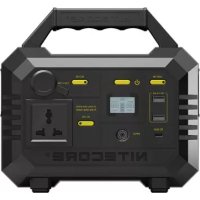
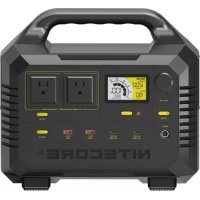
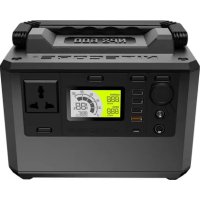
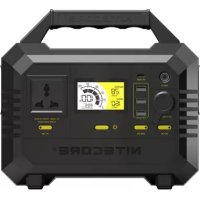
NES300 - Battery charger Nitecore - Free user manual and instructions
Find the device manual for free NES300 Nitecore in PDF.


| Product Type | Portable Power Station |
| Brand | Nitecore |
| Model | NES300 |
| Battery Capacity | 300 Wh (approx.) |
| AC Output Power | 300 W (nominal) |
| Output Ports | 2x USB-A, 1x USB-C PD, 1x AC outlet, 1x 12V output (cigarette lighter) |
| Charge Input | DC 12V (AC adapter, car charger, 100W max solar panel) |
| Charge Time (AC adapter) | Approx. 6.5 hours |
| Charge Time (100W solar panel) | Approx. 3.5 hours (varies with conditions) |
| Typical Runtime (examples) | 5W lamp: ~55h, 38W drone: ~7 charges, 150W LCD TV: ~2h |
| Display | LCD screen showing input/output power, battery level |
| Protections | Intelligent thermal, overload, deep discharge, low battery alarm |
| Operating Temperature | -10°C to +40°C (14°F to 104°F) |
| Storage Temperature | -20°C to +60°C (-4°F to +140°F) |
| Cleaning | Dry or antistatic cloth |
| Safety | Do not expose to moisture, do not disassemble, use official accessories. Do not cover or place conductive objects. |
| Estimated Weight | Approx. 3 kg |
| Estimated Dimensions | Approx. 25 x 15 x 15 cm |
| Warranty | Consult the manual |
Frequently Asked Questions - NES300 Nitecore
User questions about NES300 Nitecore
0 question about this device. Answer the ones you know or ask your own.
Ask a new question about this device
Download the instructions for your Battery charger in PDF format for free! Find your manual NES300 - Nitecore and take your electronic device back in hand. On this page are published all the documents necessary for the use of your device. NES300 by Nitecore.
USER MANUAL NES300 Nitecore
Before using or storing, please plug the power station into the power outlet until it is fully charged.

IMPORTANT NOTICE CONCERNING WARRANTY SERVICE
Thank you for purchasing! Before using this product, please find your verification code on the package box, and go to http://charger.nitecore.com/validation (or scan the QR code beside the verification code to visit on your mobile phone). Type in your verification code and personal information as required, and submit the page. After verification, NITECORE will send you a warranty service email for a free warranty extension of 6 months. This email and your registration email address are essential to your possible warranty application.
How It Works
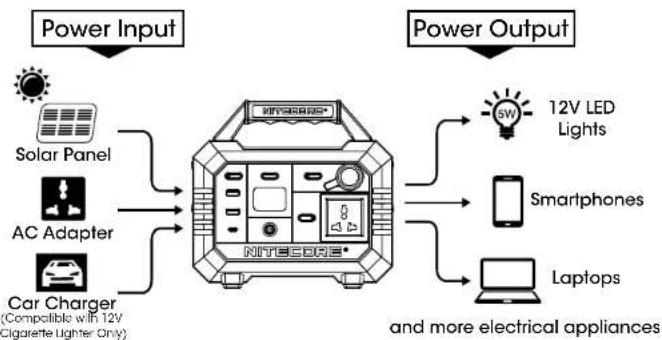
Note: The power outlet shown in this manual is for reference only. The actual product may vary depending on regional variations.
Contents
Get Familiar With Your Gear 1
Technical Specifications 2
English 3
Deutsch 5
Francais 7
Pycckn 9
11
Italiano 13
YkpaIHcbKa 15
简体中文 17
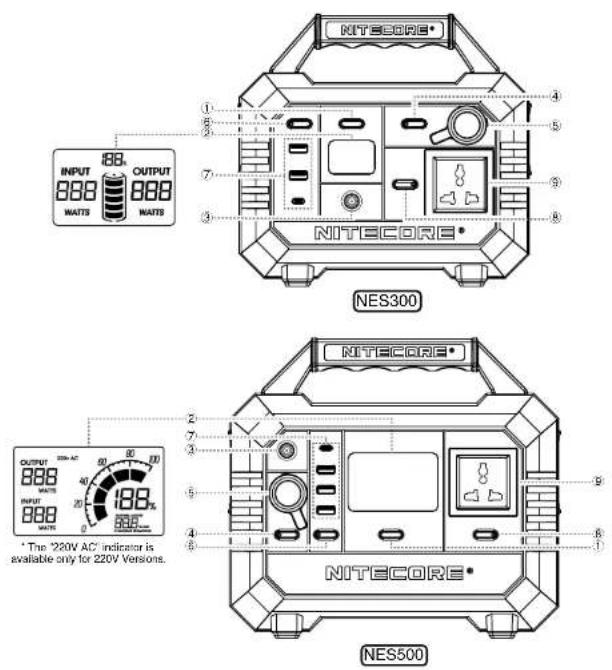
Main Switch
LCD Display
The LCD display can show the information on input output power, power remaining and more. (NESS00 can also show the runtime lasting and charging time remaining. Short press the Main Switch to switch between them when the power station is being charged.)
③ DC Input
DC Output Switch (For Controlling 5)
Cigarette Lighter Output
USB Output Switch (For Controlling)
USB Output
NES300: 2 × USB-A Output, 1 × USB-C PD Output
NESS00: 3 × USB-A Output, 1 × USB-C PD Output
⑧ AC Output Switch (For Controlling ⑨)
AC Output
The power outlet shown in this manual is for reference only. The actual product may vary depending on regional variations.
| Model NES300 | ||
| Cell 1 | 3650 Li-ion Batteries | |
| Capacity 3 | 11Wh (10.8V, 28.8Ah) (86400mAh) | |
| DC Input 1 | 4.4V-26V, up to 10A (160W max) | |
| AC Output | 220V Version: 220V~0.91A 50Hz, Pure Sine Wave | |
| 110V Version: 110V~1.81A 60Hz, Pure Sine Wave | ||
| Cig Lighter Output | 12V~10A (120W max) | |
| USB Output | 5V~2.4A (12W max each port) | |
| USB-C Output | 5V~3A / 9V~3A / 12V~3A / 15V~3A / 20V~3A (60W max) | |
| Shelf-life C | charge every 3-6 months | |
| Lifecycles 5 | 500 cycles to 80% (discharge rate: 1C, full charge/discharge, Temp 25°C) | |
| Operating Temperature | -10~+40°C (14~104°F) | |
| Dimensions 2 | 227mm x 211mm x 129mm (8.94" x 8.31" x 5.08") | |
| Weight 3 | 4kg (7.5lbs) | |
| Accessories AC Adapter, Power Cord, Car Charger | ||
| Model NES500 | ||
| Cell 1 | 3650 Li-ion Batteries | |
| Capacity 5 | 28Wh (10.8V, 48Ah) (144000mAh) | |
| DC Input | 14.4V-26V, up to 10A (160W max) | |
| AC Output | 220V Version: 220V~2.27A 50Hz, Pure Sine Wave | |
| 110V Version: 110V~4.54A 60Hz, Pure Sine Wave | ||
| Cig Lighter Output | 12V~10A (120W max) | |
| USB Output | 5V~2.4A (12W max each port) | |
| USB-C Output | 5V~3A / 9V~3A / 12V~3A / 15V~3A / 20V~3A (60W max) | |
| Shelf-life | Charge every 3-6 months | |
| Lifecycles | 500 cycles to 80% (discharge rate: 1C, full charge/discharge, Temp 25°C) | |
| Operating Temperature | -10~40°C (14~104°F) | |
| Dimensions | 262mm x 237mm x 154mm (10.31" x 9.33" x 6.06") | |
| Weight | 65kg (12.46lbs) | |
| Accessories | AC Adapter, Power Cord, Car Charger | |
(English) User Manual
① Main Switch
LCD Display
The LCD display can show the information on input/output power, power remaining and more. (NES500 can also show the runtime lasting and charging time remaining. Short press the Main Switch to switch between them when the power station is being charged.)
③ DC Input
DC Output Switch (For Controlling)
Cigarette Lighter Output
USB Output Switch (For Controlling)
USB Output
NES300: 2 x USB-A Output, 1 x USB-C PD Output
AC Output Switch (For Controlling 9)
AC Output The power outlet shown in this manual is for reference only. The actual product may vary depending on regional variations.
Charging Function
Before using or storing, please plug the power station into the power outlet until it is fully charged.
When the power station is on/off, connect it to an external power via the DC input port to charge the product.
Charg Indication: During the charging process, the display will show the input power and the power bar will
flash to inform the user. When the power station is fully charged, the power bar will stop flashing and the power level will show 100%.
Charging Time:
| NES300 NESS300 | |
| 100W Solar Panel (Depending on the sunlight intensity, temperature, etc.) | min. 3.5h min. 5.5h |
| AC Adapter / Car Charger min. 6.5h min. 10.5h |
Operating Instructions
- Long press the Main Switch to turn on/off the power station.
- When the power station is turned on, short press the output switches to turn on the respective output port and its indicator to power the external devices.
Note: - When the output power exceeds the rated specifications, the AC output will be automatically turned off to ensure
that the power station will not be damaged due to power overload. - When the power level is near depletion, the AC output will not be available for use and will be automatically turned
off. The power station will set off a warning alarm to inform the user on the low power level. - Please turn off the AC output to save power if it is left unused for a prolong time.
- When the power station is on with all ports turned off, it will be automatically turned off to save power in 10 minutes.
- The power station has an intelligent thermal protection. It will automatically activate the cooling system according
to the working condition to effectively protect the batteries and prolong their lifespan.
Compatible Devices
AC Output: Laptops, monitors, etc.
USB Output: Smartphones, digital cameras, tablets, e-readers, etc.
12V Cig Lighter Output: Lighting appliances, car chargers, etc.
| NES300 NE5500 | |||
| Cig Lighter Output 12V/6W LED Light Approx. 55h Approx. 92h | |||
| AC Output | Drone 38W Approx. 7 Charges Approx. 12 Charges | ||
| Fan 40W | Approx. 7h | Approx. 11h | |
| Electric Blanket 60W | Approx. 5h | Approx. 8h | |
| NES300 NES500 | |||
| AC Output | Projector 100W | Approx. 3h | Approx. 5h |
| LCD TV 150W | Approx. 2h | Approx. 3h | |
| Desktop Computer 200W | Approx. 1h | Approx. 2h | |
| USB Output | Mate 40 Pro | Approx. 14 Charges | Approx. 24 Charges |
| iPhone 12 Pro | Approx. 20 Charges | Approx. 38 Charges | |
| MacBook Pro 16" | Approx. 2 Charges | Approx. 4 Charges | |
| iPad Pro 12.9" | Approx. 6 Charges Approx. 11 Charges | ||
| Switch | Approx. 14 Charges | Approx. 25 Charges | |
Note: The stated data is tested in the NITECORE Lab for reference only. The data may vary in real world use due to different power of the devices or environmental conditions.
Low Power Warning: The power station needs to be recharged when it sets off a warning alarm in the output status and the power level flashes to inform the user that the power level is below 10% .
Important Safety Instructions
A warnings!
1. Please read the user manual carefully before using the product.
2. Ambient Temperature of Usage: -10 40^ (14\~104°F); Temperature of Storage: -20 60^ (-4\~140°F)
3. Please only use charging accessories included or sold officially to charge the product. It is compatible with the 12V
cigarette lighter only when charged via the car charger
4. Please connect the applicable external devices only according to the specifications in this user manual. The total power of the external devices should be no more than the rated specifications of the power station.
power of the external devices should be no more than the rated specifications of the power station. 5. The thermal resistance (or, equivalently, the heat transfer coefficient) is defined as
5. The charger is designed for adults. Use of the charger by kids under age must be under supervision. Operation, using or cleaning of the charger may NOT be done by kids aged 8 years or younger.
6. DO NOT leave the product unattended when it is working. Unplug the product at any sign of malfunction.
7. It is risky to use accessories made by unprofessional manufacturers or sold by unauthorized dealers.
8. DO NOT operate the product if the power outlet or the power cord is damaged.
9. Please unplug the product when it is left unused.
10. Store the device in ventilated areas. DO NOT expose the device in rain or moist environment. Keep it at least 20cm
(7.87") away from other objects and away from any combustible material. DO NOT place or cover other objects
over the device or use the device in environments with a temperature over 40^ (104°F).
11. DO NOT expose the device to open flames or extremely high ambient temperatures. DO NOT store or use the
product in an environment where the temperature is extremely high / low or changes rapidly, or in a confined area with a high temperature.
12. Please use a dry or anti-static cloth to keep the device clean.
13. Avoid any shock or impact to the device.
14. DO NOT place any conductive or metal object in the device to avoid short circuiting and explosions.
15. DO NOT disassemble or modify the device as this could result in battery explosion, cracking or leaking, causing
personal injury, property damage and/or other unpredictable risks.
Troubleshooting
If the external device cannot be recharged by the power station, please follow these steps:
1. Check the LCD display. The AC output will be automatically turned off if the power level is too low. In that case, please recharge the product as soon as possible.
2. Ensure that the output port has been turned on when being used, which is indicated by the respective indicator on the switch.
3. Check if the total power of the external devices exceeds the rated specifications of the power station.
4. Check if there is an unstable contact with the external devices.
About solar panels
The power efficiency of the solar panels may vary depending on the sunlight intensity, temperature, etc. It might suffer from a reduced power when in cloudy or windy environments. To ensure a high efficiency and charging safety, it is recommended to use official NTECORE solar panels (sold separately) to charge the product.
NES300:2BuxxHUSB-A,1Buxin USB-C.PD
NESS00:3DUXOXHUSB-A,1BHXQPD-USB-C
- Nepemukah BixOy AMHHORO CTOWY (aayrpaHHa)
BHXIA 3MHHPG CTPMY
PoeTnA, NpOa3A B bOyM oB6NHy, pRbHApE HnIe Iae 03HAnmEHH. QAtKTHnn ToBap MOke BuAPAHTRHC AneKHO BepoHReHbXbRbAipaiu.
Функцязардкн
PnEe BHKOPCTAHNNH 60 36BEPINH HNI KIOHNH NIIKIOHNITI ENEKTPOCTAHUO IO PO3ETIKN, OOKI BOHA HE 5yDE NOB-HTTO ZAPDKENA. KOJI ENEKTPOCTAHUIO BBKHEHO/BUMKHEHO, NIOKIOHOTI II IIO 30BONHIBOR DIXEPENA JXINHENH APEE 8XINHNOPT NOPTIOHOTIO CTpyuY, 60BZAPDHTM BIVIF.
IIndkaHau zapnii: IiCac aadzpaHAnHHa NcDinil BldocpaatXanHTbBcBnHaTOPOYKTHcA, a IndikatoP HsEe 100
Yac3aepnK
Our authorized dealers and distributors are responsible for warranty service. Should any problem covered under warranty occurs, customers can contact their dealers or distributors in regards to their warranty claims, as long as the product was purchased from an authorized dealer or distributor. NITECORE's Warranty is provided only for products purchased from an authorized source. This applies to all NITECORE products.
Any DOA / defective product can be exchanged for a replacement through a local distributor/dealer within the 15 days of purchase. After 15 days, all defective / malfunctioning NITECORE® products can be repaired free of charge for a period of 12 months (1 year) from the date of purchase. Beyond 12 months (1 year), a limited warranty applies, covering the cost of labor and maintenance, but not the cost of accessories or replacement parts. For an optional free warranty extension of 6 months, please refer to the "IMPORTANT WARRANTY NOTICE" section on top to validate your product.
The warranty is nullified if the product(s) is/are:
- broken down, reconstructed and/or modified by unauthorized parties
For the latest information on NITECORE® products and services, please contact a local NITECORE® distributor or send an email to service@nitecore.com. - The trademarks and product images specified herein this user manual are for reference purpose only. The copyright belongs to their lawful holders.
- All images, text and statements specified herein this user manual are for reference purpose only. Should any discrepancy occur between this manual and Information specified on www.nitecore.com, information on our official website shall prevail. SYSMAX Innovations Co., Ltd. reserves the rights to interpret and amend the content of this document at any time without prior notice.
SYSMAX Innovations Co., Ltd.
TEL: +86-20-83862000 FAX: +86-20-83882723
E-mail: info@nitecore.com Web: www.nitecore.com
Address: Unit 6355, 5/F, No. 1021 Gaopu Road, Tianhe District,
Guangzhou, 510653, Guangdong, China
Manufacturer: SYSMAX Power Technology, LLC
C E
Made in China
Thanks for purchasing NITECORE!
Please find us on facebook: nitecorecharger
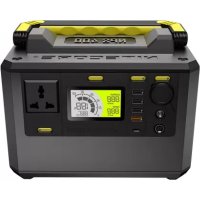
Brand : Nitecore
Model : NES300
Category : Battery charger